10/05/2026
  2591 views
Runway AI (also known as RunwayML) is one of the most advanced and comprehensive AI content creation platforms available today, focusing on creating and editing videos, images, audio, and 3D models through powerful AI tools. Beyond just generating content from text (text-to-video/image), Runway also offers a suite of intelligent editing tools like Gen-3 Alpha (video generation), Magic Tools (background removal, slow-motion, inpainting), and integrates hundreds of AI models from the community. As of December 2025, Runway has become the top choice for independent filmmakers, Hollywood studios, digital artists, and marketers due to its ability to turn ideas into professional content in just minutes.
Mục lục
What is Runway AI
Runway AI (RunwayML) is a multimodal AI creative platform that allows users to create, edit, and explore image, video, and audio content without complex programming skills. Initially known as a machine learning (ML) research tool, Runway has transformed into a full-fledged creative studio with its own generative AI models like Gen-1, Gen-2, Gen-3 Alpha (text-to-video/video-to-video) and hundreds of community models. Users can upload real videos to transform their style, create motion from still images, or generate entirely new videos from text prompts—all running on the cloud with an intuitive interface.
History and Development Company
Runway was founded in 2018 in New York by three co-founders: Cristóbal Valenzuela (CEO), Alejandro Matamala, and Anastasis Germanidis. Initially a research project at New York University (NYU), Runway quickly gained significant attention and investment. In 2023, the company raised a $141 million Series C round at a valuation of over $1.5 billion, with participation from Google, NVIDIA, Salesforce, and other major funds.
Runway was one of the co-developers of Stable Diffusion (along with Stability AI and LAION), the open-source image generation model that transformed the entire generative AI industry. By 2025, Runway had independently developed the Gen-3 Alpha and Gen-3 Alpha Turbo model series—regarded as one of the world’s highest-quality text-to-video models, excelling in natural motion and frame consistency.
Runway AI’s Goal and Mission
Runway’s core mission is to “democratize creativity with AI”—turning complex AI tools into something anyone can use to tell stories, create, and produce content. They aim to empower artists, filmmakers, designers, and content creators by removing technical barriers and reducing traditional production costs and time. Runway believes that AI does not replace humans but is a tool that expands creative possibilities, helping everyone bring their ideas to life faster than ever before.
Runway AI vs. RunwayML: Explaining the Similarities and Differences
- RunwayML was the original name (2018-2022), emphasizing its role as a Machine Learning platform for artists and researchers (ML = Machine Learning).
- Runway AI is the current brand name (from 2022 onwards), reflecting the shift to a comprehensive AI creative platform that is more accessible to non-specialist users.
Today, both terms refer to the same platform—the official website is runwayml.com, but people often call it Runway AI or simply Runway. There is no longer a difference in the product; it was simply a rebranding process to align with a mass-market creative direction rather than focusing solely on ML research. All features, accounts, and models are housed under a single, unified system.
Key Features of Runway AI
Runway AI has advanced significantly by December 2025, featuring the Gen-4.5 model series (the latest generation, leading video benchmarks) and GWM-1 (the first General World Model). The platform focuses on diverse video generation (text-to-video, image-to-video, video-to-video), intelligent editing via Magic Tools, and integrated generative audio (text-to-speech, custom voice, lip sync). Older features like Gen-1/Gen-2 have been replaced by the Gen-3 Alpha/Gen-4 series, offering higher fidelity, more natural motion, and greater control.
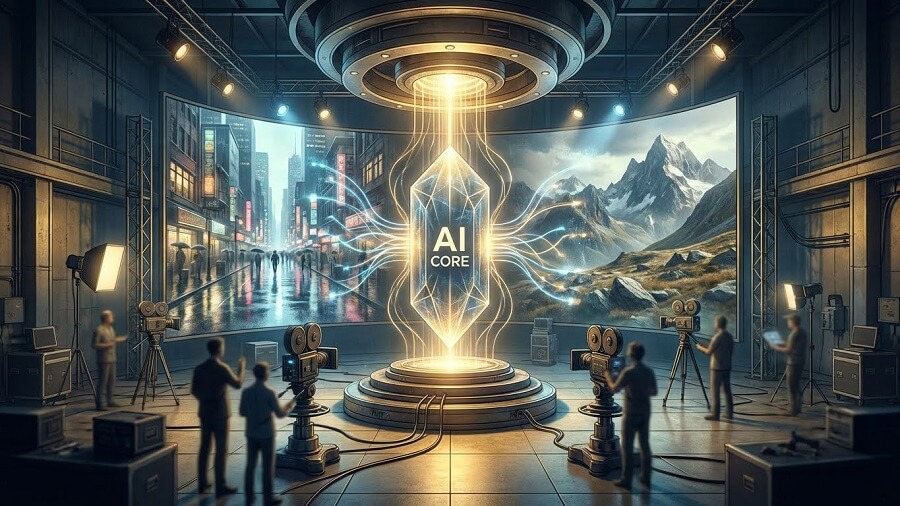
Gen-1 Toolset (Video to Video)
Gen-1 (first launched in 2022) was a video-to-video platform, but it has now been integrated and upgraded into newer models (Gen-3/Gen-4). Users can creatively transform existing videos:
- Transform existing videos: Apply new styles (style transfer), artistic effects, change outfits, and alter art direction.
- Remove objects from video (Video Inpainting): Use a Mask to remove unwanted people/objects, and the AI will naturally fill in the frame.
- Isolate and change background: Instantly remove the background and replace it with a new scene (for virtual staging in real estate or VFX).
- Add Slow Motion: Smoothly increase the frame rate to create a cinematic effect.
- Frame-by-frame editing: Magic Tools like Inpainting/Outpainting, Motion Brush (for controlling local motion), and Advanced Camera Controls (pan, zoom, rotate).
These tools are ideal for VFX, independent film editing, or video marketing.
Gen-2 Toolkit (Text/Image to Video)
Gen-2 (2023) paved the way for generation from scratch, now powerfully upgraded in Gen-4.5 with lengths up to 1 minute, native audio, and multi-shot:
- Text-to-Video: Create entirely new videos from descriptive prompts (e.g., “A spaceship flying past a strange planet, cinematic lighting”). Gen-4.5 delivers state-of-the-art motion quality and high prompt adherence.
- Image-to-Video: Upload a still image and add a prompt to create motion (e.g., character photo → video of them running and jumping naturally).
- Combined Text + Image to Video: Use a reference image as a basis and combine it with text to guide the action/scene.
Gen-4.5 also supports Director Mode (control camera movement) and Act-One/Act-Two (animate characters from a performance video).
AI Image Creation and Editing
Runway is not just for video; it’s also powerful for image generation/editing, integrated into Gen-4 Image and Frames:
- Transform and create images from text or existing images: Text-to-Image or Image-to-Image with high detail and stylistic control.
- Other tools: Image Variation (create variations), Inpainting/Outpainting (edit/remove/add details), Universal Upscaler (increase resolution).
Suitable for mood boards, storyboarding, design explorations, or virtual try-on.
Audio Creation and Editing
Runway has expanded strongly into audio since 2025, with native audio in Gen-4.5 (dialogue, background sound) and a specialized toolkit:
- Text-to-Speech and Generate Speech: Convert text into natural-sounding speech, with support for multiple languages and emotions.
- Custom Voice Training: Train a custom voice from a few minutes of clean audio samples (no noise).
- Lip Sync and Add Dialogue: Synchronize a character’s mouth with audio (from text or a file), add dialogue to a video (Act-One/Act-Two for realistic performances).
- Create soundscapes/background audio: Gen-4.5 automatically adds background sound and native dialogue to long videos.
These features make Runway an all-in-one suite, especially for short films, video podcasts, or character animation. With GWM-1 (the new generation of world models), Runway is moving towards more realistic simulations (explorable worlds, conversational avatars).
Outstanding Benefits of Using Runway AI
Runway AI is not just an ordinary AI tool but a powerful “creative assistant” that helps users, from individuals to professional studios, elevate their content production. With the latest Gen-4.5 and GWM-1 models (2025), Runway offers outstanding benefits, helping to save costs, accelerate workflows, and unlock countless new creative possibilities.
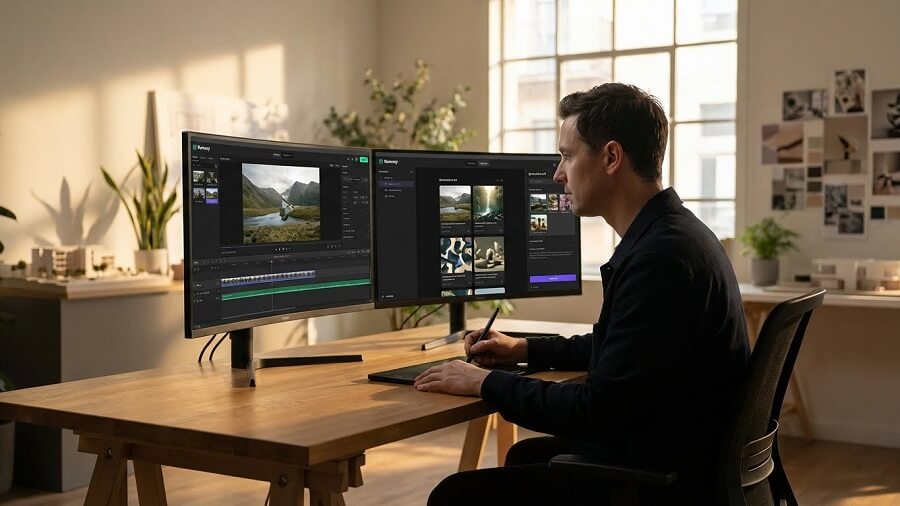
Save time and effort
Runway automates a series of highly technical tasks in traditional video and image production, reducing the time from weeks to just a few minutes.
- Real-world example: Instead of spending hours rotoscoping (manual background removal) in After Effects, you can simply upload a video and use the Remove Background or Inpainting tools – the AI handles it automatically, with frame-by-frame precision.
- Specific benefits: An independent filmmaker can complete basic VFX (object removal, background replacement, slow-motion) without needing a post-production team. According to case studies from Runway, users save an average of 70-90% of their time compared to traditional workflows, especially with Magic Tools and Director Mode (automatic camera control).
Expand creative possibilities
Runway removes technical barriers, allowing anyone to turn their “wild” ideas into reality without needing to know how to film, edit, or code.
- Real-world example: An amateur artist can describe “a dragon flying over a modern city at sunset, cinematic angle, slow motion” to create a complete video with Gen-4.5; or use Act-One to animate a character from a real performance video without needing motion capture.
- Specific benefits: Supports rapid ideation (automatic storyboarding), experimenting with diverse styles (from realistic to surreal), and combining multimodal inputs (text + image + video). Many YouTube/TikTok content creators report doubling the number of
Access to Advanced AI Technology
Runway democratizes generative AI—a technology once exclusive to major studios like Pixar or Weta Digital—making it accessible to everyone with a user-friendly interface and affordable pricing.
- Real-world example: Free users can try Gen-4.5 directly on the web/app without a powerful GPU; the Pro/Standard plans unlock unlimited generations and advanced controls.
- Specific benefits: Access to state-of-the-art models (Gen-4.5 leads the 2025 motion quality benchmark), a rich learning community (tutorials, templates), and API integration for developers. This allows freelancers, teachers, marketers, or students to access Hollywood-equivalent technology without investing thousands of dollars in hardware/software.
Professional-Quality Output
Runway is not only fast but also delivers production-ready output, which is actively used in films, commercials, and music.
- Real-world example: Many short film projects at Cannes/Sundance 2025 use Runway for VFX; music videos (like Grimes’s) and major commercials (Nike, Coca-Cola) integrate videos from Gen-3/Gen-4. Lip Sync and Generative Audio help create natural dialogue with perfect mouth synchronization.
- Specific benefits: High fidelity (accurate motion physics, good prompt adherence), native audio/dialogue support, and high-resolution export (4K+). The result is content that can be used directly for clients with minimal editing, helping to elevate portfolios and increase commercial value.
In summary, Runway AI not only saves costs but also multiplies creative potential, turning users into true “AI directors.” Whether you are an independent filmmaker, a content creator, or a business, Runway provides a clear competitive advantage in the digital content era.
How to Get Started with Runway AI
Runway AI has a user-friendly interface that is easy to navigate even for beginners, and it supports both web and mobile apps (iOS/Android). As of December 2025, the platform has been updated to Gen-4.5 with Director Mode and Generative Audio, making the creative process smoother. Here is a detailed A-Z guide to get you started in just a few minutes.

How to get started with Runway AI Register for a Runway AI Account
- Visit the official website: Open your browser and go to https://runwayml.com (or app.runwayml.com). The homepage will prominently display a “Sign Up” or “Get Started” button.
- Basic registration steps:
- Click “Sign Up” (or “Log In” if you already have an account).
- Choose a method:
- Google: Quickly sign in with your Google account (recommended, syncs automatically).
- Apple: Use your Apple ID.
- Email: Enter your email address and create a strong password (at least 8 characters, with uppercase/lowercase letters, numbers, and special characters).
- Verify your email (if using email): Check your inbox and click the confirmation link.
- Complete: You will be redirected to the dashboard with the Free plan (limited monthly credits). No credit card is required to start; upgrade to Pro/Standard/Unlimited later if needed.
Tip: Register via the mobile app to receive notifications and create content quickly on your phone.
User Interface and Workspace
The Runway interface is clean and modern, with a navigation bar on the left and the main workspace in the center.
- Overview of the main areas:
- Dashboard/Home: Displays recent projects, ready-made templates (e.g., “Cinematic Trailer,” “Fantasy World”), and remaining credits.
- Assets: A library to store your videos, images, and uploads.
- Models/Tools: Access Gen-4.5, Magic Tools (Remove Object, Lip Sync, Inpainting), and the model community.
- Projects: Organize your work into folders (similar to Google Drive).
- Explore/Community: Discover others’ works, templates, and tutorials.
- Credits & Billing: Track credits (the Free plan resets with ~100-200 credits/month) and upgrade your plan.
Tip: Use the search bar to quickly find tools like “Text to Video” or “Remove Background”.
Guide to Using Basic Tools
Text-to-Video (Gen-4.5 – The latest generation replacing Gen-2)
This is the core feature for creating videos from ideas.
- Enter effective prompts:
- Go to Models > Select Gen-4.5 (or Gen-4.5 Turbo for faster speed).
- Enter a detailed prompt (e.g., “A spaceship flying past a strange planet with erupting volcanoes, cinematic low-angle shot, brilliant red light, slow motion, sci-fi style similar to Blade Runner 2049”).
- Good prompt tip: Describe action + environment + style + camera movement + mood (e.g., “dramatic lighting, high detail, 4K”).
- Customization options:
- Style: Select a preset (Realistic, Anime, Cinematic) or upload a reference image.
- Seed: Random number (keep it fixed to reproduce variations).
- Camera Controls/Director Mode: Pan left/right, zoom in/out, tilt up/down.
- Duration: 5-20 seconds (premium plans support longer durations).
- Aspect Ratio: 16:9 (horizontal), 9:16 (vertical for TikTok), or custom.
- Generate and preview the video:
- Click Generate (costs 10-50 credits depending on length/quality).
- The process takes 30 seconds – 5 minutes; view the preview directly in the dashboard.
- Create variations from a video you like.
Remove Object from Video (Magic Tools)
A powerful object removal tool, ideal for simple VFX.
- Upload the video:
- Go to Tools > Remove Object (or the Magic Tools suite).
- Upload a video from your computer (supports MP4, MOV, max 10-30 seconds depending on the plan).
- Select the object to remove:
- Use the Brush/Mask to draw over the object area (person, car, object).
- The AI will automatically detect and track it across frames.
- Processing:
- Click Generate; the AI will fill the removed area with a natural background (using advanced inpainting).
- View the preview and refine the mask if needed.
Saving and Exporting Your Product
- Storage: Automatically saves to Assets or a Project. Name and tag them for easy management.
- Exporting files:
- Click Export/Download on the video/image.
- Format:
- Video: MP4 (H.264/H.265), resolution up to 4K (Pro+ plan).
- Images/Frames: PNG, JPG (with transparency if needed).
- Audio: If there is generative audio, export separately as WAV/MP3.
- Options: Watermark (Free plan), or clean export (paid plans).
- Sharing: Copy a private or public link to collaborate.
Getting started tip: Use the Free plan to try Gen-4.5 with available templates, then upgrade to Standard ($15/month) for unlimited credits and advanced features. Join the Runway Discord or check out the Explore section to learn prompts from the community – you’ll become proficient after just a few initial projects!
Runway AI Pricing
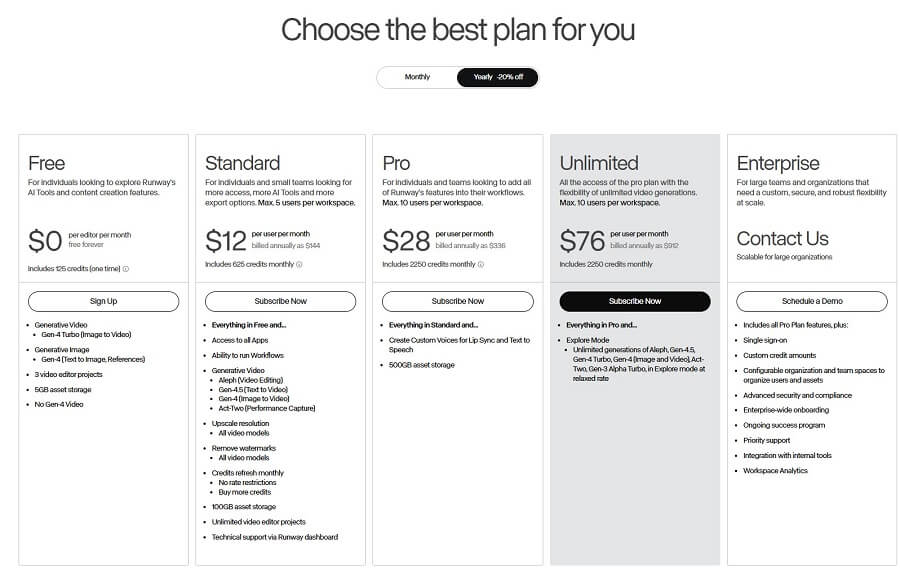
Runway AI has evolved significantly as of December 2025, with older models like Gen-1 (basic video-to-video) and Gen-2 (the first text/image-to-video) having been completely replaced by newer generations like Gen-3 Alpha/Turbo, Gen-4, and Gen-4.5 (currently the world’s leading video model). Gen-1 and Gen-2 are no longer available as standalone options but are integrated/optimized within the current tools. The platform uses a credits system to charge for generations (e.g., Gen-4.5 costs more credits for higher quality). Below is an analysis of the Free plan (basic, similar to the old Gen-1) and the Paid plans (premium with full access to Gen-4.5/Gen-4).
Runway Gen-1 (Free/Basic)
The Free plan focuses on experimentation and basic video editing (similar to the spirit of the old Gen-1: video-to-video, Magic Tools like object removal, inpainting).
- Features provided for free:
- Basic access to AI Tools (editing existing videos, background removal, basic slow motion).
- A one-time grant of 125 credits (does not reset monthly, equivalent to a few short generations with older or Turbo models).
- Basic video/image exports, limited storage.
- Limitations:
- Short video duration (usually under 10-20 seconds depending on the model).
- Limited number of projects (around 5-10 projects).
- Watermark on exports.
- Low resolution (720p), no full access to Gen-4.5/Gen-4, no custom voice or unlimited features.
- Cannot purchase additional credits, slow queue during peak hours.
Suitable for new users for experimentation, not for professional commercial use.
The old Gen-2 (text/image-to-video) is now upgraded and integrated into the Gen-4 series. Paid plans unlock full generation from text/image/video, with production-ready quality.
- Premium features:
- Create videos from text/images (Text-to-Video, Image-to-Video) with Gen-4.5/Gen-4 Turbo.
- Advanced controls (Director Mode, Lip Sync, Custom Voice, Act-One/Two for character animation).
- Unlimited generations in some modes (Explore Mode – relaxed rate), high-res export (4K+), no watermark.
- Full commercial rights (complete IP ownership).
- Subscription plans overview (prices in USD/user/month, discounts for annual payment):
Package Price (month/year) Credits/month Sample video duration (Gen-4.5/Gen-4/Turbo) Resolution & Perks Standard $15 / $12 625 credits ~25s Gen-4.5 / ~52s Gen-4 / ~125s Turbo 4K upscale, no watermark, max 5 users, commercial rights Pro ~$35 / ~$28 2250 credits ~90s Gen-4.5 / ~187s Gen-4 / ~450s Turbo Unlimited ~$95 / ~$76 Unlimited (Explore Mode relaxed) + 2250 credits Unlimited relaxed rate + credits for advanced Full features, unlimited generations, high priority Enterprise Custom (contact sales) Custom credits Custom (high-volume) SSO, dedicated support, full API, large teams - Compare features and limitations:
- Credits: Used for fast generation (Fast Mode); Unlimited has Explore Mode (slower but unlimited for the main model).
- Video duration: Depends on the model (Gen-4.5 has the highest quality but costs more credits); higher-tier plans support longer, multi-shot videos.
- Resolution: Basic for Free/Standard; Pro+ offers clean 4K+.
- Commercial rights: All paid plans allow full commercial use and IP ownership (Free has a watermark and limitations).
How to purchase and manage subscriptions
- Purchase a plan: Go to Dashboard > Plans & Billing > Upgrade. Select a plan, pay by credit card (prorated if upgrading mid-cycle). Annual saves 20%.
- Manage: Track credits on the dashboard; buy more credits (from 1000, ~$0.01/credit). Downgrade/upgrade anytime (prorated). Canceling automatically reverts to the Free plan at the end of the cycle.
- Tip: Start with the Free plan to try it out, upgrade to Standard for personal use ($12/year is the cheapest). Businesses can contact sales@runwayml.com for the Enterprise plan.
Runway focuses on paid plans to access the latest model (Gen-4.5), suitable for professional creators. Check runwayml.com/pricing for the most accurate prices!

Runway AI Pricing Runway AI Compared to Other AI Tools
Runway AI (with the latest Gen-4.5 and GWM-1 in 2025) is a comprehensive platform for video generation and editing, but it faces stiff competition from specialized tools. Below is a comparison based on benchmarks and real-world 2025 reviews, focusing on text-to-video (as this is Runway’s main strength) and image generation.
Comparison with Text-to-Video Tools
Key competitors include Pika Labs (Pika 2.5), Kling AI (1.6/2.0), Luma Dream Machine (Ray2), OpenAI Sora 2, and Google Veo 3. Runway Gen-4.5 leads in consistency and editing toolkit, but it doesn’t always win outright in photorealism or speed.
Tool Key Strengths Weaknesses Compared to Runway Best For Runway Gen-4.5 Comprehensive toolkit (Magic Tools editing, Lip Sync, Director Mode), high consistency (character/location), native audio/dialogue. Slower rendering (30s-5 mins), high credit cost for top quality, occasional artifacts in complex scenes. Professional workflow, short films, VFX. Pika Labs 2.5 Fastest speed (30-90 seconds), low price ($10/month), easy to use, good for stylized content. Less detailed control, lower consistency in multi-shot sequences. Social media, rapid iteration. Kling AI Strong physics/motion, long videos (up to 2 minutes), affordable price. Slow rendering (minutes to hours), limited editing toolkit. Longer clips, realistic motion. Sora 2 (OpenAI) Top-tier photorealism/cinematic quality, good native audio. Limited access (ChatGPT Plus/Pro), few editing tools. Premium cinematic shots. Luma Dream Machine High production-ready consistency, 3D-like motion. Few audio/editing features, high price for large volumes. High-fidelity environments. Strengths of Runway AI: Comprehensive editing suite (Inpainting, Motion Brush, Act-One for performance animation), user-friendly interface (web/app, no Discord required like the old Midjourney/Pika), and superior multi-shot consistency – ideal for projects requiring deep editing without leaving the platform.
Comparison with Image Generation Tools
Runway has Gen-4 Image (powerful text-to-image, seamlessly integrated with video), but it’s not a specialist like dedicated image tools.
Tool Key Strengths Where Runway Excels Midjourney v6.1 Top-tier aesthetic/artistic quality, rich style variation, large community. Runway offers direct image-to-video integration, making it easy to convert to animation. DALL-E 3/4 Accurate prompt adherence, ChatGPT integration, fast speed. Runway is stronger in character consistency for series (reference system). Stable Diffusion Free/open-source, highly customizable (LoRA/custom models). Runway is easier to use (no local setup required), quickly production-ready. Where does Runway AI excel in integrated image creation: Runway’s image generation (Gen-4 Image) is designed to seamlessly connect with video (image-to-video), helping create consistent storyboards or assets – a superior feature for filmmakers compared to Midjourney/DALL-E (which primarily focus on static art).
Weaknesses and Limitations of Runway AI
Despite leading in many benchmarks, Runway still has practical limitations:
- Cost for premium models: Credit-based (Standard $15/month ~625 credits, enough for only ~25s of high-quality Gen-4.5), more expensive than Pika/Kling for heavy usage; the Unlimited plan at $95/month is needed for comfortable use.
- Render time for complex projects: 30 seconds to a few minutes for short clips (slower than Pika), long queues during peak hours; complex prompts/multi-shots can take 5-10 minutes or fail, requiring regeneration.
- Sometimes imperfect results: Artifacts in video text, unnatural motion blur in fast scenes, consistency still fails at extreme angles; native audio is good but not on par with Sora/Veo for complex synchronized dialogue.
Overall, Runway is ideal for professional creators who need a full suite (generation + editing), but if speed/affordability is the priority, Pika/Kling are better options, while Sora/Veo lead in pure photorealism. Choose based on your needs: Runway is the most worthwhile “all-in-one studio” to invest in for 2025!
Runway AI compared to other AI tools Tips for Using Runway AI Effectively and Creating Optimal Prompts
Runway AI (with Gen-4.5 and Director Mode 2025) is very sensitive to prompts – a good prompt can generate a cinematic-quality video in a single attempt. Below are tips verified by the community and professional filmmakers to help you optimize your experience and achieve professional results quickly.
Principles for Writing Good Prompts
The prompt determines 80% of the video’s quality. Write with a clear structure so the AI understands your intent precisely.
- Be specific, detailed, and use strong keywords:
- Avoid vague descriptions like “a beautiful scene”. Instead, use: “A classic spaceship flies past a giant gas planet with ice rings, slow low-angle shot, retro-futuristic sci-fi style similar to Blade Runner”.
- Strong keywords: “highly detailed, cinematic masterpiece, 4K, sharp focus, volumetric lighting, dramatic atmosphere, intricate textures”.
- Describe motion, style, and lighting:
- Motion: “slow panoramic pan from left to right”, “dynamic tracking shot following the character”, “smooth zoom in on the face”.
- Style: “in the style of Denis Villeneuve”, “cyberpunk neon aesthetic”, “Studio Ghibli animation”.
- Lighting: “golden hour sunset with godrays”, “moody blue rim lighting”, “harsh overhead fluorescent lights”.
- Use “negative prompts” to eliminate unwanted elements:
- Runway supports negative prompts (in advanced settings): “blurry, low quality, distorted anatomy, text, watermark, shaky camera, overexposed, artifacts, deformed hands”.
- Tip: For human characters, add “extra limbs, fused fingers, bad proportions”. For realistic results: “cartoonish, animated”.
Example of a complete prompt:
text
A lone astronaut walking on a red Martian landscape during a dust storm, slow motion, cinematic wide shot tracking behind, dramatic orange lighting with volumetric dust particles, in the style of Dune movie, highly detailed, 4K
Negative: blurry, shaky, low resolution, cartoon, text
Optimizing the Workflow
Runway is not just a generator but a full studio – leverage smart workflows to save time and credits.
- Leverage templates and presets:
- In the dashboard, choose from hundreds of available templates (Cinematic Trailer, Fantasy World, Product Commercial) to get optimal prompts and settings from the start.
- Use Presets (Realistic, Anime, Vintage Film) to quickly apply a style without writing a long prompt.
- Use the camera control feature to create desired camera angles:
- Director Mode (Gen-4.5): Specify “pan left 30 degrees”, “tilt up slowly”, “dolly zoom in”, “orbit around subject”.
- Combine with Motion Brush to control local movements (e.g., only make the leaves fall, the rest remains static).
- Experiment with variations (seed):
- Keep the seed fixed to create consistent variations (ideal for character series).
- Generate 4-8 variations at once, choose the best one, then upscale/remix.
- Tip: Use Explore Mode (relaxed rate in the Unlimited plan) to experiment without using up credits quickly.
Integrating Runway AI into the Creative Workflow
Runway is a perfect fit for many fields, helping to accelerate the process from ideation to final product.
- Short/Indie Filmmaking: Start with a storyboard (text-to-image), convert to video (image-to-video), edit VFX (remove object, lip sync), and add dialogue (generative audio).
- Marketing & Advertising: Quickly create product visualizations (virtual staging for interiors, fashion try-ons), A/B testing variants for TikTok/Instagram ads.
- Social Media Content: Use Turbo mode for short 5-10 second clips, combined with Act-One to animate characters from real selfie videos – ideal for personal storytelling or brand content.
Final tip: Save your favorite prompts to Projects and combine them with Assets to build a personal library. Join the Runway Discord or the Explore section to learn prompts from the pros – after just 5-10 projects, you’ll be creating Hollywood-quality videos in minutes!
The Future of Runway AI and Notable Updates
Runway AI is in an explosive growth phase towards the end of 2025, with the launch of Gen-4.5 (November 2025) and GWM-1 (the first General World Model, December 2025). The company positions itself not just as a video generation tool, but as a platform for building General World Models – AI models capable of simulating the real world, paving the way for simulation, agentic AI, and applications beyond creative fields.
Product Development Roadmap
Runway does not publicly release a detailed long-term roadmap, but based on research announcements and official blogs, the clear direction is to build General World Models – general models that can simulate any world and experience.
- Since 2023, they have mentioned General World Models; by 2025, GWM-1 is the first step (an autoregressive model based on Gen-4.5).
- Future: Aiming for unifying many different domains and action spaces under a single base world model, including gaming, robotics, life sciences, and agent training.
- Major investments ($308 million raised in 2025, valuation >$3 billion) are allocated to AI research, hiring, and expanding Runway Studios (film/animation production).
Upcoming New Features
The biggest updates in late 2025 will focus on Gen-4.5 and GWM-1:
- Gen-4.5 (November 2025): Leading the text-to-video benchmark (surpassing Google/OpenAI), with native audio generation/editing, multi-shot video editing, and improved physics/motion (realistic weight, fluid dynamics).
- GWM-1 (December 2025): A family of world models, including:
- GWM-Worlds: Create explorable/interactive environments from prompts/images.
- GWM-Avatars: Conversational characters with facial expressions/lip sync (coming soon to web/API).
- GWM-Robotics: Synthetic data for robot training (simulating weather/obstacles).
- Coming soon: GWM-Avatars full rollout, deeper API integration, and progress towards a unified world model (possibly Gen-5 or an upgraded GWM in 2026).
The Role of Runway AI in the Creative Industry
Runway is leading the democratization and professionalization of AI in film, advertising, and creative fields. They collaborate closely with Hollywood and major studios:
- Notable Collaborations in 2025: Lionsgate (training models on their film catalog), AMC Networks (marketing/TV development), IMAX (AI Film Festival screenings), Fabula, Harmony Korine’s EDGLRD, and studios like Disney/Netflix (used for VFX/pre-production).
- Real-World Applications: Used in the hit Amazon series “House of David”, major commercials (Nike/Coca-Cola), short films at Cannes/Sundance, and architecture (KPF animating projects).
- Impact: Reduces VFX costs by millions of dollars and accelerates ideation/pre-vis, but also sparks controversy about job displacement. Runway emphasizes that AI is a tool to assist creativity, not replace humans.
Runway’s future promises a shift from video generation to universal simulation, expanding into robotics/gaming and changing how storytelling/media is produced. With this momentum, 2026 could be the year Runway dominates AI creative tools!