


 11/05/2026
  323 views
What is a WBS? Why is it important in project management? Let’s explore WBS from A to Z, from basic concepts and benefits to the process of building an effective WBS to elevate the quality of your work management. In project management, have you ever felt overwhelmed by a huge workload, delayed progress, or difficulty controlling costs? If so, a WBS (Work Breakdown Structure) is the solution you need. Let’s learn about what a WBS is with 1Office!
Mục lục
- What is a WBS? When to set up a WBS in project management
- What are the benefits of applying a WBS
- What are the types of Work Breakdown Structures (WBS)?
- What are the basic components of a WBS
- What are the different ways to represent a Work Breakdown Structure (WBS)?
- 6 Steps to Build a Work Breakdown Structure (WBS)
- Elevate the quality and efficiency of work management with 1Office
What is a WBS? When to set up a WBS in project management
WBS (Work Breakdown Structure) is a project management tool that helps break down the entire project scope into smaller, more manageable work components. It is the foundation for planning, cost estimation, resource allocation, and project progress control.
Simply put, a WBS is a “map” that helps you see the entire project landscape and every small detail that needs to be executed. It’s like cutting a large cake into smaller pieces to enjoy it more easily.
When should you set up a WBS?
A WBS should be established right after defining the project scope and before starting detailed scheduling. Specifically, you should build a WBS when:
- The project is large and complex with many intertwined tasks
- You need to allocate resources and budget accurately
- You want a comprehensive overview of all tasks to be completed
- You need a basis for tracking progress and reporting project status
According to a 2023 survey by the PMI (Project Management Institute), 78% of successful projects apply a WBS right from the planning stage.
What are the benefits of applying a WBS
Using a WBS not only helps you manage projects more effectively but also creates a professional image in the eyes of partners and clients. Applying a WBS in project management brings many practical benefits:
- Control project scope: A WBS helps you clearly define what needs to be done, avoiding “scope creep” from the original objectives.
- Increase management efficiency: When work is broken down, you can easily assign tasks to individuals or teams and monitor progress more closely.
- Save costs and time: According to a survey by the PMI (Project Management Institute), projects using a WBS can reduce wasted time due to unclear planning by up to 15-20%.
- Improve communication: A WBS serves as a “common language” among stakeholders, from the implementation team to the client, helping everyone clearly understand their roles.
- Support digital transformation: With project management software like 1Office, an integrated WBS helps automate processes and enhance work efficiency.
Real-world example: ABC Software Company in Vietnam reduced project implementation time by 30% and increased customer satisfaction by 25% after applying a WBS to their project management process starting in 2024.
What are the types of Work Breakdown Structures (WBS)?
A WBS does not have a fixed “template” but is designed flexibly depending on the project type. Depending on the nature and objectives of the project, a WBS can be implemented in several different ways:
Phase-based WBS
This method divides the project into time-based phases, for example: Planning → Design → Execution → Testing → Deployment.
Suitable for: Projects with a clear chronological sequence, such as construction or software development using the Waterfall model.
Deliverable-based WBS
This method focuses on the specific products to be created, then breaks them down into the tasks required to achieve those deliverables.
Suitable for: Product development projects where the final results are specific deliverables.
Functional WBS
Divides the project according to the functional areas of the organization, such as: Marketing, Engineering, Finance, Human Resources.
Suitable for: Projects involving multiple departments or divisions within an organization.
According to the latest data, 65% of businesses in Vietnam prefer deliverable-based WBS because it helps them focus on concrete results.
What are the basic components of a WBS

Each element in a WBS plays a crucial role in assigning responsibilities, estimating costs, building schedules, and monitoring progress. Here are the core components of a WBS:
- Phases: Represent the main steps in the project lifecycle, with each phase comprising interconnected activities and tasks to complete a portion of the project.
- Major Tasks: These are the specific activities within each phase, including distinct jobs that need to be performed to implement the project.
- Sub-tasks: Major tasks are broken down into more detailed tasks, ensuring clarity and precision in planning and execution.
- Deliverables: These are the tangible or intangible results produced upon completion of tasks, which can be documents, products, or other outcomes.
- Sub-deliverables: These are smaller outcomes that support the completion of larger deliverables.
- Work Packages: This is the smallest unit of work in a WBS, consisting of specific tasks or groups of tasks with clearly defined deliverables.
- Dependencies: Show the relationships between tasks, helping to determine the order of execution, i.e., which task must be completed before another can begin.
- Estimates: Involve assessing the necessary resources, time, and costs, helping managers create an accurate project budget and schedule.
- Milestones: These are specific points in time used to mark the completion of major phases, deliverables, or other significant project events.
What are the different ways to represent a Work Breakdown Structure (WBS)?
A WBS can be represented in various forms depending on needs and the tools used:
- Tree Diagram
This is the most common form, displaying the WBS as a tree diagram with the project at the top level and tasks branching downwards.
- Indented List
The WBS is presented as a text list, with levels indented to show parent-child relationships.
- Organizational Chart
Similar to a tree diagram but often designed with boxes and connecting lines, resembling a company’s organizational chart.
6 Steps to Build a Work Breakdown Structure (WBS)
To build an effective WBS, you should follow these 6 steps:
Step 1: Define the project scope and objectives
Before starting to build the WBS, ensure you clearly understand the project’s scope, objectives, and key deliverables. This forms the foundation for the subsequent work breakdown.
Step 2: Break down the major deliverables (level 2)
Divide the project into major phases or large work groups. These will be the main branches of the WBS.
Example: For a website development project, the main components could be: Requirements Analysis, Design, Development, Testing, Deployment, Maintenance.
Step 3: Decompose major deliverables into detailed tasks
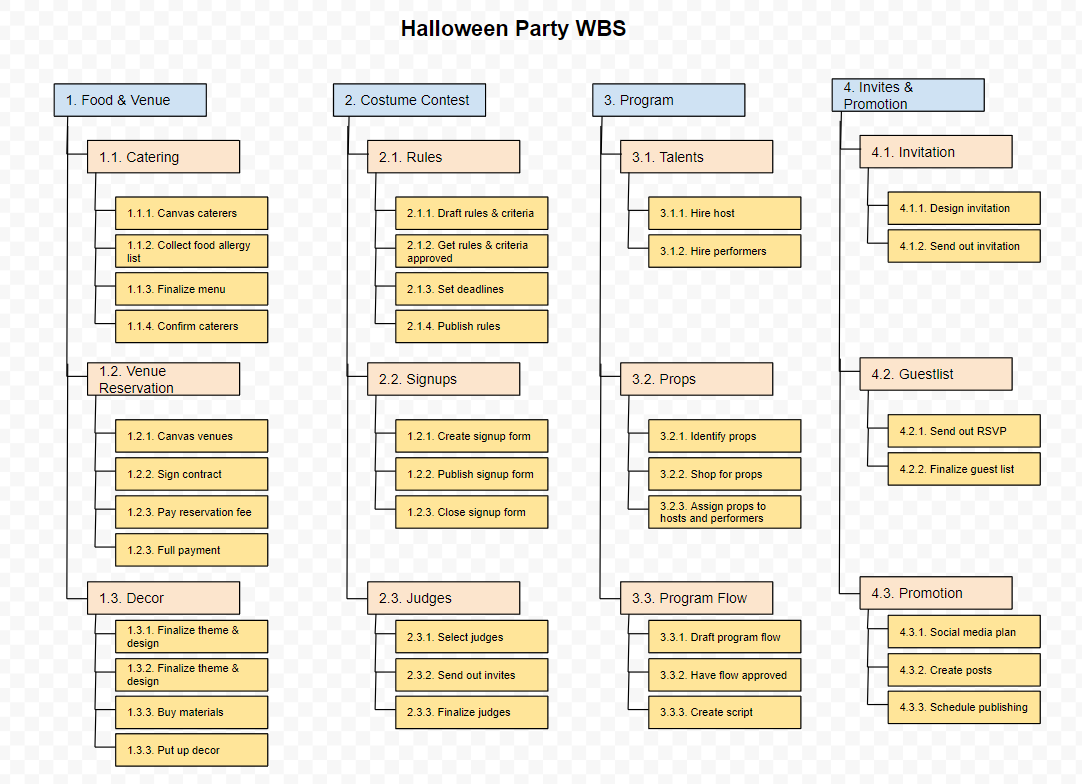
Break down each main component into more specific tasks. Continue this process until you reach an appropriate level of detail.
Example: “Design” can be broken down into: User Interface Design, Database Design, System Architecture Design.
Step 4: Identify work packages
Continue breaking down tasks until you reach work packages – tasks small enough to be assigned to an individual or a small team for execution and tracking.
Step 5: Assign identifiers to each element
Assign a number or identifier to each element in the WBS for easy reference and tracking.
Example: 1.0 Requirements Analysis, 1.1 Customer Interviews, 1.2 Create Requirements Document…
Step 6: Review, evaluate, and finalize
Review the entire WBS to ensure no tasks are missed and that the work packages are detailed enough for effective management.
Pro tip: Consult with stakeholders during the WBS creation process to ensure no important tasks are overlooked.
Elevate the quality and efficiency of work management with 1Office
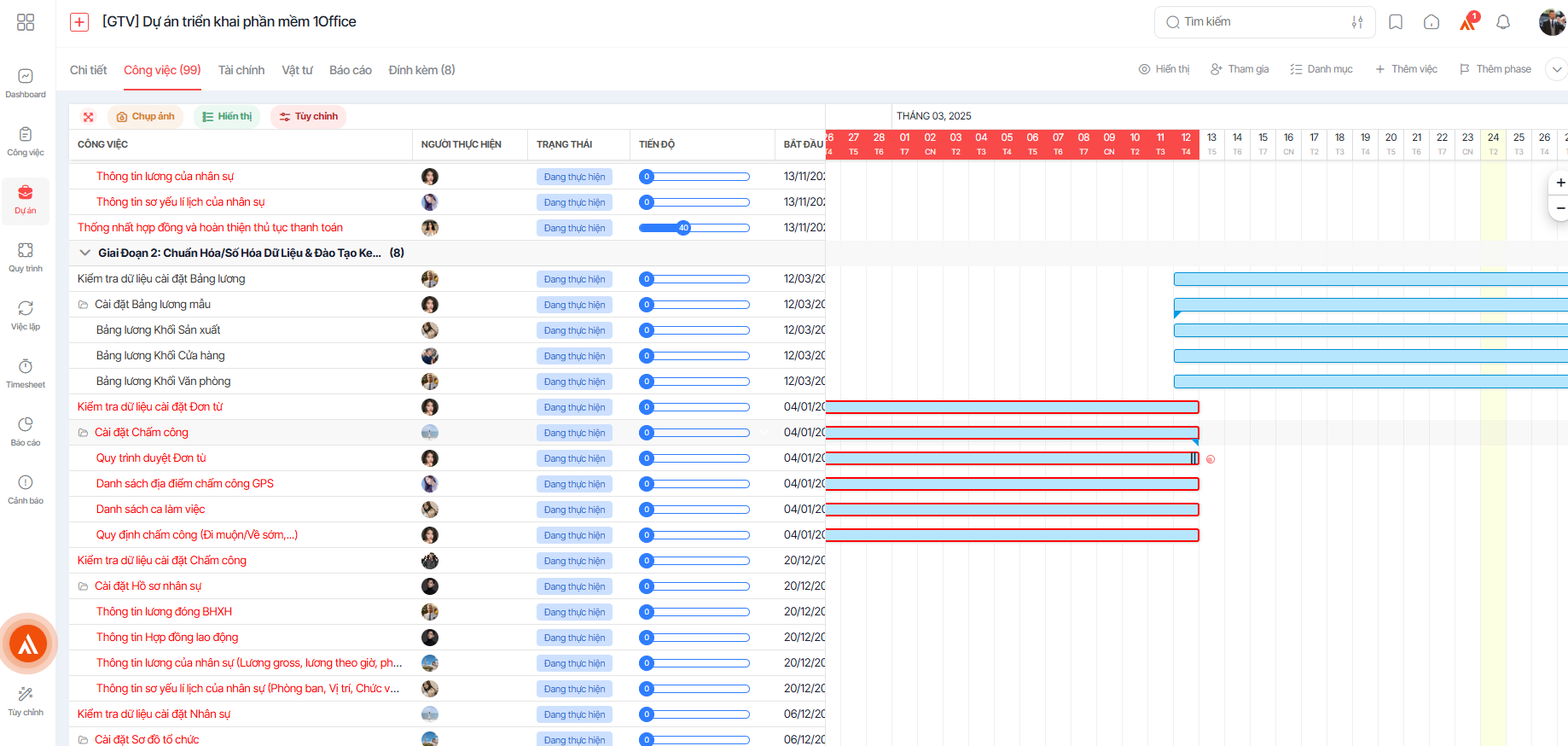
In addition to building a WBS, managers can use the 1Work module from 1Office to manage projects and oversee work comprehensively and accurately. It is the first tool in Vietnam to apply advanced global management models, recognized as a “Make in Vietnam” product by the Ministry of Information and Communications, helping businesses solve operational and project management challenges.
Sign up for a free 1Office feature Demo account!
With 1Work, managers can optimize time and effort, and easily track project progress by team, department, and individual anytime, anywhere. Key features of 1Work include:
- Plan & Track Work Status: 1Work breaks down work into multiple levels: task lists, tasks, subtasks, and checklists. Managers can assign tasks based on departmental functions (such as accounting, statistics, reporting, etc.) or to individual members. The Kanban interface with columns like To Do, In Progress, and In Review clearly distinguishes between completed and pending tasks. The recurring task feature helps efficiently manage periodic duties like daily revenue closing or monthly timesheets.
- Collaboration Support: 1Work integrates a group chat tool, helping team members communicate and coordinate smoothly, similar to project management.
- Performance Reporting: 1Work provides performance report metrics, with a “My Employees” feature that allows mid-level managers to track their team’s work efficiency in detail without accessing the entire organization’s data.
- Flexible Integration: With an open API system and a cloud platform certified with ISO/IEC 27001:2013, 1Work easily connects with other tools. When combined with process management and digital signatures, 1Work helps businesses build a streamlined, modern, “paperless” digital office model.
WBS is an indispensable tool in modern project management. By breaking down a project into manageable parts, a WBS helps you control every aspect of the project, from scope, time, and cost to quality. We hope that through this article, managers have understood what a WBS is, its role, its significance, and how to build a standard WBS for their departments and businesses. We wish you success!
















