


 12/05/2026
  469 views
SFA, or “Sales Force Automation,” is an incredibly useful tool that helps businesses improve their sales processes. In today’s digital age, SFA applications have become indispensable to the business strategies of many companies. Let’s join 1Office to learn more about what SFA is, the benefits it offers, and how to apply it effectively!
Mục lục
What is SFA?
SFA, short for Sales Force Automation, is a software system designed to automate and optimize sales processes within a business. It provides a centralized platform where sales staff can manage the entire sales process, from reaching potential customers and tracking business opportunities to managing customer lists and analyzing sales performance.
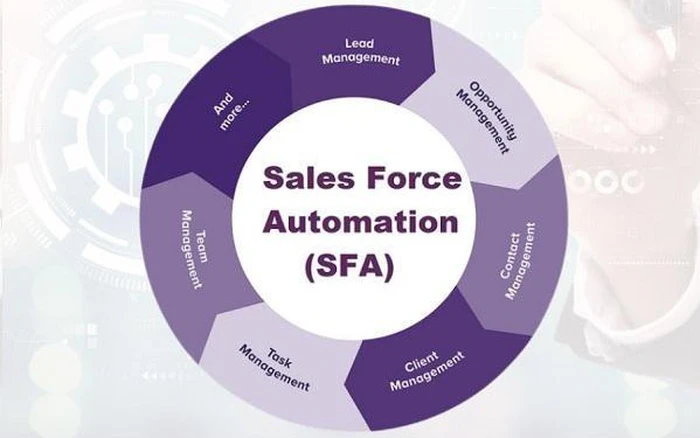
You can think of SFA as a smart virtual assistant dedicated to the sales team. It helps sales staff manage their work more effectively, such as:
- Storing customer information: SFA helps you store all customer information, from contact details to transaction history, helping you better understand customer needs.
- Tracking sales progress: You can track each stage of the sales process, from initial customer contact to closing the deal.
- Analyzing performance: SFA provides detailed reports on sales performance, helping you evaluate your work effectiveness and identify areas for improvement.
SFA is not just a data management tool; it is also a powerful support tool for managers in making data-driven decisions, while helping the sales team improve their efficiency and productivity.
Benefits of SFA in sales management
In an increasingly competitive landscape, adopting SFA helps businesses maintain their position in the market. This system supports better customer relationship management. Additionally, it allows businesses to analyze data and predict consumer trends.
By providing accurate and timely information, SFA helps business leaders make sound and swift decisions. Therefore, SFA is not just a tool but also a crucial element in a sustainable development strategy.
Enhance sales performance
One of the biggest benefits of SFA is its ability to enhance the performance of the sales team. By automating many administrative tasks, employees can focus more on building relationships with customers.
SFA helps minimize the time spent on administrative tasks, such as data entry or order tracking. Instead, employees can dedicate more time to understanding customer needs and recommending suitable products.
Improve customer relationships
SFA not only helps solve internal issues but also facilitates communication with customers. The system stores all customer-related information, from purchase history to previous feedback.
Having this information at hand helps employees interact with and care for customers more effectively. This not only helps retain customers but also creates opportunities to introduce new products.
Accurate data analysis
SFA provides analytical tools that help businesses track and evaluate sales activities in detail. By collecting and processing data, businesses can identify consumer trends and adjust their sales strategies accordingly.
Visual reports and charts make it easy for users to monitor the progress and effectiveness of each campaign. This not only helps improve performance but also creates new opportunities for the business.
How to implement an SFA system effectively

To fully leverage the benefits that SFA offers, businesses need to implement the system effectively. Below are some important steps in the SFA implementation process.
Assess business needs
First, businesses need to assess their actual needs before choosing a suitable SFA software. This includes identifying current problems in the sales process and the goals to be achieved.
A clear understanding of the needs of the sales team and customers will help the business find the SFA solution that best fits its business model.
Train employees
One of the decisive factors for a successful SFA implementation is training employees to use the software. Businesses need to organize training sessions so that employees can familiarize themselves with the system’s features.
Ensuring that everyone clearly understands how SFA works will help optimize workflows and enhance sales performance.
Monitor and adjust
After implementing SFA, businesses need to regularly monitor the system’s effectiveness. This includes collecting feedback from employees and customers to adjust processes and improve the experience.
Regular monitoring also helps businesses promptly detect and resolve issues that arise during SFA usage.
The difference between SFA and CRM
Although both SFA and CRM aim to optimize the customer management process, they have distinct differences. Below is a comparison between these two systems.
| Feature | SFA (Sales Force Automation) | CRM (Customer Relationship Management) |
| Main Objective | Optimize the sales process, increase the efficiency of the sales team | Build and maintain long-term customer relationships, enhance customer satisfaction |
| Target Audience | Potential customers, current customers | Current customers and potential customers |
| Key Features | Sales opportunity management, sales forecasting, lead list management, sales task automation | Customer information management, transaction history, customer behavior analysis, customer care |
| Stage in the Sales Process | Focuses on the stage before closing the deal | Focuses on the entire customer lifecycle, from initial contact to post-sales care |
| Example Activities | Prospecting for potential customers, sending marketing emails, scheduling appointments, tracking deal progress | Managing contact information, handling customer requests, implementing promotional programs, conducting customer surveys |
Key Features of an SFA System
SFA offers many useful features for businesses to manage their sales processes. Here are some of the key features that many current SFA software solutions provide.
Customer Information Management
One of the most important features of SFA is the ability to manage customer information. The system allows users to store and quickly access all necessary information, from names, phone numbers, and email addresses to transaction history.
This helps the sales team easily track and care for customers, thereby increasing the ability to close deals.
Tracking Transactions and Sales Processes
SFA allows users to track the status of each transaction in detail. Employees can check which stage a transaction is in, who is in charge, and what steps need to be taken next.
This not only helps prevent information loss but also ensures that every transaction is handled promptly and effectively.
Creating Reports and Analyzing Performance
An essential feature of SFA is the ability to create reports and analyze performance. By collecting data, the system can provide detailed reports on sales figures, individual employee performance, and market trends.
Through these reports, businesses can make strategic decisions based on concrete data.
Common Challenges When Using SFA
Although SFA offers many benefits, implementing and using this system also comes with some challenges. Here are common issues that businesses may face.
Difficulties in Employee Training
One of the biggest challenges when implementing SFA is employee training. Not everyone can easily approach and familiarize themselves with the new features of the system.
Without an effective training method, employees may feel frustrated and unable to fully utilize the software’s capabilities. Businesses need to establish a specific training plan and support employees during the familiarization process.
Resistance from Employees

Many employees may feel apprehensive about changing from traditional work methods to using new technology. This resistance can reduce the effectiveness of the SFA implementation process.
To address this issue, business leaders need to create a positive environment, encourage employees to participate in the transition process, and emphasize the benefits that SFA brings to their daily work.
Information Security Issues
When using SFA, businesses face risks related to customer information security. Storing data on a digital platform can lead to information leaks or attacks by hackers.
Therefore, businesses need to implement strong security measures to ensure data safety. This not only protects customer interests but also helps the business maintain its credibility and reputation in the market.
Future Development Trends of SFA
With the continuous advancement of technology, SFA is becoming increasingly sophisticated and effective. Here are some prominent trends in the SFA field that businesses should pay attention to.
Use of Artificial Intelligence (AI)
Artificial intelligence is becoming a crucial part of modern SFA software. AI can automatically analyze data and make accurate predictions about customer behavior.
This helps the sales team optimize their sales strategies and improve the customer experience. Using AI will help businesses save time and resources.
Integration with Other Tools
The next development trend is integrating SFA with other business tools such as CRM, Marketing Automation, and data analytics. This creates a complete ecosystem that helps businesses manage more effectively.
This integration not only helps share information synchronously but also enhances analytical and decision-making capabilities.
Enhanced Mobile Experience
With the growth of mobile technology, more and more SFA software now offer versions for mobile devices. This allows sales teams to access information and manage transactions anytime, anywhere.
The mobile experience will become a crucial factor, especially as remote work becomes increasingly common.
Conclusion
In conclusion, SFA is an extremely effective tool for sales management and optimizing business workflows. By automating management tasks, SFA not only helps improve work efficiency but also enhances customer relationships. Although there are some challenges in implementing and using SFA, its outstanding benefits make it a worthwhile investment for any business aiming for sustainable growth in the digital age.
















