


 09/05/2026
  658 views
Mục lục
1. What is Workflow Automation?
Workflow Automation is a term that describes the application of technology to automate repetitive workflows. Instead of manual processing, the system is pre-configured with rules to seamlessly coordinate tasks between humans and machines.

Specifically, this process operates on “If-Then” logic. When a trigger event occurs, the system immediately performs the corresponding action, thereby minimizing manual intervention and reducing processing delays.
Furthermore, Workflow Automation also connects disparate applications into a unified ecosystem. This allows data to flow continuously between departments, creating synchronized and consistent collaboration throughout the organization.
In contrast, traditional processes often depend on the memory and proactiveness of individuals. Conversely, with automation, every step is executed according to a pre-set script, thereby limiting forgotten tasks, errors, or data loss.
2. The Benefits of Applying Workflow Automation in Operations
Workflow automation creates a significant improvement in productivity while effectively controlling the waste of potential resources within the business. By implementing process automation, organizations can leverage many practical operational benefits, such as:

- Reduce operational costs: Businesses cut costs arising from system errors and reduce reliance on intermediary personnel, thereby optimizing the budget for long-term growth goals.
- Save time: The system automatically handles repetitive tasks, freeing up resources for personnel to focus on creative and strategic activities.
- Eliminate errors: Operating according to a pre-set script helps control the risk of data mix-ups and ensures accuracy throughout all operations.
- Cross-departmental collaboration: Workflows are automatically routed between specialized departments, thus avoiding information “silos,” promoting cohesion, and speeding up customer request processing.
- Data transparency: All operational activities are recorded in a real-time reporting system, allowing leadership to easily track work progress and make data-driven decisions.
3. Roadmap for Effective Workflow Automation Implementation and Design
To transition from a manual model to automated operations, businesses need a well-structured implementation strategy. This process requires a close combination of systems management thinking and flexible technology application capabilities.
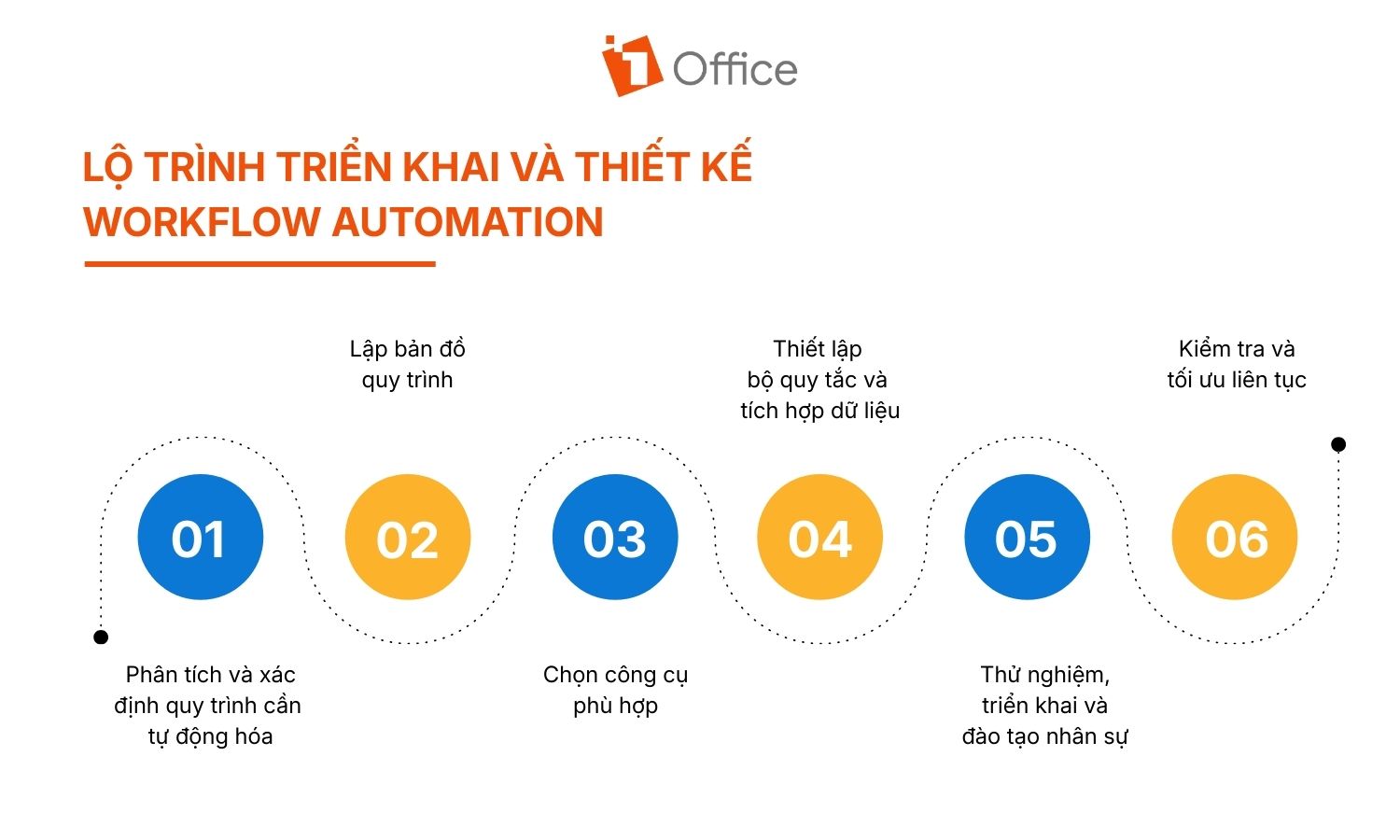
3.1 Analyze and Identify Processes for Automation
The discovery phase is a crucial first step, allowing managers to accurately identify which processes should be prioritized for improvement. Through systematic analysis, businesses can avoid scattering resources on processes that are not yet ready or lack urgency, thus ensuring a clearer and more effective implementation direction.
First, it’s necessary to gather detailed information on how work is assigned and the scope of authority among functional groups to ensure operational clarity. At the same time, focus on reviewing stages that frequently cause delays, generate errors, or require extensive manual operations to identify areas for optimization.
Additionally, it’s essential to clarify the criteria for initiating work and the scope of tasks for each individual throughout the entire operational flow.
3.2 Process Mapping Before Automation
After clearly identifying the priority links, the business needs to transform the survey data into a visual plan to restructure the operational flow. At this stage, the process map plays a central role in depicting the entire data journey, thereby quickly identifying overlaps, redundant intermediary steps, or potential progress bottlenecks.
To create a process map, you need to list all processing steps, decision points, and participating parties, then standardize them into a value chain diagram that runs from the starting point to the end.
In addition, businesses should organize cross-functional meetings to review and adjust the diagram, ensuring the process accurately reflects the operational reality at each touchpoint. It is crucial to standardize regulations on the type of data transferred between steps to eliminate ambiguity in responsibility and enhance seamless collaboration.
See more: Job Analysis Skills in Human Resource Management to Triple Management Efficiency
3.3 Choose a Tool Suitable for Your Business Scale
The choice of technology software plays a decisive role in the ability to bring the process map to life in actual operations. A suitable tool not only solves current problems but must also ensure flexible scalability in line with the organization’s growth rate.
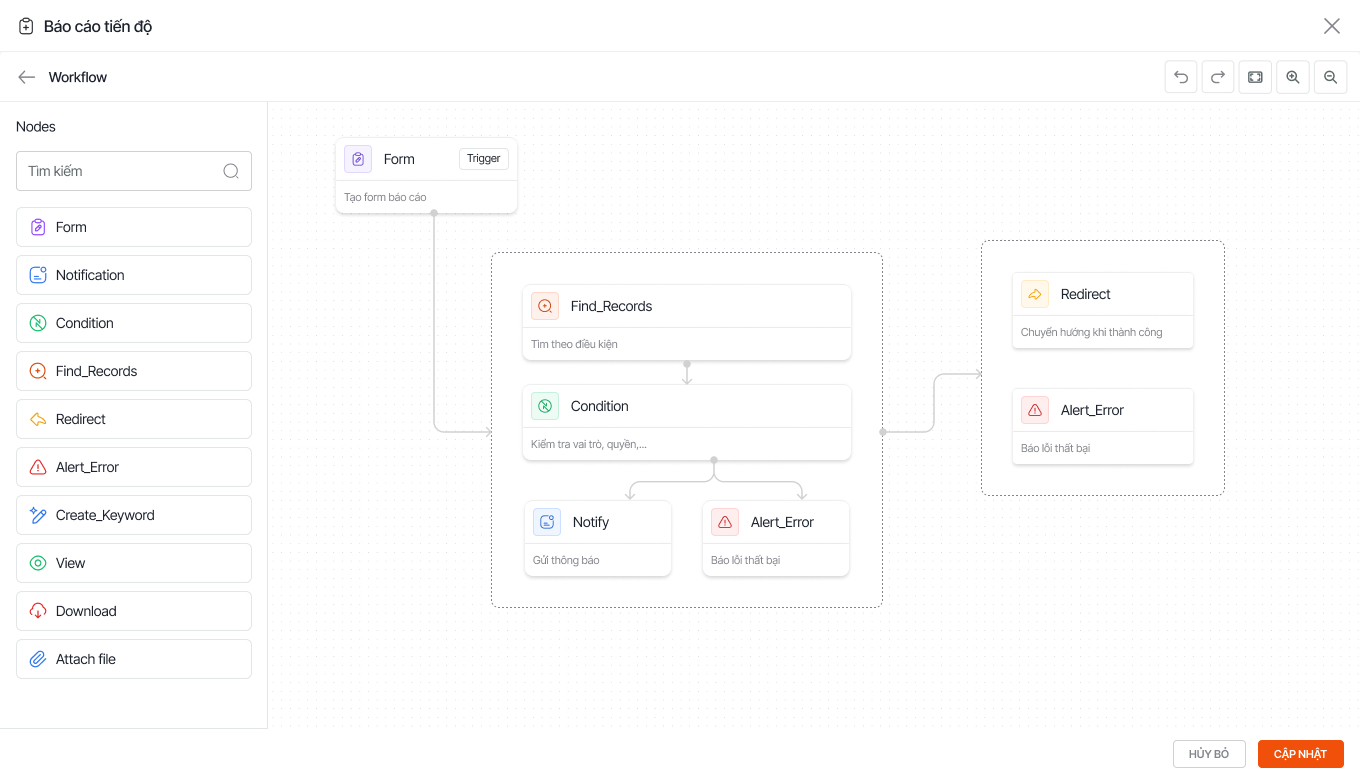
- Prioritize solutions with an intuitive drag-and-drop design interface to help managers build processes themselves without needing in-depth programming knowledge.
- Choose a system that allows for smooth connections with existing applications like CRM, HRM, or accounting to create a seamless data flow.
- Carefully analyze service packages to ensure the number of users and software features meet the actual needs of each department.
Using integrated platforms like 1Office is becoming the new standard, helping businesses maintain data consistency and optimize operational costs within a single ecosystem.
3.4 Establish Automation Rules and Integrate Data
After acquiring the right tool, the business needs to configure technical parameters to turn the theoretical diagram into a self-operating Workflow Automation system. This is the stage of converting management rules into logical commands that machines can understand and execute accurately.
- Build trigger conditions: Accurately set up starting points (Triggers) based on real events such as acquiring a new customer, receiving an order, or reaching a document approval deadline.
- Configure automatic actions: Define the tasks the system will perform immediately after a trigger occurs, such as sending notifications, updating task statuses, or routing documents.
- Synchronize system data: Connect information fields between software modules to ensure the output data of one step is always the accurate input for the next.
- Customize logic formulas: Use smart conditional filters to direct the workflow in different directions depending on the value of the input data.
3.5 Test, Implement, and Train Personnel
This stage focuses on transitioning the system from a simulated environment to live operation, while ensuring the team is ready to adapt to the new way of working. Thorough preparation of people and processes is the key condition for Workflow Automation to operate stably from the very beginning.
First, select a representative department for a short-term pilot to test suitability and detect any emerging issues early. Concurrently, standardize operational documents and video tutorials demonstrating system operations so that personnel can easily look them up during use.
At the same time, conduct live training sessions to ensure employees clearly understand how to use the system and their role in the new workflow. Finally, develop a roadmap for changing mindsets and work habits, thereby minimizing disruption and increasing readiness when implementing the automated process.
3.6 Continuously Test and Optimize the System
A perfect automation process needs to be refined regularly to adapt to changes in business strategy. Businesses need to maintain monitoring activities to ensure the system always operates at its optimal state.
- Monitor the Dashboard: Regularly track real-time reports on the system to identify bottlenecks or overdue tasks early.
- Collect Feedback: Record actual contributions from personnel directly operating the system to detect any inadequate or cumbersome automation rules.
- Refine Performance Metrics: Adjust technical parameters and process logic based on actual operational data to improve work processing speed.
- Update Processes Periodically: Re-evaluate the entire Workflow Automation flow after each business cycle to ensure compatibility with the organization’s scale.
4. Establish KPIs to Measure Process Automation Effectiveness
To accurately assess the value of an automation system, managers cannot rely on subjective judgments. Businesses need to build a specific set of KPIs to track shifts in productivity and costs throughout the operational process.

Specifically, the KPI system should be established around the following aspects:
- Processing Speed Index (Lead Time): Measure the total time required to complete a work cycle to assess the ability to optimize information flow.
- Operational Error Rate: Control the number of data errors arising at each link to demonstrate the absolute accuracy of the automation model.
- Cost Per Process: Analyze the reduction in spending on personnel and consumable resources compared to traditional manual operation methods.
- Employee Productivity: Track the actual workload each employee handles after being freed from repetitive tasks.
- Team Satisfaction Level: Survey the system’s transparency and convenience to ensure high consensus from the direct implementation team.
See more: A-Z Guide to Building a KPI System for Businesses
5. Tips for Choosing Workflow Automation Software for Your Business
5.1 Criteria for Choosing Software that Meets Your Needs
An ideal process management software needs to balance both modern technology and the practical experience of the staff. Below are 7 key criteria that businesses should not overlook when evaluating Workflow Automation platforms:
- User-Friendly Interface: Prioritize software with an intuitive drag-and-drop design to allow non-technical personnel to master and set up processes easily.
- Powerful Integration Capabilities: Choose a system that supports flexible connections with existing applications like CRM, HRM, or accounting through an open API or available links.
- Customization and Flexibility: Ensure the solution allows for adjusting complex workflows according to the specific characteristics of each department, rather than being confined to fixed templates.
- System Scalability: The technology platform must be able to handle sudden increases in the number of users and data volume as the business expands its scale.
















