


 10/05/2026
  2324 views
Claude AI is an advanced artificial intelligence assistant developed by Anthropic, renowned for its ability to assist with content writing, data analysis, and natural language processing safely and accurately. Not just a chatbot, Claude is also continuously expanding with new products like Claude Design (Launching April 2026), which helps users create visual design products from just a description. This article by 1Office will help you understand what Claude AI is, its pricing, and how to use this tool effectively.
Mục lục
- What is Claude AI?
- About Anthropic
- A Brief Comparison with Competitors for Initial Positioning
- History and Development of Claude
- Core Differentiator: “Constitutional AI” and the Safety-First Approach
- What is Claude Design? Anthropic’s New AI Design Tool for Creating Visual Products from Descriptions
- Key New Features (Compared to Previous AI Design Tools)
- 2. Claude AI Versions
- 3. Key Features of Claude AI
- 4. Practical Use Cases of Claude AI
- 5. Guide to Registering and Using Claude AI Effectively (Free & Paid)
- Is Claude AI free or paid?
- 7. Advantages and Limitations of Claude AI
What is Claude AI?
Claude AI is a Large Language Model (LLM) and AI chatbot developed by Anthropic, a startup focused on safe AI research. It operates on a transformer architecture, enabling it to process and generate natural, human-like text from diverse data sources such as internet text, contractor data, and user feedback. Claude can assist with writing, programming, data analysis, multilingual translation, and even interact with desktop environments (like moving the mouse cursor or typing). Unlike other models, Claude is trained to prioritize being “helpful, harmless, and honest,” which helps it avoid toxic or biased responses.

- What is Claude AI

About Anthropic
Anthropic is an AI company founded in 2021 in San Francisco by siblings Dario Amodei (CEO, former VP of Research at OpenAI) and Daniela Amodei, along with several other former OpenAI employees. The name “Anthropic” comes from the meaning “related to humans,” emphasizing a commitment to keeping humans at the center of AI development. Anthropic’s vision is to build advanced yet safe AI, aiming to research the safety properties of AI at the technological frontier and deploy reliable public models. Its core philosophy is safe and ethical AI, focusing on mitigating risks such as misinformation, bias, or harmful misuse. They prioritize methods like large-scale supervision and AI model interpretability, with major investments from Amazon ($8 billion), Google ($2 billion), and other funds helping to expand their cloud infrastructure.
A Brief Comparison with Competitors for Initial Positioning
Claude is positioned as a “friendly and safe competitor” to ChatGPT (from OpenAI), with a stronger focus on ethics and transparency. While ChatGPT is known for its flexibility and widespread popularity, Claude excels in handling long contexts (up to 200,000 tokens, equivalent to hundreds of pages of a book) and minimizing harmful content through a self-critique mechanism. Compared to Google Gemini, Claude is less biased due to its training on multilingual data and deep focus on ethics, but it may be slower in some high-speed tasks. Overall, Claude is well-suited for environments requiring high reliability, such as education or business, rather than purely entertainment applications.
History and Development of Claude
Claude has been in development since 2021, with the first training process completed in the summer of 2022 but delayed for internal safety testing to avoid a dangerous AI race. Below are the key milestones:
| Time | Key Milestones |
| 2021 | Anthropic founded by the Amodei siblings and former OpenAI employees, focusing on safe AI research. |
| Summer 2022 | Completed training for the first Claude 1, but release was delayed to prioritize safety testing. |
| March 2023 | Launched Claude 1 (including Claude 1.3), the first public version, with a focus on Constitutional AI. Named after Claude Shannon, the “father of information theory”. |
| July 2023 | Launched Claude 2, with improvements in math, reasoning, and cognitive abilities; partnered with Quora, DuckDuckGo. |
| March 2024 | Claude 3 (Haiku, Sonnet, Opus) launched, outperforming competitors on benchmarks; integrated with AWS Bedrock and Google Cloud. |
| June 2024 | Claude 3.5 Sonnet, twice as fast as Opus, supports desktop interaction. |
| 2024-2025 | Major investments from Amazon ($4 billion) and Google; Claude 3.5 Haiku with price unchanged; expansion of multilingual and domain-specific expertise. |
| November 2025 | Launched Claude Opus 4.5, the latest version with training data up to March 2025; acquired Bun to improve Claude Code. |
| December 2025 | Partnered with the Icelandic Ministry of Education to integrate Claude into teaching; NVIDIA and Microsoft invested up to $15 billion. |
This rapid development reflects Anthropic’s commitment to balancing innovation with safety, marked by growing revenue and awards for ethical AI.
Core Differentiator: “Constitutional AI” and the Safety-First Approach
Claude’s biggest differentiator is Constitutional AI (CAI), a proprietary training framework by Anthropic designed to align AI with human values without relying solely on human feedback (RLHF). CAI operates in two phases: (1) Supervised Learning: The model self-evaluates and revises its responses based on an internal “constitution” of about 75 principles, inspired by the 1948 UN Universal Declaration of Human Rights, Apple’s terms of service, and other ethical documents (e.g., “Choose the response that supports freedom, equality, and fraternity”). (2) Reinforcement Learning from AI Feedback (RLAIF): The model compares and prioritizes safe responses, reducing harmfulness without requiring humans to review sensitive content.
This approach creates an “alignment tax”—the cost of ensuring ethical AI—but it helps Claude self-regulate, reducing the risk of misuse and increasing scalability. The result: Claude handles adversarial inputs well, reduces toxicity, and supports constitution customization for specific cases, making it safer than other models. Anthropic continues to research model interpretability to increase transparency.
What is Claude Design? Anthropic’s New AI Design Tool for Creating Visual Products from Descriptions
Launched in April 2026 by Anthropic, Claude Design is a new-generation AI tool that helps turn ideas into complete design products—from prototypes and wireframes to slides and marketing materials—just through conversation.
Unlike traditional design tools, Claude Design does not require advanced design skills. Users simply provide a description (prompt), and the system generates an initial version, which can then be edited directly, commented on, or refined step-by-step, just like working with a real designer.
Key New Features (Compared to Previous AI Design Tools)
- End-to-end AI design workflow: Not just creating images, but building complete prototypes, layouts, and slides
- Automatic design system integration: Claude can read a codebase / design file → apply brand-standard fonts, colors, and components
- Flexible interaction: edit via chat, inline comments, or UI adjustment sliders (spacing, colors, etc.)
- Supports multiple roles: usable by everyone from designers and marketers to founders
- Diverse file exports: PPTX, PDF, HTML, or push to Canva
- Code connectivity: can be handed off to Claude Code for actual implementation
2. Claude AI Versions
Claude AI has evolved significantly through generations, with the Claude 3 Series (and subsequent updates like 3.5, 4, and 4.5) being the current core platform. These models are designed with a tiered structure: Opus for maximum power, Sonnet for balance, and Haiku for high speed. By the end of 2025, the latest versions are the Claude 4.5 Series (Opus 4.5, Sonnet 4.5, Haiku 4.5), with training data updated to mid-2025 and improvements in reasoning, coding, and long-context processing. They support text and image inputs, text outputs, multiple languages, and vision capabilities. Below is a detailed analysis.
- Claude AI versions

Introduction to the Claude 3 Series Models (Opus, Sonnet, Haiku)
The Claude 3 Series was launched in March 2024, marking a major leap in intelligence, speed, and safety compared to previous versions. These models use an advanced transformer architecture with a context window of up to 200,000 tokens (equivalent to hundreds of pages of documents), expandable to 1 million tokens in some versions (like Sonnet 4.5). They are optimized for tasks ranging from everyday conversation to complex analysis, with a focus on being “helpful, harmless, and honest”. Subsequent updates like Claude 3.5 (August 2025) and Claude 4.5 (September-November 2025) improved speed (Sonnet is twice as fast as Opus), coding capabilities (solving 64% of agentic problems), and image processing (like chart analysis). Currently, aliases like “claude-opus-4-5” automatically point to the latest version.
- Roles and strengths of each version:
- Claude Opus (4.5): The most powerful model, designed for ambitious projects and complex tasks. Strengths: Processing large documents (docs, slides, spreadsheets), deep analysis, in-depth research, long-term reasoning, and high-precision coding. It excels in fields like medicine, law, finance, and STEM, with an “extended thinking” capability for complex problems. Suitable for businesses requiring high accuracy, but with average speed.
- Claude Sonnet (4.5): The ideal balanced model for daily work and business use. Strengths: Professional writing, quick analysis, task automation, complex coding, and agentic tasks (like contextual customer support). It is twice as fast as Opus, with high performance in reasoning and multi-step processing, making it the default choice for most users (including Pro and Team).
- Claude Haiku (4.5): The fastest and most affordable model, optimized for instant responses. Strengths: Quick summarization, real-time chat, short document processing, and web search integration. It provides near-frontier intelligence at high speed, suitable for mobile applications or high-volume tasks, but is less profound in complex tasks.
Quick comparison of performance, speed, and cost between versions
Based on data from Anthropic (updated December 2025), the table below compares version 4.5 (the latest). Performance is based on internal benchmarks (such as GPQA for reasoning, HumanEval for coding); speed is measured in tokens/second and latency; cost is the API price (USD/million tokens, can be reduced with batching or caching).
| Features | Claude Opus 4.5 | Claude Sonnet 4.5 | Claude Haiku 4.5 |
| Performance | Highest (reasoning: 65% GPQA; coding: 93%; excels at in-depth research) | High balance (reasoning: 60% GPQA; coding: 90%; good for agents and writing) | Near-frontier (reasoning: 42% GPQA; coding: 88%; fast for summarization) |
| Speed | Average (25-50 tokens/second; 2s latency) | Fast (50-72 tokens/second; 0.7-1s latency; twice as fast as Opus) | Fastest (52-123 tokens/second; 0.7s latency) |
| Cost (Input/Output per MTok) | $5 / $25 | $3 / $15 | $1 / $5 |
| Context | 200K tokens (expandable to 1M for a fee) | 200K tokens (1M beta) | 200K tokens |
| Max output | 64K tokens | 64K tokens | 64K tokens |
| Knowledge cutoff | May 2025 (trained until Aug 2025) | Jan 2025 (trained until Jul 2025) | Feb 2025 (trained until Jul 2025) |
*Note: Costs may vary with features like vision ($0.20/image) or extended thinking; Haiku is the most cost-effective for large volumes.
Previous Claude Versions
Versions before Claude 3 laid the foundation for safety and context processing capabilities, but are now considered legacy (Claude 1 will be discontinued from 11/2024, Claude 2 from 7/2025). They still hold historical value, with gradual improvements in accuracy and context window. Below are the key features:
| Version | Release Date | Key Highlights |
| Claude 1 (1.0-1.3) | March 2023 | First public version (limited beta); focused on safety with Constitutional AI; 9K token window; good for basic text, but limited in coding/math. Claude Instant 1.2 (8/2023): A faster, cheaper version ($0.80 input MTok). |
| Claude 2 (2.0-2.1) | July 2023 (2.0); Nov 2023 (2.1) | Improved context (100K → 200K tokens, equivalent to 500 pages); Claude 2.1 reduced hallucinations (errors) by 2x, supports tool use (API calls, web search); strong in coding (76.5% on the Bar exam), but was criticized for being “too safe” (refusing harmless requests). Higher cost ($8 input MTok). |
These versions helped Claude surpass its initial competitors in ethics, leading to the boom of the Series 3. For current use, it is recommended to upgrade to 4.5 to leverage the latest intelligence.
3. Key Features of Claude AI
Claude AI stands out with its combination of superior intelligence, speed, and commitment to safety, making it an ideal assistant for both individuals and businesses. As of December 2025, new updates like Claude Sonnet 4.5 (launched in September 2025) and the memory feature for the Max plan have elevated its ability to handle complex tasks, including autonomous agents and dynamic tool integration. Below are the main features, categorized by requirement.
- Key features of Claude AI

Superior Natural Language Processing Capabilities
Claude excels at understanding and generating natural language, thanks to its advanced LLM architecture and training on diverse data. It not only answers questions but also creates high-quality content with superior accuracy compared to many competitors.
- Text generation: Claude can write in-depth blog posts, professional emails, movie scripts, romantic poetry, or creative short stories. For example, you can ask it to “Write a 1000-word blog post about the impact of AI on education, in a persuasive style,” and it will produce coherent, SEO-optimized content with the appropriate tone. In Claude 4.5, the “extended thinking” feature helps generate longer content without losing coherence.
- Summarizing long texts: Highly effective with dense documents like books, research reports, or legal contracts. Claude can condense a 500-page book into a 1-page summary, preserving the main ideas, citing sources, and avoiding hallucinations. The new “context editing” feature (September 2025) allows for real-time summary adjustments, ideal for business document analysis.
- Language translation: Supports over 100 languages with near-human accuracy, including contextual translation to preserve cultural nuances. For example, translating a contract from English to Vietnamese will handle legal terminology accurately. Claude 4.5 supports multilingual capabilities to handle code-switching conversations.
- Analysis and explanation: Claude understands and explains complex concepts like quantum theory, contract analysis, or international law. It analyzes input data, provides logical arguments, and suggests actions, which is useful for academic research or legal consultation.
Programming and Code Debugging Capabilities
Claude is a top-tier AI programmer, especially with Sonnet 4.5 – the best model for coding and complex agents (launching September 2025). It supports over 20 programming languages, from Python to JavaScript.
- Writing, debugging, and analyzing source code: Claude can write complete code for web applications, debug errors in large codebases, or analyze software architecture. For example, if you ask it to “Write a Python script to analyze CSV data and plot a graph,” it will provide clean, commented, and explained code. In the November 2025 update, the “advanced tool use” feature allows Claude to automatically detect and execute tools, helping coding agents automate the development process.
- “Analysis tool” environment for running and testing JavaScript: Claude integrates Artifacts (updated July 2025), an interactive sandbox environment for running and testing JavaScript code in real-time. You can write JS code in the chat, see a live preview (like an interactive website or a dynamic chart), and edit and debug instantly without leaving the interface. This feature supports file uploads (PDF, images) for related code analysis, making it ideal for frontend developers.
Large Context Window Processing
Claude stands out with a context window of up to 200,000 tokens (equivalent to 150,000-500,000 words, depending on the language), and can be expanded to 1 million tokens in some beta versions (like Sonnet 4.5).
- Explaining the advantages of a high token limit: With a large context window, Claude can process long documents without forgetting details, such as analyzing an entire annual financial report or a multi-hour conversation. The advantages include: (1) Reduced hallucinations by retaining the entire history; (2) Support for multi-step tasks, like summarizing a book and then answering detailed questions from a specific chapter; (3) Increased efficiency for businesses, for example, analyzing a 100-page contract without needing to break it down. The “memory tool” (September 2025) and “token budget tracking” (October 2025) updates help monitor and dynamically adjust the context, allowing agents to run longer without exceeding limits.
Safety and Ethics (Constitutional AI)
Claude is designed with the philosophy of being “helpful, harmless, and honest,” using Constitutional AI (CAI) to align the model with human values without relying heavily on human feedback.
- A deeper look at how Claude is trained to avoid harmful and biased content: CAI operates through a “constitution” of 75 ethical principles (inspired by the UN Universal Declaration of Human Rights and similar documents), where the model self-critiques and revises its responses before outputting them. The training process includes: (1) Supervised learning to prioritize safe responses; (2) RLAIF (Reinforcement Learning from AI Feedback) to compare and eliminate harmful content without humans needing to review sensitive material. The result: A 90% reduction in gender/racial bias compared to other models, refusal of harmful requests (like criminal instructions), while remaining flexible with harmless content. In 2025, Anthropic continues to improve with “task persistence” to maintain safety in long-running agents, ensuring Claude is not easily “jailbroken.”
Multimodal Analysis
Starting with the Claude 3 Series (2024), Claude supports multimodal capabilities, and the July 2025 update expanded its ability to upload images/PDFs for in-depth analysis.
- Ability to process images, charts, and tables: Claude can describe images in detail (e.g., “Analyze this revenue chart and forecast trends”), extract data from tables (like Excel via upload), or explain infographics. In Artifacts, it creates interactive charts from input data. With the vision model in 4.5, it achieves 85% accuracy on benchmarks like ChartQA, which is useful for scientific data analysis or business reports. It supports PDF uploads for summarizing and extracting images within them.
Response Speed and Efficiency
Claude optimizes speed through a tiered model system, with Haiku leading in cost-effectiveness.
- Emphasis on fast processing speed, especially with Haiku: Haiku 4.5 processes 100+ tokens/second with a latency of under 1 second, ideal for real-time conversations or quick summaries. Sonnet 4.5 is twice as fast as Opus for agent tasks, while Opus prioritizes depth. The global web search update (May 2025) integrates instant internet searches, speeding up information updates. Overall, Claude saves 50% of the time compared to equivalent models, especially when combining memory and tool use to handle repetitive tasks efficiently.
4. Practical Use Cases of Claude AI
By the end of 2025, Claude had become one of the most trusted AIs for businesses and individuals worldwide due to its high accuracy, long context window, and superior safety features. Below are the most common practical applications, with specific examples from users and large companies.
- Practical Use Cases of Claude AI

In Work and Business
| Field | Popular Real-world Applications | Notable Companies Using |
| Marketing & Content | – Writing blog posts, social media captions, TikTok/Reels video scripts
– Creating 50+ ad variations for A/B testing in just a few minutes – Analyzing customer sentiment from thousands of reviews |
Canva, Notion, Jasper, HubSpot, L’Oréal |
| Programming & Development | – Writing entire backend/frontend from Vietnamese/English requirements
– Debugging complex errors in a codebase of >10,000 lines – Generating API documentation, automated unit tests – Refactoring legacy code (COBOL → Python) |
Palantir, Replit, GitHub Copilot Teams (many devs are switching to Claude), Stripe |
| Data Analysis | – Summarizing hundred-page financial reports in 2–3 minutes
– Extracting data from contract and invoice PDFs – Analyzing charts, forecasting trends from uploaded Excel/CSV files |
McKinsey, Deloitte, Goldman Sachs, PwC |
| Customer Support | – Building 24/7 multilingual chatbots (Claude + API)
– Automatically classifying tickets, suggesting answers |
Intercom, Zendesk, DuckDuckGo (uses Claude as its AI Answer Engine), Sourcegraph Cody |
| Project Management | – Creating detailed plans from a 1-page brief
– Writing automated weekly/monthly reports – Analyzing project risks, proposing solutions |
Asana, Monday.com, ClickUp, Accenture |
In learning and research
| Application | Practical Example in 2025 |
| Document analysis & summarization | A student uploads 10 PDF papers → Claude returns a comparison table of methods, results, and limitations in 5 minutes |
| Explaining complex concepts | Request: “Explain quantum mechanics for beginners in Vietnamese, with illustrations” → receive a detailed answer + ASCII art + LaTeX formulas |
| Writing theses and research papers | Claude automatically generates an outline, finds the latest academic sources (with web search), writes the literature review section + provides proper APA/MLA citations |
| Learning foreign languages | Practice speaking English/French/Japanese via voice mode (iOS/Android), get pronunciation corrections, and create personalized exercises |
| Exam preparation | Upload old exam papers → Claude generates 100 similar multiple-choice questions + provides answer explanations |
→ Many top universities (Stanford, MIT, NUS, Hanoi National University) have incorporated Claude into their official curriculum or encourage students to use it responsibly.
In personal life
| Purpose | Popular Uses in 2025 |
| Intelligent Personal Assistant | – Manage work schedules, automatic reminders
– Plan detailed trips (flights + hotels + itinerary) – Track personal expenses from photos of receipts |
| Creativity & Entertainment | – Write short stories, love poems on demand
– Create podcast scripts, board game ideas – Play role-playing games (text adventures) that last for weeks |
| Health & Lifestyle | – Create a 7-day diet plan based on weight and allergies
– Guide meditation, at-home gym workouts – Analyze blood test results |
| Personal Finance | – Analyze stock investment portfolios
– Create a savings plan to buy a house – Compare insurance packages |
| Cooking | Upload a photo of ingredients in the fridge → receive 3 creative recipes + step-by-step instructions |
Some notable case studies in 2025
- Quora: Replaced its entire answer engine with Claude → 40% increase in user satisfaction.
- DuckDuckGo: Launched a free “AI Chat” feature using Claude as its primary backend.
- Notion: Integrated Claude directly into Notion AI (in the Notion AI Pro version).
- Government of Iceland: Partnered with Anthropic to integrate Claude into the entire public education system, from elementary to university level.
5. Guide to Registering and Using Claude AI Effectively (Free & Paid)
Claude AI is easily accessible via the web, mobile apps (iOS/Android), and desktop, with a simple registration process that takes just a few minutes. As of December 2025, the interface has been updated to support Artifacts (creating interactive content like code and charts) and direct web search integration. Below is a detailed guide based on official information from Anthropic.
- Guide to registering and using Claude AI

How to access Claude AI
Claude AI can be accessed for free via a web browser without needing to download an application, but the mobile app offers a smoother experience with voice mode and notifications.
- Access the official website (claude.ai):
- Open a browser (Chrome, Safari, Firefox) and go to https://claude.ai. The homepage prominently displays a “Try Claude” button, which leads to the chat interface. If you already have an account, log in directly; if not, proceed to the registration step.
- How to register an account:
- On the claude.ai page, click “Sign up” or “Try Claude”.
- Choose a method:
- Google: Click “Continue with Google” to quickly sign in with your Google account (recommended for individual users, automatically syncs email).
- Email: Enter your personal email address (e.g., yourname@gmail.com) and create a strong password (at least 8 characters, including uppercase/lowercase letters, numbers, and special characters).
- SSO (Single Sign-On): If you are using it through a business (Google Workspace or Microsoft), select the SSO option.
- Anthropic will send a verification code via email (or SMS if you choose to use a phone number). Enter the code to complete the process – this takes less than 1 minute.
- Agree to the Privacy Policy and terms of service; you can opt to receive product update emails (you can unsubscribe later).
- After registration, you will be directed to the chat dashboard with the default Sonnet model. Phone number verification is not mandatory but is recommended to enhance security (optional in account settings).
Note: Registration is free and does not require a credit card. If you encounter an error (like not receiving the verification code), check your spam folder or try a different browser.
User interface and basic interaction
The Claude interface is simple, resembling a modern chat application, with a left sidebar for chat history and Projects (for organizing chats).
- How to send prompts and upload documents:
- Send a prompt: In the main dialog box (center of the screen), type your question or command (e.g., “Write a blog post about AI in education”). Press Enter or click the send icon (arrow). Claude will respond immediately, with the option to continue the conversation by replying directly.
- Upload a document: Click the attachment icon (paperclip) below the dialog box. It supports PDF, images (JPG/PNG), text documents (TXT, DOCX), spreadsheets (CSV/Excel), and code (up to 10MB). After uploading, add a prompt like “Summarize this report and suggest improvements.” Claude will analyze the content, extract data, or create Artifacts (e.g., a chart from Excel data).
- Other features: Use the right-hand toolbar to activate web search (to find the latest information), Artifacts (to preview interactive code/images), or share the chat (copy link or export as PDF).
The interface is beginner-friendly, supports multiple languages (including Vietnamese), and offers an option to switch between models (if you are a Pro user).
Tips for getting the best answers (basic prompt engineering techniques)
Prompt engineering is the key to getting more accurate and creative answers from Claude. According to Anthropic’s official guide (updated 2025), apply the following techniques for optimization:
- Be clear and specific: Avoid ambiguity. Instead of “Write about marketing,” use “Write a 500-word blog post about email marketing for small businesses, in a persuasive style, including 3 real-world examples.”
- Use examples (multishot prompting): Provide 1-3 examples to guide the format. For example: “Translate the following sentence into Vietnamese: ‘Hello world’ → ‘Xin chào thế giới’. Now translate: ‘AI is changing the world’.”
- Chain of Thought (CoT) – Let Claude think step-by-step: Request “Think step-by-step before answering” to handle complex problems. For example: “Solve this problem step-by-step: 2x + 3 = 7.”
- Use XML tags: Claude is specially trained with tags for structuring. For example: “Analyze this data Revenue table: Q1: 100k, Q2: 150k Respond in a table format.”
- Assign a role (system prompts): Start with “You are a marketing expert with 10 years of experience” to set the tone.
- Prefill response and chain prompts: Start a sample response (“Conclusion: …”) or break the task into a chain (prompt 1: research; prompt 2: summarize).
Pro tip: Use the Prompt Generator tool in the Claude Console (in a Pro account) to automatically improve your prompts. Experiment and iterate – Claude learns from the conversation context.
Is Claude AI free or paid?
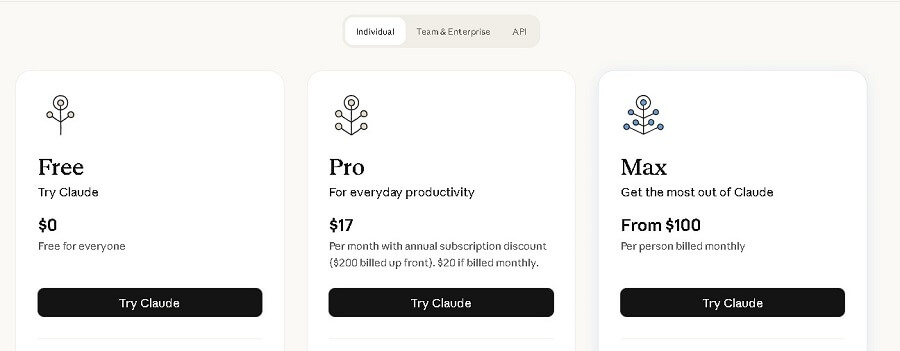
Claude offers both a free version (available immediately after signing up) and paid versions (Pro, Max, Team). The free version is suitable for basic users, while the paid versions unlock higher limits and advanced features. Prices do not include tax and are subject to change – check at claude.ai/pricing.
| Version | Price (USD/month, 2025) | Main Model | Usage Limits | Best for |
| Free | $0 (forever) | Sonnet 4.5 (mid-range, balanced) | ~20-30 messages/5 hours (auto-reset); wait times during peak hours; no full Code support | New users, light learning, testing |
| Pro | $20 (monthly) or $17 (annually, $200 prepaid) | Sonnet 4.5 + Opus 4.5 (most powerful for deep reasoning) | 5x the free tier (~45-100 messages/5 hours); high priority; unlimited Projects | Professionals, developers, researchers |
| Max | From $100 (5x Pro) to $200 (20x Pro) | All models (Opus priority) | 5-20x Pro; higher output; early access to features | Heavy users, individual businesses |
| Team | $30/user (monthly) or $25/user (annually, 5-user minimum) | All models | Pooled quota; admin controls; project sharing | Small teams, businesses |
- Free version explained (Sonnet): Uses Sonnet 4.5 – a balanced, fast model that supports basic chat, file uploads, web search, and Artifacts. Limits are in place to manage server load but are sufficient for 1-2 hours of daily use. Does not include access to Opus (more powerful for complex tasks).
- Paid version (Claude Pro – Opus): Pro unlocks Opus 4.5 for in-depth analysis, complex code, and a 200K-1M token context window. You can cancel your subscription at any time through your account settings.
Benefits of the Paid Version
Upgrading to Pro/Max offers significant value, especially if you use Claude daily:
- More queries: 5-20x the free limit, avoiding interruptions (e.g., Pro allows for longer sessions for large projects without waiting for a 5-hour reset).
- More powerful model: Access to Opus 4.5 – excels at reasoning (65% on the GPQA benchmark), coding (93% on HumanEval), and processing long documents, with a 50% reduction in hallucinations compared to Sonnet.
- Other benefits: Priority access during peak hours (no waiting), Claude Code (integrated terminal for developers), Projects (organize chats by topic), Google Workspace integration (email/calendar/docs), Research tools (deep search), and early access to features like extended thinking. According to 2025 user data, Pro saves time equivalent to $80/month for intensive work.

- Claude AI Pricing
7. Advantages and Limitations of Claude AI
Claude AI, with its latest models like the Claude 4.5 Series (released late 2025), continues to establish itself as one of the safest and most powerful LLMs. However, like any AI technology, it has its limitations. Based on reviews from reputable sources in 2025, here is a detailed analysis of its pros and cons to help you assess its suitability for your needs.
Advantages
Claude stands out due to its Constitutional AI philosophy, which focuses on being helpful, harmless, and honest, allowing it to excel at tasks requiring depth and reliability. Key advantages include:
- Handles ultra-long and complex documents: With a context window of up to 1 million tokens (equivalent to thousands of pages), Claude can easily analyze long reports, large codebases, or entire books without losing context. This makes it ideal for legal, financial, or scientific research, surpassing many competitors like ChatGPT (272K tokens).
- High reasoning and logical analysis capabilities: Claude Opus 4.5 achieves 65% on the GPQA benchmark (scientific reasoning) and supports “extended thinking” for multi-step problem-solving in complex areas like advanced mathematics or strategic analysis. It also leads in coding with a 77.2% score on SWE-bench, supporting debugging and natural code generation.
- Adheres to strict AI safety and ethical principles: Constitutional AI helps reduce harmful and biased content by 90%, with the ability to self-critique based on 75 ethical principles. This makes Claude suitable for businesses needing to comply with regulations (like HIPAA) and less susceptible to “jailbreaking” than other models.
- Fast speed (especially Haiku) and efficiency (Sonnet): Haiku 4.5 processes 100+ tokens/second with under 1-second latency, ideal for quick summaries or real-time chat. Sonnet 4.5 balances speed and depth, being twice as fast as Opus, which saves time on daily tasks.
- Generates coherent, natural content with fewer “hallucinations” in summarization tasks: Claude produces more “human-like” text that requires fewer edits, and has a low hallucination rate (around 6.2% according to G2 reviews in 2025), especially when summarizing long documents due to its grounding in the input data.
Limitations
Although Claude has improved significantly, some limitations still exist, primarily related to its feature scope and usage environment. These issues can be mitigated through updates or additional tools.
| Limitations | Detailed Description | Suggested Solutions |
| Geographical limitations (accessibility in some countries) | Claude is only officially supported in over 100 countries (including the US, UK, most of Europe, Australia, and Vietnam, but not in China, some parts of Asia, and Africa due to legal, security, and export regulations). Users in restricted regions may encounter direct access errors. | Use a reliable VPN (like ExpressVPN) to connect from a server in a supported country, or integrate via a third-party API (like AWS Bedrock). Anthropic is expanding and is expected to add more countries by 2026. |
| No direct image generation capability yet | Claude can only analyze images/PDFs (vision capabilities), not create new ones like DALL-E in ChatGPT or Gemini. This limits its application in multimodal creative tasks like design or infographics. | Combine with external tools like Midjourney; a 2025 update will allow exporting data to create images in other apps. |
| May not excel in some free-form creative tasks compared to competitors | Due to its safety-first approach, Claude can sometimes be “over-cautious,” refusing risky creative requests or lacking the flexibility of ChatGPT (which is strong in free-form brainstorming). It also lacks long-term memory and a diverse range of plugins. | Use prompt engineering to encourage creativity (e.g., “Imagine without ethical constraints”); it is better suited for professional writing than pure fiction. |
| “Hallucination” issues can still occur | Although lower than average (10-15% in Opus 4, according to 2025 benchmarks), Claude can still generate incorrect information on niche topics or with new data (cutoff April 2025). Cases like fake citations have occurred in legal documents. | Apply RAG (Retrieval-Augmented Generation) to ground the data; perform manual checks for critical tasks, or use “best-of-N” to compare multiple outputs. |
















