


Business Operations Process: 5 Steps to Build and Optimize for Efficiency


In any business, building and maintaining an effective operating procedure is a key factor in achieving sustainable success. Operating procedures not only help optimize work and minimize errors but also enhance management efficiency and service quality.
However, to build a truly effective operating procedure, businesses need to clearly understand the steps of design, implementation, and control. This article will provide you with a comprehensive overview of business operating procedures, from basic concepts to specific steps for process optimization, helping leaders and managers make the right decisions to achieve business goals. Let’s explore with 1Office how to build operating procedures that help your business run more smoothly and efficiently.
Mục lục
- 1. What is an operating procedure?
- 2. The importance of building operating procedures
- 3. The 4 Pillars of an Operating Procedure
- 4. The 5 Stages of Building and Optimizing Operational Processes
- 5. Challenges and Solutions in Building an Operational Process
- 6. Effective Business Operating Models
- 7. Toolkit for setting up and digitizing operational processes
- 8. Standardized Business Operations Process Template Set
- 9. Conclusion
1. What is an operating procedure?

An operating procedure is a series of steps or activities performed in a specific sequence to achieve particular business objectives. It is an indispensable part of any organization, helping to standardize work, optimize performance, and ensure continuity in daily operations. An operating procedure typically includes steps from planning, implementation, and monitoring to evaluating results, with the goal of maintaining stability and efficiency in all aspects of the business.
In the modern context, operating procedures are also a crucial factor in applying technology, helping businesses optimize work, minimize risks, and increase productivity. Building a standardized operating procedure not only helps departments coordinate effectively but also ensures that all activities within the business are carried out accurately and transparently.
2. The importance of building operating procedures
2.1. Optimizing Work Performance
When operating procedures are clearly and standardly built, businesses can optimize work steps, minimizing wasted time and resources. This helps employees work more efficiently, while also reducing errors and enhancing work quality. A clear procedure also helps avoid unnecessary repetition of tasks, creating a productive work environment.
2.2. Enhancing Management and Monitoring Capabilities
A standardized operating procedure helps managers easily track and monitor work progress. Having specific metrics and standards for each step in the procedure makes inspection, evaluation, and decision-making easier. This helps ensure that all activities within the business are carried out on schedule and meet the required quality standards.
2.3. Ensuring Continuity and Stability
Operating procedures help businesses maintain stability in daily operations, especially in emergencies or during personnel changes. Once a procedure is established, any employee can access and follow the predefined steps, helping to avoid disruptions and ensure continuity in work.
2.4. Supporting the Digital Transformation Process
Operating procedures play a crucial role in supporting businesses’ digital transformation and adoption of new technologies. Automating steps within the procedure enhances control and reduces manual tasks. This is a key factor that helps businesses increase flexibility and be ready to face challenges in the digital era.
2.5. Improving Service and Product Quality
When operating procedures are implemented in a standardized manner, the quality of the business’s products and services also improves significantly. The procedure helps define specific quality standards, thereby minimizing the possibility of errors and increasing customer satisfaction. This not only helps the business retain customers but also creates a sustainable competitive advantage in the market.
2.6. Minimizing Risks and Errors
A well-structured operating procedure helps minimize risks and errors in business activities. Clearly defining work steps and assigning responsibilities helps the business avoid omissions or deviations during implementation. The procedure also helps in the early detection of potential issues and allows for timely corrective measures, thereby minimizing negative impacts on the business.
3. The 4 Pillars of an Operating Procedure
3.1. People
People are the most important element in a business’s operating procedure. The staff not only performs daily tasks but also contributes to the success of the procedure through their professional competence, skills, and work ethic.
For an operating procedure to be effective, businesses need to invest in employee training, ensuring they clearly understand their roles and have the necessary skills to perform their jobs according to the procedure. At the same time, building a team of employees with teamwork and creative abilities will help the operating procedure remain flexible and respond quickly to changes.
- Ensure the staff is well-trained and updated with new skills.
- Build a culture of teamwork and encourage creativity at work.
- Periodically evaluate employee performance and create opportunities for advancement.
3.2. Technology
Technology is an indispensable pillar in building modern operational processes. Applying technological tools helps automate and optimize steps in the process and enhance work efficiency.
Process management software, ERP and CRM systems, or data analysis tools help businesses monitor and control operational processes accurately and quickly. Technology also helps minimize errors, save time and costs, while supporting digital transformation and enhancing competitiveness.
- Apply automation software tools to minimize manual work.
- Use ERP and CRM systems to manage and optimize processes.
- Invest in data analysis technology to make accurate and timely decisions.
3.3. Standardized Processes
Standardized processes are essential to ensure all tasks are performed consistently and effectively. Clear processes help departments coordinate smoothly and avoid repetition or confusion in their work.
Building standardized processes helps clearly define work steps, assign responsibilities, and set standards to be achieved. This not only helps optimize work steps but also makes it easier for the business to evaluate efficiency and make necessary improvements.
- Define clear work steps and assign specific responsibilities.
- Ensure operational processes are standardized and easy to apply across all departments.
- Periodically review and improve processes to ensure their effectiveness and relevance.
3.4. Control and Evaluation
Control and evaluation are crucial steps that help businesses monitor the effectiveness of their operational processes. Establishing Key Performance Indicators (KPIs) helps measure work progress and quality. Regular inspection, monitoring, and reporting tools help managers detect issues in the process early and take timely corrective actions. Periodic evaluations help improve processes and enhance efficiency in all business activities.
- Establish KPIs to track work progress and results.
- Use monitoring and reporting tools to detect issues early.
- Periodically evaluate and improve processes to optimize work efficiency
4. The 5 Stages of Building and Optimizing Operational Processes
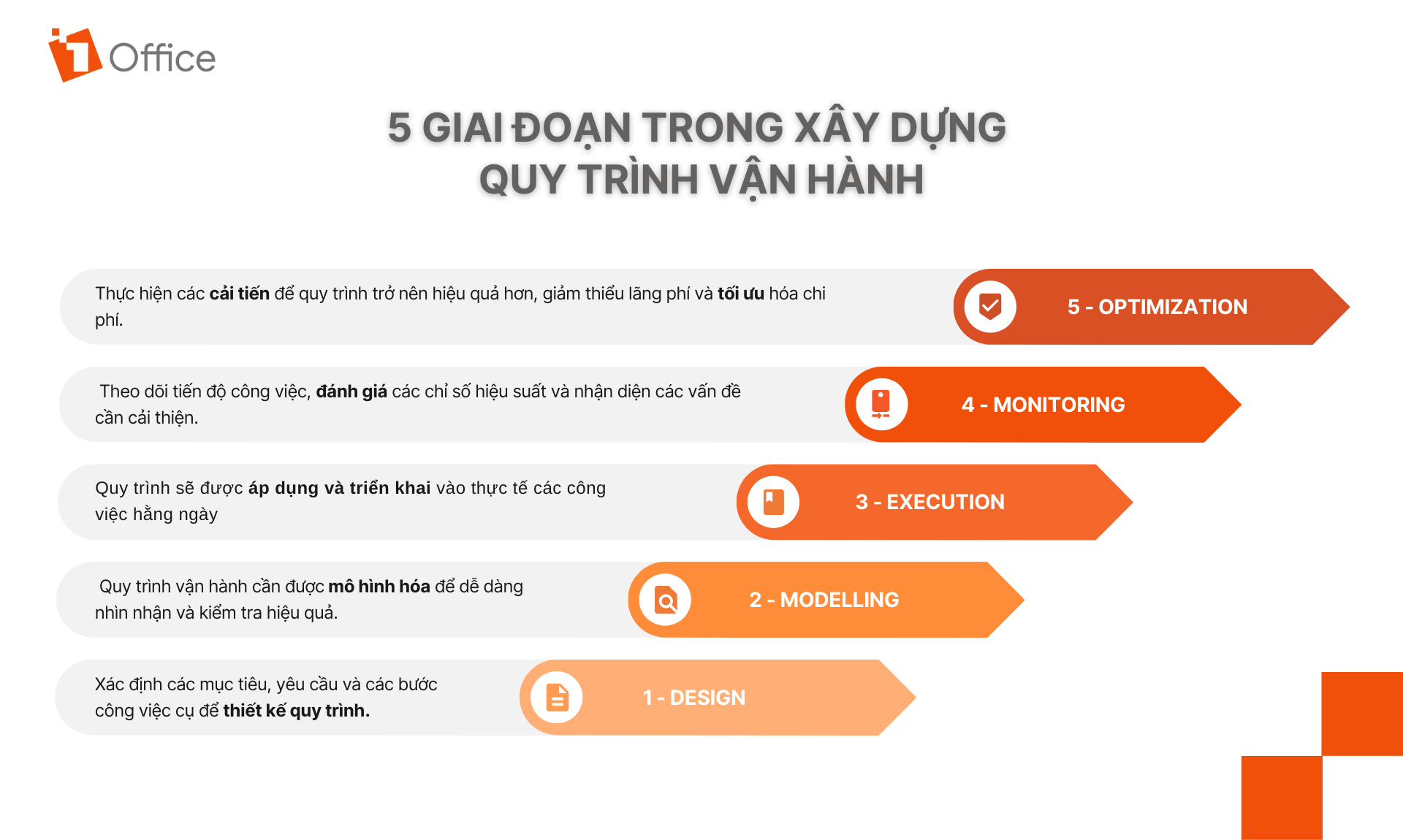
4.1. Design (Process Design)
The first stage in building an operational process is process design. In this stage, the objectives, requirements, and specific work steps are defined to create an operational process that aligns with the business’s needs and goals.
- Define process objectives: Set the goals to be achieved, such as increasing efficiency, reducing costs, or improving service quality.
- Outline work steps: Design specific work steps and assign responsibilities to relevant departments or employees.
- Select support tools: Choose software, technology, or tools to support process execution, such as ERP, CRM, or project management tools.
4.2. Modelling (Process Modelling)
After design, the operational process needs to be modeled for easy visualization and effectiveness testing. A process model helps create a detailed map of work steps, communication points, and relationships between departments within the organization.
- Create a process diagram: Model the process in a visual diagram format, making it easy to identify steps and workflows.
- Identify connection points: Analyze communication points between departments and process steps to ensure continuity and efficiency.
- Analyze potential scenarios: Simulate potential scenarios within the process to prepare timely response measures.
4.3. Execution (Process Implementation)
The execution stage is the step of implementing the process into daily work. The process will be applied and monitored to ensure that work steps are carried out as planned.
- Implement the new process: Apply the designed process to the business’s actual operations.
- Train employees: Provide detailed training and guidance to employees on how to perform the steps in the operational process.
- Monitor implementation: Ensure that the steps in the process are executed correctly and on schedule.
4.4. Monitoring (Monitoring and Evaluation)
The monitoring and evaluation phase is crucial for ensuring that the operational process is working effectively. Businesses need to track work progress, evaluate performance indicators, and identify areas for improvement.
- Track work performance: Use key performance indicators (KPIs) to monitor and evaluate the results of the process implementation.
- Feedback and improvement: Collect feedback from employees and customers to detect potential issues and devise adjustment plans.
- Periodic reviews: Conduct regular reviews to assess the effectiveness of the process and detect errors early.
4.5. Optimization (Process Optimization)
The final stage is to optimize the operational process. After monitoring and evaluating the process, businesses need to implement improvements to make the process more efficient, minimize waste, and optimize costs.
- Data and performance analysis: Analyze the data collected from the monitoring phase to identify opportunities for process improvement.
- Process improvement: Implement changes in the process to optimize performance, and reduce time and costs.
- Adopt new technology: Invest in new technology and tools to automate processes and enhance work efficiency.
5. Challenges and Solutions in Building an Operational Process
5.1. Lack of a Well-Structured Operational Process
Many businesses have not yet built a well-structured and effective set of operational processes. Some businesses have processes, but they are not optimized, leading to wasted time and resources. Additionally, the lack of coordination regulations between departments causes work delays, errors, and can lead to a blame game during collaboration.
Solution:
- Build a standardized process: Businesses need to invest time in establishing a standard set of operational processes with clear responsibility assignments for each department.
- Optimize the process: Regularly evaluate and improve the process to eliminate redundant steps and enhance work efficiency.
- Train employees: Ensure that all employees understand and adhere to the established process, minimizing delays and errors.
5.2. Lax Management of Product and Service Quality
One of the major problems businesses face is a quality control process that is not strictly implemented. This leads to inconsistent product or service quality, failure to meet customer requirements, loss of customers, and damage to the company’s reputation.
Solution:
- Establish a quality control process: It is necessary to build a clear quality control process, from production to delivery, ensuring that every product/service meets the standards.
- Apply technology: Use quality management software and data analysis tools to detect errors early and take timely corrective measures.
- Train and raise quality awareness: Provide training to employees on the importance of quality and the necessary control processes to ensure products/services meet standards.
5.3. Operating with Multiple Disparate Tools
Many businesses today face the issue of using different management tools, from customer relationship management (CRM) software to enterprise resource planning (ERP) systems. However, these tools cannot be integrated, causing difficulties in data management, information sharing, and data analysis.
Solution:
- Choose integrated software: Businesses need to find and implement integrated software that allows linking different management systems, making it easier to share data and information.
- Automate processes: Use technology to automate steps in the operational process, from human resource management to warehouse management, to minimize reliance on disparate tools.
- Train employees on the new system: After implementing a new tool, provide training to employees so they can use the tools effectively and in a synchronized manner.
6. Effective Business Operating Models
6.1. BPA (Business Process Analysis) Model
BPA (Business Process Analysis) is a method used to analyze and evaluate business processes within an enterprise. The goal of BPA is to identify weaknesses in the current process and then propose improvements to enhance efficiency and minimize waste.
Key Steps in the WFA Model:
– Identify the Process to be Analyzed:
- First, it is necessary to select the specific business process that the company wants to analyze. This process can be daily tasks, product/service value chains, or critical departments within the enterprise.
– Process Modeling:
- Use tools like flowcharts and BPMN (Business Process Model and Notation) diagrams to describe the steps and the relationships between them in a process.
– Data Collection and Analysis:
- Collect data on current processes, including resources, costs, time, and issues that arise during execution. Then, analyze this data to identify bottlenecks and areas for improvement.
– Performance and Cost Evaluation:
- Evaluate KPIs to check the effectiveness of the current process. Consider the costs and benefits of improving or changing the process.
– Proposing Improvements:
- After analysis and evaluation, BPA helps propose improvements such as process automation, step simplification, or process restructuring to enhance productivity and minimize errors.
Benefits of the BPA Model:
- Increased efficiency: Helps identify redundant steps and optimize processes.
- Minimized errors: Analyzing and improving processes helps reduce errors and increase accuracy.
- Enhanced customer satisfaction: Optimized processes lead to better customer service.
6.2. WFA (Workflow Automation) Model
WFA (Workflow Automation) is the process of automating repetitive workflows within an organization to minimize human intervention and increase work efficiency.
Key Steps in the WFA Model:
– Identify Processes for Automation:
- Select repetitive and time-consuming workflows for automation. This can include approval processes, document management, or customer transaction processes.
– Select Automation Tools:
- Choose suitable workflow automation software or tools like Zapier, Trello, Asana, Monday.com, or UiPath. These tools can help automate tasks, transfer information, and direct work between departments without manual intervention.
– Design the Automated Workflow:
- Simulate the automated process using process design tools. Use workflow diagrams to describe the steps to be automated and how they are interconnected.
– Implementation and Testing:
- Deploy the automation system and monitor the results. Ensure that the automated process runs smoothly and without issues.
– Monitor and Improve the Process:
- After deployment, monitor the automated process and check its effectiveness. Evaluate KPIs such as completion time, error rates, and customer satisfaction, and improve the process if necessary.
Benefits of the WFA Model:
- Increased performance: Automation helps complete tasks faster and more accurately.
- Reduced personnel costs: Eliminates manual tasks, reducing the need for staff for repetitive jobs.
- Improved control: Automated tasks have fewer errors and are easier to monitor.
- Enhanced customer experience: Automation helps reduce processing time, thereby improving the customer experience.
6.3. BPM (Business Process Management) Model
BPM is a business process management model in which all workflows are defined and optimized to achieve maximum efficiency. BPM involves developing, monitoring, and improving workflows throughout their lifecycle.
Key Steps in the BPM Model:
- Process design: Identify the steps in the process and the relationships between them.
- Process implementation: Apply the process to the company’s actual operations.
- Monitoring and evaluation: Continuously track the process to ensure its effectiveness.
- Process improvement: Based on the collected data, improve the process steps to achieve higher efficiency.
BPA and WFA are two powerful models that help businesses optimize operational processes and enhance work efficiency. The BPA model focuses on analyzing and improving processes, while WFA helps businesses automate workflows to minimize human intervention.
The combination of both models will help businesses operate more efficiently, reduce costs, and enhance customer satisfaction.
7. Toolkit for setting up and digitizing operational processes
1Office also supports Low-Code and AI features, creating a powerful platform for businesses to customize and optimize their operational processes without needing professional developers.
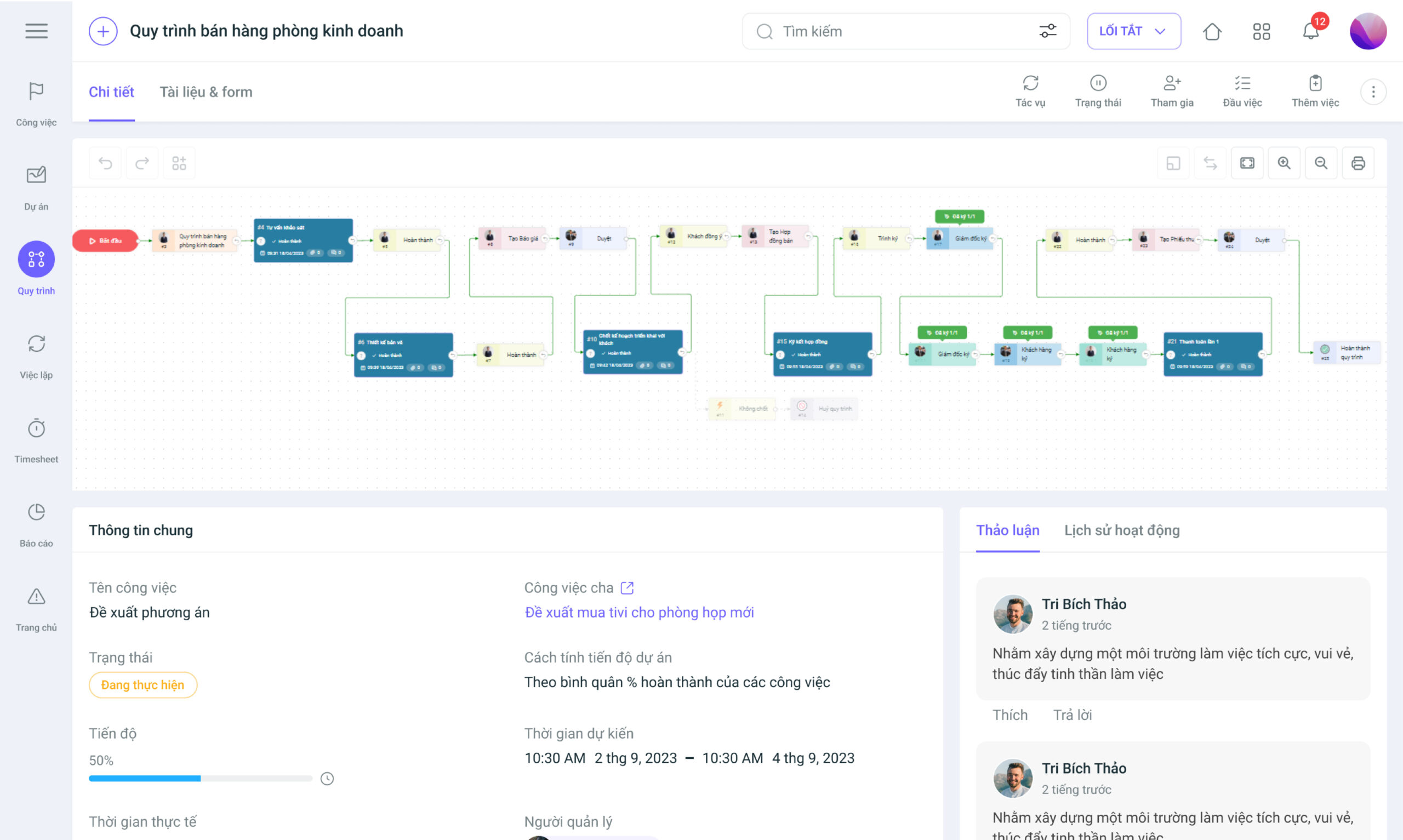
7.1. Business Process Automation (1BPA)
1BPA (Business Process Automation) by 1Office helps businesses automate repetitive work processes, minimizing human intervention and saving time. The automation features include:
- Digitize and automate 90% of all process types
- The system allows for dynamic process setup, giving businesses operational flexibility. Each process can be divided into multiple steps with conditions and flexible logic branching.
- Each step in the process can be assigned to a specific department or individual. Access control is configurable, ensuring information security.
- Displays the status of each step in the process, who is handling it, and how long it takes. If a step is delayed, the system will automatically send an alert.
- Integrated digital signatures directly within the process: Supports businesses in achieving 100% digital transformation, eliminating paperwork.
- The system automatically measures the average completion time for each process. If any step is frequently delayed, the system will suggest improvements.
- Integration with KPI & OKR for performance evaluation: When employees complete tasks according to the process, the system automatically updates KPIs and tracks OKRs.
- Automate approval and reporting processes: Manage approval requests, documents, and reports without manual intervention.
- Save time and costs: Process automation minimizes manual tasks, helping to reduce errors and improve efficiency.
- Flexible integration: 1BPA allows connection to external systems via API or Webhook, making it easy for businesses to expand and integrate with other tools.
7.2. AI and Low-Code Integration
Low-Code: Allows users to build applications and automation processes through a drag-and-drop interface, minimizing reliance on developers. This helps accelerate deployment and reduce costs.
- Create automated processes: Users can easily set up and manage business processes by dragging and dropping pre-built nodes without coding.
- Easy data management: Flexible data management and access control tools help businesses easily manipulate and control information.
AI: The AI feature helps improve processes through data analysis, trend forecasting, and work optimization.
- Automated analysis and decision-making: AI not only helps analyze data but also automatically makes decisions based on the information collected.
- Workflow optimization: AI learns and continuously optimizes workflows, helping to increase efficiency and minimize errors.
8. Standardized Business Operations Process Template Set
In building and maintaining an effective operational process, standardization is a crucial step. A standardized process helps businesses minimize wasted time and resources, optimize work efficiency, and ensure that business activities run smoothly, transparently, and are easy to control.

To support businesses in this endeavor, 1Office provides a Standardized Operations Process Template Set for all businesses, including processes for departments such as:
- Template process set for the Human Resources department
- Template process set for the Administration – Accounting department
- Template process set for the Sales department
Through the standardized operations process template set, 1Office helps businesses establish a solid foundation for building an effective process system, optimizing work, and achieving sustainable growth. This document set will provide you with template processes applicable to various departments within your business, making them easy to implement and apply in practice.
9. Conclusion
Building and standardizing operational processes are crucial factors that help businesses enhance efficiency, minimize waste, and increase productivity. In particular, applying technologies like process automation, AI, and Low-Code not only helps optimize repetitive tasks but also improves decision-making capabilities and promotes sustainable development.
1Office provides tools and a set of template processes to help businesses easily implement and digitize their operational processes. Thanks to features like process automation, data management, and smart reporting, businesses can save time and costs, improve work efficiency, and thereby increase their competitive edge in the market.




