


What is GitHub Copilot? Definition & Overview


GitHub Copilot is the smartest “AI programming assistant” available today, developed by GitHub (Microsoft) and OpenAI. It acts as a “coding partner” that is always ready to suggest, complete, and even generate entire code snippets from just a few lines of comments or natural language descriptions. Launched in 2021 and becoming an indispensable tool for millions of developers by 2025, Copilot not only suggests code line-by-line like older plugins but also understands the entire project context, supports over 50 popular programming languages (Python, JavaScript, TypeScript, Go, Java, C#…), and integrates smoothly into familiar IDEs like VS Code, JetBrains, and Visual Studio.
Mục lục
- What is GitHub Copilot?
- 3. Key Features of GitHub Copilot
- 4. Benefits of Using GitHub Copilot
- 5. Limitations & Challenges of Using GitHub Copilot
- 6. Basic Guide to Installing and Using GitHub Copilot
- 7. Tips & Tricks to Maximize Efficiency with GitHub Copilot
- 8. GitHub Copilot Costs and Plans
- 9. GitHub Copilot vs. Other AI Programming Assistants
What is GitHub Copilot?
GitHub Copilot is an AI-powered coding assistant developed by GitHub (a Microsoft company) and OpenAI. Launched in 2021 and becoming one of the world’s most popular AI programming tools by 2025, Copilot acts as a “coding companion” – automatically suggesting code, completing functions, writing tests, explaining code, and even generating entire snippets from just comments or natural language descriptions.
Copilot integrates directly into familiar IDEs like Visual Studio Code, Visual Studio, JetBrains IDEs, and Neovim, helping developers write code faster, cleaner, and with fewer errors.

Technology Platform
GitHub Copilot is built on OpenAI Codex – a Large Language Model (LLM) specially trained on billions of lines of public code from GitHub and other sources.
- Initially (2021-2023): Based on Codex (a fine-tuned version of GPT-3).
- Currently (2025): Uses the latest models like GPT-4o, GPT-4-Turbo, and custom models from OpenAI/Microsoft, combined with retrieval techniques to increase accuracy based on project context.
- Copilot Chat utilizes the conversational capabilities of GPT to explain, debug, and refactor code.
This technology allows Copilot not only to provide line-by-line suggestions but also to understand the entire file and project context.
Its Purpose
GitHub Copilot was created to address challenges in the programming process and significantly increase developer productivity (according to a GitHub study, an average 55% increase in coding speed).
- Reduce time spent writing boilerplate code (repetitive code).
- Help new developers learn faster and explore unfamiliar libraries/APIs.
- Reduce syntax errors and basic logic bugs.
- Allow developers to focus on creating solutions rather than technical details.
Available Versions
- Copilot for Individuals: For individual developers/freelancers (priced at ~$10/month or $100/year).
- Copilot for Business: For businesses/teams (priced at ~$19/user/month), with added management features (blocking sensitive public code suggestions), organizational integration, and higher security.
- Copilot Chat: Integrated into IDEs (VS Code, JetBrains…), allowing for Q&A, code explanation, and refactoring using natural language (free with Pro/Business plans).
<span style="font-weight
Suggestion Generation Process
- Identifying the developer’s intent:
- Via comments: For example, typing // Create a recursive factorial function in Python → Copilot generates the entire function.
- Via function/variable names: Typing def calculate_tax( → suggests parameters and tax calculation logic.
- Via existing code: Writing the beginning of a function → auto-completes the body, handles errors, and adds tests.
- Proposing code snippets, functions, or complete solutions:
- Inline suggestions (grayed-out text appearing on the next line) – press Tab to accept.
- Multi-line suggestions (entire code blocks, functions, classes).
- Copilot Chat: Ask in natural language (“Explain this function”, “Refactor this code to be cleaner”) → provides detailed answers, fixes code.
- Working in real-time, interacting directly within the IDE:
- Seamless integration with VS Code, JetBrains, Visual Studio, Neovim…
- Suggestions appear instantly as you type (low latency thanks to edge computing).
- You can accept (Tab), reject (Esc), or choose a different variant (Alt + ] / [).
Real-world example:
Typing the comment // API endpoint to fetch user profile with JWT authentication → Copilot generates the entire Express.js route with token verification middleware and standard error handling.
GitHub Copilot acts as a “second brain” – deeply analyzing context, learning from a massive code repository, and providing real-time suggestions in the IDE. It doesn’t replace developers but helps you write code faster (increasing average productivity by 55%), cleaner, and with fewer errors. With Copilot Chat, you can also “talk” to your code to debug and refactor – turning programming into a smarter and more exciting experience than ever in 2026!

3. Key Features of GitHub Copilot
GitHub Copilot is not just a code suggestion tool but a comprehensive programming assistant that significantly boosts productivity (by an average of 55% according to a 2025 GitHub study). Below are its most prominent features, making Copilot an indispensable “AI colleague” for developers.
Automatic Code Suggestions (Autocompletion)
This is the core feature, operating in real-time within the IDE.
- Suggests single lines and complex code snippets: As you type, Copilot displays grayed-out suggestions (ghost text) – from simple lines to entire code blocks, functions, and classes.
- Auto-completes functions, classes, and methods: Simply write a function name or a short comment → Copilot generates the full body, including error handling and correct data type returns.
Example: Typing def fibonacci(n): → Copilot auto-completes an efficient recursive or iterative function.
Natural Language to Code Conversion
Copilot understands comments or descriptions in English (and partially in Vietnamese) to generate code.
- Write a comment describing an idea, and Copilot creates the corresponding code: Type a comment like // Create a GET /users API endpoint with JWT authentication → Copilot generates a complete Express.js/Node.js route with middleware.
Illustrative example:
- Python: Comment # Recursive factorial function with memoization → Copilot generates a function with @lru_cache.
- JavaScript: // Fetch data from API and handle error → Copilot writes an async/await fetch with a try-catch block.
Multi-language & IDE Support
Copilot is flexible, supporting most popular languages and major IDEs.
- Popular supported programming languages: Python, JavaScript/TypeScript, Go, Ruby, C#, Java, PHP, C++, Rust, Kotlin, Swift, SQL, HTML/CSS, and hundreds of other languages – with the highest quality for Python/JS/TS.
- Compatible with major IDEs: Visual Studio Code (best integration), JetBrains IDEs (IntelliJ, PyCharm…), Neovim, Visual Studio, Azure Data Studio.
GitHub Copilot Chat
AI chat feature directly in the IDE (Ctrl/Cmd + I or sidebar).
- Live chat feature: Q&A, code explanation, bug fixing, refactoring.
- How to use it for debugging and learning new concepts:
- Highlight code → “@copilot Explain what this snippet does?” → AI analyzes it line by line.
- “Find the bug causing a memory leak in this function” → AI pinpoints the location and suggests a fix.
- “Write a unit test for this function using Jest” → AI generates a complete test.
Documentation & Testing
- Assists in writing boilerplate code for unit tests: Type a comment like # Write a test for the calculate_tax function → Copilot generates test cases with Jest/Pytest, including edge cases.
- Suggests documentation for functions and classes: Type /// or /** → Copilot auto-generates detailed JSDoc/XML docstrings, describing parameters, returns, and examples.
GitHub Copilot transforms programming into a smarter experience – from real-time suggestions and converting natural language to code, to chat-based debugging and automated testing. With multi-language/IDE support and the powerful Copilot Chat, it is the leading productivity tool for individual developers and businesses in 2025!

4. Benefits of Using GitHub Copilot
GitHub Copilot is not just a code suggestion tool but a true “AI programming assistant,” delivering outstanding benefits that help developers increase productivity, reduce errors, and learn faster. Here are the most notable advantages (based on GitHub research and user surveys from 2025).
Accelerate Development Speed
Copilot significantly reduces manual coding time (according to GitHub research: an average productivity increase of 55%, with some developers reporting up to 2-5 times faster).
- Reason: Automatically completes functions, classes, and boilerplate code from just a comment or the first few lines.
- Example: Write a comment // Create a REST API endpoint for user registration with email validation → Copilot generates the entire Express.js/Node.js route with validation and error handling in seconds.
- Benefit: Developers can focus on business logic instead of repetitive syntax, completing features faster.
Minimize Errors and Improve Code Quality
Copilot suggests clean, secure code that adheres to best practices – reducing syntax errors, logical flaws, and code smells.
- Reason: It learns from billions of lines of public code, prioritizing standard patterns (try-catch, async/await, secure coding).
- Example: When writing a data processing function, Copilot automatically adds null/undefined checks, error handling, or uses optional chaining.
- Benefit: Code has fewer bugs, is easier to maintain, and is suitable for large projects – reducing time spent on debugging and code reviews.
Support Learning and Discovery
Copilot is an excellent “AI tutor,” especially for newcomers or when working with new technologies.
- Reason: It explains code, suggests patterns, and introduces libraries/frameworks.
- Example: Ask Copilot Chat “Explain how React hooks work” → The AI provides a detailed explanation with examples; or it might suggest “Use useReducer for complex state” when it detects messy state code.
- Benefit: Quickly learn new languages (Rust, Go), discover best practices, and lower the barrier to entry for junior developers.
Automate Repetitive Tasks
Copilot eliminates tedious work, allowing developers to focus on creativity.
- Reason: Quickly generates boilerplate (unit tests, config files, CRUD operations).
- Example: Type // Generate unit tests for this function → Copilot generates complete Jest/Pytest test cases with edge cases.
- Benefit: Saves hours on setup, configuration, and testing – increasing time for core logic.
Easily work with unfamiliar languages
Copilot supports over 50 programming languages, making it easy for developers to switch frameworks or learn new languages.
- Reason: Suggests correct syntax, automatically imports libraries, and explains unfamiliar code.
- Example: Switching from Python to Go → Copilot generates Go code with the correct syntax, suggesting goroutines and channels.
- Benefit: Work with multiple languages/frameworks without worrying about forgetting syntax – ideal for full-stack developers or multi-skilled teams.
GitHub Copilot offers comprehensive benefits – increasing speed, reducing errors, supporting learning, and automating tasks – turning programming into a smarter experience. With reasonable pricing (~$10/month for individuals, $19/user for teams), Copilot is the most worthwhile investment for both individual developers and businesses in 2025. If you’re using VS Code, try Copilot now – you won’t want to go back to the old way of coding!

5. Limitations & Challenges of Using GitHub Copilot
Although GitHub Copilot is a powerful AI programming tool trusted by millions of developers, it still has some limitations and challenges to consider before regular use. These points do not diminish its overall value but require users to be vigilant and responsible.
Accuracy and Relevance
- Suggested code may not always be optimal, accurate, or suitable for the specific context: Copilot sometimes “hallucinates” (creates code with logical errors, subtle syntax mistakes) or suggests inefficient solutions (e.g., unnecessary loops, suboptimal algorithms). Especially with complex projects or specific business requirements, suggestions may not be a perfect match.
- Challenge: You still need to review code thoroughly – Copilot assists, but does not completely replace a developer’s thinking.
Security Issues
- Potential to generate code with security vulnerabilities: Because it is trained on public data (including old code that hasn’t been updated with best practices), Copilot might suggest code that is vulnerable to attacks (SQL injection, hard-coded secrets, missing validation).
- Challenge: Large enterprises (Copilot for Business) have filters that block some sensitive suggestions, but security checks are still necessary (using SCA tools like Snyk, Dependabot).
Copyright and Intellectual Property Issues
- Concerns about reusing copyrighted source code without attribution: Copilot learns from public code on GitHub – in some cases, suggestions closely resemble code with strict licenses (GPL, copyleft) → this could lead to copyright infringement if used commercially without complying with the license.
- Challenge: From 2022-2025, there have been several related lawsuits (Copilot accused of copying code), although GitHub/OpenAI has improved its filters. Businesses need to be cautious with proprietary code.
Not a Replacement for Programming Skills
- Still requires developers with deep knowledge to review and edit: Copilot excels at boilerplate and common patterns, but it doesn’t understand complex business requirements or create novel solutions – this can easily lead to “bad code” if suggestions are accepted blindly.
- Challenge: Newcomers might become overly reliant, slowing the development of their critical thinking skills; seniors still need to review to ensure the code is clean and scalable.
Cost
- Although there is a trial version, long-term use has a cost: A 30-60 day free trial, then ~$10/month for Individuals, ~$19/user/month for Business – which can be high for freelancers or large teams if the ROI isn’t clear.
- Challenge: There is no long-term, unlimited free plan like some local AI tools (Ollama, Tabby).
GitHub Copilot offers significant productivity benefits but is not a “silver bullet” – developer skills are still needed for review, security, and copyright compliance. For businesses, the Business plan addresses most security/copyright concerns. If used correctly, the advantages far outweigh the disadvantages – but always remember: Copilot is an assistant, not a replacement!

6. Basic Guide to Installing and Using GitHub Copilot
GitHub Copilot is easy to install and use, especially for Visual Studio Code (VS Code) users – the most popular IDE. Here is a detailed A-Z guide (updated 2025) to help you get started in just 5-10 minutes.
System Requirements
- GitHub Account: A GitHub account is required (free to register at github.com). The Copilot plan requires a subscription (Individuals ~$10/month or Business).
- Supported IDEs:
- Visual Studio Code (most recommended).
- Visual Studio 2022+.
- JetBrains IDEs (IntelliJ, PyCharm, WebStorm…).
- Neovim, Azure Data Studio.
- Operating System: Windows, macOS, Linux – all are well-supported.
- Internet Connection: An online connection is required to log in and receive suggestions (Copilot is cloud-based).
Installation Steps
- Sign up for GitHub Copilot:
- Visit https://github.com/features/copilot.
- Click “Start free trial” or “Get started” (free 30-60 day trial).
- Log in to your GitHub account → select a plan (Individuals or Business) → proceed to payment (credit card/Stripe).
- Install the extension in VS Code (most common):
- Open VS Code → Extensions (Ctrl+Shift+X).
- Search for “GitHub Copilot” (publisher: GitHub) → Install.
- Also search for “GitHub Copilot Chat” → Install (for the chat feature).
- Log in to your GitHub account:
- VS Code will show a notification → Click “Sign in to GitHub”.
- A browser window will open → log in to GitHub → authorize Copilot.
- Once completed → the Copilot icon will appear in the bottom corner of VS Code (it will be blue when active).
For other IDEs: Similarly, search for the “GitHub Copilot” extension in the JetBrains/Visual Studio marketplace.
Basic Usage
After installation, Copilot works in real-time – suggestions appear as grayed-out text (ghost text).
- Activating suggestions: Simply start typing code or comments – Copilot will automatically provide suggestions (no manual activation needed).
- Accepting/rejecting suggestions:
- Accept: Press Tab (for the entire suggestion) or Ctrl+Enter (to accept it partially).
- Reject: Press Esc or just keep typing.
- Cycling through different suggestions:
- When multiple variants are available → press Alt + ] or Alt + [ (Windows/Linux), Option + ]/[ (macOS) to switch between them.
- Or open the Copilot panel (Ctrl+Enter) to see 10 suggestions.
Practical Example with a Simple Function
Suppose you want to write a function to sum an array of numbers in Python:
- Type a comment: # Function to sum even numbers in a list
- Copilot immediately suggests:
Python
def sum_even_numbers(numbers):
return sum(num for num in numbers if num % 2 == 0)
- Press Tab → the function is auto-completed.
- If you want a different variant (using a loop): Press Alt + ] → Copilot will provide a traditional for loop.
Copilot Chat: Highlight the code → right-click → “Ask Copilot” or open the chat (Ctrl+I) → ask “Explain this function” or “Write a test for this function”.
Installing GitHub Copilot only takes a few minutes, and using it is extremely simple with Tab/Esc. Get started with VS Code and the free trial – you’ll see your productivity soar from the very first lines of code! If you encounter login issues, check your GitHub account and ensure you have the latest extension. Happy coding with your new “AI colleague”!

7. Tips & Tricks to Maximize Efficiency with GitHub Copilot
GitHub Copilot is a powerful AI assistant, but its true effectiveness depends on how you use it. Here are practical tips and tricks from the developer community (updated 2025) to help you get the most out of Copilot—increasing productivity while keeping your code clean, secure, and accurate.
Write Clear and Detailed Comments
Copilot “reads” comments to understand your intent—the more detailed the comment, the more accurate the suggestion.
Tip: Write comments as if you were describing the requirements to a junior developer.
For example, instead of // Function to calculate sum, write:
- // Function to calculate the sum of even numbers in an array, returns 0 if the array is empty, handles negative numbers.
- Benefit: Copilot generates code that covers edge cases and error handling, reducing time spent on later revisions.
Break Down Complex Tasks
Copilot is better at handling small blocks of code than entire large systems.
- Tip: Write a separate comment for each part:
- // Create a User class with id, name, and email fields.
- // Add a validate_email() method that returns a boolean.
- // Write a POST /users API endpoint to create a new user.
- Benefit: More accurate suggestions, easier to review and edit each part.
Leverage Copilot Chat
Copilot Chat (Ctrl+I in VS Code) is your “AI mentor.”
- Usage tips:
- Highlight code → ask “Explain what this code does.”
- “Write unit tests for this function using Jest/Pytest.”
- “Refactor this function according to clean code principles.”
- “Find potential bugs in this code snippet.”
- Benefit: Debug faster, learn new patterns, and improve old code without searching Google.
Always Review and Edit the Code
Copilot isn’t perfect—always review the code before committing.
- Tips:
- Check the logic, edge cases, and security (don’t hard-code secrets).
- Run manual tests or use a linter (ESLint, Pylint).
- Reject incorrect suggestions (Esc) and rewrite them yourself if needed.
- Benefit: Avoid production bugs, security vulnerabilities, and code debt.
Customize Settings
Go to Settings (Ctrl+,) → search for “GitHub Copilot”.
- Tips:
- Increase “Suggestion Delay” if your machine is slow.
- Exclude sensitive files/folders (node_modules, .env) to avoid incorrect suggestions.
- Fully enable “Inline Suggestions” and “Chat.”
- Benefit: A smoother experience, suitable for low-spec machines.
Combine with Other Dev Tools
Copilot is most powerful when used within an ecosystem.
- Tips:
- Use Prettier/ESLint to format code after Copilot provides a suggestion.
- Combine GitHub Actions + Copilot to automatically review PRs.
- Use SonarQube/Snyk to scan the security of Copilot-generated code.
- Benefits: Clean, secure, and consistent code – compensating for Copilot’s limitations.
Conclusion: By applying the tips above, you will transform GitHub Copilot from a “code suggester” into a “superb AI colleague” – increasing productivity 2-3 times while maintaining high-quality code. Start with detailed comments and Copilot Chat – after just one week, you won’t be able to code without Copilot! Wishing you more effective programming than ever in 2025!

8. GitHub Copilot Costs and Plans
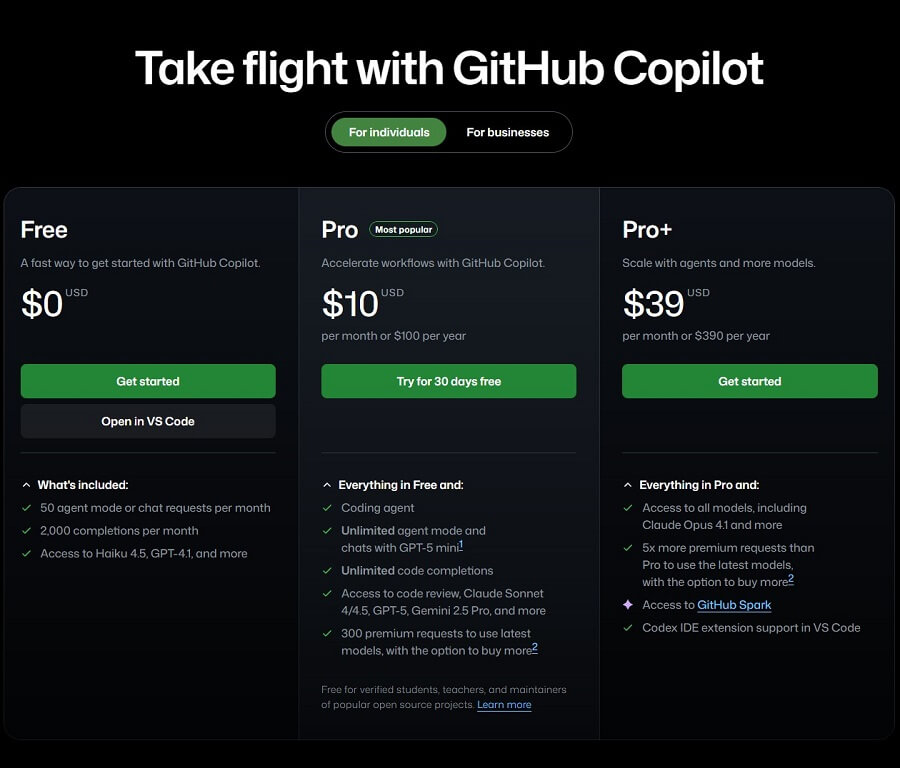
GitHub Copilot offers various flexible plans, from limited free tiers to premium enterprise options, suitable for individual programmers, teams, and large businesses. Prices are in USD/month (with a discount for annual payments), payable via a GitHub account. Below is detailed information based on official pricing.
Copilot for Individuals (For individuals/freelancers)
- Current pricing:
- Copilot Pro: $10/month or $100/year (save ~17%).
- Some sources mention an additional Pro+ tier (~$20-39/month) for a higher number of premium requests and the latest models.
- Free trial: 30-day trial with full Pro features (unlimited completions, premium models) – register at github.com/features/copilot.
- Free for:
- Students, teachers: Free Copilot Pro via the GitHub Education Student/Teacher Pack (verified via school email or student ID).
- Verified open source maintainers: Free Pro for popular repositories (GitHub automatically confirms based on stars/activity).
- Suitable for: Individual developers, freelancers, students – unlimited completions, Copilot Chat, premium models.
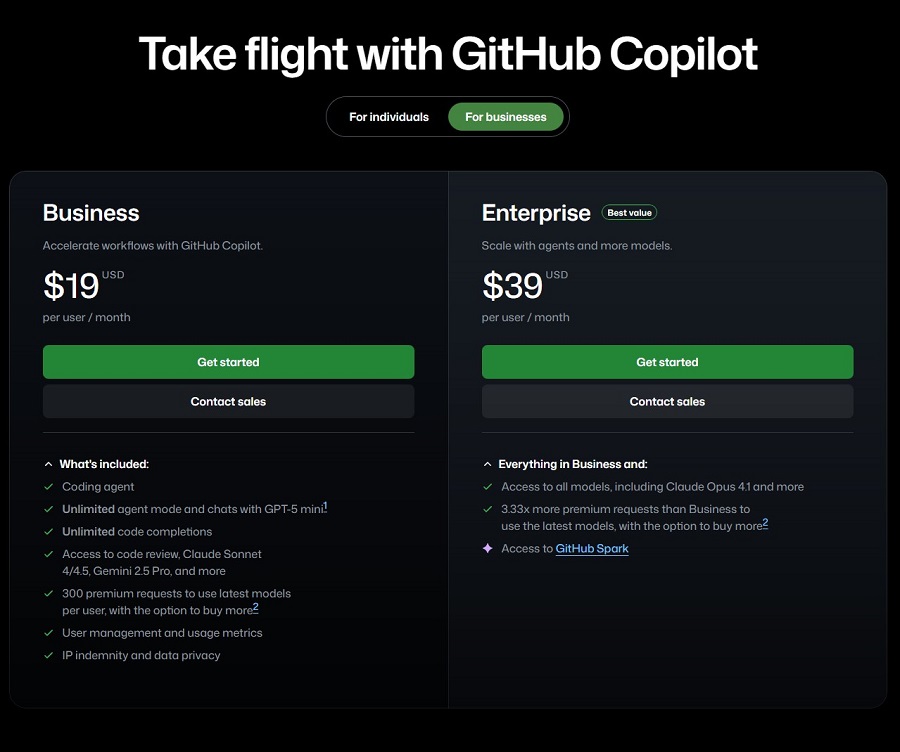
Copilot for Business (For businesses/teams)
- Price: $19/user/month (no separate annual option, but discounts are available for high volume or enterprise agreements).
- Additional features for businesses:
- Organization-wide policy management (block sensitive/public code suggestions).
- Enhanced security (IP indemnity – copyright compensation, organizational code is not used to train models).
- Centralized management (easily assign/remove seats via GitHub admin).
- Audit logs, SSO, VPN proxy support.
- Billing and user management:
- Billed per seat (user) assigned within the organization.
- GitHub admin manages seats (add/remove at any time, billing is adjusted at the end of the cycle).
- Monthly billing cycle, based on the average number of users during the period.
Plan Summary Table
| Plan | Price | Target Audience | Billing | Key Features |
|---|---|---|---|---|
| Business | 19 USD / user / month | Businesses, technical teams | Billed monthly | • Coding Agent (Advanced AI-assisted coding) • Unlimited Agent mode & chat with GPT-5 mini • Unlimited code completion • Access to AI Code Review • Use multiple AI models: Claude Sonnet 4.5, Gemini 2.5 Pro… • 300 premium requests / user / month for the latest models (add-ons available) • User management & usage statistics • IP legal protection & data privacy |
| Enterprise | 39 USD / user / month | Large enterprises, high demand | Billed monthly | • Includes all Business features • Access to all AI models, including Claude Opus 4.1 • 3.33x more premium requests than Business • Option to purchase additional premium requests • Access to GitHub Spark (AI-powered app building & deployment platform) |
GitHub Copilot has an attractive free plan for students/OSS and a 30-day trial for everyone – ideal for trying before you buy. The Individuals plan at $10/month is suitable for individuals; the Business plan at $19/user is for teams/businesses needing high security. If you are a student or an OSS maintainer, check your eligibility now at github.com/features/copilot to get Pro for free!
9. GitHub Copilot vs. Other AI Programming Assistants
The AI programming assistant market in 2025 is very dynamic with many powerful options. Below is a brief comparison of GitHub Copilot with its main competitors: Amazon CodeWhisperer, Google Gemini Code Assist (formerly Duet AI/Codey), and Tabnine.
Brief Comparison Table
| Criteria | GitHub Copilot | Amazon CodeWhisperer | Google Gemini Code Assist | Tabnine |
| AI Model | GPT-4o/Claude 3.5 + custom GitHub | Amazon Titan/Claude-based | Gemini 1.5 Pro/Flash | Internal model + optional open-source |
| IDE Integration | VS Code, JetBrains, Visual Studio, Neovim (best) | VS Code, JetBrains, AWS IDEs | Google Cloud, VS Code, JetBrains | Most IDEs (very broad) |
| Contextual Suggestions | Strong project-wide context | Good, focuses on AWS services | Good, integrates with Google Cloud | Good, customizable local model |
| Copilot Chat | Very powerful (explain, refactor, test) | Has basic chat | Has powerful chat (Gemini) | Has chat (Pro) |
| Security/Copyright | IP indemnity (Business), filters sensitive code | Strong security (AWS enterprise) | Strong Google Cloud security | Local mode (does not send code to the cloud) |
| Pricing | $10/month (Indi), $19/user (Business) | Free for individuals, paid for enterprise | Limited free, paid Cloud plan | Basic Free, Pro ~$12-20/month |
| Highlights | Deep GitHub integration, large community | AWS integration, free for individuals | Google ecosystem integration | Local/private model, highly customizable |
GitHub Copilot’s Unique Strengths in a Competitive Landscape
- Deep integration with the GitHub ecosystem: Strongest project-wide context, understands repos, issues, and PRs – ideal for developers who use GitHub daily.
- Intelligent Copilot Chat: Explains code, refactors, and generates detailed tests – superior to the basic chat features of CodeWhisperer/Tabnine.
- Large community and high adoption: Millions of users and continuous feedback improve the model – consistently high-quality suggestions.
- Excellent business features: IP indemnity, policy management – suitable for businesses concerned about copyright/security.
Copilot’s Unique Weaknesses Compared to Competitors
- Higher cost: No robust free tier for individuals like CodeWhisperer or the local version of Tabnine.
- Cloud dependency: No fully local mode (unlike Tabnine), code is sent to the server – a security concern for proprietary projects (although the Business plan includes indemnity).
- Limited model customization: Cannot train custom models like Leonardo/Tabnine enterprise.
GitHub Copilot leads in overall experience, Copilot Chat, and IDE integration – the top choice for individual developers and businesses using GitHub. If the priority is free/AWS → CodeWhisperer; Google Cloud → Gemini; private/local → Tabnine. For most developers, Copilot remains the “gold standard” for AI programming assistants in 2025!




