09/05/2026
  1188 views
Meeting minutes are an important document that helps fully record the content, decisions, and outcomes of each meeting. However, not everyone knows how to format them correctly and formally. In this article, 1Office will compile 8+ Standard Conference Minute Templates, the most common ones used today, with downloadable files for you to easily apply to specific situations.
Mục lục
- 1. What are conference minutes?
- 2. Guide to Drafting Standard Conference Minutes
- 3. Tổng hợp các mẫu biên bản hội nghị phổ biến
- Mẫu 1: Mẫu biên bản hội nghị chung: Dùng cho mọi cuộc họp cơ bản
- Mẫu 2: Mẫu biên bản hội nghị Ban Chấp hành/Ban Thường vụ (Đảng ủy)
- Mẫu 3: Mẫu biên bản hội nghị cán bộ công chức/viên chức
- Mẫu 4: Mẫu biên bản hội nghị phụ huynh học sinh
- Mẫu 5: Mẫu biên bản hội nghị người lao động
- Mẫu 6: Mẫu biên bản hội nghị đối thoại (với nhân dân/sinh viên)
- Mẫu 7: Mẫu biên bản hội nghị liên tịch/giữa hai đơn vị
- Mẫu 8: Mẫu biên bản họp giao ban/định kỳ
- 4. Các lỗi thường gặp khi soạn thảo biên bản hội nghị & cách khắc phục
- 4.1. Lỗi về cấu trúc và định dạng: Thiếu quốc hiệu, tiêu ngữ, sai quy cách trình bày
- 4.2. Lỗi về nội dung: Ghi thiếu/thừa thông tin, không khách quan, lan man, khó hiểu
- 4.3. Spelling and Grammatical Errors: Affecting Professionalism
- 4.4. Missing Signatures and Confirmation: Reducing Legal Validity and Transparency
- 4.5. No Scientific Storage or Management: Difficulty in Retrieval
- 5. Tips for Improving the Efficiency of Minute-Taking and Management
- 5.1. Using Supporting Technology: Note-Taking Software, Recording Tools, and Digital Templates
- 5.2. Training and Assigning a Secretary: Ensuring the Minute-Taker Has Sufficient Skills
- 5.3. Review and Approval Process: Ensuring Minutes are Reviewed Before Issuance
- 5.4. Smart Storage and Retrieval: Using an Electronic Storage System, Categorizing by Topic and Time
- 6. Frequently Asked Questions about Conference Minutes
1. What are conference minutes?
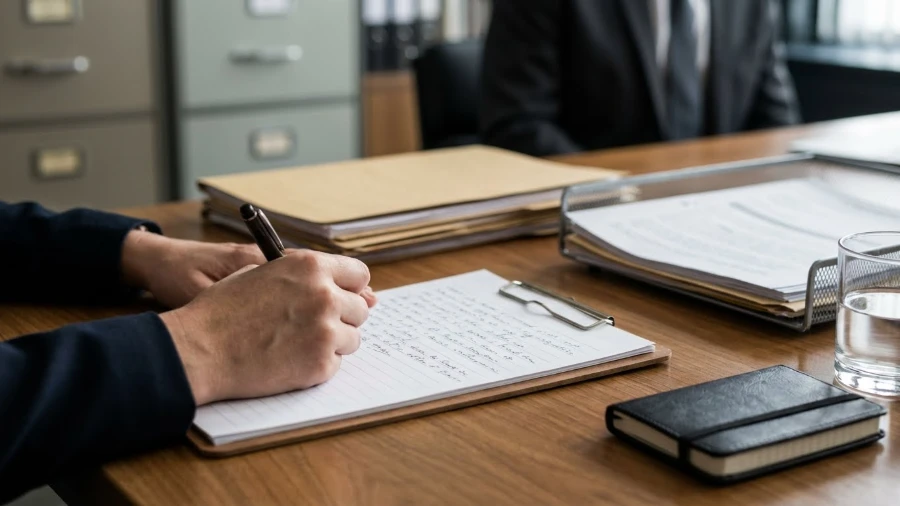
Conference minutes are an official administrative document used to systematically and fully record the entire proceedings of a meeting, conference, or discussion session within an agency, organization, or business. The content of the minutes reflects core information such as the time, location, attendees, issues discussed, key opinions expressed, agreed-upon decisions, and tasks and responsibilities assigned after the meeting.
The task of taking minutes is usually handled by the meeting secretary or an assigned person. This is a key role that requires the minute-taker to closely follow the meeting’s content, take timely, accurate, and objective notes, and then compile and edit them into a complete document for relevant parties to review and sign for confirmation.
1.1. Purpose and Importance
Conference minutes are not just about recording content; they also play a crucial role in the management and operation of an organization:
- Official Information Confirmation: The minutes accurately reflect the content discussed and agreed upon, helping to prevent misunderstandings, confusion, or disputes that may arise after the meeting.
- Legal Basis and Oversight: In many cases, especially when signed by the chairperson and secretary, the minutes have legal value and are used as a document for inspections, audits, or dispute resolution as required by authorities.
- Work Management and Decision-Making Tool: Tasks, responsible individuals, and deadlines are clearly stated in the minutes, supporting progress tracking and serving as a foundation for decisions in future meetings.
- Archival and Organizational Development Document: The minutes help preserve important milestones in the operational process, serving as a basis for analysis, evaluation, and learning for future stages.
Thanks to these values, conference minutes have become an indispensable component of modern governance, contributing to enhancing transparency, professionalism, and operational efficiency of the organization.
1.2. Requirements for Standard Conference Minutes
For conference minutes to be truly valuable, their content must meet several important criteria:
- Accuracy: The recorded information must be true to the actual proceedings of the meeting, without additions or misinterpretations of attendees’ opinions.
- Objectivity: The presentation must be neutral, avoiding the inclusion of personal opinions, emotions, or subjective judgments in the minutes.
- Completeness: Ensure all necessary elements are recorded, such as attendees, discussion topics, conclusions, decisions, and assigned tasks, avoiding the omission of important information.
- Clarity and Coherence: Use concise, easy-to-understand language; a logical structure and consistent formatting help readers quickly grasp the main content.
- Timeliness: The minutes should be completed and sent to relevant parties soon after the meeting (usually within 24-48 hours or according to internal regulations) to ensure they are up-to-date and that work can be implemented.
When all these criteria are met, conference minutes are not just an administrative procedure but become an effective tool for management and operations within the organization.
2. Guide to Drafting Standard Conference Minutes
Below are the basic steps and important notes to help you draft complete, accurate, and professional conference minutes:
2.1. Preparation Before the Conference
Thorough preparation before the meeting directly impacts the quality of the minutes. The secretary or assigned person should note the following steps:
- Understand the Meeting’s Objectives and Content: Carefully review the approved agenda to understand the issues to be discussed, the order of topics, and the time allotted for each part. This helps in proactively identifying points that need to be recorded fully and accurately.
- Prepare a Minute Template: Prioritize using the standard template of the agency or organization. If one is not available, prepare one according to current regulations (such as Decree 30/2020/ND-CP). It’s advisable to pre-fill fixed sections like the title, national emblem, and general information to save time during the meeting.
- Finalize the Attendee List: Create a detailed list including the full names, titles, and departments of the chairperson, secretary, delegates, and guests. Prepare a sign-in sheet to easily confirm attendance or absence.
- Ready Your Note-Taking Tools: Bring enough spare pens and paper, fully charged electronic devices, and note-taking software. If using a recording device, you must ask for and receive consent from the chairperson and attendees.
Thorough preparation helps the secretary focus entirely on the meeting’s content, resulting in more accurate, coherent, and effective minutes.
2.2. Basic Sections of Conference Minutes
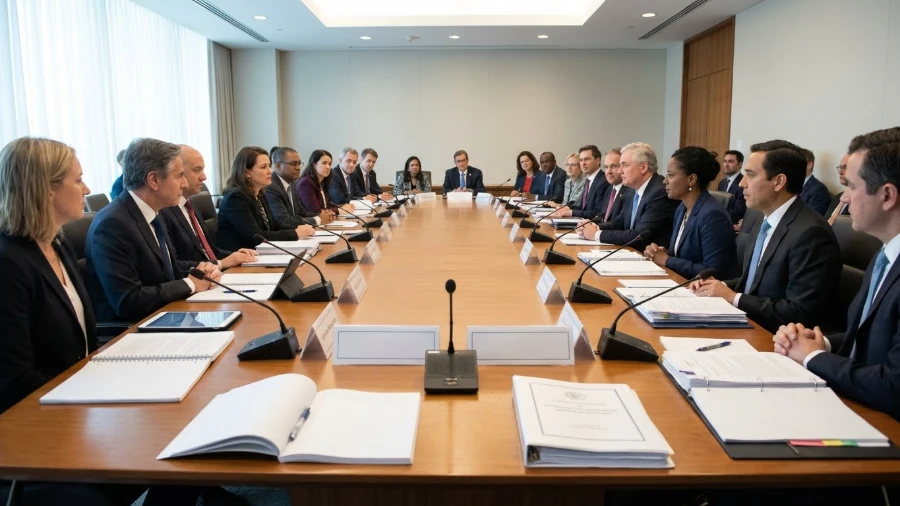
A valid set of conference minutes must be presented in a consistent structure, ensuring all content complies with Decree 30/2020/ND-CP (Template 1.9, Appendix III) and related regulations. Specifically, it includes the following sections:
(1) National Emblem, Motto, and Name of the Agency/Organization: In conference minutes, the presentation of the national emblem, motto, and name of the agency/organization must strictly adhere to the regulations in Decree 30/2020/ND-CP on clerical work applicable to state administrative documents.
- National Emblem: The line “SOCIALIST REPUBLIC OF VIETNAM” is placed at the top right of the first page, written in uppercase, font size 12-13, in bold, regular style.
- Motto: The motto “Independence – Freedom – Happiness” is centered directly below the national emblem, in lowercase, font size 13-14, bold, with the first letter of each phrase capitalized, with hyphens, and a horizontal line underneath with a length corresponding to the text.
- Name of Agency/Organization: The name of the issuing agency is presented at the top left of the page, occupying about half the width, written in uppercase, font size 12-13, in bold, regular style. If there is a parent agency, the unit’s name is centered below the parent agency’s name, with a horizontal line underneath; if the name is long, it can be presented on two lines.
Khi tuân thủ tốt các lưu ý trên, biên bản hội nghị không chỉ đáp ứng yêu cầu về hình thức và pháp lý mà còn trở thành tài liệu rõ ràng, dễ theo dõi và hỗ trợ hiệu quả cho việc triển khai công việc sau cuộc họp.3. Tổng hợp các mẫu biên bản hội nghị phổ biến
Dưới đây là các mẫu biên bản thường dùng, áp dụng cho các cuộc họp từ cơ bản đến chuyên môn, từ trường học đến doanh nghiệp:
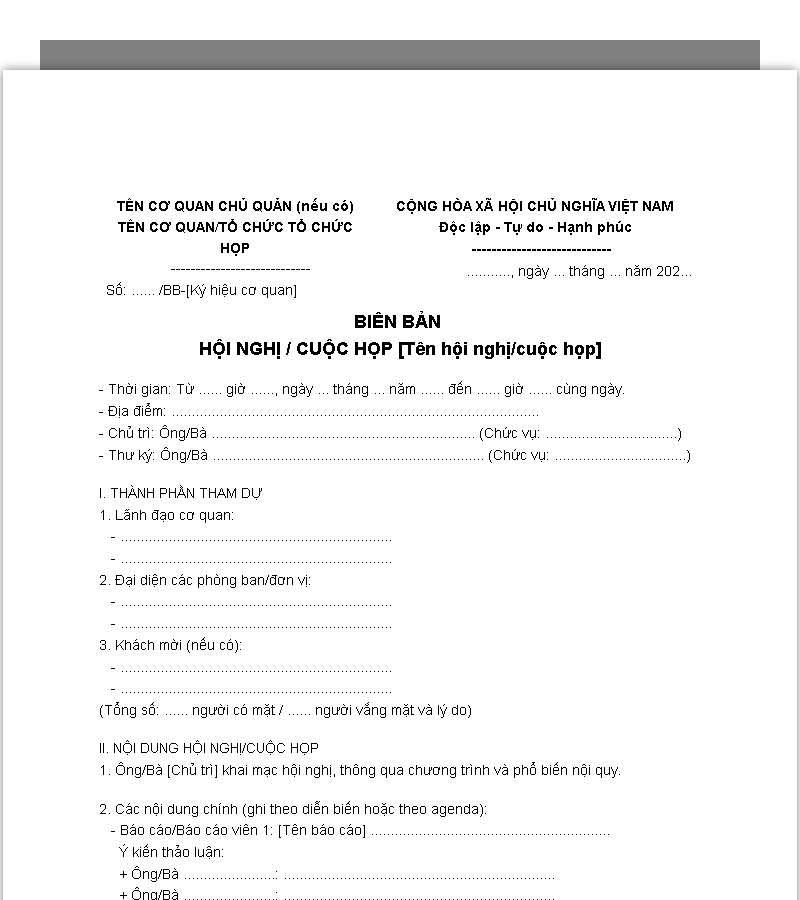
Mẫu 1: Mẫu biên bản hội nghị chung: Dùng cho mọi cuộc họp cơ bản
Mẫu biên bản hội nghị chung phù hợp với hầu hết các cuộc họp cơ bản trong cơ quan, tổ chức hoặc doanh nghiệp. Nó giúp ghi chép đầy đủ thông tin về thời gian, địa điểm, thành phần tham dự và nội dung chính của cuộc họp. Biên bản này dễ áp dụng, dễ chỉnh sửa, phù hợp với cả họp trực tiếp và họp trực tuyến. Đây là mẫu cơ bản mà bất kỳ thư ký nào cũng nên nắm vững.

Mẫu biên bản hội nghị chung >>> Link Download Mẫu biên bản hội nghị chung
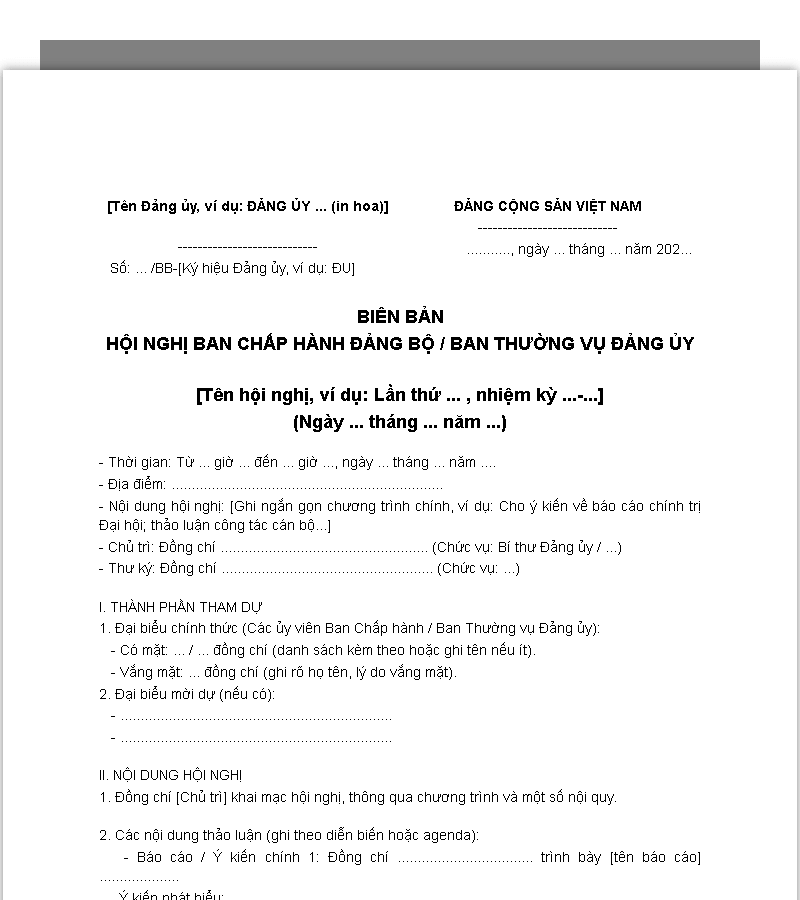
Mẫu 2: Mẫu biên bản hội nghị Ban Chấp hành/Ban Thường vụ (Đảng ủy)
Mẫu được thiết kế theo hướng dẫn chính thức dành cho các cuộc họp của Ban Chấp hành hoặc Ban Thường vụ Đảng ủy. Biên bản này ghi chép chi tiết các quyết định, nghị quyết, ý kiến đóng góp và nhiệm vụ phân công. Biên bản đảm bảo tính chính xác, trang trọng, phục vụ cho việc lưu trữ và kiểm tra sau này. Đây là loại biên bản quan trọng, có giá trị pháp lý cao trong nội bộ Đảng.
Mẫu biên bản hội nghị ban chấp hành, ban thường vụ Đảng ủy >>> Link Download Mẫu biên bản hội nghị Ban Chấp hành/Ban Thường vụ (Đảng ủy)
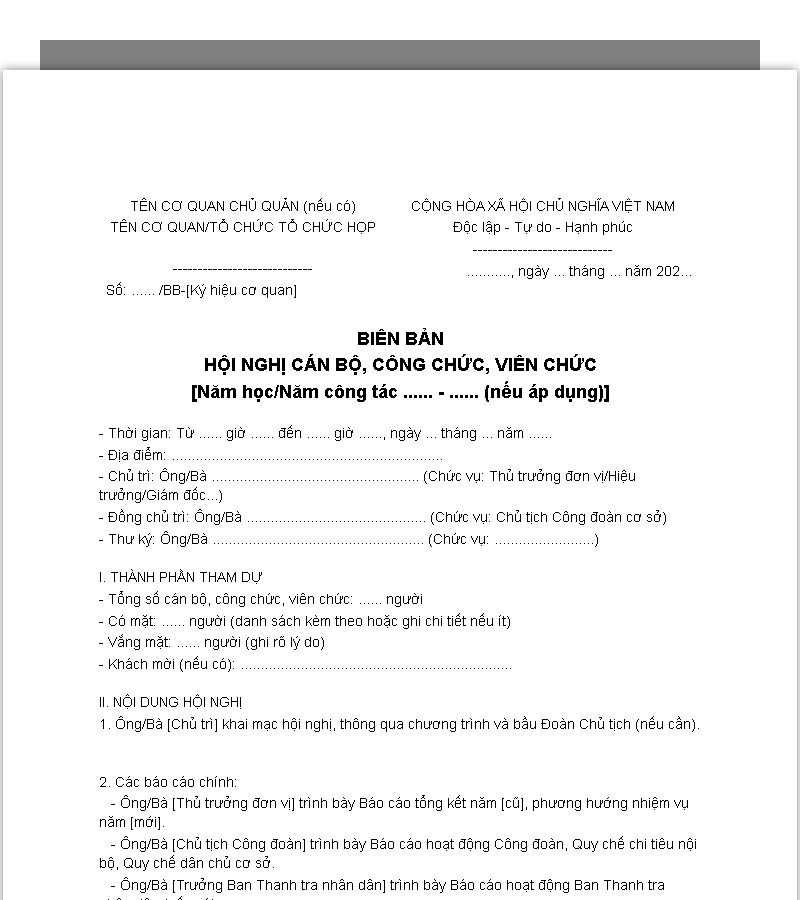
Mẫu 3: Mẫu biên bản hội nghị cán bộ công chức/viên chức
Mẫu này dùng trong các cơ quan nhà nước, đơn vị sự nghiệp để ghi nhận nội dung cuộc họp giữa cán bộ, công chức và viên chức. Biên bản giúp theo dõi nhiệm vụ được giao, thời hạn thực hiện và quyết định quan trọng của cấp quản lý. Nội dung được trình bày logic, đầy đủ nhưng vẫn đảm bảo ngắn gọn, dễ hiểu. Đây là công cụ quan trọng để nâng cao hiệu quả quản lý nội bộ.
Mẫu biên bản hội nghị cán bộ công chức, viên chức >>> Link Download Mẫu biên bản hội nghị cán bộ công chức/viên chức
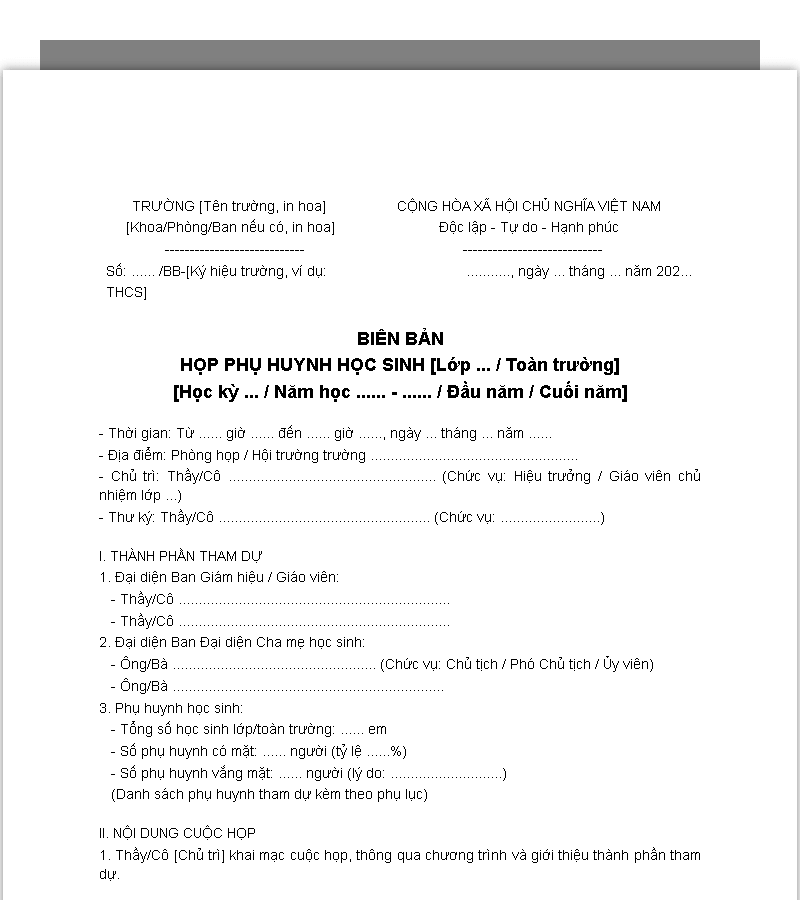
Mẫu 4: Mẫu biên bản hội nghị phụ huynh học sinh
Mẫu biên bản này áp dụng trong trường học, dành cho các cuộc họp phụ huynh học sinh. Nó ghi nhận ý kiến, kiến nghị, thắc mắc của phụ huynh cũng như thông tin phản hồi từ nhà trường. Biên bản giúp giáo viên và ban giám hiệu tổng hợp, theo dõi và phối hợp chăm sóc, giáo dục học sinh hiệu quả. Đồng thời, biên bản cũng lưu giữ hồ sơ tham chiếu cho các cuộc họp tiếp theo.
Mẫu biên bản hội nghị phụ huynh học sinh >>> Link Download Mẫu biên bản hội nghị phụ huynh học sinh
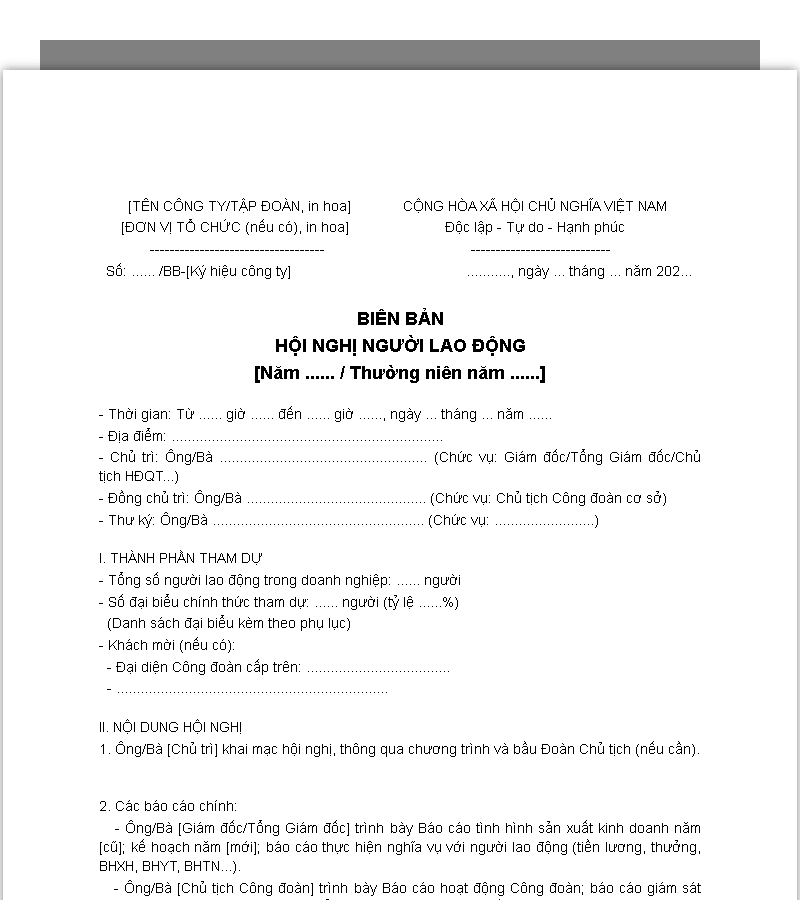
Mẫu 5: Mẫu biên bản hội nghị người lao động
Đây là mẫu biên bản dùng trong doanh nghiệp hoặc tổ chức công đoàn để ghi nhận ý kiến của người lao động. Nó tập trung vào việc thảo luận quyền lợi, nghĩa vụ, các thỏa thuận và quyết định chung. Biên bản giúp doanh nghiệp quản lý thông tin minh bạch và làm căn cứ cho các giải pháp cải thiện điều kiện làm việc. Đồng thời, biên bản cũng hỗ trợ giải quyết tranh chấp nếu có phát sinh.
Mẫu biên bản hội nghị người lao động >>> Link Download Mẫu biên bản hội nghị người lao động
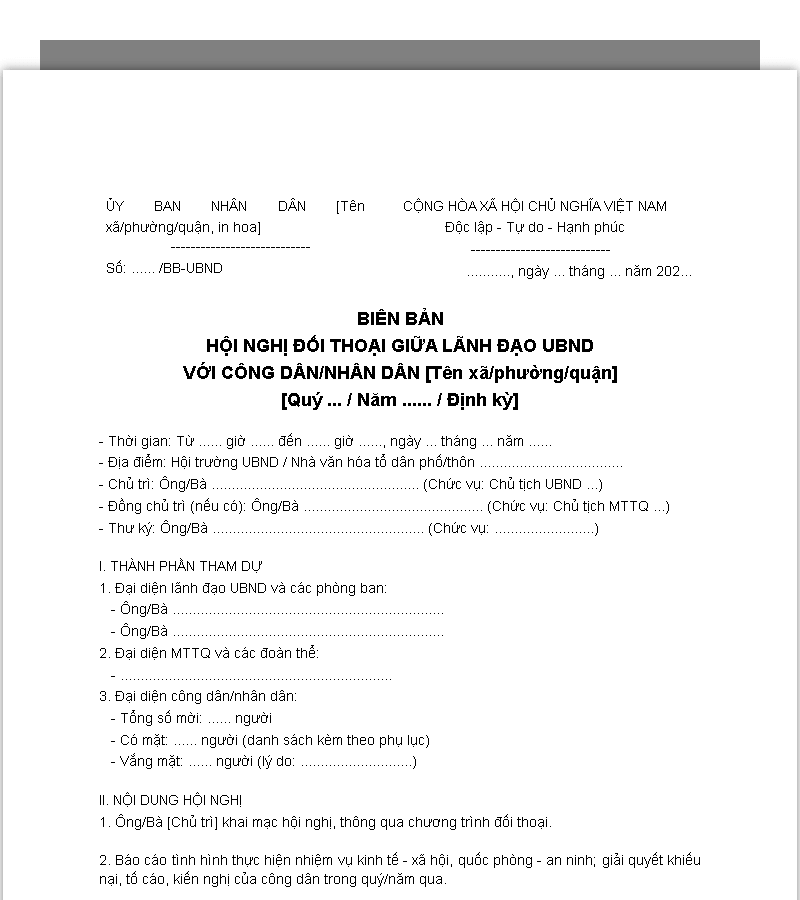
Mẫu 6: Mẫu biên bản hội nghị đối thoại (với nhân dân/sinh viên)
Mẫu này dành cho các buổi đối thoại công khai giữa cơ quan, tổ chức với nhân dân hoặc sinh viên. Biên bản ghi lại các ý kiến, kiến nghị, phản hồi và kết luận từ đối tượng tham gia. Nó đảm bảo thông tin được lưu trữ chính xác, phục vụ công tác phản hồi, giám sát và ra quyết định. Biên bản còn giúp nâng cao tính minh bạch và trách nhiệm trong các buổi đối thoại.
Mẫu biên bản hội nghị đối thoại >>> Link Download Mẫu biên bản hội nghị đối thoại (với nhân dân/sinh viên)
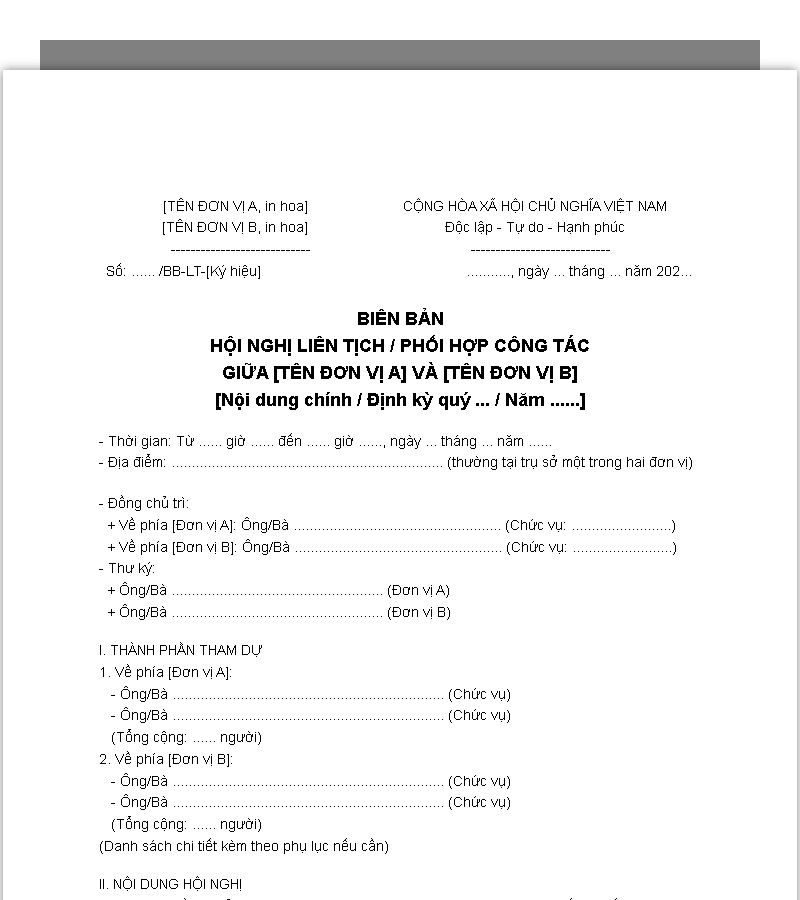
Mẫu 7: Mẫu biên bản hội nghị liên tịch/giữa hai đơn vị
Mẫu này dùng khi có sự phối hợp giữa hai tổ chức hoặc đơn vị khác nhau. Nó ghi nhận các thỏa thuận chung, nhiệm vụ được phân công, thời hạn thực hiện và kết luận cuộc họp. Biên bản giúp đảm bảo cả hai bên nắm rõ trách nhiệm và cam kết thực hiện đúng kế hoạch. Đây là công cụ quan trọng để phối hợp hành chính và giải quyết công việc chung hiệu quả.
Mẫu biên bản hội nghĩ liên tịch giữa hai đơn vị >>> Link Download Mẫu biên bản hội nghị liên tịch/giữa hai đơn vị
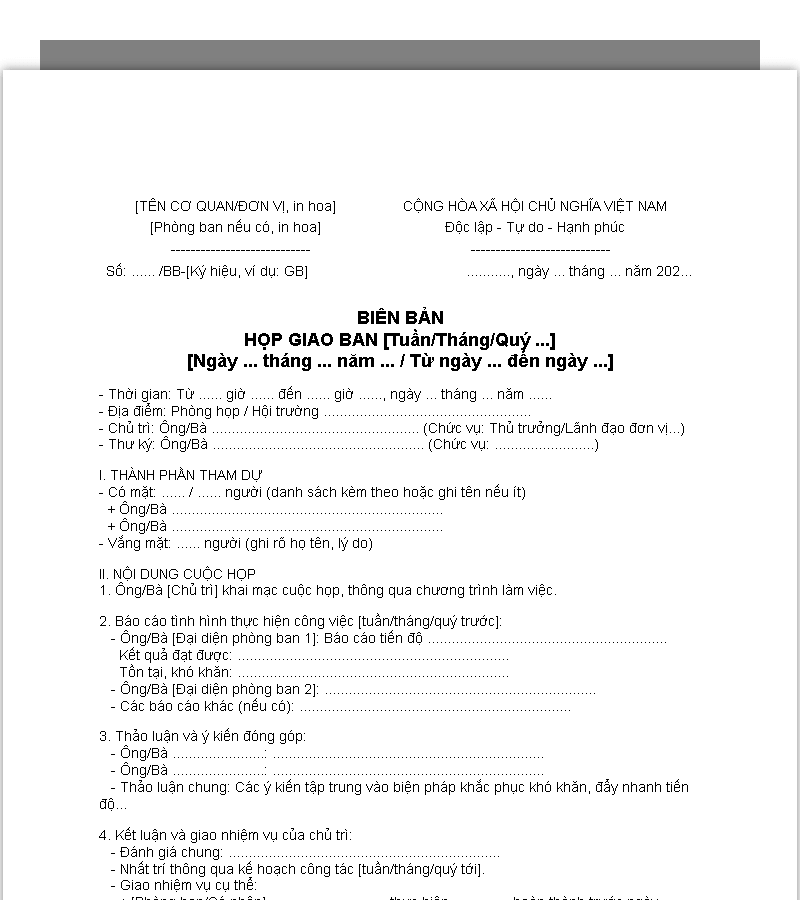
Mẫu 8: Mẫu biên bản họp giao ban/định kỳ
Mẫu biên bản này áp dụng cho các cuộc họp nội bộ định kỳ, như họp tuần, họp tháng hoặc giao ban phòng ban. Nó ghi nhận tiến độ công việc, các nhiệm vụ được giao và kế hoạch tiếp theo. Biên bản giúp quản lý theo dõi kết quả công việc, kiểm soát tiến độ và điều chỉnh kịp thời. Đây là công cụ quan trọng để duy trì nhịp độ hoạt động liên tục trong tổ chức.
Mẫu biên bản họp giao ban định kỳ >>> Link Download Mẫu biên bản họp giao ban/định kỳ
4. Các lỗi thường gặp khi soạn thảo biên bản hội nghị & cách khắc phục
Dưới đây là những sai sót phổ biến khi ghi biên bản và cách xử lý để đảm bảo tính chính xác, khách quan và chuyên nghiệp:
4.1. Lỗi về cấu trúc và định dạng: Thiếu quốc hiệu, tiêu ngữ, sai quy cách trình bày
Biên bản hội nghị là một loại văn bản hành chính chính thức, vì vậy việc trình bày đúng thể thức là yêu cầu bắt buộc theo quy định của Nghị định 30/2020/NĐ-CP về công tác văn thư. Trên thực tế, nhiều biên bản mắc các lỗi cơ bản như: không có Quốc hiệu “CỘNG HÒA XÃ HỘI CHỦ NGHĨA VIỆT NAM” và Tiêu ngữ “Độc lập – Tự do – Hạnh phúc”; tiêu đề biên bản đặt sai vị trí, dùng font hoặc cỡ chữ không phù hợp; thiếu số hiệu, ngày tháng không đúng chuẩn; bố cục rời rạc, không tách bạch rõ phần mở đầu, nội dung và kết thúc.
Cách khắc phục
- Ưu tiên sử dụng mẫu biên bản chuẩn do cơ quan, đơn vị ban hành hoặc tham khảo các mẫu hành chính từ nguồn đáng tin cậy.
- Bám sát cấu trúc thống nhất: Quốc hiệu – Tiêu ngữ – Tên biên bản – Thời gian, địa điểm – Thành phần tham dự – Nội dung diễn biến – Kết luận – Chữ ký xác nhận.
- Rà soát kỹ hình thức trước khi ban hành để bảo đảm biên bản được trình bày rõ ràng, đồng bộ và thể hiện tính chuyên nghiệp của tổ chức.
4.2. Lỗi về nội dung: Ghi thiếu/thừa thông tin, không khách quan, lan man, khó hiểu
Đây được xem là nhóm lỗi ảnh hưởng trực tiếp đến giá trị sử dụng của biên bản, thường xuất phát từ việc người ghi không theo sát nội dung cuộc họp hoặc vô tình đưa yếu tố chủ quan vào văn bản. Những biểu hiện hay gặp gồm:
- Bỏ sót ý kiến then chốt hoặc quyết định quan trọng
- Ghi quá nhiều chi tiết không cần thiết khiến biên bản dài dòng, khó theo dõi
- Dùng từ ngữ mập mờ, thiếu rõ ràng
- Phản ánh sai diễn biến do lồng ghép nhận xét cá nhân hoặc thiên lệch quan điểm.
Cách khắc phục
- Ghi nhận đúng trọng tâm: Tập trung vào các nội dung cốt lõi như kết luận, quyết định và nhiệm vụ được giao (ai phụ trách, thực hiện việc gì, thời hạn ra sao), chỉ ghi nguyên văn khi thật sự cần thiết.
- Giữ tính khách quan: Phản ánh trung thực những gì diễn ra tại cuộc họp, không suy diễn, không thêm cảm xúc hay đánh giá riêng của người ghi.
- Diễn đạt rõ ràng, mạch lạc: Sử dụng câu ngắn gọn, logic, sắp xếp nội dung theo trình tự thời gian hoặc theo chương trình nghị sự.
- Rà soát và xác nhận sau họp: Đọc lại biên bản cho các bên liên quan nghe hoặc xem trước khi ký để kịp thời bổ sung, chỉnh sửa những điểm còn thiếu hoặc chưa chính xác.
4.3. Spelling and Grammatical Errors: Affecting Professionalism
Spelling and grammatical errors, such as incorrect punctuation, unconventional abbreviations, and convoluted or incoherent sentences, though minor, can significantly impact the professionalism and credibility of the minutes. They also make it difficult for readers to grasp the content when referencing it later.
How to fix
- Utilize spell-checking tools like Word and Google Docs, and proactively proofread the document multiple times.
- Use standard language, pay attention to punctuation, and avoid repetition or lengthy, confusing expressions.
- Have another person read and edit the minutes before distribution to ensure they are clear, standard, and professional.
4.4. Missing Signatures and Confirmation: Reducing Legal Validity and Transparency
A fairly common mistake is that the minutes lack the required signatures, such as those of the chairperson or secretary. Other issues include not reading the content aloud before signing or failing to specify the number of copies made. These shortcomings make the minutes less transparent and can cast doubt on their validity.
How to fix
- Immediately after the meeting, read the full text of the minutes aloud for all parties to agree on the content and make necessary edits. Then, proceed with signing for confirmation (signatures of the chairperson and secretary are mandatory, and signatures of attendees should be included when possible).
- Clearly state: “These minutes are made in… copies, each having equal legal validity.”
- Double-check for all required signatures before circulation to ensure legal validity and provide a solid basis for future reference and dispute resolution.
4.5. No Scientific Storage or Management: Difficulty in Retrieval
Many minutes, after being finalized, are not organized and stored systematically. This leads to fragmented storage, lack of sequential numbering, and no classification by time or meeting content. In some cases, only a soft copy is saved on a personal computer without backups, making documents easy to lose and time-consuming to find when needed.
How to fix
- Establish a unified storage process: number minutes sequentially (e.g., MM-01/2025), and keep both paper and electronic copies (prioritizing PDF files with scanned signatures).
- Organize files in a clear folder system, such as: year – meeting type – date/month, for easy retrieval.
- Use document management software or an electronic records system to control, quickly search, and periodically back up data.
- Send the minutes to relevant parties immediately after the meeting so the information is stored in multiple locations, reducing the risk of loss.
1Office helps businesses overcome fragmented and hard-to-search minute storage with a centralized document management system that offers clear classification and automatic backups. This makes managing PDF files and sharing documents fast and consistent.
- Storage & Classification: All minutes are stored in a central repository, organized by year, meeting type, and time; supports PDF files with scanned signatures and automatic numbering.
- Search & Retrieval: Find minutes in seconds using keywords, filters, or metadata; manage edit history and versions.
- Backup & Security: Automatic backups on a cloud platform, detailed access permissions, and reduced risk of data loss.
- Sharing & Approval: Online approvals, digital signatures, and quick sharing with relevant parties; link tasks to track and send reminders for post-meeting follow-ups.
>>> SEE MORE: What is 1Office software? An overview of the 1Office.vn business management platform
5. Tips for Improving the Efficiency of Minute-Taking and Management
Below are tips and tools to help you take minutes quickly and accurately, and to make them easy to retrieve and manage long-term:
5.1. Using Supporting Technology: Note-Taking Software, Recording Tools, and Digital Templates
Taking minutes entirely by hand is not only time-consuming but also makes it easy to miss important information. In today’s context, technological solutions help secretaries take notes more effectively, increasing accuracy and enhancing the professionalism of the minutes.
Application tips
- Use note-taking platforms like Microsoft OneNote, Notion, Evernote, or Google Docs to update content live during the meeting, making it easy to edit and share immediately afterward.
- Record the meeting (with the consent of attendees) using tools like Otter.ai, Zoom, or Google Meet. This not only stores the audio but also supports speech-to-text transcription for content verification.
- Utilize digital minute templates (on Word, Excel, Google Docs) with standard layouts that automatically display the national emblem and date, saving time and reducing formatting errors.
- Combine AI tools like ChatGPT or Vietnamese speech-to-text software to quickly create a draft of the minutes after the meeting, which can then be edited for suitability.

Tips for improving the efficiency of minute-taking and management 5.2. Training and Assigning a Secretary: Ensuring the Minute-Taker Has Sufficient Skills
The quality of the minutes largely depends on the secretary’s competence. When the note-taker lacks skills or experience, the minutes are prone to errors, incompleteness, and inaccuracy.
Application tips
- Appoint a permanent or rotating secretary, but choose individuals who can take notes quickly and understand both administrative procedures and the technical content of the meeting.
- Organize regular training on minute-taking skills, including how to select key points, use standard administrative language, and adhere to the document format specified in Decree 30/2020/ND-CP.
- Encourage secretaries to take online courses on meeting minute skills or to practice with smaller meetings before handling important conferences.
- Apply a paired working model: one person records the main content while another assists with reviewing and cross-checking, which reduces pressure and improves the accuracy of the minutes.
5.3. Review and Approval Process: Ensuring Minutes are Reviewed Before Issuance
Minutes are typically finalized after the meeting. However, without a careful review step, the document can easily contain errors, leading to misunderstandings or affecting its legal value.
Application tips
- Establish a unified process: the secretary drafts the minutes → reads the content aloud at the end of the meeting for members to provide feedback → makes edits directly → the chairperson and secretary initial the draft → sends the minutes to all attendees for confirmation within 24-48 hours.
- Implement multi-layered checks: the secretary self-reviews → another member assists with editing → the chairperson conducts the final review and approval.
- Utilize the “Track Changes” feature in Word or Google Docs to make feedback and edits transparent without losing the original content.
- Set clear deadlines for approving and issuing the minutes to avoid delays and ensure information is updated and used promptly.
5.4. Smart Storage and Retrieval: Using an Electronic Storage System, Categorizing by Topic and Time
If minutes are only stored as paper copies, they are easily lost. Meanwhile, unsystematic storage makes searching and referencing a time-consuming and laborious process.
Application tips
- Prioritize electronic storage: convert minutes to PDF files with scanned signatures, accompanied by an editable file (Word/Docs), and store them on a cloud platform like Google Drive, OneDrive, or an internal document management system.
- Design a scientific folder structure in sequence: year → meeting type (board, department, technical, etc.) → date – meeting name, to make retrieval fast and consistent.
- Standardize file naming conventions, for example: “MM-[Sequence Number][Date][Meeting Name].pdf”, for easy identification and sorting.
- Use specialized document management software like VNPT iOffice, FPT.eOffice, or an electronic ISO system to enable keyword searches, topic tagging, and automatic backups.
- Share the minutes via email after the meeting or post them on internal channels (Zalo, Microsoft Teams, etc.) so members can easily access them when needed.
To address the issue of fragmented and hard-to-search minute storage, many organizations are switching to electronic document management. The Document module in 1WORK (part of the 1Office comprehensive management platform) supports:
- 100% digitization of meeting minutes: create, store, and manage them centrally on one system.
- Scientific classification by year, meeting type, and topic; quick search by keyword.
- Process-based minute handling: assign tasks, track progress, and send automatic reminders directly within the document workflow.
- Integration with digital signatures and document logs, ensuring minutes are compliant, transparent, and easy to retrieve later.
This solution helps organizations reduce manual paperwork, improve the efficiency of minutes management, and aligns with the direction of digital office transformation.
Tips for improving the efficiency of minute-taking and management
6. Frequently Asked Questions about Conference Minutes
6.1. Who is responsible for taking conference minutes?
The person responsible for taking conference minutes is usually the conference secretary or someone assigned by the chairperson (often an office staff member). The minutes need to be signed by the chairperson and the secretary to ensure accuracy and transparency; both parties are jointly responsible for the content. At the end of the conference, the minutes should be read aloud for feedback and corrections before signing; audio recording (if permitted) can be used to assist with verification.
6.2. Is it mandatory for conference minutes to be stamped?
Conference minutes are an internal administrative document, and their legal validity primarily relies on the signatures of authorized persons (usually the chairperson and the secretary), not on a company seal.
According to current regulations (such as Decree 30/2020/ND-CP, Law on Enterprises 2020), internal minutes are still valid without a seal. Stamping is only required when the document is issued externally or as per the internal regulations of each organization to enhance formality.
6.3. Can minutes be amended after they have been issued?
If errors are discovered, new minutes must be created or a correction/replacement document must be issued, depending on the nature of the error.
- Content errors: create new minutes or a replacement document of equivalent value.
- Formatting or technical presentation errors: correct with a separate document.
Therefore, it is necessary to review and edit carefully before signing; after issuance, do not erase or edit directly to ensure legal validity.
6.4. How long should conference minutes be stored?
The storage period for conference minutes depends on the nature and value of the document, commonly ranging from 5-20 years, or stored permanently for important conferences.
- Regular administrative conferences: stored for a limited period (usually 5-10 years or until they are no longer of use).
- Important, strategic conferences: stored permanently or transferred to historical archives.
- Businesses: follow relevant legal regulations; shareholder meeting minutes are usually stored permanently.
Recommendation: store both paper and electronic copies in parallel, and classify them clearly for easy retrieval.
6.5. How do conference minutes differ from regular meeting minutes?
Both conference minutes and regular meeting minutes record the proceedings of a meeting, but they differ in scope and scale:
Criteria Conference Minutes Regular Meeting Minutes Scale – Formality Used for large events, high-level participants, formal presentation, includes national emblem and motto Internal meetings, small scale, simple presentation, formality not required Content Records detailed reports, presentations, resolutions; includes appendices if necessary Focuses on conclusions, task assignments, deadlines Format and Signature Confirmation Complies with Decree 30/2020/ND-CP; usually requires signatures from the chairperson, secretary, and possibly all delegates Complies with Decree 30/2020/ND-CP; primarily requires signatures from the chairperson and secretary Legal Validity Has higher legal value, serves as a basis for important decisions and major resolutions Mainly for internal use, serves management and daily work tracking Using the correct Conference Minutes Template not only ensures clear meeting records but also guarantees legal validity and simplifies storage and retrieval. We hope the above templates will help you save time on drafting and effectively apply them to various types of real-world conferences.