


 10/05/2026
  153 views
What is a Kanban board? A Kanban board is a visual tool developed from the Kanban method, a work management system that helps limit the amount of work in progress (WIP) and optimize workflow. The Kanban board allows teams to easily track progress, identify bottlenecks, and promote continuous improvement in existing processes.
Mục lục
- 1. What is a Kanban board? The principles of Kanban
- 2. Pros and Cons of the Kanban Method
- 3. Components of a Kanban Board
- 4. Types of Kanban Boards & Examples
- 5. Steps to Create a Kanban Board
- 6. Some Management Tools That Use the Kanban Method
- 7. Comparing Kanban, Scrum, and Agile
- Frequently Asked Questions about Kanban Boards
1. What is a Kanban board? The principles of Kanban
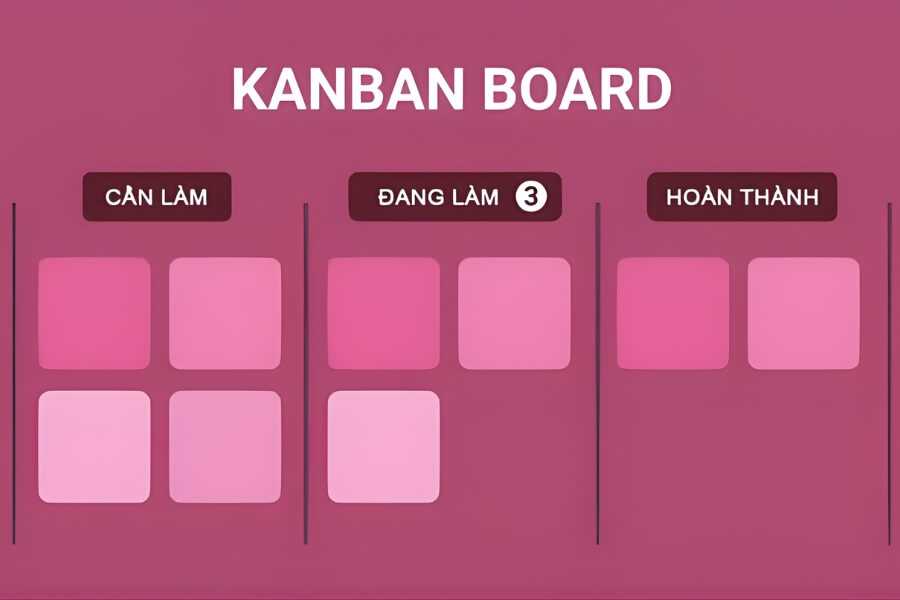
What is a Kanban board? A Kanban board is a visual work management tool that helps teams track and control workflow according to actual statuses. The board is typically structured into columns representing process stages, for example:
| To Do → Doing → Done. |
Each task is represented by a card (Kanban card) and moves across columns as its progress changes, thereby reflecting the actual status of the entire workflow.
A Kanban board operates by visualizing each work item through cards placed in columns on the board. Each column represents a stage in the “value stream”—the sequence of steps a task goes through from start to finish.
Tasks are written on Kanban cards and placed in the column corresponding to their current status.
- Different card colors help classify types of work (e.g., bug, task, improvement…).
- Swimlanes (horizontal rows) are used to organize work by team, priority, or type of item, making it easy for multiple teams working on the same board to maintain visibility.
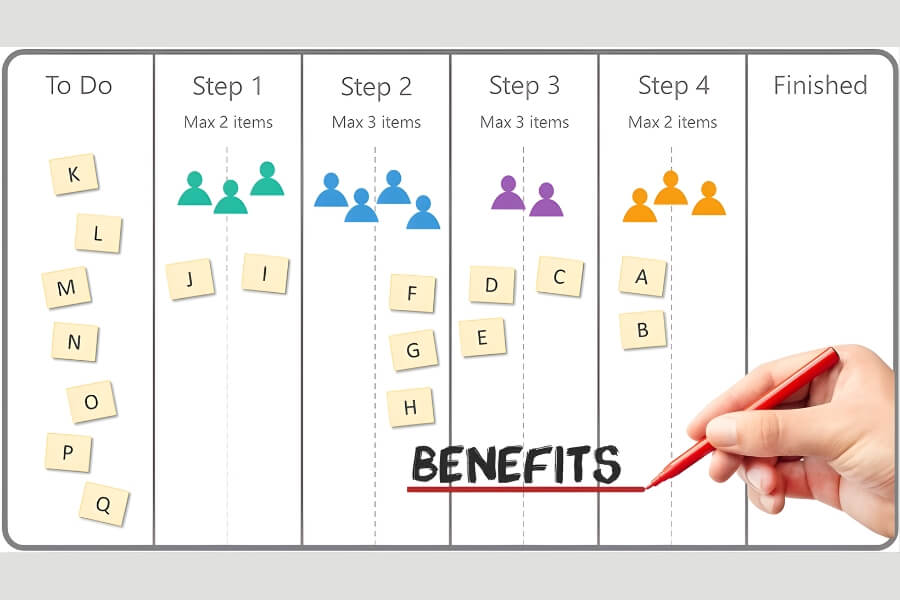
- WIP (Work In Progress) limits are set for certain columns to control the number of tasks being processed, preventing bottlenecks and maintaining a stable workflow.
- Team members pull cards and move them from left to right as progress changes, reflecting the work’s journey through each stage.
Thanks to this visual and tangible mechanism, the Kanban board helps teams track progress in real-time, detect bottlenecks early, and optimize work efficiency.
2. Pros and Cons of the Kanban Method
After understanding what a Kanban board is, here are the pros and cons of applying the Kanban method in work and project management:
2.1. Advantages of the Kanban Method
Here are the key benefits that Kanban brings to teams and projects:
- Task Transparency: Kanban helps clarify the work that needs to be done for a project to progress smoothly. Each card on the Kanban board contains a full task description, sub-tasks, deadlines, progress, and related notes, helping employees grasp the information and complete their work effectively.
- Synchronized Work Status: The Kanban board provides a comprehensive overview of project progress, allowing leaders to easily track it without constant follow-ups. Employees can also quickly see what they and their teammates are working on and which tasks need to be prioritized, thereby increasing autonomy and proactivity.
- Improved Team Performance: Kanban helps visualize the workflow, identify important tasks to prioritize, and quickly detect steps that are slow or causing bottlenecks in the process. As a result, the team can focus resources at the right time, improving overall efficiency.
- Better Focus and Reduced Burnout: The ability to clearly see tasks helps employees reduce anxiety about missing work and focus on their main responsibilities. Kanban supports attention management, reasonable task prioritization, limits burnout, and maintains the quality of results.
2.2. Limitations of the Kanban Method
Here are the limitations to consider when implementing Kanban:
- Project Progress Management: Kanban is simple and visual, but it lacks detailed timeline information like a Gantt chart, making it difficult to predict completion times for tasks or the entire project if only Kanban is used for progress tracking.
- Limitations with Complex Projects: Kanban boards are effective for small to medium-sized projects. For large projects, additional organizational layers like swimlanes are needed to maintain a clear structure. If not managed well, the Kanban board can become cluttered and affect the team’s work efficiency.
- Continuous Updates are Mandatory: Kanban is only effective when the board is updated regularly. This requires discipline from both leaders and team members. Using visual project management software will make updating easier and more efficient.
3. Components of a Kanban Board
To better understand what a Kanban board is, here are the main components that make up a Kanban board and their roles:
3.1. Columns
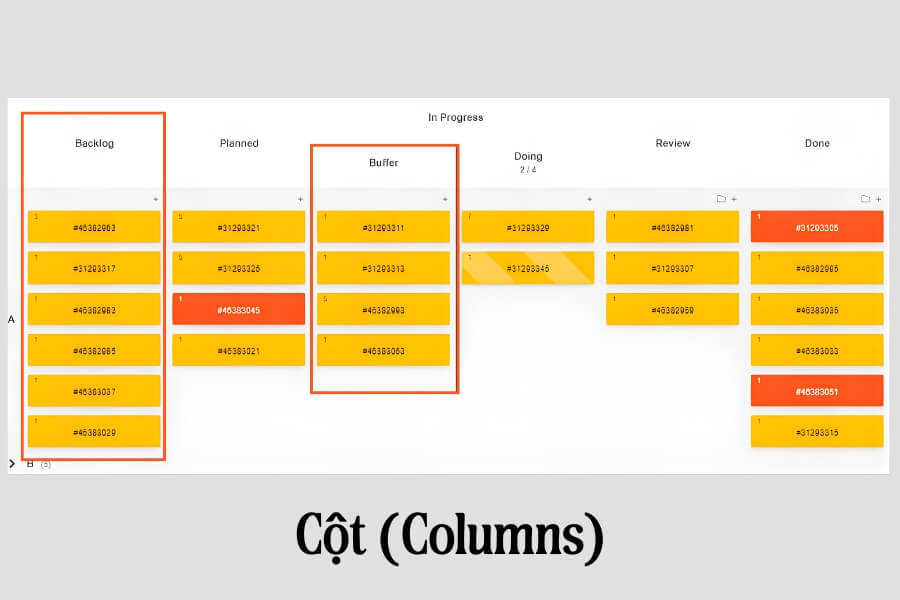
The horizontal columns on a Kanban board are the backbone of the entire system. Each column represents a stage in the workflow, for example, from “To Do” to “Done”. Dividing tasks by columns helps users immediately grasp the progress of each task and easily identify the next step to take.
Kanban boards can be flexibly customized to meet business needs: adding or removing steps in the process, dividing into sub-stages, or creating as many columns as the process requires.
Examples of how to divide columns on a Kanban board:
- To Do – Doing – Done
- Backlog – Planned – Doing – Review – Done
- Requirements Gathering – Requirements Verification – Scheduled – Doing – Testing – Review – Deployed – Done
3.2. Cards
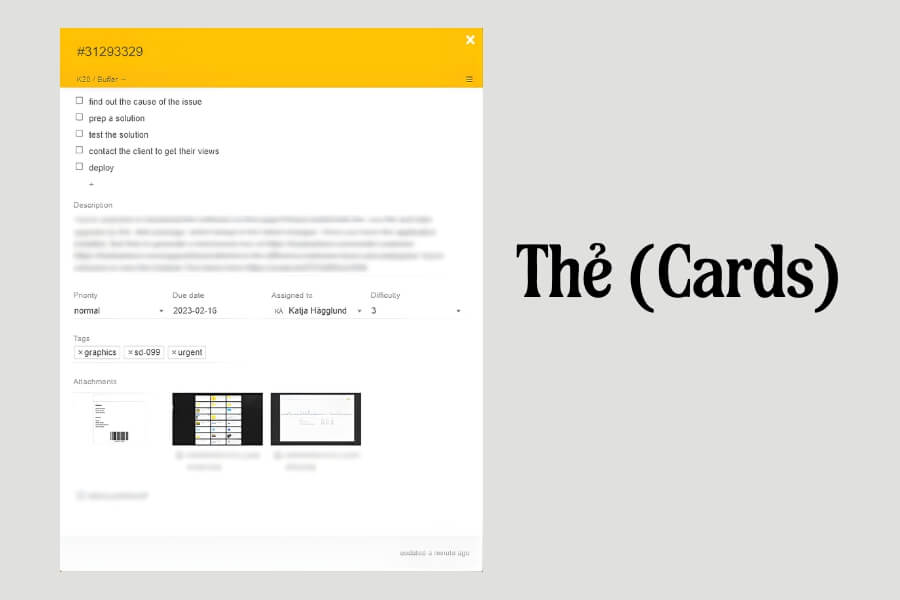
If columns are the backbone of a Kanban board, then cards are the building blocks. Each card represents an individual task or project and moves from one column to another as work progresses. Cards can contain detailed information such as images, comments, attachments, etc., helping to keep all related data centralized and easily accessible.
For example, a Kanban card representing a new product development project might include:
- Task description
- Manager in charge
- Expected completion date
- Status updates according to the plan
- Team comments
- Internal identifier code
- Attachments
- Links to source code repositories or external documents, and other information.
3.3. Work in Progress (WIP) Limits
WIP limits help employees focus on important tasks, avoid being distracted by multiple jobs at once, thereby improving efficiency and work quality. Each column on the Kanban board is set with a maximum number of tasks that can be in progress at the same time.
For example, if the “In Progress” column has a WIP limit of 4, it means that no more than 4 tasks can be in progress simultaneously. You must complete at least one existing task before starting a new one. If this limit is exceeded, the system will issue a warning, helping you identify overload situations in a timely manner. Adhering to WIP limits is an effective way to reduce pressure, avoid being overloaded, and ensure maximum focus on the current task.
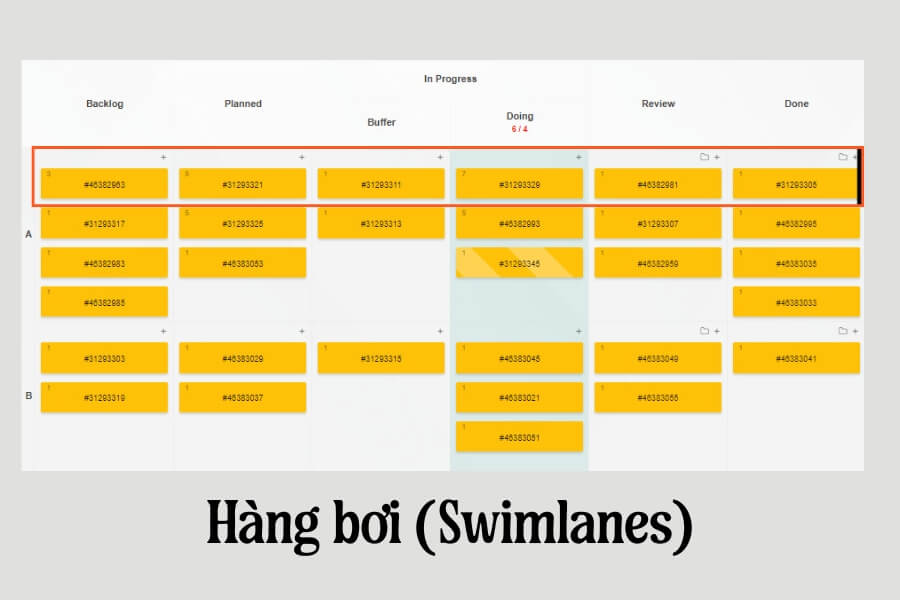
3.4. Swimlanes
Swimlanes are horizontal partitions on a Kanban board that help categorize tasks by project, work type, client, priority level, or any criteria that fit your workflow. Thanks to swimlanes, related task cards are kept together, and the overall workflow overview becomes clearer.
For example, you can use swimlanes to differentiate tasks by high, medium, and low priority, or by product A and product B. The more visual the board, the easier it is to determine work priorities and ensure no tasks are missed.
Tags are a quick and easy way to classify, sort, and filter cards on a Kanban board. Tags provide context, highlight important tasks, and make it easy to identify which jobs to focus on to achieve specific goals.
For example, you can use tags to mark tasks related to software bugs, new feature requests, or improvements. Alternatively, you can attach a user story ID to tasks related to that story. Filtering the board by custom tags helps you prioritize work, stay organized, and make more accurate decisions.
4. Types of Kanban Boards & Examples
Below are the most common types of Kanban boards, along with illustrative examples of their practical use:
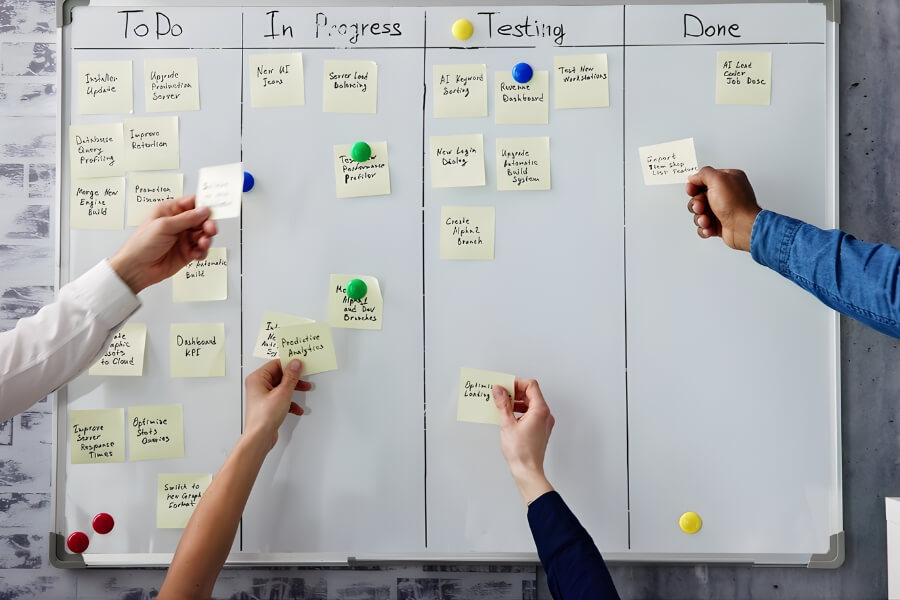
4.1. Physical Kanban Boards
A physical Kanban board is the simplest type, consisting of vertical columns and notes representing each task. These notes move across the columns as work progresses, making it easy to visualize the status of tasks.
The advantages of a physical board are that it is always visible, easy to set up and present, and supports effective team communication. However, it is not optimal for remote teams or when handwriting is difficult to read.
Example: At Optimizely, teams used Jira, but coordination was not smooth. Keith Nottonson created a large physical Kanban board (called the “Wall of Work”) that displayed the entire project, its status, and the team members responsible, helping everyone understand the progress. Initially, it only had three columns: To Do – Doing – Done, but through discussions, the board was gradually optimized, improving the workflow.
This board applied a “commit and deliver” mechanism: projects were accepted and committed to completion, then entered into Jira to record all data and interactions.
4.2. Digital Kanban Boards
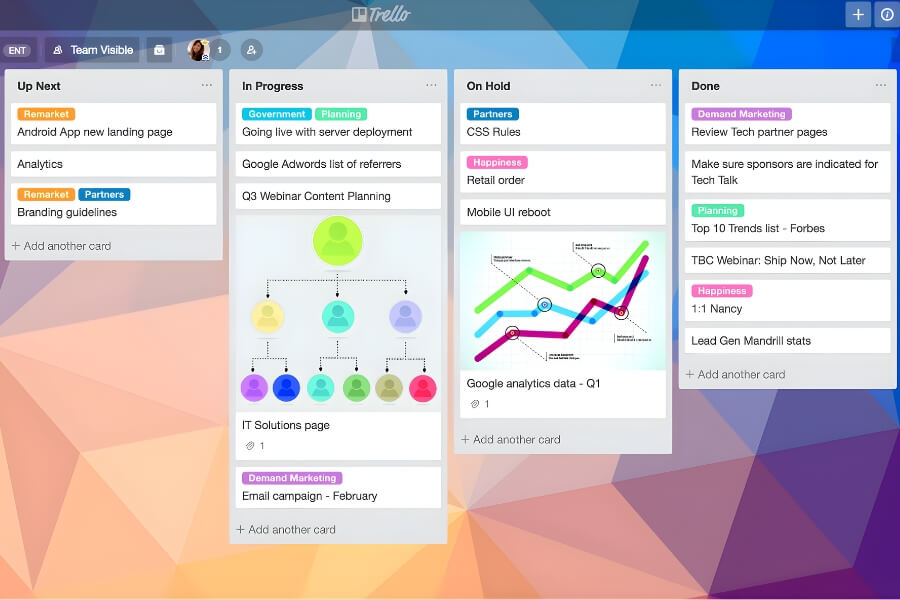
As Kanban became popular among software and engineering teams, Kanban boards transitioned to a digital format, allowing remote teams to work and sync at all times.
Tools like Trello allow for the quick creation of Kanban boards with lists such as Backlog – Up Next – In Progress – Done, where each task is managed by a card that moves according to its progress. Digital boards are easy to share, always up-to-date, and track comments, helping leaders monitor project status remotely.
For advanced needs like WIP limits, swimlanes, or backlog management, more powerful tools like Jira Kanban allow for process customization, setting WIP limits, creating swimlanes, and managing the backlog to prioritize work effectively.
5. Steps to Create a Kanban Board
After understanding what a Kanban board is, here are the basic steps to set up and implement an effective Kanban board:
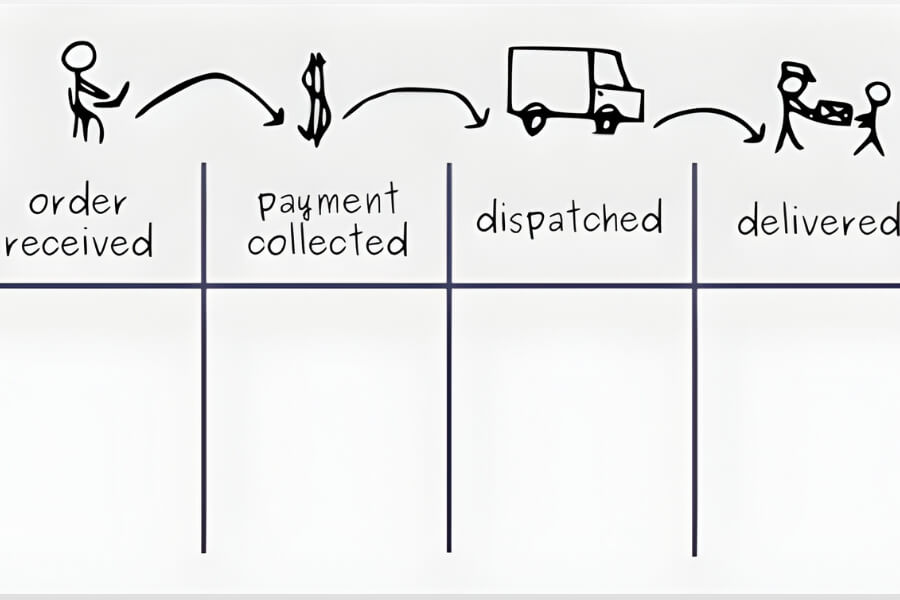
Step 1 – Visualize the workflow: Prepare a board (either a whiteboard or a digital one) and divide your workflow from start to finish into distinct steps, with each step corresponding to a column on the board.
Step 2 – Identify types of work: List the types of work you typically perform, for example: customer orders, support requests, or maintenance. Assign a unique color to each type and prepare corresponding colored cards (sticky notes).
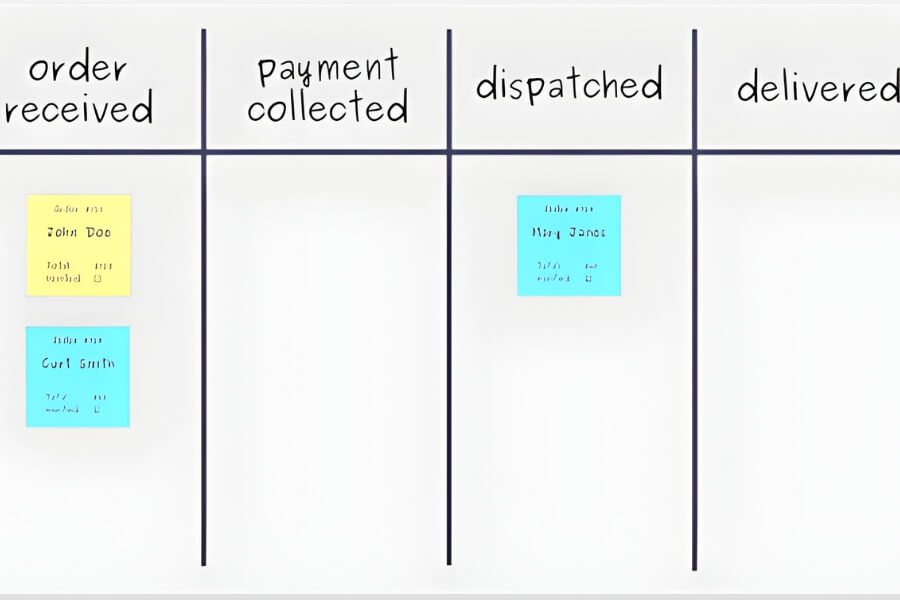
Step 3 – Write tasks on cards and place them on the board: Write each task on a card of the corresponding color and place it in the appropriate column. The order of the cards within a column should reflect their priority, with the most important task at the top.
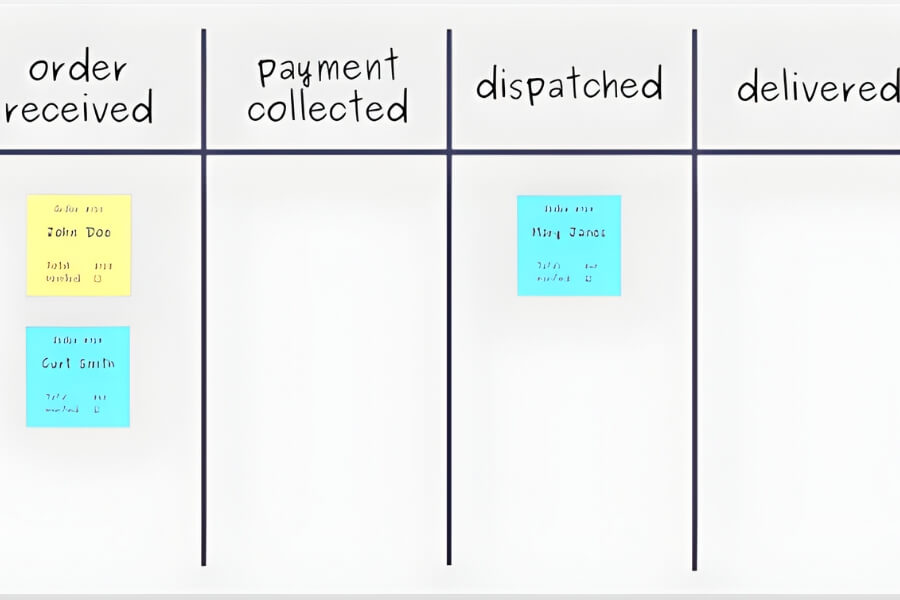
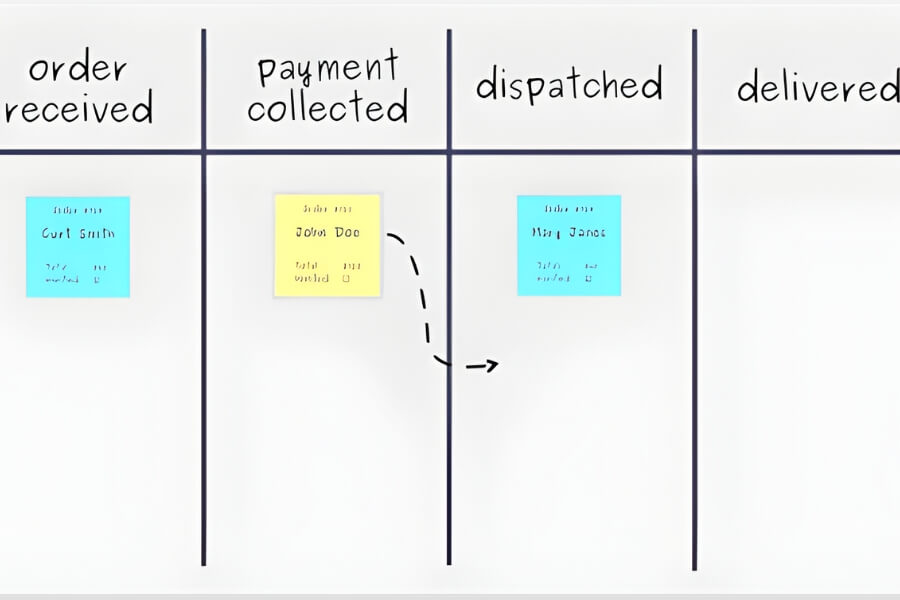
Step 4 – Implement work using Kanban: Start working on tasks from top to bottom. When a task is completed, move it to the bottom of the next column to maintain a continuous workflow.
Step 5 – Improve the workflow: The goal of Kanban is to maintain a steady and smooth workflow. The Kanban board helps you see the overall status of work, quickly identifying problems or bottlenecks. No column should be overloaded, and no task should get “stuck.”
Limit Work in Progress (WIP): Set a limit on the maximum number of tasks in each column to avoid overload. For example, each column should have a maximum of 2 tasks at a time. When the limit is exceeded, stop accepting new tasks and focus on completing at least one existing task. WIP limits help control the amount of unfinished work, ensuring focus and efficiency before taking on new tasks.
Note: The Kanban board is just one part of the overall Kanban method; there are many other techniques to help maintain a continuous workflow.
6. Some Management Tools That Use the Kanban Method
Here are some software and tools that support task management using the Kanban method:
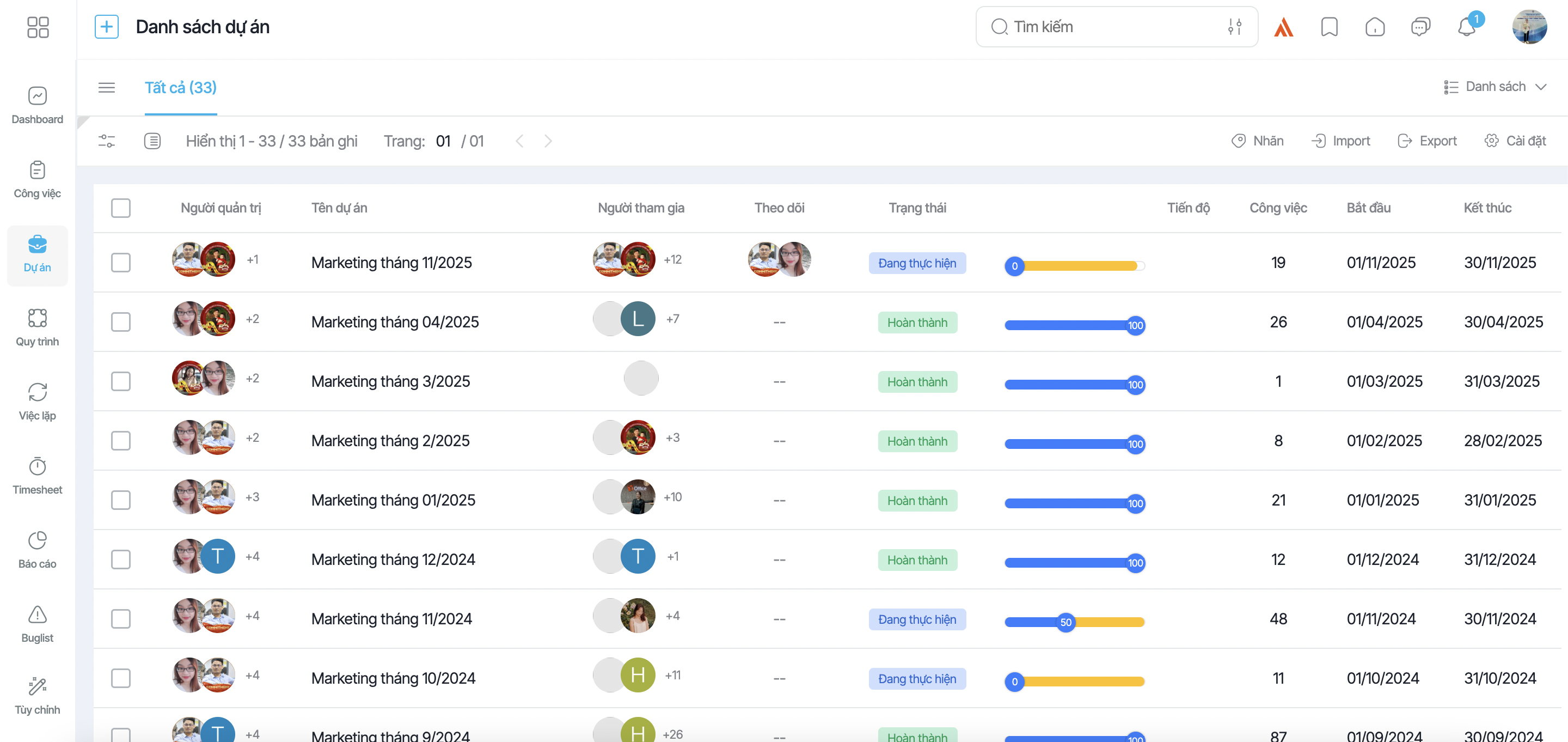
6.1. 1Office Project Management Software
1Office is a management platform that helps businesses easily implement Kanban, optimize processes, and improve work efficiency. With 1Office, businesses can track all tasks, promote team collaboration, reduce resource waste, and focus on tasks that bring real value to the business.
When applying Kanban on 1Office, there are a few things to keep in mind to optimize efficiency:
- Manage tasks anytime, anywhere: 1Office is an online software that helps track tasks from start to finish, regardless of location or time.
- Intuitive Kanban interface: Uses 3 basic columns “To Do – In Progress – In Review,” each with a different color, making it easy for managers to assign tasks and assess progress.
- Focus and control tasks: For each campaign, assign specific tasks and limit 3-4 tasks in the “In Progress” column to avoid distractions and overload.
- Direct tracking and reminders: Managers can comment and send progress reminders directly on task cards without needing to meet in person, which enhances efficiency and transparency.
Applying Kanban on 1Office helps leaders manage team tasks more easily, optimize productivity, and improve business operational efficiency.
6.2. Trello Task Management Application
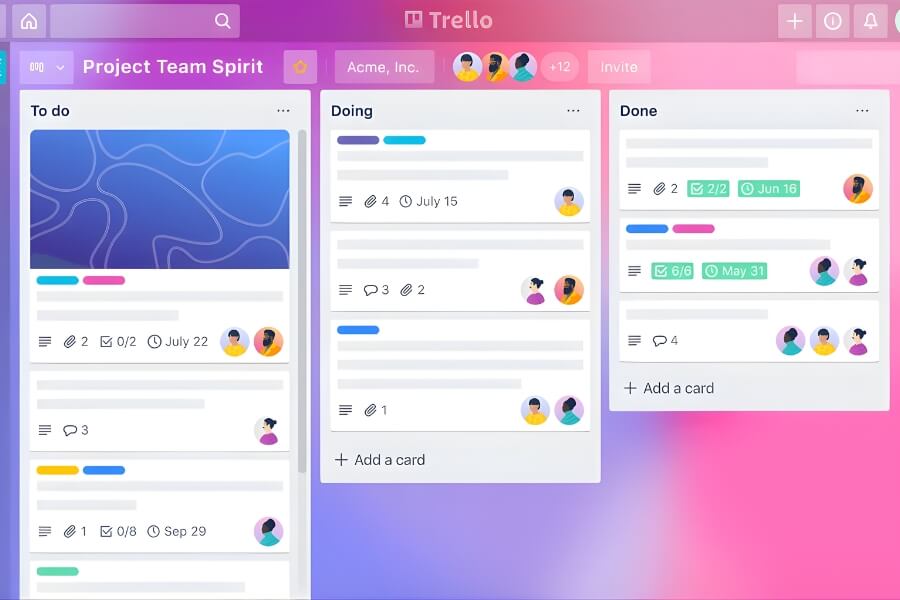
Trello is a task management tool based on the Kanban method, known for its minimalist design, ease of use, and free version. As a result, Trello is a popular choice for many individuals and small teams.
Trello’s interface simulates sticky notes on a whiteboard. Each column (List) represents a step in the process, for example: To-do > Step 1 > Step 2 > Step 3 > Done. You can drag and drop cards between Lists to update progress. Each Card has all the necessary information fields and allows members to communicate directly through comments and tagging.
Trello’s limitations lie in its simple management hierarchy, lack of time management features, and absence of summary reports.
6.3. Base Workflow Business Process Management Software
Base Workflow is a platform for managing and automating processes, helping to standardize and connect hundreds of business operations in one place. The system allows for the flexible creation of processes within or across departments, while also providing visual progress tracking and real-time data updates to promptly identify and address bottlenecks.
- Detailed and transparent permission settings, supporting users to participate in or manage multiple departments and projects simultaneously.
- Flexible progress tracking through multiple display modes: Kanban, list (to-do), calendar, Gantt chart, etc., suitable for various management purposes.
- Integrated internal chat supports 1-on-1 and group chats directly within the system.
- Daily automatic task reminders, including task lists and overdue alerts.
- Result review feature, ensuring the workflow is not blocked and maintaining output quality.
7. Comparing Kanban, Scrum, and Agile
Agile, Scrum, and Kanban: Nature and Relationship
- Agile is a project management methodology and philosophy based on two core principles: iterative development and incremental growth. The goal of Agile is to shorten the time-to-market for a product, helping businesses quickly receive feedback and optimize delivery value.
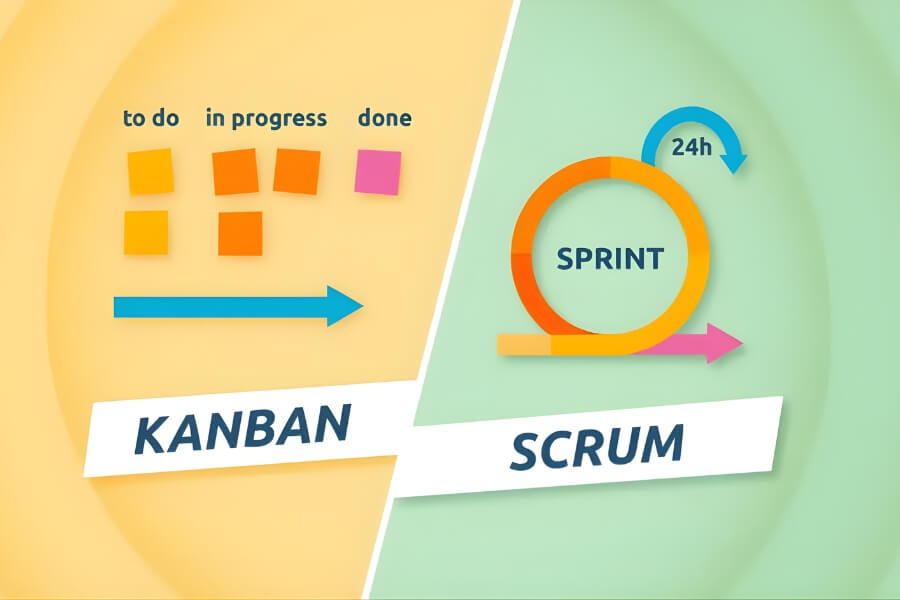
- Scrum is a framework that operates according to Agile, often applied in projects where the product requirements or goals are not clearly defined from the outset. Scrum operates in fixed-length Sprints (periods) of 1-4 weeks, aiming to continuously improve the product, techniques, team, and work environment.
- Kanban is also a management model within the Agile family, providing a set of tools to visualize the workflow using boards, columns, and cards to optimize the flow of work. Kanban clearly embodies the Agile spirit through its ability to adapt quickly, limit disruptions, and ensure transparency throughout the process.
As both Scrum and Kanban are implementations of Agile, when analyzing their differences, the focus should be on comparing these two methods.
| Criteria | Kanban | Scrum |
| Origin | Lean Manufacturing | Software development |
| Operating Principle | Visualize workflow using boards, columns, and cards | Continuous improvement through development iterations (Sprints) |
| Core Principles | – Effectiveness
– Efficiency – Predictability |
– Transparency
– Adaptation – Inspection |
| Workflow | Continuous flow, not bound by cycles | Follows fixed cycles, operates in Sprints |
| Implementation Steps | – Design the Kanban board
– Set WIP limits – Create task cards – Implement tasks – Improve the Kanban flow |
– Build the Product Backlog
– Sprint Planning – Sprint Execution – Daily Stand-up – Sprint Review – Sprint Retrospective |
| Team Structure | No defined roles; suitable for any organizational structure | 3 clear roles: Product Owner, Scrum Master, Development Team |
| Metrics | – Cycle Time
– Lead Time – Workflow Efficiency |
– Velocity
– Workload – Team Satisfaction |
>>> SEE MORE: Details on the differences between Kanban and Scrum
Frequently Asked Questions about Kanban Boards
Frequently Asked Questions about Kanban Boards
Is Kanban Lean or Agile?
Kanban is a method within the Agile framework, but it originates from Lean. Initially, Kanban was developed at Toyota under the Lean system to optimize workflow and reduce waste. Later, it was adapted for software development and project management with an Agile mindset, thanks to its ability to visualize work, limit work in progress (WIP), and promote continuous improvement.
What is a Kanban board used for?
A Kanban board is a tool for managing and visualizing work progress through different stages. Specifically, a Kanban board helps to:
- Display the status of each task from “To Do” → “In Progress” → “Done,” helping the entire team understand the progress.
- Limit the amount of work in progress (WIP) to avoid overload and increase focus.
- Track and control progress, and promptly identify and resolve bottlenecks.
- Increase transparency, team collaboration, and optimize resource allocation.
- Manage projects flexibly, making it easy to adjust to changes in requirements or priorities.
- Provide data for managers to evaluate performance and drive continuous improvement.
What are the two core rules of a Kanban board?
The two core rules of a Kanban board are:
- Visualize the workflow: All work is clearly displayed on the board through cards and status columns (“To Do,” “In Progress,” “Done”), helping the team easily track progress.
- Limit Work in Progress (WIP Limit): Restrict the number of concurrent tasks in each column to prevent overload, reduce bottlenecks, and focus on completing started work.
In summary, these two principles ensure transparency, control, and continuous improvement in work management using Kanban.
What is a Kanban view?
A Kanban view is a visual representation of work on a Kanban board, with cards representing individual tasks arranged in status columns like To Do, In Progress, and Done. This display makes it easy to track progress, identify bottlenecks, and coordinate work effectively by dragging cards across columns as their status changes. A Kanban view is often found in project management or CRM software, supporting flexible and transparent management.
What does Kanban mean in Japanese?
In Japanese, Kanban is a combination of “kan” (visual) and “ban” (card), which can be understood as “information board” or “signboard.” The term originated in the Japanese manufacturing industry, first used by Toyota, to describe a method of managing work by visualizing the process through cards and boards.
What are the main principles of using Kanban?
The main principles of Kanban are:
- Visualize the work: Display tasks on cards in columns corresponding to their status, helping the team track and coordinate easily.
- Limit WIP: Restrict the number of concurrent tasks to avoid overload and bottlenecks.
- Manage flow: Optimize the workflow, ensuring tasks move smoothly through the stages.
- Make policies explicit: The process is transparent, with guidelines for everyone to understand and follow.
- Implement feedback loops: Continuously evaluate, review, and improve based on actual data.
- Improve collaboratively, evolve experimentally: Always adjust and enhance working methods to achieve the highest efficiency.
What is an example of Kanban in manufacturing?
Examples of Kanban in manufacturing:
- Toyota: Uses Kanban cards to coordinate raw materials and components, ensuring each production stage receives only the necessary amount, avoiding excess inventory and waste.
- Zara: Applies Kanban to maintain low inventory and quickly update new collections, using real-time sales data to respond promptly to market demand.
- Other manufacturing companies: Use Kanban to optimize work cycles, control inventory, and improve supplier relationships; a Kanban board placed near the production area or with suppliers helps facilitate quick decision-making.
These examples show that Kanban helps visualize progress, control the flow of materials and work, reduce inventory, and increase production efficiency.
What types of projects is Kanban suitable for?
Kanban is suitable for projects with the following characteristics:
- Work and priorities change continuously, requiring maximum flexibility in management.
- Continuous workflow, not following a fixed cycle like Sprints in Scrum.
- Requires continuous improvement and maintaining a stable workflow to avoid bottlenecks.
- Small or cross-departmental teams that need to manage multiple projects and tasks simultaneously.
- Projects that support operations, customer service, or processes requiring a quick response.
- When an organization wants to improve its processes without making major changes to its current structure or procedures.
Understanding what a Kanban board is and applying the method correctly will help you manage work more flexibly, visually, and effectively. To implement Kanban quickly and optimally, your business can use the 1Office project management software – an enterprise management platform that integrates the Kanban method, making it easy to track progress, assign tasks, and improve team performance. Contact 1Office today for a consultation and to experience an effective work management solution for your business!
















