The Process of Building a Successful Sales Management ERD Model for Businesses


In today’s era of rapid technological development, sales management has become more complex than ever, requiring businesses to adopt modern models and tools to optimize processes and enhance performance. One of the key models widely used in the field of sales management is the ERD model. So, what is an ERD model, and what is its importance in sales management? What is the secret to drawing the most accurate sales management ERD model? 1Office will answer all these questions in this article!
Mục lục
- 1. What is an ERD model?
- 2. Why is the ERD model important in sales management?
- 3. The secret to drawing the most accurate sales management ERD diagram for your business
- 4. 3 common sales management ERD model templates used in businesses
- 5. Some Applications of ERD Models in Supporting Sales Management
- 5.1 Managing Customer Information and Customer Relationships
- 5.2 Managing Products, Inventory, and the Goods Receipt and Dispatch Process
- 5.3 Managing Orders and the Order Fulfillment Process
- 5.4 Managing Payments, Invoices, and Financial Transactions
- 5.5 Managing Promotions, Sales Campaigns, and Customer Loyalty
- 6. Common Mistakes When Building a Sales Management ERD Model
- 7. How to Optimize an ERD Model to Enhance Sales Management Performance
- 8. Frequently Asked Questions about ERD Models for Sales Management
- 9. Conclusion
1. What is an ERD model?
An ERD (Entity Relationship Diagram) model is a visual data structure used to simulate and design entities and the relationships between them in a business’s sales management process. The ERD model provides a comprehensive view of the main components and how they interact within the sales management system.
An ERD model consists of three main components: entities, relationships, and attributes. Below is a detailed description of each of these components:
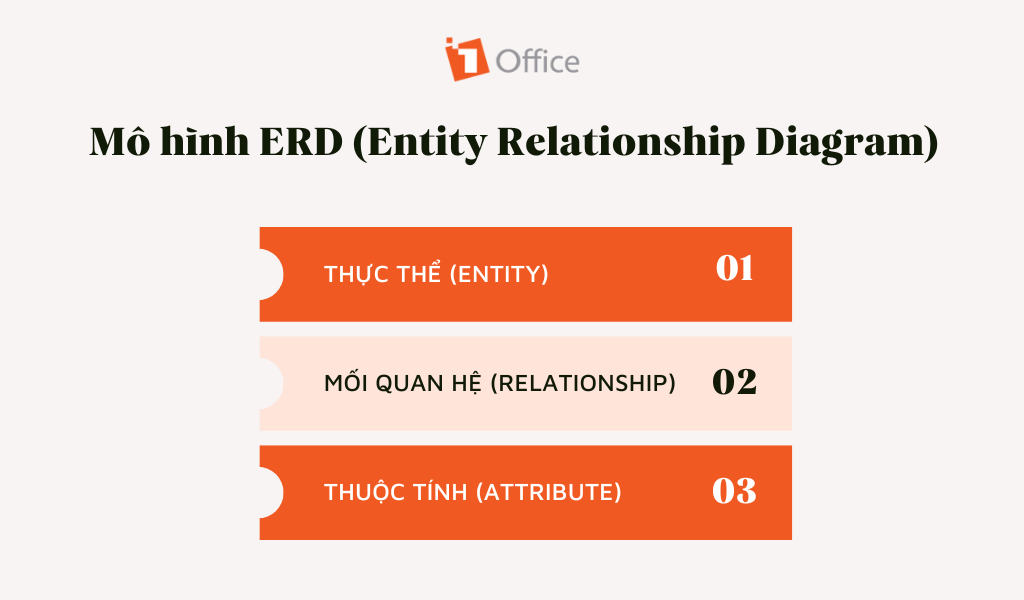
Entity: An entity represents a specific object or aspect in sales management. For example, in a sales management system, common entities might include customers, products, orders, suppliers, and warehouses. Each entity has a set of characteristic attributes to describe and store related information.
Relationship: A relationship defines how entities interact and are linked to each other. For example, in a sales management system, there might be a “Purchases” relationship between Customer and Product, or a “Supplies” relationship between Supplier and Product. This relationship represents the interaction and dependency between entities in the sales process, which can be one-to-one, one-to-many, or many-to-many, depending on the scale and logic of the sales process.
Attribute: Attributes are specific pieces of information related to each entity. For example, in the “Customer” entity, attributes might include Name, Address, Phone Number, and Email. Attributes help define and store detailed information about each entity in the sales management system.
>> Read more: What is a Flowchart? Tools and Tips for Drawing the Most Accurate Flowcharts for Businesses
A sales management ERD model is often represented by geometric diagrams, where entities are represented by rectangles, relationships by connecting lines, and attributes are listed inside the corresponding entity.
2. Why is the ERD model important in sales management?
The ERD model is important because it helps businesses organize and connect data logically. Instead of storing data in a fragmented way, an ERD clearly defines the relationships between components like Customers, Products, and Orders, helping the management system operate accurately and without redundancy.

A reliable sales management system must be based on accurate and complete data. The ERD model helps identify and define entities and their relationships while also specifying related attributes. This helps resolve data issues such as duplication, inconsistency, or missing information, creating a foundation for an accurate and reliable data system.
2.2 Business information system
An ERD diagram helps organize information related to customers, products, orders, etc., and defines the relationships between them. Having an effective business information system enhances the ability to track, analyze, and make decisions, thereby improving the performance and efficiency of the sales process.
2.3 Designing and building a complete database
This model provides a detailed and comprehensive data structure for the sales management system. It helps identify the necessary entities, relationships, and attributes, leading to the design and construction of a complete and well-organized database. Having a reliable and structured database facilitates the storage, retrieval, and processing of information in the sales management process.
2.4 Classifying and organizing data
By identifying entities and relationships, it allows information to be arranged into clear, manageable units. Classifying and organizing data enhances the ability to search, retrieve, and analyze information, thereby helping to make accurate and quick management decisions.
2.5 Optimizing the sales process
The ERD model helps optimize the sales process by simulating and analyzing the relationships between customers, products, and orders. It helps identify and optimize the flow of information from order reception, payment processing, to delivery and inventory management. Thus, the ERD diagram plays a crucial role in improving efficiency, enhancing flexibility, and enabling a rapid response to customer needs.
>> See more: How to build a methodical and professional sales process diagram in 2022
3. The secret to drawing the most accurate sales management ERD diagram for your business
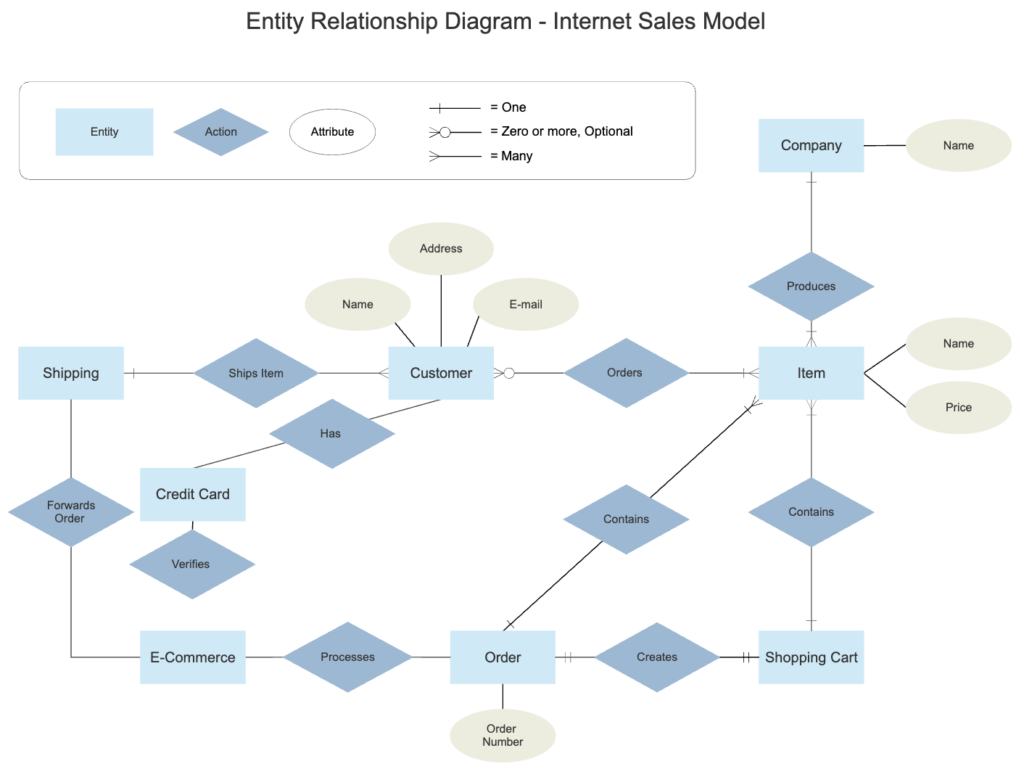
3.1 Guide to drawing a sales management ERD diagram
Step 1. Identify the main entities: including important objects or concepts in the sales process such as Customer, Product, Order, Employee, and Warehouse…
Step 2. Identify the relationships between entities: including the “Purchase” relationship between “Customer” and “Order” or the “Manage” relationship between “Employee” and “Warehouse”.
Step 3. Name and define the attributes of each entity: for example, the attributes of “Customer” can include name, address, phone number, and email.
Step 4. Draw the ERD diagram: use appropriate symbols, shapes, and charts to represent entities (ovals), relationships (straight lines), and attributes (small circles). Additionally, businesses can use software that supports the ERD diagramming process.
Step 5. Link and determine cardinality: businesses need to determine the quantity and relationship between entities in the model. For example, the “Purchase” relationship can have a “One-to-Many” cardinality, where one customer can create multiple orders.
Step 6. Review and adjust: to ensure that it accurately reflects the data structure and relationships between components in the sales process. If necessary, adjust and improve the diagram to meet the specific requirements and goals of the business.
3.2 Design an effective ERD model with process management software
1Office is a versatile and powerful online tool designed to help businesses establish and manage workflows in the most effective way. With 1Office, managers can optimize business operations, enhance interaction and collaboration among team members, thereby improving work performance. Some of the outstanding features of this software include:
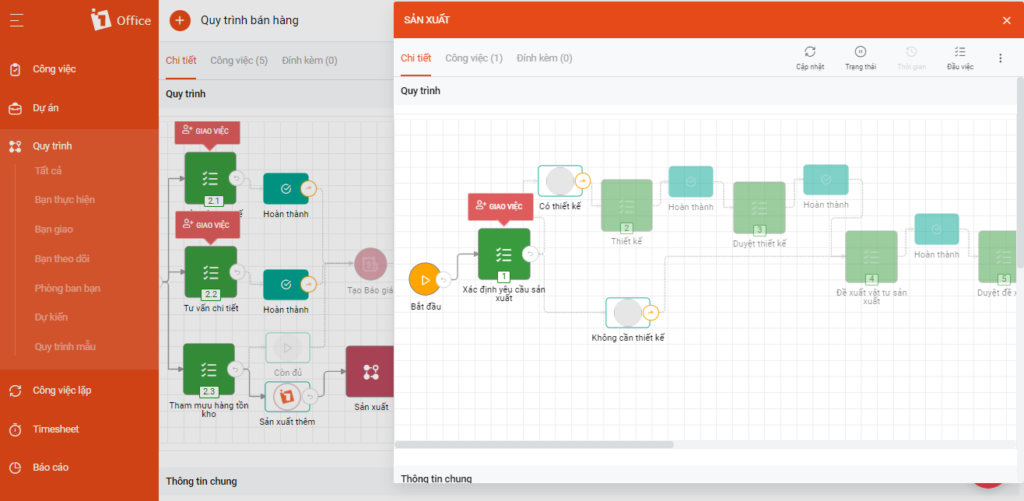
- Establish standard processes based on departmental structure, specific stages, and individual tasks.
- Define performers, supervisors, and an automatic task assignment function for individuals and departments.
- Link related objects, prevent operational errors, and build conditional branching processes, integrated by department and position on the HRM module.
- Report and track work progress in real-time, such as: percentage of work completed, completion rate of workload, and completed work items.
- Systematize and centrally manage all data on the software, making it easy to measure and evaluate the effectiveness of work and projects, with access anytime, anywhere.
Get a free demo of the features
4. 3 common sales management ERD model templates used in businesses
4.1 Basic ERD Model
- Entities: Customer, Product, Order, Employee, Warehouse.
- Relationships: Purchase, Manage, Inventory In/Out.
- Attributes: Customer (name, address, phone number), Product (name, price, description), Order (order date, status), Employee (name, position).
4.2 Extended ERD Model
- Entities: Customer, Product, Order, Employee, Warehouse, Supplier, Invoice.
- Relationships: Purchase, Manage, Inventory In/Out, Supply, Payment.
- Attributes: Customer (name, address, phone number, email), Product (name, price, description, stock quantity), Order (order date, status, total value), Employee (name, position, salary), Supplier (name, address, phone number), Invoice (invoice number, issue date, total amount).
4.3 Hierarchical ERD Model
- Entities: Customer, Order, Order Detail, Product.
- Relationships: Places, Includes, Creates.
- Attributes: Customer (name, address, phone number), Order (order date, status), Order Detail (quantity, price), Product (name, price, description).
The ERD models above are for reference only and can be customized to fit the specific needs of a business. However, they provide a basic framework for identifying and organizing related entities, relationships, and attributes in the sales management process.
5. Some Applications of ERD Models in Supporting Sales Management
ERD models have many important applications in supporting sales management. Below are some specific applications of a sales management ERD model:
5.1 Managing Customer Information and Customer Relationships
An ERD model allows for the organization and management of detailed customer information, including personal details, purchase history, preferences, and feedback. This helps businesses create a comprehensive customer database and analyze customer relationships to enhance engagement and interaction.
5.2 Managing Products, Inventory, and the Goods Receipt and Dispatch Process
This includes information such as: description, price, stock quantity, and other related information. The goal is to organize and track the goods receipt and dispatch process, manage inventory, and optimize resource management.

5.3 Managing Orders and the Order Fulfillment Process
An ERD model helps define the relationships between customers, products, and orders. It allows for the management and tracking of the order fulfillment process from order receipt, confirmation, and processing to shipping and delivery. This helps optimize the sales process and ensures customers receive the right products on time.
5.4 Managing Payments, Invoices, and Financial Transactions
This involves recording payment information, tracking payment statuses, and generating invoices for customers. Additionally, an ERD model can be integrated with financial and banking systems to manage sales-related financial transactions.
5.5 Managing Promotions, Sales Campaigns, and Customer Loyalty
An ERD model allows for the management of information about promotional campaigns, discount programs, and customer loyalty. This helps track the effectiveness of sales campaigns, analyze data, and create more suitable marketing strategies.
6. Common Mistakes When Building a Sales Management ERD Model
Although the ERD (Entity Relationship Diagram) model is a fundamental tool in database design, many businesses still make basic mistakes that cause their sales management systems to operate inefficiently. Here are the common mistakes to avoid.
6.1. Designing an Overly Complex and Impractical Model
A major mistake is trying to include every detail in the ERD, making the diagram cluttered, difficult to understand, and hard to implement.
Consequence: it becomes difficult for technical staff to maintain, and the sales department cannot understand the data relationships.
Solution: only represent the core entities and relationships—for example: Customer, Product, Order, Payment—and then expand gradually.
6.2. Not Clearly Defining Relationships Between Entities
An incorrect ERD or a lack of precise links between data tables (e.g., a customer can have many orders, but each order belongs to only one customer) leads to errors when summarizing revenue or tracking transaction history.
Solution: correctly identify the relationship types (1–1, 1–many, many–many) and use clear primary and foreign keys from the beginning.
6.3. Omitting Important Data During the Design Process
Many businesses focus only on product and order information, forgetting data such as customer interaction history, promotional programs, or post-sales feedback.
Solution: review the entire Customer Journey to ensure every touchpoint is described in the ERD.
6.4. Not Updating the Model with Changes in the Sales Process
When a business expands or changes its policies (adds sales channels, loyalty programs, etc.), if the ERD model is not updated, the data will quickly become outdated and inconsistent.
Solution: periodically review and update the ERD model at least quarterly, especially after changes in business processes.
6.5. Not Testing and Evaluating the Model Before Implementation
Some businesses implement an ERD immediately after creating it, without a simulation data testing phase. This can easily lead to logic errors or incorrect data relationships.
Solution: Test with sample data and have multiple departments (IT, sales, accounting, etc.) review it to ensure accuracy.
7. How to Optimize an ERD Model to Enhance Sales Management Performance
After finalizing the ERD model, optimization will help businesses not only manage data effectively but also maximize the value of information in sales activities.
7.1. Normalize Data to Avoid Duplication and Discrepancies
One of the key factors in optimizing an ERD is ensuring data is normalized.
-
Eliminate duplicate data between tables (e.g., a customer’s name appearing in multiple places).
-
Establish data constraints to ensure integrity.
-
Use a consistent format for data fields such as customer ID, product ID, phone number, email, etc.
7.2. Integrate the ERD Model with a CRM or ERP System
An ERD model will be most effective when integrated with comprehensive management software like CRM, ERP, or 1Office.
-
Helps synchronize customer, product, and order data across departments.
-
Supports automated reporting, reducing manual data entry.
-
Creates a solid foundation for applying data analytics (BI) or AI to predict purchasing behavior.
7.3. Optimize Query Performance and Data Processing Speed
As sales data grows rapidly, the system can become slow.
How to optimize:
-
Build appropriate indexes for frequently queried tables.
-
Limit unnecessary many-to-many relationships.
-
Break down large data tables using partitioning or archiving techniques.
7.4. Continuously Test, Monitor, and Improve the Model
An ERD model is not static; it needs to be updated according to changes in sales strategy or user behavior.
-
Perform periodic testing to detect data relationships that are no longer suitable.
-
Collect feedback from system users (sales, accounting, marketing) for improvements.
-
Use workflow management tools to visualize processes and ensure the ERD accurately reflects operational reality.
8. Frequently Asked Questions about ERD Models for Sales Management
How do I know if an ERD model is good enough to implement?
A good ERD model can answer all business data questions without overlap. Try asking: “From this diagram, can I retrieve the purchase history of a specific customer?”. If the logic is seamless and there are no redundant entities, the diagram meets the standard.
What is the difference between an ERD model and a Flowchart?
A Flowchart describes the sequence of steps (Who does what first, what comes next). An ERD describes the structure of information (How customer data links to invoices). A Flowchart is used to manage work, while an ERD is used to build a storage system.
Do small businesses need to create an ERD before using software?
Absolutely. Clearly defining data relationships helps you choose the right software or set up spreadsheets systematically from the start. This avoids complex data migration when the business scales.
Instead of leaving the ERD as just a drawing, businesses can transform it into a real operational system thanks to the 1Office platform , which integrates No-code and AI Agents:
- No coding required, easy drag-and-drop operations
- Directly transform data & processes from the ERD
- Save on technical costs
- Flexible system, easy to scale in stages.
When does a “Many-to-Many” relationship in an ERD cause trouble for sales management?
If not handled by an intermediary table (like an “Order Details” table), this relationship will make it impossible to accurately calculate the total amount or cause duplicate inventory errors. This is the main reason why report data does not match reality.
Should promotion rules be included in the ERD model?
Yes. Connecting the “Promotion” entity with the “Order” entity helps the system automatically calculate the actual revenue and accurately measure the effectiveness of each marketing campaign instead of requiring manual calculations.
9. Conclusion
The above is all the information shared by 1Office about the sales management ERD model. We hope this article has helped managers better understand the importance of ERDs and how to draw the most accurate ERD model.
Is your business struggling to find a solution that is both cost-effective and manages the sales process efficiently? A sales management software customized to fit the needs of each business will make your business administration process much more convenient and effective! Get a consultation on the process management and sales management features of 1Office via:
- Hotline: 083 483 8888
- Facebook: https://www.facebook.com/1officevn/
- Youtube: https://www.youtube.com/@1office-chuyendoisodn