


 12/05/2026
  469 views
Digital signatures are no longer an unfamiliar “tool” in business and are being widely applied across all industries. Using digital signatures will be a powerful assistant for businesses, helping to reduce 90% of transaction costs and time. So, what is a digital signature? What are the processes and methods for using digital signatures in business operations? Let’s find out with 1Office in the article below.
Mục lục
- What is a digital signature?
- How do businesses benefit from using digital signatures?
- The structure of a digital signature
- Functions of digital signatures for businesses
- What are the types of digital signatures?
- Applications of digital signatures in business operations
- Digital Signature Creation Process
- 1SIGN – The Superior Digital Signature Solution by 1Office – Integrating Digital Signatures into Workflows
- Cost of Using 1Sign Digital Signature
What is a digital signature?
A digital signature is a form of electronic signature used to verify the authenticity and integrity of digital data. A digital signature can be considered a digital version of a conventional handwritten signature, but with a higher level of information safety and security. Simply put, it is an encrypted code attached to a message or document. Once created, the code serves as proof that the information sent to the recipient has not been tampered with.
How do businesses benefit from using digital signatures?
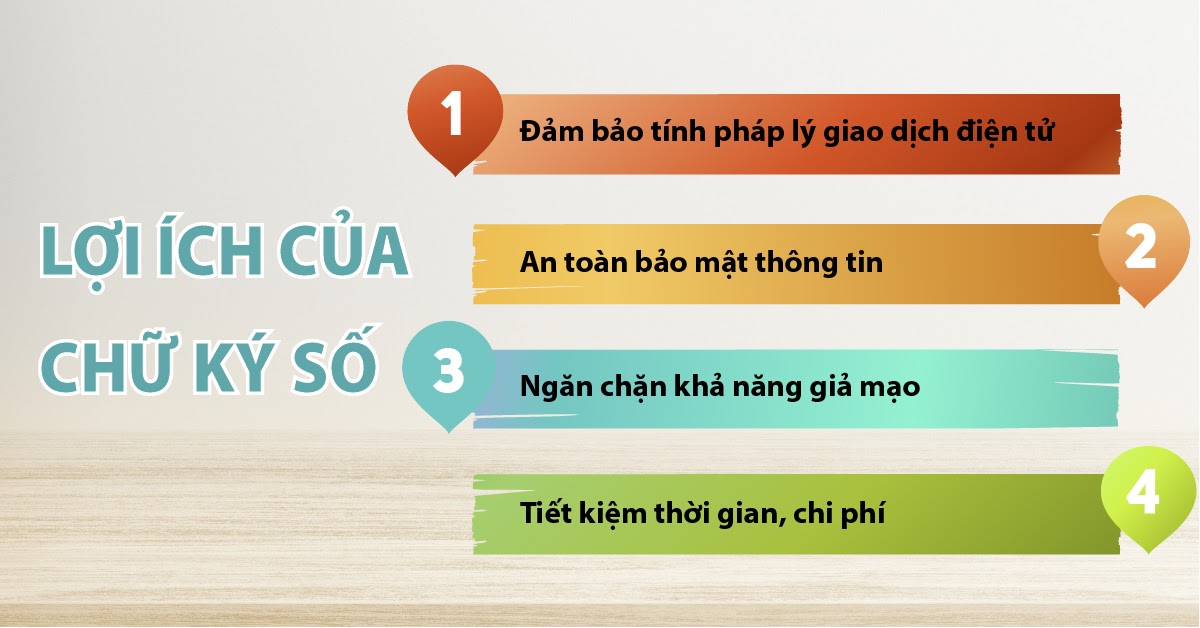
Ensuring legal validity in electronic transactions
First and foremost is the ability to ensure the integrity of electronic documents as well as identify the author’s identity. The use of digital signatures in electronic transactions is considered the basis for affirming the legal validity of electronic documents, making them equivalent to paper documents.
Information safety and security
The integrity of documents and records using digital signatures is guaranteed, ensuring that data or information is not altered or lost during storage or transmission
Forgery prevention
Creating another signature that is identical to an existing digital signature is nearly impossible. According to expert research, the probability of it being forged is extremely low, whereas the probability of forging a handwritten signature can be as high as 70%.
Saving time and costs
Using a digital signature service helps speed up the signing and approval process, allowing you to sign multiple electronic documents at once on a computer/phone and send them directly to leaders, partners, customers, etc., via the internet. Moreover, businesses can also save time on travel, printing, or waiting for their turn to sign.
The structure of a digital signature
Based on RSA technology, the structure of a digital signature consists of a key pair from an asymmetric cryptography system: a public key and a private key. In this system:
| Private key | Used to create a digital signature |
| Public key | Used to authenticate, verify digital signatures, and perform user authentication. The public key is generated from the corresponding private key in the key pair. |
| Signer | Subscribers use their private key to digitally sign a specific data message under their name. |
| Recipient | An organization or individual who receives a data message digitally signed by the signer. They use the signer’s digital certificate to verify the digital signature in the received data message and proceed with related activities and transactions. |
| Digital signing | The process of inputting a private key into a software program to automatically generate and attach a digital signature to a specific data message. |
Functions of digital signatures for businesses
For organizations and businesses, a digital signature has the same legal value as a seal and the signature of a legal representative. The main function of a digital signature is to carry out electronic transactions where its use is permitted by law:
- Used in e-commerce transactions in the digital environment: Signing electronic contracts, making online payments, transferring funds online, paying for insurance, etc.
- Used for signing in email transactions, signing emails to help partners and customers confirm the sender.
- Used for e-government services, digitally signing when completing administrative procedures or seeking confirmation from state agencies.
- Used for online tax declarations and payments, social insurance declarations, customs declarations, banking transactions, electronic securities trading, etc.
What are the types of digital signatures?
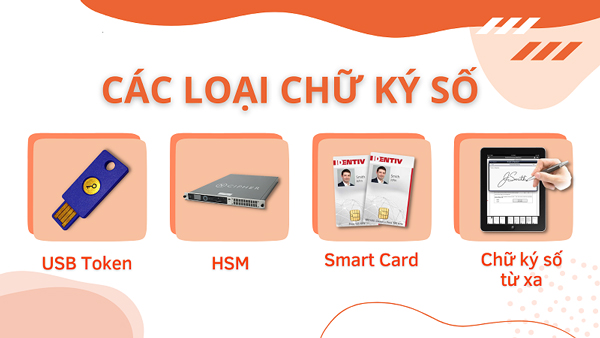
USB Token
USB Token is the first type of digital signature to appear on the market and is widely used today. With this type, businesses are issued a Digital Certificate and a private key stored on the USB Token. When conducting an electronic contract transaction, the business must connect the USB to a computer to sign digitally.
HSM Digital Signature
HSM is often produced in the form of a PCI card plugged into a computer or a standalone network-connected device. HSM has many features to meet the high demands and requirements for frequent and fast digital signing or to support automatic signing. However, HSM digital signatures are quite expensive and are typically used only by large enterprises with large-scale management systems and good infrastructure.
Smartcard Digital Signature
This is a type of digital signature integrated onto a SIM card, developed by some mobile network operators. This method allows for flexible digital signing via mobile devices. However, its drawback is that users must use a SIM card from the network operator for integration. This is inconvenient when the user is outside the coverage area or on a business trip abroad.
Remote Digital Signature
Unlike the three types mentioned above, remote digital signatures use cloud technology, allowing users to sign without any additional hardware. Thanks to this advantage, users can sign anytime, anywhere, even when on a business trip or working from home.
>> See more: Remote Digital Signature – The contactless signing solution during the pandemic
Applications of digital signatures in business operations
Digital signatures have the same legal value as a handwritten signature of an individual or the seal of a business/organization in online electronic transactions and administrative procedures for businesses, such as:
| APPLICATIONS OF DIGITAL SIGNATURES | ||
| Personal Digital Signature | Business/Organizational Digital Signature | Digital Signature for Individuals within an Organization |
|
|
Professional transactions within the organization or representing the organization in external transactions under authorization:
|
Businesses, organizations, and individuals use digital signatures as a commitment to agree to the terms and content specified in documents, contracts, vouchers, or electronic transactions. Digital signatures ensure the accuracy, integrity, and security of the messages specified in the signed document.
Using digital signatures helps the data exchange process between organizations and individuals occur quickly, conveniently, saving time and effort, while also ensuring legality.
Digital Signature Creation Process
To register for a digital signature, you need to follow these 4 steps:
- Step 1: Choose a digital signature provider: You need to select a digital signature service provider licensed by the Ministry of Information and Communications for the digital signature to be legally recognized.
- Step 2: Gather necessary documents such as citizen ID card, passport, business license, etc., for the digital signature certification authority to verify personal information.
- Step 3: Communicate with the provider to choose a suitable digital signature package, submit documents, and perform verification (Contact support: 0904885833 1SIGN – 1Office).
- Step 4: The provider verifies the information and issues the digital signature: This organization will check the customer’s information, then issue a digital certificate and deliver it to the customer if the application meets all the specified conditions.
Note: You need to register your digital signature information on the electronic transaction system to ensure its validity when in use.
1SIGN – The Superior Digital Signature Solution by 1Office – Integrating Digital Signatures into Workflows
1Office introduces an integrated Digital Signature feature that helps businesses completely overcome the limitations of traditional paper-based signing.
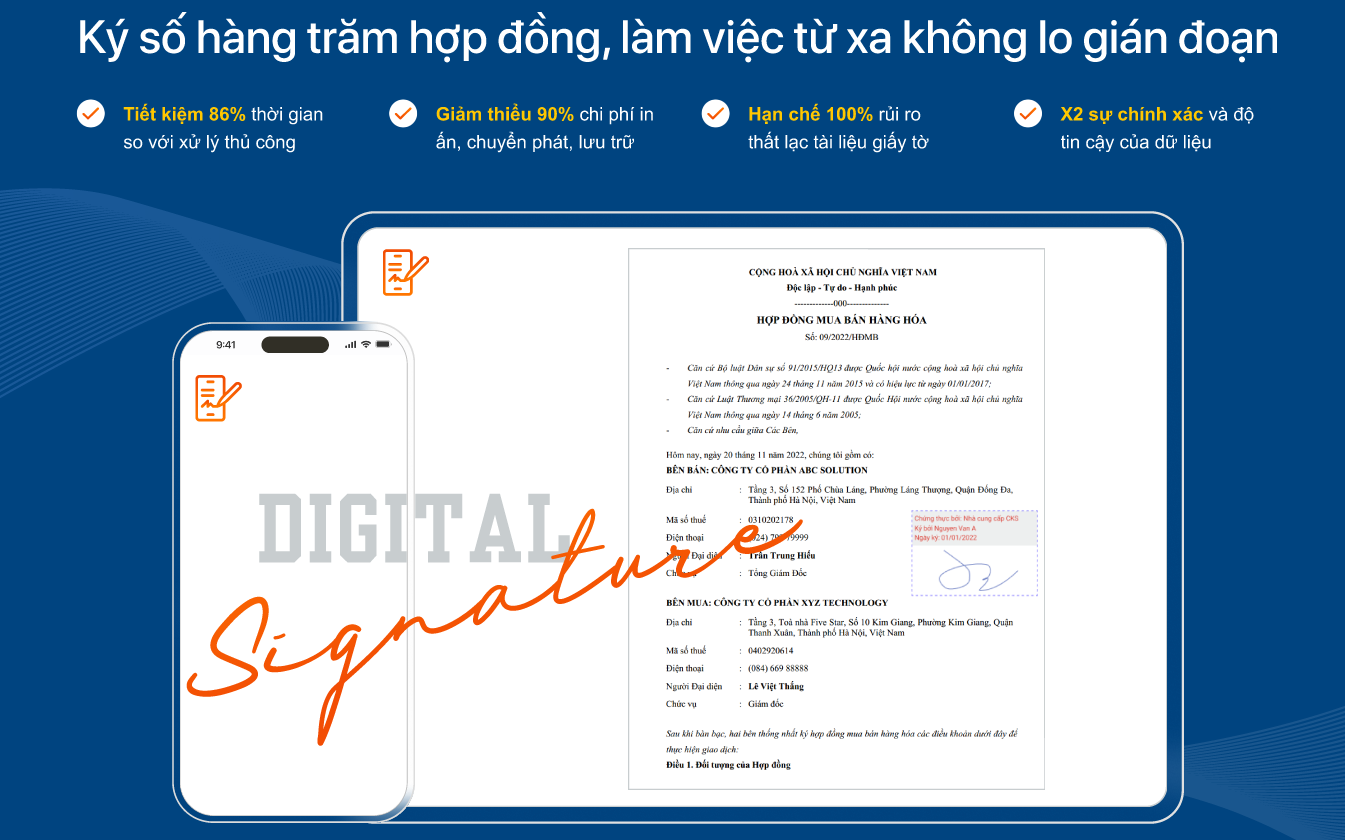
This feature will help businesses eliminate printing, shipping, and storing paper documents, as well as bridge the gaps of space and time in remote management. It supports businesses in realizing the dream of a “paperless office,” ensuring speed, flexibility, and continuity across all aspects, from administration, finance, and sales to human resources.
→ REGISTER FOR A FREE 1SIGN DIGITAL SIGNATURE CONSULTATION ←
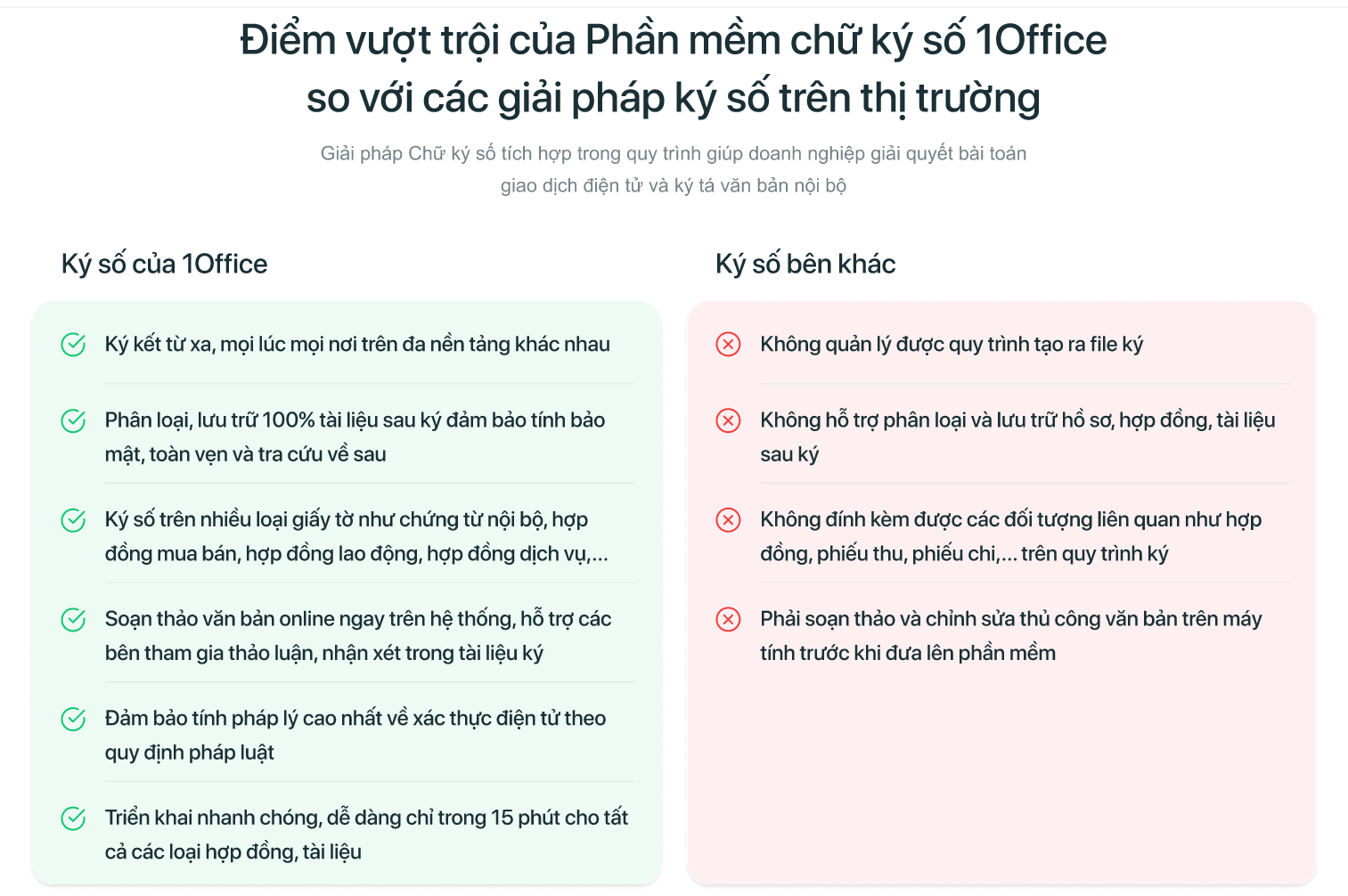
Current standalone software of this kind only meets the needs of commercial transactions and government procedural documents, failing to handle internal vouchers due to a lack of integration with business operations. In contrast, 1SIGN is considered a major step forward compared to individual digital signing applications on the market today, thanks to its advantages:
- SIGN ON ANY WORKFLOW: Integrating digital signatures into workflows helps businesses form a comprehensive management ecosystem, meeting all work-from-home needs. The signing process, involving collaboration between departments, helps resolve internal operations quickly, ensuring smooth and continuous operations and boosting business efficiency.
- SIGN ON ANY DOCUMENT: Businesses can use it for a variety of documents, such as internal memos, labor contracts, and commercial agreements. The approval and signing of documents within operational workflows can be done quickly and conveniently while ensuring legality and security; it’s easy to track, manage, and store without direct physical contact.
- CENTRALIZED STORAGE AND MANAGEMENT: The software helps businesses store all documents and records on a cloud platform, minimizing the risk of scattered documents and ensuring absolute information security. Additionally, documents are linked to specific related parties, making management and searching easy by time, department, or operation. At the same time, businesses can conveniently extract documents.
- SIGN MULTIPLE DOCUMENTS SIMULTANEOUSLY: The software allows signing up to hundreds of documents at once. This is an extremely practical feature that helps leaders resolve internal operations quickly, in just 1/10th of the time required for manual processing. This allows leaders to focus on more important business strategies.
Cost of Using 1Sign Digital Signature
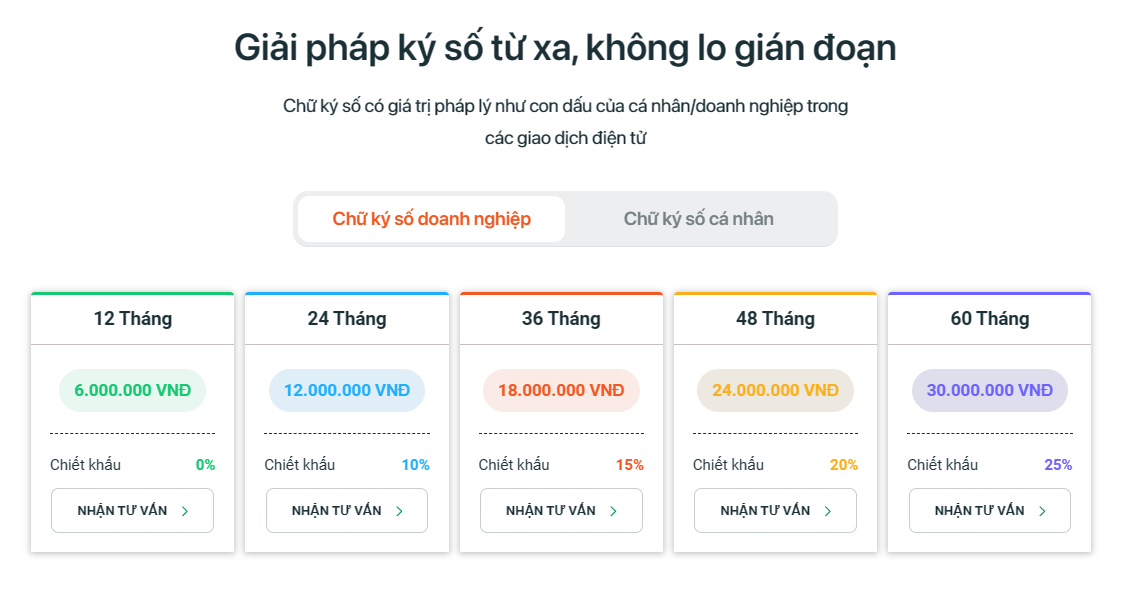
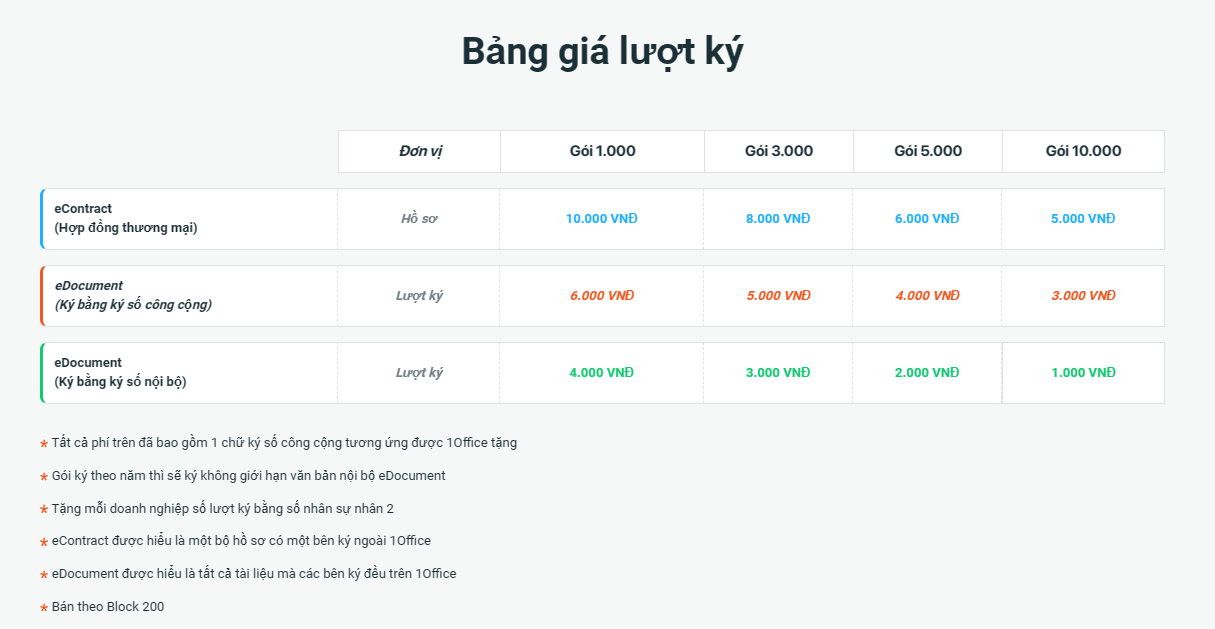
In today’s market, competition among digital signature service providers brings significant benefits to consumers through a wide variety of choices and competitive pricing. One of the standout options is the 1Sign 1Office digital signature service, which has built trust with over 6,000 businesses and serves millions of individual customers.
Below is the price list for the digital signature service from 1Sign 1Office that you can consider, with a commitment to safety, efficiency, and optimization in meeting your business’s electronic document signing needs:
→ REGISTER FOR A FREE 1SIGN DIGITAL SIGNATURE CONSULTATION ←

















