


 11/05/2026
  271 views
What is Pomodoro? This is not just a time management technique but also a method that helps millions of people worldwide work with greater focus, reduce stress, and optimize performance. With the simple principle of working in 25-minute high-focus intervals followed by short breaks to maintain energy, Pomodoro has become a powerful tool for office workers, managers, and freelancers. But is this method truly suitable for everyone? How can it be applied to achieve the highest effectiveness? In this article, we will delve into the principles, benefits, and scientific ways to use Pomodoro to enhance work productivity.
Mục lục
- 1. What is the Pomodoro Technique?
- 2. What are the benefits of the Pomodoro Technique?
- 3. Who should use the Pomodoro Technique?
- 4. What are the steps to implement the Pomodoro Technique?
- How to implement the Pomodoro Technique
- Step 1: Identify the task to be done
- Step 2: Set the Pomodoro timer (usually 25 minutes)
- Step 3: Work with focus until the timer rings
- Step 4: Take a short 5-minute break
- Step 5: Repeat the Pomodoro cycle
- Step 6: Take a long break of 15-30 minutes after every 4 Pomodoros
- Tips for optimizing the Pomodoro Technique
- 5. What are the principles to follow when applying the Pomodoro Technique?
- 6. What are the common challenges when applying the Pomodoro Technique?
- Difficulty maintaining focus for 25 minutes
- Getting interrupted during work
- Feeling pressured by the fixed time intervals
- Not used to short breaks, easily skipping them
- Unable to complete a task in one Pomodoro
- Feeling that Pomodoro is not suitable for certain types of work
- Lack of motivation to maintain Pomodoro long-term
- 7. Tools to Help Apply the Pomodoro Technique
- 8. What is the difference between the Pomodoro Technique and other time management methods
- 9. How to Apply the Pomodoro Technique for Team Management in a Business?
- 10. Conclusion
1. What is the Pomodoro Technique?

The Pomodoro Technique is a time management method developed by Francesco Cirillo in the late 1980s. It is a method that helps individuals optimize focus and work performance by dividing time into short work intervals, typically 25 minutes, interspersed with short 5-minute breaks to maintain productivity without burnout.
The name “Pomodoro” comes from the Italian word for tomato. The name originated from the tomato-shaped kitchen timer Cirillo used as a university student to improve his concentration. During his studies, he realized that by dividing work into fixed time intervals and setting limits for each work session, his performance and focus improved significantly.
Initially, this method was primarily used for studying, but due to its high applicability, it quickly became popular in many fields such as office work, programming, content creation, and project management. Today, Pomodoro is considered one of the most effective time management techniques, helping millions of people worldwide enhance their work productivity and improve their concentration.
2. What are the benefits of the Pomodoro Technique?
Enhances focus and eliminates distractions
Pomodoro helps you work with high concentration by dividing tasks into fixed time intervals.
Knowing you only need to focus for 25 minutes before a break makes you more likely to work efficiently, avoiding distractions from social media, emails, or phone notifications. This is especially useful for office workers, students, and creative professionals.
Reduces stress and prevents burnout
Working continuously for long periods can easily overload the brain, leading to stress and burnout. Pomodoro helps balance work and rest time, keeping your mind sharp. The short breaks after each work session help the brain recover, preventing fatigue and increasing the ability to maintain performance throughout the day.
Improves work productivity
Breaking down work into Pomodoro sessions helps you focus on completing each part instead of feeling overwhelmed by a large workload. When work is done in small steps, you feel more in control, which boosts motivation and reduces procrastination.
Enhances time management skills
Pomodoro helps you better understand how you use your time. By tracking the number of Pomodoros needed to complete a task, you can evaluate and adjust your work plan more effectively. This helps in managing work scientifically, especially suitable for those with multiple tasks in a day.
Increases discipline and effective work habits
Adhering to Pomodoro cycles creates a disciplined work habit. When your brain gets used to this work rhythm, you will find it easier to maintain focus and achieve a state of high performance naturally. Gradually, Pomodoro helps you form a sustainable working method, avoiding distractions and wasted time.
With these benefits, Pomodoro not only helps improve work efficiency but also supports you in maintaining a more balanced and scientific work lifestyle.
3. Who should use the Pomodoro Technique?
The Pomodoro Technique is suitable for various groups of people, especially those who need to optimize their work time, maintain focus, and enhance performance. Below are the groups of people who should apply Pomodoro to improve their work and studies.
Managers and leaders
Those in management roles often have busy schedules and must handle multiple tasks simultaneously. Pomodoro helps them optimize their time, focusing on each important task without getting drawn into unnecessary work.
Office workers
People working in an office environment often face a series of tasks such as writing reports, handling emails, attending meetings, and completing projects. Pomodoro helps them manage their work more effectively by breaking down each task, avoiding procrastination, and minimizing stress when dealing with a large workload.
Students and learners
Pomodoro is an ideal method for students, especially when studying, doing homework, or preparing for exams. Studying in Pomodoro sessions helps students maintain focus without feeling overwhelmed, while also improving memory retention thanks to the well-timed breaks.
Freelancers and remote workers
For freelancers, managing time and maintaining work discipline is a major challenge. Pomodoro helps them organize their work better, complete projects on time without losing motivation or procrastinating.
Creative professionals
Designers, writers, editors, or anyone in a creative field can benefit from Pomodoro. Working in short sessions helps stimulate creativity, while breaks give the brain time to relax and generate new ideas.
Programmers and software engineers
Programming is a job that requires high concentration for long periods. Pomodoro helps programmers work with source code more effectively, while avoiding fatigue when dealing with complex problems. Alternating between work sessions and short breaks helps maintain logical and creative thinking abilities.
4. What are the steps to implement the Pomodoro Technique?
How to implement the Pomodoro Technique
The Pomodoro Technique is designed to be simple yet highly effective if implemented correctly. Below are the specific steps to apply Pomodoro to your work and studies.
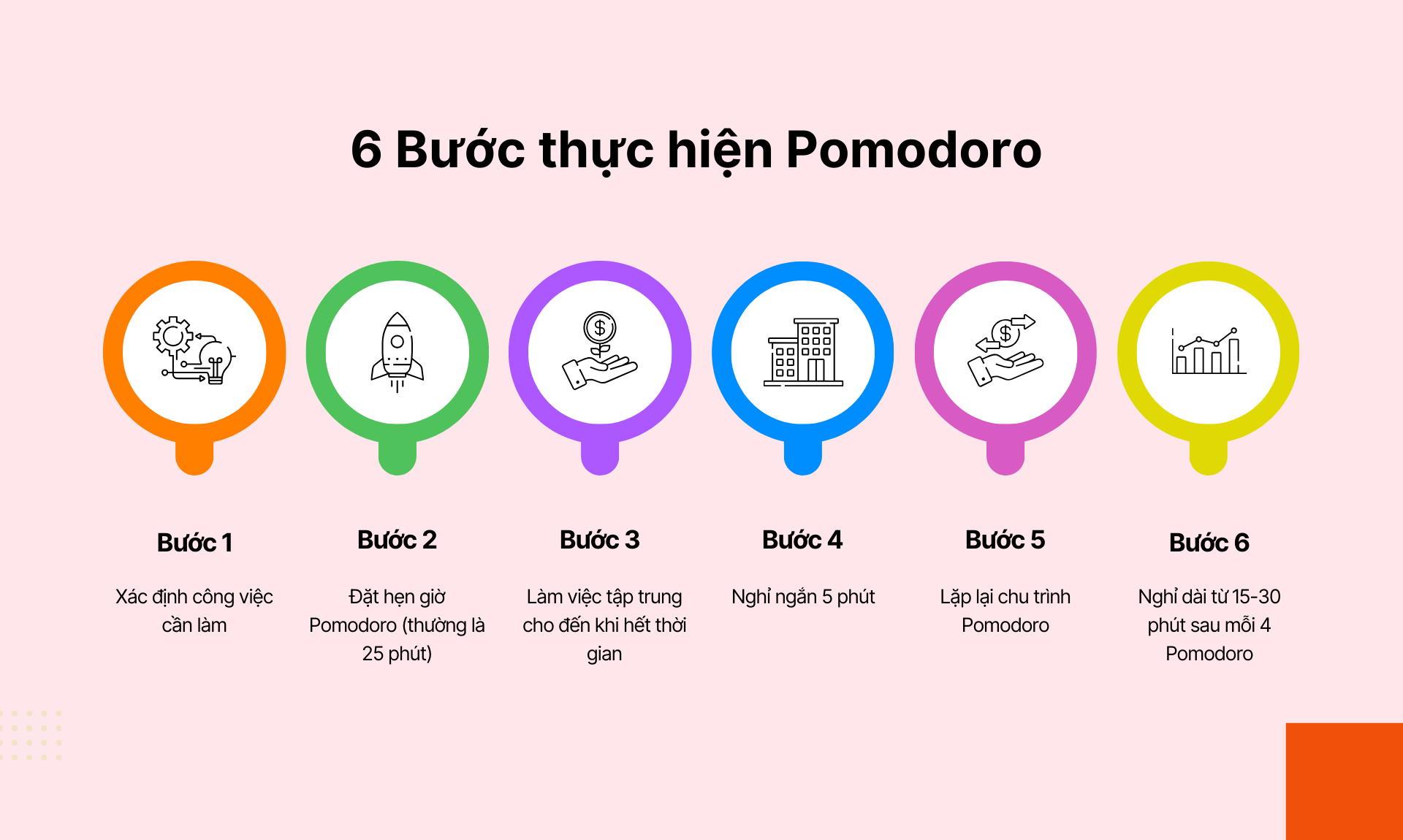
Step 1: Identify the task to be done
Before you begin, choose a specific task you want to complete. It could be writing a report, programming, studying, or handling emails. Clearly defining the task will help you focus better throughout the work process.
Step 2: Set the Pomodoro timer (usually 25 minutes)
Use a timer or a Pomodoro app to set a 25-minute work session. During this time, you need to focus completely on the task, avoiding all distractions from your phone, social media, or email.
Step 3: Work with focus until the timer rings
Start working with 100% focus. If any interruptions occur, note them down to handle later. Try not to stop in the middle to ensure you achieve the highest productivity in each Pomodoro session.
Step 4: Take a short 5-minute break
When the timer goes off, you will have a 5-minute break. This is the time to relax, walk around, drink water, or simply look away from the computer screen to reduce stress.
Step 5: Repeat the Pomodoro cycle
After the break, continue working with a new Pomodoro session. Repeat this process 4 times, meaning you complete 4 consecutive work sessions.
Step 6: Take a long break of 15-30 minutes after every 4 Pomodoros
After completing 4 Pomodoro sessions (equivalent to about 2 hours of work), take 15-30 minutes for a longer rest. You can go for a walk, listen to music, or do something relaxing before starting the next Pomodoro cycle.
Tips for optimizing the Pomodoro Technique
✔ Choose a quiet workspace to minimize distractions.
✔ Note down interruptions and handle them during the long break.
✔ Customize the Pomodoro duration if needed – 25 minutes is the standard, but you can adjust it flexibly based on the task’s complexity.
✔ Use a Pomodoro support app like 1Office to track your work performance.
5. What are the principles to follow when applying the Pomodoro Technique?

A Pomodoro is indivisible
A Pomodoro session (usually 25 minutes) is considered a complete unit of work. If you are interrupted mid-session, that session does not count and must be restarted from the beginning. This helps you build discipline and create an effective work cycle.
Focus on only one task during each Pomodoro
Throughout the 25-minute Pomodoro, you should only focus on one specific task. Do not multitask, check emails, or browse social media. This helps deepen your concentration and enhance work productivity.
Record interruptions to handle later
If a new idea or another task comes to mind while you are working, do not switch to it immediately. Note it down and continue with the current Pomodoro session. You can then handle that task during a break or in another Pomodoro.
Do not skip the breaks between Pomodoros
Many people tend to skip the 5-minute break after each Pomodoro because they want to finish their work faster. However, short breaks are a crucial part of helping the brain relax and prepare for the next work session. Skipping breaks can lead to fatigue and reduced performance.
Adjust the Pomodoro time to suit yourself
Although 25 minutes is the standard time, you can adjust it flexibly depending on the complexity of the work and your ability to concentrate. Some complex tasks may require longer Pomodoros (40-50 minutes), while lighter tasks may only need 15-20 minutes.
Take a long break after every 4 Pomodoros
After completing 4 consecutive Pomodoro sessions, you need to take a 15-30 minute break to fully recover. This is the time that helps the brain “recharge,” improve memory, and maintain long-term work performance.
6. What are the common challenges when applying the Pomodoro Technique?
Difficulty maintaining focus for 25 minutes
Problem: Some people find it difficult to concentrate for a full 25 minutes, especially when they are not used to this method or work in a distracting environment.
Solution:
- Start with shorter intervals (10-15 minutes) and gradually increase to 25 minutes as you get used to it.
- Create a quiet work environment by turning off phone notifications, staying away from social media, and using noise-canceling headphones.
- Use Pomodoro support apps like 1Office, Forest, Pomodone, or Focus To-Do for reminders and motivation.
Getting interrupted during work
Problem: Phone calls, emails, messages, or unexpected tasks interrupt the Pomodoro, reducing the method’s effectiveness.
Solution:
- Inform colleagues or family members about your Pomodoro schedule to avoid being disturbed.
- Jot down distractions instead of dealing with them immediately, then handle them during a break or another Pomodoro.
- Use the “Protect the Pomodoro” technique, which means committing to completing a full Pomodoro session without interruption before doing anything else.
Feeling pressured by the fixed time intervals
Problem: Some people feel constrained by strictly adhering to the 25-minute work, 5-minute break cycle, especially when tasks cannot be clearly broken down.
Solution:
- Flexibly adjust the Pomodoro time: You can extend a Pomodoro to 40-50 minutes if the task requires continuous focus, but you still need to adhere to the principle of taking breaks.
- Don’t apply the Pomodoro Technique to every task; use it only for tasks that require high concentration, such as writing reports, programming, or studying.
Not used to short breaks, easily skipping them
Problem: Some people tend to work continuously without taking a break after each Pomodoro, leading to fatigue and loss of productivity.
Solution:
- Use a timer with break reminders to ensure you follow the process correctly.
- Use break time effectively, such as walking around, stretching, or drinking water, instead of scrolling on your phone or doing other work.
- View breaks as an essential part of the process that helps you recharge, rather than as an interruption.
Unable to complete a task in one Pomodoro
Problem: Some complex tasks cannot be completed in 25 minutes, leading to a feeling of incompletion and affecting morale.
Solution:
- Break down the task into smaller parts, each fitting into one Pomodoro session. For example, if you are writing a report, break it down into: researching materials, creating an outline, drafting the main content, and editing.
- String together multiple Pomodoros for larger tasks, ensuring each session has a clear objective.
- Use the “Buffer Pomodoro” method (a spare Pomodoro) for tasks that cannot be broken down, to allow enough time for full completion.
Feeling that Pomodoro is not suitable for certain types of work
Problem: Some tasks that require creativity, brainstorming, or teamwork are not easily divided into fixed 25-minute intervals.
Solution:
- Flexibly adjust the Pomodoro time: You can try longer Pomodoros (40-50 minutes) or combine it with other methods like Time Blocking.
- Use Pomodoro for time tracking instead of being rigid: If you are writing or designing, use Pomodoro to measure time rather than imposing a fixed cycle.
- Combine Pomodoro with other methods: For example, use Pomodoro for individual tasks and use Kanban or GTD (Getting Things Done) to manage larger projects.
Lack of motivation to maintain Pomodoro long-term
Problem: Initially, many people are enthusiastic about Pomodoro, but after a while, they forget to apply it or feel discouraged.
Solution:
- Track your progress and work results by recording the number of Pomodoros completed each day.
- Make Pomodoro a fixed habit, integrating it into your daily work schedule.
- Create a Pomodoro challenge for a week or a month to maintain motivation.
- Use Pomodoro apps with gamification features, like Forest (where you grow a tree by completing a Pomodoro), to create a sense of accomplishment.
7. Tools to Help Apply the Pomodoro Technique
Register for a free feature demo!
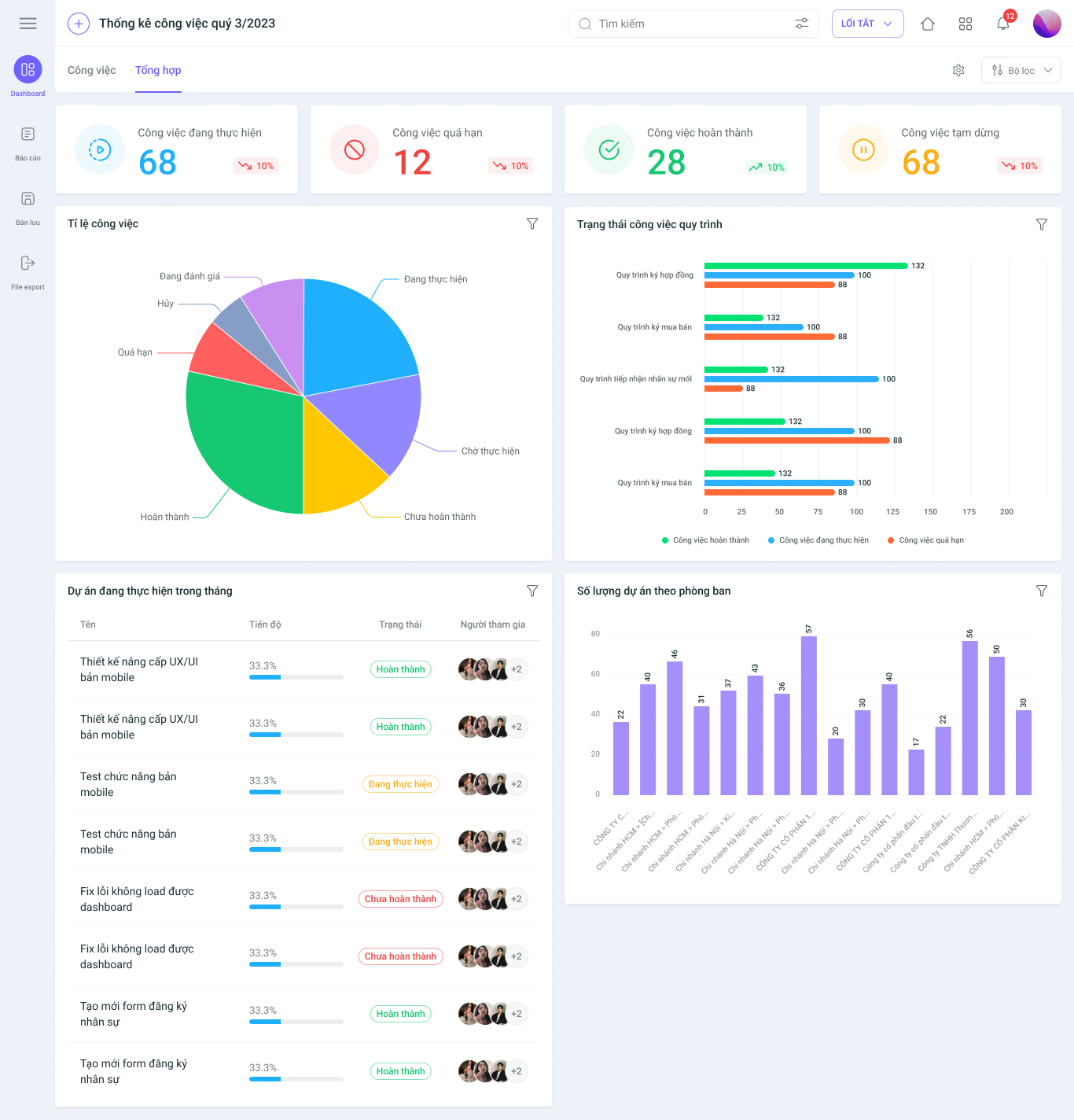
1Office with the 1Work work management feature
1Office is a comprehensive business management platform, where the 1Work feature helps manage work scientifically and effectively, especially suitable for businesses and teams applying the Pomodoro Technique. Some outstanding features of 1Work include:
- Planning and assigning tasks: Allows for visual task assignment, ensuring work is completed on schedule.
- Tracking work progress: Displays real-time work status, helping managers easily monitor progress.
- Automatic reminders and reports: Supports notifications for important deadlines, helping to avoid missed tasks.
- Supports remote work: Access and manage work anytime, anywhere via an internet-connected device.
- Flexible permissions: Helps businesses organize work effectively with access rights based on each employee’s role.
With 1Office – 1Work, the Pomodoro Technique can be integrated into team workflows, helping businesses enhance productivity and minimize work interruptions.
Tomato Timer
Tomato Timer is an online Pomodoro tool that operates simply with a minimalist interface. You just need to:
- Visit the website and press the “Start” button to begin a 25-minute Pomodoro session.
- When the time is up, press Alt + S to start a 5-minute break.
- No account registration required; use it directly in your browser.
Focus To-Do
This is an application that combines a Pomodoro Timer with a To-Do List, helping you manage tasks effectively. Some notable features include:
- Create a to-do list and set a Pomodoro timer for each task.
- Automatically compiles statistics and reports on work performance.
- Syncs data across multiple devices (PC, phone).
Tomighty
Tomighty is a Pomodoro software for computers, allowing you to set a work timer directly on your desktop without opening a browser. The application has a simple, easy-to-use interface and supports notifications when it’s time for a break.
Pomodorable
Pomodorable combines the Pomodoro Technique with a to-do list, helping you track tasks and evaluate your work completion level. This application is suitable for those who want to improve their personal task management using the Pomodoro Technique.
In summary
- If you need in-depth work management, choose 1Office – 1Work.
- If you want to use it directly in your browser, Tomato Timer and Marinara Timer are good choices.
- If you want to combine the Pomodoro Technique with a To-Do List, try Focus To-Do or Pomodorable.
- If you prefer a desktop application, Tomighty is a better fit.
- If you need to customize your Pomodoro sessions, Focus Timer is a flexible option.
8. What is the difference between the Pomodoro Technique and other time management methods
| Pomodoro | Time Blocking | Getting Things Done (GTD) | Eat That Frog | The Eisenhower Matrix | |
| How it works | Divides work time into short sessions (25 minutes of work, 5 minutes of rest). | Plans the day in fixed time blocks. | Captures all tasks, organizes them by priority, and executes them step-by-step. | Starts the workday with the most important task (the “frog”). | Categorizes tasks by urgency and importance. |
| Pros | – Enhances focus and reduces distractions.
– Helps prevent burnout. – Easy to apply, no complex tools needed. |
– Provides a specific plan for each working hour.
– Limits distractions with a clear schedule. |
– Comprehensive task management.
– Suitable for people with a large workload. |
– Helps tackle the most important tasks first.
– Increases motivation. |
– Helps clearly identify priority tasks.
– Reduces time wasted on unimportant things. |
| Cons | – Not suitable for creative work that requires a continuous flow of thought.
– Can be stressful if a task isn’t completed within one Pomodoro session. |
– Inflexible, difficult to apply to highly dynamic work.
– Requires detailed upfront planning. |
– Requires significant time for task organization.
– Easy to get overwhelmed if not implemented correctly. |
– Not suitable for work with many small tasks.
– Not optimized for long-term time management. |
– Doesn’t help with task completion, only with prioritization. |
| Best for | Office workers, programmers, students, and freelancers who need to enhance their focus. | People with fixed schedules like project managers and CEOs. | Anyone with many tasks requiring tight management, such as directors and senior managers. | People who tend to procrastinate or easily lose motivation. | Busy people who need to prioritize tasks quickly. |
>>>> Read more: 5 Effective Time Management Methods Businesses Shouldn’t Overlook
9. How to Apply the Pomodoro Technique for Team Management in a Business?
For the Pomodoro Technique to be truly effective in a corporate environment, it needs to be applied flexibly and scientifically. Here are the optimal steps for effective implementation:
Establish an Uninterrupted Work Environment
- Define a common focus time frame for the team.
- Use the “Do Not Disturb” status on internal communication platforms (Slack, Teams).
- Schedule meetings during long breaks to avoid interrupting Pomodoro sessions.
Define Specific Tasks for Each Pomodoro
- Plan at least 4-6 Pomodoros per day with clear tasks.
- Apply the “One Pomodoro – One Task” rule, avoiding multitasking.
- Use management tools like 1Office – 1Work, Trello, or Asana to track progress.
Synchronize Pomodoros in Teamwork
- Agree on a synchronized Pomodoro schedule within the team to avoid interrupting each other.
- Set specific times for discussion, responding only after a Pomodoro session ends.
- Use Pomodoros to time-box team meetings, making them more efficient.
Combine Pomodoro with Task Management Tools
- Use 1Office – 1Work, Trello, or ClickUp to track the number of completed Pomodoros.
- Evaluate progress using a Burn-down chart to monitor work performance.
Flexibly Adjust Pomodoros Based on the Task
- Creative/programming tasks: Use 50 minutes of work – 10 minutes of break.
- Simple tasks: Use 15-20 minutes of work – 5 minutes of break.
- Adjust Pomodoro timing according to the specific nature of the work to optimize performance.
Evaluate Effectiveness and Continuously Improve
- Hold weekly team meetings to assess the effectiveness of the Pomodoro Technique.
- Adjust Pomodoro timing based on employee feedback.
- Track the number of completed Pomodoros to improve work planning.
10. Conclusion
Hopefully, through this article, you now know “what Pomodoro is.” The Pomodoro Technique is a simple yet effective time management method that helps enhance focus, boost productivity, and reduce stress. Breaking down work into short sessions interspersed with breaks helps optimize work efficiency without causing burnout.
When applied correctly, Pomodoro is not only suitable for individuals but can also enhance team performance, limit interruptions, and improve task management. However, it needs to be adjusted flexibly depending on the type of work and work habits to achieve optimal results.
Maintaining the Pomodoro Technique as a habit can help you manage your time more scientifically, complete tasks faster, and create a balance between productivity and mental well-being.
















