


 09/05/2026
  14826 views
When a business has multiple branches, shift workers, field staff, or remote employees, manual timekeeping can easily lead to data inaccuracies and time-consuming month-end consolidation. A mobile timekeeping app allows employees to check in flexibly using GPS, QR codes, or facial recognition, while also helping managers track time, shifts, and payroll more transparently. The article below compiles the top mobile timekeeping apps for businesses to consider when choosing a suitable solution.
Mục lục
- 1. Why should businesses use a mobile timekeeping app?
- 2. TOP 8+ Best Mobile Timekeeping Apps for Businesses
- 3. Guide to Using a Mobile Time Clock App for F&B Chains
- 4. Can a Mobile Time Clock App Be Used for Companies with Remote Employees?
- 5. Frequently Asked Questions about Mobile Time Clock Apps (FAQs)
- 6. Conclusion
1. Why should businesses use a mobile timekeeping app?
Using a mobile timekeeping application is an essential digital transformation solution that helps eliminate spatial and temporal barriers, while standardizing HR data transparently, accurately, and instantly.
A mobile timekeeping app is an application installed on a smartphone that makes employee time tracking simpler and more convenient. A mobile timekeeping app typically provides features that allow employees to clock in using various methods such as QR code scanning, facial recognition, card swiping, or GPS check-in. Additionally, the app also offers other features like work schedule management, payroll calculation, report consolidation, and HR management.
Using a mobile timekeeping app makes time and attendance management much more professional and optimized compared to traditional methods, specifically:
- Time-saving: Employees can clock in and register for work directly on their mobile phones without having to go to the office or a designated time clock area.
- Convenient: A mobile timekeeping app helps employees clock in anytime, anywhere without worrying about distance or time. This allows personnel in specific job roles that require frequent travel to clock in flexibly without having to be physically present at the company.
- High accuracy: Mobile timekeeping apps are integrated with features like facial recognition, voice recognition, fingerprints, etc., ensuring high accuracy in the timekeeping process. This minimizes errors and prevents issues related to discrepancies in employees’ workdays.
- Easy management: Managers can easily monitor and create various types of timesheets and control employee work schedules through the mobile timekeeping app, thereby managing productivity and evaluating employee attendance more effectively.
- Increased transparency: A mobile timekeeping app enhances transparency in the timekeeping process, allowing both managers and employees to track their working hours and ensuring fairness in the month-end consolidation of workdays.
>> Read more:
2. TOP 8+ Best Mobile Timekeeping Apps for Businesses
2.1. 1Office Mobile Timekeeping and Payroll App
1Office provides a comprehensive and flexible timekeeping and payroll solution to handle any company’s time and compensation policies. 1Office is confident in delivering the most superior time and attendance management system with outstanding features:
- Offers multiple timekeeping methods for businesses to choose from, such as GPS on the Mobile App based on pre-defined locations, or connections with AI Cameras, magnetic cards, etc.
- Timekeeping data is pushed directly to the app in real-time, helping to monitor employee check-in and check-out times throughout the workday.
- Employees can easily and proactively track their attendance status and register for shifts conveniently on their phones or computers.
- Timekeeping data is synchronized with the payroll management module to automatically calculate employee payslips.
- Additionally, 1Office provides a comprehensive digital HR management solution, including features for leave management, work schedule management, employee profile management, training, employee evaluation, and statistical reporting on employee work performance.
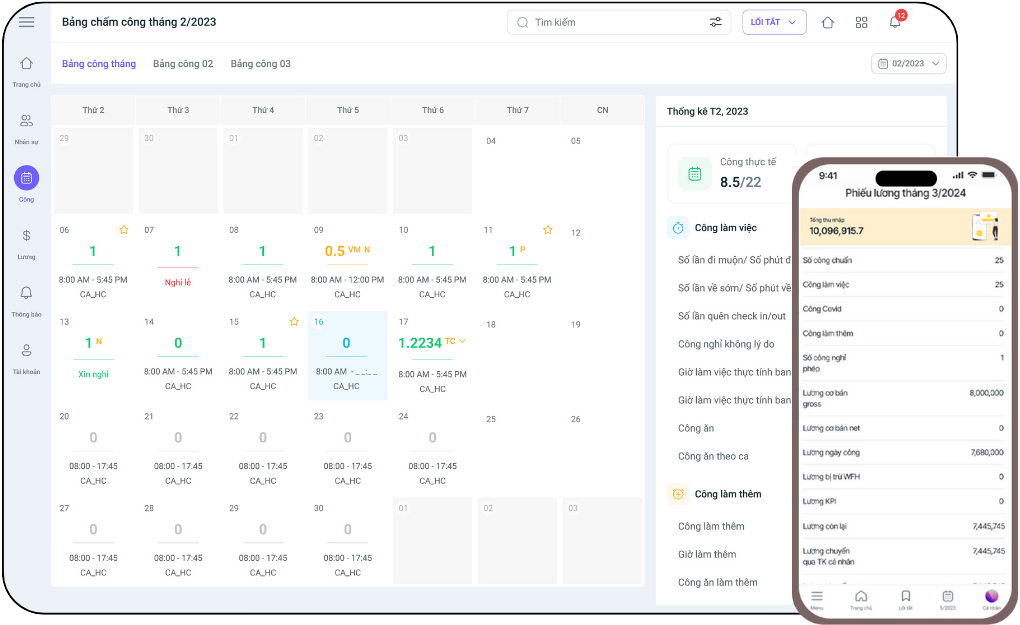
Get a free consultation and demo of the 1Office timekeeping app
If you are looking for a mobile timekeeping app that is both easy to use and powerful enough to keep up with the pace of modern business operations, then 1Office is a worthy consideration. More than just a timekeeping tool, 1Office is an integrated management platform where data is processed by AI in real-time: automatically reconciling time, shifts, and payroll; detecting discrepancies; alerting to anomalies; and synchronizing with the payroll, KPI, and HR profile systems. Everything can be done right on your phone – fast, accurate, and transparent down to the minute.
Read more: Top 33 reputable timekeeping and payroll software in Vietnam 2026
2.2. Happy Time Online Timekeeping App
Happy Time is a mobile timekeeping app that helps businesses manage and optimize the storage of employee workday data.
Key Features
- Automates and streamlines timekeeping and data consolidation processes.
- Allows data integration with other types of timekeeping support devices.
- Ensures that information is always updated accurately and promptly.
- Delivers a “happy” user experience by integrating a Gamification system, motivating staff through an “on-time clock-in” game.
- Supports internal communication efforts, allowing employees to stay updated with all information on the app.
- The HappyHealth feature takes care of the well-being and mental health of employees.
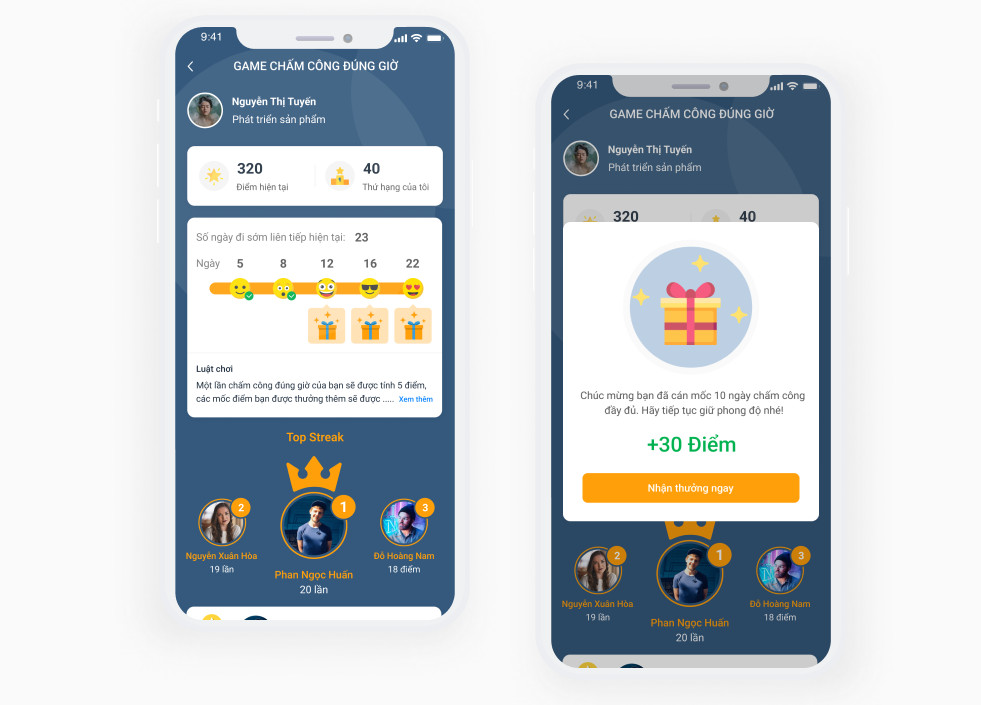
| Pros | Cons |
|
|
>> Read more: TOP 12 Free and Leading Employee KPI Evaluation Software Today
2.3. HRM PRO Mobile Timekeeping Management App
The HRM Pro mobile timekeeping app is one of the most popular smart HR management and timekeeping solutions in Vietnam.
Key Features
- Diverse Timekeeping Methods: HRM Pro allows timekeeping through various methods such as QR code scanning, facial recognition, card swiping, fingerprint scanning, and GPS check-in.
- Work Schedule Management: HRM Pro enables management of work schedules, shifts, and tracking of employee work hours.
- Automated Payroll Calculation: HRM Pro calculates employee salaries based on timekeeping data and other relevant information.
- HR Management: HRM Pro provides features for managing employee information, employee records, and leave requests.
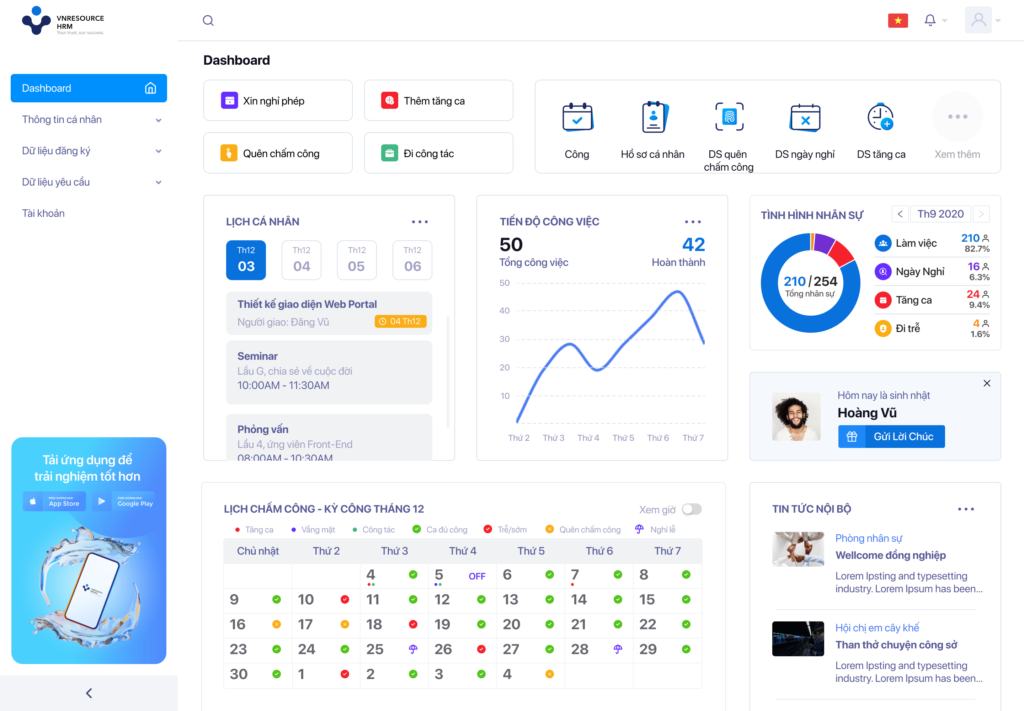
| Pros | Cons |
|
|
2.4. MOOLA PRO Mobile Timekeeping App
Moola is a business management app developed by US experts. Its online timekeeping feature for mobile, part of the human resources and payroll management system, is considered a fairly comprehensive solution.
Key Features
- Smart timekeeping using AI facial recognition technology for fast, accurate, and easy clock-ins.
- Employees can easily track their work hours on their phones or request paid leave, compensatory time off, etc.
- Additionally, Moola allows for the compilation of reports on payroll and detailed timesheets for each employee.
| Pros | Cons |
|
|
2.5. Sổ Chấm Công: Free Mobile Timekeeping App
Sổ Chấm Công is a powerful support application for businesses. This timekeeping and payroll app helps record hours worked at locations like offices and construction sites, providing managers with complete and fast report data.
Key Features
- Automatic Timekeeping: The Sổ Chấm Công app allows for automatic timekeeping via devices such as computers, mobile phones, or wearables.
- Employee Management: The Sổ Chấm Công app provides employee management tools such as creating and managing employee profiles, viewing payroll, and checking the current status of employees.
- Fingerprint or Face Authentication: The modern Sổ Chấm Công app supports fingerprint or face authentication to ensure accuracy and security in timekeeping.
- Work Schedule Management: The Sổ Chấm Công app allows for managing employee work schedules, including defining shifts, working hours, and days off.
- HR Request Approval: The Sổ Chấm Công app allows for approving employee requests for leave, late arrivals, and early departures.
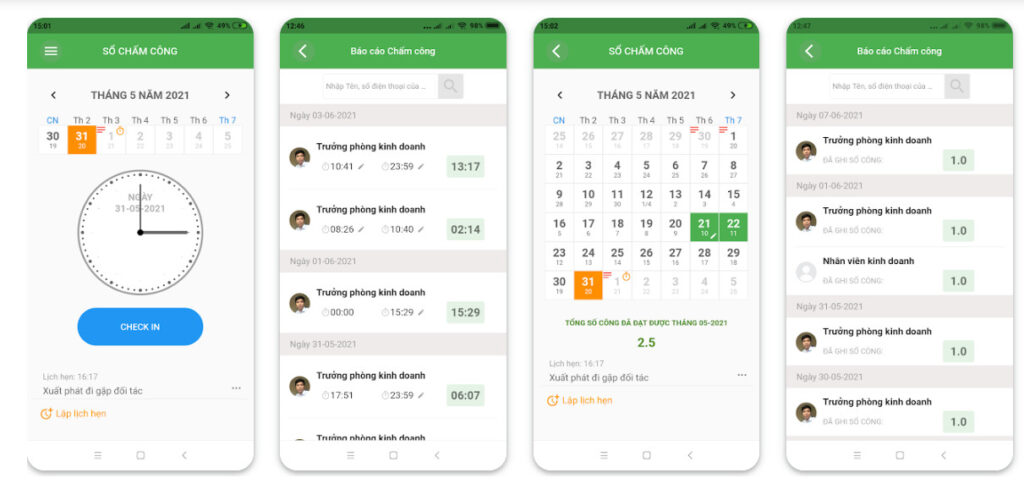
| Advantages | Disadvantages |
|
|
2.6. Tanca Mobile Timekeeping App
Tanca is a popular human resource management support application, serving over 57,000 businesses globally across 30 different business sectors.
Key Features
- Easy employee timekeeping management: The app allows managers to easily confirm, view, and edit employee timekeeping information.
- Fast data synchronization: The app allows direct synchronization of timekeeping data with the time clock, saving time and ensuring data accuracy.
- Payroll and overtime support: The app calculates payroll and overtime for employees based on hours worked, ensuring accuracy and transparency in payroll calculations.
| Pros | Cons |
|
|
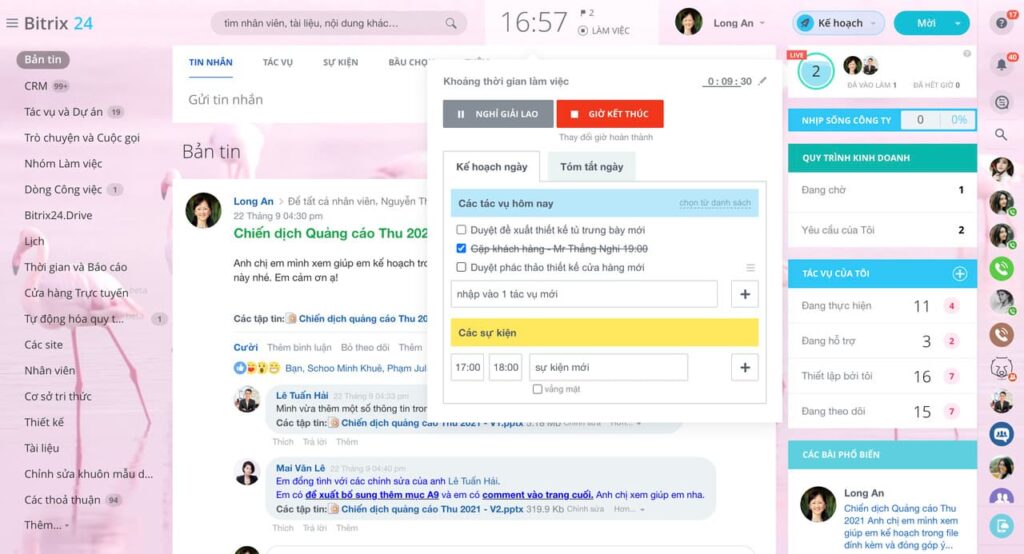
2.7. Bitrix Mobile Timekeeping App
Bitrix is an app available in both cloud and on-premise versions, making it easier for users to manage and operate their businesses.
Key Features
- Manage employee timekeeping and leave data
- Track employee work time and working hours
- Create flexible work schedules for employees
- Manage employee training and development
- Provide reports and analysis of timekeeping data to help managers better understand employee activities.
| Advantages | Disadvantages |
|
|
3. Guide to Using a Mobile Time Clock App for F&B Chains
In the F&B industry, where staff often work in shifts and rotate flexibly between branches, accurate and transparent timekeeping is crucial for stable operations. Below is a detailed guide on how to set up and use the 1Office mobile time clock app for chain businesses:
Step 1: Set Up Time Clock Points by Branch
- Add time clock locations: Go to the Time Clock module → Settings → List of time clock points.
- Add branches and GPS locations: For each store, you can set a permitted radius (from 50m–200m) so employees can only clock in when they are physically at the location.
- Assign time clock points by department or branch: This helps the system automatically recognize the correct work location for staff.
Step 2: Flexible Shift Assignment
- Create morning, afternoon, night shifts, etc., based on the actual needs of each store.
- Assign shifts to individual employees or groups weekly – the system will display the corresponding shift each day for employees to clock in on time.
Step 3: Employee Clock-in via Mobile Phone
- Open the 1Office app on your phone → select the “Time Clock” section.
- The system automatically uses GPS, displays the current shift → the employee takes a facial photo (if the photo capture feature is enabled).
- The system confirms success and saves the history in real-time.
Step 4: Management Tracking – Data Aggregation
- Store managers can track the daily/weekly/monthly timesheets of each employee.
- Timekeeping data is automatically sent to the central HR department → linking to the payroll on 1AI Salary without manual entry.
Key Benefits of Mobile Time Clock for the F&B Industry:
- No need for expensive, error-prone time clock machines.
- Employees on flexible shifts can still ensure punctuality.
- The system can control missed shifts, late arrivals, early departures, forgotten clock-ins, etc.
- Automatically connects timesheets to payroll, reducing errors for HR.
4. Can a Mobile Time Clock App Be Used for Companies with Remote Employees?
The answer is: Absolutely. In the context of increasingly popular hybrid or remote work, a mobile time clock app is the optimal solution for businesses to monitor working hours without violating employee privacy.
How to Apply Time Clock for Remote Employees:
1. Set up time clock points via personal Wi-Fi or registered GPS address
- Employees working from home can register a specific address → The system uses GPS within a permitted radius.
- Or use time clock via a verified internal Wi-Fi (helps prevent location spoofing).
2. Require a photo upon clock-in
- Combine GPS/Wi-Fi + a photo at the time of clock-in to ensure transparency.
- Photos are stored with each clock-in – managers can verify them at any time.
3. Assign tasks with deadlines – instead of monitoring desk time
- The 1Office system integrates with the Task module (1Work) → time clock + task assignment → easy management based on output.
4. Alert for no clock-in or unusual clock-in activity
- The system automatically detects employees who forget to clock in, clock in at the wrong time, or have a GPS discrepancy → sends a notification to HR.
Benefits of Using a Time Clock App for Remote Staff:
- Ensures flexibility – employees can work from anywhere.
- Transparency – reduces fraudulent time reporting.
- Systematizes data – automatically links to payroll and work performance.
- Improves employee experience – they don’t feel restrictively monitored.
5. Frequently Asked Questions about Mobile Time Clock Apps (FAQs)
How to prevent buddy punching or location spoofing?
Modern apps use Global Positioning System (GPS) technology combined with facial recognition (FaceID). The system only accepts a clock-in when the employee is within the permitted radius and the live photo matches their original profile.
Does the app work when the phone has no internet connection?
Yes. Most apps support offline data storage. The clock-in time will be recorded in the device’s memory and automatically synchronized with the management system as soon as the phone reconnects to the internet.
How do employees on business trips or working remotely clock in?
Managers can flexibly set up “dynamic clock-in points” based on actual coordinates or allow clocking in via GPS at any approved location, ensuring accurate timekeeping for mobile staff.
Can the data from the app be used directly for payroll calculation?
Yes. When using integrated platforms like 1Office, timekeeping data automatically flows into the payroll, cross-references with leave or overtime requests, and calculates the final salary without manual data entry.
Sign up for a free feature demo!
Does location tracking during clock-in violate privacy?
No. The app only records the location and image at the moment the employee actively confirms their clock-in. The system does not track personal journeys or locations outside of working hours, ensuring information security for the employee.
6. Conclusion
In this article, 1Office has introduced the most effective mobile time clock apps with detailed reviews. For a more detailed consultation on the market-leading HR management app, 1Office, you can contact us via:
- Hotline: 083 483 8888
- Fanpage 1Office: <a href="https
















