


 10/05/2026
  49987 views
A flowchart is a visual tool that helps businesses describe processes, identify bottlenecks, and standardize workflows between departments. But what is a flowchart, how do you draw one, and how can it be applied to be truly effective? This article will help you understand everything from the concept and creation steps to using a flowchart in a real business context.
Mục lục
- 1. What is a Flowchart?
- 2. Some Tips for Drawing an Effective Flowchart
- 3. Steps to Create a Flowchart (Process Flow Diagram) for a Business
- 4. Top 3 Free Flowchart Tools for Businesses
- 5. Some Widely Used Flowchart Templates in Businesses
- 6. Limitations of Using Manual Flowcharts
- 7. Benefits of Flowcharts in Business Management and Operations
- 8. Using Software as a Business Solution
1. What is a Flowchart?
Flowchart is a type of diagram that uses graphical symbols, including shapes and arrows, to describe the steps in a process or algorithm. It helps users understand and visualize a process or algorithm, thereby optimizing the process and increasing work efficiency.
In business, a flowchart is an effective support tool for presenting and describing processes, algorithms, or business-related activities. With a flowchart diagram, processes or actions can be presented in an easy-to-understand and visual way.

2. Some Tips for Drawing an Effective Flowchart
To draw an effective flowchart, you need to pay attention to the following tips:
- Clearly define the purpose of the flowchart: To help the reader understand the purpose of the flowchart, you need to clearly and detailedly describe the process or algorithm it depicts.
- Use standard symbols: The symbols in a flowchart should be used according to standards to help readers easily understand and apply it to their work.
- Arrange the steps logically: The steps in the flowchart need to be arranged in a logical order, from the first step to the last.
- Use colors and lines: Colors and lines in a flowchart can also help readers easily distinguish between different steps and better understand the process.
- Use groups and titles: To help readers better understand each part of the process, use groups and titles to categorize and label them.
Overall, managers can use flowcharts to manage processes, increase productivity, and reduce working time for their businesses. Using a process flowchart helps managers understand the steps in a process, identify potential problems, and improve the process quickly and effectively.
| >> Read more: Steps to Standardize Business Management Processes and the Most Professional Management Process Set of 2022 |
3. Steps to Create a Flowchart (Process Flow Diagram) for a Business
Planning the steps to create a business flowchart is crucial because it ensures the process is designed and implemented accurately and effectively. If a process does not function well or lacks a complete and clear description, it can lead to issues such as wasted time, costs, and resources, a lack of continuity and consistency, and can easily cause managers to lose control within the business.
3.1 Define and Standardize Symbols and Rules
Building a specific set of symbols and rules for each process helps managers within the business understand the diagrams you create. These symbols and rules are often standardized for use across all fields and different industries.
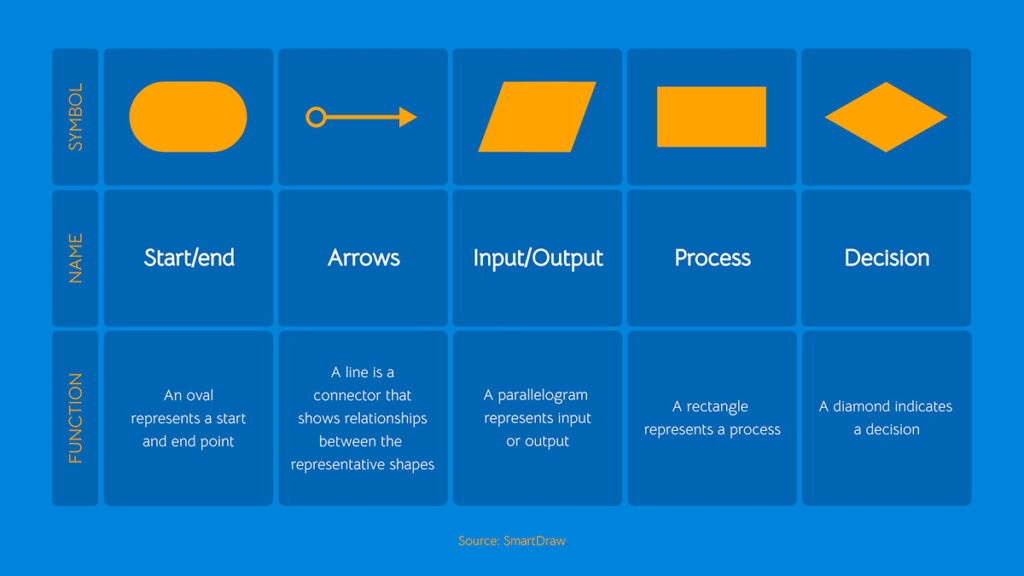
Basic shapes in a flowchart include:
- Circle: represents a termination node or the starting point of a cycle.
- Square: represents a process or a step in the process.
- Rectangle: represents a state or an action.
- Special shape: For example, an oval to represent an area containing detailed steps.
- Triangle: represents a decision or a condition.
- Box: represents a data storage area.
Symbols connecting the shapes:
- Arrow: indicates the direction of the process flow.
- Straight line: indicates the connection between shapes.
3.2 Analyze the Necessary Steps in the Process Flowchart
Managers need to analyze and identify the necessary steps in the business management process to ensure completeness and accuracy. This step includes identifying necessary activities, thought processes, and any steps required to complete a specific process and ensure it is optimized.
For example, a business’s risk management process will include basic steps such as: identifying risks, assessing and prioritizing risks, allocating resources and monitoring, and evaluating the process. These steps need to be performed in a logical and precise sequence to ensure effectiveness, so using a process flowchart can help make this process more concrete and straightforward.
3.3 Gather Necessary Information for the Process to Operate
After analyzing the necessary steps in the process, you need to gather relevant information to ensure your process operates effectively. Relevant information sources include documents, policies, regulations, existing company processes, past experiences, and information from stakeholders involved in the process. At the same time, identify the necessary resources to execute the process, system requirements, and conditions that must be met to ensure the process functions correctly.
3.4 Proceed to Draw the Flowchart
The steps to draw a flowchart include: choosing a drawing tool, creating a framework, adding symbols, designing the data flow, adding text, checking and correcting, and saving and sharing. Managers need to ensure the diagram is designed accurately and completely for use in their work. After completion, the diagram can be saved and shared with other members of the organization.
| >> Read more: What is a Gantt Chart? Applying Gantt Charts in project and task management |
3.5 Test and debug before implementing into the business’s operational process
The final step in creating a flowchart is to test and debug it before implementing it into the business’s operational process. Managers need to review the flowchart to ensure it functions effectively and meets the business’s requirements.
During the review process, managers should consider the following factors:
- Comprehension: Managers must ensure the flowchart accurately reflects all steps in the business’s operational process and meets the job’s requirements.
- Clarity: The flowchart must be presented clearly, avoiding ambiguity and being easy for all members of the business to understand.
- Completeness: Managers need to check if the flowchart includes all the necessary steps in the business’s operational process.
- Consistency: The flowchart must align with the company’s regulations and standards to ensure operational consistency.
4. Top 3 Free Flowchart Tools for Businesses
4.1 ThinkComposer
ThinkComposer is a free and open-source flowchart software designed to help users create simple and easy-to-understand UML, ERD, DFD, and flowchart diagrams. With a simple and user-friendly interface, this workflow diagram software allows users to easily create, modify, and save their diagrams. ThinkComposer also offers features like custom colors, a symbol library, and options for creating custom shapes.
Key Features:
- Provides various diagram templates for users to choose from.
- Supports multiple languages and various file formats such as PDF, XPS, HTML, etc.
- Allows users to design and customize shapes and symbols for their diagrams.
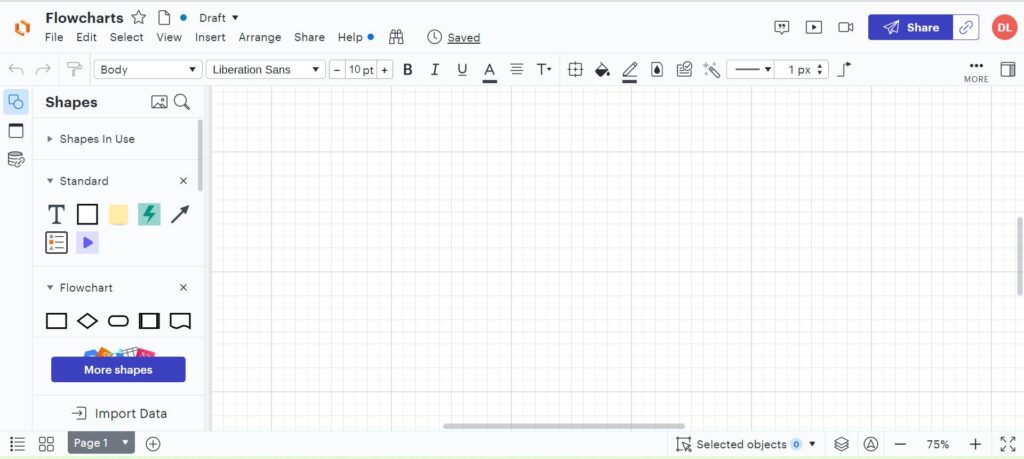
4.2 LucidChart
LucidChart is a free, easy-to-use online flowchart tool for businesses. With LucidChart, users can create and edit diagrams and charts quickly and easily. This tool also provides a symbol library and pre-made templates to help users create more complex diagrams. LucidChart also allows users to share their diagrams with colleagues or clients by generating a link or downloading them as an image.
Key Features:
- Integrates with various project management and design tools.
- Allows for the creation of diagrams with varying levels of complexity and size.
- Supports integration with multiple platforms and cloud storage services.
4.3 Pencil Project
Pencil Project is a free and open-source flowchart software designed for multiple platforms, including Windows, Linux, and macOS. With Pencil Project, users can create diagrams, charts, and user interfaces easily and quickly. The software also provides a wide variety of shapes, templates, and symbols to help users create beautiful and professional diagrams. Pencil Project also allows users to save and share their diagrams as images or PDF files.
Key Features:
- Supports various diagram types such as UML, web, iOS, Android, etc.
- Integrates many pre-made shape and symbol templates for users to choose from.
- Allows exporting diagrams in various formats such as HTML, PDF, PNG, etc.
5. Some Widely Used Flowchart Templates in Businesses
5.1 New Employee Recruitment Process
Describes the detailed steps in the recruitment process, from posting the job, receiving candidate applications, interviewing, background checks, making a hiring decision, and notifying the candidate. The shapes used in the flowchart include: start, process, input/output, decision, and end.
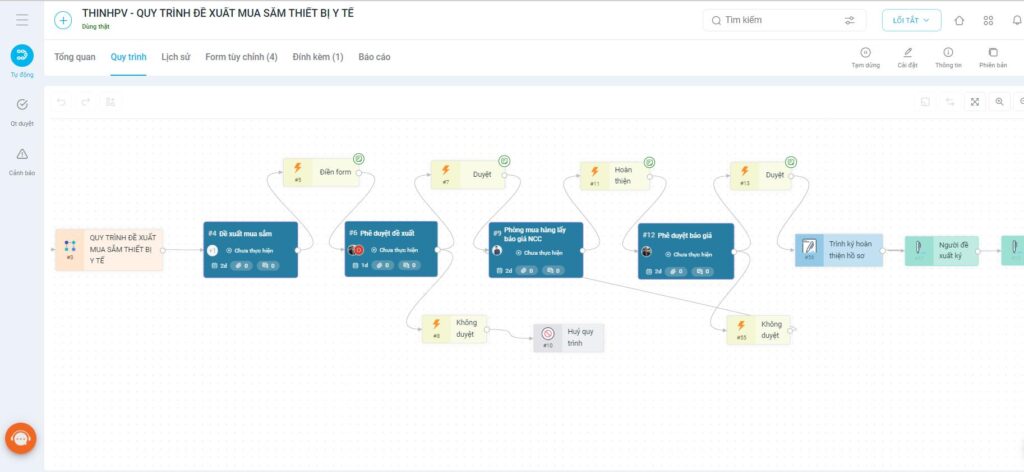
5.2 Asset Procurement Proposal Process
Describes the asset procurement proposal process, from making the proposal, reviewing the request, approval, searching for suppliers, placing an order, processing payment, and tracking the asset. The shapes used in the flowchart include: start, process, input/output, decision, search and order, and end.
5.3 Contract Payment Process
Describes the detailed contract payment process, from reviewing the contract and related documents, confirming and approving the payment, processing the payment, and storing related information. The shapes used in the flowchart include: start, process, input/output, decision, payment confirmation, and end.
6. Limitations of Using Manual Flowcharts
Time and Effort Consuming: Drawing flowcharts manually requires significant time and effort from employees. If a business has many processes to describe and documents that need frequent updates, manual drawing becomes very costly in terms of time and effort.
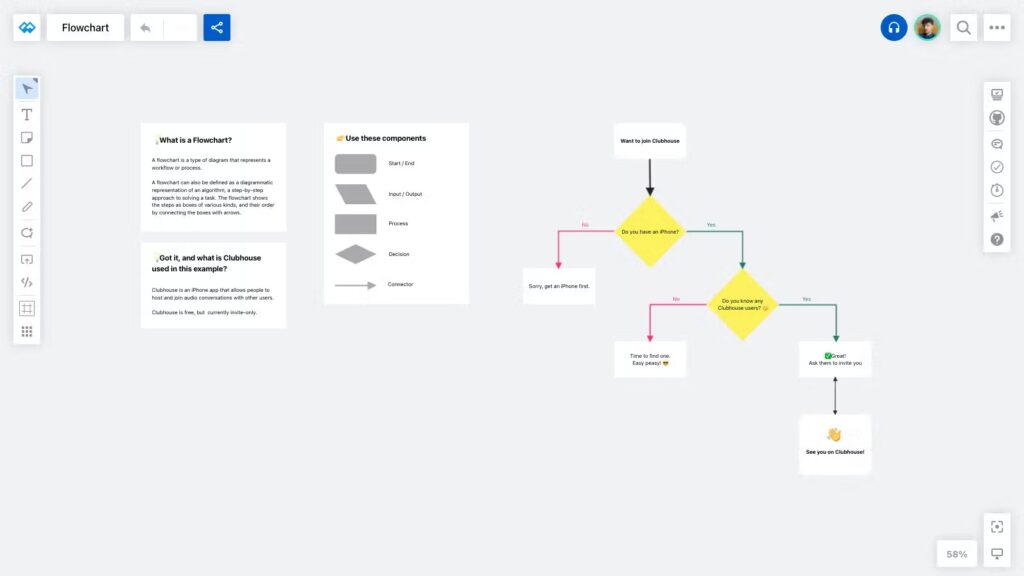
Prone to errors: When drawn manually, the use of different icons, symbols, and colors can cause misunderstandings and lead to errors during implementation. Furthermore, modifying or updating the process is also prone to errors and difficult to track.
Difficult to distribute and manage: With manual flowcharts, the diagrams must be printed and distributed to relevant departments, which causes trouble and difficulty in managing and tracking the process.
No interactivity: A manual flowchart is just a static document and does not allow interaction with the process. Users cannot execute steps directly on the flowchart diagram and cannot monitor the process in real-time.
No automation: A manual flowchart cannot automate the execution of the process. Users must perform each step one by one and cannot use automation technology to reduce time and increase process efficiency.
7. Benefits of Flowcharts in Business Management and Operations
A flowchart (process diagram) is not just a tool that helps businesses visualize work steps, but it also acts as an “operational mind map” that helps managers see the entire scope of operations. When used correctly, flowcharts bring many outstanding benefits to an organization — from productivity and efficiency to the ability to optimize the management system.
7.1. Reduce Errors and Information Loss in the Work Process
By visually representing each work step, flowcharts help employees clearly understand who does what, when, and in what sequence.
-
Avoids confusion between departments or processing steps.
-
Minimizes missed tasks or miscommunicated information.
-
Limits risks arising from a lack of synchronization between individuals or teams.
For example: In a contract approval process, a flowchart clearly shows the processing flow through different levels (sales → legal → director), so everyone knows the status and the person responsible.
7.2. Standardize Operations Across Departments
Flowcharts help businesses establish standard processes, serving as a basis for all departments to perform tasks uniformly.
-
Easily train new employees without manual guidance.
-
Serves as a basis for building SOPs (Standard Operating Procedures).
-
Increases transparency and control throughout the entire work chain.
As a result, businesses can reduce the “everyone does it their own way” situation, helping work proceed smoothly and in sync.
7.3. Easily Identify Bottlenecks and Optimize Processes
When the entire process is mapped out on a flowchart, managers can easily identify delays, repetitive steps, or redundant steps.
-
Helps accurately analyze the causes of reduced productivity.
-
Allows for improvements to the workflow to save time and resources.
-
Supports faster decision-making with visual data.
For example: A flowchart for a procurement process might reveal that the accounting department is often the “bottleneck” causing payment delays — from there, the business can consider automating approvals or integrating ERP software to improve it.
7.4. Enhance Team Collaboration and Communication
Flowcharts help everyone understand their roles and their connection to colleagues.
-
Clearly defines the “hand-off points” between departmental teams.
-
Increases collaboration by visualizing the connection to a common goal.
-
Supports team meetings, reporting, and progress checks with clarity.
7.5. Serves as a Foundation for Automation and Digital Transformation
Businesses that are applying process management software (like 1Office, Zoho Flow, Monday.com) all start by standardizing their flowcharts.
Once an accurate flowchart is in place, the system can:
-
Automate approval processes, reminders, and reports.
-
Measure the performance of each step.
-
Connect data between departments without manual intervention.
In summary, a flowchart not only helps to “visualize” a process but also aids in improvement, control, and automation, making it an indispensable management tool for any modern business.
8. Using Software as a Business Solution
1Office BPA is a business solution that helps manage automated processes efficiently and saves time. Specifically, the 1Office software assists businesses in managing records, storing data, updating project progress reports, approving online requests, and more. Instead of using manual flowcharts, 1Office allows you to create and manage automated business operation processes through an intuitive and easy-to-use graphical interface.
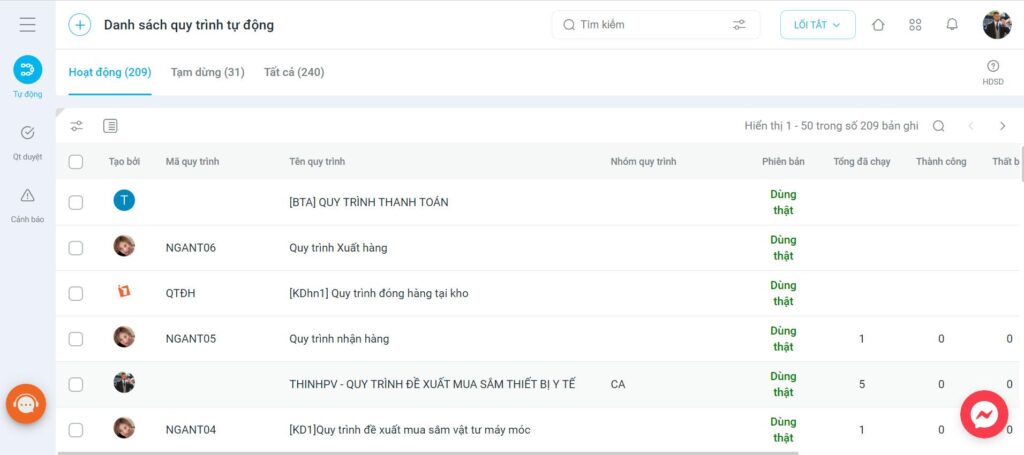
Key features of 1Office include:
- Design and implement automated processes based on the specific needs of the business or the processes of departments within the organization
- Visual reports and statistics help you manage and control processes effectively.
- Notification features help you receive information about process steps that need to be completed and monitor progress.
- Integration features with other applications help you consolidate data and optimize processes.
With 1Office, businesses can minimize risks and errors in processes, increase work productivity, and enhance professionalism in business operations. Through this article, 1Office hopes that managers have a better understanding of what a flowchart is in a business context, the steps to create a flowchart, and the solution of using automated process management software as a replacement for manual flowcharts. If you have any further questions, please contact us via:
- Hotline: 083 483 8888
- Facebook: https://www.facebook.com/1officevn/
- Youtube: https://www.youtube.com/@1office-chuyendoisodn
















