


 13/05/2026
  370 views
Building a workflow is a must if you want your business to operate smoothly and efficiently. However, many businesses struggle with creating workflows. Join 1Office to explore 11 steps to build and manage an effective workflow, boosting business growth by 65%, in the following article!
Mục lục
- I. What is a workflow?
- II. 11 steps to build and manage a workflow you need to know
- 1. Identify the need for the workflow
- 2. Define the purpose of the workflow
- 3. Determine the scope of the workflow
- 4. Determine the number of work steps in the workflow
- 5. Identify workflow control points
- 6. Identify the person responsible for the work
- 7. Identify required documents and records
- 8. Determine the control method for work steps
- 9. Identify points for testing and trials
- 10. Describe/explain the work steps
- 11. Finalize definitions, reference documents, and accompanying forms
- III. Tips for effective workflow management for Vietnamese businesses
I. What is a workflow?
A workflow is understood as a set of instructions and regulations for performing the steps of a task according to a predefined standard to achieve the task’s objective. Additionally, a workflow can be changed and optimized in stages to suit the new requirements and tasks of the business.

Building a workflow is crucial for a business
Following a workflow ensures quality, progress, and productivity. A standard and professional workflow, if implemented well, will bring many benefits to the business. Some of these benefits include:
- Ensures work operates smoothly
- Enhances the performance and efficiency of employees within the business
- Minimizes operational risks as tasks are standardized and sequenced
- Saves time and costs on unnecessary steps by improving operational activities
Read more: What is project progress management? An effective project progress management process for PMs – PMAs
II. 11 steps to build and manage a workflow you need to know
1. Identify the need for the workflow
The first step is to identify the need for the workflow:
- System upgrade.
- Application of new standards.
- Due to requirements from management levels…
- Restructuring.

Identify the need for the workflow
2. Define the purpose of the workflow
Defining the purpose will help the business determine the steps to perform the work, control methods, work frequency, execution time, etc.
- How does the process need to comply with the organization’s goals/policies?
- You need to determine the nature of the process. What is it?
- Significance: The entire set of work steps, control methods, frequency, and deadlines will be based on the purpose of setting up the workflow.
See more: 1Office Work Progress Management Software – The best solution for task assignment and evaluation
3. Determine the scope of the workflow
Next, you need to determine the scope of the workflow:
- Determining the scope will help the business define the target audience that needs to execute and comply with the established workflow.
- The scope of application can be the entire organization, by department or individual, by space, time, field, etc.

Determine the scope of the workflow
4. Determine the number of work steps in the workflow
To build a good workflow, you need to determine the number of work steps required:
- The number of steps in a process can be determined depending on the nature of that work.
- A process with too many steps will lead to difficulties in control, while too few steps will result in insufficient control.
- In practice, a process can have from 5 to 20 steps, but 8-15 steps is generally suitable.
To analyze the steps in a process, you need to rely on the following factors:
- Input: what factors does the process input consist of?
- Output: what factors constitute the process output?
- Next, use the 5W+1H and 5M methods to clarify the issue.

Determine the number of work steps in the workflow
Many businesses often apply the 5W-1H-5M formula to analyze the steps of a workflow:
- What? What is the task?
- Why? What are the goals and requirements of the task?
- Who? Who will perform the task?
- When? When will the task be performed?
- Where? Where will the task be performed?
- How? How will the task be performed?
|
Read more: 7+ most used work management apps |
5M Method (identifying resources):
- Man: Human Resources
- Money: Finance
- Machine: Machinery/ Technology
- Material: Supply System
- Method: Working Method

Use the 5M method (identifying resources)
| Read more: A simple way to create a work progress tracker in Excel to help managers 2X their management efficiency |
5. Identify workflow control points
Identifying key control points is part of a manager’s inspection function:
- Identifying key control points is part of a manager’s inspection function.
- In principle, there should be as many control points as there are work steps, but due to limited resources, organizations only establish critical control points.
- Critical control points follow the Pareto 80/20 rule.
Read more: Tips for more effective work management
6. Identify the person responsible for the work
For each work step, it is necessary to identify which department/individual will perform it:
- Does the personnel performing the work have sufficient qualifications, skills, and experience?
- For many processes, it is necessary to define roles more clearly: primary performer, secondary performer, and supporter.
7. Identify required documents and records
A process cannot be complete without compliance and user guide documents.
After a business workflow is completed, it should be accompanied by an explanation of definitions, terms within the process, and interpretations of abbreviations for the reader’s understanding.
If the process includes accompanying forms, it is necessary to clearly specify the forms, the information, and where the form regulations are located within the content.
8. Determine the control method for work steps
When building a workflow system, managers need to identify methods to inspect and control the entire process to ensure proper evaluation of its optimization level and to make suitable improvements to the operational system.

Determine the control method for work steps
- Many organizations consider the process control sheet a system document, but many others see it only as a support tool for process setup.
- The process control sheet is a separate document used for process interpretation.
When determining the inspection method, the factors to consider include:
- Steps that require inspection
- Critical points to inspect
- The person performing the inspection
- Inspection frequency
9. Identify points for testing and trials
Next, you need to identify the points for testing and trials:
- Determine the purpose of the test: to ascertain whether the work is being performed according to the set standards.
- Pre-test: This is the trial run or pilot production phase, one of the most important points of the testing method.
- Test during the implementation process.
- Measure the feasibility of the process
The contents of the test checklist include: Stage, control point, equipment used, frequency, instruction documents, inspector, records, etc.

Identify points for testing and trials
10. Describe/explain the work steps
The next step is to describe/explain the work steps:
- Provide a specific description of the steps in the workflow.
- How are the work steps to be performed?
- If the explanation of how to perform the steps is too complex or long, a separate implementation guide document is needed.
11. Finalize definitions, reference documents, and accompanying forms
Finally, you need to complete the definitions, reference documents, and attached forms:
- Definitions: Explain the meaning of terms in the process, interpret abbreviations.
- Accompanying forms: Identify which forms are included in the process and their code numbers.
III. Tips for effective workflow management for Vietnamese businesses
Building a workflow is a crucial task for any business that wants to operate smoothly and efficiently.
To build faster and more effective workflows, businesses can also seek help from workflow creation software.
Understanding the challenges businesses face during the digital transformation era, 1Office provides a comprehensive business management solution with a suite of digital tools to help businesses improve work efficiency, manage tasks, projects, and campaigns, thereby saving time, costs, and other resources.

1Office – The comprehensive business management solution
This is a powerful tool that helps leaders manage their businesses with ease.
With the Workplace toolkit, departments can easily search and filter information. Managers can access and monitor the progress of tasks and projects without needing to be physically present.
1Office helps users create specific and realistic work plans for fast and highly effective operations.
Because the workflow is digitized on the software, the system is tightly integrated with the HR data system, allowing users to conveniently assign tasks by position or department, saving time and effort.
Once a task is assigned, it is automatically updated in the individual’s schedule. Employees also receive immediate notifications when a task is assigned, eliminating forgotten or missed tasks. Each individual can take initiative in their work.
The system will display the entire process in detail, including the person responsible for each step, allowing for timely detection and resolution of any issues that arise.
After completing their step, the previous person will click the button to change the status to Completed. A notification will then be sent to the person responsible for the next step.
Based on the initially set deadline for the process, the system will automatically send reminder notifications to the members involved in the workflow.
Additionally, based on the digitized workflow, new employees can easily grasp their tasks, which helps save training time.
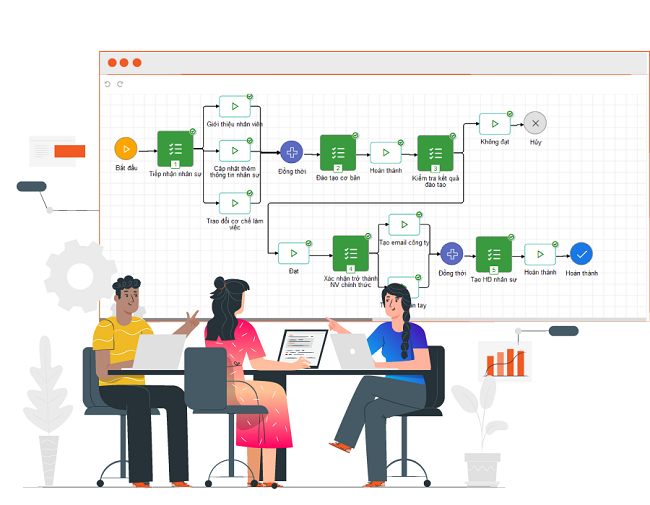
This is a powerful tool that helps leaders manage their businesses with ease
The 1Office solution can be used on multiple platforms, from computers and phones to tablets. Therefore, managers can control all the work of Departments/Positions from anywhere, as long as they have an internet connection.
Management becomes convenient because the 1Office task management module is integrated and directly linked with other modules: It links with revenue/expenditure to calculate profit/loss for each project, and links with KPIs to calculate salaries and bonuses.
In addition, instead of discussions in group chats where messages can get lost, users can discuss directly under the plan and process of each task.
Furthermore, users can attach document files or add images as work materials, helping tasks flow more smoothly.
The system also allows users to create events and invite others to participate. The event will be automatically added to the participants’ work calendars.
With 1Office, managers can quickly and accurately measure the effectiveness of each process based on digitized data.
Reports are visualized on screens like Dashboards and dynamic reports. From these reports, managers can accurately evaluate the effectiveness and work performance of employees.
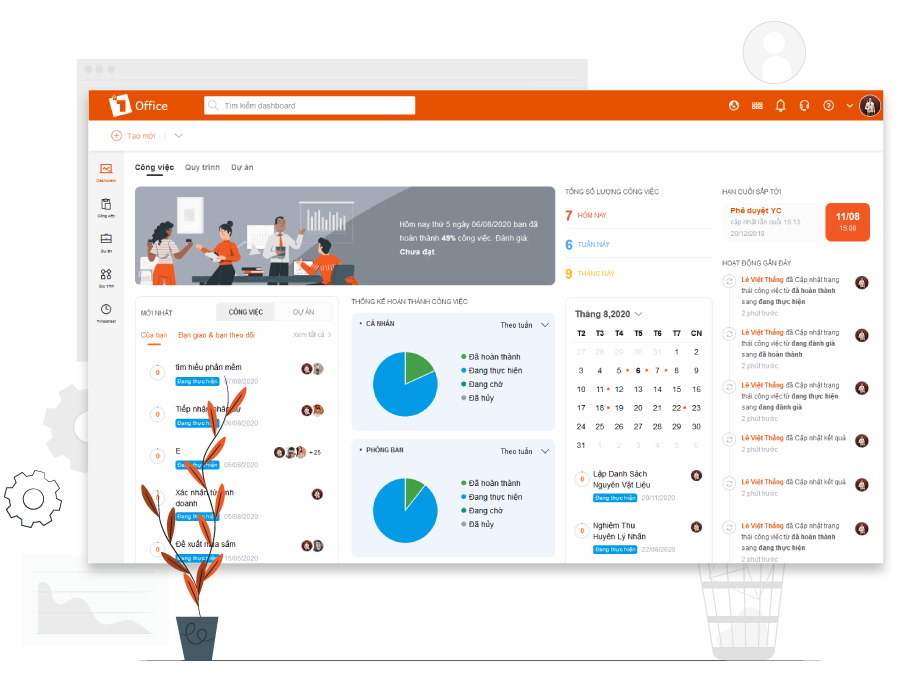
Visual reports on screens like a Dashboard
This gives managers a comprehensive, objective view to promptly improve processes and train employees’ professional skills, thereby enhancing work performance.
Not only does it save work and management time, but 1Office also helps businesses significantly increase labor productivity. In addition, its reasonable and flexible pricing is one of the factors that make many businesses choose 1Office.
Additionally, 1Office has been selected by the Ministry of Information and Communications as a pioneering platform in the national digital transformation program, being a solution that brings sustainable efficiency to businesses.
1Office hopes this article has helped you better understand the steps to build a workflow for your business and has provided you with more information and knowledge to apply to your future work.
Additionally, if you are facing difficulties in building and managing workflows, please register for a trial to receive a consultation. 1Office will help you resolve your challenges quickly!

















