


ERP Implementation Costs: How to Implement Cost-Effectively and Ensure Efficiency


Implementing an ERP system is a crucial step for businesses to optimize processes and enhance operational efficiency. However, one of the factors that makes many businesses hesitate is the ERP implementation cost. So, how can you control this cost while still achieving maximum efficiency? In this article, let’s explore with 1Office the detailed costs associated with ERP implementation, from software, consulting, and training costs to post-implementation maintenance fees. Additionally, this article will share tips to help businesses save costs and optimize their budget when adopting an ERP system.
Mục lục
- 1. Introduction to ERP Software
- 2. ERP Implementation Costs
- 3. Key Costs of ERP Implementation
- 3.1. ERP Software Purchase Costs
- 3.2. Hardware Costs
- 3.3. Consulting and Implementation Costs
- 3.4. User Training Costs
- 3.5. Customization and Development Costs
- 3.6. Post-Implementation Maintenance and Support Costs
- 3.7. Integration Costs with Other Systems
- 3.8. Project Management Costs
- 3.9. Testing and Quality Assurance Costs
- 3.10. System Renewal and Upgrade Costs
- 4. Factors Affecting ERP Implementation Costs
- 4.1. Business Scale
- 4.2. Industry of Operation
- 4.3. Level of Software Customization
- 4.4. Number of Modules
- 4.5. Software Licensing Models (On-premise, SaaS, Hybrid)
- 4.6. Integration Requirements with Other Systems
- 4.7. User Training and Support
- 4.8. Implementation Time
- 4.9. Security and Compliance Requirements
- 5. Cost Comparison of Popular ERP Software
- 6. Cost-Saving Solutions for ERP Implementation
- 6.1. Choose Cloud ERP (SaaS) Instead of On-Premise Implementation
- 6.2. Choose an ERP Package Suitable for Your Scale and Specific Needs
- 6.3. Phased ERP Implementation
- 6.4. Use Off-the-Shelf ERP Instead of Custom Development
- 6.5. Enhance Internal Training
- 6.6. Optimize the ERP Implementation Process and Project Management
- 6.7. Choose a Multi-functional ERP Software
- 6.8. Optimize System Integration
- 6.9. Optimize System Integration
- 7. Risks and Limitations of ERP Implementation
- 7.1. Unexpected Costs
- 7.2. Difficulties Integrating with Legacy Systems
- 7.3. Employee Adaptation and Training
- 7.4. Extended Implementation Time
- 7.5. Difficulties in Software Customization
- 7.6. Security and Data Safety Risks
- 7.7. Lack of Commitment and Investment from Leadership
- 7.8. Difficulty in Evaluating and Measuring Effectiveness
- 8. 1Office Software – A Cost-Effective and Efficient SaaS Solution
- 9. Frequently Asked Questions about ERP Software
1. Introduction to ERP Software
ERP (Enterprise Resource Planning) software is a comprehensive business management solution that helps integrate and automate crucial business processes, from finance, human resources, manufacturing, and sales to logistics and customer relationship management (CRM). The main goal of ERP software is to provide a single, reliable information system that helps businesses optimize operations, minimize errors, and improve management decisions.
With ERP, departments within a company can share data and information seamlessly, thereby reducing duplication and enhancing work efficiency. This is especially important for large-scale enterprises or those operating in multiple different sectors.
Today, ERP software can be deployed in various forms, from traditional on-premise ERP to cloud-based (SaaS) ERP solutions, allowing businesses to flexibly choose the solution that best fits their needs and budget. Modern ERP software also offers high customizability, enabling businesses to implement the system in a unique and optimized way for their scale and industry.
2. ERP Implementation Costs

2.1. Costs Based on Industry
Each industry has unique requirements for the features and nature of an ERP system, which directly affects implementation costs. Some industries require specific features, leading to increased costs:
- Manufacturing: Manufacturing companies need modules related to production management, inventory management, supply chain management, and quality control. This requires ERP software with high customizability and integration capabilities with other systems in the business.
- Retail: Retail businesses will need modules related to inventory management, point of sale (POS), and customer relationship management (CRM), while also needing to handle a large volume of transactions. This can increase ERP implementation costs.
- Financial Services: Businesses in banking, insurance, or auditing require ERP systems with complex features related to finance and reporting. Customization and compliance with legal regulations can increase implementation costs.
2.2. Costs Based on Business Size
The size of the business directly impacts ERP implementation costs, including the number of users, the scope of implementation, and the volume of data to be processed. Large and small enterprises will have different needs:
- Small and Medium-sized Enterprises (SMEs): These businesses often have limited budgets and require basic features. Therefore, they typically opt for simple and cost-effective ERP solutions, such as cloud-based SaaS ERP with monthly or per-user subscription fees.
- Large Enterprises: Large corporations need robust ERP systems capable of handling large workloads and complex features. Additionally, they may require software customized to their specific needs and long-term consulting support. Consequently, the ERP implementation cost for large enterprises is typically much higher than for smaller businesses.
2.3. Costs Based on Specific Requirements
The specific requirements of a business also affect implementation costs. Specific factors may include:
- Customization: If a business requires a highly customized ERP system to meet its specific needs, the cost will increase. Developing and implementing custom ERP software can be expensive as it requires the involvement of a highly skilled technical team.
- Integration with Other Systems: If a business requires integrating the ERP with existing systems like CRM, accounting software, or other customer management software, implementation costs will increase due to the need for additional development and integration testing.
2.4. Costs Based on the Number of Modules
Another significant factor affecting ERP implementation costs is the number of modules the business needs. Each ERP module has its own cost, and if a business requires multiple modules, the implementation cost will be higher:
- Basic Modules: Basic modules typically include finance, human resources, and sales. These modules may have a lower cost as they are common features and are pre-integrated into most ERP systems.
- Advanced Modules: Modules such as manufacturing, inventory management, supply chain management, or data analytics may require more customization, leading to higher ERP implementation costs. These modules often require the system to be capable of processing large amounts of data and performing complex calculations.
2.5. Costs Based on Licensing Model (On-Premise, On-Cloud, Hybrid)
Depending on the ERP deployment model the business chooses, costs can vary significantly:
- On-Premise (Local Deployment): This is the traditional ERP deployment model, requiring the business to invest in its own hardware, servers, and network infrastructure. The initial cost is high, but there are no monthly maintenance fees. However, long-term maintenance and upgrade costs can be quite high.
- On-Cloud (Cloud ERP): Cloud ERP (SaaS) offers more flexible pricing with a monthly or per-user subscription model. Businesses do not need to invest in hardware infrastructure, and all maintenance, upgrades, and data backups are handled by the service provider. The cost can be lower, especially for small and medium-sized enterprises.
- Hybrid (Combination of On-Premise and On-Cloud): Some businesses require a combination of the two models to leverage the advantages of both on-premise and cloud deployments. The cost of a hybrid ERP implementation will be higher as it requires maintaining both systems, and integration between them can be complex.
2.6. Costs Based on Security and Compliance Requirements
Another important factor in ERP implementation is the requirement for security and legal compliance, especially for industries such as finance, banking, healthcare, or international businesses.
- High Security: Businesses requiring high security will have to spend more on establishing security mechanisms, data encryption, and implementing strict data protection procedures.
- Legal Compliance: If a business must comply with industry regulations (e.g., GDPR for businesses in the EU, or special financial regulations), they may need to pay extra for compliance and for integrating compliance-ensuring features into the ERP system.
3. Key Costs of ERP Implementation
When implementing an ERP (Enterprise Resource Planning) system, there are several key costs to consider. Below is a list of important expenses that businesses should be aware of during ERP implementation:
3.1. ERP Software Purchase Costs
- Software Licensing Fees: This is the initial cost for purchasing the license to use the ERP software. This cost can be a one-time purchase or an annual fee.
- Cloud ERP Software: This typically involves a monthly or per-user subscription fee, instead of a large upfront payment like traditional ERP software.
- Customized ERP Software: If the software needs to be customized to fit the specific requirements of the business, this cost can be higher.
3.2. Hardware Costs
- Servers and Storage Devices: For on-premise ERP systems, businesses need to invest in servers, storage systems, and other infrastructure equipment.
- Network and Related Equipment: Network devices such as routers, switches, firewalls, and other security equipment will need to be purchased to ensure connectivity and security for the ERP system.
3.3. Consulting and Implementation Costs
- Consulting Fees: This is the cost of hiring experts or consulting firms to help the business select and implement a suitable ERP system. Consultants can also assist with pre-implementation steps, such as process and requirements analysis.
- Implementation Costs: This covers the cost of configuring and installing the ERP software, ensuring the system functions correctly and integrates with other systems within the business.
3.4. User Training Costs
- End-User Training: This is the cost associated with training employees to use the ERP system. Training includes familiarizing staff with the software interface and teaching them how to use basic and advanced features.
- Training for Management and IT Staff: Senior managers and IT staff also need training to effectively monitor and manage the ERP system.
3.5. Customization and Development Costs
- Software Customization: If the ERP software needs to be modified to meet the specific requirements of the business, this cost can be very high. Customization can involve new modules, user interface changes, or integration with other software systems.
- New Feature Development: Sometimes businesses need to add new features or adjust existing ones in the ERP software, leading to additional software development costs.
3.6. Post-Implementation Maintenance and Support Costs
- System maintenance costs: After implementation, the ERP software requires regular maintenance to ensure system performance and stability. Maintenance can include bug fixes, system upgrades, and updates to new features.
- Technical support costs: Businesses may need to hire technical support services to resolve issues that arise while using the ERP system. This can include support from software vendors or third-party companies.
3.7. Integration Costs with Other Systems
- Integrating ERP with other systems: Businesses often need to integrate their ERP with other systems such as CRM, SCM (Supply Chain Management), accounting systems, or other specialized software. This integration may require custom software and incur additional costs.
3.8. Project Management Costs
- Project management costs: The ERP implementation process often requires a project management team to oversee, track progress, and ensure the project is completed on time and within budget. These costs include the salaries of project management staff and monitoring expenses.
3.9. Testing and Quality Assurance Costs
- Software testing and verification: After implementation, the ERP system needs to be thoroughly tested to ensure all features function correctly. Testing costs may include hiring quality assurance specialists or conducting internal testing phases.
3.10. System Renewal and Upgrade Costs
- ERP software upgrades: ERP software frequently receives new updates with additional features and performance improvements. Upgrade costs may arise when a business needs to migrate from an old version to a new version of the software.
- IT infrastructure upgrades: If the ERP system requires new hardware or networking to operate effectively, the business may need to upgrade its existing IT equipment, creating additional costs.
4. Factors Affecting ERP Implementation Costs

4.1. Business Scale
The scale of the business (large, medium, small) is the primary factor determining ERP implementation costs. Large enterprises typically have more departments and more complex processes, thus requiring more sophisticated ERP features and incurring higher costs.
4.2. Industry of Operation
Feature requirements and software characteristics will vary depending on the industry. Different industries will have unique requirements for ERP software.
- Manufacturing: Businesses in the manufacturing sector require features such as production management, supply chain, and logistics. These features demand an ERP software capable of handling large volumes of data and complex integrations, which increases costs.
- Retail: Requires integration of the ERP with sales and inventory management systems, and rapid processing of goods and transactions, which will also increase implementation costs.
- Financial services: Businesses in the financial industry need features related to complex financial management and compliance with legal regulations, leading to higher customization costs.
4.3. Level of Software Customization
Customizing the ERP software to fit the specific requirements and processes of a business will increase implementation costs.
- Custom ERP software: When a business requires features not available in standard ERP software, the cost of customization will be high. Developing unique features requires a technical team, a long development time, and thorough testing.
- Off-the-shelf ERP software: Off-the-shelf ERP solutions with minimal customization will save costs because the business only needs to configure existing features and does not have to spend on additional development.
4.4. Number of Modules
The cost of ERP implementation can vary depending on the number of modules the business requires. Each additional module will increase the implementation cost.
- Basic modules: Modules such as finance, human resources, and sales typically have lower implementation costs because they are basic features already built into the ERP software.
- Advanced modules: Modules such as production management, supply chain, and logistics require more complex features and higher customization, thereby increasing implementation costs.
4.5. Software Licensing Models (On-premise, SaaS, Hybrid)
The ERP software licensing model significantly impacts the overall cost. Different licensing models have different implementation and maintenance costs.
- On-premise (on-premise deployment): Businesses need to invest in hardware (servers, storage devices) and have long-term system maintenance costs. However, post-implementation maintenance costs can be lower than with SaaS ERP.
- SaaS (cloud ERP): Costs are paid monthly or per user, helping businesses save on initial investment. However, monthly maintenance costs are ongoing and may increase with the number of users or storage capacity.
- Hybrid: A combination of on-premise and SaaS models, allowing businesses flexibility in choosing an ERP software that suits their requirements. However, the implementation cost for a hybrid model will be higher as it requires maintaining both systems.
4.6. Integration Requirements with Other Systems
Integrating ERP with existing systems like CRM, SCM, or accounting systems can increase implementation costs.
- Businesses often require ERP to integrate with other software they are using to synchronize data and processes. Integrating different systems can be complex and expensive as it requires software customization and thorough testing.
4.7. User Training and Support
Employee training and user support are important factors affecting ERP implementation costs.
- Training: Training employees to use the ERP software is a significant expense, especially for large-scale enterprises. Training relevant departments on software usage and ERP system management can be time-consuming and costly.
- Technical Support: Businesses need to pay for post-implementation technical support contracts to ensure the ERP system operates stably and to resolve any issues that arise.
4.8. Implementation Time
A prolonged implementation time will increase costs due to the need for additional resources, personnel, and expert support.
- Businesses requiring rapid ERP implementation may have to pay extra for overtime for the implementation and consulting teams. Each extended implementation phase will require additional time and costs to complete.
4.9. Security and Compliance Requirements
Businesses in industries such as finance, banking, healthcare, and other sectors with high security requirements and legal compliance will have higher ERP implementation costs.
- High Security: Ensuring data safety and personal information security will drive up costs. Security features like data encryption, multi-factor authentication, and access control need to be integrated into the system
5. Cost Comparison of Popular ERP Software
5.1. SAP Business One

Features:
- Financial, accounting, and fixed asset management
- Human resources, timekeeping, and payroll management
- Production, warehouse, and supply chain management
- Customer and sales management
- Integrated data analysis and reporting
- Debt and contract management
- Feature for managing multiple subsidiaries.
Cost:
- The ERP software purchase fee is a significant expense, ranging from 200 million to over 1 billion VND depending on the package and number of users.
- Implementation and consulting costs will increase depending on customization requirements.
- Pros: Suitable for large enterprises, flexible and powerful for multi-industry, multi-national management.
- Cons: High implementation costs, requires robust hardware infrastructure and a specialized technical support team.
5.2. Fast Business Online (FBO)
Features:
- Financial management, accounting, financial reporting
- Human resources, payroll, and insurance management
- Inventory, sales, and purchasing management
- Production and distribution management
- Debt and contract management
- Intelligent data analysis and reporting
Cost:
- Implementation fee starts from 15 million VND for the basic package, and up to 100 million VND depending on the scale and additional features required.
- Annual maintenance fee is about 10 million to 50 million VND.
- Pros: The software is suitable for medium and large enterprises, with a reasonable cost compared to the features provided.
- Cons: Requires an IT team to support system implementation and maintenance.
5.3. Odoo ERP

Features:
- Financial and accounting management
- Human resources, timekeeping, and payroll management
- Sales, inventory, and purchasing management
- Production and supply chain management
- Project, task, and CRM management
- Integration of reporting and data analysis modules
- Fixed asset and debt management features
Cost:
- Implementation fee starts from 10 million VND for the basic package, and can go up to 100 million VND with advanced features.
- Annual subscription fee ranges from 500,000 VND to 2 million VND/user, depending on the number of features and users.
- Pros: Open-source, highly customizable, reasonable cost for small and medium-sized enterprises.
- Cons: Requires time for implementation and customization; technical support can be challenging for small businesses.
Learn more:
>>> Top 10 Best Free ERP Software
>>> Successful ERP Software Implementation Process for Businesses
6. Cost-Saving Solutions for ERP Implementation
6.1. Choose Cloud ERP (SaaS) Instead of On-Premise Implementation
Solution: Choosing cloud-based ERP software (SaaS) instead of on-premise implementation is one of the most effective ways to save costs.
- Lower initial investment cost: With cloud ERP, businesses do not need to invest in hardware such as servers, storage devices, etc. The ERP implementation cost will be reduced, as businesses only need to pay a monthly or annual subscription fee.
- No hardware maintenance required: All maintenance, software upgrades, and data backups are handled by the ERP provider, reducing costs for the business.
- Flexibility: Businesses can easily scale up or down their software usage without worrying about additional costs related to hardware procurement.
6.2. Choose an ERP Package Suitable for Your Scale and Specific Needs
Solution: Businesses should choose an ERP software package that fits their scale and actual requirements, avoiding overly complex and expensive packages.
- Minimalist software package: Small and medium-sized enterprises only need basic features like financial, HR, and sales management. Choosing software packages with many unnecessary advanced features will increase implementation costs.
- Avoid excessive customization: Custom ERP features will increase costs. Businesses should carefully evaluate their actual requirements and only customize when absolutely necessary.
6.3. Phased ERP Implementation
Solution: Instead of implementing the entire ERP system from the start, businesses can implement it in phases, starting with the most critical modules and gradually expanding.
- Save on initial costs: Phased implementation helps reduce initial costs. Businesses can invest in necessary modules first, then expand when the budget allows.
- Easy to adjust and improve: Phased implementation makes it easier for businesses to adjust the ERP system when necessary and avoid unforeseen costs throughout the entire implementation process.
6.4. Use Off-the-Shelf ERP Instead of Custom Development
Solution: Choose off-the-shelf ERP software with standard features instead of developing a fully custom ERP software.
- Save on development costs: Off-the-shelf ERP software has already been developed and tested; businesses only need to configure it to fit their requirements. Developing a custom ERP from scratch can be costly and prolong the implementation time.
- Ensure stability and long-term support: Off-the-shelf ERP software from major vendors comes with support and maintenance packages, helping to minimize the costs of bug fixes and upgrades.
6.5. Enhance Internal Training
Solution: Businesses can enhance internal training instead of hiring external training experts.
- Save on training costs: Training internal staff helps reduce the cost of hiring external training experts. Businesses can use training materials and online support systems to train employees.
- Improve system self-management capabilities: Internal training helps employees better understand the ERP software and enables them to resolve issues on their own without relying on third parties.
6.6. Optimize the ERP Implementation Process and Project Management
Solution: Create a detailed and rigorous ERP implementation plan and manage the project well to avoid wasting resources and costs.
- Minimize implementation time: Proper project management and reasonable resource allocation help reduce implementation time, thereby lowering personnel costs and other incidental expenses.
- Ensure higher efficiency: A well-planned implementation helps minimize unnecessary issues, saving on repair and post-implementation support costs.
6.7. Choose a Multi-functional ERP Software
Solution: Select an ERP software that can integrate multiple features and modules, thereby reducing costs for other supplementary software.
- Reduce costs for supplementary software: Some ERP software provides many built-in features such as CRM, inventory management, sales, and finance. Using a multi-functional software helps businesses avoid investing in separate software for each department.
- Increase synchronization within the business: An integrated ERP system helps synchronize data between departments, thereby minimizing errors and costs associated with managing multiple different software.
6.8. Optimize System Integration
Solution: Ensure that the integration of the ERP system with the business’s existing software is optimized, avoiding the integration of too many unnecessary external applications.
- Reduce integration costs: Integrating the ERP with existing systems will help businesses save costs and reduce the complexity of managing multiple systems.
- Optimize data: System integration helps synchronize data, avoiding duplication and minimizing data management costs.
6.9. Optimize System Integration
Solution: Ensure that the integration of the ERP system with the business’s existing software is optimized, avoiding the integration of too many unnecessary external applications.
- Reduce integration costs: Integrating the ERP with existing systems will help businesses save costs and reduce the complexity of managing multiple systems.
- Optimize data: System integration helps synchronize data, avoiding duplication and minimizing data management costs.
7. Risks and Limitations of ERP Implementation
7.1. Unexpected Costs
One of the biggest risks when implementing an ERP is unforeseen costs. The implementation process may encounter changes in requirements or issues that arise during deployment, leading to higher-than-expected costs.
Causes:
- Changes in requirements during implementation.
- Difficulties integrating with existing systems.
- Higher-than-expected costs for training and post-implementation support.
Solution: Create a detailed plan, budget for potential extra costs, and prepare a contingency fund for unforeseen situations.
7.2. Difficulties Integrating with Legacy Systems
An ERP system needs to integrate with other software and systems the business is already using. This integration process can encounter many technical issues and lead to additional costs.
Causes:
- Legacy software is not compatible with the new ERP.
- The process of synchronizing data from old systems to the ERP may encounter errors or omissions.
Solution: Choose an ERP with high compatibility with existing systems, create a detailed integration plan, and have a professional team to support the process.
7.3. Employee Adaptation and Training
ERP implementation requires employees to familiarize themselves with a new system, and inadequate preparation for training can lead to errors, work disruptions, and reduced operational efficiency.
Causes:
- Employees are unfamiliar with the software’s interface and features.
- Lack of a proper training plan, or insufficient resources to adequately train employees.
Solution: Invest in comprehensive training for all levels of staff, and use user guides and online support systems to help employees quickly get accustomed to the software.
7.4. Extended Implementation Time
The ERP implementation process can take longer than initially planned, causing work disruptions and increasing costs.
Causes:
- Customizing the software to fit the company’s business processes can be time-consuming.
- Lack of thorough preparation for the implementation roadmap.
Solution: Create a detailed implementation plan, break the process into phases, and regularly monitor the project’s progress.
7.5. Difficulties in Software Customization
ERP software may not fully meet the specific requirements of a business. Requesting too many custom features can lead to high implementation costs and long timelines.
Causes:
- An ERP may not be an immediate fit for all of a company’s specific processes or requirements.
- Customizing an ERP requires changing the source code or developing unique features, which increases costs.
Solution: Carefully evaluate requirements and customize only when absolutely necessary. Sometimes, choosing an off-the-shelf ERP with standard features can be more effective than excessive customization.
7.6. Security and Data Safety Risks
ERP implementation can face issues related to security and data protection, especially when the ERP system is connected to many other systems or when using a cloud-based ERP.
Causes:
- Company data can be leaked or breached if the system is not well-secured.
- Security vulnerabilities during or after implementation can make the system susceptible to attacks.
Solution: Ensure the ERP system has high security, use robust data protection tools like encryption and two-factor authentication, and conduct regular security audits.
7.7. Lack of Commitment and Investment from Leadership
One of the reasons for ERP implementation failure is a lack of commitment and support from leadership. If leadership does not prioritize the ERP, the project may be delayed or lack sufficient resources for a successful implementation.
Causes:
- Lack of interest and understanding of ERP benefits from leadership.
- Improper project management, lack of resources, and supervision.
Solution: Leadership needs to have a strong commitment and a clear understanding of the importance of ERP. Decisions and investments must be strongly supported from the highest level.
7.8. Difficulty in Evaluating and Measuring Effectiveness
After implementation, some businesses face difficulties in evaluating and measuring the effectiveness of the ERP system. This can lead to a failure to identify issues and optimize processes.
Causes:
- The business does not have clear performance indicators for evaluation.
- Lack of a robust reporting system or powerful analytical tools within the ERP.
Solution: Businesses need to define specific key performance indicators (KPIs) from the outset and use reporting tools to measure the effectiveness of the ERP post-implementation.
8. 1Office Software – A Cost-Effective and Efficient SaaS Solution
1Office is the perfect SaaS solution for businesses looking to optimize management processes, enhance work performance, and save costs. With a flexible cloud platform, 1Office helps you manage human resources, customer relationships (CRM), and the workplace simply, effectively, and automatically. Notably, 1Office is not only powerful due to its AI integration for data analysis and trend prediction, but it also provides a Low-Code platform that allows businesses to easily customize and develop the system according to their requirements without needing in-depth programming knowledge.
Thanks to these outstanding features, 1Office not only helps minimize implementation and operational costs but also offers excellent flexibility in business management.
8.1. HRM (Human Resource Management)
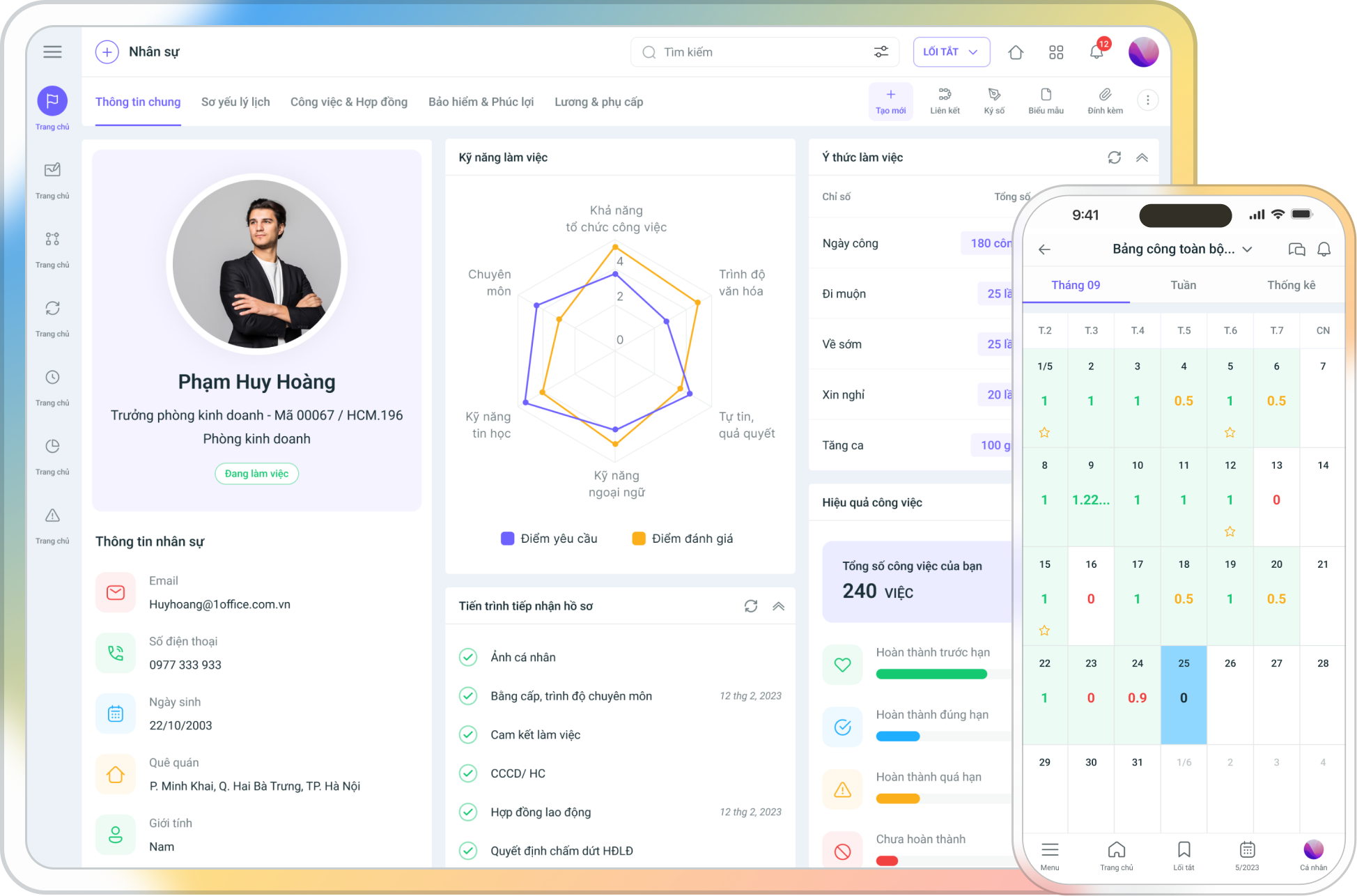
Features:
- Employee Profile Management: Store and manage detailed employee information, from personal details to information about employment contracts, benefits, training, and promotions.
- Automated Payroll and Benefits Calculation: 1Office helps automatically calculate salaries, insurance, and other employee benefits, minimizing errors and saving time.
- Timekeeping and Absence Tracking: Calculate working hours, automate timekeeping, and track vacation days and sick leave, ensuring accuracy and transparency.
- Recruitment and Training Management: Manage the candidate recruitment process, and track training and personnel development schedules.
- Performance Evaluation: Provides tools to set goals and evaluate employee work performance (KPI & OKR), helping to guide work improvement and career development for employees.
Benefits:
- Saves time and minimizes errors: Automating processes like payroll and timekeeping helps reduce the administrative workload and processing errors.
- Effective personnel management: Employees are evaluated fairly and transparently, helping the business easily manage its team and make personnel development decisions.
- Convenient and easy: 1Office allows for personnel management from anywhere at any time, facilitating employee management in remote or multi-location work environments.
8.2. CRM (Customer Relationship Management)
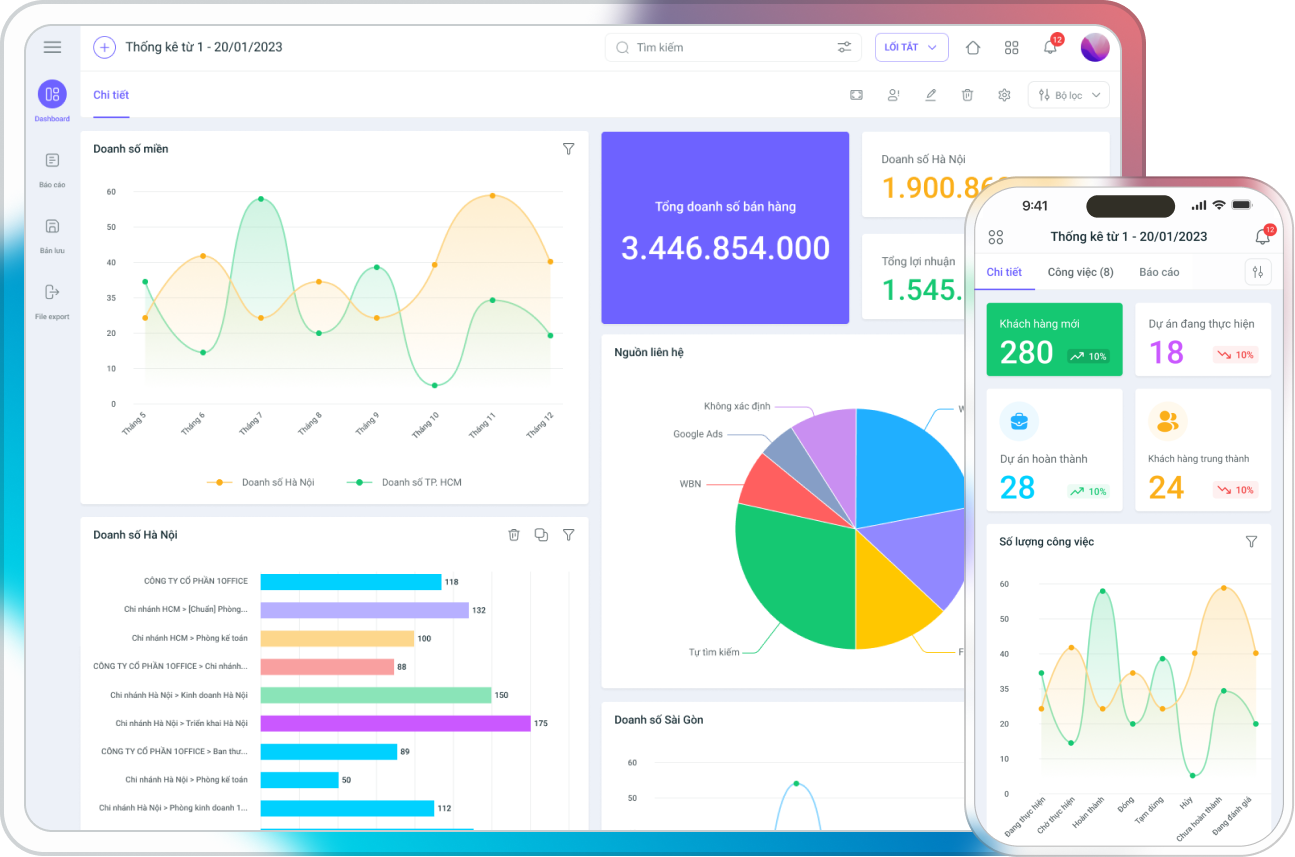
Features:
- Customer information management: Quickly store and retrieve customer information, transaction history, marketing campaigns, and customer care activities.
- Sales and marketing management: Track and analyze sales opportunities, helping the sales team identify potential customers and improve conversion rates.
- Integration of customer care tools: Provides tools such as email marketing, call reminders, automated notifications, and transaction history tracking.
- Analysis and reporting: Generate detailed reports on sales performance and customer satisfaction, helping businesses improve customer relationships and increase revenue.
Benefits:
- Increased sales efficiency: Managing customer information and tracking transaction history helps optimize the sales process, improving conversion rates and revenue.
- Improved customer relationships: 1Office helps businesses maintain long-term customer relationships through effective customer tracking and care.
- Automated customer care processes: Save time and increase accuracy in customer communication and care.
8.3. Workplace
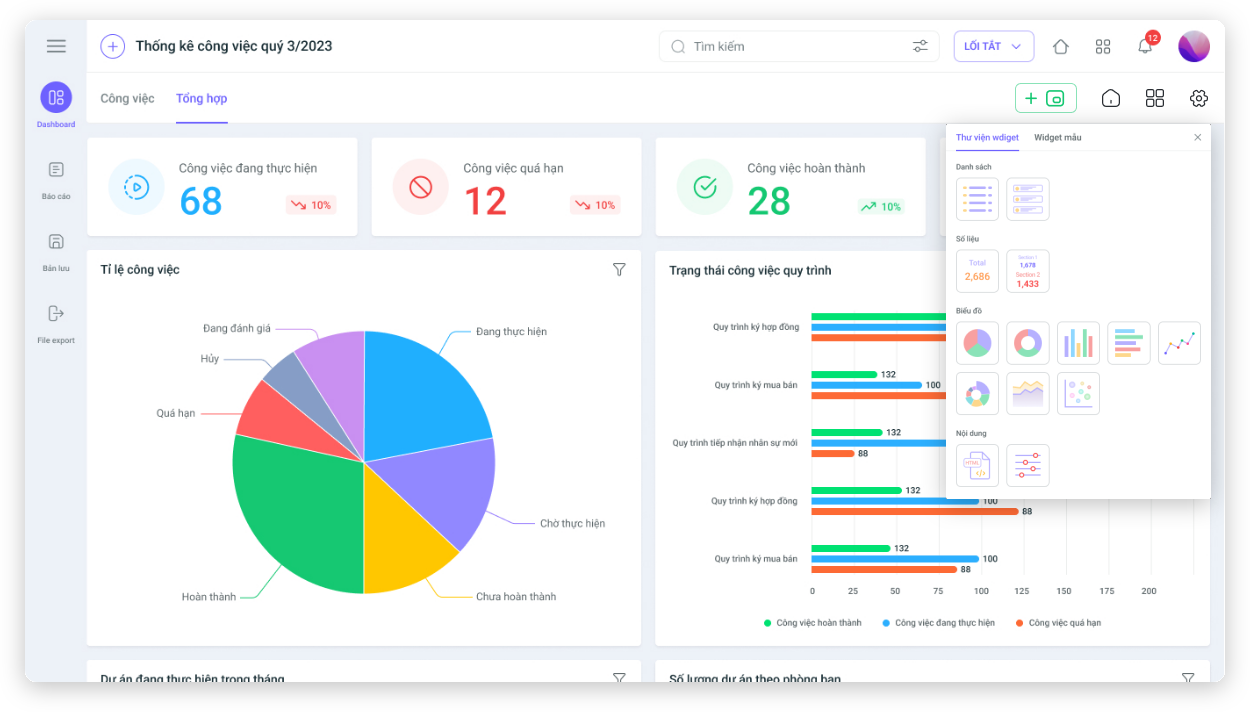
Features:
- Task and project management: Manage work progress, assign tasks, and track work results by project and department.
- Document and information sharing management: Allows for easy document storage and information sharing between departments and employees.
- Work schedule management: Synchronize work schedules, meeting calendars, calls, and other important company events.
- Create and manage online meetings: Supports organizing online meetings, helping remote teams connect more effectively.
Benefits:
- Enhanced work efficiency: Tasks are clearly assigned, progress is tracked, and collaboration is easy, helping teams work more effectively.
- Strengthened collaboration and communication: The online work environment helps employees easily share documents and information, reducing interruptions.
- Optimized work schedules: 1Office helps synchronize work schedules and meetings, allowing everyone in the company to stay informed and adjust their work accordingly.
8.4. Low-code Platform and AI Integration
AI Features:
- Workflow automation: AI helps automate many manual tasks in the workflow, such as analyzing HR data, creating meeting minutes, and drafting automated emails.
- Data prediction and analysis: Allows users to ask questions about information such as sales, personnel, customers, etc. It analyzes the information and supports CEOs/Managers in taking appropriate actions.
- Improved user experience: Assists customers by answering questions related to software usage guides, acting in place of customer support for some common software questions.
Low-code Platform:
- Rapid application customization and development: The Low-Code platform allows non-programmers to easily create and customize applications, saving time and costs.
- Data and business process management: Users can define their own business processes, applications, and user interfaces according to the company’s requirements without needing a programming expert.
9. Frequently Asked Questions about ERP Software
9.1. How Much Does ERP Implementation Cost?
ERP implementation costs can vary greatly depending on business size, ERP software type, required features, and deployment method (On-premise, SaaS, Hybrid). Small businesses might only need a lower initial investment with cloud-based software (SaaS), while large enterprises may require more complex ERP systems at a higher cost. Depending on requirements and budget, businesses should choose software that fits their actual needs.
9.2. What Is the Difference Between SaaS ERP and Traditional ERP?
SaaS ERP (Cloud-based Software) helps businesses reduce hardware investment costs and eliminates the need to maintain a complex IT system. Costs are typically calculated per user or per month. Meanwhile, Traditional ERP (on-premise) requires a large hardware investment and long-term maintenance costs but can be more flexible for businesses with high security and compliance requirements.
9.3. How to Measure Effectiveness After ERP Implementation?
To evaluate the effectiveness of an ERP system, businesses need to establish clear KPIs (Key Performance Indicators) from the outset. These indicators can include order processing time, operating costs, inventory management efficiency, or labor productivity. Measuring effectiveness will help businesses identify the strengths and weaknesses of the ERP system and make timely adjustments.




