


 10/05/2026
  7487 views
A salary increase decision is an administrative document that recognizes the efforts and contributions of an employee. A proper salary increase decision template not only helps make the salary raise process transparent and professional but also builds trust among employees. This article will guide you on how to write a standard salary increase decision and provide a ready-to-download template file that is easy to customize for any business.
Mục lục
- I. What is a Salary Increase Decision?
- II. In Which Cases Are Salary Increases Typically Applied?
- III. Required Content in a Salary Increase Decision Template
- IV. Guide to filling out the salary increase decision template
- V. Guide to writing a standard salary increase decision template
- VI. Download the Latest Free Salary Raise Decision Template (Word File)
- VII. Some important notes when issuing a salary raise decision
- VIII. Frequently Asked Questions about salary raise decision templates
- IX. Conclusion
I. What is a Salary Increase Decision?
A salary increase decision is an administrative document issued by company leadership to announce a salary adjustment for an employee, typically based on work results, performance, or periodic salary review regulations. This document has legal validity and is officially issued and archived within the company.
Role:
- Serves as the legal basis for the accounting department to implement the salary adjustment.
- Officially recognizes the achievements and contributions of the employee.
- Helps maintain a transparent record of salary progression, making it easy to reference in the future.
II. In Which Cases Are Salary Increases Typically Applied?
Salary increases are implemented when a business needs to recognize an individual’s professional growth and breakthrough achievements or to ensure employee benefits amidst changes in legal policies and the labor market.
Below are common situations where businesses typically issue a salary increase decision:
1. Periodic Salary Increase
This is a common form of salary increase in businesses with clear salary and bonus policies. It is usually conducted every 6 or 12 months after evaluating an employee’s competency, job completion level, and contributions.
For example: An employee who has worked for one full year and consistently achieved a KPI score above 85% for three consecutive quarters will be recommended for a periodic salary increase according to company policy.
2. Performance-Based Salary Increase
This type of salary increase is based on the results of KPI, OKR evaluations, or other performance indicators. Employees with outstanding achievements who bring significant value to the organization will receive a well-deserved salary raise without having to wait for the periodic review.
Suggestion: Use software like 1Office to track, analyze performance, and automatically recommend salary increases based on real data.
3. Salary Increase Upon Promotion
When an employee is appointed to a higher position (e.g., from specialist to team leader), their salary is also adjusted to accurately reflect their new responsibilities and role. This should be accompanied by a clear appointment decision and salary adjustment decision.
4. Salary Increase Due to Government Adjustments
Businesses operating in Vietnam must comply with the regional minimum wage set by the Government. When the minimum wage is adjusted, businesses need to review their salary scales and issue salary increase decisions for positions with salaries below the new minimum level.
5. Ad Hoc Salary Increase
Applied in special cases such as:
- Employees with outstanding, expectation-exceeding contributions.
- Needing to retain talent when facing the risk of a “brain drain.”
- Promptly recognizing breakthrough achievements.
Note: Ad hoc salary increases require a written proposal and approval from management. These decisions should be stored in an HRM system like 1Office for easy reference and transparency.
III. Required Content in a Salary Increase Decision Template
A standard salary increase decision template not only reflects professionalism but also ensures legal validity and clarity in the human resource management process. Below is the mandatory content for a salary increase decision document:
1. Document Title and Reference Number
-
Title: Must clearly state that it is an administrative decision, for example: “DECISION ON EMPLOYEE SALARY INCREASE”.
-
Reference Number: Follow the company’s numbering system (e.g., DEC/HR/2024/007).
2. Legal Basis and Company Regulations
This section specifies the internal regulations or legal documents that form the basis for this decision. It usually begins with the phrase:
-
“Based on the current Labor Code…”
-
“Based on the company’s salary and bonus regulations…”
3. Information of the employee receiving the salary increase
Specify:
-
Full name of the employee
-
Employee ID (if any)
-
Job title, department
-
Start date
Providing accurate information will make the document transparent, easy to look up, and facilitate future record processing.
4. Salary adjustment details
-
Current salary: State clearly in the currency unit.
-
New adjusted salary: Can be based on a salary scale or a specific amount.
-
Increase rate (%), if any: Should be added for easy tracking and statistics.
Example:
Old salary: 10,000,000 VND
New salary: 12,000,000 VND (20% increase)
5. Effective date
The effective date is a mandatory section. Clearly state the day/month/year the decision takes effect.
It should be stated specifically: “This decision is effective from June 1, 2024”.
6. Implementation responsibility
Clearly specify the relevant departments responsible for implementation:
-
HR department to update records and payroll
-
Accounting department to adjust payroll
-
The head of the department with the employee receiving the salary increase is to be notified
The end of the document must include:
-
Full name and title of the approver
-
Company stamp (if any)
-
Date of signing the decision
Additional optimization tip:
-
You can digitize and manage all salary increase decisions on HR software like 1Office. This software allows for easy creation, approval, and storage of decisions, while also linking directly to employee records, payroll, and KPIs.
IV. Guide to filling out the salary increase decision template
To ensure the salary increase decision template is issued correctly and to minimize errors, businesses need to fill in the following sections completely:
1. Information of the issuing entity
-
Company/Business name (as stated in the business license).
-
Decision number (e.g., No. 05/QD-ABC).
-
Date, month, and year of issuance.
2. Basis for issuing the decision
Fill in the appropriate bases, which usually include:
-
The current Labor Code
-
Company’s labor regulations/Salary and bonus policy
-
Proposal from the Head of Department or Head of Human Resources
-
KPI evaluation results, work performance
Note: The clearer the basis, the more legally sound the decision.
3. Information of the employee receiving the raise
-
Full name
-
Position
-
Department/Division
-
Type of labor contract (if necessary)
Tip: It’s advisable to cross-check the information with the personal profile to avoid errors.
4. Salary level before and after adjustment
-
Old salary level (specify in full: basic salary or contract salary)
-
New salary level after adjustment
-
Increase percentage or amount (not mandatory, but should be included for transparency)
Example:
-
Old salary: 8,000,000 VND/month
-
New salary: 9,500,000 VND/month
-
Increase: 1,500,000 VND/month
5. Effective date of the new salary level
-
Clearly state the start date of application (e.g., from January 1, 2026).
-
You can also add the scope of application: “For the salary period of… onwards”.
6. Implementation responsibility
Usually includes:
- The Human Resources Department is responsible for updating the salary system
- The Accounting Department will make payments according to the new salary
- Relevant departments will coordinate implementation
7. Signature and seal
- Signatory: Director/Legal representative or authorized person
- Company seal (if the business uses a seal)
- Clearly state the full name and position of the signatory
8. Recipients
List clearly to identify the receiving departments/parties:
- The employee
- Human Resources Department
- Accounting Department
- For internal records
V. Guide to writing a standard salary increase decision template
For a salary increase decision template to reflect professionalism, transparency, and legal validity, you need to follow a clear writing process as follows:
Step 1: Document opening
-
Include the full national emblem and motto and the name of the issuing authority.
-
Write the decision number according to the company’s system.
-
Set the document title in uppercase, centered: “DECISION ON EMPLOYEE SALARY INCREASE”.
Step 2: Present the legal basis
-
List the bases in the company’s rules and regulations regarding salary and bonuses.
-
Add basis from the 2019 Labor Code or relevant state regulations if applicable.
Step 3: Present the content of the decision
Includes:
-
Information of the employee receiving the raise (full name, department, employee ID, position).
-
Current salary and new salary (clearly state the amount and effective date).
-
Reason for the raise (if necessary), for example: promotion, good performance review, periodic raise.
Step 4: Conclude the document
-
Clearly state: “This decision is effective from…”
-
State the relevant departments responsible for implementation
-
Signature, full name, and title of the approver (usually Director/CEO)
Pro tip:
Use HR management software like 1Office to create online salary raise decision templates, which helps with storage, automatically fills in employee data, saves time, and increases transparency.
VI. Download the Latest Free Salary Raise Decision Template (Word File)
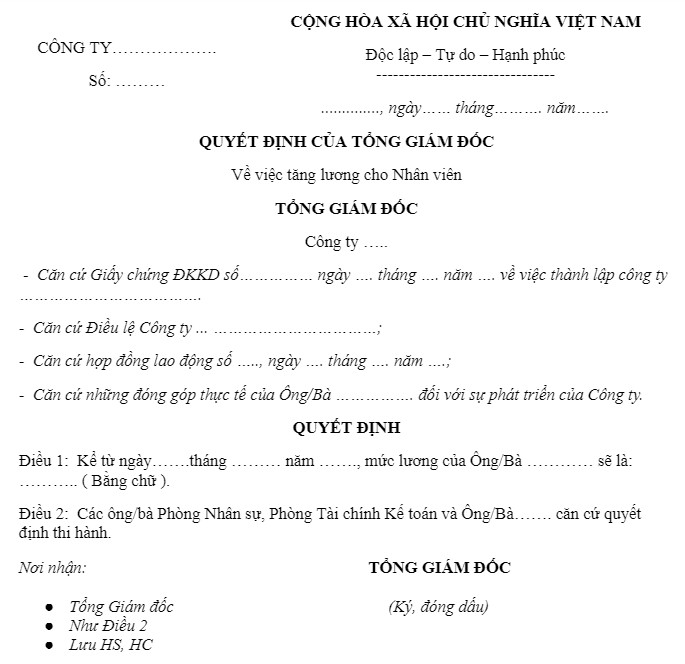
You can download the standard .doc file template for easy editing to fit your business model here: DOWNLOAD FREE WORD TEMPLATE
VII. Some important notes when issuing a salary raise decision
When creating and issuing a salary raise decision template, the HR department and management need to pay special attention to the following factors to ensure effectiveness and limit administrative risks:
1. Clear basis, in accordance with regulations
Absolutely do not make decisions based on feelings.
There must be complete competency assessments, salary raise proposal forms, KPI results, etc.
2. Consistency with the payroll and budget
Carefully check the salary fund before approving the salary raise decision.
Synchronize data with the finance and accounting departments to avoid errors.
3. Record the correct effective date
Avoid applying it to the wrong pay period, which could unbalance the payroll or cause misunderstandings for employees.
4. Transparent internal communication
Send the salary raise notification to the applicable employee.
It can be made public within the team/department if needed to promote a positive competitive spirit.
5. Store documents according to procedure
Store the salary raise decision in the individual’s personnel file.
You should use software like 1Office for electronic storage, making it easy to search, retrieve, and cross-reference when needed.
VIII. Frequently Asked Questions about salary raise decision templates
Is it mandatory to issue a salary raise decision in writing?
It is not required by law, but it should be issued in writing to:
- Serve as a legal basis in case of disputes
- Keep personnel records
- Demonstrate transparency in salary payment
Most businesses use official documents.
Does a salary raise decision require the Director’s signature?
Usually, the Director or the Legal Representative is the signatory.
However, if there is a written authorization, the Head of HR or the Department Head can also sign.
Is it mandatory for the employee to sign to acknowledge the salary raise decision?
It is not mandatory, but many businesses require it to:
- Confirm the employee has received the information
- Limit future disputes
When should a salary raise decision be issued?
Businesses usually issue it when:
- It’s time for a periodic review (6 months, 12 months)
- An employee achieves outstanding performance
- Adjusting salaries according to the market
- Adjusting due to a change in job position
When does the salary raise decision take effect?
Determined by the company. Typically:
- From the beginning of the next month
- Or from the date specified in the decision
- The most important thing is to be transparent and consistent with the payroll period.
Can a salary be increased without a specific reason?
Yes, but the reason should be stated in the decision for reference purposes:
- KPI achievement
- Performance-based adjustment
- Market-based adjustment
- Promotion
Can one salary increase decision be issued for multiple employees?
Yes. A company can issue a salary increase decision with an attached list, applying to multiple employees at once (often used during quarterly/annual reviews).
Does a salary increase decision need a company stamp?
If the company uses a stamp → it should be stamped for official validation. If the company is not required to use a stamp → only the signature of an authorized person is needed.
Does a salary increase require re-signing the employment contract?
It depends on the case:
- If the salary changes but other terms remain the same → re-signing is not necessary, only an updated appendix/decision is needed.
- If there is a change in position, job nature, or contract type → a contract appendix is required.
IX. Conclusion
A salary increase decision template is not just an administrative document, but also a clear expression of the company’s compensation and recognition strategy. Creating and issuing a standardized decision template will help make the salary increase process transparent, professional, and strengthen employee trust.
Don’t forget, you can absolutely use HR management software like 1Office to synchronize salary data, issue salary increase decisions, and manage employee performance more easily, accurately, and scientifically than ever before.
















