


 12/05/2026
  673 views
With a large number of business management software solutions available at various costs and quality levels, many businesses today are unsure which software to choose to optimize their management. 1Office.vn software is one of the most popular comprehensive management platforms among many businesses recently. So, what is 1Office software? What are the outstanding advantages of this solution? Let’s find the answers in the article below!
Mục lục
- I. What is 1Office.vn software?
- II. Management features of 1Office software
- III. Pros and Cons of the 1Office All-in-One Management Software
- IV. Customer reviews of 1Office.vn management software
- IV. How to Use 1Office to Improve Business Efficiency in the Retail Industry
- V. Answering Customer Questions About the 1Office Software
- 1. Why should our business choose 1Office vn instead of other software?
- 2. Where can I find the user guide for the 1Office software?
- 3. How does 1Office vn improve recruitment efficiency?
- 4. Can the 1Office software be used by a manufacturing company with under 100 employees?
- 5. How to use the 1Office software to standardize operational and HR processes
I. What is 1Office.vn software?
1Office.vn is an effective comprehensive business management software for enterprises, developed by 1Office Joint Stock Company. This solution is researched and developed based on scientific thinking methods, combined with a modern technology platform, ensuring uniformity, coherence, and comprehensiveness.
It’s not just a comprehensive company management software like many other management applications today; 1Office provides an online working environment on the Internet with a modern platform and an interface that is easily recognizable for Vietnamese businesses because the software is developed by Vietnamese technology engineers with a deep understanding of business needs and operations.
The 1Office system is designed and built entirely on a cloud computing technology platform, which can be easily deployed, maintained, and upgraded, so users can work anytime, anywhere, as long as they have an internet connection.
Register for a free software demo!
Read more: 1Office Review: Detailed review of 1Office business management software
II. Management features of 1Office software
Small and medium-sized enterprises that have used 1Office software for a while have all commented that this software has helped business managers automate all processes in business management and operations more smoothly and effectively.
In terms of features, 1Office solves problems in business management and operations:
1. Work Management Module (1Work)
Work management is one of the important requirements for any business or manager. Instead of managing tasks and projects manually and disjointedly as in the past, businesses can now manage them on a single platform.
The 1Work module helps businesses in general and teams in particular work according to plan and on schedule. As a result, managers will always have the most detailed view of the plan and work objectives to assign tasks and monitor their execution.
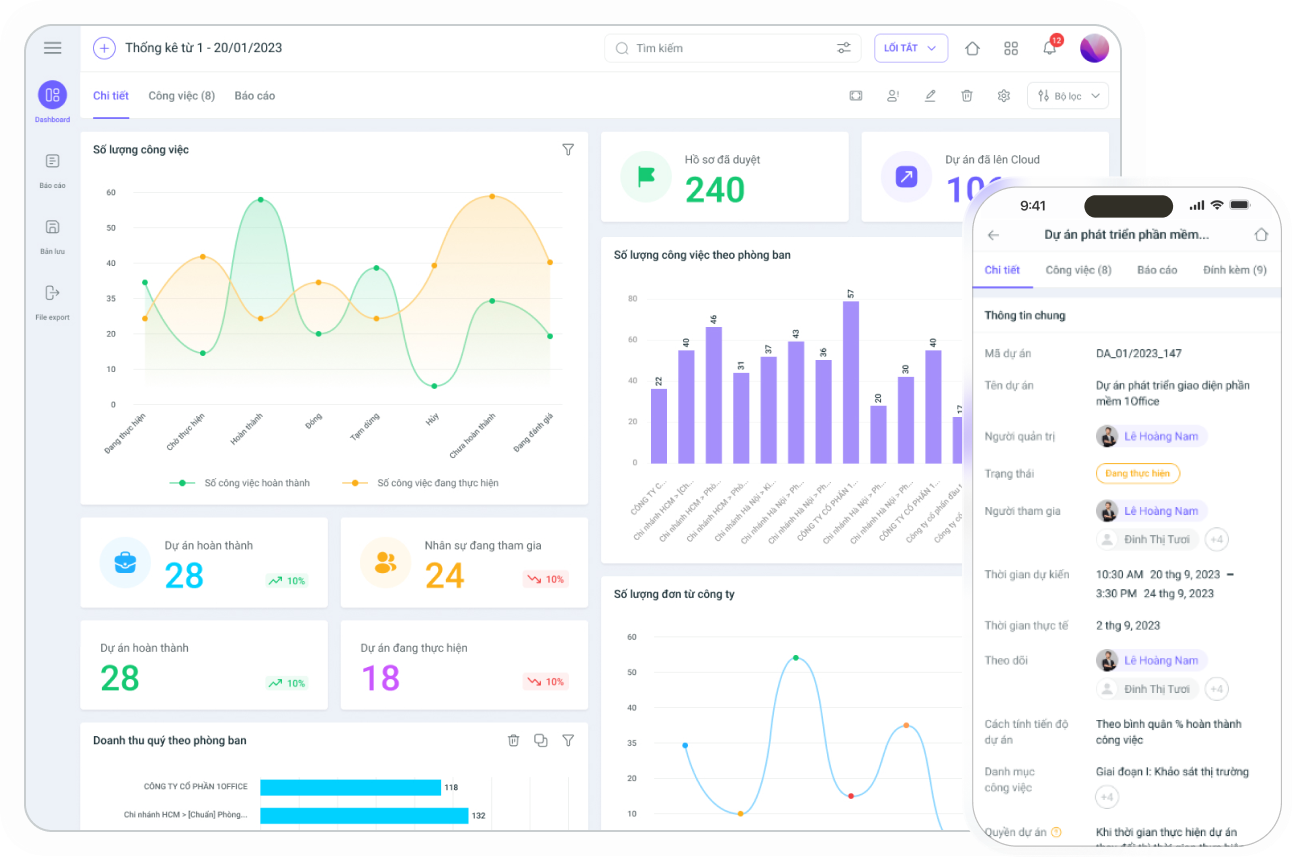
The 1Work module includes key features that help businesses optimize their operational processes:
- Task and project management
This feature helps teams create projects and allocate resources; assign tasks flexibly by assignee, position, or department. Furthermore, users can also track every issue that arises in the project in detail and continuously to grasp the progress.
- Digital signature
Digital signatures are now used to sign documents, records, and papers online and in bulk in a short amount of time. The 1Office digital signature has solved the time-consuming problem of manually signing numerous documents.
Simply put, if a project contract needs approval, instead of sending it back to the office to be signed by hand, the business owner can now track and sign it digitally quickly. This module is integrated with other modules such as payroll management, work management, etc., helping to save time and costs.
- Internal network
1Work is where businesses can store all internal information, pin important announcements, and easily interact with each other. Building and strengthening company culture also becomes more effective and widespread as a result.
Notably, the internal network is also the interface from which users can access other modules like Workplace, HRM, and CRM, which brings convenience and consistency to work.
- Process automation
The 1Work module of 1Office is integrated with BPA to help businesses automatically assign tasks to individuals or departments and link related parties, avoiding operational errors.
In addition, the work management process system is built specifically for each department and staff position, with a clear division of responsibilities for each part, helping to minimize delays or missed assignments.
- 1Chat
Allows creating chat groups for specific departments, positions, or titles. The system will automatically add relevant personnel to the chat group. Displays a list of commands to quickly create charts such as: Column chart, Pie chart, Bar chart, etc., or statistical data like Comparing 2 figures, Counting digitally signed documents, etc., right within the conversation.
2. Human Resource Management Module (HRM)
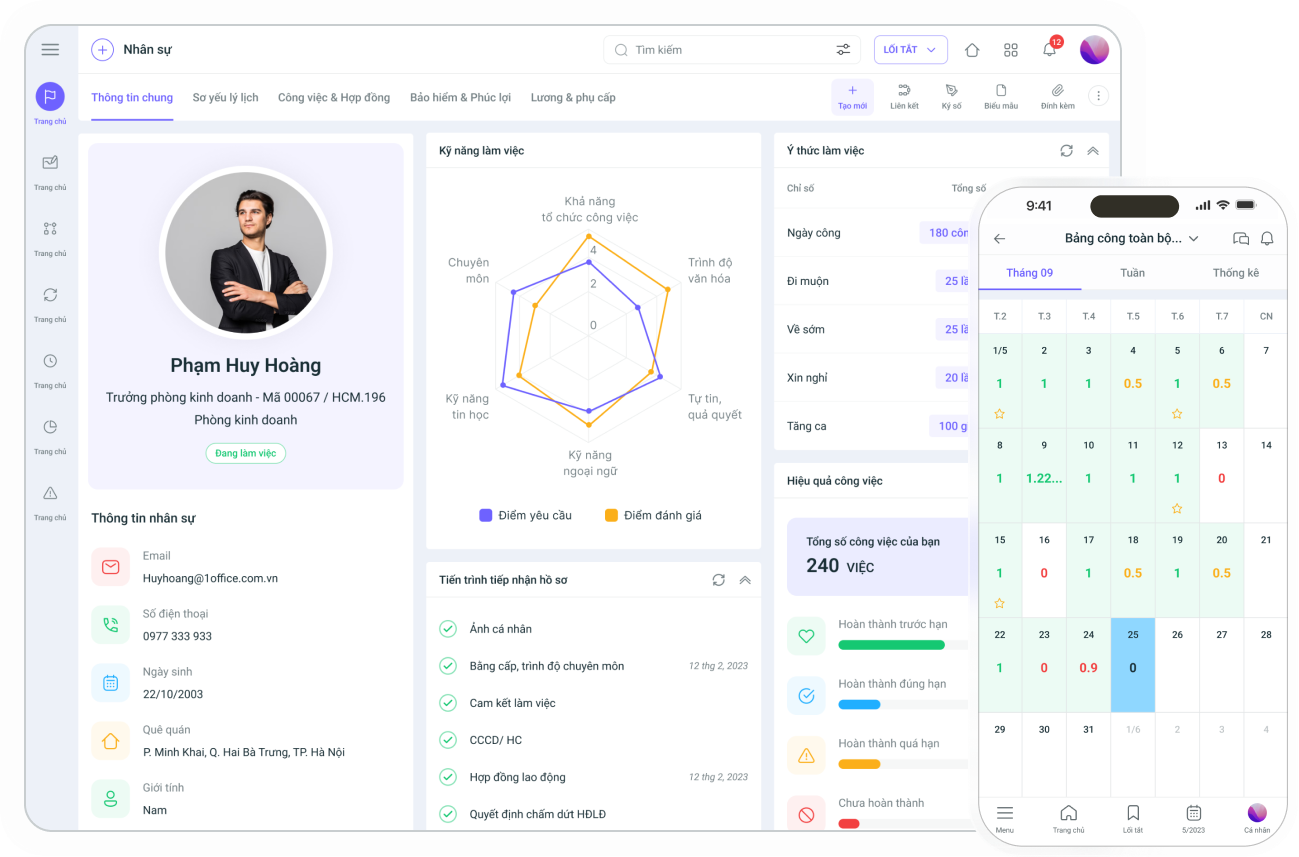
1Office’s 1HRM module is the most comprehensive and professional human resource management solution available today for all businesses, helping managers easily search for information, track, and evaluate employee performance with modern features.
- Personnel Management
Store all employee profile information, work status, employment contracts, salary data, department positions, insurance information, compensatory leave – annual leave information, and more on a single platform.
The personnel management feature of 1Office Software is aimed at businesses with large-scale workforces, which are very difficult to control and monitor using traditional methods.
- Recruitment Process Management
1HRM allows the recruitment department to create recruitment proposals, launch campaigns, update candidate profiles, evaluate, and schedule interviews.
Additionally, the personnel screening and evaluation process is also addressed. 1HRM integrates the ASK competency assessment framework, effectively evaluating and screening candidate profiles, helping to improve the quality of recruitment for the business.
- Automated Timekeeping and Payroll
The 1HRM software can connect to time clocks or allow remote timekeeping via GPS tracking to automatically create shift schedules, manage days off, manage leave and compensatory time, track actual working hours, and more. Additionally, the software automatically links to the payroll system based on predefined formulas.
This feature helps manage timekeeping effectively and conveniently, and enables the HR department to calculate salaries for each employee quickly and accurately.
- Comprehensive Employee Evaluation System with KPIs & OKRs
1Office’s employee competency evaluation system is configured to provide a multi-dimensional, intuitive view through dashboards, dynamic reports, and smart filters, helping managers accurately assess employee performance.
The software allows users to build evaluation criteria for each department, such as sales, human resources, customer care, etc., and manage them centrally on a single system. 1Office software helps managers easily track the achievement of evaluation criteria for each department, thereby adjusting the evaluation framework for each department, or even for individual employees.
3. Customer Relationship Management Module (CRM)
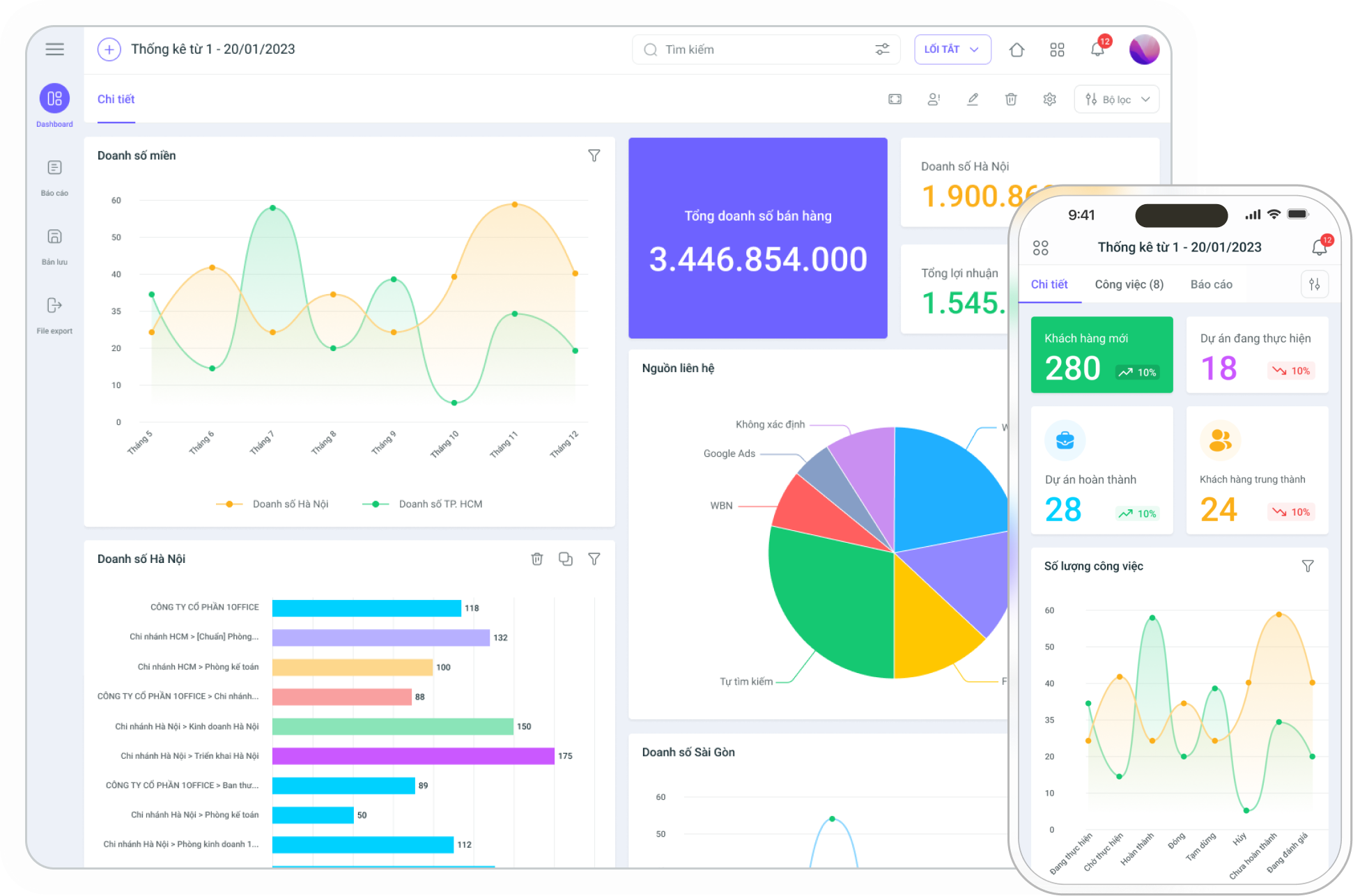
The 1Office CRM software is a module that helps businesses store and manage all customer information, create marketing campaigns, provide thorough customer care, and optimize the sales process.
CRM can help businesses:
- Centralized Customer Data Storage
Customer information and data are automatically aggregated and pushed into the system from various channels such as email, call centers, websites, social media, etc. It allows for the classification of customer data based on various criteria, making it easy to search.
- Identify Sales Opportunities
Analyze customer information data and categorize them into groups: potential, opportunity, no demand, etc. Automatically compile real-time reports and statistics based on updated customer data.
- Support Sales Management Activities
CRM provides a foundational customer database for developing multi-channel marketing and sales promotion campaigns. This helps professionalize the customer care process and optimize the customer experience.
4. Advance Module
In addition to the feature modules above, 1Office also has the Advance module – a module that provides a toolkit for configuring business automation processes.
You can learn more about this module HERE.
III. Pros and Cons of the 1Office All-in-One Management Software
As mentioned above, every software has its own strengths and also some limitations. Evaluating these two aspects helps businesses get a more comprehensive view to decide whether or not to use this software.
1. Advantages of 1Office.vn Management Software
First and most importantly, 1Office can completely address the shortcomings that standalone software cannot solve, such as: data connectivity, user interface consistency, linkage between departments in the business, and the ability to assign permissions by department, position, title, etc. Specifically:
- All-in-One Management Solution
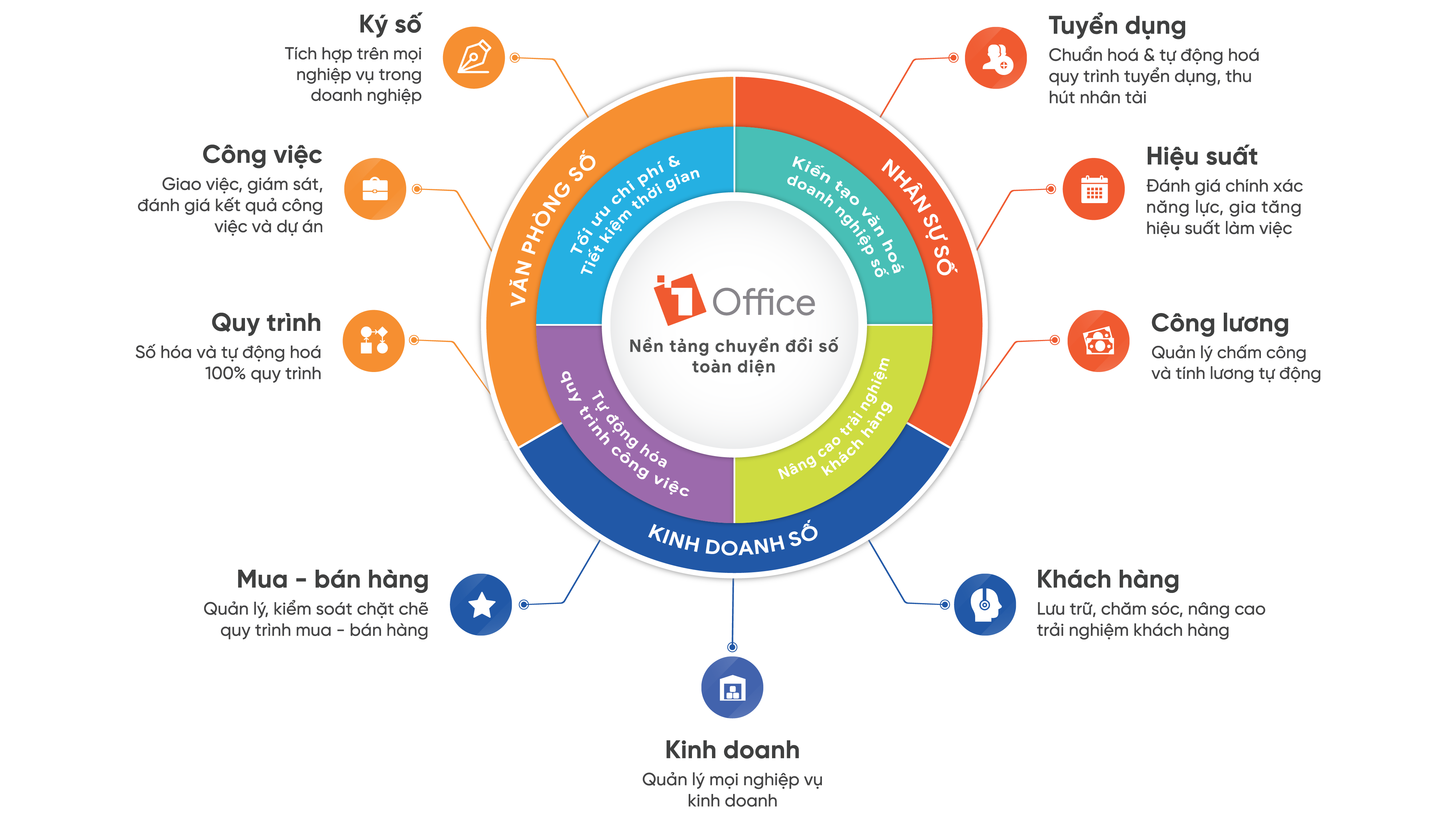
1Office is an all-in-one business management solution, built on the All-In-One model, helping to handle all business operations in a single software. All activities from Sales & Marketing, administration – human resources to internal business management are digitized and managed centrally on one platform.
Notably, all data across the entire business is tightly interconnected, using each other’s data for calculations. Therefore, almost all operations are automated, and the CEO can easily obtain multi-dimensional reports on every aspect of the business.
- Integration and Scalability
1Office is built on a Core Platform developed by 1Office itself. If you have knowledge of code and algorithms, you will see that this Core Platform has strict regulations on data structure, inheritance, common functions, UX, and UI.
This design makes the 1Office.vn software easy to integrate with other software.
- Customization and Automation Capabilities
1Office is flexible enough to be customized for each specific case. Users can proactively install and flexibly create features that suit their usage needs.
For example:
Automatic reporting system; Excel formulas; automatic approval system; automatic alert system…
- Fully integrated features
1Office aims to provide a toolset with a full range of features for managing business operations, while still ensuring flexibility and customization.
This means users can choose to install and use only the features that meet their needs. However, if new needs arise later, users can easily integrate new features into the software.
- Reasonable and flexible pricing
Most other management software on the market charges a fixed package fee, which inflates the cost and wastes many resources.
But with 1Office vn, the software is charged on a “subscription” basis – the usage cost corresponds to the number of users. This helps businesses have more options and optimize costs.
- Helps standardize businesses effectively
1Office allows businesses to standardize all work processes completely automatically thanks to: diverse smart alerts; a huge repository of document templates; and flexible linear or branching process models.
- Accompanied by 1Academy – A treasure trove of modern management knowledge
When managers choose to use 1Office for their business, you not only get to experience useful toolsets and features but also enhance your business knowledge with exclusive materials from 1Academy – an academy specializing in providing and disseminating in-depth management knowledge and solutions accompanied by advanced technology.
1Academy acts as a bridge, guiding Vietnamese businesses to access the most suitable modern management solutions on an advanced technology platform, to create long-term value changes for Vietnamese enterprises.
2. Limitations of 1Office management software
As mentioned with the modern features above, 1Office has provided users with a series of tools to optimize operational processes, manage tasks, projects, as well as recruitment and customer care.
However, due to its extensive features and massive data repository, 1Office vn is only suitable for medium to large-sized enterprises. Small businesses using 1Office will find it difficult to fully utilize the resources the software offers.
This is also the biggest limitation of 1Office, as it cannot yet meet the needs of small-scale businesses. However, the founder and the technology engineering team at 1Office vn are continuously researching to solve this problem and expand their customer base.
In the near future, 1Office aims to both improve its existing features and better meet the needs of new customer segments, especially small-scale businesses.
See more: 5 “golden criteria” for choosing business management software
IV. Customer reviews of 1Office.vn management software
Throughout its 10 years of operation and development, 1Office software is currently being used by over 5,000 customers, who are large enterprises in various business sectors.
Let’s take a look at what they shared about using 1Office:
- Yody – a famous fashion store chain – successfully applied 1Office HRM to resolve backlogs in human resource management such as recruitment, timekeeping, and payroll:
“1Office has been a great support for Yody in our digital transformation process. Since implementing the software, employees can work from anywhere, at any time, and still access it to receive work assignments, report on tasks, and handle timekeeping and payroll…”
(Shared by Mr. Trung Son – HR Director of Yody)
- Ahamove also became a long-term customer of 1Office by applying the Workplace task management tool to end the time-consuming process of contract approval:
“Thanks to applying 1Office, management information from purchasing, contract approvals, to approving plans that require multiple levels of confirmation,… are all managed on the system…”
(Ms. Nguyen Kim Anh – HR Manager at AhaMove)
- F88 also had positive feedback about 1Office after applying 1Office HRM and effectively optimizing their timekeeping and payroll process:
“1Office helps me control timekeeping for the office block as well as 80 stores. 1Office also solves the problem of shift scheduling, shift changes, overtime, and approving external leave requests…”
(Mr. Phung Anh Tuan – CEO of F88)
- Toco Toco milk tea, after a period of using 1Office’s task and human resource management tools, has effectively improved its timekeeping and payroll situation:
Sharing about this, Mr. Le Phuc Khanh – CEO said: “After learning about and implementing the 1Office software, we can now easily control timekeeping for the office block as well as 80 stores, solve complex shift scheduling issues, and manage shift changes, overtime, and extra work through the shift and leave request system…”
- IIG Vietnam, an educational organization, successfully underwent digital transformation thanks to 1Office, automating the entire business process and ending the long-standing issue of fragmented workflows:
“After automating our business on 1Office, the company has streamlined the HR Department’s workflow. At the same time, other departments have also significantly reduced their daily time and workload.”
(Ms. Nguyen Vu Hong Anh – Deputy General Director of IIG Vietnam)
As you can see, businesses that have used 1Office are all satisfied and have achieved high digital transformation efficiency. Because 1Office always aims to help every business achieve the best operational and management quality, as long as the business conditions are suitable, choosing 1Office is a wise choice.
IV. How to Use 1Office to Improve Business Efficiency in the Retail Industry
For businesses in the retail industry, such as fashion store chains or mini-marts in Hanoi or HCMC with 30-50 employees, optimizing sales processes and customer care is a decisive factor in increasing revenue and strengthening the brand. The 1Office software provides a comprehensive management solution, integrating modules like 1CRM, 1Work, and 1HRM, helping retail businesses digitize processes, improve business efficiency, and create a superior customer experience.
One of the strengths of 1Office in the retail industry is its customer management capability through the 1CRM module. This software allows for the collection and storage of customer data from multiple channels such as websites, social media, or call centers, and then categorizes customers based on criteria like potential customers, VIPs, or customers with no demand. Based on this data, businesses can implement personalized marketing campaigns, such as sending promotional SMS to frequent customers. A fashion store chain in HCMC used 1CRM to run a promotional campaign, resulting in a 20% increase in customer return rates after just three months. 1CRM’s real-time reports also help managers track the conversion rate from potential customers to buyers, allowing for timely adjustments to business strategy.

Additionally, the 1Work module supports the management of work schedules and daily tasks at stores. Managers can assign counter shifts, delegate tasks like inventory checks or product displays, and monitor progress through an intuitive dashboard. The 1Chat feature integrated into 1Work allows sales staff and store managers to communicate quickly, ensuring smooth coordination during peak hours. Meanwhile, the 1HRM module automates timekeeping via GPS or time clocks, manages leave days, and calculates salaries based on pre-set formulas. This helps reduce payroll errors, as seen in the case of the aforementioned fashion chain, which reduced payroll mistakes by 30% thanks to 1HRM, while also improving customer service efficiency through optimized schedules.
The digital signature feature in 1Work is also a highlight, enabling the quick signing of contracts with suppliers or partners, saving time on paperwork. Furthermore, the Advance module of 1Office supports process automation, such as sending promotional notifications when new stock arrives or automatically assigning inventory check tasks, helping to reduce manual workload. As a result, retail businesses not only increase revenue but also build a professional image and enhance the customer experience through attentive service and smooth operational processes.
To achieve maximum efficiency, retail businesses should start with the 1CRM and 1Work modules to focus on sales and schedule management, then expand to 1HRM as their workforce grows. The 1Office team provides free demos and detailed training to ensure employees quickly become familiar with the system. With its combination of modern technology and customization capabilities, 1Office is the ideal solution to turn your retail chain into an efficient business machine. Want to discover how 1Office can transform your business into a retail industry leader? Register for a demo experience today!
V. Answering Customer Questions About the 1Office Software
During the consultation process, the 1Office customer care team has received countless questions about features and how to register. Here are some of the most common ones:
1. Why should our business choose 1Office vn instead of other software?
1Office can overcome the limitations that many management software solutions still face today. This is its first strength. The software is designed with a full range of features to manage business operations.
Next is the flexibility and customization of 1Office. Customers have the ability to install, remove, or add one or more features to suit their specific needs.
Finally, the implementation cost of 1Office is much more reasonable than many other software solutions available today, making it suitable for businesses of various sizes.
2. Where can I find the user guide for the 1Office software?
When you begin implementing the 1Office software, the system will activate an Admin account with full operational rights. You will use this Admin account to perform the initial system setup.
The software user guide is detailed on the 1Office support page HERE.
Additionally, businesses don’t need to worry about how to use it, as the 1Office sales team will provide detailed guidance, conduct demos, and offer training support to ensure all employees can use the system.
3. How does 1Office vn improve recruitment efficiency?
When it comes to recruitment, HR professionals often spend weeks, or even months, screening and evaluating CVs to see if they match the criteria. This is not only time-consuming but can also lead to errors.
However, with 1Office HRM, the CV evaluation and screening tool optimally supports HR by assessing CV quality based on pre-set company criteria, improving recruitment quality, saving time, and reducing errors.
4. Can the 1Office software be used by a manufacturing company with under 100 employees?
Yes, absolutely. In fact, manufacturing businesses with 30–100 employees are the customer group currently using the 1Office software most effectively.
At this scale, companies often face the following challenges:
-
Managing shifts, overtime, and shift changes flexibly for each department
-
Tracking production progress, assigning tasks by team, group, or production line
-
Managing direct and indirect personnel, complex payroll calculations
-
Approving internal proposals and requests is still cumbersome and manual
The 1Office software provides a flexible Lowcode + AI platform that helps manufacturing companies:
-
Design their own processes for each department: accounting, production, administration, QC, etc.
-
Automate task assignment and workflow routing, and send alerts for delays
-
Calculate payroll based on shifts, allowances, attendance, and output, reducing errors and ensuring transparency
-
Monitor in real-time with visual dashboards for each workshop and team
Not only is it suitable, but 1Office is also a tool that creates an operational advantage for small and medium-sized manufacturing companies – when you don’t have the resources to invest in a traditional ERP but still want systematic, modern management.
5. How to use the 1Office software to standardize operational and HR processes
To standardize operations and HR management on the 1Office software, businesses can follow these 4 steps:
Step 1: Digitize existing HR and operational processes
-
Use Workflow Studio to drag and drop all manual steps: from leave requests and KPI approvals to purchase proposals.
-
Assign roles, approval conditions, and SLAs for each step to standardize procedures across the company.
Step 2: Standardize data and permissions
-
Create core data using Object Studio: personnel, departments, tasks, products, etc.
-
Assign access rights by hierarchy – employees only see what they need to handle, reducing errors.
Step 3: Automate actions & reminders
-
Integrate AI Agent (1AI Process, 1AI Monitor) to track progress and suggest suitable handlers.
-
Task assignment, tracking, approvals, and deadline reminders are automated for each process.
Step 4: Measure & improve processes
-
Use 1AI Performance and Dashboard to monitor the performance of each department and project.
-
Identify “bottlenecks” and adjust processes immediately when alert data is available.
👉 With 1Office, CEOs can not only digitize but also standardize how the business operates – without depending on individuals or departments. Every action is clear, transparent, and can be continuously improved.
Above is all the detailed information and review of the 1Office vn total management software. We hope these insights are helpful for you and for businesses struggling to find a software solution to optimize business management and operations.
For more detailed information, please contact:
- Hotline: 083 483 8888
- Fanpage: https://www.facebook.com/1officevn/
- Youtube: https://www.youtube.com/channel/UCeTIRNqxaTwk0_kcTw6SxmA
















