


 12/05/2026
  186 views
Dear valued customers,
1Office would like to sincerely thank you for trusting and using our services. With the desire to improve product quality and provide you with a better experience, we are constantly researching and developing new features. This time, we are upgrading the Payroll module.
Estimated upgrade time: 6:00 PM, September 8, 2023
Upgrade content:
1 – Upgrading payroll types
2 – Consolidated payroll
3 – New payroll formula set
1. Upgrading payroll types
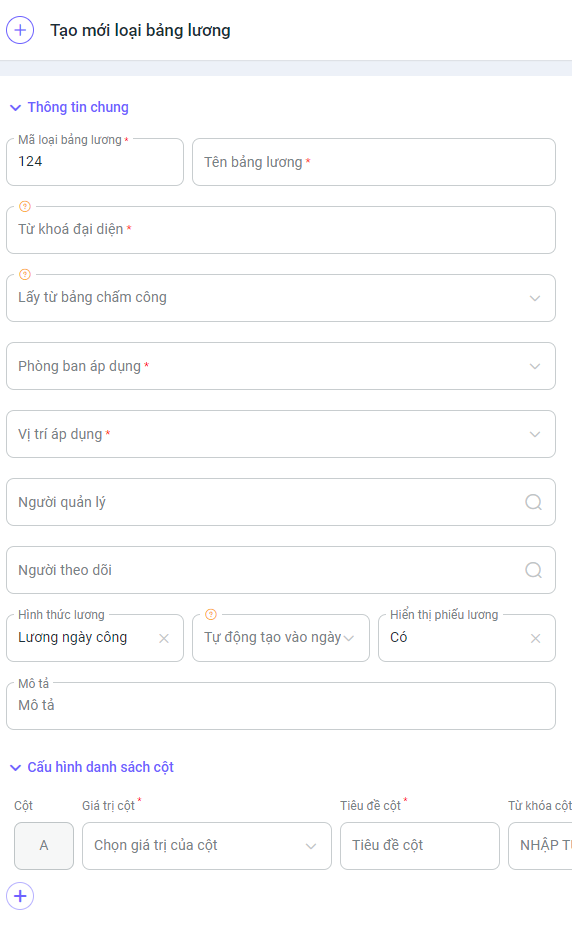
On the new payroll type creation screen, we have decided to adjust and add a few data fields to better suit our customers.
- Payroll type code: Allows managing and configuring payroll type codes to increment according to specific rules, helping to identify and differentiate payroll types.
- Representative keyword: Each payroll type is represented by a keyword. This makes it easy to call data from different payroll types within the payroll formula.
- Auto-create on date: The system automatically creates the payroll for the previous month on specific days each month, helping to reduce manual work and optimize the payroll calculation process.
- Added tax function: The SA_PIT() tax function calculates and updates with the newest and most accurate tax formulas according to state law.
- Display payslip: Customize toggling the display of payslips.
- Display individual column values: Toggle the values of columns in the payslip.
Consolidated payroll: The system automatically generates a consolidated payroll for the company based on the payrolls of branches and departments (called regular payrolls). The consolidated payroll will, by default, automatically retrieve the following data columns from the regular payrolls: Workdays, workday salary, insurance salary, insurance contribution amount, personal income tax, penalties, and total amount.
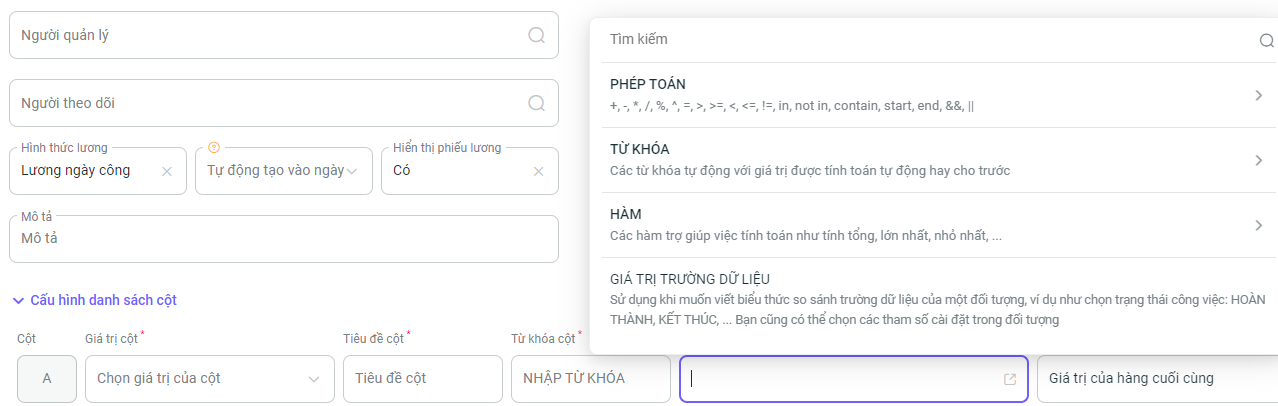
2- Comprehensive: Allows retrieving data from all objects in the system to support payroll calculations.3- Diverse payroll functions: Adds many new payroll functions to meet the complex calculation needs of users.4- Formula suggestions: When typing, suggestions for functions will be displayed right below the dialog box, making it easy to search and avoid entering incorrect formulas.
Important: The new payroll formula set only applies from this point forward and does not affect payrolls calculated with the old formulas.
We kindly ask our valued customers to take note of the update time to avoid any disruption to your business operations.
For any support, please contact us via Hotline 19003313 or our Livechat and Ticket system.
Sincerely,
The 1Office Product Development Team.
















