


 13/05/2026
  459 views
Multitasking has become a habit for many in the modern workplace, but it doesn’t always boost productivity. If you want to understand what multitasking is, its benefits, and why it can be counterproductive, this article will give you a clearer perspective before you apply it.
Mục lục
1. What is Multitasking? Types of Multitasking
Multitasking is the practice of performing multiple tasks and switching between them simultaneously to speed up progress and shorten completion time.
There are 3 common types of multitasking:
- The first and most obvious form of multitasking is performing two physical tasks at the same time, such as talking on the phone with a customer while drafting a plan.
- The second type involves performing only one physical task while your brain is thinking about another issue, such as attending a meeting while mentally figuring out how to solve an unfinished task.
- The third type of multitasking is called “utilizing idle time.” Checking emails while a report is printing or listening to a podcast while waiting for a director to approve a draft are examples of this form of multitasking. Essentially, this is a method of effectively using time that might otherwise be wasted. However, from a cognitive perspective, it is still a form of multitasking because the person is engaged in multiple workflows simultaneously and has not fully completed the previous task.
2. Multitasking – A “Double-Edged Sword” in Business Operations
Benefits of Proper Multitasking
Saves time
Multitasking is a method many businesses use to optimize time and accelerate work progress. Running workflows in parallel instead of sequentially helps save time by completing more tasks. For example, instead of memorizing a department head’s feedback and editing a draft later, an employee can edit the draft directly during the meeting to save the remaining time for other tasks.
Saves costs
Many companies today prefer candidates who can multitask to handle various positions and functions. An employee who can flexibly handle multiple tasks at once can help the business save on outsourcing costs and optimize its operating budget.
Improper Multitasking Can Be Counterproductive
Multitasking disrupts workflows
Most tasks within an organization are implemented according to a specific process, creating a continuous “flow” of work throughout the business’s operational machinery. This workflow allows team members to perform tasks seamlessly and systematically. When multitasking, this workflow is interrupted and may even break. This is because the person has to pause one process to switch to another task. As a result, multiple workflows overlap, causing difficulties and reducing operational efficiency.
Reduces labor productivity
A multitasking work style can severely affect employee productivity. Many studies have shown that the human brain can only focus on processing one stream of information at a time. Therefore, when we multitask, we are actually just switching our attention from one task to another. The brain then needs extra time to “reboot” and adapt to a new workflow. Additionally, processing too much information at once can lead to confusion and information overload, making it easier to make mistakes. This results in decreased work efficiency and delayed progress.
Declining employee health
Performing too many tasks at once can overload the brain and lead to mental stress. According to a study conducted at the University of London, participants who multitasked experienced a 15-point drop in their IQ scores during cognitive tests.
A McKinsey study also found that 87% of employees who frequently multitask reported experiencing health problems and being in a constant state of fatigue. It is clear that multitasking seriously affects both the physical and mental health of employees, compromising their quality of life.
Multitasking is only a short-term solution for temporary situations and should only be used in specific cases. However, it is not an optimal long-term solution for businesses.
See more: TOP 9 Factors Affecting Work Efficiency and How to Improve Them
3. Common Mistakes When Multitasking
Mixing Entertainment with Work
This is an unscientific but very common habit among employees. Combining entertainment with work is also a form of multitasking, as the brain is distracted by two different streams of thought. Listening to music while writing a report or watching a movie while working are common examples of this type of multitasking. However, this is also one of the main reasons for inefficient work performance. Because when we are in a state of entertainment and relaxation, it is very difficult to concentrate on work, leading to low productivity and prolonging the time it takes to complete tasks.
Handling Multiple Demanding Tasks at Once
A common situation for multitaskers (multitasking person) today is that they are always stressed and overloaded from shouldering multiple responsibilities at once. A person acting as the leader for two different projects simultaneously is a typical example of a multitasking person. This also means the burden is doubled, putting extreme pressure on both employees and managers.
Numerous Distractions
One of the biggest reasons multitasking backfires is that employees are distracted by environmental factors. A small interruption, like a loud conversation or a constantly ringing phone, can break one’s train of thought. This leads to reduced concentration on work and makes it easy to make unnecessary mistakes.
| Read more: What is Kanban? How to apply Kanban in work management |
4. 6+ Tips for Effective Multitasking to Increase Work Productivity
Multitasking isn’t really the perfect choice for businesses looking to increase productivity and optimize operations. However, in some cases, if you know how to multitask intelligently, you can absolutely 2X your work efficiency and achieve surprising results. Here are some multitasking skills that managers can apply to coordinate employees for effective multitasking:
Prioritize tasks
Instead of letting employees “drown” in deadlines, arrange tasks by importance so employees know which ones to prioritize. One useful tool is the Eisenhower matrix. The Eisenhower priority matrix is a business analysis tool that allows individuals and teams to objectively compare options to determine which projects are urgent and important, deliver the most value, and have the highest chance of success to be prioritized.
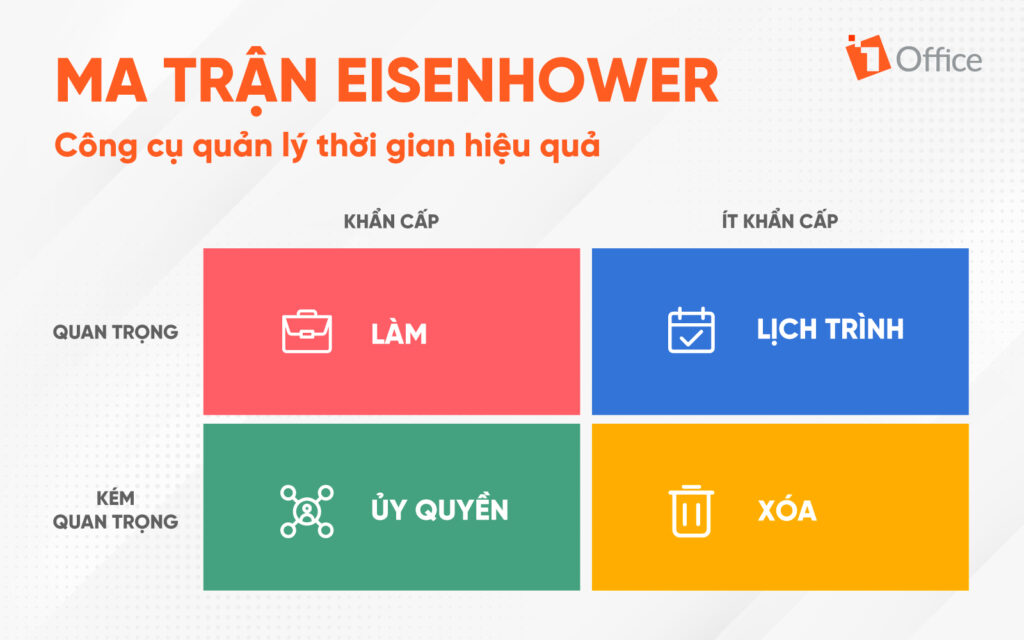
The Eisenhower matrix (also known as the 2×2 matrix) divides tasks into four quadrants: important – urgent, important – not urgent, not important – urgent, and not important – not urgent. By classifying tasks into these 4 groups, managers can identify which tasks need to be focused on first and which tasks can be multitasked simultaneously.
Read more: INCREASE WORK EFFICIENCY BY 200% WITH WORK IMPROVEMENT IDEAS
Group similar tasks together
One of the effective multitasking skills that doesn’t complicate the workflow is grouping tasks with similar characteristics and methods to be performed at the same time. This helps the brain get used to a single workflow with similar actions, allowing it to operate more smoothly.
For example, instead of breaking them into small tasks and doing them alternately, you can post multiple advertisements on different social media platforms within the same time frame. This not only saves time but also maintains employee morale.
Multitask at a suitable pace
Performing multiple tasks at once can put employees in a state of rush and urgency – a major cause of extreme stress and errors. Therefore, maintain a steady workflow by breaking tasks into small time intervals. This means setting a time limit for each task, during which the employee focuses on only that one task and only switches to other tasks when the set time is up. This form of multitasking skill is called the Pomodoro Technique.
For example: An employee performs a specific task for 25 minutes and takes a short break when the time is up. During each 25-minute block, you should focus on only one task. Then, after every 3 to 4 25-minute blocks, you can take a longer break to rest your brain.
This method is very useful because the human brain concentrates most effectively for 25 to 30 minutes. This will help employees minimize the impact of constant context switching.
Eliminate distractions
Create an ideal workspace for employees so they can fully concentrate on their work. This includes eliminating distractions and information noise. An effective work environment that supports maximum employee productivity needs to meet the 5S standard:
- Sort: Sort and eliminate unnecessary items and potential distractions
- Set in Order: Arrange everything neatly, orderly, with clear numbering and labels
- Shine: Keep the workplace clean
- Standardize: Consistently maintain the first three activities
- Sustain: Turn the above tasks into habits
When in a comfortable space, employees will have better morale and multitask more effectively.
Support your employees
This is one of the most essential multitasking skills to help employees multitask successfully. Don’t be a “dictatorial” boss in your employees’ eyes; instead, provide them with the necessary tools and guidance to execute tasks effectively. Additionally, managers should also care for their employees’ mental well-being by allowing rest periods between tasks so they can “refresh” themselves and avoid burnout.
Multitask intelligently with technology
Today, technology solutions have become powerful tools that help managers and employees multitask effectively. Applying task management software to your operational processes not only helps businesses increase productivity but also saves time and resources. Among them, 1Office is one of the pioneering and most superior business management platforms for digital transformation on the market. With its powerful management features, 1Office can decisively solve the productivity problem for businesses in all fields:
- An automated, intuitive Dashboard reporting system provides metrics for measuring and evaluating business performance, personnel fluctuations, etc.
- Sends reminder alerts when tasks are due, helping employees avoid forgetting or missing tasks when handling multiple assignments.
- Supports detailed work planning, clear resource allocation, and automatically updates individual schedules.
- Creates scientific, systematic workflows, helping managers and employees clearly track work progress.
TRY THE WORK MANAGEMENT SOFTWARE FOR FREE
Through this article, 1Office has provided readers with an understanding of what multitasking is, as well as a technology solution to help businesses multitask effectively and scientifically. For a free consultation and a trial of today’s leading business management software, please contact us using the information below:
- Hotline: 083 483 8888
- Fanpage: https://www.facebook.com/1officevn/
- Youtube: https://www.youtube.com/channel/UCeTIRNqxaTwk0_kcTw6SxmA

















