


 13/05/2026
  186 views
To enhance recruitment quality for businesses, this August, 1Office has upgraded several new features such as setting statuses, candidate sources, and creating/updating recruitment statuses. These are all useful improvements that help make the personnel recruitment process in businesses easier.
Mục lục
1. Upgraded Settings Section
When a recruitment campaign is completed, the system will automatically change the status to ‘Completed’ as per the proposal.
Status Settings
Allows users to set candidate statuses based on the available fields in the system.
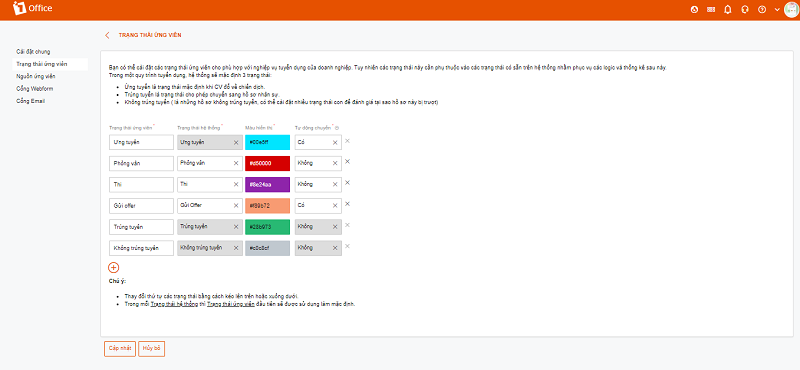 Users can easily select candidate status settings that fit their business’s recruitment process.
Candidate Source Settings
One of the biggest changes in the recruitment feature is the ability to set candidate sources from 3 different categories: recruitment portals (Vietnamwork, Jobsgo…), social networks, and other sources.
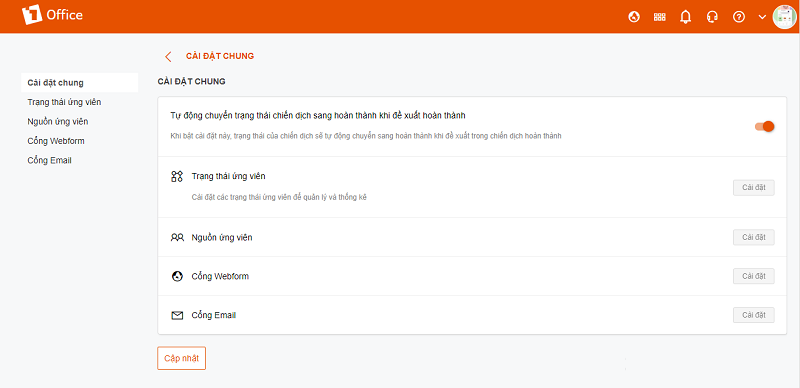 The Mailbox and Webform gateways have been moved to the system’s settings section
Mailbox and Webform are recruitment gateways that make the process more convenient for the HR department. Previously, users selected these two gateways from the system’s Menu. Now, 1Office has moved these two tasks to the “Settings” section of the recruitment module.
2. Recruitment Proposal
In the “Create New” proposal section, an option “Recruit until filled” has been added. When this field is selected, the system will disable the “Recruitment deadline” field. Once the required number of candidates has been hired, the system will automatically change the proposal’s status to “Completed”.
Proposal Status
Previously, the proposal’s status depended entirely on the approval status. Now, 1Office has upgraded it to include 3 additional campaign-related proposal statuses:
– When a proposal is approved, if any campaign is assigned to it, the system will set the status to “Recruiting”.
– When the required number of candidates has been hired, the system will change the proposal’s status to “Completed”.
– When the campaign period ends, but the HR department has not yet hired enough candidates, the system will also set the proposal status to “Expired”.
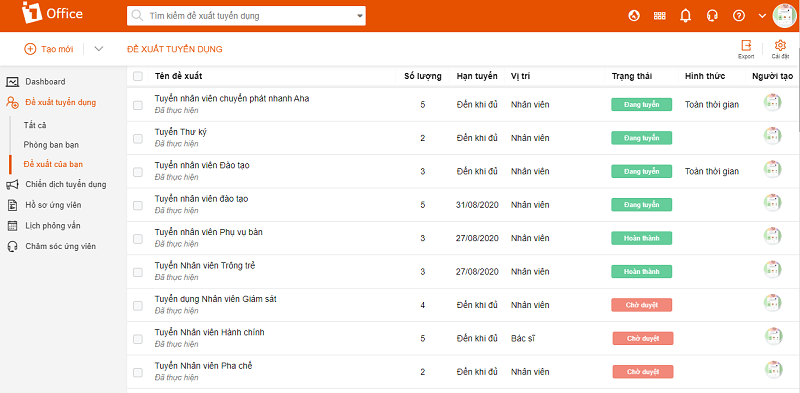 The system has been upgraded with 3 new statuses: Recruiting, Completed, and Expired
Proposal Approval
When approving a proposal, the approver is allowed to extend the campaign and change the number of hires for the campaign.
If the recruitment campaign ends before the HR department has hired enough candidates, they can perform the “Extend Proposal” action to increase the campaign duration.
3. Recruitment Campaign
Create New
For each recruitment campaign, users will create a campaign by setting parameters: Campaign start date and end date. (The campaign end date cannot be later than the recruitment deadline in the proposal).
The system will also provide suggestions for the quantity and estimated cost of a recruitment campaign.
Campaign Status
Added campaign statuses include “Planned” or “In Progress”; these two statuses will depend on the campaign’s start date.
When the user sets the proposal status to follow the campaign, the system will also automatically change it to ‘Completed’. If you want to complete the proposal earlier than scheduled, you can manually change the status to ‘Completed’ without depending on the time set in the system.
For an ongoing recruitment campaign, if the user no longer wants to proceed with it, you can use the “Cancel” action.
The “Expired” status will depend on the campaign’s end date and the proposal’s status in the system.
Tasks
Changed the “Add Channel” task to “Add Portal,” adding webform and mailbox recruitment portals.
The “Extend Campaign” task allows for extending the campaign’s duration.
Each campaign will have many different candidate sources. The “Budget” task helps users calculate the cost of recruiting candidates from these various sources.
Updated the interface for adding recruitment portals to a campaign.
4. Candidate Profiles
In the candidate profile task, the system will move the option to view candidates by week, month, etc., from the left menu to the “List of Candidate Profiles” title.
Upgraded the candidate evaluation feature.
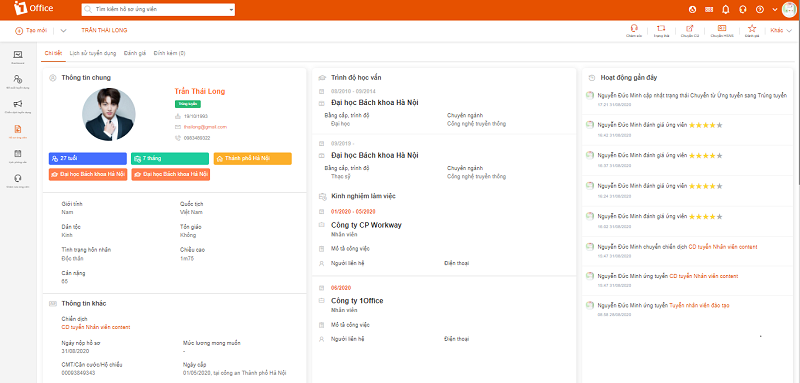
The system upgrades the candidate evaluation feature for recruitment
Evaluation
Evaluation Criteria
The Description fields now include an editor, similar to the one in Word.
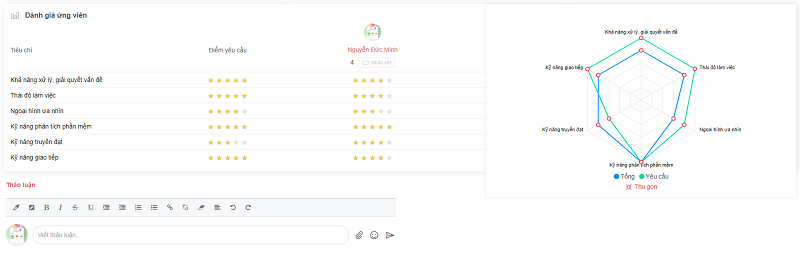 The system allows users to create candidate evaluation criteria based on 5 criteria and create evaluation templates depending on the company’s recruitment requirements.
Allows creating a library of evaluation criteria based on 5 main criteria groups: Skills, Knowledge, Attitude, Appearance, and Other. From these criteria, evaluation templates can be created for specific positions.
Evaluation Templates
Each evaluation template can be created for only one position and is automatically assigned based on the position in the relevant campaign.
Evaluation
When recruiting personnel, the person authorized to evaluate the interview is the one who directly participates in the interview process.
The “evaluate on behalf of” feature allows campaign managers, campaign leaders, and interviewers to participate in evaluating candidates on the system.
ASK Evaluation will be moved to the HR module
In this new update, the ASK evaluation feature has been reorganized and moved to the HR module to facilitate more effective candidate evaluation.
This latest update to the recruitment module will certainly enhance the experience for businesses using 1Office. Don’t forget to follow 1Office to stay updated on the latest new features that help improve your business’s work performance.
















