


 13/05/2026
  240 views
Business digitalization is becoming increasingly popular with many practical, convenient, and significant benefits in the era of digital transformation 4.0. As the Covid pandemic situation continues to be complex, digitalization has become an essential need for every business to adopt. Digitalization is not just a stepping stone for transitioning work platforms but also a prerequisite for businesses to “survive” in the current volatile era.
Mục lục
1. What is business digitalization?
Business digitalization is the process of converting business operations, management, and tasks related to traditional records, papers, and documents—such as handwritten papers, printed documents, or any images, audio, and data in various formats—into a standard digital format on computers and other storage devices.
2. The importance of business digitalization
It’s clear that while the data digitalization process today can be complex, it brings many tangible benefits to businesses. Digital transformation in the 4.0 era offers significant advantages for businesses, such as:
2.1 Increased work productivity and quality
In reality, each employee spends at least 12 minutes searching for paper documents. However, with just a few data digitalization steps, businesses can significantly reduce this wasted time. Consequently, company employees can use that time to learn and develop more skills, allowing them to handle more important tasks.
2.2 Cost savings
Previously, printing documents required significant expenses for items like paper, ink, and equipment. However, business digitalization helps you minimize these costs in the most effective way. Additionally, it frees up time to focus on core business areas and increase investment to achieve the best value. You can learn more about how to store documents quickly to save maximum time and effort.

2.3 Easy and unlimited access
All data converted to digital format can be easily accessed via the cloud or internet-connected devices anywhere, anytime. Digitalization revolutionizes organization to a new level, making it easier for you to manage and search for all information and data.
2.4 Enhanced access security
When a document is scanned, it can be tracked. If necessary, you can restrict viewing access to that document and set up related workflows with permission groups (access rights, comment rights, editing rights) for each individual or department.
2.5 Improved information security
Previously, businesses struggled with storing paper documents to prevent loss or damage, which was frustrating and tiresome. In particular, information stored on paper is vulnerable to theft or damage. Therefore, digital documents were created to help you ensure that the company’s confidential materials will be stored and kept securely.
2.6 Disaster recovery
Storing any data always carries the risk of disaster. Whether natural or man-made, disasters like forest fires, house fires, floods, or earthquakes can destroy paper documents, school equipment management, and important materials. This can have a significant impact on confidential documents and critical information that directly affects the business.
2.7 Environmentally friendly
According to research, millions of tons of waste paper are discarded by agencies and businesses each year, impacting the environment. Therefore, storing information in a digital format is considered an environmentally friendly idea. This method allows for a reduction in unnecessary printing, raising environmental awareness for your business.
2.8 A perfect stepping stone for digital transformation
Storing virtual data or scanning images is the first important step in building a digital transformation plan. From there, all document information is the golden key that helps business organizations ensure outstanding success in the future and save a lot of costs.
It’s clear that business digitalization brings great benefits to users, integrating many smart features to help businesses digitalize easily and effectively. Understanding user needs, digitalization software will help you optimize your entire work process professionally and automatically.
3. The Smartest, Most Professional Business Digitalization Software – 1Office
To help users convert paper documents to digital format, 1Office’s business document management software helps you easily search and filter information, allowing superiors to easily access and track project progress without needing to be physically present. In addition, all images and data help businesses easily reach and quickly attract potential customers.
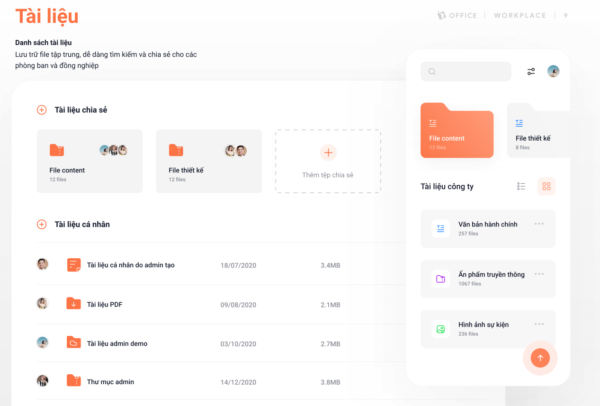
The document management software will help businesses systematize and centrally manage all these resources synchronously and effectively with many features such as:
- Create folder: Create a parent folder to store documents
- Upload documents: The software allows users to upload file types like Word, Excel, PDF, etc., to store for work purposes
- Share documents: Allows sharing documents with individuals or departments and adjusting management, editing, and viewing permissions for the recipient
- Rename document: Users have the right to rename documents to make them easier for viewers to recognize
- Move folder: Allows moving documents to another folder
In addition, the data security feature is also enhanced, minimizing the risk of information leaks that could be exploited by malicious actors, affecting the company’s reputation. Anyone in the business can easily use this software. With simple and easy-to-understand operations, superiors and employees can interact, freely discuss, and share everything through the internal network. Additionally, you can learn more about our project management software, which helps you track project progress quickly and effectively.
The content above has introduced users to the benefits and role of business digitalization in the 4.0 era. It also provides an effective and convenient digitalization solution to help businesses systematize and centrally manage all their resources professionally and automatically. Apply this useful toolkit today to save time, costs, and resources.
To better understand the document management features of the document management software, you can refer to the video below to use the software effectively.
For more details, please see:
Fanpage: https://www.facebook.com/1officevn/
Youtube: https://www.youtube.com/channel/UCeTIRNqxaTwk0_kcTw6SxmA
















