


ANNOUNCEMENT: ADDING DATA STREAM SCREEN FOR EACH MODULE


Dear valued customers,
1Office would like to sincerely thank you for your trust and for using our services. With the desire to improve product quality and provide you with a better experience, we are constantly researching and developing new features and utilities. In this upgrade, we are adding a Data Stream screen for each module
Estimated upgrade time: 18:00, July 21, 2023
Data Stream is an overview data flow that describes the steps and detailed information for each step. Through the data stream, users can track the overall operational process of an object, understand the necessary steps and related information, thereby helping them perform their work accurately and efficiently.
Important: In this update, we are first building the Data Stream for the WORKPLACE and HRM modules. For the CRM module, we will continue to update and add to it continuously.
Below is the Data Stream screen for the Leave Request object; other objects will have similar components.
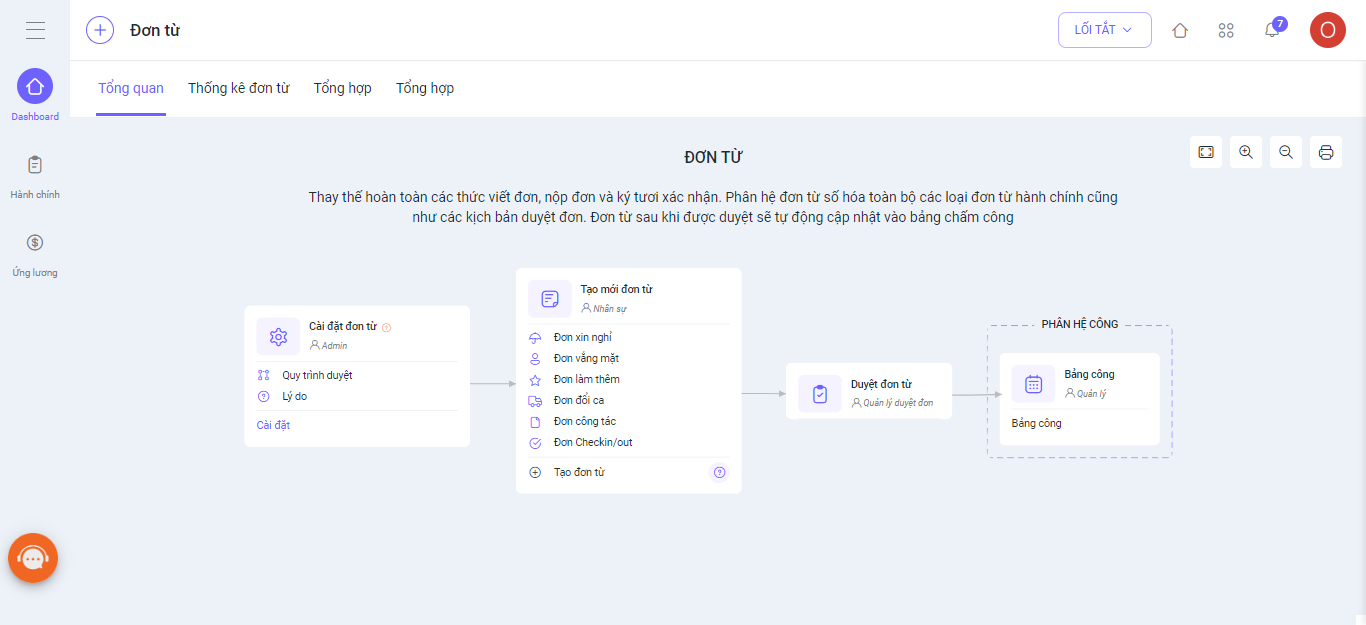
1. Each step of the Data stream is assigned links that help users directly access the relevant object to perform their work. This provides convenience and speed for users in accessing and performing related tasks.
2. To ensure users can clearly understand the meaning and purpose of each step in the Data stream, we provide information and user guides (if any) at each step. This helps users understand why that step needs to be performed and its significance in the workflow.
3. Definitions of components in the Data Stream:
|
No. |
Component Name |
Symbol |
Description |
|
1 |
Work Object |
|
Represents the tasks to be performed on the Data Stream. |
|
2 |
Arrow |
|
Represents the workflows to be performed in the Data Stream. |
|
3 |
Setup/Create New Link |
|
Links to the screen for performing the task that the object represents |
|
4 |
Object Information Description |
|
Describes the properties of the object |
|
5 |
User Guide |
|
Detailed instructions on how to use the software |
|
6 |
Participants |
|
The entities interacting with the steps in the Data Stream |
|
7 |
Permissions |
|
The user/role that can perform the task. |
Note: The feature update process is performed periodically and will not affect customer data. After this period, the system will resume normal operations. We kindly ask our valued customers to take note of the update schedule to avoid any disruption to your business operations.
For any assistance, please contact us via Hotline 19003313 or our Livechat and Ticket systems.
Sincerely,
The 1Office Product Development Team.




