



 12/05/2026
  538 views
The Eisenhower Matrix is a very popular time management tool because it helps you clearly see which tasks need to be done immediately, which should be planned, and which should be eliminated. In this article, you will understand what the Eisenhower Matrix is and how to apply it to your daily work.
1. What is the Eisenhower Matrix?
The Eisenhower Matrix is a way to organize tasks by urgency and importance, so you can effectively prioritize your most important work. Another name for the Eisenhower Matrix is the Urgent-Important Matrix.
This is a fairly popular time management tool in the international market, but perhaps in the Vietnamese market, this concept is still quite new.
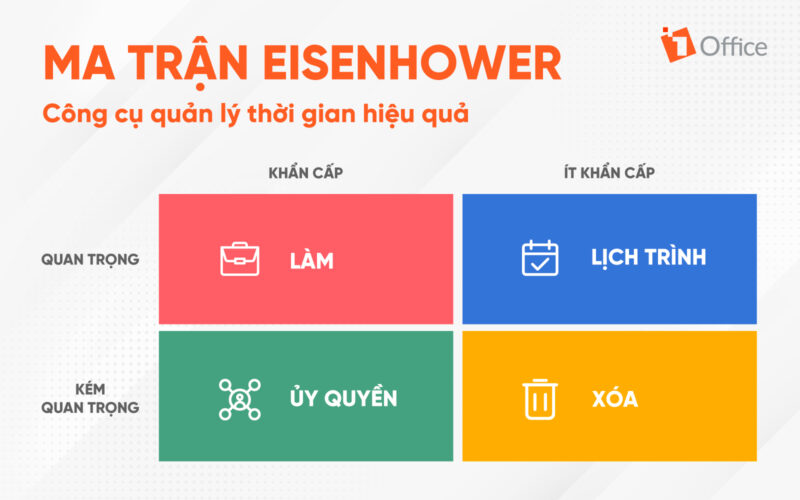
Typically, the Eisenhower Matrix is constructed by dividing it into 4 quadrants:
- Quadrant 1: Do First
- Quadrant 2: Schedule
- Quadrant 3: Delegate
- Quadrant 4: Delete
And to be able to divide tasks into the 4 quadrants, the user does so by classifying work into 4 levels:
- Urgent and important (tasks you will do immediately).
- Important, but not urgent (tasks you will schedule to do later).
- Urgent, but not important (tasks you will delegate to someone else).
- Not urgent and not important (tasks you will eliminate).
See more: Effective time management skills to improve work productivity
2. Why is it called the Eisenhower Matrix?
The simplest explanation is that this matrix model was created by Dwight D. Eisenhower – the 34th President of the United States and a five-star general in World War II. In a 1954 speech, Eisenhower quoted an unnamed university president as saying: “I have two kinds of problems, the urgent and the important. The urgent are not important, and the important are never urgent.”
Dwight constantly had to make difficult decisions about which of the many tasks he should focus on each day. This ultimately led him to invent the world-famous Eisenhower principle, which today helps us prioritize tasks by urgency and importance.
3. How to use the Eisenhower Matrix for time management
3.1. The structure of the Eisenhower Matrix
An Eisenhower Matrix is built on 4 quadrants. Below, we will explore the function and purpose of each specific quadrant:
- First quadrant: Do
In this quadrant, you will place tasks that are both urgent and important. When you see a task on your to-do list that must be done now, has clear consequences, and affects your long-term goals, place it in this quadrant.
There should be no question about which tasks fall into this quadrant, as these are the tasks that are always on your mind and are most likely to cause you stress.
- Second quadrant: Schedule
Tasks that are important but not yet urgent and not yet due will be placed here. Because these tasks affect your long-term goals but do not need to be done immediately, you can schedule them for later. You will tackle these tasks right after handling the tasks in the first quadrant. You can use various time management tips to help you complete the tasks in this quadrant.
- Third quadrant: Delegate
This section includes tasks that must be completed now, but they do not affect your long-term goals. Therefore, you can delegate these tasks to other members of your team. Delegating tasks is one of the most effective ways for a manager to manage their workload and give their team the opportunity to expand their skill set.
- Fourth quadrant: Delete
Tasks that are not important and not urgent can hinder you from achieving your goals. Therefore, you need to filter out unimportant tasks and place them on your to-do list in the fourth quadrant, the “delete” quadrant.
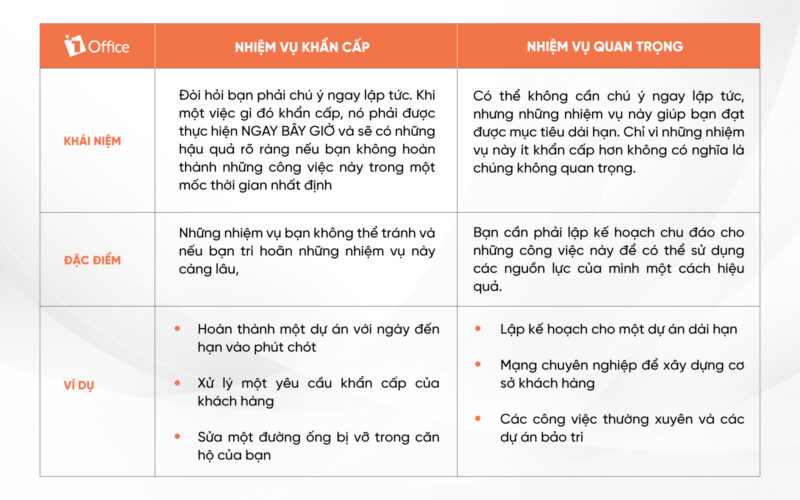
3.2. How to distinguish between urgent and important tasks
Distinguishing between urgent and important in the Eisenhower Matrix can help you identify which tasks to perform and which can be better handled by other team members, thereby enabling managers to make decisions.
3.3 4 tips for prioritizing your tasks
3.3.1. Color-code each task you have to do by level
As you list your tasks, you should also classify them by color. You can use the following color code as a reference:
- Red = Highest priority items
- Blue = Second highest priority
- Green = Third highest priority
- Yellow = Not a priority
Once you have color-coded your tasks, these colors will transfer directly to the Eisenhower Matrix.
- Red tasks: Your “do” tasks for the first quadrant.
- Blue tasks: Your “schedule” tasks for the second quadrant.
- Green tasks: Your “delegate” tasks for the third quadrant.
- Yellow tasks: Your “delete” tasks for the fourth quadrant.
3.3.2. Limit the number of specific tasks in each category
Try to limit the maximum number of tasks in each quadrant to 5, even if you have many things to do. Limiting the number of tasks this way will help keep your matrix from becoming cluttered and overwhelming.
3.3.3. Create separate to-do lists for personal and work tasks
Another way to limit the number of items on your Eisenhower Matrix is to create two separate matrices: one for personal tasks and one for work-related tasks.
Work-related issues and your personal tasks require different timelines, resources, and methods, so the resolution process for these two aspects will also differ.
3.3.4. Eliminate before optimizing
Eliminate unnecessary tasks first to prioritize effectively. With this approach, you will start with the fourth quadrant.
In fact, 60% of each person’s time at work is spent on things like sharing status approvals or tracking information. If you can quickly go through the process of sorting and selecting priority items, go ahead and do so. This will speed up the prioritization process, and you might go through a second round of elimination afterward.
| Learn more: Effective Time and Work Management Tips You Should Know Sooner |
4. Examples of How to Use the Eisenhower Matrix in Time Management
4.1. Using the Eisenhower Matrix to Manage Personal Tasks
In this section, let’s look at some examples of the Eisenhower Matrix to help readers better understand how to use it.

Examples of tasks you might include in quadrant 1:
- Write a blog post due tomorrow
- Finalize a project proposal
- Respond to client emails
Examples of tasks you might include in quadrant 2:
- Enroll in a professional development course
- Attend a networking event
- Add improvements to a personal project
Examples of tasks you might include in quadrant 3:
- Upload blog posts
- Transcribe meeting notes
- Checking non-client emails
Examples of tasks you might include in quadrant 4:
- Doing busywork
- Attending a status meeting
- Approving status updates
4.2. Using the Eisenhower Matrix to Manage General Business Tasks
Hospitals regularly handle accident and emergency patients brought in by ambulance who require immediate care.
- Quadrant 1 Task: If an emergency occurs with a patient suffering from acute appendicitis, the urgency for surgery is very high. The hospital has available operating rooms and a surgical team on site. Without a doubt, the operation will have to be performed in the (very) near future, and it is
- Quadrant 2 Task: Tasks in quadrant 2 must be scheduled. The patient will be placed on a waiting list and their turn won’t come for several days or weeks. However, there is a lurking danger in the case of the second quadrant. If a schedule is made, but no one follows it, it will surely fail. Scheduling is not procrastinating; it’s an agreement you make with yourself and your surroundings to perform tasks in order of priority.
- Quadrant 3 Task: There is a case of a patient with acute appendicitis who is rushed to the hospital. It is clearly an urgent matter; however, the hospital currently has no available operating rooms. Therefore, people are urgently calling nearby hospitals to see if they can perform the surgery for the patient immediately. In this case, the task is assigned (delegated) to someone else.
- Quadrant 4 Task: This is often the most challenging quadrant when it comes to time management. It comes down to assertiveness. To what extent can you say ‘no’, not let yourself be led by what you ‘have to do’, and look for alternatives.
The article above has given readers a more specific look at the Eisenhower Matrix and provided the necessary information to help you use this tool most effectively. If you need any further information or consultation, please contact 1Office for a free consultation.
For more details, please visit:
Fanpage: https://www.facebook.com/1officevn/
Youtube: https://www.youtube.com/channel/UCeTIRNqxaTwk0_kcTw6SxmA