


 12/05/2026
  415 views
Mục lục
- What is an Excel Payroll Sheet?
- What is PIT? Why should it be calculated in the payroll sheet?
- Download the Latest Standard Excel Payroll Template for PIT Calculation [Free]
- What information is included in an Excel payroll template for calculating personal income tax?
- What are the benefits of an Excel payroll template for calculating Personal Income Tax?
- Some notes when using the Excel payroll template for calculating Personal Income Tax
- 1HRM – The smart payroll and PIT calculation platform to replace complex Excel processes
- Frequently asked questions about the Excel payroll template for calculating Personal Income Tax
- Conclusion
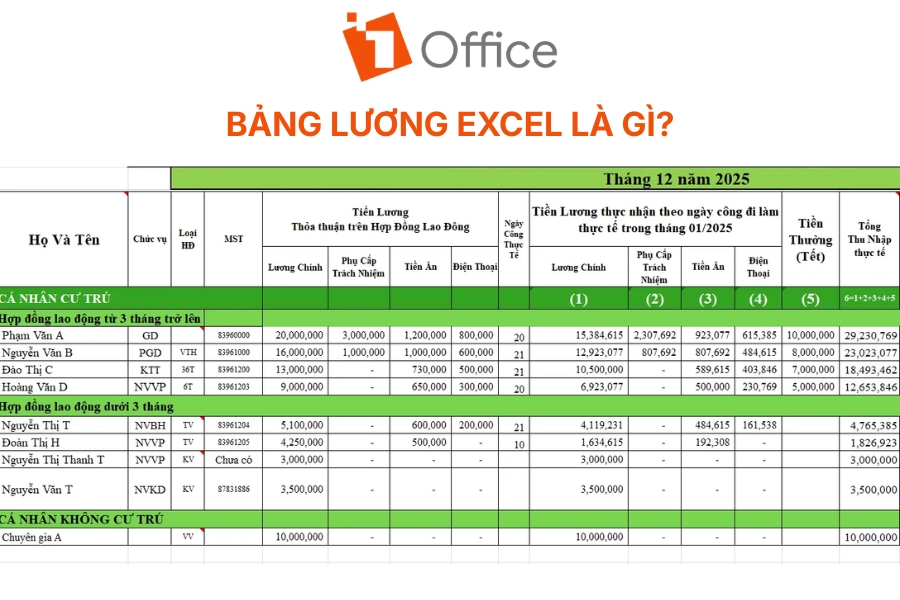
What is an Excel Payroll Sheet?
What is PIT? Why should it be calculated in the payroll sheet?
PIT (Personal Income Tax) is a mandatory collection that individuals with income from wages and salaries must pay to the State Budget, according to the provisions of the Law on Personal Income Tax. The purpose of this tax is to:
- Ensure citizens’ financial obligations to the State
- Contribute to income regulation, narrowing the gap between rich and poor
- Create resources for the budget to develop public services
Why should PIT be calculated directly in the payroll sheet?
- To determine the employee’s net salary after tax deductions.
- To help accountants fulfill their obligations to declare and pay taxes to the tax authorities.
- To ensure transparency and clarity between the business and the employee.
- To avoid errors during year-end tax finalization.

See more: What Salary Level Requires PIT Payment? (Update 2026)
Download the Latest Standard Excel Payroll Template for PIT Calculation [Free]
Excel Payroll Template for PIT Calculation [Download Now]
What information is included in an Excel payroll template for calculating personal income tax?
What are the benefits of an Excel payroll template for calculating Personal Income Tax?
An Excel payroll sheet with built-in formulas for calculating personal income tax (PIT) offers many practical benefits for businesses and their accounting-HR departments, including:
- Convenient for tax finalization: Salary and tax data are stored centrally, helping accountants quickly consolidate and declare for the year-end finalization period.
- Saves time on payroll processing: Simply enter data on income, insurance, and the number of dependents, and Excel will automatically calculate the PIT and the amount of PIT refund.
- Increases calculation accuracy: Applying pre-set formulas and the latest tax schedules helps reduce errors in calculating salaries, insurance, and taxes.
- Transparent and easy to check: All income, allowances, deductions, and taxes are clearly displayed, making it convenient for data reconciliation.
- Supports HR cost management: Businesses can easily track the salary fund, tax costs, and insurance by department or pay period.
- Easy to customize to business needs: Excel allows for the flexible addition or removal of data columns, formulas, or salary policies according to the actual operating model.
See more: 7+ effective salary payment methods for businesses
Some notes when using the Excel payroll template for calculating Personal Income Tax
When using an Excel payroll sheet to calculate PIT, businesses should note:
- Check formulas: Ensure that the formulas for calculating salary, insurance, and tax are correct to avoid data errors.
- Update new regulations: Adjust deduction levels, insurance, and tax schedules according to current regulations.
- Classify income correctly: Clearly separate taxable and tax-exempt income for accurate PIT calculation.
- Secure the payroll file: Restrict sharing and set access permissions to protect personnel data.
- Back up regularly: Save the file monthly/quarterly for easy lookup and to prevent data loss.
- Update when changes occur: Adjust immediately when there are changes in salary, allowances, or dependents.
- Lock formula cells: Helps prevent accidental edits and ensures the stability of the payroll sheet.
1HRM – The smart payroll and PIT calculation platform to replace complex Excel processes
When calculating personal income tax using Excel, businesses often face many difficulties such as incorrect formulas, mistaken family circumstance deduction data, difficulty updating new tax schedules, or spending a lot of time reconciling between salary, insurance, and tax. As the number of employees increases, manual management is more prone to errors and affects the PIT declaration and finalization process.
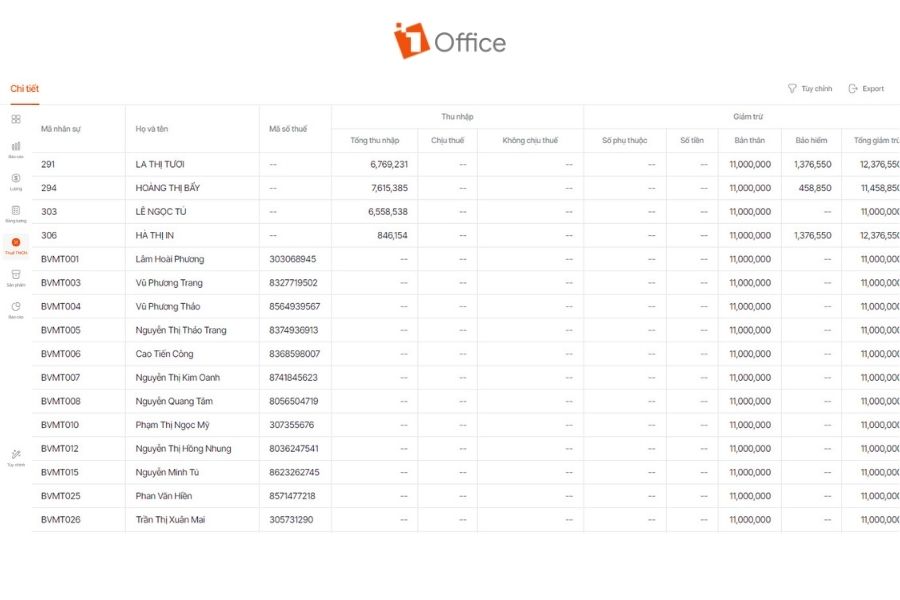
This is also why many businesses are now switching to payroll and tax software like 1HRM to automate the PIT calculation process, synchronize personnel data, and improve accuracy in payroll management.
The outstanding features of 1HRM payroll software include:
- Automatically calculates PIT according to the latest progressive tax schedule
- Synchronizes data on salary, insurance, dependents, and family circumstance deductions on the same system
- Automatically updates tax calculation formulas and deductions according to current regulations
- Minimizes errors from manual data entry or calculations in Excel
- Manages payroll and tax data centrally, easy to look up and secure with access permissions
- Automatically generates payslips and PIT statistics for each employee
- Supports quick export of salary, tax, and finalization data reports
Frequently asked questions about the Excel payroll template for calculating Personal Income Tax
Can Personal Income Tax be calculated automatically in Excel?
Yes. Businesses can absolutely automate the calculation of personal income tax (PIT) in Excel by using functions like IF, SUM, SUMPRODUCT, or VLOOKUP combined with tax calculation formulas. By setting up a payroll sheet and a progressive tax schedule in advance, Excel will automatically calculate the tax payable based on the income, family circumstance deductions, insurance, and number of dependents for each employee.
Does the Excel file for PIT calculation need to be updated with new regulations?
Yes. The Excel file for calculating personal income tax (PIT) needs to be updated regularly according to new legal regulations, especially when there are changes in the tax schedule, family circumstance deduction levels, or insurance rates. From 2026, updating the 5-tier progressive tax schedule and new tax calculation formulas is necessary to ensure that salary and tax data are always accurate and compliant with regulations.
What are the limitations of an Excel payroll sheet?
The limitations of an Excel payroll sheet include a high risk of data errors, lack of security and control, limited automation and integration, and difficulty in handling large-scale operations.
Is there an alternative to Excel for calculating payroll and Personal Income Tax?
Businesses can consider 1HRM software to automate the PIT calculation process, synchronize personnel data, and enhance accuracy in payroll management.
Conclusion
This article has provided the latest standard 2026 Excel payroll template for calculating Personal Income Tax (PIT), along with detailed instructions on the payroll structure and important notes for calculating personal income tax using Excel. Using a payroll template with pre-built formulas not only helps businesses save time processing data but also minimizes errors in calculating salaries, insurance, and tax finalization.

















