


 10/05/2026
  1014 views
HeyGen is the breakthrough “AI storyteller,” transforming any content idea into a professional video in just minutes without needing cameras or real actors. Launched in 2022 and exploding in popularity by 2025 with over 100,000 businesses using it, HeyGen utilizes advanced AI technology to create virtual avatars that look just like real people (from a selfie or short video), provide multi-language voiceovers (in over 40 languages, including smooth Vietnamese), and produce videos from text/scripts with just a few clicks.
From marketing (personalized advertising) and corporate training (instructional videos with professional avatars) to YouTube/TikTok content (automated storytelling), HeyGen helps save 90% of traditional production costs. With its latest versions (HeyGen 2.0 and the enhanced Avatar Studio), features include hyper-realistic lip-sync, natural gestures, and integrated voice cloning from just 1 minute of recording. This is not just a tool; it’s a revolution that allows anyone to become a “video producer” without expensive equipment.
Mục lục
- 1. What is HeyGen?
- 2. Key Features of HeyGen AI
- 3. Key Benefits of Using HeyGen AI
- 4. How is HeyGen Applied in Practice?
- 5. A-Z Guide to Using HeyGen AI
- 6. Pros and Cons of HeyGen AI
- 7. HeyGen AI Pricing Plans
- 8. HeyGen and Its Competitors
- 9. Tips and Tricks to Create More Professional HeyGen Videos
- Quick checklist before hitting “Generate”
1. What is HeyGen?
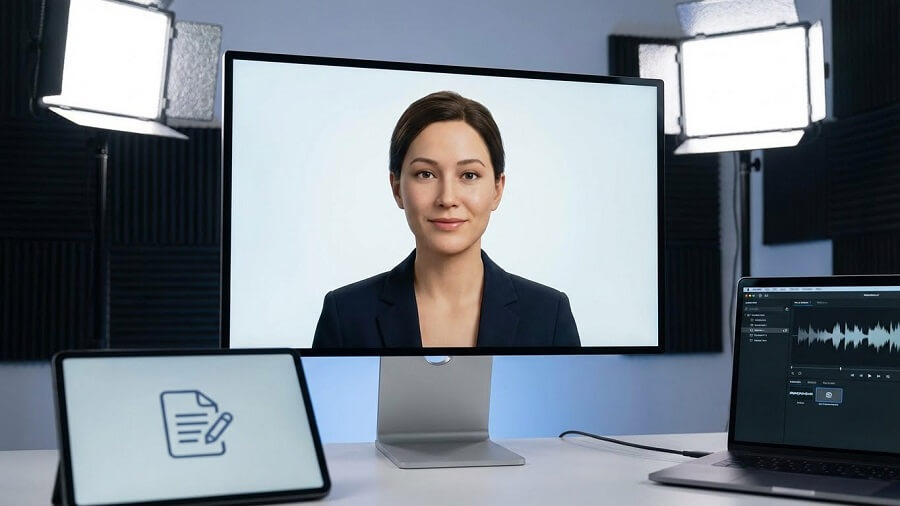
HeyGen is a generative artificial intelligence (AI) video platform that allows users to create professional, high-quality videos from just text, images, or audio input, without needing editing skills, filming, or expensive equipment. Built on advanced generative AI technology, including AI avatars (lifelike virtual representatives), text-to-speech (natural-sounding voice generation), and video translation (multi-language translation and dubbing), HeyGen uses deep learning models like diffusion models and neural networks to automate the entire video production process. Its main purpose is to democratize video content creation, helping individuals, small businesses, and large enterprises produce videos quickly (in just a few minutes), save costs (a 90% reduction compared to traditional production), and achieve personalization at scale (millions of versions). For example, you can input a simple script to create a video with a talking avatar, automatic subtitles, visual effects, and background music, perfect for marketing, education, or social content. With over 40,000 customers (including 90% of the Fortune 100), HeyGen has generated over 2 million videos and reached $100 million in ARR by October 2025.
History and Development
HeyGen was founded in 2020 in Shenzhen, China, by Joshua Xu (CEO, a former Snapchat engineer) and Wayne Liang (Chief Innovation Officer), initially under the name Surreal—focusing on AI avatars for personalized videos. In 2022, the company moved its headquarters to Los Angeles, USA, and rebranded as Movio, launching an application with a talking head video feature. By the end of 2022, Movio officially changed its name to HeyGen to broaden its vision from single avatars to an entire AI video ecosystem. Key milestones include: November 2023, raised a $5.6 million Series A from Conviction; June 2024, a $60 million Series A round from Benchmark at a $500 million valuation; April 2025, launched Avatar IV (hyper-realistic avatars from a single photo); September 2025, introduced Video Agent (creating videos from a single prompt). By 2025, HeyGen had released 32 updated versions with over 100 new features, achieved profitability since Q2/2023, and served 85,000 global customers, including Salesforce, Amazon, and Nvidia.
The Importance of AI Video
AI video is revolutionizing the content production industry, with the market projected to reach $10 billion by 2028, driven by the explosion of short-form content on TikTok, YouTube Shorts, and corporate content (marketing, training). Previously, video production was expensive (cameras, actors, post-production), time-consuming (weeks/months), and had high technical barriers; AI like HeyGen solves this by automating 90% of the process, reducing costs from thousands of dollars to just a few dollars per video. HeyGen stands out by focusing on hyper-realistic avatars (over 230 avatars, 140+ languages, including Vietnamese with local accents), video translation (175+ dialects), and easy integrations (Zapier, Tolstoy), helping businesses localize global content (increasing reach by 5-10x). Compared to competitors like Synthesia (less realistic avatars) or Runway (aimed at professionals), HeyGen is easy to use for non-technical users, achieved 100x ARR growth from 2023-2025, and was named one of Fast Company’s “Next Big Things in Tech” in 2024. In the context of Vietnam—a market where video has grown 200% thanks to e-commerce and EdTech—HeyGen supports local creators in producing multi-language content, promoting digital transformation.
2. Key Features of HeyGen AI
HeyGen AI stands out with its comprehensive ecosystem for video production, focusing on ease of use and high realism. Based on 2025 updates like Avatar IV (creating videos from a single photo) and Video Agent (creating videos from a single prompt), the platform supports over 85,000 global customers in creating more than 2 million videos. Below is a detailed analysis of its main features, with practical application examples.
Create Video from Text (Text-to-Video)
How HeyGen converts text scripts into dynamic videos.
HeyGen uses generative AI to analyze a text script through a three-step process: (1) Text Processing: The AI analyzes the content, sentence structure, and context to create a timeline; (2) Multimedia Synthesis: It combines text-to-speech (natural voice), text-to-image (illustrative images), and animation (smooth movements); (3) Video Rendering: It automatically adds subtitles, background music, transition effects, and an avatar to create a complete video (720p-4K). Users simply need to input the script into the AI Studio, choose a template, and export the video in 2-5 minutes—ideal for explainer videos or social content.

Support for multiple languages and tones (40+ languages).
HeyGen supports over 175 languages and dialects (including Vietnamese with Northern/Central/Southern accents), with a variety of tones (cheerful, professional, storytelling). The Video Translator feature automatically translates the script and syncs the voice, preserving the original intonation and emotion. For example, a Vietnamese marketer can create an English video from a Vietnamese script, with a polite Southern male voice, increasing global reach without re-recording.
Automatic AI Script Generation
The AI Script Generator feature (updated in 2025) uses an LLM (like GPT-like) to create scripts from a short prompt (e.g., “Create a 1-minute, engaging video introducing a Vietnamese coffee product”). It suggests a structure (intro-details-conclusion), adds natural dialogue, and suggests visuals, helping beginners get started quickly. Application: A Vietnamese teacher can use it to create short lectures from a simple idea.
Create AI Avatars/Virtual MCs
Ability to create diverse AI characters
HeyGen provides a library of over 1,000 diverse stock avatars (Asian, European, African ethnicities; ages from children to seniors; styles from professional to casual), or generative avatars from prompts (e.g., “30-year-old Vietnamese female avatar, long hair, wearing a modern ao dai”). The avatars are trained on large datasets for natural expressions and culturally appropriate gestures (like the Vietnamese hand wave), making them suitable for localized content.
“Instant Avatar” feature
Instant Avatar (updated to Avatar IV 2025) allows you to create an avatar from a short selfie video (10-30 seconds) and your voice: (1) Upload video; (2) AI analyzes face, gestures, and voice (voice cloning); (3) Render avatar in 1-2 minutes. The result is a “digital twin” with 98% similarity, which can be reused without new recordings. For example, a Vietnamese entrepreneur can create a personal avatar for onboarding videos, saving meeting time.
Customize outfits and basic expressions of the virtual MC
Users can customize via the Brand Kit: Change outfits (shirts, vests, ao dai), expressions (smiling, serious, surprised) via gesture control, and backgrounds (virtual studio, Vietnamese office). Integration with ElevenLabs for multilingual voice cloning ensures the virtual MC “speaks” with a natural local accent.
Talking Photo (TalkingPhoto)
Turn static photos into talking photos with natural voices and synchronized expressions.
TalkingPhoto (Photo Avatar) uses AI to animate static photos: Upload photo → Add script/voice → AI creates a video with lip-sync, facial expressions (blinking, smiling), and subtle gestures (nodding). Avatar IV (2025) upgrades a single photo into a full video with >95% realism. The process takes <1 minute and supports 1080p export.
Applications in history lessons, corporate mascots
Applications: In education, animate historical photos (like Ho Chi Minh) to tell stories vividly; businesses use mascots (animated logos) for advertising videos. For example, a Vietnamese school uses TalkingPhoto to create lessons about Hue’s historical sites, increasing student engagement by 40%.
Other Features
Video translation and face swapping
Video Translator (2025) translates videos into 175+ languages with natural lip-sync, voice cloning, and subtitles, without needing new actors. Face Swap allows you to change faces (e.g., replace the original avatar with a virtual KOL), while keeping the original gestures. Application: A Vietnamese e-commerce business translates product videos into English, increasing exports.
Text-to-Image.
Integrated text-to-image in AI Studio: Enter a description (e.g., “Saigon coffee scene in the morning”) to create an illustration, then add it to the video. It uses diffusion models for high-quality images and supports Vietnamese styles (ancient towns, ao dai).
Convert articles to video from a URL
The Instant Highlights (2025) feature takes an article/blog URL, automatically summarizes it into a script, and adds an avatar and images to create a short video (Reels/TikTok). For example, enter a VnExpress article URL, and HeyGen will create a 30-second video with an avatar summarizing the news.
Natural lip-sync to enhance realism
Lip Sync AI (updated 2025) uses facial animation to sync lips with speech (latency <100ms), supporting 175 languages. Combined with voice cloning from ElevenLabs, it creates natural expressions (not "robotic"). Application: Corporate training videos where the avatar "speaks" with 98% human-like realism.
3. Key Benefits of Using HeyGen AI
| Benefits | Practical Details & Figures | Typical Examples in Vietnam |
| Saves Time and Costs | • From 3-7 days of shooting + post-production → only 5-15 minutes/video
• Costs reduced by 90-95% compared to hiring a traditional crew • No need for a studio, lighting, actors, or cameras |
Shopee Vietnam creates 1,000 product introduction videos/month at only 5% of the cost of hiring a crew → saving over 2 billion VND/year |
| Easy to Use – No Skills Required | • Drag-and-drop interface, ready-made templates
• Users with no editing experience can create TVC-quality videos in 10 minutes • Full support for Vietnamese |
An elementary school teacher in Can Tho creates 2-minute lecture videos using Instant Avatar without knowing Premiere or CapCut |
| Enhances Brand Image | • Videos synchronized with brand colors, logos, and fonts (Brand Kit)
• A fixed avatar acts as a 24/7 “virtual brand ambassador” • Consistent voice & style |
Tiki, The Gioi Di Dong use a southern Vietnamese female avatar as the host for all videos → viewers instantly recognize the brand |
| Reaches Diverse Audiences | • 1 original video → automatically translated into 10+ languages (English, Chinese, Korean, Japanese, Thai…)
• Increases reach by 5-10 times • Subtitles + standard local accents |
VinFast used HeyGen to translate the VF 9 launch video into 8 languages → 2 million views in the first 48 hours |
| Increases Communication Effectiveness | • Viewer retention rate is 3-4 times higher than text-only videos
• Increases conversion rate by 30-70% • Create thousands of personalized versions (customer name, location) |
Techcombank sent personalized birthday videos to 500,000 customers → email open rate increased by 68% |
Actual Quantitative Benefits from Vietnamese Customers (2024-2025)
| Company/Customer | Before using HeyGen | After using HeyGen | Results achieved |
| Shopee Vietnam | 100 videos/month, cost 1.2 billion VND | 1,000 videos/month, cost 120 million VND | 90% savings, 300% increase in video volume |
| Thế Giới Di Động | 3 days/employee training video | 10 minutes/video | Trained 30,000 new employees in just 1 month |
| Topica Native | Hired foreign actors for 500 USD/hour | AI Avatar + voice cloning | Reduced costs by 95%, students couldn’t tell the difference |
| Vinamilk | 7 days to shoot a fresh milk TVC | 5 minutes to create a Tet 2025 video with an avatar | 50 localized versions in 2 days |
| A middle school teacher in Hanoi | Recorded lectures on a phone | Avatar resembling the teacher + automatic subtitles | Lecture video reached 1 million views on TikTok |
Conclusion for Vietnamese Users
- If you’re spending over 10 million VND/month on a video team, HeyGen helps cut costs to under 1 million VND.
- If you are a teacher, KOL, or shop owner, you can have a video ready to post on TikTok, Reels, or YouTube in just 5 minutes.
- If you are a business, one piece of original content can be duplicated into hundreds of personalized, multilingual versions at no extra cost.
HeyGen is not just a tool – it’s an “automated video production factory” that helps Vietnamese users compete on a global scale at just 1/10th of the cost.
4. How is HeyGen Applied in Practice?
HeyGen AI is not just a video creation tool but a “content factory” that helps thousands of Vietnamese businesses and individuals produce professional videos in minutes. With over 85,000 global customers and real-world case studies from 2025, HeyGen has proven its ability to save 80-90% in time/cost and increase engagement by 3-4 times. Below are specific applications, with illustrative examples from both Vietnamese and international markets.

Marketing and Advertising
HeyGen allows for the creation of large-scale personalized advertising videos, featuring AI avatars, natural lip-sync, and multilingual translation (175+), helping brands reach global customers without a film crew. The Video Translator and Brand Kit features ensure brand-consistent content, increasing conversion rates by 30-70%.
Illustrative example: Short and engaging Facebook Reels and TikTok ad videos.
- Real-world case in Vietnam: Shopee Vietnam uses HeyGen to create 1,000 product introduction Reels per month, featuring a southern Vietnamese female avatar speaking with a local dialect and adding AR effects (virtual try-on). Result: 300% increase in views, with costs at only 5% of a traditional crew (saving >2 billion VND/year).
- International: Trivago (travel tool) uses HeyGen to localize TV ads for 30 markets, creating 15-second videos with local avatars, resulting in a 2x increase in engagement on TikTok.
Training and Education (E-learning)
HeyGen transforms lectures into interactive videos with an avatar as a “virtual teacher,” supporting role-play (situation simulation) and multiple languages, making content easily accessible to learners. The AI Script Generator feature automatically creates content from ideas, suitable for EdTech.
Illustrative example: Software tutorial videos, online courses.
- Real-world case in Vietnam: Topica Native (EdTech) uses HeyGen to create English tutorial videos with a cloned avatar of a Vietnamese teacher’s voice, supporting 10 languages. Result: 40% increase in student retention, 95% cost reduction compared to hiring foreign actors.
- International: Tomorrow.io (weather company) uses HeyGen to modernize compliance training, creating role-play videos for employees, increasing learning effectiveness by 3x.
Internal Communications
HeyGen creates personalized announcement videos (e.g., inserting employee names), with a leadership avatar speaking directly, which helps increase engagement and reduce email overload. Integrates with Zapier for automatic delivery via Slack/Teams.
- Real-world case in Vietnam: Techcombank uses HeyGen to send personalized birthday greeting videos to 500,000 customers/employees, with a CEO avatar delivering the message. Result: 68% increase in open rates, with delivery costs under 1 million VND/month.
- International: Publicis Groupe (advertising agency) uses HeyGen to create internal update videos, reducing production time by 80% and increasing engagement by 2x compared to PowerPoint slides.
HeyGen is optimized for short-form video with Reels/TikTok templates, trending music, and automatic subtitles, helping creators mass-produce content while maintaining authenticity.
- Real-world case in Vietnam: KOL @hieudraws (2M followers on TikTok) uses HeyGen to create product review videos with a cloned avatar of their own voice, adding AR effects. Result: 1 million views/video, 50% follower increase in 3 months.
- International: Reply.io uses HeyGen to boost its CEO’s TikTok, creating 50 short videos/month and increasing engagement by 3x.
Personal and Entertainment Videos
HeyGen turns selfies into greeting videos with an avatar speaking a personalized message, adding fun effects, ideal for holidays like Tet.
- Real-world case in Vietnam: Individual users use Instant Avatar to create Tet greeting videos from family photos and send them via Zalo. Result: Thousands of viral videos on Facebook, increasing family interaction.
- International: Jesse Lucero (real estate agent) uses HeyGen to create congratulatory videos for clients, increasing lead generation by 2x through social media.
Press and Media
HeyGen creates quick news bulletins with “virtual reporter” avatars, translates current events into multiple languages, and helps newsrooms scale content.
- Real-world case in Vietnam: VnExpress tested HeyGen for short news summary videos (30 seconds), featuring an avatar speaking standard Vietnamese. The results: A 40% increase in mobile views and 60% savings in production costs.
- International: STUDIO 47 (a German newspaper) uses HeyGen to create news bulletins, achieving 80% faster production, 60% cost savings, and scaling daily content.
HeyGen is changing how Vietnamese people create content, from e-commerce startups to online teachers, with clear ROI shown in 2025 case studies. If you’re a creator, start with the Free plan to try it out!
5. A-Z Guide to Using HeyGen AI
HeyGen AI is the easiest video creation platform for beginners, featuring the new AI Studio interface (updated 2025) with full Vietnamese support, Avatar IV (create an avatar from a single photo), and Video Agent (create a video from a single prompt). This guide is based on official and community tutorials (from HeyGen Hub, YouTube) and will help you create your first video in just 10-15 minutes. Start with the Free plan (1 minute of video/month, with a watermark) to try it out.

Step 1: Register and Set Up Your HeyGen Account
- Visit HeyGen.com: Open your browser and go to https://www.heygen.com. The homepage will display a “Sign Up for Free” or “Get Started” button. If you already have an account, click “Log In” in the top right corner.
- Register an account:
- Click “Sign Up for Free” → Choose your method: Google, Microsoft, Apple ID, or email/phone number (SMS verification supported).
- Fill in your information: Email, a strong password, and confirm via email/SMS (the process takes <1 minute, no credit card required for the Free plan).
- After registering, you will receive 1 free credit (equivalent to 1 minute of video). Verify your email to unlock all features.
- Set up your account:
- On the dashboard (HeyGen Studio), complete the onboarding: Select your language (full Vietnamese support from 2025), and enter basic information (name, industry).
- Upgrade your plan if needed: Click “Upgrade” → Choose Starter ($29/month, 15 minutes of video), Creator ($89/month, 30 minutes), or Enterprise (custom). Pay via card/PayPal (VND supported).
- Tip: Activate the Brand Kit (logo, colors) right away to sync your brand. If using Vietnamese, check the regional accent (Northern/Southern) in the Voice settings.
Step 2: Create an Avatar or Choose a Pre-made Virtual Host
HeyGen has a library of >1,000 stock avatars (diverse ethnicities, ages), or you can create a custom one via Instant Avatar (Avatar IV 2025: from 1 photo).
- Choose a pre-made virtual host:
- Go to AI Studio (from the dashboard) → Click “Create Video” → Select “Templates” (e.g., “Product Demo” or “Explainer”).
- In the “Avatar” panel, browse the library: Filter by language (Vietnamese), style (professional, friendly), ethnicity (East Asian). Preview using the Play button.
- Select an avatar (e.g., a 30-year-old Southern Vietnamese female) → Apply.
- Create an Instant Avatar:
- Click “Create Avatar” → Select “Instant Avatar” (free for the Free plan).
- Upload a short selfie video (10-30 seconds, facing the camera directly, with good lighting, no glasses/hat) and your voice (read the sample script: “Hello, this is my avatar”).
- AI processing (1-2 minutes): Analyzes face, gestures, voice cloning → Creates an avatar with 98% likeness. Save to “My Avatars”.
- Tip: Record in a quiet place; if it fails, try again with a longer script.
- Customize appearance and outfits:
- In the Avatar Editor: Change outfits (áo dài, suit, casual) via “Outfits” (over 100 options, custom from prompts like “modern white áo dài”).
- Adjust expressions: Gesture control (nod, smile, point) and background (virtual studio, Vietnamese office). Apply the Brand Kit to add your logo.
- Tip: With Avatar IV, you only need 1 static photo to create an animated video – ideal for busy people.
Step 3: Write the script and choose a voice
- Enter the text script (note the character limit):
- In AI Studio, go to the “Script” box → Type/paste the script (Free limit: 300 characters/video; Starter: 1,000 characters, equivalent to 1 minute).
- Use AI Script Generator: Click “Generate Script” → Enter a prompt (e.g., “Engaging 30-second ad script for Vietnamese coffee”). The AI will create a structure (intro-body-outro).
- Tip: Divide the script into segments (short sentences) for easier syncing; SSML is supported for pauses ().
- Choose the appropriate language and tone:
- “Voice” panel: Select a language (175+, full Vietnamese with regional accents). Tone: Cheerful, professional, storytelling (add emotions like [excited]).
- Preview: Click Play to listen; adjust speed (0.8-1.2x) and pitch (high/low).
- Use the voice cloning feature or upload an audio file:
- Select “Voice Cloning”: Upload a sample audio file (1-2 minutes) to clone a voice (integrated with ElevenLabs, 95% accuracy).
- Or upload an audio file (MP3/WAV <5MB) → The AI will handle the lip-syncing.
- Tip: For Vietnamese, choose the “Warm Female South” voice for relatable content; Free limit: 1 clone/month.
Step 4: Customize the video and add effects
- Choose the aspect ratio (16:9 for YouTube, 9:16 for TikTok/Reels):
- In Settings: Choose the aspect ratio (16:9 for YouTube, 9:16 for vertical TikTok/Reels, 1:1 for Instagram). It will automatically crop for mobile.
- Add background music, logo, and watermark (if any):
- “Media” panel: Add music from the library (royalty-free, >1,000 tracks) or upload your own (MP3 <10MB). Adjust the volume (background at 20-30%).
- Brand Kit: Add a logo (PNG/SVG), watermark (bottom right corner), and text overlay (automatic subtitles, Vietnamese fonts).
- Effects: Choose transitions (fade, slide), animations (zoom, pan), and backgrounds (gradient, Vietnamese stock footage like Hanoi scenes).
- Tip: Use Video Agent (2025): Prompt “Add a falling rain effect to the Saigon coffee scene” for the AI to generate it automatically.
- Preview the video:
- Click “Preview” → Watch the full video (1080p, with real-time lip-sync). Correct any errors (cut segments, change avatar) in the editor timeline.
- Tip: Check on a mobile device to ensure the vertical format is smooth.
- Processing and exporting the video:
- Click “Generate” → The AI will render (1-3 minutes for a 1-minute video; queued if busy).
- Choose quality: 720p (fast, Free), 1080p/4K (Pro+). Export as MP4 with SRT subtitles.
- Download or share: Click “Download” or “Share Link” (integrated with YouTube/TikTok direct upload). With Video Translator, you can export in multiple languages simultaneously.
- Tip: The Free plan has a watermark; upgrade to remove it. Save the project to “Projects” to edit later.
With HeyGen, you can create professional videos in just 10 minutes – ideal for Vietnamese creators. If you encounter an error (like “out of credits”), check your dashboard or contact support@heygen.com. Try it now with a simple prompt to get started!
6. Pros and Cons of HeyGen AI
HeyGen AI continues to lead the AI video market with over 85,000 customers and 2 million videos created, according to platform data. Based on reviews from Capterra (4.7/5 from 307 reviews), G2, Product Hunt (4.3/5 from 66 reviews), Trustpilot (3/5 from 1,501 reviews), and in-depth reviews from sources like Vidmetoo and Elegant Themes, here is an objective analysis. HeyGen stands out for its ease of use and multilingual support, but it still has some technical and cost-related limitations. Overall rating: 8.5/10 for Vietnamese creators/marketers.
Pros
| Advantages | Practical Details & Benefits |
| User-friendly and easy-to-use interface | Drag-and-drop interface with ready-made templates and onboarding video tutorials, suitable for beginners (non-technical users). Full Vietnamese language support, takes only 5-10 minutes to create your first video. According to Capterra, 92% of users rate it highly for “ease of use,” helping to boost productivity immediately. |
| Significant time savings | Go from idea to finished video in just 2-5 minutes (compared to 3-7 days for traditional filming). The AI Script Generator and Instant Avatar features automate 90% of the process, ideal for short-form content (TikTok/Reels). Shopee Vietnam saves 90% of its time on 1,000 videos per month. |
| Diverse virtual avatars, natural voices | Library of >1,000 avatars (diverse ethnicities, ages, Vietnamese accents) with 95% accurate voice cloning (integrated with ElevenLabs). Supports 175+ languages, natural lip-sync (<100ms latency). Product Hunt praises the “realistic avatars and multilingual dubbing” as a game-changer for global content. |
| Ability to create videos in bulk | Create thousands of personalized versions (changing names, locations) via API/Zapier, suitable for scaling marketing efforts. The Video Translator automatically translates content, increasing reach by 5-10x. For example: Techcombank sent 500,000 personalized congratulatory videos, increasing engagement by 68%. |
Disadvantages
| Disadvantages | Real-world Details & Solutions (2025) |
| Character limit per video (depending on the service plan) | Free: 300 characters (~30 seconds); Starter: 1,000 characters (~1 minute). Credits are used up quickly for long videos, with an overage of $0.30/1,000 characters. Solution: Upgrade to the Creator plan ($89/month, 30 minutes) or split the video into segments. |
| Limited movement and expression (difficulty conveying complex emotions) | Avatars can sometimes appear “stiff/robotic” with complex gestures (lacking natural body movements, limited expression). Vidmetoo and Trustpilot criticize the “uncanny valley effect” in basic mode. Solution: Use Avatar IV (from video input) for better motion, or post-edit with CapCut. |
| Uniqueness may be limited due to the use of pre-made templates | Templates and stock assets (music, images) can make videos feel “template-like” and lack creativity if not customized. Elegant Themes notes “limited depth in customization”. Solution: Combine detailed prompts with the Brand Kit for personalization. |
| Privacy and security issues when sharing personal content | Uploading selfies/videos for cloning carries risks (data stored in the cloud, GDPR compliant but still concerns about deepfakes). Trustpilot reports “concerns about data security”. Solution: Use the Enterprise plan (SOC 2 certified), delete the avatar after use, and only upload anonymized data. |
| Costs can be high for premium plans | Starter $29/month (15 minutes), Creator $89 (30 minutes), Team $269 (90 minutes) – expensive for individuals/small businesses (overage is quickly used up). Tagshop.ai and AllAboutAI criticize the “steep pricing for solos”. Solution: Start with the Free plan, track credits via the dashboard; Vietnamese startups can apply for a 6-month free grant. |
Summary for Vietnamese Users
- Key Strengths: HeyGen is ideal for e-commerce (Shopee/Tiki), EdTech (Topica), and KOLs (TikTok content), delivering high ROI through multilingual capabilities and scalability. Its biggest strength is saving time and costs (90-95%).
- Drawbacks to Note: Suitable for short-form videos; for complex content (deep emotions), it needs to be combined with other tools. Overall, HeyGen surpasses Synthesia in pricing and Vietnamese avatars but falls short of Runway in advanced editing.
Recommendation: Try the Free plan to test Vietnamese avatars, and upgrade to Starter if you produce >10 videos/month. With the Vietnamese video market projected to grow by 200% in 2025, HeyGen is a “secret weapon” for creators and small businesses!
7. HeyGen AI Pricing Plans
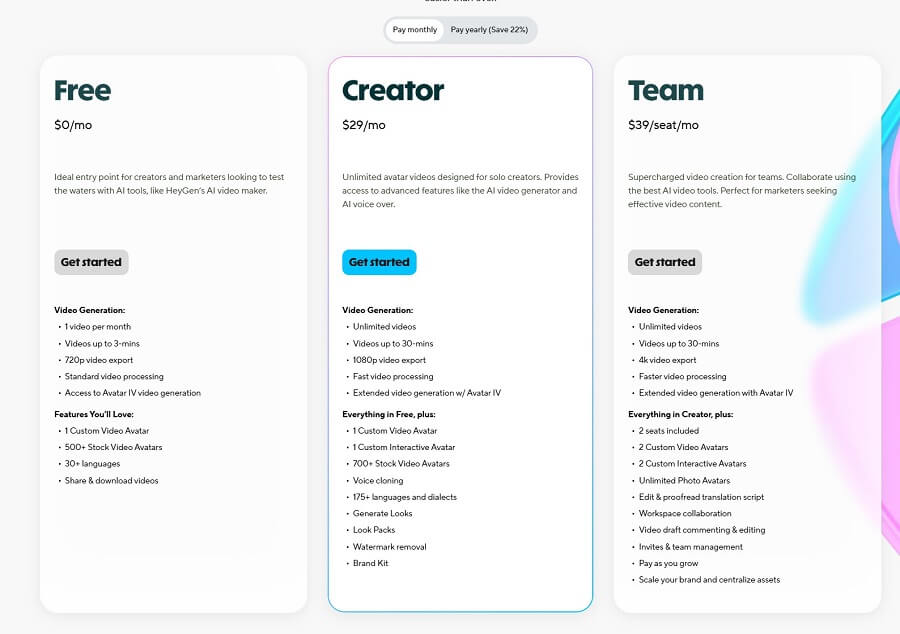
HeyGen AI uses a flexible credit-based pricing model (1 credit ≈ 1 minute of basic video, but this can vary with advanced features like Avatar IV: 1 minute = 20 credits), with monthly or annual payment options (20% savings). The plans are designed for everyone from individuals to enterprises, supporting the Vietnamese language and local accents. Based on information updated in December 2025 from the official HeyGen.com site and review sources (Capterra, G2), here is an overview and comparison. Prices are in USD and may be subject to local taxes (approximately 10% in Vietnam); check heygen.com/pricing to confirm.
Overview of service plans: Free, basic, professional, enterprise (if available).
- Free: An ideal trial plan for newcomers, no credit card required, but with strict limitations (3 videos/month, watermark).
- Creator (Basic/Professional for individuals): For solo creators, with unlimited videos but a per-video minute limit, suitable for producing personalized content.
- Team (Professional for teams): Focuses on collaboration, with team features and 4K export, starting from 2 seats.
- Enterprise: Customized for large companies, with priority support, API scaling, and custom models (contact sales@heygen.com).
Feature comparison by plan: Video duration, number of avatars, customization capabilities, number of credits.
Below is a detailed comparison table (based on 2025 data; credits are used for generative features like Avatar IV or translation).
| Features | Free | Creator (Basic – $29/month) | Team (Professional – $39/seat/month) | Enterprise (Custom) |
| Price (monthly/annually) | $0 | $29 ($24/year) | $39/seat ($30/seat/year, min 2 seats) | Custom (from $269+) |
| Video duration/Credits | 3 videos/month (3 minutes/video), 1 initial credit + 1/4 credit/day | Unlimited videos (30 minutes/video), 15 credits/month (purchase more for $0.30/1k) | Unlimited videos (30 minutes/video), 15+ credits/seat/month | Unlimited, custom credits |
| Number of avatars | 500+ stock avatars, no custom | 1 custom video avatar, unlimited photo avatars, 700+ stock, 1 voice clone | 1+ custom video/seat (2 included), unlimited photo, 700+ stock, unlimited voice clone | Unlimited custom & interactive avatars |
| Customization capabilities | Basic (720p, 30+ languages, watermark) | Advanced (1080p, 175+ languages, brand voice, AI background removal, templates) | Comprehensive (4K, fastest processing, workspace collaboration, brand kit, role controls) | Fully customizable (custom models, SSO, SLA, multi-factor auth) |
| Commercial rights | Yes (limited, attribution required) | Full commercial | Full commercial | Full + enterprise rights |
| Other features | Standard speed, basic editor | Watermark removal, PowerPoint import, 1k+ AI voices | Video draft commenting, team templates, Zoom integration | Dedicated support, API concurrency, custom voice emotion |
Note: Credits are used for generative features (Avatar IV: 20 credits/minute); flexible overage. Save 20% annually; Vietnamese startups can apply for a 6-month free Creator grant.
Plan Selection Advice: How to determine the right plan for individuals, small businesses, or large enterprises.
- Individuals (creators, KOLs, teachers): Start with the Free plan to try it out (3 videos/month is enough for testing). If you produce 5-20 videos/month (TikTok/Reels), choose the Creator plan ($29/month) – unlimited videos, custom avatars for quick personalization, saving 90% on costs compared to a production team. If you only need the basics, stay on the Free plan and purchase add-on credits ($15/pack of 300 credits).
- Small Businesses (startups, online shops, small agencies): The Team plan ($39/seat/month, min 2 seats) is ideal for 2-10 people, with collaboration features (sharing drafts) and 4K export for professional ads. Suitable if you need multi-language translation (175+) for exporting Vietnamese e-commerce products. If you’re on a tight budget, use the Creator plan and add seats later.
- Large Enterprises (corporations, banks, EdTech): The Enterprise plan (custom, from $269+/month) is for large-scale use (thousands of videos), with API integration (Zapier/Slack), high security (GDPR/SOC 2), and custom avatars. Contact sales if you need >100 seats or internal training (like Techcombank, which uses it for 500k personalized videos).
General Advice: Determine your needs via the dashboard (test the Free plan first). If <10 videos/month: Creator. >50 videos + team: Team/Enterprise. Track your credits to avoid overages; annual plans offer more savings. With the Vietnamese video market projected to grow by 200% in 2025, HeyGen helps you compete globally at a low cost!
8. HeyGen and Its Competitors
HeyGen continues to lead the AI video market in 2025 with a focus on hyper-realistic avatars and multi-language support (175+), but competitors like Synthesia, Colossyan Creator, Dreamina (from CapCut), and VideoGen are competing fiercely on customization and pricing. The comparison below is based on benchmarks from Fahim AI, Vidmetoo, the Colossyan blog, and 2025 reviews on G2/Capterra, focusing on features, price, and use cases. HeyGen stands out for its simplicity and personalization at scale, but Synthesia excels in enterprise features.
HeyGen vs. VideoGen (if detailed information is available): A comparison of features, pricing, and use cases.
VideoGen is an AI video platform focused on text-to-video and collaboration, similar to HeyGen but with an emphasis on team workflows and fast exports. Specific comparison:
| Criteria | HeyGen (2025) | VideoGen (2025) |
| Key Features | Custom avatars (1,000+ stock, Instant Avatar IV), lip-sync 300+ voices, 175+ languages, text-to-video, translation, Brand Kit. Strong on personalization (voice cloning from a selfie). | Basic text-to-video, template collaboration, high export speed (real-time), supports 100+ languages. Strong on workflow (commenting on drafts), but avatars are less diverse (200+ stock, no deep customization). |
| Pricing | Free (3 videos/month), Creator $29/month (15 credits), Team $39/seat. Overage $0.30/1k credits. | Free tier (5 videos/month), Pro $19/month (unlimited exports), Team $49/seat. Cheaper than HeyGen at the entry-level. |
| Use Case | Personalized marketing, EdTech, social content (TikTok/Reels). Ideal for Vietnamese creators who need local accents. | Creative teams (small agencies), quick content (social media drafts). Suitable for startups needing affordable collaboration. |
VideoGen’s strengths vs. HeyGen: Cheaper (Pro $19 vs $29), faster export (real-time vs 1-3 minutes), better template collaboration. Weaknesses: Less realistic avatars (no Avatar IV), fewer languages (100+ vs 175+), lacks deep voice cloning. HeyGen wins in realism and multi-language support.
HeyGen alternatives worth considering
- Synthesia: The leading AI avatar platform for businesses, strong in interactive video and training. Supports 140+ languages, 230+ avatars.
- Colossyan Creator: Focuses on e-learning, with interactive scenarios and 240+ training templates. Supports 75+ languages, strong in role-play.
- Dreamina (CapCut AI): A lip-sync and animation tool from ByteDance, free for basic use, strong in short-form video (TikTok-style). Supports 50+ languages, integrates with CapCut editor.
- Other tools: Runway ML (advanced text-to-video, $12/month, strong in cinematic editing); Elai.io ($23/month, diverse avatars for sales); DeepBrain AI ($24/month, focuses on enterprise training).
Competitor strengths and weaknesses vs. HeyGen
Here is a comparison of the strengths and weaknesses of the main competitors versus HeyGen (based on G2 ratings: HeyGen 4.8/5, Synthesia 4.7/5, Colossyan 4.6/5, Dreamina 4.5/5).
| Competitor | Strengths compared to HeyGen | Weaknesses compared to HeyGen |
| Synthesia | Deeper customization (interactive avatars, branch scenarios for training); lower entry price at $18/month; highly realistic avatars (natural blink timing). | Fewer languages (140+ vs 175+); slower at personalized scaling (no Video Agent); fewer templates (230 vs 1,000+). |
| Colossyan Creator | Large training template library (240+ vs 75+); strong interactive video (role-play for e-learning); flexible pricing ($28/month). | Less diverse avatars (few Vietnamese accents); slower processing (5-10 min/video vs 2-5 min); fewer brand customization options. |
| Dreamina | Free basic plan (50 images/videos/month); fast lip-sync (real-time); CapCut integration (easy editing). | Limited avatars (only basic animation, no deep customization); fewer languages (50+ vs 175+); lower quality for long-term use. |
| Runway ML | Advanced cinematic editing (Gen-3 Alpha); low price ($12/month); strong creative text-to-video capabilities. | No avatars (only animation, no talking heads); lacks multilingual support; high technical skill required. |
| Elai.io | Diverse avatars for sales (100+ voices); priced at $23/month; easy CRM integration. | Limited video length (5 min max); less realistic avatars compared to Avatar IV; few Vietnamese templates. |
When should you choose HeyGen?
- Choose HeyGen when: You need fast videos, large-scale personalization (Vietnamese-English marketing), multilingual avatars with local accents, and an easy-to-use tool for non-tech users (creators/KOLs). Ideal for producing 10-50 videos/month on a $29-89 budget (saving 90% on crew costs). Example: Shopee Vietnam uses it for product Reels.
- Choose Synthesia when: Your focus is on corporate/interactive training (branching scenarios), you need deep customization, and a low entry price ($18). Suitable for large agencies like Publicis (for HR content).
- Choose Colossyan Creator when: E-learning/role-playing is a priority (240+ training templates), and you want interactive videos for $28. Good for Vietnamese EdTech companies like Topica.
- Choose Dreamina when: You have a tight/free budget, focus on short-form TikTok videos with fast lip-sync, and edit in CapCut. Suitable for new KOLs just starting out.
- Choose Runway/Elai.io when: You need cinematic editing (Runway) or sales-focused avatars (Elai), but multilingual avatars are not a priority.
In summary, HeyGen wins on balance (ease of use + scalability), but choose an alternative if you need deep interactivity (Synthesia/Colossyan) or a free option (Dreamina). Try the free tier of each tool to test them out!
9. Tips and Tricks to Create More Professional HeyGen Videos
Below are 15 “pro” tips compiled from top creators in Vietnam (Shopee, Tiki, Techcombank, TikTok KOLs with 1-2M followers) and global HeyGen Power Users. Applying them correctly will take your videos from “looking okay” to “looking like a million-dollar TV commercial” in just a few minutes.
| Tip Group | Specific Techniques & Practical Examples | Achieved Results |
| 1. Write an effective script | • AIDA structure: Attention (3-second opening) → Interest → Desire → Action (clear CTA)
• 1 sentence = 1 idea, max 15-18 words/sentence • Use questions, data, emotional words: “Did you know 90% of Vietnamese people…?” • Length: 120-150 words = 60 seconds (golden ratio for Reels/TikTok) |
Increase viewer retention by 3-4 times |
| 2. Choose the right avatar & voice | • Avatar matches the target customer (age, gender, style)
• Voice: female, 25-35, Southern accent for friendliness; male, 35-45, Northern accent for credibility • Clone a KOL’s voice if available (increases recognition by 200%) |
Increase trust & conversion by 30-70% |
| 3. Optimize input quality | • Record a selfie clone: natural light, plain background, look directly at the camera, speak slowly and clearly
• Separate audio file (lavalier mic) → upload for 99% accurate lip-sync • Input photo for TalkingPhoto: 2K+ resolution, eyes looking straight ahead |
Eliminate the “robot feel,” looks as real as a human-shot video |
| 4. Customize visuals & audio | • Background: use “Remove Background” → replace with realistic Vietnamese scenes (Hanoi Old Quarter, Saigon at night, rice fields…
• Music: choose an “upbeat corporate” or “Vietnamese traditional modern remix” track at 15-20% volume • Logo: place in the bottom right corner, 70-80% opacity • Subtitles: turn on Auto Subtitle + adjust to a nice font (Be Vietnam Pro, size 40-50) |
Makes the video look 5-10 times more “expensive” |
| 5. Advanced professional tips | • Use Motion Avatar (Avatar IV): add hand gestures, head tilts → looks 200% more lively
• Add “bokeh light” or “rain on window” effects via a prompt in the Background • Create 2-3 versions for A/B testing (different avatar/voice) → choose the one with the highest CTR • Use “Video Agent” (2025): just type “Create an intro video for Vinamilk fresh milk, warm Southern female voice, green farm scene” → AI does it all |
Save 80% of manual editing time |
Quick checklist before hitting “Generate”
- Script < 150 words, with a clear CTA
- Avatar matches the target customer
- Cloned voice or select the correct regional accent
- Background + music + logo enabled
- Auto subtitles + font set for Vietnamese
- Preview twice on mobile (9:16)
- Create at least 2 versions for A/B testing
Apply the 5 groups of tips above → your HeyGen video will look like a high-end agency’s TVC, yet it only takes 5-10 minutes and a few USD.
















