


 10/05/2026
  2816 views
Kling AI is one of the standout generative AI technologies, allowing users to create videos and images from text or static images. Developed by Kuaishou Technology—the company behind the Kuaishou platform—Kling AI is attracting significant interest in the content creation field. In this article, 1Office will help you understand what Kling AI is, its pricing, and how to create high-quality videos.
Mục lục
What is Kling AI?
Kling AI is a multimodal AI platform whose core function is to transform text descriptions or static images into high-quality, dynamic videos up to 2 minutes long at 1080p/4K resolution, complete with natural motion, realistic physics, and recently, native audio (synchronized sound). As of December 2025, the latest versions are Kling Video 2.6 and Kling O1 (a unified multimodal model), supporting simultaneous audio-visual generation and high consistency for characters/scenes.
Developer: Kuaishou Technology (founded in 2011, listed on HKEX: 01024), a Chinese social content giant with billions of users. Kling AI was publicly launched in June 2024, rapidly expanding globally thanks to its proprietary DiT (Diffusion Transformer) technology combined with a 3D VAE, and has achieved hundreds of millions of USD in revenue in its first year alone.
Goal and Vision: Kling AI aims to democratize AI video creation, turning everyone into a “director” without needing professional equipment. The long-term vision is to build General World Models to simulate reality, with broad applications in film, advertising, gaming, education, and e-commerce.

- What is Kling AI
Why is Kling AI creating such a “buzz”?
Kling AI exploded in popularity starting in 2024 and continues to lead in 2025 by outperforming many competitors like Sora (OpenAI), Runway Gen-4.5, and Veo 3 (Google) in several aspects:
- Key highlights attracting attention:
- Realistic video quality: Accurate motion physics (flowing water, blowing hair, physical collisions), high character/scene consistency (solving a major problem in AI video), and synchronized native audio (speech, sound effects) from Kling 2.6/O1.
- Powerful multimodal capabilities: Supports multi-image references, integrated video editing, lip-sync, and detailed camera control—creating production-ready cinematic videos.
- Rapid update speed: Over 30 iterations in 2025 (from 2.0 in April, 2.5 Turbo in September, to O1/2.6 in December), leading benchmarks in motion quality and cost-effectiveness.
- Global popularity: Tens of millions of users, annualized revenue >$100 million USD in just 10 months, and practical applications in Hollywood and major advertising campaigns.
Kling AI is creating a “buzz” because it delivers near-cinematic quality video at a low cost, is easily accessible (global web/app: klingai.com), and continuously exceeds expectations—from its “director-like memory” consistency to unified audio-visual generation, exciting the global community of creators, filmmakers, and marketers. In the 2025 AI video race, Kling is often rated on par with or superior to Sora/Runway in realism and affordability, making it an indispensable tool for modern content creation.
How Kling AI Works and the Technology Behind It
Kling AI operates on advanced generative AI technologies, combining diffusion and transformer models to create videos from text or images. As of December 2025, the latest versions (Kling O1 and Video 2.6) have made significant strides with a unified multimodal architecture, delivering natural motion and superior cinematic quality.
Explaining the Core Technology
- Diffusion Transformer (DiT) Architecture: Kling AI uses a Diffusion Transformer (DiT) as its core foundation—a combination of a diffusion model (which starts with random noise and gradually “cleans” it to create content) and a transformer (which efficiently processes long data sequences). DiT helps the model deeply understand text-to-video semantics, creating coherent videos from the first frame to the last without flickering or loss of consistency.
- Proprietary 3D Variational Autoencoder (VAE): Kuaishou developed its own 3D VAE for synchronous spatiotemporal compression (compressing space and time simultaneously). This technology reproduces high-detail content, supports 1080p/30fps resolution (and higher), and maintains training efficiency without sacrificing quality.
- How Kling AI Understands Text (NLP) and Converts Ideas into Images/Video: The model integrates advanced Natural Language Processing (NLP) to analyze detailed text prompts (scene, action, style). Then, the DiT + 3D VAE converts this into a 3D latent space, which is gradually denoised to create continuous frames. With Kling O1 (unified multimodal), a Multimodal Visual Language (MVL) framework is added to process text, images, and video simultaneously—enabling a deeper understanding of intent and supporting iterative editing.
- 3D Spatiotemporal Attention Technology: This is the “heart” of Kling. The 3D Spatiotemporal Joint Attention Mechanism allows the model to simultaneously focus on both space (spatial) and time (temporal). It captures complex dependencies between frames, recreating realistic physics (flowing water, blowing hair, object collisions) and natural motion without requiring extensive post-processing.
Power in Simulation and Reconstruction
- Natural and realistic simulation of 3D facial expressions and body movements: Thanks to 3D face/body reconstruction from deep learning and spatiotemporal attention, Kling recreates subtle expressions, hand gestures, and lifelike body movements from a static image or prompt. Characters maintain high consistency across multiple frames (no facial or limb distortions).
- Ability to create cinematic-quality videos with lighting and color effects: Kling automatically simulates volumetric lighting, god rays, rim light, and cinematic color grading. Combined with physics-based rendering, the videos achieve dynamic lighting effects (golden hour, neon night), vibrant colors, and realistic depth of field—nearly on par with Hollywood films, supporting multi-shot sequences and detailed camera control.
Overall, Kling AI’s mechanism is based on an advanced diffusion process with 3D spatiotemporal modeling, helping to overcome the limitations of older models (such as motion artifacts or lack of realism). With Kling O1, the unified multimodal architecture unlocks “director-level” capabilities – editing with natural language and combining diverse inputs to create production-ready videos in just a few minutes. This is why Kling is leading the 2025 AI video race!
Key Features of Kling AI
Kling AI (latest versions Kling 2.6 and O1 by late 2025) stands out with its ability to generate high-quality videos, natural motion, and integrated native audio (synchronized sound). The platform supports text-to-video, image-to-video, and text-to-image, making it suitable for both professional creators and beginners.
- Key features of Kling AI
Create Video from Text (Text-to-Video)
This is the core feature, turning text prompts into complete videos.
- Detailed explanation of how to input a prompt and how Kling AI converts it into a video: Users input a detailed prompt (describing the scene, action, style, camera movement, dialogue). Kling uses DiT + 3D spatiotemporal attention to understand semantics, generate continuous frames from noise, and ensure realistic physics and consistency. With Kling 2.6/O1, native audio (speech, sound effects from the prompt) is added.
- Examples of videos you can create:
- Cinematic quality: Sci-fi scenes with volumetric lighting and complex motion (flowing water, blowing hair).
- Complex movements: Characters running, jumping, and natural physical collisions.
- Social media videos: Short TikTok/Reels clips with dialogue and fun effects (basic 5-10 seconds, extendable to longer durations).
Create Video from Image (Image-to-Video)
- Process of turning a static image into a dynamic video: Upload a static image (or up to 10 multiple references with O1), and add a prompt to guide the motion/camera. Kling uses 3D reconstruction to animate the face/body, maintain character consistency, and create lifelike motion (e.g., a portrait photo → a talking video with lip sync).
Create Image from Text (Text-to-Image)
- Ability to generate high-quality images from text descriptions: Using the integrated Kolors model, it creates highly detailed 1080p+ images in various styles (realistic, anime, artistic). It supports image variation, upscaling, and references for consistency.
Customization and Control Capabilities
- Customize video style, color, sound, and lighting effects: Choose styles (cinematic, anime), color grading, volumetric lighting/god rays. With Kling 2.6: Native audio (synchronized dialogue, sound effects, ambience). Motion Brush (for local motion control), Elements (multi-reference for objects/characters).
- Support for multiple output formats and camera movements: Aspect ratios: 16:9, 9:16, 1:1. Director Mode: Pan, zoom, tilt, roll, orbit. Export in 1080p/30fps (2K+ in some modes), MP4 with audio.
- Ability to create long videos: Basic 5-10 seconds, extendable up to 3 minutes (video extension feature), or 30 seconds to 2 minutes depending on the mode (O1: 3-10 seconds with high precision).
- Multilingual support: Main prompts in English/Chinese, audio supports bilingual (English-Mandarin), some basic multilingual support (Japanese/Korean in avatar mode). Does not fully support 100+ languages like some competitors.
Kling AI stands out for its high realism, native audio-visual sync (Kling 2.6/O1), and detailed control, making it ideal for short films, advertisements, and social content. Visit klingai.com or the app to try it for free!
Detailed Guide to Using Kling AI for Beginners
Kling AI (global version 2025) is easily accessible via web/app, with a user-friendly English interface. You receive 66-100 free credits daily (enough for a few short videos), with no advanced skills required.
- Detailed guide to using Kling AI for beginners

How to Sign Up for a Kling AI Account
- Visit https://kling.ai or app.klingai.com/global (global version).
- Click “Sign Up” or “Get Started for Free” prominently displayed on the homepage.
- Choose a method:
- Email: Enter your email address, create a password, and confirm via the code sent to your email.
- Google/Apple: Quick sign-in (recommended, secure, and convenient).
- Complete: You will be taken directly to the dashboard with your daily free credits.
Special Notes:
- The global version does not require a Chinese phone number (unlike the domestic kwai.com version).
- Free credits are limited (66-100/day, reset daily); upgrade to Pro ($10-50/month) for unlimited access.
- If you encounter a region block, use a US/UK VPN server (but violating terms of service is not recommended).
Interface and Main Areas of Kling AI
The interface is clean and modern, with a left sidebar and a main central area.
- Dashboard/Home: Displays your credits, recent generations, available templates, and quick start options.
- Create/Generate: The main area for selecting a mode (Text-to-Video, Image-to-Video, Text-to-Image).
- Gallery/History: A history of your created videos/images, which you can remix or download.
- Explore/Community: View creations from other users and shared prompts.
- Settings/Billing: Manage your account, credits, and plan upgrades.
Create videos/images step-by-step
Simple process, just 5 main steps (applies to all modes).
Step 1: Select a mode
- Go to the Create tab > Select:
- Text-to-Video: Generate from text.
- Image-to-Video: Upload a static image to animate.
- Text-to-Image: Generate an image (Kolors model).
Step 2: Enter a detailed and effective description (Prompt)
- Write a specific prompt: “Scene description + action + style + camera + lighting”.
- Prompt writing tips:
- Details: “A cyberpunk city at night with raining neon lights, slow camera pan from left to right, cinematic style like Blade Runner”.
- Add a negative prompt: “blurry, low quality, distorted”.
- For Image-to-Video: Upload a reference image + a prompt to guide the motion.
Step 3: Adjust the settings (Settings)
- Aspect Ratio: 16:9 (horizontal), 9:16 (vertical for TikTok), 1:1.
- Duration/Length: 5-10 seconds (free), longer in Pro.
- Style/Preset: Realistic, Anime, Cinematic.
- Camera Controls: Pan, zoom, tilt (Director Mode).
- Advanced: Motion Brush (draw the motion area), Elements (reference objects).
Step 4: Click “Generate” and wait for the result
- Click Generate (costs 10-50 credits depending on complexity).
- Time: 30 seconds – 5 minutes (Turbo mode is faster).
Step 5: Preview, customize, and download
- Preview the video immediately.
- Remix (change the prompt/settings for variations).
- Download MP4 (1080p+, with audio if available).
- Upscale or extend (lengthen the video) if needed.
Kling AI is ideal for beginners thanks to its ready-made templates and prompt suggestions. Start with free credits to try it out – after just a few attempts, you’ll be creating professional videos with ease! If you get stuck, watch tutorials on YouTube or use the quickstart guide in the app.
Kling AI Pricing
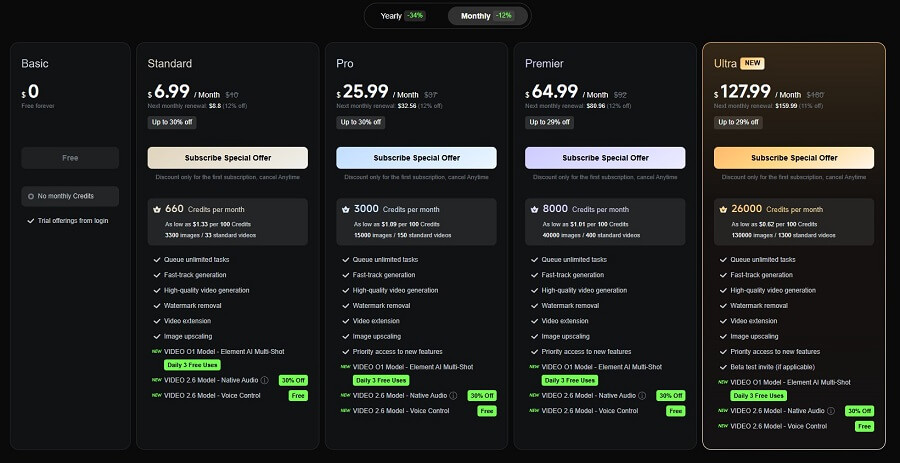
Kling AI uses a credit-based pricing model (credits are used to generate videos/images, costing around 10-50 credits for a short video depending on quality). There is a basic free plan and flexible paid plans (monthly/yearly, with a 20-30% discount for annual payments). Official pricing is from kling.ai/global (global version), is in USD, and may vary slightly by region.
Free Plan
- Credits: 66-100 credits/day (resets daily, with partial rollover).
- Features: Basic generation (5-10 second short videos, 720p-1080p), watermark, slow queue.
- Suitable for: New users, casual creators.
Official Paid Plans
Based on the latest information from reputable sources (kling.ai and 2025 reviews):
| Plan | Monthly Price (USD) | Annual Price (USD/month equivalent) | Credits/Month | Key Features |
| Standard | ~$7-10 | ~$6-8 (discounted for yearly) | 660-700 credits | No watermark, 1080p, video extend, priority queue |
| Pro | ~$35-37 | ~$28-30 | 2,000-2,500 credits | Higher quality, custom controls, lip sync, longer video |
| Premier/Unlimited | ~$90-95 | ~$75-80 | Unlimited (relaxed) + high credits | Full features, priority support, full commercial rights |
- Note: Credits roll over (unused credits are carried over to the next month on paid plans). Additional credits can be purchased separately (~$0.01-0.02/credit).
- API/Enterprise: Custom, starting from a few thousand USD upfront for high-volume usage.

- Kling AI Pricing
Pros and Cons of Kling AI
Kling AI (version 2.6 and O1 late 2025) is one of the leading AI video generation tools, renowned for its cinematic quality and natural motion. However, like any new technology, it has its limitations. Here is an analysis of its pros and cons based on user experience and real-world benchmarks from 2025.
Pros
- Fast, high-quality video creation, saving time and costs: With just a text prompt or a still image, Kling generates production-ready videos in minutes, with 1080p+ resolution and high FPS (30-48). This saves hours of manual editing and is more cost-effective than hiring a production team (credit-based, with 66-100 free daily credits).
- Advanced 3D reconstruction technology, smooth motion: Using 3D Spatiotemporal Attention and DiT, Kling realistically simulates physics (flowing water, blowing hair, collisions), maintains high character consistency, and synchronizes lip-sync/native audio – excelling in lifelike motion.
- User-friendly interface, easy to use (especially for beginners): Simple web/app interface, ready-made templates, and prompt suggestions – no advanced skills required.
- Great creative potential: Supports multimodal input (text/image/video), detailed camera control, Elements (multi-reference), suitable for short films, advertisements, and social content.
Cons
- Requires a Chinese phone number to access full features: The global version (kling.ai) allows for easy email registration, but some premium features or the domestic version still require a Chinese number; the global version may be more limited (fewer credits, longer queues).
- Unclear commercial use policy: Paid plans allow for full commercial use (no watermark, IP ownership), but the terms require copyright compliance (no use of real faces without permission), and there is a clause allowing Kling to use input/output for training – this needs careful review before large-scale commercial use.
- Advanced features can be complex for new users: Detailed prompting requires skill (negative prompts, motion brush), and img2img can sometimes be difficult to control precisely.
- Limitations on video length or deep customization: Basic videos are 5-10 seconds (free), extendable to 2-3 minutes (Pro, costs many credits); rendering can be slow (minutes to hours during peak times), with artifacts in complex or stylized scenes (anime/Pixar styles are not yet perfect).
Overall, Kling AI’s strengths are in realism and cinematic quality, making it ideal for professional creators. However, beginners may face a learning curve and high credit costs for heavy usage. If speed/affordability is a priority, try Pika or Luma; but for top-tier quality, Kling is the leader in 2025!
- Pros and cons of Kling AI
Comparing Kling AI With Its Competitors
Kling AI (Kuaishou) and Sora (OpenAI Sora 2, updated 2025) are the two giants in the AI video generation field, often compared directly due to their high quality and multimodal features. As of December 2025, Kling stands out for its affordability and global accessibility, while Sora leads in hyperrealism but has more limited access.
Kling AI vs Sora: Detailed Comparison Table
| Criteria | Kling AI (2.6/O1) | Sora 2 (OpenAI) |
| Video Quality | High-realism motion physics, good character consistency, native audio synchronization; strong realism but occasional artifacts in stylized videos. | Top-tier hyperrealistic/cinematic quality, exquisite detail; a leader in photorealism and diverse styles. |
| Video Length | Up to 2-3 minutes (extend feature), suitable for longer-form content. | Typically 5-60 seconds (unlimited generation on Plus but shorter clips). |
| Exclusive Features | Multi-reference (10+ images), Motion Brush, Elements (object control), native audio-visual sync, strong lip sync. | Diverse input (text/image/video remix), good multi-shot storytelling, ChatGPT integration. |
| Ease of Use | User-friendly, simple web/app interface, ready-made templates; easy for newbies. | Integrated with ChatGPT, easy to prompt but limited detailed control. |
| Accessibility | Fully global (kling.ai), free tier with 66-100 credits/day; quick email signup. | Region-locked (US, Canada, some Asian countries); available via ChatGPT Plus/Pro. |
| Pricing | Robust free tier; Standard ~$10/month (660 credits), Pro ~$37/month, Premier ~$92/month (high unlimited usage). | $20/month (Plus, unlimited Sora), $200/month (Pro); no separate free tier. |
Kling AI’s Unique Strengths Compared to Sora
- Cost-effective and accessible: Kling is significantly cheaper (86% of Sora’s quality at 14% of the cost according to some tests), has a good free tier for experimentation, and is globally available without regional restrictions – ideal for individual creators/startups.
- Longer videos and motion physics: Kling excels at longer-form content (2-3 minutes vs. Sora’s shorter clips), natural physics (water, hair, collisions), and native audio sync (Kling 2.6/O1).
- Deep customization: Multi-reference, Motion Brush, and Elements provide precise control – suitable for complex projects like short films/commercials.
- Update speed: Over 30 iterations in 2025, with rapid improvements (Turbo mode is 30% cheaper).
Sora is strong in hyperrealism and integration with the OpenAI ecosystem, but Kling wins on value-for-money and practical daily use.
Kling AI’s Position in the Current AI Video Market
Kling AI ranks in the top 1-2 (along with Sora) among AI video generators in 2025, often leading in realism/motion and affordability according to benchmarks from Reddit, YouTube, and specialized blogs (Fahim AI, CrePal, ReelMind).
A general comparison with other tools:
- Runway Gen-4.5: Powerful editing toolkit (Magic Tools), but expensive and slow to render; Kling is faster/cheaper.
- Luma Dream Machine (Ray2): High cinematic consistency, but limited audio; Kling has better native audio.
- Pika Labs 2.5: Fastest speed, low price; Kling offers higher quality for professionals.
- Google Veo 3: Strong photorealism, but limited access; Kling is more accessible.
Kling stands out for its best value (high quality at a low price), suitable for global creators; Sora/Veo are premium options for hyperrealism. The 2025 market is segmented: Kling dominates affordability/long-form, while Sora is the cinematic premium choice – Kling is “making waves” thanks to its perfect balance!
- Comparing Kling AI with its competitors
Potential Applications of Kling AI in Various Fields
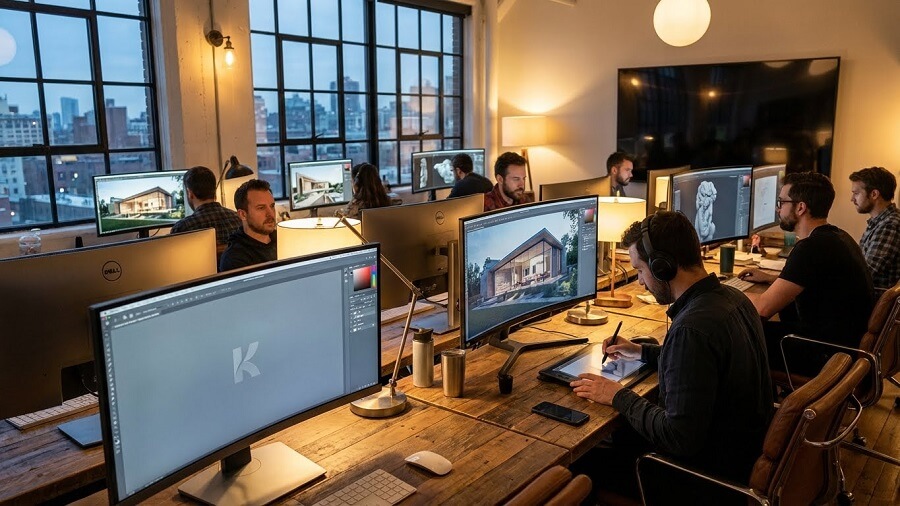
Kling AI (with its ability to create cinematic-quality videos from text/images in just minutes) is opening up countless practical application opportunities. By the end of 2025, this technology will not only be for experts but will also become a powerful tool for education, marketing, entertainment, and content creation for individuals/businesses.
Education
Kling AI helps teachers and educational institutions create vivid learning content without expensive filming equipment.
- Visual lectures: Turn PowerPoint slides or scripts into lecture videos with talking avatars and illustrative animations (e.g., history → reenacting ancient battles).
- Complex simulations: Create videos illustrating scientific concepts (chemical reactions, planetary motion, human anatomy) or historical/biological simulations without needing specialized 3D software.
- Practical applications: E-learning platforms like Coursera, Khan Academy, or schools in Vietnam can use Kling to mass-produce multilingual video lectures, increasing student engagement.
Marketing and Advertising
This is the field where Kling AI shines the most due to its speed and low cost.
- Engaging video ads: Create 15-60 second clips with products “flying” in virtual spaces, cinematic effects, and native audio (natural voiceovers).
- Product visualization: Turn static product photos into 360° demo videos, virtual try-ons (for clothes, cosmetics).
- Practical applications: Advertising agencies and brands (Nike, Coca-Cola have tested similar tools) use Kling to A/B test dozens of ad variants in a single day, saving thousands of USD compared to live-action shoots.
Entertainment and Arts
Kling AI is revolutionizing the independent film and digital art industries.
- Short films and storytelling: Creators write a script → Kling generates complete cinematic scenes.
- Animation/VFX content: Create character animations and special effects (fire, water, explosions) without complex software like After Effects.
- Practical applications: Many short films at Cannes/Sundance 2025 use Kling for pre-visualization and VFX; artists like Harmony Korine (EDGLRD) are collaborating with similar Chinese technology.
Business
Kling AI goes beyond creativity to support business operations.
- Internal content creation support: Employee training videos, internal product demos, visual reports.
- Process automation: Create software user guide videos, new employee onboarding materials.
- Data analysis: Turn charts/data into explanatory animated videos (data storytelling).
- Practical applications: Businesses use Kling for internal communication, sales pitch videos, or quick product demos for clients.
Personal Content Creation
Kling AI is the “secret weapon” for individual content creators.
- Short-form social media videos: From idea → viral TikTok/Reels clips with eye-catching effects.
- Personal storytelling: Vloggers can create virtual backgrounds and animations to illustrate their stories.
- Practical applications: Millions of creators on YouTube/TikTok use Kling to mass-produce content without filming, increasing their posting frequency and engagement.
In summary, Kling AI is democratizing high-quality video production, helping every field from education to entertainment save significant time and money. With continuous updates (native audio, longer videos), Kling’s application potential is just beginning – this is a game-changing tool for creators and businesses in the 2025-2030 digital content era!
- Potential applications of Kling AI in various fields
The Future of Kling AI and the AI Video Industry
The AI video industry is entering an explosive growth phase in late 2025 and is projected to continue into 2026, with Kling AI (from Kuaishou) leading the way thanks to its rapid updates and reasonable costs. Kling is not just competing but also shaping trends, from cinematic videos to real-world simulations.
Development Trends in AI Video Technology
AI video technology in 2026 will focus on:
- Higher quality: 4K/60fps, longer videos (2-5 minutes+), synchronized native audio (dialogue, sound effects).
- Unified multimodal: Combining text/image/video/audio in a single model (like Kling O1 and General World Models).
- Deep customization: Custom voice, precise lip-sync, immersive experiences (VR/AR, 360-degree).
- Broad applications: From film to gaming/robotics, with synthetic data for training realistic AI.
- Challenges: A sharp increase in deepfakes and misinformation, leading to strict regulations (banning non-consensual deepfakes, mandatory watermarking for synthetic content).
How Will Kling AI Change the Future of Content Creation?
Kling AI democratizes creativity, reducing production costs by 70-90% and accelerating timelines from weeks to minutes.
- Individual creators: YouTubers/TikTokers can create viral clips quickly and personalize content.
- Businesses: Dynamic advertisements, automated training videos, reshaping marketing/film.
- Entertainment industry: Film pre-visualization, indie VFX, long-form content – Kling has the potential to reach billions in ARR if it continues to lead in cost-efficiency.
Kling turns “everyone into a director,” ushering in an era of hyper-personalized and interactive content.
Updates and Potential Developments of Kling AI
From Kuaishou’s roadmap (late 2025):
- Kling 2.6/O1: Simultaneous audio-visual, 30% cost reduction, powerful multimodal capabilities.
- Q1 2026: 4K/60fps, custom voice libraries, longer sequences.
- Long-term: Advanced General World Models (simulating explorable worlds), VR/AR integration, enterprise tools (gaming/smart devices).
Kling aims to be a “unified creative studio,” competing with Sora/Runway through affordability and rapid iteration (over 30 updates in 2025).
Discussion on Ethical and Copyright Issues in AI Video
AI video carries significant risks:
- Deepfakes/misinformation: A sharp increase in 2026, used for scams, political manipulation, or non-consensual content (pornographic deepfakes).
- Copyright: Training on web data causes disputes (copyright infringement from original images/videos).
- Regulations: Many countries are enacting laws to ban non-consensual deepfakes (US/EU 2025-2026), requiring watermarks on synthetic media and ethical training (consent-based data).
Kling/Kuaishou emphasizes responsible AI (content moderation, user guidelines), but the industry needs to balance creativity with protection (watermarks, detection tools). The future in 2026: Deepfakes will be mainstream but tightly regulated, promoting “ethical AI video” through measures like mandatory watermarks and consent frameworks.
In summary, Kling AI is leading the trend of affordable, high-quality video, changing content creation forever – but its success depends on resolving ethical challenges. 2026 promises a fierce race, with Kling strongly positioned as the value leader

















