


What is Krea AI? Pricing and tips for creating realistic videos


Krea AI is the most groundbreaking “real-time AI creative studio” today, allowing anyone—from professional designers to beginners—to create, edit, and enhance images and videos with just a few clicks, without needing complex software. Launched in 2023 and exploding throughout 2024-2025 with over 50 major updates, Krea AI instantly transforms vague ideas like “a cyberpunk city at sunset, Blade Runner style, highly detailed” into professional-quality images/videos on a real-time canvas, complete with a powerful enhancer tool up to 22K and video generation from leading models like Flux, Kling, and Runway.
With a user-friendly interface similar to Photoshop AI, exclusive features like Logo Illusions, infinite Patterns, and team collaboration, Krea AI is not just a generative tool but a comprehensive “creative assistant” for designers, marketers, artists, and content creators. Completely free at the basic level (50 images/day) and starting from just $30/month to unlock unlimited access, Krea AI is leading the “AI for professional creativity” trend, helping you turn ideas into reality faster than ever in the 2025 generative AI era.
Mục lục
1. What is Krea AI?
Krea AI is a comprehensive creative platform based on artificial intelligence (generative AI) that allows users to create, enhance, and edit images, videos, and 3D models from text descriptions or initial ideas. With advanced generative AI models as its core technology (like Krea 1 – an image generation model launched in 2025), Krea AI combines diffusion models, real-time generation, and multimodal processing to turn simple prompts into high-quality, photorealistic, or artistic content.
The purpose behind Krea AI is to democratize professional creativity, helping designers, artists, marketers, and regular users access powerful AI tools without needing programming skills or complex software. The platform focuses on a real-time workflow (live editing canvas), enhancers (quality upgrades), and deep customization (LoRA training), making it an “all-in-one AI studio” for both dynamic and static visual creation.
1.1 History and Development
Krea AI launched around 2023 as a real-time AI image generator, quickly evolving into a full suite with video and 3D capabilities. By December 2025, Krea had rolled out over 50 major updates, including the launch of Krea 1 (a new image benchmark model in June 2025), Krea Nodes (a node-based workflow), and advanced video generation integration.
The company is recognized as one of the leading creative AI startups (Fast Company 2024-2025), with millions of users and a top position in the AI design tools market, competing directly with Midjourney, Leonardo AI, and Adobe Firefly. Krea stands out for its rapid update pace and focus on the user experience for professional creators.
1.2 Key Differentiators
From the beginning, Krea AI has differentiated itself from other AI tools through:
- Real-time canvas and editing: Edit directly in the browser (draw, enhance, upscale in real-time), eliminating the need for multiple regenerations like with Midjourney (Discord-based) or DALL-E (static output).
- All-in-one suite: Combines image/video/3D generation, enhancement, and editing in one platform, with a personalized LoRA trainer and Patterns (infinite seamless textures)—more powerful than tools specializing in a single area.
- Accessible yet powerful: An intuitive interface for beginners, but with a node-based system (Krea Nodes) for complex pro workflows, offering superior customization and consistency compared to raw Flux/Stable Diffusion.
- Exclusive Enhancer: A high-quality automatic upscaling/enhancement tool that transforms low-res images into professional quality while preserving details—a major advantage over competitors.
Overall, Krea AI is not just a generator but a true “creative hub,” ideal for designers who need speed and flexibility. It is leading the 2025 AI tools trend with a perfect balance between ease of use and professional depth.
2. The Outstanding Features of Krea AI
Krea AI (updated 2025) is a comprehensive AI creative suite, distinguished by its real-time generation, powerful enhancer, and video integration from leading models. Below are the main features, complete with illustrative examples.
2.1 Text-to-Image Generation (Flux)
- How it works: Uses the Flux model (as well as Ideogram and Krea 1) to analyze text prompts, generating real-time images with high detail, and supporting style transfer and image prompts.
- Practical applications: Quickly create concept art, article illustrations, game character designs, or marketing posters.
- Tips for effective prompts: Detail + style + quality (e.g., “A futuristic cityscape at sunset, cyberpunk style, highly detailed, 4K, vibrant neon lights”).
2.2 Create Video from Text & Images (Text-to-Video / Animator)
- How to turn descriptions into video: Enter a prompt or upload an image, select a model (Veo 3, Kling, Runway, Hailuo, Pika, Luma), and AI will animate with keyframes, motion transfer, and lip sync.
- Supported styles: Film (cinematic), Render (3D-like), Animation, Experimental (abstract art).
- Applications: YouTube intros/outros, short promotional videos, social media animations.
2.3 Real-time Image Generation
- Explanation: The real-time canvas allows you to sketch or enter a prompt, and the AI generates/enhances it instantly (under 50ms/frame).
- Benefits: Rapid idea testing, instant feedback loop – ideal for brainstorming.
2.4 Image Upscaling & Editing (Enhancer)
- Capabilities: Upscale to 22K (2x-16x), enhance detail, remove objects, add/change style.
- Options: Presets (realistic, digital art, product, portrait); adjust color, lighting, saturation, contrast.
- Object removal: Brush tool + natural AI fill.
2.5 Automatic Logo Design (Logo Maker)
- How it works: Enter a prompt or upload a logo, and the AI creates variations and illusions (integrating the logo into realistic scenes like landscapes or objects).
- Integration capability: Create “hidden” logos in landscapes (e.g., a coffee logo within a coffee cup on a mountain).
2.6 Team Collaboration Features
- Support: Shared workspace, real-time sync, invite members, shared compute pool, assign plans.
- Benefits: Design/film/media teams can work simultaneously, share projects, and get fast feedback – ideal for agencies/large teams.
Krea AI excels with its real-time workflow and all-in-one suite, enabling fast, professional, and accessible creation!
3. Detailed Guide to Using Krea AI for Beginners
Krea AI is an easy-to-use AI creation platform with a user-friendly real-time interface. You can start for free and upgrade when needed. Below is a step-by-step guide (updated 2025).
3.1 Accessing and Registering a Krea AI Account
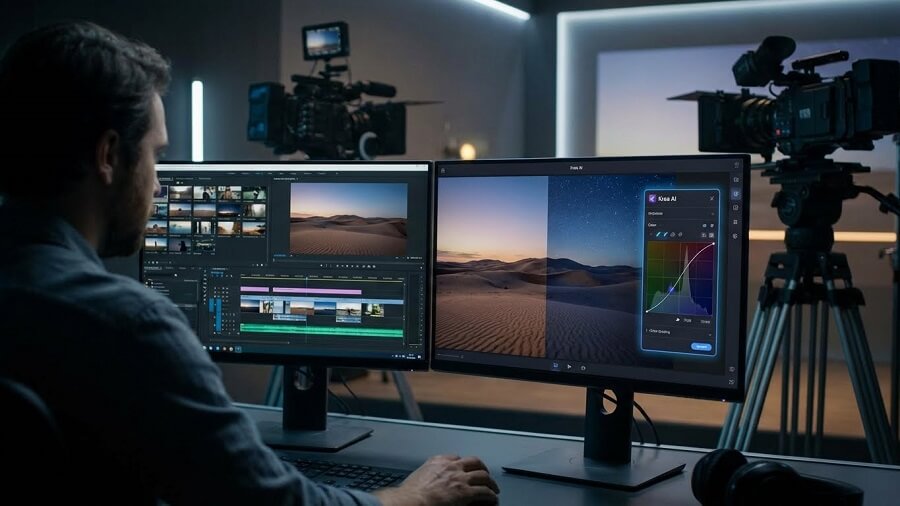
- Guide to accessing the official website: Open your browser and go to https://www.krea.ai – the homepage displays the real-time tool and main features.
- Steps to register an account:
- Click “Sign Up” or “Get Started” on the homepage.
- Choose to sign in with Google (fastest) or email (enter email + password).
- Confirm (if using email) and complete – you will be taken to the dashboard immediately with free credits.
- Notes on free and paid versions:
- Free: 50 image generations/day, 10 videos/day, limited parallel generations (2), watermark on some outputs, no full commercial license.
- Paid (Pro): From ~$30/month, unlimited generations, full real-time access, private projects, commercial rights, AI trainings (5/month). Upgrade in Settings/Billing.
3.2 Guide to Using the Main Features
Image Generation (Flux)
Flux is Krea’s powerful text-to-image model.
- Step 1: Select “Generate” or “Flux” on the dashboard.
- Step 2: Enter a detailed description (Text Prompt) (e.g., “A futuristic city at sunset, cyberpunk style, highly detailed, vibrant neon”).
- Step 3: Choose a style (presets like Realistic, Anime), aspect ratio, and advanced parameters (steps, guidance scale).
- Step 4: Click “Generate” – you’ll see a real-time preview, and the result will appear in moments.
- Pro tip: Use keywords like “highly detailed, 4K, cinematic lighting, sharp focus” for high quality; add a negative prompt (“blurry, low quality”) to avoid errors.
Create Video (Animator)
Animator turns text/images into animated videos with keyframes.
- Step 1: Select “Animator” or “Video”.
- Step 2: Upload a static image (or enter a text prompt), add keyframes (upload multiple images for a sequence).
- Step 3: Choose a style (Film, Render, Animation, Experimental), adjust motion and camera.
- Step 4: Click “Generate Video” – wait 30s-2 minutes, preview and extend if needed.
Enhance Image (Enhancer)
A powerful tool to upscale/enhance images up to 22K.
- Step 1: Upload the image to be edited (drag & drop).
- Step 2: Adjust resolution (2x-16x), style (realistic, artistic), AI level (strength), color/lighting.
- Step 3: Click “Enhance” – AI automatically upscales, removes noise/objects, and adds detail.
Krea AI is real-time and intuitive. Start for free to explore – upgrade to Pro for unlimited and pro features. Join the Krea Discord for community tips!
4. Krea AI Pricing
Krea AI offers a powerful free plan for new users and paid plans (Pro, Team/Enterprise) to unlock unlimited generations, advanced features, and a full commercial license. Prices are in USD/month (20% discount for annual payment), based on information from the official krea.ai website and reputable sources (subject to change – check directly at https://www.krea.ai/pricing).
4.1 Free Plan
- Price: 0 USD.
- Limits:
- 50 image generations/day.
- 10 video generations/day.
- Limited parallel generations (2-3).
- Watermark on some outputs.
- No full commercial license (personal use only).
- Suitable for: New users, hobbyists.
4.2 Paid Plans
Individual Plans
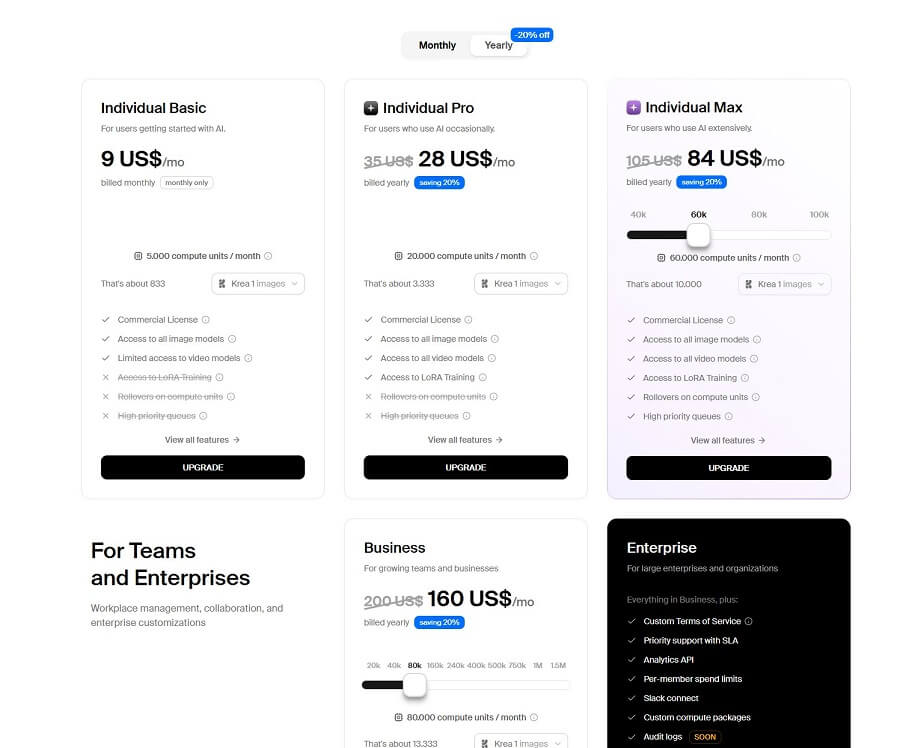
| Plan | Price | Compute Units / month | Best for | Key access rights |
|---|---|---|---|---|
| Individual Basic | 9 USD/month | 5,000 CU (~833 images) | Beginners | ✔ Commercial license ✔ Access to image generation models ✖ Limited video ✖ No LoRA training |
| Individual Pro | 28 USD/month (billed annually, 20% off) | 20,000 CU (~3,333 images) | Frequent users | ✔ Commercial license ✔ Image & video generation ✔ Access to all image & video models ✖ No LoRA training |
| Individual Max | 84 USD/month (billed annually, 20% off) | 60,000 CU (~10,000 images) | Professional creators | ✔ Commercial license ✔ Unlimited image & video ✔ LoRA training ✔ Compute unit rollovers ✔ Priority queue |
Business Plan (Teams & Enterprise)
| Plan | Price | Compute Units / month | Best for | Key Features |
|---|---|---|---|---|
| Business | 160 USD/month (billed annually, 20% off) | 80,000 CU (~13,333 images) | Teams & small businesses | ✔ Team management ✔ Advanced image & video generation ✔ Train LoRA ✔ Rollover compute units |
| Enterprise | Contact us | Custom | Large enterprises | ✔ Custom terms ✔ Priority SLA support ✔ Analytics API ✔ Per-member spending limits ✔ Slack integration ✔ Custom compute plans ✔ Audit logs (coming soon) |
- Paid plan benefits: Unlimited/realtime, personalized AI training (LoRA), advanced enhancer/upscale, team workspace.
- Add-ons: Option to top-up credits as needed.
5. Krea AI Compared to Other AI Tools
Krea AI (2025) is an all-in-one AI creative platform with powerful realtime generation and enhancer features, directly competing with Midjourney (peak artistic quality), DALL-E (high precision), and Stable Diffusion (flexible customization). Below is a detailed comparison based on actual 2025 reviews.
Comparison with Midjourney, DALL-E, Stable Diffusion
| Criteria | Krea AI | Midjourney (v6.1) | DALL-E 3/4 (OpenAI) | Stable Diffusion (tools like Automatic1111/ComfyUI) |
| Image Quality | High, good realtime detail, powerful enhancer (up to 22K); versatile with multiple styles. | Top-tier artistic excellence, aesthetic coherence. | Accurate prompt adherence, good hyperrealism. | Highly flexible with custom models, but depends on setup. |
| Speed | Realtime (sub-second), fast for iteration. | Queue-based, slower (minutes). | Fast via ChatGPT. | Fast locally with powerful hardware, cloud-dependent. |
| Ease of Use | Most user-friendly, intuitive canvas for newbies. | Learning curve (Discord/web), complex prompts. | Easiest via ChatGPT. | Difficult for newbies (requires setup). |
| Unique Features | Realtime canvas/edit, enhancer/upscale, video integration, Logo Illusions, team collab. | Strong style reference, large community. | ChatGPT integration, safety filters. | Open-source custom LoRA/training, unlimited local. |
| Pricing | Free (50 images/day), Pro ~$30/month unlimited. | From $10/month (Basic) to $120 (Mega). | $20/month (ChatGPT Plus). | Free locally, cloud ~$10-50/month depending on the tool. |
| Community | Growing fast, active Discord. | Largest, public gallery. | Via OpenAI community. | Huge Reddit/Hugging Face, extensive extensions. |
5.1 Who is Krea AI best suited for?
Krea AI is ideal for professional designers, creative teams, and marketers who need a real-time workflow (fast ideation, direct editing), a powerful enhancer, and an all-in-one solution (image + video). If you want top-tier artistic quality → Midjourney; precision prompting → DALL-E; deep customization/open-source → Stable Diffusion. Krea strikes a good balance between ease of use and power, suitable for the newbie-to-pro transition.
5.2 Advantages of Krea AI
- Friendly, easy-to-use interface for beginners: Real-time canvas similar to Photoshop AI, no complex initial prompts required.
- Fast processing speed: Real-time generation/enhancement, iteration is many times faster than queue-based tools.
- Diverse features: Text-to-image/video, 22K enhancer/upscaler, Logo Maker, Patterns, team collaboration – a more complete suite than most competitors.
- Real-time image generation capability: Instant feedback, test ideas without waiting.
- Free version available for trial: 50 images + basic videos per day, enough for in-depth testing.
5.3 Limitations and Disadvantages
- Accuracy or detailed control can sometimes be limited compared to more specialized tools: Complex prompts may not adhere as well as with DALL-E or custom Stable Diffusion.
- Output quality can be inconsistent across different features or prompts: Artistic stylization is not on par with Midjourney, and the video feature is new, sometimes resulting in artifacts.
- Reliance on paid plans to access all features and the highest quality: The free plan limits generations/parallel processing; the Pro plan is needed for unlimited use and a full commercial license.
- Potential ethical and copyright issues in generative AI: Like many generative tools, the training data can be controversial regarding copyright; Krea has a policy but is not as fully transparent as some competitors.
Overall, Krea AI stands out for its real-time workflow and versatility, suitable for creators who need speed and in-depth editing. If you prioritize pure artistic quality → Midjourney; free/customization → Stable Diffusion. Choose Krea if you want a versatile “AI studio” for 2025!
6. Who Should Use Krea AI? Practical Use Cases
With its real-time interface, powerful enhancer, and diverse image/video creation capabilities, Krea AI is the ideal tool for those who need high creative speed, intuitive editing, and professional output without a steep learning curve. Below are the main user groups and practical applications of Krea AI in daily work (updated 2025).
6.1 Content Creators
- Practical application: Create engaging YouTube thumbnails, blog post images, infographics, or short videos for Reels/TikTok in just a few minutes.
- Benefits: The real-time canvas helps test ideas quickly, the enhancer upscales old photos to high quality, saving time compared to Photoshop. Social media managers can create numerous variants for A/B testing campaigns.
6.2 Designers
- Practical application: Brainstorm concept art, create UI/UX mock-ups, design game characters, or project mood boards using only prompts and real-time editing.
- Benefits: Logo Maker + Illusions quickly create unique logos; the enhancer transforms rough sketches into professional images. Freelance designers save hours compared to traditional tools.
6.3 Marketing Professionals
- Practical application: Create advertising banners, product visualizations (showing products in realistic contexts), or short demo videos for landing pages/email marketing.
- Benefits: Integrated video generation helps create cinematic ad clips without filming; team collaboration supports effective teamwork for agencies.
6.4 Artists and Hobbyists
- Practical application: Experiment with artistic styles (digital painting, surrealism), create consistent artwork series, or turn abstract ideas into images/videos.
- Benefits: Real-time generation allows you to “draw” with AI and edit instantly – like having a 24/7 art assistant. Beginners can also easily create beautiful works without drawing skills.
6.5 Education and Training
- Practical Applications: Create lecture illustrations, complex diagrams, concept explainer videos, or engaging e-learning materials.
- Benefits: Teachers/lecturers can quickly visualize abstract ideas (history, science) without specialized software; the enhancer sharpens old documents.
6.6 Small and Medium-sized Enterprises (SMEs)
- Practical Applications: Create website images, product catalogs, social media content, or company introduction videos without hiring a full-time designer.
- Benefits: Reduce design costs by 70-90% compared to agencies; team collaboration facilitates quick internal coordination. Startups use Krea to build a strong brand visual from an early stage.
Krea AI is best suited for those who need a fast, intuitive, and versatile workflow – from individual creators to professional teams. If you frequently work with images/videos and want to save time while maintaining high-quality output, Krea AI is the ideal choice for 2026!
7. The Future of Krea AI and Its Community
Krea AI is establishing itself as one of the leading versatile AI creative platforms in 2025, with rapid updates and a long-term vision towards multimodal immersion. With over $83 million in funding (including Series B in 2025), Krea is not only focusing on real-time generation but also building a comprehensive creative ecosystem.
7.1 Upcoming Updates and New Features
Krea AI is known for its “ship weeks” and frequent updates (dozens in 2025). Recent and upcoming standout features include:
- Krea 1 and FLUX.1 Krea [dev] (June-July 2025): In-house developed image model, high photorealism, avoids the oversaturated “AI look.”
- Stage (April 2025): Create 3D environments from text/image.
- Advanced video integration: Support for Veo 3, Kling, Runway Gen-4 – cinematic video with audio.
- Expected in 2026: 8K video generation, neural interface (integrating AR/VR like Apple Vision Pro), offline mode beta, deeper personalization/aesthetics research (powerful personalized custom models), and immersive 3D conversion for metaverse/VR.
The roadmap focuses on unified multimodal systems (combining real-time image/video/3D/audio) and greater controllability.
7.2 The Role of Krea AI in the AI Era
Krea AI positions itself as the “Adobe for the AI era” – a unified platform for generative models, offering controllability (detailed control) and a real-time workflow for creativity. Long-term vision: To blur the lines between media (image/video/sound), build immersive environments, and provide tools for artisan-level manipulation. In the AI era, Krea democratizes professional creativity, helping designers/artists/marketers work 5-10 times faster, while promoting ethical AI through transparent training and user-centric design. With significant funding and hires from top universities (MIT, Princeton), Krea is leading the “creative AI suite” trend – from ideation to production-ready.
The Krea AI community is very active, making it an ideal place to learn and share:
- Official Discord: Join at https://discord.com/invite/rJurUAR8Kz (over 100,000 members). The #showcase channel is for sharing creations, #prompt-sharing for learning prompts, #feedback for direct communication with developers, and there are weekly challenges.
- How to join: Register at Krea.ai → find the Discord link in the dashboard or blog. Join to ask for real-time tips, see pro workflows, and get early updates.
- Learn and share: Docs.krea.ai offers detailed tutorials; blog.krea.ai provides feature updates; the community gallery is for remixing ideas. Many creators share case studies (from freelancers to large agencies like Pixar/LEGO using Krea).
The community helps newcomers progress quickly, going from newbie to pro in just a few weeks – one of Krea AI’s greatest strengths!




