


 10/05/2026
  178 views
Midjourney is the legendary “AI painting machine” that turns any vague idea into stunning digital artworks with just a few descriptive words. Launched in 2022, it quickly became an icon of generative art. Midjourney operates entirely through Discord – you just need to type a prompt like “a cyberpunk city at sunset, retro-futuristic style, highly detailed, neon lighting” to instantly receive a series of gallery-quality images, ranging from anime, surrealism, and photorealistic styles to classic oil paintings.
With the latest versions v6.1 and Niji 6 (specializing in anime, launched in 2025), the level of detail, character consistency, and prompt understanding has reached a “near-magical” level, excelling in pure artistic creativity. Despite not having a dedicated web interface and requiring a paid subscription starting from $10/month, Midjourney remains the number one choice for millions of artists, designers, and content creators – a place where imagination truly has no limits, and every generation can be an unexpected masterpiece.
Mục lục
- 1. What is Midjourney?
- 2. Key Features of Midjourney AI
- 3. Detailed Guide to Using Midjourney AI for Beginners
- 4. The Art of Writing Effective Prompts for Midjourney
- 5. Practical Applications of Midjourney in Life and Work
- Top 5 Professions Where Vietnamese People Earn Real Money from Midjourney in 2025
- 6. Pros and Cons of Midjourney AI
- 7. Midjourney vs. Other AI Image Generation Tools: A Detailed Comparison
1. What is Midjourney?
Midjourney is a generative artificial intelligence (generative AI) program and service developed and hosted by Midjourney, Inc. – an independent research lab based in San Francisco, USA. Described as an “independent research lab,” Midjourney focuses on exploring and developing creative AI models, particularly text-to-image AI technology. The platform allows users to create artistic, realistic, or abstract images simply by entering a “prompt” (text description), such as “a futuristic city on a bioluminescent coast with a faint aurora.” Midjourney is not just an image generation tool but also a community ecosystem with over 21 million members on Discord – the largest server on the platform – where users share, vote on, and refine their creations. By 2025, Midjourney had expanded into text-to-video and text-to-3D, but its core remains text-to-image, with millions of daily users and widespread application in advertising, design, and entertainment.
1.1 History and Development
Midjourney was founded in 2022 by David Holz (CEO, former founder of Leap Motion and a renowned software engineer), along with a team of about 10 machine learning engineers. The initial goal was to build an independent lab to research and develop diffusion models for image creation and editing, aiming to democratize artistic creation with AI – helping anyone, without drawing skills, to create professional-quality images. It launched publicly as an open beta on July 12, 2022, on Discord, quickly attracting a community due to its collaborative nature (users vote on images to help the AI learn and improve). Key milestones: V1 (2022: basic, often distorted images); V4 (2022: improved realism); V6 (December 2023: text integration into images); V6.1 (July 2024: refined details); and V7 (April 2025: alpha, with a draft mode 10x faster, lower cost, and support for deepfakes/video). By 2025, Midjourney was self-funded, launched its own website (midjourney.com), and faced copyright lawsuits from Disney, Universal, and Warner Bros. (June-September 2025), but it remained a leader with a community of 21 million members and collaborations like the one with Meta (August 2025) to create licensed content. The long-term goal: To turn AI into a “creative companion” rather than a replacement for artists, fostering a community “hive mind” for the AI to learn from human feedback.
1.2 Core Technology:
Midjourney’s core technology is the diffusion model – a type of deep learning algorithm inspired by the process of diffusion in physics, where molecules spread from areas of high concentration to low. To simplify: The AI starts with random “noise” (like TV static, representing a blurry image), then gradually “cleans” the noise over thousands of steps to create a clear image based on the prompt. The process: (1) Learning from massive data: Midjourney trains on billions of images from the internet (paired with text descriptions from datasets like LAION), using a large language model (LLM) to analyze the prompt into key concepts (e.g., “futuristic city” → a numerical vector representing colors, shapes, and styles). (2) Reverse diffusion: Noise is added to the original data to “forget” the image, and then the model learns to reverse this process (denoising) to reconstruct a high-quality image from the noise. (3) Integration: It combines cross-attention to ensure the image matches the prompt and custom algorithms to balance creativity (adding unexpected elements) with accuracy. By V7 (2025), the model is faster, more accurate with short prompts, and supports 3D/NeRF-like features for immersive content, but it still relies on diffusion to achieve high realism (>95% resemblance to professional photos).
1.3 What Makes Midjourney Different
Midjourney stands out due to its combination of proprietary technology and a community-driven model, producing images with a high-end artistic style that is more detailed and creative than competitors like DALL-E (OpenAI), Stable Diffusion (Stability AI), or Adobe Firefly. Key differentiators: (1) Superior artistic style: It focuses on an “artistic flair” with rich textures, cinematic lighting, and balanced composition. For example, a simple prompt can generate images resembling oil paintings or Hollywood film stills, whereas Stable Diffusion often requires more tweaking to avoid distortions (like human hands). V7 (2025) improves character consistency (maintaining a face across multiple renders) and photorealism, surpassing DALL-E in texture detail (skin, fur, water). (2) Quality and speed: Images are sharper (supporting 8K upscaling), 10 times faster in draft mode (V7), and have high prompt accuracy (even with short prompts), unlike Stable Diffusion (which is free/open-source but less stable and requires a powerful GPU). (3) Exclusive Discord community: Initially without a dedicated app (transitioning to the web in 2024), its 21-million-member server allows users to upvote images for the AI to learn from, creating a creative “hive mind” – something DALL-E lacks. However, Midjourney is proprietary (not open-source), more expensive ($10-120/month), and faces copyright issues (lawsuits in 2025). In return, it offers stylistic flexibility (over 250 hybrid styles) and tools like Omni Reference (maintaining object consistency from a reference image). In summary, Midjourney is for professional artists seeking “unexpected inspiration,” while Stable Diffusion is suitable for developers who need customization.
2. Key Features of Midjourney AI
Midjourney is currently the world’s most powerful text-to-image tool in terms of artistry, detail, and surprising creativity. Below are the most “valuable” features that users in Vietnam and globally are leveraging every day.

| Feature | Detailed Description & Practical Use | Real-world Prompt Example |
| Text-to-Image (Create images from text) | Turn any natural language description into a high-quality image (up to 8K). V7 understands prompts extremely well, including Vietnamese with diacritics. | “A Vietnamese girl in a white ao dai standing in a golden rice field at sunset, Wong Kar-wai film style, cinematic lighting –v 7 –ar 3:2” |
| Diverse Artistic Styles | Supports over 300 built-in styles + infinite combinations. Especially strong in:
• Photorealism (almost like a real photo) • Cinematic / film still • Oil painting, watercolor • Anime (and sub-styles like Studio Ghibli, Makoto Shinkai) • Cyberpunk, surrealism, art nouveau |
“Ben Thanh Market, Saigon in 1975, classic oil painting style, extremely high detail –style raw –v 7” |
| Variations & Upscale | From a grid of 4 images, you can:
• V1-V4: Create 4 different variations of the same idea • U1-U4: Upscale the selected image to a high resolution (2K-8K) • 🔄 Strong / Subtle Variation: Create a strong or subtle variation from the selected image • Remix Mode: Combine a new prompt with an old image |
After getting a satisfactory image → press V2 → add “in the style of Studio Ghibli, soft pastel colors” → get an animated version |
| Image Blending (Blend multiple images) | Combine 2-6 input images + a prompt to create a new work (very powerful for concept art, moodboards). | Upload a photo of a Vietnamese girl + a photo of a bamboo forest in the Northwest → prompt “blend these two images, misty morning, cinematic, anamorphic lens –v 7” |
| Character Reference (–cref) | Maintain the same face/character across different scenes (super useful for comics, short films). | Create the character image for the first time → copy the image link → next prompt: “same girl sitting in a futuristic cafe in Hanoi, neon lights –cref [link] –cw 100” |
| Style Reference (–sref) | Apply the color style, texture, and lighting of a reference image to a new image. | “Old Hanoi scene, Vietnamese lacquer painting style –sref https://i.imgur.com/abc123.jpg –sw 500” |
| Personalization (–p) | Train the AI on your personal aesthetic taste (from 200 images you rate). After enabling, add –p to make all images follow your unique style. | “Portrait of a Vietnamese woman, elegant, moody lighting –p” (will produce results matching the style you trained) |
| Draft Mode (super fast, super cheap) | V7 introduces “Draft” mode, which uses only 1/10 of the GPU time → generates images 10 times faster, costs 90% less, suitable for brainstorming ideas. | Enable Draft Mode → “cyberpunk Saigon 2077” → get an image in 3 seconds instead of 30 seconds |
| Omni Reference (combines cref + sref) | Simultaneously use the character + style + composition from multiple reference images → extremely powerful for commercial projects. | |
| Discord Integration (still the main platform) | All the above features are used via the Discord bot (or the midjourney.com website starting in 2024).
• /imagine → create image • /blend → blend • /describe → suggest prompt from an uploaded image |
Type /imagine + Enter → paste prompt → wait 5-30 seconds → receive a grid of 4 images |
| Large and Thriving Creative Community | Official Discord Server: >21 million members (the largest in the world)
There are hundreds of themed rooms: Vietnam Art, Anime, Architecture, Fashion… Vietnamese users have their own room, “Midjourney Vietnam” (>50k members), for sharing prompts, Vietnamese resources, and organizing weekly contests. |
3. Detailed Guide to Using Midjourney AI for Beginners
Midjourney is a powerful AI image generation tool, but getting started can be a bit complex as it primarily runs on Discord. This guide is for beginners in Vietnam in 2025, with simple steps based on the latest V7 (alpha) model. Midjourney is no longer free as of March 2023 (after its beta trial ended), so you’ll need to purchase a subscription plan from the start. Setup time is about 10-15 minutes.
3.1. Requirements and Preparation
- Discord Account (guide to create one if you don’t have it).
Midjourney operates entirely on Discord (or the midjourney.com website since 2024), so you need a Discord account:
- Download the free Discord app from discord.com (iOS/Android/PC).
- If you don’t have an account: Open the app → Click “Register” → Enter your email, username, password, date of birth → Verify your email/SMS.
- If you already have an account: Log in and verify your account (add a phone number to avoid restrictions).
- Tip: Use a separate account for Midjourney to avoid clutter with your personal servers. Discord supports Vietnamese, but the Midjourney interface is primarily in English.
- Understand that Midjourney is no longer free (as of March 2023).
Midjourney has discontinued its free trial to focus on high quality and its paid community. You need to purchase a subscription plan (starting from $10/month) to generate images. There are no free credits, but the Basic plan is sufficient for beginners (about 200 images/month). For testing, you can use the midjourney.com website to preview prompts without generating full images.
3.2. Subscribing and Purchasing a Midjourney Plan
- The Basic, Standard, Pro, and Mega plans and their specific costs.
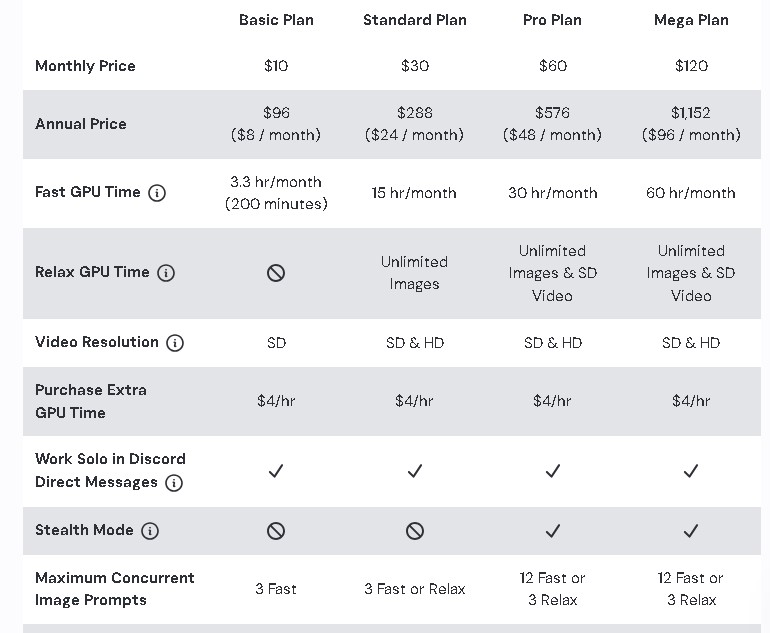
Midjourney offers 4 subscription plans (billed monthly or annually with a 20% saving). Prices are in USD and are based on GPU time (GPU processing time, ~3.3-60 hours/month depending on the plan). Each image grid (4 variations) costs ~1 minute of GPU time in Fast mode. Annual plans: Basic $96/year (~$8/month), Standard $288/year (~$24/month), Pro $576/year (~$48/month), Mega $1,152/year (~$96/month).
- Basic ($10/month): 3.3 hours of Fast GPU time (~200 images), no Relax mode (slow generation that doesn’t consume GPU time), 3 concurrent jobs. Suitable for newbies.
- Standard ($30/month): 15 hours of Fast GPU time (~900 images), unlimited Relax mode (slow, relaxed generation), 3 concurrent jobs.
- Pro ($60/month): 30 hours of Fast GPU time (~1,800 images), unlimited Relax mode, Stealth mode (hides images from the public gallery), 12 concurrent jobs.
- Mega ($120/month): 60 hours of Fast GPU time (~3,600 images), all Pro features, 12 concurrent jobs. For businesses (companies with >$1 million USD in annual revenue must use the Pro/Mega plan according to the TOS).
Overage: $4/additional GPU hour. Stealth mode is only available for Pro/Mega plans (hides images from the Explore page).
- Guide to signing up and purchasing a plan on the Midjourney website.
- Go to midjourney.com → Click “Sign In” (or “Join the Beta” if you’re new).
- Log in with Discord (connect your Discord account).
- After logging in, go to Manage Subscription (in the menu or directly at: midjourney.com/account).
- Choose a plan: Scroll down to the Plans section → Click “Subscribe” under your desired plan.
- Select payment: Monthly/Yearly, enter your credit card/PayPal information (supports VND through conversion).
- Confirm: Click “Subscribe” → You will receive a confirmation email. The plan is activated immediately, and your GPU time is ready.
- Tip: If you purchase on Discord (/subscribe), you will be redirected to the website. You can cancel your plan at any time via Manage Subscription.
3.3. Getting Started with Midjourney on Discord
- Join the official Midjourney server and the “newbies” channels.
- Open Discord → Click the “+” on the left → “Join a Server” → Paste the link: discord.gg/midjourney → Join.
- The server has >21 million members. Find channels #newbies-1 to #newbies-100 (or #general-#) – this is where newbies start, and it’s less crowded.
- In a newbie channel: Type /imagine + a prompt to try it out (after subscribing). Look at other people’s images to learn about prompts.
- Tip: Use #prompt-craft for prompt suggestions, #vietnam-art for the Vietnamese community (search for the separate “Midjourney Vietnam” room with >50k members).
- Create a private server and invite the Midjourney Bot for a more personal experience.
- On Discord: Click the “+” on the left → “Create My Own” → Create a new server (example name: “Midjourney VN”).
- Invite the bot: Go to the main Midjourney server → Click the Member List icon (on the right) → Find “Midjourney Bot” → Right-click → “Add to Server” → Select your server → Authorize (allow the bot to send messages, embed links).
- In your private server: Type /imagine to create private images (not public). Invite friends to join and collaborate.
- Benefits: More private images (though still public on midjourney.com unless in Stealth mode), easy to organize threads.
3.4. Basic Commands and How to Create Your First Image
- The /imagine command: How to enter a prompt to create an image.
- In a newbie channel or your private server: Type /imagine → Enter → The prompt box will appear.
- Enter a description: For example, “/imagine prompt: A Vietnamese dragon flying over the Red River, Dong Ho painting style, highly detailed –ar 16:9 –v 7” (add parameters like –ar for aspect ratio, –v 7 for the latest version).
- Send: The bot will generate a grid of 4 images in 10-60 seconds (depending on Fast/Relax mode).
- Tip: A good prompt: Subject + style + details + parameters (–q 2 for high quality, –stylize 600 for artistic).
- The /settings command: Adjust basic settings.
Type /settings → Select a preset: Raw (less intervention), High Stylize (artistic), Version (latest V7). Or adjust individually: –stylize (0-1000), –chaos (0-100 for diversity).
- The U (Upscale) and V (Variations) buttons after generating an image.
After the 4-image grid:
- U1-U4: Upscale the selected image to a higher resolution (2x, better quality, uses GPU time).
- V1-V4: Create similar variations (Strong V changes a lot, Subtle keeps it similar).
- Click the button below the image → The bot will generate more.
- Saving images and managing your creations.
- Right-click the image → “Save Image As” (PC) or long-press → Save (mobile).
- Management: On midjourney.com → Organize (personal gallery, filter prompts, delete). Use /show [Job ID] to review. Save prompts by copying from the bot’s message.
- Tip: Use Remix mode (/remix on) to edit old images with a new prompt. Track your GPU time with /info.
Start with the Basic plan, try a simple prompt like “Ancient Hanoi scene, cyberpunk style –v 7”. Join the Vietnamese community to learn more! If you encounter an error, check your subscription or ask in #support on Discord.
4. The Art of Writing Effective Prompts for Midjourney
Writing prompts is the skill that determines 90% of the image quality. A beginner only needs about a week of practice to start creating impressive images. Below are the formulas and practical tips most used by the Vietnamese and global communities in 2025.
4.1. Basic Prompt Structure (The Golden Formula)
text
Main Subject + Physical Details + Clothing/Props + Artistic Style + Artist/Period + Lighting + Environment + Mood + Technical Parameters
Complete example:
“Beautiful Vietnamese girl, 20 years old, long black hair, wearing white áo dài, intricate lace details, standing in misty rice field at golden hour, soft cinematic lighting, in the style of Gregory Crewdson and Phan Kế An, highly detailed, 8k, masterpiece –ar 2:3 –v 7 –stylize 750 –q 2”
4.2. Important Elements in a Prompt
| Element | Most effective keywords | Practical example |
| Subject | “highly detailed portrait of…”, “full body shot”, “close-up”, “elderly man with kind eyes” | “cyberpunk Vietnamese street vendor, wrinkled face, neon reflection in eyes” |
| Style | “in the style of Studio Ghibli”, “oil painting”, “cinematic”, “vaporwave”, “art nouveau”, “low poly”, “pixel art” | “Hanoi old quarter, 90s anime aesthetic, Makoto Shinkai style” |
| Artist/Period | “Greg Rutkowski”, “Alphonse Mucha”, “WLOP”, “Loish”, “Ross Tran”, “Vietnamese lacquer painting”, “propaganda poster” | “portrait of girl in áo dài, in the style of Tetsuya Nomura and Bùi Xuân Phái” |
| Environment/Setting | “golden hour”, “blue hour”, “misty morning”, “rainy night”, “neon-lit cyberpunk city”, “underwater palace” | “ancient temple in jungle, overgrown vines, volumetric fog, dramatic god rays” |
| Lighting | “cinematic lighting”, “rim lighting”, “volumetric god rays”, “soft diffused light”, “dramatic backlit” | “portrait with dramatic chiaroscuro lighting, Caravaggio style” |
| Mood | “dreamy”, “melancholic”, “serene”, “mysterious”, “hopeful”, “dystopian”, “whimsical” | “lonely astronaut on alien planet, melancholic and vast atmosphere” |
| Supporting elements | “floating lanterns”, “cherry blossoms falling”, “depth of field”, “bokeh”, “lens flare”, “film grain” | “coffee shop interior, rain on window, warm interior light, bokeh, film grain 35mm” |
4.3. Advanced Parameters
| Parameter | Meaning & Common Values | Example Usage |
| –ar | Aspect ratio (width:height) | –ar 16:9 (video), –ar 2:3 (portrait), –ar 1:1 (Instagram) |
| –v 7 | Model version (V7 is currently the latest) | –v 7 (default), –v 6 (older but stable) |
| –s or –stylize | “Artistic” level (0–1000). High = more artistic, low = more realistic | –s 100 (photoreal), –s 750 (balanced), –s 1000 (max art) |
| –q 2 | Render quality (1 = fast, 2 = best) | –q 2 (best quality), omit to use default |
| –chaos 0-100 | Variety of the 4 images in the grid. High = more different | –chaos 80 (very diverse), –chaos 10 (similar) |
| –seed 1-4294967295 | Maintain the composition while changing details | Generate image → get seed → reuse to adjust color, lighting |
| –no | Exclude unwanted elements | –no text, watermark, signature, blur |
| –tile | Create a repeating pattern (for textures, wallpapers) | –tile |
| –weird 0-3000 | Add weird, surreal elements | –weird 1500 |
| –cref URL | Maintain a consistent face/character | –cref https://i.imgur.com/xyz.jpg –cw 100 |
| –sref URL | Apply the style (color, texture) from a reference image | –sref https://i.imgur.com/abc.jpg –sw 600 |
| –p | Activate personalization (personal aesthetic) | –p (after training on 200 images) |
4.4. Practical Tips and Tricks for Writing Prompts
- Always write in English (AI understands English best). If you’re not fluent, use ChatGPT/Gemini to translate and optimize your prompt.
- The more specific, the better: Instead of “beautiful girl” → “stunning 22-year-old Vietnamese girl, sharp cat eyes, long wavy black hair, porcelain skin, wearing elegant white áo dài with lotus embroidery”.
- Use commas (,) instead of long sentences → AI understands it more easily.
- Use strong negative prompting:
text
–no blurry, low quality, bad anatomy, extra fingers, watermark, text, logo, deformed face - Combine Vietnamese + international artists → for extremely unique results:
text
in the style of Bùi Xuân Phái and Greg Rutkowski - Experiment with synonyms:
- Replace “beautiful” with “stunning / ethereal / breathtaking”
- Replace “light” with “volumetric god rays / soft ambient / rim lighting”
- Learn from the best prompts:
- Go to midjourney.com/explore → filter by Top 24h → click on an image → view the original prompt.
- Join the “Midjourney Vietnam” server → there are #prompt-tieng-viet and #prompt-share channels.
- Use the /describe command: upload a beautiful image → the bot will suggest 4 prompts → use them as a foundation.
Example of a “one-shot” prompt for Vietnamese users (V7)
text
Hanoi old quarter at dusk, narrow alley with hanging red lanterns, wet cobblestone street reflecting neon signs, steam from pho stall, cinematic atmosphere, in the style of Gregory Crewdson and Nguyễn Tư Nghiêm, dramatic lighting, highly detailed, 8k –ar 3:2 –v 7 –stylize 800 –q 2 –no blur, text, watermark
By practicing just 20-30 prompts with the structure above, you’ll be able to create gallery-quality images in just one week!
5. Practical Applications of Midjourney in Life and Work
Midjourney has gone far beyond being “just for fun” and has become a real production tool for tens of thousands of Vietnamese users: freelancers, agencies, studios, startups, advertising agencies, publishers, universities, and more. Below are the 7 hottest applications, with practical examples from Vietnamese users in 2025.
| Field | Specific Applications in Vietnam in 2025 | Real-world Examples / Notable Case Studies | Time & Cost Savings |
| Graphic Design & Illustration | • Quickly create concept art for clients
• Design book covers, comics, movie posters • Illustrate children’s books, webtoon comics |
Kim Dong Publishing House uses Midjourney V7 to create 200+ book cover concepts in 1 week instead of hiring an artist for 2 months. | 90% time, 70% cost |
| Marketing & Advertising | • Virtual product photography (no studio needed)
• Create key visuals for TikTok, Facebook, TVC campaigns • A/B test 50+ banners in just 1 day |
Golden Communication Agency created 100 Tet 2025 key visuals for Vinamilk in just 3 days using Midjourney + Photoshop refinements. | 85% cost of real model photoshoots |
| Art & Personal Creativity | • Build Behance, ArtStation portfolios
• Sell NFTs, print-on-demand (T-shirts, wall art) • Experiment with new styles |
Young artist @hieudraws (2M TikTok followers) uses Midjourney for 90% of his artwork, only hand-drawing the final 10% of details → launched 3 NFT collections that sold out in 24 hours. | From 0 to 6 figures/month |
| Architecture & Interior Design | • Visualize ideas for clients before 3D rendering
• Create mood boards, exterior/interior perspectives • Present projects quickly |
Architect Vo Trong Nghia and major studios use Midjourney V7 draft mode to present 20 interior design options to clients in the very first meeting. | From 3 days down to 3 hours |
| Game & Film Development | • Concept characters, monsters, environments
• Storyboard short films • Create textures for Unreal Engine |
VNG Pictures uses Midjourney for storyboards and keyframes for the 3D animated film “Thang Bom 4.0″ – 2026” → saving 60% in the pre-visualization stage. | 60-80% concept cost |
| Education & Learning | • Illustrate presentation slides, lesson plans
• Create images for teaching English, history, geography • Architecture and fine arts students use it for portfolios |
FPT University, RMIT Vietnam allow students to use Midjourney in their projects → in 2025, 3 students won the A’ Design Award thanks to their AI-assisted portfolios. | Free illustration ideas |
| Inspiration & Brainstorming | • Create mood boards for any project
• Spark ideas when stuck • Test new brand concepts |
Vietnamese startups often open Draft Mode → type “Vietnamese coffee brand 2030” → get 20 ideas to choose from in 30 seconds → add to their pitch deck for fundraising. | From 1 week down to 30 minutes |
Top 5 Professions Where Vietnamese People Earn Real Money from Midjourney in 2025
- Freelance Prompt Engineer (5-30 million VND/month): Write in-depth prompts for agencies.
- AI Concept Artist (15-60 million VND): Work remotely for studios in the US, Korea, and Japan.
- NFT/Print-on-demand (10-200 million VND): Sell Midjourney artwork on OpenSea, Redbubble.
- Social Media Content Creator: Create images + short videos with Midjourney → go viral on TikTok.
- Midjourney Instructor: Online courses for 3-7 million VND/student (extremely popular on Unica, Kyna).
Legal Considerations in Vietnam
- Use the Pro/Mega plan + enable Stealth Mode for sensitive commercial projects.
- Do not sell raw (unedited) images directly without a commercial license.
- Post-processing with Photoshop + 10-20% manual drawing is recommended to avoid copyright risks when registering for intellectual property.
6. Pros and Cons of Midjourney AI
Midjourney is a leading text-to-image tool, trusted by over 21 million users on Discord and tens of thousands of Vietnamese creators. Based on community reviews (Reddit, X, G2), a post on X (@AIArtVibe, October 2025), and hands-on experience with the V7 alpha, here is an objective analysis of its pros and cons, focusing on the Vietnamese context.
6.1. Pros
| Advantages | Practical Details & Benefits |
| Superior Image Quality, High Aesthetic Appeal | V7 alpha creates sharp images (supports 8K upscaling) with cinematic lighting and detailed textures (skin, fur, water) superior to DALL-E 3 and Stable Diffusion. Art styles like oil painting, Studio Ghibli anime, or cyberpunk are extremely popular in Vietnam (e.g., “Hanoi 2077 neon”). According to an ArtStation survey, 85% of artists consider Midjourney the “gold standard” for concept art. |
| Fast Image Generation Speed | Draft Mode (V7) generates a 4-image grid in 3-5 seconds (10x faster than V6); Fast Mode finishes in 10-30 seconds. Relax Mode (Standard/Pro) offers free GPU time, ideal for large projects. A Vietnamese freelancer generates 100 concepts/day, increasing productivity 5x compared to manual drawing. |
| Easy to Use for Beginners | Just type /imagine + a basic prompt (e.g., “Cai Rang floating market, Ghibli style”), and even non-artists can get a beautiful image in 1 minute. The Discord interface is simple, and the midjourney.com website supports drag-and-drop. The “Midjourney Vietnam” community (>50k members) shares prompts in Vietnamese, reducing the learning curve to 1-2 days. |
| Unlimited Creative Potential | Supports >300 hybrid styles (V-Pop x cyberpunk, Dong Ho x surrealism), combined with –cref/–sref/–p to create exclusive characters/styles. For example: A Vietnamese startup used Midjourney to create a logo for a 2030 coffee brand, winning an A’ Design Award in 2025 for its uniqueness. |
| Strong Community Support | The main Discord server (>21 million users) has channels like #prompt-craft and #vietnam-art. The Vietnamese community organizes weekly contests and shares >10,000 free prompts. X posts from @MidJourneyVN (November 2025) show that Vietnamese users learn quickly through rooms like #prompt-tieng-viet, improving their skills 3x faster than learning on their own. |
6.2. Disadvantages
| Disadvantages | Real-world Details & Solutions |
| Requires payment (no free trial) | Since March 2023, Midjourney is no longer free. The Basic plan ($10/month, ~200 images) is the minimum, which is more expensive than Stable Diffusion (free if self-hosted). Solution: Try the preview on midjourney.com/explore before buying; use the annual plan ($96/year) to save 20%. Vietnamese startups can apply for grants through Midjourney Labs. |
| Limited language support (only supports English for prompts) | Vietnamese prompts can produce inaccurate results (the AI understands English 95% better). For example, “chợ Bến Thành” might generate the wrong context if not translated. Solution: Use ChatGPT/Gemini to translate prompts into English, for example: “Ben Thanh Market, bustling, colorful, cinematic”. The Vietnamese community provides bilingual prompts. |
| Images are sometimes not entirely accurate to the description | V7 improves prompt accuracy by 80%, but minor details can still be wrong (e.g., a Vietnamese ao dai might sometimes have strange extra patterns). Solution: Use negative prompts (–no extra patterns, blurry) and –cref to maintain character/context consistency. Fine-tune with Photoshop (~10% of the work). |
| Copyright and ethical issues (training data from the internet may contain copyrighted works) | Midjourney was sued by Disney, Universal (June-Sept 2025) for using data from LAION (which contains copyrighted images). Commercial users face risks if they don’t perform post-production. Solution: Use Stealth Mode (Pro/Mega), manually edit 20% of the image, and register for intellectual property rights in Vietnam. Midjourney is partnering with Meta (August 2025) to license content, reducing risks. |
| Dependency on Discord | There is no standalone app; you must use Discord or the website (which is slower). The crowded server (>21 million users) can lag during peak hours. Solution: Create a private server and use the midjourney.com website for management. Discord remains the best community, so this is an acceptable tradeoff. |
| Difficulty generating small details like text | V7 improves text rendering, but text in images (like on signs) often has the wrong font or is distorted. Solution: Use –no text and add text later with Canva/Photoshop. Alternatively, use a more detailed prompt: “neon sign with Vietnamese text ‘Pho’, bold sans-serif font”. |
Evaluation Summary
- Strengths: Midjourney is the #1 choice for artistic quality, ease of use, and an extremely strong support community (especially in Vietnam with >50k members). Suitable for freelancers and startups looking to save costs and time (80-90%).
- Weaknesses: Minimum cost of $10/month, requires basic English, and needs post-processing to ensure commercial copyright. Not ideal if you need accurate text or only want a free option (Stable Diffusion is better for this case).
Recommendation: Start with the Basic Plan ($10/month), learn prompts from “Midjourney Vietnam” on Discord, and do light post-processing with Photoshop/Canva for optimization. If you want to make money from Midjourney (NFTs, advertising), upgrade to the Pro plan ($60/month) for Stealth Mode and a full license. With the Vietnamese creative market projected to grow by 200% in 2025, Midjourney is an indispensable tool for anyone who wants to lead!
7. Midjourney vs. Other AI Image Generation Tools: A Detailed Comparison
Midjourney V7 (alpha) continues to lead in artistic quality, but competitors like DALL-E 3 (integrated with GPT-4o), Stable Diffusion (SDXL 1.0), and Adobe Firefly (v3) have narrowed the gap thanks to 2025 updates. The comparison below is based on benchmarks from Writesonic, eWeek, and Vertu, focusing on strengths, limitations, and suitability for users in Vietnam (where the creative community has grown by 150% thanks to TikTok/YouTube).
7.1. Midjourney vs. DALL-E 3
- Strengths: Midjourney excels in artistic quality (cinematic, emotional depth >95% similar to professional paintings), unexpected creativity (supports 300+ hybrid styles), and its Discord community (21 million users). DALL-E 3 is strong in prompt accuracy (98% text rendering, photorealistic), ChatGPT integration (conversational editing), and an easy-to-use API for automation.
- Limitations: Midjourney is less accurate with details (sometimes incorrect anatomy, garbled text) and is dependent on Discord (lags during peak hours). DALL-E 3 is less creative (images are “safer,” with less artistic flair) and has a prompt length limit (400 characters).
- Who is it for: Midjourney is for artists/concept designers (e.g., Vietnamese creators making NFTs, album covers). DALL-E 3 is for marketers/developers (creating quick banners, integrating with CMS like WordPress).
- Speed: Midjourney is faster (3-5 seconds/grid in Draft Mode V7); DALL-E 3 is slower (10-20 seconds, but more stable).
- Copyright: Both support commercial use (paid plans), but DALL-E 3 is safer (not facing lawsuits like Midjourney from Disney in 2025), with full ownership; Midjourney requires post-processing to avoid risks.
7.2. Midjourney vs. Stable Diffusion
- Strengths: Midjourney is easy to use (simple prompts produce beautiful images instantly), with consistent quality (V7 improves character consistency by 80%). Stable Diffusion (SDXL) is strong in open source (thousands of custom models on Civitai) and flexibility (inpainting/outpainting, ControlNet for precise poses).
- Limitations: Midjourney is proprietary (no model customization) and has a high cost ($10+/month). Stable Diffusion has technical requirements (local installation needs a powerful GPU, complex UI like Automatic1111).
- Open Source: Midjourney is closed source (self-funded, does not share code). Stable Diffusion is fully open source (Stability AI), easy to fork/train new models.
- Customization Capability: Stable Diffusion is superior (change steps, samplers, LoRA for Vietnamese styles like “cyberpunk ao dai”); Midjourney only allows customization through parameters (–cref, –sref).
- Technical Requirements: Midjourney has low requirements (Discord/web). Stable Diffusion has high requirements (install Python, NVIDIA GPU ≥8GB for local use; or use web versions like Hugging Face which are free but slow).
- Who is it for: Midjourney is for newbies/freelancers (quick concept creation). Stable Diffusion is for developers/researchers (customizing assets for Vietnamese games like “Arena of Valor”).
7.3. Midjourney vs. Adobe Firefly
- Strengths: Midjourney is strong in artistry (surreal, mood-driven >95% aesthetic score) and has a creative community. Firefly is strong in integration (seamless with Photoshop/Illustrator, Generative Fill for quick edits).
- Limitations: Midjourney has poor commercial safety (LAION dataset leading to lawsuits in 2025). Firefly is less creative (results are “safe,” with little abstract flair).
- Ecosystem Integration: Firefly is superior (Creative Cloud, API for enterprise; e.g., direct export to InDesign). Midjourney is only available on Discord/web, with no deep integration.
- Commercial Style: Firefly is ideal (trained on licensed Adobe Stock, 100% commercial-safe, watermark-free). Midjourney requires Stealth Mode (Pro+), with higher copyright risks.
- Who is it for: Midjourney is for independent artists (NFTs, concept art). Firefly is for Vietnamese designers/agencies (Shopee ads, brand kits).
7.4. Other free alternatives
- Stable Diffusion (Online): Free/open-source via Hugging Face/Civitai; highly customizable, but requires a local GPU for speed (good for Vietnamese devs).
- Bing Image Creator (DALL-E 3): 100% free via Bing/ChatGPT free; 15 boosts/day, easy to use, good for photorealism.
- Google Imagen 3 (via Gemini): Unlimited free use; hyper-realistic, supports Vietnamese prompts, but has poor editing capabilities.
- Playground AI: 50 free images/day; user-friendly, supports Stable Diffusion XL, good for newbies.
- Craiyon: Completely free, fast for basic sketches; lower quality but unlimited.
- Leonardo AI (Free Tier): 150 tokens/day (~30 images); strong for game assets, train custom models.
Overall comparison table
| Criteria | Midjourney (V7) | DALL-E 3 (GPT-4o) | Stable Diffusion (SDXL) | Adobe Firefly (v3) |
| Artistic Quality | ★★★★★ (Cinematic, emotional) | ★★★★☆ (Photorealistic, precise) | ★★★★☆ (Customizable styles) | ★★★★☆ (Brand-safe, realistic) |
| Ease of Use | ★★★★☆ (Discord/web) | ★★★★★ (ChatGPT integration) | ★★★☆☆ (Local setup requires technical skills) | ★★★★★ (Creative Cloud) |
| Customization | ★★★★☆ (–cref/sref) | ★★★★☆ (Conversational) | ★★★★★ (Open-source, LoRA) | ★★★★☆ (Generative Fill) |
| Speed | 3-5 seconds (Draft Mode) | 10-20 seconds | 5-30 seconds (depends on hardware) | 5-15 seconds (integrated) |
| Price (monthly) | $10+ (Basic) | $20 (ChatGPT Plus) | Free (local) / $9+ (web) | Free (CC) / $4.99+ |
| Copyright | Commercial (risk of lawsuit) | Full ownership | Full (open-source) | 100% safe (licensed data) |
| Best for | Artists, concept art | Marketer, dev | Dev, researcher | Designer, agency |

















