


 10/05/2026
  1157 views
SeaArt AI is Asia’s leading “AI digital art studio,” enabling anyone to turn text ideas into stunning art pieces and vibrant short videos in just seconds, without any drawing skills or complex software. Launched in 2023 and growing rapidly throughout 2024-2025 with over 210,000 community-contributed models and LoRAs, SeaArt AI is more than just a typical text-to-image tool. It also supports image-to-image, video creation, inpainting/outpainting, face swap, and high-quality upscaling—especially excelling in anime, fantasy, and realistic styles with superior natural quality in Vietnamese and other Asian languages.
Mục lục
- 1. What is SeaArt AI?
- 2. Key Features That Make SeaArt AI Appealing
- 3. Detailed A-Z Guide to Using SeaArt AI
- 4. Pros and Cons of Using SeaArt AI
- 5. Is SeaArt AI Free? Service Plans and Credits
- 6. Comparing SeaArt AI With Other Leading AI Image Generation Tools
- 7. Tips for Using SeaArt AI Effectively for Beginners and Advanced Users
- 8. Important Notes When Using SeaArt AI (Ethics & Copyright)
1. What is SeaArt AI?
SeaArt AI is a leading generative AI art creation platform in Asia, allowing users to convert text into images (text-to-image), intelligently edit photos with AI, create short videos, and access many other artistic features in just seconds. The main purpose of SeaArt is to democratize art creation, helping anyone create high-quality images, illustrations, or videos without needing manual drawing skills or complex software like Photoshop or Illustrator.
From a simple description (prompt), SeaArt AI can generate a wide range of artworks in various styles—from anime, fantasy, and realistic to oil painting and cyberpunk—and supports detailed customization to match individual ideas.
Technology Platform
SeaArt AI is primarily built on Stable Diffusion (versions like SDXL, Flux, Pony…) combined with thousands of custom models (checkpoints and LoRAs) contributed by the community. This technology uses a diffusion model to “learn” from billions of images, then reconstructs and transforms them according to the user’s prompt. Additionally, SeaArt integrates modern AI algorithms for inpainting (editing image areas), outpainting (expanding images), upscaling (increasing resolution), and recently, short video creation—delivering high speed and quality.
Mission and Target Audience
The mission of SeaArt AI is to inspire and expand everyone’s creative potential, making AI an accessible tool so that anyone can become an “artist” without technical barriers.
The target audience is very broad:
- Beginners: User-friendly interface, detailed guides – just write a simple prompt to get beautiful results.
- Artists and Graphic Designers: Customize LoRA/models to create professional concept art, book illustrations, and posters.
- Marketers: Quickly create ad images, banners, and social media content.
- Game Developers and Comic Creators: Create consistent characters, backgrounds, and textures for games/webtoons.
- Personal Users: Create unique avatars, artistic photos, and wallpapers for entertainment and self-expression.
With a generous free plan and a vibrant Cyberpub community, SeaArt AI is becoming an indispensable “companion” for the creative communities in Vietnam and Asia—a place where art meets technology easily and inspiringly!
2. Key Features That Make SeaArt AI Appealing
SeaArt AI attracts millions of users with its comprehensive creative ecosystem, from basic image generation to advanced editing and dynamic videos—all based on Stable Diffusion with a massive model library. Here are the most prominent features (updated 2025) that make SeaArt the most popular “all-in-one” AI art platform in Asia.
Text-to-Image Generation
How it works: The user inputs a prompt (a detailed text description) → The AI analyzes it and uses a diffusion model to generate an image from random noise, producing results in just 5-30 seconds. The process includes semantic processing of the prompt, applying styles, and refining details.
Emphasis on creating high-quality, sharp images quickly: SeaArt excels in high resolution (up to 4K-8K), fine details (skin, hair, natural lighting), and fast speed—ideal for creators who need quick yet professional ideas.
Advanced AI Photo Editing
SeaArt not only generates but also helps intelligently refine images, much like an “AI Photoshop”.
- Inpainting/Outpainting: Inpainting allows you to mask an area for editing → enter a new prompt → the AI fills in natural content (removes unwanted objects, adds details). Outpainting extends the image frame beyond its borders while maintaining a consistent style—useful for expanding concept art.
- Face Swap (AI Face Swapping): Upload an original photo → select a new face → the AI performs an accurate swap, preserving expressions and lighting—applicable in advertising, memes, or character design.
- Background Removal, Detail Improvement (Upscale/Enhance): Automatically remove the background (1 click), Upscale increases resolution to 4K-8K, and Enhance improves sharpness and color—turning low-quality images into professional print-ready products.
Create AI Videos and Animations
SeaArt is rapidly expanding into video, bringing dynamic capabilities to static creations.
- Image-to-Video (Motion): Upload a static image → AI adds smooth motion (walk, dance, zoom) with a duration of 5-20 seconds – turning portraits into talking videos or action scenes.
- Text-to-Video: Enter a prompt describing a scene (e.g., “Anime girl dancing in a shower of cherry blossoms”) → AI generates a short video with motion effects, dynamic lighting, and backgrounds – supports Kling/Minimax models for high quality.
Diverse Library of Models and Styles
SeaArt is renowned for its repository of over 210,000 community-contributed models/checkpoints and LoRAs – the largest in Asia.
- Featuring a treasure trove of styles: Anime (Pony, Anything V5), 3D Render, Realistic (SeaArt XL), Oil Painting (DreamShaper), Abstract (Abstract XL), Cyberpunk, Fantasy, Comic – suitable for any idea.
- Explaining the importance of choosing the right model: The correct model ensures better prompt adherence and reduces errors (e.g., Pony for anime, Realistic XL for portraits) – increasing quality by 50-70%.
Creative and Interactive Community (Cyberpub)
Cyberpub is the “heart” of SeaArt – a community of over 10 million users with millions of shared creations.
- Artwork sharing feature: Upload images/videos → receive likes, comments, and remixes from the community – making it easy to learn.
- Find inspiration and presets from the community: Browse by tag (anime, fantasy), copy prompts/models → apply them directly to your project.
- Interaction: Participate in contests, follow artists, discuss techniques – the Vietnamese community is very active with ready-made Vietnamese prompts.
SeaArt AI stands out due to its perfect combination of versatile image/video creation, a massive model library, and a strong supportive community – making it the most accessible AI creation platform for Asian users. With these features, SeaArt not only helps you create content quickly but also sparks endless inspiration, ideal for everyone from newbies to pros in 2026!
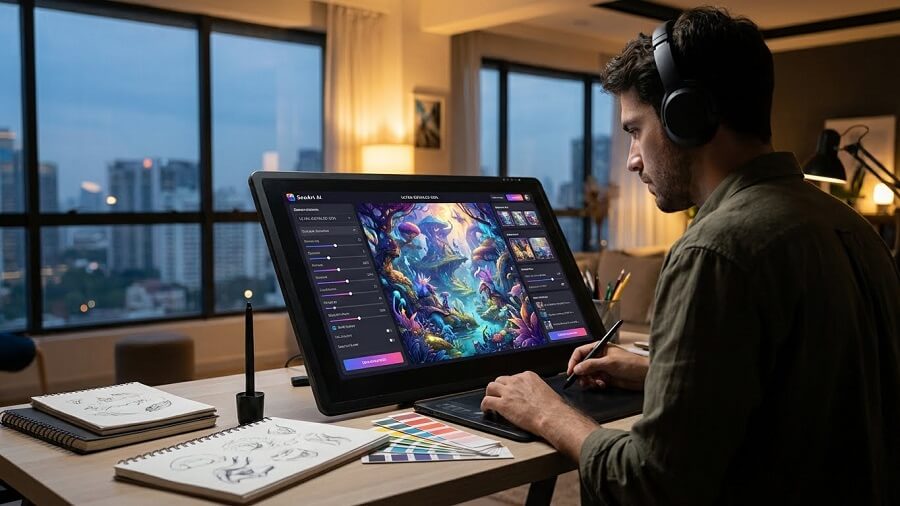
3. Detailed A-Z Guide to Using SeaArt AI
SeaArt AI is a user-friendly and accessible AI art creation platform for beginners. You can start for free and create hundreds of images/videos on your first day. Below is a detailed step-by-step guide (updated for 2025 based on the official seaart.ai website).
Step 1: Register and Log In to Your SeaArt AI Account
- Visit the website/download the app:
- Web: Go to https://www.seaart.ai.
- App: Download “SeaArt AI” from the App Store (iOS) or Google Play (Android) – supports quick creation on mobile.
- Registration steps:
- Click “Sign Up” in the top right corner.
- Choose: Google (fastest), Apple, Microsoft, or Email (enter email + password → confirm the link sent to your email).
- Complete → you will be logged in automatically.
- Notes on your account and initial credits:
- After registration: Receive free credits (around 150-500 initial credits + daily credits of ~150-300 upon login).
- Credits are used for generation (1 basic image costs ~10-50 credits).
- The free plan is sufficient for daily use; Pro/VIP plans offer unlimited credits and advanced features.
Step 2: User Interface (UI) Overview
A clean interface:
- Home: Homepage, trending works, community exploration.
- Generate: The main area for creating images/videos (Text-to-Image, Image-to-Image…).
- Cyberpub: Community for sharing and remixing prompts/models.
- Swift AI: AI Chat for prompt suggestions and editing.
- Train: Train personal LoRA/models (Pro).
Step 3: Basic Guide to Creating Text-to-Image Art
- Access the “Generate” feature: Click the Generate tab → select Text to Image.
- Write an effective prompt:
- Good structure: Subject + details + action + setting + style + quality (e.g., “A cute anime girl with long black hair, wearing a white dress, standing under a cherry blossom tree, Studio Ghibli style, highly detailed, masterpiece, 8k”).
- Strong keywords: “best quality”, “intricate details”, “cinematic lighting”.
- Customize parameters:
- Model: Choose SDXL, Flux, Pony (anime), Realistic…
- Style: Anime, Realistic, Fantasy…
- Aspect ratio: 1:1, 16:9…
- Number of images: 1-8.
- Steps/CFG Scale: 20-50 steps for high quality, CFG 7-12.
- Use Negative Prompt: In the Negative field → add “blurry, low quality, deformed hands, bad anatomy” to eliminate errors.
- Generate and Preview: Click Generate → wait 5-30 seconds → view 4-8 variants.
- Refine and Enhance:
- Upscale/Enhance: Select an image → Upscale to 4K-8K, enhance details.
- Variation/Remix: Create new versions from your favorite image.
- Download and Share: Download high-quality PNG/JPG, share on Cyberpub.
Step 4: Guide to Using AI Editing Tools
- Inpainting:
- Select image → Inpaint.
- Draw a mask (brush) over the area to be edited.
- Enter a new prompt (e.g., “add red roses”).
- Generate → The AI will fill it in naturally (e.g., remove unwanted objects or add facial details).
- Outpainting:
- Select image → Outpaint.
- Choose the expansion direction (up/down/left/right).
- Enter a continuation prompt → The AI will expand the image frame while maintaining a consistent style.
- Face Swap:
- Select the Face Swap tool.
- Upload the original image + the new face image.
- The AI swaps automatically, preserving expressions/lighting (e.g., replacing a real person’s face with an anime character’s).
SeaArt AI is extremely easy to use – you can create professional artwork in just 10-15 minutes! Start for free now to explore the huge model library and the Cyberpub community. If you run into trouble, use the Swift AI chat for prompt assistance. Happy creating!
4. Pros and Cons of Using SeaArt AI
SeaArt AI is one of the most popular AI art generation platforms in Asia in 2025, thanks to its balance of ease of use and creative power. However, like any generative AI tool, it has some limitations to consider. Here is an objective analysis of its pros and cons based on actual user experience.
Pros
- User-friendly interface, easy for beginners: Intuitive design, full Vietnamese language support, and detailed guides allow even those new to AI art to create beautiful images in just a few minutes.
- Fast image generation speed: Generation takes only 5-30 seconds (depending on the model and parameters), suitable for creators who need to produce content quickly, such as YouTube thumbnails, Instagram stories, or concept ideas.
- High image quality, diverse styles: With over 210,000 models/LoRAs, SeaArt supports everything from anime, realistic, and fantasy to oil painting and cyberpunk – with sharp quality and high detail (up to 4K-8K when upscaled).
- Large, strong community, abundant inspiration: Cyberpub features millions of shared works, making it easy to remix prompts/models and learn from others – the Vietnamese community is very active, with plenty of ready-to-use prompts for reference.
- Many powerful integrated AI editing tools: Inpainting, Outpainting, Face Swap, Upscale – all on one platform, allowing you to refine images without needing external software like Photoshop.
Disadvantages
- Limited free credits, payment required for unlimited use: The free plan provides daily credits (around 150-500 credits depending on the time), which is enough for basic use but runs out quickly if you generate a lot or use high-end models – you need to upgrade to Pro/VIP for unlimited access.
- Requires a certain learning curve to optimize prompts and use advanced features: To get the best results, you need to learn how to write detailed prompts, understand LoRA/models, and parameters (steps, CFG scale) – it might take new users a few days to get used to it.
- Sometimes AI results are not exactly as desired: It still encounters common Stable Diffusion errors like extra hands, incorrect anatomy, or inaccurate details if the prompt is not optimized – requiring multiple generations or manual editing.
SeaArt AI excels in accessibility, diversity, and community support – ideal for beginners, anime/fantasy creators, and Vietnamese marketers. If you can accept a slight learning curve and upgrade to Pro when needed, SeaArt will deliver immense creative value at a reasonable cost.
5. Is SeaArt AI Free? Service Plans and Credits
SeaArt AI has a very generous free version, enough for new users and casual creators to generate tens to hundreds of images/videos daily at no cost. However, for unlimited use and to unlock premium features, you can upgrade to paid plans. The system operates on credits – the unit used to generate images/videos.
Free Policy
- Initial free credits: After a new registration, you immediately receive 150-500 credits (depending on the time and promotional programs).
- How to get more free credits:
- Daily login: Receive a bonus of 150-300 credits/day (increases with consecutive logins).
- Participate in events: Complete tasks (watch short ads, invite friends, join contests on Cyberpub) → receive hundreds of extra credits.
- Credits regenerate: A portion of credits resets daily/weekly.
- Sufficient for use: With 300 credits/day, you can create 20-50 high-quality images or a few short videos – completely free and without heavy advertising.
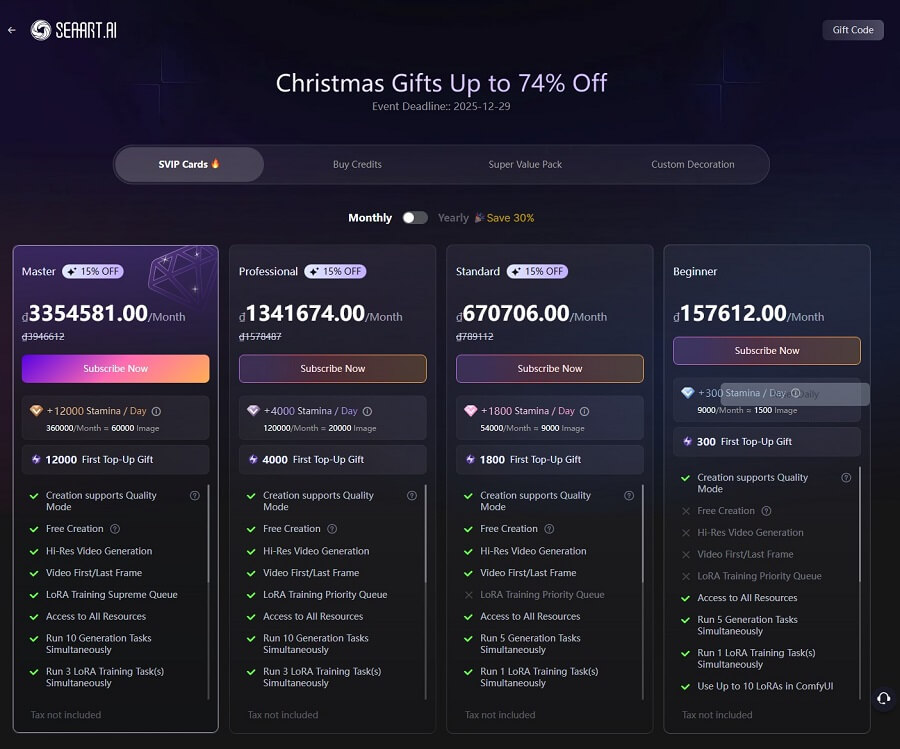
SEART AI PRICE LIST (MONTHLY – SVIP CARDS)
| Plan | Price / month | Stamina / day | Total images / month (estimated) | Key features |
|---|---|---|---|---|
| Beginner | 157,612đ / month | ~9,000 images / month | • Supports Quality Mode • Unlimited resources (Access to All Resources) • Run 5 image generation tasks simultaneously • Run 1 LoRA training task simultaneously • Supports up to 10 LoRAs in ComfyUI ❌ Free Creation not supported ❌ Hi-Res Video Generation not supported |
|
| Standard | 670,706đ / month | ~54,000 images / month | • Quality Mode • Free Creation • Hi-Res Video Generation • Video First / Last Frame • LoRA Training Priority Queue • Access to All Resources • Run 5 image generation tasks simultaneously • Run 1 LoRA training task simultaneously |
|
| Professional | 1,341,674đ / month | ~120,000 images / month | • All Standard features • Run 10 image generation tasks simultaneously • Run 3 LoRA training tasks simultaneously • LoRA Training Priority Queue |
|
| Master | 3,354,581đ / month | ~360,000 images / month (up to ~600,000 images) |
• All Professional features • LoRA Training Supreme Queue (highest priority) • Run 10 image generation tasks simultaneously • Run 3 LoRA training tasks simultaneously |
Offers & Notes
- Christmas Gifts – Up to 74% off (Event deadline: 29/12/2025)
- First Top-Up Gift:
-
Beginner: 300
-
Standard: 1.800
-
Professional: 4.000
-
Master: 12.000
-
- Tax not included
- Yearly option available – save an additional ~30%
How to Manage and Use Credits Effectively
- Choose a light model: Use Turbo/Light models for testing → consumes fewer credits than Pro/HD models.
- Generate fewer images at a time: Choose 1-2 images instead of 8 to test prompts.
- Upscale last: Only upscale the final, satisfactory image (costs more credits than generating).
- Use Cyberpub: Copy popular prompts/models from the community → reduce trial and error.
- Track credits: The dashboard clearly displays remaining credits and usage history.
- Purchase more if needed: Top-up credits one-time (they don’t expire quickly).
SeaArt AI offers a powerful free version for basic users – enough for daily creation without any cost. If you generate a lot or need advanced models/videos, the Pro plan at ~$10-20/month is a worthwhile investment. With the credit-saving tips above, you can make the most of this platform while keeping costs low!
6. Comparing SeaArt AI With Other Leading AI Image Generation Tools
SeaArt AI (2025) is a platform based on Stable Diffusion with a huge community model library, focusing on diverse styles (especially anime) and video/editing features. Below is a comparison with its main competitors: Midjourney (high-end artistic), DALL-E 3 (integrated with OpenAI/ChatGPT), and Leonardo AI (customizable pro).
Compared to Midjourney
- SeaArt’s strengths: More accessible (user-friendly web/app, no Discord required), generous free plan (sufficient daily credits), strong Vietnamese community (Vietnamese prompts available, rich anime LoRA). Fast speed, integrated editing (Inpainting, Upscale).
- SeaArt’s weaknesses compared to Midjourney: Artistic/realistic quality is not as top-tier (Midjourney is famous for its cinematic, surreal dreamlike style), fewer advanced prompt customization options.
- Midjourney’s strengths: Super-realistic, top-tier artistic quality, large Discord community – but requires a subscription ($10-120/month), and its Discord interface is complex for newbies.
Compared to DALL-E 3 (OpenAI)
- Image generation capabilities: SeaArt offers diverse models/LoRA for deep style customization (strong in anime, fantasy), while DALL-E 3 excels at prompt adherence (understands intent accurately) and high-end realism.
- Editing features: SeaArt is superior (Inpainting, Outpainting, Face Swap, video), while DALL-E 3 has limited editing capabilities (mainly generates new images via ChatGPT).
- Pricing: SeaArt has a strong free plan + affordable Pro (~$5-30/month), while DALL-E 3 is available via ChatGPT Plus ($20/month) or API pay-per-use (~$0.04-0.12/image).
Compared to Leonardo AI
- Similar features: Both are strong in custom model/training, image-to-image, and upscaling – pro web workflow.
- Differences: SeaArt has a larger community library (210k+ models), powerful video features, and is more affordable; Leonardo excels in realism/photorealism (Phoenix model), real-time canvas editing, and deep model training.
- Community: SeaArt’s Cyberpub for quick prompt/model sharing; Leonardo’s Discord for strong support.
Who is SeaArt AI for Compared to its Competitors?
SeaArt AI is the best choice for beginners, creators in Vietnam/Asia, and anyone who needs a powerful free tool with diverse anime/fantasy styles and basic video capabilities at a low cost. If you prioritize surreal artistic quality → Midjourney; accurate prompts/high-end realism → DALL-E 3; pro custom training → Leonardo AI. SeaArt offers the highest “value for money” for the casual to semi-pro creative community in 2025!
7. Tips for Using SeaArt AI Effectively for Beginners and Advanced Users
SeaArt AI is very powerful, but 80% of a beautiful result depends on how you write prompts and customize settings. Here are the pro tips from the community (updated 2025) to help you go from newbie to pro quickly – creating high-quality images/videos while saving credits.
Pro Prompt Writing Tips
A good prompt is the key to getting beautiful results on the first try.
- Use specific syntax (e.g., weights, parameters):
- Emphasize keywords with parentheses: (beautiful:1.2), ((masterpiece:1.4)) → increases influence by 20-40%.
- Combine: “A beautiful girl, long black hair, wearing white dress, (masterpiece:1.3), highly detailed, 8k”.
- Learn from the community (copy prompt, remix): Go to Cyberpub → find beautiful images by tag (anime, realistic) → click Remix or copy prompt → make minor edits (change character, colors) → apply immediately. This is the fastest way to learn pro prompt structures.
- Leverage the Negative Prompt: Always fill in the Negative field: “blurry, low quality, deformed hands, bad anatomy, extra fingers, ugly, poorly drawn face” → eliminates common errors (extra hands, distorted faces). Add more specifics according to style: “cartoon, 3d” if you want to avoid them.
Optimize Image Settings
The right parameters help make images sharper without costing many extra credits.
- Resolution: Choose 512×512 or 768×768 for speed → upscale later (4K-8K) for high quality.
- Sampling Steps: 20-30 for quick tests, 40-60 for high quality (better details).
- CFG Scale: 7-10 (strictly follows the prompt), 12-15 if you want more creativity but it can easily get “overcooked”.
General Tip: Use a light model (Turbo) to test prompts → use a Pro model for the final image.
Leverage Inpaint/Outpaint Features to Fix Errors or Extend Images
This is the “secret weapon” to turn “almost beautiful” images into “perfectly beautiful” ones.
- Inpaint: Mask the flawed area (extra hand, distorted face) → enter a new prompt (“beautiful hand”) → the AI will fix it naturally.
- Outpaint: Extend the image frame → add a new background while maintaining a consistent style (e.g., extending a portrait to a full body shot).
Tip: Mask precisely (use a small brush for details) → for a smoother result.
Cyberpub is SeaArt’s “treasure trove” with millions of creations.
- Find beautiful images → remix the prompt/model → learn how to combine LoRA.
- Upload your creations → get feedback, likes → motivation to improve.
- Participate in contests/events → receive free bonus credits.
By applying detailed prompt tips, negative prompts, custom settings, and Inpaint/Outpaint – you will “level up” from basic images to masterpieces in just a few days. Participate in Cyberpub regularly to learn from the community and earn extra credits. SeaArt AI will become your “limitless art studio” – making creation more fun and effective than ever before!
8. Important Notes When Using SeaArt AI (Ethics & Copyright)
SeaArt AI offers great creative power, but it comes with a high degree of user responsibility. Improper use can lead to legal, ethical, or copyright violations. Below are the most important notes (based on SeaArt’s terms of service and general regulations on generative AI in 2026).
Content Regulations
SeaArt AI has a content filtering system, but it is not 100% perfect. Users are fully responsible for the content they create.
- Avoid creating violent, harassing, political, or illegal images: Do not create explicit NSFW content, gory violence, racial or religious discrimination, or content related to sensitive political issues (political deepfakes, violent protests). Such content may result in your account being suspended by SeaArt or reported to the authorities (in accordance with Vietnam’s Cybersecurity Law and international regulations).
- NSFW Content: SeaArt allows some adult content (artistic/erotic) but prohibits explicit pornography or content involving children – violations will result in a permanent ban.
Image Copyright
- Ownership of generated images: According to SeaArt’s terms, users own the images generated with paid plans (Pro/VIP) and are permitted to use them for commercial purposes (selling, advertising). The free plan typically only allows for personal (non-commercial) use. However, this right is not absolute because the model is trained on copyrighted data.
- Limitations on using images of other people or celebrities: Avoid cloning the faces of real people (especially celebrities) without permission – this may violate privacy rights and image rights (Vietnamese Civil Code, European GDPR). Deepfaking celebrities for commercial or malicious purposes is illegal.
User Responsibilities
- Use the tool ethically and legally: SeaArt is a creative tool – use it to create positive art and new ideas, not for malicious purposes (fake news, scams, harassment). When sharing your work, you should add an “AI generated” note for transparency (especially for realistic content).
- Recommendations:
- Do not upload sensitive personal photos to avoid security risks.
- Check the Terms of Service regularly as they may be updated (SeaArt prohibits certain content according to local laws).
SeaArt AI opens up a world of unlimited creativity, but the responsibility lies with the user. Adhering to ethical, copyright, and legal regulations will help you use it safely, avoid risks, and fully enjoy the fun of AI art. Creating responsibly – that is the smartest way to use the tool!

















