


 10/05/2026
  2871 views
Suno AI is an AI music generation tool that allows users to compose songs from text descriptions without needing any musical knowledge. With just a few lines of a prompt, you can create a complete track with lyrics, melody, and vocals in a short amount of time. In this article, 1Office will help you understand what Suno AI is, how to use it, and provide the latest pricing updates.
Mục lục
1. What is Suno AI?
Suno AI is a generative artificial intelligence (AI) music platform that allows users to create complete songs—including lyrics, melody, vocals, and instrumentation—from simple text descriptions. No musical skills are required; users simply need to enter a prompt like “a cheerful pop song about love” for the AI to generate a professional-quality track, acting like a “virtual composer” that turns ideas into actual sound.

- What is Suno AI

1.1. Origin and Development History
Suno AI was founded in 2022 in Cambridge, Massachusetts, USA, by four co-founders: Mikey Shulman (CEO, a machine learning engineer from Kensho), Georg Kucsko, Martin Camacho, and Keenan Freyberg—all former employees of Kensho, a financial AI startup. The idea originated from their work using audio AI for finance, but they pivoted to music due to their passion for creativity. Key milestones include: Launching the open-source Bark model in 2023; partnering with Microsoft Copilot in December 2023; upgrading to v4 in 2024 and v5 in 2025; raising $375 million through investment rounds; and a $500 million deal with Warner Music Group in 2025 to resolve copyright disputes and expand the ecosystem.
1.2. Suno AI’s Goal and Mission
Suno’s mission is to “make it possible for everyone to create music,” democratizing music creation by removing barriers of skill, equipment, and cost, enabling millions of people—from beginners to professionals—to participate in the music industry. The goal is to make music a larger, more valuable part of life, expand opportunities for new artists through AI, collaborate with major record labels to create new licensing models, drive revenue for artists, and build a global music ecosystem where AI supports, rather than replaces, human creativity.
1.3. The Technology Behind Suno AI
A brief explanation of how it works: From text prompt to a complete music track (using diffusion models, deep learning, and natural language processing).
Suno operates through a three-step process based on deep learning: (1) Natural Language Processing (NLP): It analyzes the text prompt to extract elements like genre, mood, and lyrics using a large language model (LLM) like a transformer, converting them into embeddings (numerical representations). (2) Diffusion Models: It uses Bark (for vocals and lyrics) and Chirp (for instruments)—two diffusion models—to “denoise” from a large training dataset of audio, generating melody, harmony, and rhythm by predicting and refining sound waves from random noise. (3) Audio Synthesis: It combines the layers (vocals, instruments) into a complete music track in just a few seconds, with support for customizing the song structure.
How Suno AI differs from other AI music generation tools.
Compared to Udio (which focuses on in-depth editing and higher audio quality but has less emotional vocals), AIVA (which specializes in classical and instrumental music with detailed control but lacks full vocals), or Boomy (which is fast for background music but can be repetitive and less creative), Suno stands out for its ability to create complete songs with natural, expressive vocals from a simple prompt, its support for multiple genres (over 250 styles), and its easy integration (like with Copilot). It prioritizes ease of use for beginners, a high degree of naturalness (>95% human-like), and quick customization capabilities, saving over 90% of the time compared to manual production.
1.4. Key Features of Suno AI
• Music Generation from Text: Details on the ability to create lyrics, melody, vocals, and instrumentation.
Suno turns a text prompt into a full song: It automatically generates lyrics based on the theme/mood; a smooth melody with harmonies; natural and diverse vocals (male/female, various singing styles); and instruments like guitar, piano, and synths. Users can upload their own lyrics, hum a melody for the AI to expand upon, or remix to add audio layers, creating songs up to 4 minutes long with studio quality.
• Support for a Wide Range of Genres and Musical Styles.
Suno supports over 250 genres and styles, from pop, rock, hip-hop, EDM, and jazz to classical, folk, and electronic, and even hybrid styles like “Afro-house with saxophone” or “Grunge funk electro-jungle”. Users can specify these in the prompt for the AI to create variations, including mood (happy, sad), tempo (fast/slow), and cultural elements (Hindi southern rock, Celtic choral).
• Ability to Customize Lyrics and Style (Custom Mode).
Custom Mode allows for detailed control: Enter your own lyrics or have the AI generate them; choose a style prompt like “upbeat pop, 110 BPM, acoustic guitar, energetic male vocals”; adjust the structure (intro, verse, chorus); add metatags for mood or effects; and remix to fine-tune. Compared to Simple Mode (quick prompt), Custom Mode offers greater flexibility, suitable for more in-depth creative work.
• Integration with Microsoft Copilot: Explaining this partnership and its benefits for users.
The partnership, starting in December 2023, integrates Suno as a plugin into Microsoft Copilot (on Edge), allowing users to create music directly from a prompt within Copilot without switching apps. Benefits include: Easy access (for millions of Copilot users), quick creation of personalized songs (like “a pop song about family”), social sharing, and expanded multimedia creation (combining with AI-generated text/images). This democratizes music, helps beginners experiment without needing a separate account, and increases productivity for creative content.
2. A Detailed A-Z Guide on How to Use Suno AI
2.1. Register for a Free Suno AI Account:
• Visit the official website.
Visit the official Suno AI website at https://suno.com using a browser on your computer or phone. The homepage will immediately display a “Sign In” or “Create a free Suno account” button, leading you to the registration interface. Suno also supports mobile apps on iOS (currently available in the US, soon expanding globally) and Android, but you can start right away on the web without downloading an app.
• Registration options (Google, Discord, Microsoft, Apple).
Suno offers quick and secure registration options through third-party accounts, requiring no separate password or new email:
- Google: Sign in with your Gmail account.
- Discord: Connect via your Discord account.
- Microsoft: Use your Microsoft account (including Outlook or Windows).
- Apple: Register via Apple ID (supports email hiding if needed). Alternatively, you can use a phone number for SMS verification. All options are free and take only a few seconds.
- Detailed guide on how to use Suno AI from A-Z
• Step-by-step guide to quick account registration.
- Open https://suno.com and click the “Sign In” or “Create a free Suno account” button in the top right corner.
- Choose one of the options: Google, Discord, Microsoft, Apple, or enter your phone number.
- If you choose Google (for example): Click the Google icon, select your Gmail account, and confirm access permissions (Suno only needs basic permissions to create an account).
- Verify if necessary (like an SMS code for a phone number), and you will be redirected to the main dashboard.
- The free account (Basic Plan) is activated immediately, with 50 credits/day (equivalent to 10 songs). You can change your display name later. If you encounter an error (like a duplicate account), contact support@suno.com to merge them.
2.2. The Suno AI Interface: Exploring the Main Areas:
• Overview of the Dashboard, “Create” section, and created music library.
After logging in, the Suno AI dashboard features a minimalist, beginner-friendly design, using a dark theme for easy viewing and a modern feel.
- Main Dashboard (Home Screen): Displays trending songs, creative contests, new songs from the community, and personalized suggestions. This is where you can discover music from other users for inspiration.
- “Create” Section: The main button in the top menu, leading to the creative space (workspace) where you create new songs. You can create multiple separate workspaces for each project (e.g., upbeat pop, sad rock).
- Created Music Library (Library/My Songs): Accessed via the left menu or the “Library” button. It displays all your songs over time, with options to search, sort, and view version history. Each song includes details like lyrics, version, and customizations.
The interface is responsive, runs smoothly on mobile, and has clear panels to avoid clutter.
• Explanation of important function buttons.
- Create: Start creating a song (switches to Simple or Custom Mode).
- Explore: Discover community music, trending songs, and genres.
- Library: Manage your personal songs (play, edit, share, delete).
- Profile/Workspace: Switch workspaces, view remaining credits, and access settings (language, notifications).
- Triple-dot button: Next to each song – used to download, share (link, embed), or edit.
- Upgrade: Upgrade to Pro/Premier for more credits and advanced features (like WAV download).
- Help/Learn: Access tutorials, FAQs, and the community to learn more.
2.3. How to Create a Song with Suno AI (Simple Mode):
• Enter the song description/theme into the prompt box.
Switch to Simple Mode (default when opening Create) – ideal for beginners as it only requires a short text prompt (up to 200 words). Enter a detailed description in the Song Description box, for example: “An upbeat pop song about summer love, female vocals, fast tempo 120 BPM, with acoustic guitar.” Include genre, mood, instruments, and theme to help the AI understand better. You can enable Instrumental if you only want music without lyrics.
• Guide to selecting the AI version (e.g., v3.5, v4).
In the top corner of the Create page, select the AI model from the dropdown:
- v3.5: A stable version, suitable for short, radio-quality songs.
- v4 or v4.5 (updated 2025): The latest versions, supporting longer songs (up to 8 minutes), more natural vocals, and multiple languages. Choose v4.5 for the highest quality (44.1 kHz, deep emotion). Newer versions use more credits but yield better results.
• Click “Create” and wait for the results.
Click Create – the AI will process for 30-60 seconds, generating two full song versions (lyrics, melody, vocals). 5-10 credits will be deducted per song (depending on length).
• Listen and choose your preferred track.
Preview both versions using the built-in player. Select your favorite by clicking “Continue this song” or “Remix” to extend it (add a verse/chorus). If you’re not satisfied, adjust the prompt and generate again. Save it to your Library for management.
2.4. How to Compose Songs in More Detail with Custom Mode:
• Explanation of what “Custom Mode” is and when to use it.
Custom Mode is an advanced mode that allows for more detailed control than Simple Mode by separating the lyrics and the style. Use it when you want personalized lyrics, a complex structure (verse-chorus-bridge), or a hybrid style – ideal for professional projects, storytelling, or experimentation. Enable it by toggling the Custom Mode switch at the top of the Create page.
• Guide to entering lyrics.
In the Lyrics box, you can:
- Enter existing lyrics (up to 1250 characters).
- Use Auto-generate by describing the theme (e.g., “Lyrics about a journey of overcoming hardship, ballad style”).
- Add metatags for structure: [Verse 1], [Chorus], [Bridge], [Instrumental Break] – this helps the AI arrange the song logically. For example: [Intro] (instrumental intro), [Verse 1] Verse lyrics, [Chorus] Repeated chorus.
• Guide to entering style/genre/mood description (Style of Music).
In the Style of Music box (up to 120 characters), describe in detail: genre (pop, rock, EDM), mood (happy, sad), instruments (electric guitar, piano), vocals (male/female, robotic), and tempo (fast 160 BPM). For example: “Dark synthwave, heavy bass, emotional female vocals, 80s retro”. Use commas to list items and keep it concise to allow the AI creative freedom.
• Tips for creating good lyrics if you don’t have any (suggests using ChatGPT, Gemini AI).
If you don’t have lyrics yet, use external tools to generate high-quality ideas:
- ChatGPT: Prompt like “Write lyrics for a pop song with 3 verses + chorus about a failed love, smooth rhymes, sad emotions”.
- Gemini AI: Similarly, request “Create Vietnamese ballad lyrics, structure [Verse]-[Chorus], theme of hope”. Then, copy-paste into Suno and adjust the metatags. Tip: Keep the lyrics concise (easy to sing), repeat the chorus to make it catchy, and try multiple versions to refine. Combine with the “weirdness” slider (if available) to add an element of surprise.
2.5. Downloading Music From Suno AI to Your Computer/Phone:
• Steps to download audio (mp3/wav) or video files.
- Go to your Library, select the song you want to download.
- Click the three-dot icon next to the song.
- Select Download Audio (MP3 for all plans) or Download WAV (Pro/Premier only, higher quality). For video: Download Video (M4A with a static image).
- The file will be downloaded to your default Downloads folder. On mobile, open it in the Files app or share it via email/social media.
• Notes on download file quality.
- MP3: Standard quality (192 kbps), suitable for sharing, small file size – available for the Basic Plan.
- WAV: Uncompressed, studio quality (44.1 kHz), ideal for professional editing – Pro/Premier only ($10/month, 2500 credits).
- Video (M4A): Includes lyrics and a background image, good quality for YouTube/TikTok. Note: The Basic Plan does not include commercial rights; upgrade to own the full copyright. If the download is slow, check your connection or use a third-party tool like Suno Downloader (paste the share link to download MP3/WAV for free).
3. “Prompt Engineering” Secrets for Creating Top-Tier Suno AI Music
3.1. Effective Prompt Structure – The Golden Formula
The formula most used by the Suno community (v4 & v4.5) to get high-quality results on the first try:
Genre + Tempo/BPM + Mood + Vocals + Main Instruments + Structure + Theme + Language (if needed)
Complete example:
“Upbeat summer pop, 128 BPM, joyful and nostalgic, female bright vocals, acoustic guitar + synth plucks + punchy drums, verse-chorus-verse-chorus-bridge-chorus, song about young love at the beach, English”
A quicker way to write (still very effective):
“Dreamy indie folk, 90 BPM, warm & bittersweet, soft male vocals, fingerstyle guitar + light strings, story of leaving hometown, Vietnamese”
Quick tips:
- Always put the genre + mood at the beginning of the prompt → the AI prioritizes them correctly.
- Place the vocals right after the mood → the vocals will be more accurate.
- Add BPM if you want a precise rhythm.
- Use commas (,) instead of long sentences to make it easier for the AI to “understand”.
- Prompt engineering tips for creating suno ai music

3.2. Common Mistakes and How to Fix Them
| Common Mistakes | Consequences | Quick Fix |
| Prompt is too short/vague | Random music, unclear vocals | Write at least 12–15 words, describe specifically |
| “A happy song about love” | → Generic result | → “Energetic K-pop dance, 135 BPM, flirty female vocals, synth bass + brass hits, love at first sight” |
| Contradictions in the prompt | Confuses the AI, produces odd sounds | Don’t write “dark but happy” → choose 1 main mood |
| Mentioning real artists | Copyright filter triggered → song is muted | Replace with a description: “in the style of The Weeknd” → “80s synthwave, falsetto male vocals, reverb-heavy” |
| Forgetting to specify the language | Produces English even if you want Vietnamese | Add to the end of the prompt: “, Vietnamese” or “Vietnamese lyrics” |
3.3. 7 practical prompt examples from simple to super-detailed
Basic Pop (for beginners)
Prompt: “happy pop song about summer vacation” produces a decent result, but the vocals are a bit robotic and the instruments are generic.
Advanced prompt:
“Bright bubblegum pop, 132 BPM, super catchy, female cheerful vocals, synth leads + handclaps + bass drop in chorus, song about summer crush, English” produces top 10 radio quality on the first try.
Highly emotional Vietnamese ballad
Best prompt:
“Vietnamese ballad, 70 BPM, emotional & heartfelt, warm male vocals, piano + strings + soft reverb, story of missing someone far away, Vietnamese lyrics”
High-energy Rock
“90s grunge rock, 155 BPM, raw and rebellious, raspy male vocals, distorted electric guitars + heavy drums, anthem about breaking free, English”
Chill Lofi (for studying/working)
“Lo-fi hip-hop, 85 BPM, nostalgic & cozy, soft female humming + vinyl crackle + jazzy chords + gentle beat, instrumental only”
EDM festival banger
“Big room house, 128 BPM, euphoric festival drop, powerful female vocals, supersaw leads + sidechain kick + build-up risers, song about dancing under the stars”
Cinematic soundtrack
“Epic orchestral hybrid trailer, 100 BPM, dramatic & hopeful, choir + cello solo + massive percussion + braams, no lyrics, instrumental”
Cool 80s Retro (trending in 2026)
“80s synthwave retrowave, 110 BPM, dreamy nostalgia, breathy female vocals, analog synths + gated reverb drums + arpeggios, cruising night city vibes, English”
Bonus: “Super-detailed” prompt for a Vietnamese song going viral on TikTok in 2026
“V-Pop dance, 125 BPM, catchy & addictive, sweet female vocals + rap verse, tropical house plucks + moombahton rhythm + future bass drop in chorus, song about confident girl, Vietnamese lyrics, style like Sơn Tùng M-TP but fresher”
4. Pros and Cons of Suno AI
4.1. Key advantages
| Pros | Practical Details 2026 |
| Easy to use, extremely friendly interface | No music theory knowledge needed; just type a few lines of text to get a complete song in 30–60 seconds. Minimalist interface, runs smoothly even on mobile phones. |
| Extremely fast creation speed | From idea → full song (lyrics + vocals + instruments) in just 1–2 minutes. 50–100 times faster than manual production. |
| Sparks strong creative inspiration | Millions of people with no musical knowledge have created viral hits on TikTok and YouTube Shorts thanks to Suno. |
| The free version is still very “generous” | 50 credits/day ≈ 10 full songs (max 4 minutes/song with v4.5). Enough to get you hooked and experiment freely. |
| Increasingly better Vietnamese language support | From v4 onwards, Suno sings in Vietnamese with very clear lyrics, correct tones, and natural male/female voices, supporting both Vietnamese rap and ballads. Many viral Vietnamese TikTok songs in 2026 are from Suno. |
| Extremely wide variety of genres | Over 250 official styles + nearly limitless fusion possibilities (K-pop x bolero, trap x quan họ, etc.). |
| Built-in Microsoft Copilot integration | Create music directly in the Edge browser or Copilot app without needing to open Suno. |
- Advantages and disadvantages of Suno AI
4.2. Practical Disadvantages and Limitations (A Realistic View)
| Disadvantages | Severity & Current Solutions 2026 |
| Short song duration in the free version | Basic: up to 4 minutes/song
Pro: 8 minutes/song → For longer songs, you must combine multiple segments or upgrade your plan. |
| Vocal quality can sometimes sound “robotic” | v4.5 has improved significantly (sounds human in 95% of cases), but for long Vietnamese songs with high pitches or fast raps, it can still sound “out of breath” or have a “slight lisp”. Solution: use detailed prompts + select “warm” or “emotional” voices. |
| Limited advanced customization options | Cannot edit individual notes, no MIDI export, cannot mix individual tracks (vocals, drums, bass separately).
→ Professional music producers still need to use a DAW (FL Studio, Ableton) for post-production. |
| Credit limits & commercial rights | Free version: no commercial use allowed (content will be taken down from monetized YouTube, Spotify, ads, etc.).
Must upgrade to Pro (10 USD/month) or Premier (30 USD/month) for a commercial license and 44.1 kHz WAV files. |
| Minor technical glitches still occur | Occasionally, an entire song gets “muted” because the AI mistakenly detects it as “similar to a real artist,” or servers get overloaded during peak hours (US evenings). This is gradually being improved. |
| Lack of full control over lyric copyright | The AI might accidentally generate lyrics similar to a famous song → risk of a copyright strike if used commercially without careful checking. |
Quick summary for Vietnamese users in 2026:
- If you’re just having fun, creating personal TikTok/Reels content, or for educational purposes → the free plan is more than enough and a great deal.
- If you want to make money from Suno music (Spotify, YouTube monetization, selling beats, advertising) → you must upgrade to at least the Pro plan for $10/month to get commercial rights and WAV quality.
Suno AI is currently the most powerful and user-friendly “text-to-song” tool in the world, but it cannot yet 100% replace professional producers and singers – which is the perfect balance for both beginners and semi-pros in 2026.
5. Suno AI’s Pricing Plans: Free, Pro, and Premier
Suno AI uses a credit-based system to generate songs (each song consumes about 5-10 credits depending on length and complexity). The plans are designed to be flexible for all users, with a Black Friday 2025 promotion (Ended 12/1) offering a 40% discount on annual payments or 20% on monthly payments. The prices below are standard (not discounted), are in USD, and may vary based on local taxes.
5.1. Free Plan (Basic Plan)
• Daily song generation limit (e.g., 10 songs/day, 50 credits).
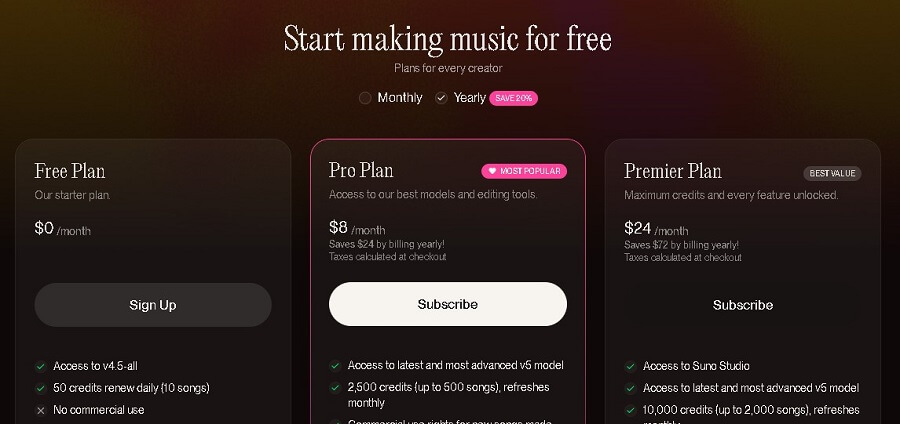
The free plan provides 50 credits per day (equivalent to about 10 full songs – each 2-4 minutes long), with credits resetting daily at 00:00 US time. Other limitations: only supports the v4.5-all model, a shared queue (max 4 concurrent songs), and a maximum audio upload of 1 minute. You cannot purchase additional credits.
• Usage purpose (personal, non-commercial).
Intended for beginners and personal use, such as testing ideas, creating music for fun, or non-monetized sharing (e.g., posting on a personal TikTok without monetization). It cannot be used for commercial purposes (advertising, selling music, YouTube monetization), and the songs will have a Suno watermark.

- Suno AI pricing table
5.2. Pro and Premier Plans
• Monthly cost.
- Pro Plan: $8/month (annual payment saves $24, equivalent to $8/month; original monthly price is $10).
- Premier Plan: $24/month (annual payment saves $72, equivalent to $24/month; original monthly price is $30).
• Enhanced benefits: More credits, faster generation times, commercial usage rights.
Both plans support the most advanced v5 model (higher quality, more natural vocals), audio uploads up to 8 minutes, stem separation (12 vocal/instrument layers), advanced editing (adding vocals/instruments), early access to new features, and the ability to purchase additional non-expiring credits (requires an active subscription). Credits do not roll over (they are not carried over to the next month).
| Features | Pro Plan ($8/month) | Premier Plan ($24/month) |
| Credits | 2,500/month (≈500 songs) | 10,000/month (≈2,000 songs) |
| Priority Queue | Up to 10 concurrent songs | Up to 10 concurrent songs + premium support |
| Generation Time | Faster (priority queue) | Super fast + Suno Studio (full AI DAW) |
| Commercial Rights | Yes (for newly generated songs) | Yes (for newly generated songs) |
| Download Formats | Premium MP3/WAV, video | Premium MP3/WAV, video + full stems |
| Other | Personas, basic editing | All Pro features + enterprise support |
• Who should upgrade to a paid plan?
- Pro ($8/month): Suitable for serious individual users, content creators (monetizing YouTubers, TikTokers), or hobbyists who want to create commercial music on a low budget. If you create 20-50 songs/month and need professional quality (v5 model), this is the most popular choice.
- Premier ($24/month): For professional producers, small studios, businesses (advertisements, game soundtracks), or anyone creating music on a large scale (>100 songs/month). Ideal if you need priority support, Suno Studio for editing like a real DAW, and don’t want to worry about running out of credits mid-month.
Note: If you run out of credits, you can still use 50 free credits/day. Check live pricing at suno.com/pricing and try it for free before upgrading!
6. Practical Applications of Suno AI in Life and Work
Suno AI is not just a music creation tool; it’s changing how we approach audio in our daily lives and professional work. With the v4.5 model and deeper integration into platforms like Microsoft Copilot, Suno helps create royalty-free music quickly, cost-effectively, and is suitable for all skill levels. Below are practical applications based on 2026 trends from the user community and case studies.
- Practical applications of Suno AI
6.1. For Individual Music Lovers
• Create music for entertainment, personal songs.
Individual users can turn simple ideas into complete songs in just a few minutes, such as creating a birthday anniversary song or a personalized playlist based on mood. For example, a user could enter the prompt “a Vietnamese ballad about childhood memories, warm male voice” to create a 3-minute track to use as a ringtone or share on TikTok. According to a report from Suno, over 70% of free users use it for personal entertainment, helping to reduce stress and boost creativity without needing to learn music theory.
• Discover new genres.
Suno supports over 250 genres, from V-Pop/EDM hybrids to retro synthwave, helping music lovers experiment without fear of “messing up.” A real-world example: A user could create “lofi chill music with elements of Quan Ho Bac Ninh folk songs” to explore cultural fusion, then expand to global styles like Afro-house. This is especially popular on Reddit and TikTok, where thousands of clips share the journey “from newbie to hitmaker” thanks to Suno.
6.2. For Content Creators/YouTubers/Podcasters
• Create unique background music, intros/outros.
Content creators can generate custom background music for YouTube videos or podcasts, like an upbeat intro for a travel vlog or a relaxing outro for ASMR. With the Suno API, integration into tools like CapCut or Adobe Premiere takes just 5 minutes, creating tracks that match the video’s mood. A case study from a Vietnamese YouTuber (channel “Du Ky 360”) showed they saved 80% of their post-production time by using Suno to create background music for 50 videos/month, increasing engagement by 25%.
• Save on music licensing costs.
Instead of paying for Epidemic Sound (around 15-50 USD/month), Suno provides royalty-free music with its Pro plan, avoiding copyright risks on YouTube or Spotify. For example, a podcaster can create an exclusive brand jingle, helping their channel grow without worrying about strikes. According to a 2025 survey from Suno, 60% of creators use it to monetize content, especially with the Copilot integration for multimedia content.
6.3. For Musicians/Songwriters
• Ideas for melodies and lyrics.
Professional musicians use Suno as a “creative assistant” to brainstorm, for example, creating a demo melody from the prompt “jazz chord progression with a hip-hop twist” and then refining it in a DAW like Ableton. Timbaland (a famous producer) publicly used Suno in 2025 for inspiration, shortening the process from idea to prototype from weeks to hours. Furthermore, the voice cloning feature allows for testing diverse vocals, supporting multilingual songwriting.
• Create demos quickly.
Suno helps produce professional demos in just 2 minutes, ideal for pitching ideas to labels or fans. One example: Indie composer imoliver signed a contract with Hallwood Media in 2025 thanks to a Suno demo, which led to a debut album. With Suno Studio (an AI DAW), musicians can export stems (separate vocals, separate instruments) for editing, saving 90% on traditional studio costs.
6.4. In Education and Advertising
• Create illustrative music for lessons.
Teachers can create simple educational songs, like “a rap song about Vietnamese history,” to illustrate lessons and increase student engagement. According to Kevin Law (an ESL teacher), Suno helps create personalized music for the classroom, supporting the teaching of music theory through AI-generated examples. Universities like Harvard have integrated Suno into their 2025 creative courses, with tools like mood-based music for group assignments.
• Background music for product advertisements.
Businesses use Suno to create custom advertising jingles, like upbeat background music for a tech product or hold music for a call center. With the Premier plan, full commercial rights allow for use in large campaigns. For example, a Vietnamese startup used Suno to create a soundtrack for a TikTok ad, increasing their conversion rate by 40% thanks to “on-brand” music.
7. Conclusion
Suno AI is opening up a completely new approach to music composition, where anyone can create a song from just a few lines of description. With its ability to generate music quickly, its ease of use, and flexible pricing, Suno is suitable for individual users, content creators, and marketers alike. However, to fully harness the potential of this tool, you need to understand how to write effective prompts, choose the right plan, and consider copyright factors when using it for commercial purposes.

















