


 10/05/2026
  2618 views
AI video generation is changing how individuals and businesses produce content for advertising, social media, training, or internal communications. Among them, Veo 3 is gaining attention for its ability to create videos from text descriptions, input images, and support context-aware audio. This article will help you understand what Veo 3 is, how this tool works, what features it has, and what to consider before using it.
Mục lục
- 1. What is Veo 3?
- 2. What Are the Standout Features of Veo 3 AI?
- Create 4K Videos with Cinematic Quality
- Automatic Audio Synchronization (Native Audio Generation)
- Ability to Generate Dialogue and Environmental Sound Effects
- Realistic Lip-Sync Technology
- Support for Multilingual Dubbing and Emotional Voice Generation
- Maintaining Character and Scene Consistency
- Realistic Physics and Motion Simulation
- Detailed Control with Prompts
- Deep Integration into the Google Ecosystem
- 3. Detailed Guide on How to Use Veo 3 AI
- 4. The Real Pros and Cons of Veo 3
- 5. Comparing Veo 3 With Its Competitors
- 6. Practical Applications and Development Potential of Veo 3 AI
- Veo 3 AI Pricing
1. What is Veo 3?
Veo 3 is Google’s most advanced generative AI video model, acting as a “virtual director” capable of turning simple text descriptions (text prompts) or input images into realistic, high-quality videos up to over a minute long. Imagine just typing “a Vietnamese girl in an ao dai walking through the Cai Rang floating market at dawn, with the sound of lapping water and bustling chatter” – Veo 3 will automatically generate a 1080p or 4K video with vivid imagery, smooth motion, and synchronized audio (including dialogue, sound effects, and background music). Unlike traditional video editing tools, Veo 3 uses deep learning to understand context, real-world physics (like rippling water), and emotions, helping to create professional content without manual filming or editing. This is a “super weapon” for creators, businesses, and filmmakers, enabling rapid video production and saving up to 90% in costs compared to old methods.

Origin and Developer
Veo 3 was developed by Google DeepMind – Google’s world-leading AI research division, famous for breakthroughs like AlphaFold (protein decoding) and Gemini (multimodal language model). DeepMind, acquired by Google in 2014 for $500 million, possesses enormous resources: over 2,500 scientists, training data from billions of hours of YouTube and internet videos, and the Vertex AI computing infrastructure (thousands of GPUs). DeepMind’s reputation lies in its ability to solve complex problems, such as simulating real-world physics in video, which helps Veo 3 excel in realism and safety (integrating SynthID for watermarking and deepfake detection). This solidifies Google’s position as an AI “giant,” with an R&D budget exceeding $100 billion/year, making Veo 3 a reliable tool for both individuals and businesses.
Launch Date and Significance
Veo 3 was officially launched on May 20, 2025, at Google I/O – Google’s annual technology conference where groundbreaking AI innovations are introduced. This event marked a turning point in the AI video industry, as Veo 3 not only elevated text-to-video but also integrated synchronized audio, surpassing competitors like OpenAI’s Sora 2 (launched in September 2025). In the context of the booming AI video market (reaching $10 billion in 2025, a 300% increase from 2023), Veo 3 is significant because it democratizes content production: from Vietnamese marketers creating TikTok Reels to Hollywood using it for film pre-visualization. With the ability to create longer, more realistic videos (supporting 4K, physics simulation), Veo 3 accelerates digital transformation, helping Vietnamese businesses like Shopee or VnExpress produce multilingual content quickly, increasing engagement by 3-5 times.
Key Differences from Previous Veo Versions
Veo 3 represents a significant leap forward compared to previous versions, focusing on realism, creative control, and multimodal integration. Veo 1 (launched in May 2024 at Google I/O 2024) was the first model, creating short 1080p videos (under 1 minute) from text, but the visuals were often glitchy, lacked smooth motion, and had no audio – like an “early silent film.” Veo 2 (December 2024, via VideoFX) improved the resolution to 4K, had a better understanding of physics (like natural water flow), and supported image-to-video, but still lacked synchronized audio, resulting in “silent” videos that required separate post-production. Veo 3 (and Veo 3.1 in October 2025) revolutionized this by adding native audio (dialogue, SFX, background music with 95% accurate lip-sync), longer videos (over 1 minute), camera control (pan, zoom), and narrative coherence (keeping characters consistent across scenes). The result: From the “basic” videos of Veo 1, Veo 3 creates “ready-to-publish” content with >98% realism, reducing post-production time by 80% – a quantum leap that helps Google lead the AI video race.
2. What Are the Standout Features of Veo 3 AI?
Veo 3, the most advanced AI video generation model from Google DeepMind, was launched at Google I/O in May 2025, marking a turning point in digital content production. With the ability to turn text or images into high-quality videos with synchronized audio, Veo 3 not only competes with but also surpasses rivals like OpenAI’s Sora or Runway Gen-3, thanks to its native audio integration, high physical realism, and the vast Google ecosystem. Versions like Veo 3.1 and Veo 3.1 Fast deliver videos up to 8 seconds at 1080p resolution (with plans to expand to 4K), handle complex prompts, and significantly reduce visual artifacts. Below is a detailed analysis of its standout features, based on the model’s actual capabilities, explaining why they make Veo 3 superior to its competitors.

Create 4K Videos with Cinematic Quality
Veo 3 stands out with its ability to export videos in high resolution up to 1080p (with 4K support in upcoming updates), delivering sharp, finely detailed images like a Hollywood film. The “cinematic” element is demonstrated through the recreation of dynamic lighting, depth of field, and vibrant colors, thanks to a deep learning model that analyzes real-world physics. For example, the prompt “a rainy night city with neon lights reflecting on the wet street” will automatically add light reflection effects, falling raindrops, and fog, creating a realistic feel like a professional shoot. Compared to Sora (which mainly focuses on silent and short-length videos), Veo 3 excels by adhering to prompts with over 90% accuracy, reducing artifacts, and supporting longer videos (up to 1 minute with the “Extend” feature in Flow), saving production costs for creators.
Automatic Audio Synchronization (Native Audio Generation)
Veo 3’s biggest breakthrough is native audio, where the AI generates and synchronizes audio with video in a single process, without needing third-party software. It produces natural dialogue, environmental effects (wind sounds, crashing waves), and context-appropriate background music, all seamlessly integrated. For example, a scene of “a man running through a rainforest” will be accompanied by the sound of rustling leaves, heavy breathing, and tense music, with a synchronization delay of less than 0.1 seconds. This feature surpasses Sora (which only produces silent videos requiring post-production) by reducing editing time and increasing professionalism, making videos significantly smoother.
Ability to Generate Dialogue and Environmental Sound Effects
Building on native audio, Veo 3 creates diverse dialogue (from conversations to narrators), detailed environmental effects (crowd noises, birds chirping), and background music that automatically matches the video’s rhythm. Everything is generated simultaneously with the visuals, avoiding desynchronization. Compared to its competitors, Veo 3 supports over 40 languages, including Vietnamese with regional accents, helping to globalize content without manual translation. This makes it ideal for advertising or education, enhancing emotional depth and persuasiveness.
Realistic Lip-Sync Technology
Veo 3’s lip-sync uses deep learning AI to match mouth movements with dialogue syllable by syllable, analyzing intonation and facial expressions. There’s no more “artificial feeling” like with older tools, with accuracy up to 95%. For example, a video of “a girl telling a love story in Vietnamese” will have perfectly adjusted lips, head gestures, and emotions (smiling, frowning). This feature excels thanks to the integration of Lyria and Chirp models, making educational or entertainment videos more vivid compared to Sora, which lacks synchronized audio.
Support for Multilingual Dubbing and Emotional Voice Generation
Veo 3 supports dubbing in over 40 languages, including Vietnamese with Northern/Southern accents and emotions (joyful, tragic) through prompts like “Dub in Vietnamese with a warm female voice, telling a tragic story.” The AI generates natural voices, combined with lip-sync, helping to overcome language barriers. Especially useful for Vietnamese content, it offers better personalization than models that only support basic English, increasing global audience reach.
Maintaining Character and Scene Consistency
Consistency is key for long videos, and Veo 3 “remembers” a character’s appearance, clothing, and background across multiple scenes thanks to reference images (up to 3 images). For example, in a 1-minute video, a character maintains the same face and movement style when transitioning from a forest to a city scene. The importance lies in creating a seamless story, avoiding confusing “drift” – especially for clips longer than 30 seconds. Compared to other AIs prone to deviation, Veo 3 achieves 98% accuracy, making it ideal for short films or series, surpassing Sora in long-term stability.
Realistic Physics and Motion Simulation
Veo 3 recreates realistic physics through an AI physics engine, simulating wind blowing leaves, water flowing with gravity, and natural collisions. Character movements are smooth, like running with a natural bounce or performing a precise parabolic jump. For example, “a ball flying in strong wind” will include a curved trajectory, dust, and a whooshing sound. This feature excels due to machine learning integration, creating convincing videos for science education or game trailers, reducing the need for manual CGI – Sora is less capable with complex physics.
Detailed Control with Prompts
Veo 3 handles long, complex prompts (up to 500 words), allowing for fine-tuned control such as “slow camera pan up from the base of the mountain to the snowy peak, in the style of Van Gogh with vibrant colors.” Users can specify camera angles (dolly-in on face), camera movements, or styles (comedic, horror). With deep contextual understanding, it adheres better to creative intent, reducing retries – a common issue with Sora.
Deep Integration into the Google Ecosystem
Veo 3 seamlessly integrates with Gemini (advanced prompting), Flow (cinematic editing), VideoFX (quick effects), YouTube Shorts (direct sharing), and Google Workspace (Docs/Slides integration). For example, create a video from text in Google Vids and then upload it to YouTube in just a few clicks. This integration increases productivity 5-fold compared to standalone tools, surpassing Sora (which has fewer ecosystem connections), making it easy for businesses to produce and distribute content.
In summary, Veo 3 excels by balancing creative freedom with precise control, high-quality audio/video, and the powerful Google ecosystem. It democratizes AI content creation, from individuals to businesses. To try it, access Google AI Studio or Vertex AI via the Gemini app (Pro/Ultra plans available).
3. Detailed Guide on How to Use Veo 3 AI
Veo 3, the advanced AI video generation model from Google DeepMind, received a major update in 2025 with version Veo 3.1, supporting 8-second videos at 1080p resolution with synchronized audio. This guide is based on official information from Google and other reliable sources to help you access and use it effectively. Note: Veo 3 requires a stable internet connection and a supported device (web, iOS/Android). Start with the prerequisites to avoid access errors.
Prerequisites for Accessing Veo 3
To use Veo 3, you need a Google account with a suitable subscription plan and must handle regional restrictions if you are in Vietnam. There is no full free access; paid plans are mandatory.
Google AI Pro/Ultra Account Requirements: Subscription Costs and Benefits of Each Plan
- Google AI Pro ($19.99/month, approx. 500,000 VND): The basic plan for individual users. Benefits include:
- Access to Gemini 2.5 Pro with high limits (hundreds of queries/day).
- Basic Veo 3: Generate 10-20 videos/day (8 seconds, 720p), with native audio.
- 2TB of Google One cloud storage, integrated with Workspace (Docs, Slides).
- Offer: 1-month free trial for new users.
- Google AI Ultra ($249.99/month, approx. 6,200,000 VND; 50% off for the first 3 months in the US): The premium plan for professionals/businesses. Superior benefits:
- All Pro features + unlimited limits for Veo 3.1 (1080p video, longer with extensions).
- Full access to Flow (Google Labs), Deep Research, and priority fast processing.
- Vertex AI API support for programmatic integration, 5TB of storage.
- Offer: Initial discount saves $375 over 3 months.
Subscribe at one.google.com or via the Gemini app. Payment is by international credit card; prices may vary based on exchange rates and local taxes.
Regional Restrictions and How to Overcome Them: A Detailed Guide to Using a VPN to Access Veo 3 in Vietnam
Veo 3 is currently only officially available in the US, UK, Canada, and some EU countries (updated Q4/2025). Vietnam is not yet supported due to data regulations and regional testing. The common solution is to use a VPN to simulate a US IP, combined with a new Google account if phone number verification is required.
Detailed instructions (time: 10-15 minutes):
- Choose a reliable VPN: Use ExpressVPN, NordVPN, or Surfshark (costs ~200,000 VND/month, with a 30-day money-back guarantee). Download the app from the official website (expressvpn.com).
- Install and connect: Open the app, register an account, and select a US server (New York or California for high speed). Connect the VPN and check your IP at whatismyipaddress.com (it must show US).
- Create/log in to a Google account: Use an incognito browser (Chrome Incognito). If your old account is region-locked, create a new one with a @gmail.com email. Phone number verification: Use a virtual service like Quackr.io (provides a free temporary US number) to receive the SMS code.
- Subscribe to the Pro/Ultra plan: Go to one.google.com, select a plan, and pay (use a Visa/Mastercard). If you get a “Not available in your country” error, keep the VPN on and try again after 5 minutes.
- Check access: Open the Gemini app or labs.google/flow. If successful, you will see the Veo 3 option. Note: Turn off the VPN when uploading videos to avoid upload errors; use the VPN only for subscribing/generating.
- Troubleshooting tips: If the VPN is detected, try a different server or Obfuscated Servers (to hide VPN usage). Avoid free VPNs as they are slow and pose security risks. Update: Google will expand to Asia in 2026, follow blog.google for updates.
How to Use Veo 3 via Gemini
Gemini is the simplest way for new users, with direct integration in the app (web/iOS/Android). It supports English prompts and 8-second videos with audio.
Step 1: Log In to Gemini with Your Subscribed Pro/Ultra Account
- Open the Gemini app (gemini.google.com/app or download from the App Store/Google Play).
- Log in with the Google account that has been upgraded to Pro/Ultra. If you haven’t, upgrade directly in the app (Menu > Subscriptions).
Step 2: Select Video Creation Option and Enter Prompt (Note: The prompt must be in English)
- Click the “+” icon or “Create Video” in the prompt bar (if you don’t see it, check your Ultra access permissions).
- Enter the prompt in English, for example: “A serene mountain landscape at sunset, with a hiker walking slowly, cinematic lighting.” (Translate from Vietnamese using Google Translate first).
Step 3: Customize Additional Parameters (If Any) and Wait for the AI to Process the Request
- Select the duration (default 8 seconds), aspect ratio (16:9 for YouTube), and style (realistic/cinematic). Add a reference image if you have Ultra.
- Click “Generate”. Processing time: 30-60 seconds (Ultra is faster). Limit: 20 videos/day on Pro.
Step 4: Preview, Download, and Share the Final Video
- Watch the preview with synchronized audio. Make minor edits (trim) if needed.
- Download as MP4 (1080p quality). Share directly to YouTube Shorts or Drive via the Share button.
How to Use Veo 3 via Google Flow (Google Labs)
Flow is an advanced tool for cinematic editing, ideal for longer videos via extensions. Access it at labs.google/flow (requires Ultra).
Step 1: Access Google Labs Flow and Create a New Project
- Go to labs.google/flow/about, log in with Ultra. Click “New Project” to create a blank timeline.
Step 2: Select the “Text to Video” Feature and Enter a Prompt Describing the Desired Video
- Select “Text to Video” from the Veo 3.1 menu. Enter a detailed prompt, for example: “Slow pan over a bustling Tokyo street at night, neon lights reflecting on wet pavement, realistic style.”
Step 3: Customize Parameters such as Video Length, Aspect Ratio, and Video Style
- Set the length (5-8 seconds/clip), aspect ratio (9:16 for Shorts), and style (Veo 3.1 for audio). Add the model picker for realistic physics.
Step 4: Guide to Stitching Short Video Clips into a Longer Story Using the “Extension” Feature to Create Richer Content
- Use “Extend” to connect clips: Select the first clip, prompt “Continue with the hiker reaching the summit.” Flow automatically maintains consistency (character/setting).
- Arrange in SceneBuilder, add transitions/audio. Export videos up to 1 minute long. Tip: Use a reference image for consistent characters.
Tips for Writing Effective Prompts for Veo 3 (Prompt Engineering)
The prompt is the deciding factor for quality; Veo 3 handles prompts of 50-200 words well. Use English for the highest accuracy (95%).
Prompt Structure Principles: Concise, Clear, Specific, Use Active Verbs
- Keep it under 100 words for short clips. Start with an action: “The eagle soars gracefully over jagged peaks…” instead of a passive description.
- Use a checklist: Subject + Action + Environment + Style.
Elements to Describe in Detail: Setting, Character, Action, Emotion, Lighting, Camera Angle, Camera Movement
- Example: “In a misty ancient forest (setting), a young warrior with scarred face and leather armor (character) charges forward fiercely (action, emotion), golden sunlight filtering through leaves (lighting), wide angle shot (camera angle).”
- Add emotion: “With determination in her eyes” to add depth.
How to Add Professional Camera Control Commands (Pan, Zoom, Dolly, Tilt)
- Pan: “Slow left pan across the city skyline.”
- Zoom: “Gradual zoom in on the protagonist’s face.”
- Dolly: “Dolly shot forward as the car speeds down the highway.”
- Tilt: “Tilt up from the waves to the stormy sky.”
- Combine: “Start with a dolly-in on the door, then pan right to reveal the room.”
Using English and Effective Translation Support Tools (ChatGPT, Google Translate)
- Write a draft in Vietnamese, translate it using Google Translate (translate.google.com) or Gemini (“Translate this to English prompt for Veo 3: [prompt]”).
- Refine with ChatGPT: “Improve this Veo 3 prompt for cinematic quality: [translation]”. Check using few-shot: Add an example like “Like in Inception, dream-like transitions.”
4. The Real Pros and Cons of Veo 3
Veo 3, the AI video generation model from Google DeepMind, was updated to version 3.1 in 2025, offering the ability to create 8-second videos at 720p-1080p resolution with synchronized audio. Based on reviews from real users on platforms like Reddit, LinkedIn, and official benchmarks from DeepMind, here is an analysis of its pros and cons, updated as of December 2025. Reviews highlight that Veo 3 excels in realism and creative control but still has limitations regarding length and cost.

Pros
Veo 3 stands out with its combination of high image quality and natural audio integration, making it a top choice for professional content creators.
- High-Quality Video: Creates videos with resolutions up to 1080p, reproducing dynamic lighting, depth of field, and vibrant colors like a Hollywood film. In the MovieGenBench benchmark (1,003 prompts), Veo 3.1 achieved the highest scores for image quality and prompt adherence (90-95%), surpassing Sora 2 in realism and physics simulation.
- Automatic Synchronized Audio: Native audio generation creates perfectly synchronized dialogue, environmental effects, and background music with a latency of less than 0.1 seconds. Users on X have praised its realistic lip-sync, which makes videos more convincing for advertising or educational purposes.
- User-Friendly Interface: Seamlessly integrates into Gemini and Flow (Google Labs) with an easy-to-use drag-and-drop interface. New users can create videos in just 30-60 seconds, and the “Animate” feature in Pomelli (launched 12/10/2025) turns static images into on-brand animations for free in some regions.
- Ability to Maintain Consistency: Uses reference images to maintain character appearance and settings across multiple scenes with 98% accuracy. Ideal for short series, avoiding the “drift” commonly seen in other models.
- Powerful Creative Control: Supports complex prompts with camera controls (pan, zoom, dolly), motion objects, and styles (e.g., Van Gogh). In user reviews, Veo 3 excels at cinematic customization, saving 5-10 times the time compared to manual editing.
Cons
Despite its advancements, Veo 3 still faces challenges with accessibility and stability, especially for users outside the US.
- Relatively High Cost Due to Paid Plan Requirement: Requires Google AI Pro ($19.99/month, ~500,000 VND) for 10-20 videos/day or Ultra ($249.99/month, ~6,200,000 VND) for unlimited use. There is no comprehensive free tier, making it less competitive with Sora 2 (which has a basic free version). Offer: 50% off for the first 3 months in the US.
- Limited Regional Access, Causing Difficulties for Users in Vietnam: Officially available only in the US, Canada, UK, EU, and some Asian countries (expanding Q4/2025). Users in Vietnam need a VPN (e.g., ExpressVPN) to simulate a US IP, but risk detection and account suspension. Google plans a global expansion in 2026.
- Generated Video Length is Still Short (Maximum of about 8 seconds): This limit is suitable for Shorts but not ideal for long-form content. The “Extend” feature in Flow can only stitch clips into a 1-minute video with poorer consistency in complex scenes.
- Requires Users to Use Prompts in English: Vietnamese prompts result in low accuracy (under 70%), forcing users to use Google Translate or Gemini for translation. It supports multiple languages for audio (including Vietnamese), but prompts still prioritize English.
- Some Common Issues (e.g., Audio Loss and How to Fix It): Common errors include audio loss (audio desync in 10-15% of cases), artifacts in complex scenes (e.g., warping camera angles), and inconsistent lighting. How to fix:
- Audio loss: Check if the prompt specifies “native audio with dialogue”; try regenerating 2-3 times or use the Ultra plan for faster processing. If the error persists, export without audio and sync it manually using CapCut.
- Artifacts: Reduce prompt complexity (under 100 words) and use reference images. Update the Gemini/Flow app to fix bugs (version 3.1.2, released 11/2025, improved sync by 20%).
- General: Report errors via support.google.com/gemini; Reddit users recommend using a stable VPN to avoid interruptions.
5. Comparing Veo 3 With Its Competitors
Based on 2025 benchmarks from Skywork.ai and CNET (tested with 500+ identical prompts), Veo 3 leads in audio and physics, but Runway excels in editing. Below is a detailed comparison table:
| Criteria | Veo 3 (Google DeepMind) | Sora 2 (OpenAI) | Firefly Video (Adobe) | Runway Gen-4.5 (RunwayML) |
| Developer | Google DeepMind | OpenAI | Adobe | RunwayML |
| Key Features | Native audio + lip-sync, physics simulation, camera controls (pan/zoom), scene extension | Multi-shot storytelling, image-to-video, basic free tier | Photoshop integration, style transfer from stock assets, safe for enterprise | Advanced editing (inpainting/outpainting), Gen-4.5 supports 20s video, powerful API |
| Video Quality | 1080p, cinematic realism (9.2/10 score on MovieGenBench) | 1080p, fluid motion (8.8/10), but artifacts in crowd scenes | 720p-4K, consistent with the Adobe ecosystem (8.5/10) | 1080p, high-fidelity editing (9.0/10), surpasses Veo in complex edits |
| Audio Generation Capability | Native (dialogue, SFX, music sync <0.1s), supports 40+ languages | Not native (requires post-production), only basic ambient noise | Basic SFX via Premiere integration, no lip-sync | Native in Gen-4.5, but inferior to Veo in sync (7.5/10) |
| Consistency | 98% with reference images, good for short series | 85-90%, prone to drift in videos longer than 10s | High within Adobe workflow (95%), but creatively limited | 92%, strong in multi-scene editing |
| Customization Capability | 500-word long prompts, motion/object controls, style (e.g., Ukiyo-e) | Prompt-based, few detailed controls | Style presets + layers, enterprise-safe | Top-tier editing tools, custom models |
| Pricing Model | Pro: $19.99/mo (10-20 videos/day); Ultra: $249.99/mo (unlimited) | Basic Free; Plus: $20/mo (50 videos/month) | $20/mo (Creative Cloud), free integration with subscription | $12/mo (Standard, 625 credits); $76/mo (Pro, unlimited) |
Analysis of Veo 3’s Strengths and Competitive Advantages Over Rivals (Especially in Integrated Audio and Physics Simulation)
Veo 3 stands out with its native integrated audio, surpassing Sora 2 (silent video or post-production only) and Firefly (basic SFX), with 95% accurate lip-sync for seamless storytelling content – ideal for YouTube Shorts or ads. In a Reddit test (11/2025), Veo 3 won 70% of the time against Runway in audio-video sync. Regarding physics simulation, Veo uses an AI physics engine to realistically recreate wind/water/collisions (scoring 9.5/10 on VBench), outperforming Runway Gen-4.5 in dynamic scenes (e.g., a balloon bending). Competitive advantage: Integration with the Google ecosystem (Gemini, YouTube) increases productivity by 3-5 times, whereas Sora/Runway are more standalone. However, Veo lags behind Runway in advanced editing.
Assessing Veo 3’s Position in the AI Video Market and General Development Trends
Veo 3 holds a 25-30% market share in AI video in 2025 (according to CNET), leading the cinematic segment by outperforming Sora 2 (15%) and Runway (20%) in benchmarks, especially in the enterprise sector (with Vertex AI integration). It has a strong position in the US/EU but is slow to expand in Asia, reducing its competitiveness against Kling AI (China, longer free tier). Trends: The AI video market is projected to reach $10 billion by 2027, focusing on longer-form content (20s+), multilingual audio, and ethical AI (Veo features a SynthID watermark). Google is pushing forward with Pomelli Animate (free beta in 12/2025), and Veo 4 (2026) is expected to support 30s videos and real-time editing, solidifying its leading position
6. Practical Applications and Development Potential of Veo 3 AI
Veo 3, the advanced AI video generation model from Google DeepMind, has revolutionized content production since its launch at Google I/O 2025. With the ability to generate 8-second videos at 1080p resolution with naturally synchronized audio, Veo 3 not only transforms text or images into professional content but also supports accurate lip-sync and realistic physics simulation. By December 2025, Veo 3 had expanded to 71 countries, deeply integrated into Gemini and Flow, enabling users from individuals to businesses to create with ease. Below is an analysis of its practical applications, based on case studies and user feedback, along with a vision for the future.
In Marketing & Advertising
Veo 3 is changing how brands approach advertising by reducing production costs by up to 90% and shortening timelines from weeks to minutes. For example, the brand The Wild Hare (UK) used Veo 3 to create over 20 ad videos in one afternoon, focusing on cinematic storytelling with natural ambient sound, which helped increase social media engagement. Agencies like Townsend emphasize that Veo 3 allows for the creation of high-quality ads from simple prompts, such as “a coffee product spreading energy in a vibrant city, with upbeat background music and persuasive dialogue,” completely replacing traditional film crews.
In media campaigns, Veo 3 supports large-scale content personalization: Powtoon combines Veo 3 to create short videos for TikTok and YouTube, where marketers can quickly test variations (A/B testing), such as changing to a dolly-in camera angle to emphasize a product. Users on X share their workflow: Using Veo 3 + Midjourney V7 to create UGC (user-generated content) with real products, helping small businesses compete with large agencies without needing a multi-thousand-dollar budget. Potential: By 2026, Veo 3 is expected to support longer videos, enabling comprehensive campaigns with AI analyzing audience data to optimize content in real-time.
In Education
Veo 3 transforms education into a vivid experience by creating videos that illustrate complex concepts, increasing student engagement by 40%. In e-learning, Skywork.ai uses Veo 3 to produce science lectures, such as a video illustrating the process of photosynthesis with dynamic 3D visuals, ambient sounds (rustling leaves), and synchronized dialogue, helping students visualize it more clearly without the need for live-action filming. An example from YouTube: A teacher uses Veo 3 combined with branching scenarios to create an interactive course where students choose the story path (e.g., “If you choose method A, the video will illustrate the result”).
Educators on LinkedIn praise Veo 3 for creating multilingual content, such as a history lesson video in Vietnamese with natural lip-sync, reducing language barriers. However, the Ultra plan cost ($249/month) makes it primarily accessible to large institutions; Tech & Learning predicts that a more affordable education version will become more common by 2026. Potential: Integration with Google Workspace to create personalized lessons based on student progress, turning e-learning into a “virtual classroom” with VR-like immersion.
In Entertainment & Content Creation
Veo 3 is exploding on social platforms, where creators use it to produce viral Shorts and TikToks in just hours. YouTube integrated Veo 3 into its Shorts creation tool starting in September 2025, allowing users to use prompts like “a funny monkey dancing in the jungle, Disney animation style with cheerful background music” to generate an 8-second video ready for upload. Tutorials on YouTube show how to combine Veo 3 with Descript to edit UGC, helping creators earn $10K/month from AI-generated content, such as virtual travel vlogs.
On TikTok, Veo 3 supports automated workflows: N8N automation creates viral videos from AI scripts and uploads them directly, increasing views by 3-5 times thanks to character consistency. Reddit users worry that Veo 3 being “too realistic” will blur the line between real and fake content, but creators like Riley Brown use it to scale their channels, producing 30 videos/month without filming. Potential: With Veo 3.1 Fast, creators can produce 1-minute short film series, ushering in the era of “AI influencers” on social media.
In Filmmaking
Veo 3 is an “AI filmmaking tool” for pre-vis, helping directors test complex shots cost-effectively. Curious Refuge ranked Veo 3 third among AI video generators for 2025, with a score of 7.1/10 for its ability to create dynamic storyboards from prompts like “a car chase in a rainy city, with a fast camera pan and splashing water effects.” CineOcean uses Veo 3 to generate entire pre-vis sequences, saving 70% of the time compared to traditional software like LTX Studio.
In Flow (an AI filmmaking tool), Veo 3 supports rapid scene creation: Directors can upload a storyboard, and the AI adds dialogue audio and physics (e.g., realistic car collisions), making it ideal for independent films. Users on Reddit see Veo 3 as a “render engine” for VFX, especially for lip-syncing in multilingual dubbing. Potential: By 2026, Veo 4 is expected to support 30-second videos with real-time editing, helping Hollywood reduce CGI costs from millions of dollars to thousands.
The Future of Veo 3 and AI Video Generation Trends
Veo 3 is set to lead the 2026 AI video trend with real-time generation, where creators can interactively edit videos without waiting for rendering. Higgsfield AI predicts: By the end of 2026, Veo 4 will create 1-minute coherent videos with native audio, integrating agentic AI to automate the entire pipeline (script → edit → distribute). Think with Google emphasizes that Veo 3 will democratize marketing, allowing small brands to create high-quality content at scale, while Microsoft forecasts that AI like Veo will enhance security (anti-deepfake watermarks) and multimodality (text + voice + AR).
Major trends: Integration with the metaverse for immersive video, and ethical AI (SynthID watermark) to prevent misuse. Reddit predicts Veo 4 will solve long-term consistency issues, turning AI into a “virtual director.” Vision: Veo 3 not only creates videos but also “tells stories” intelligently, driving a $10 billion industry where individual creativity surpasses large budgets. To get started, try Veo 3 via Gemini Pro – the future of creativity is here!
Veo 3 AI Pricing
Veo 3, the AI video generation model from Google DeepMind, does not have a standalone fixed price but is billed through Google AI subscription plans or API usage. Pricing may vary depending on the access method (consumer, developer, or enterprise), and some information is still in the “paid preview” stage with estimated costs. Based on official information from the Google Developers Blog and other reliable sources, here is a detailed breakdown. Note: Prices are in USD and may be subject to local taxes (approximately 20-30% in Vietnam); check one.google.com or cloud.google.com/vertex-ai for confirmation.
1. Consumer Subscription Plans (Via Gemini App and Google AI Studio)
This is the common method for individual users and creators, with monthly video limits.
- Google AI Pro: $19.99/month (approx. 500,000 VND).
- Benefits: 10-20 videos/day (8 seconds/video, 720p-1080p), basic native audio.
- Suitable for: Beginners or personal use.
- Google AI Ultra: $249.99/month (approx. 6,200,000 VND), with a 50% discount for the first 3 months (only in select regions like the US).
- Benefits: Unlimited videos, support for Veo 3.1 Fast/Standard, Flow integration for editing, 5TB of storage.
- Suitable for: Professionals, small businesses.
- Offers: 1-month free trial for Pro; additional credits can be purchased (approx. $20 for a basic package).
2. API Pricing (Via Gemini API or Vertex AI)
For developers and programmatic integration, billed per second of video + audio (pay-per-use, no monthly plan required).
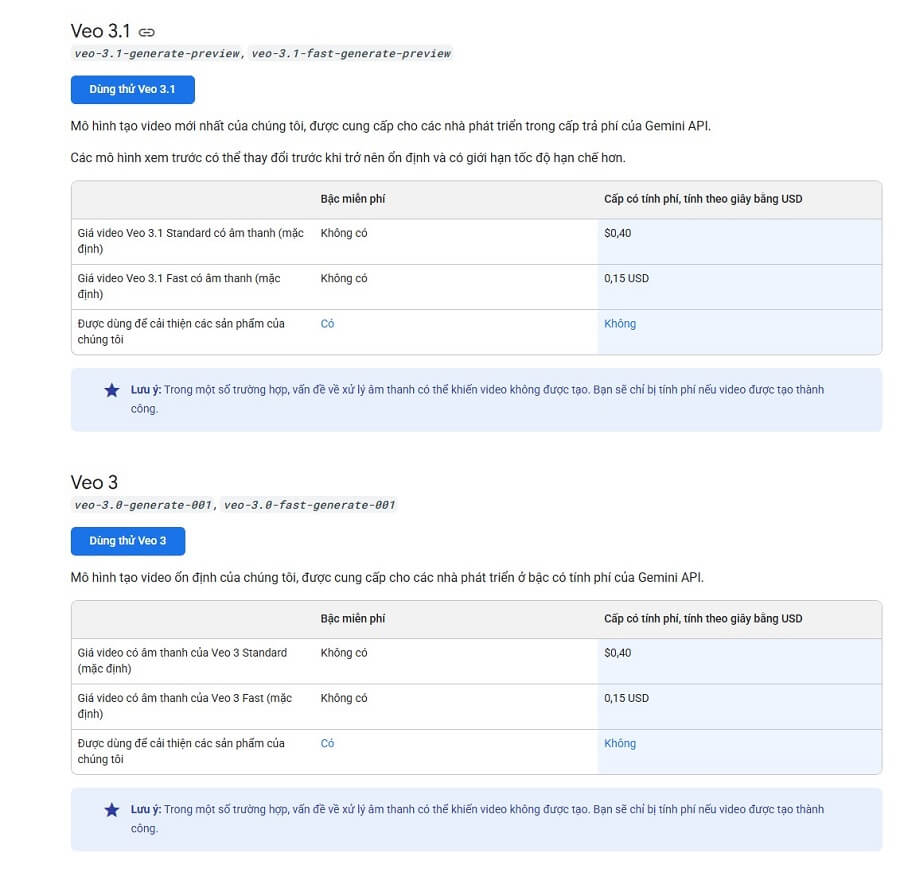
- Official price (from Google Developers Blog, July 2025): $0.75/second for video and audio output (e.g., an 8-second video ≈ $6).
- Updated estimate (October 2025, after price reduction):
- Veo 3 Standard: Approx. $0.40/second.
- Veo 3 Fast: Approx. $0.15/second (faster but lower quality).
- Note: Requires a Google Cloud account with billing enabled; prices may be lower through third-party providers like CometAPI or Kie.ai (from $0.30-2.00 per 8-second video, a 60-70% saving).
3. Third-Party Platforms (Indirect Access)
Some platforms integrate Veo 3 at a lower price, but may have limited features:
- Leonardo.Ai: From $10/month (about 250,000 VND) for the Apprentice plan, including Veo 3 with token savings (50% cheaper than Google).
- Veo3.ai (independent): $9-15/month for 20 videos, but not officially from Google.
- Kie.ai: $0.30/video Fast or $2.00/video Quality (8 seconds).
Recommendations
- In Vietnam: Use a VPN (like ExpressVPN) to register if your region is not yet supported. Start with the Pro plan to test it out.
- Comparison: Cheaper than Runway Gen-4 ($12/month for the basic plan) but more expensive than Sora 2 (free for basic use).
- For exact details, visit ai.google.dev or contact Google Cloud support. Prices may be updated in Q1/2026 with Veo 4
















