


 10/05/2026
  154 views
What is HRM Software is currently considered a comprehensive human resource management solution for all businesses in the 4.0 era. Applying human resource management software helps businesses build and develop a comprehensive workforce. This helps improve employee performance and provides new vision and strategies for human resource management. So, what is HRM software and what role does it play in a business? Let’s explore with 1Office in the article below.
Mục lục
- 1. What is HRM software?
- 2. The importance of HRM software in a business
- 3. Functions of HRM Software
- 4. Objectives of HRM Software in a Business
- 5. Types of HRM Software
- 6. What are the criteria for choosing good HRM software?
- 7. Steps to Implement HRM Software in a Business
- 8. Common Mistakes Businesses Make When Choosing HRM
- 9. 1Office HRM Software – A Comprehensive Human Resource Management Solution for Businesses
- 10. Featured Customers Successfully Applying 1HRM Software
- 11. Factors for a successful HRM software implementation
- 12. Common mistakes businesses make when choosing HRM software
- 13. Frequently Asked Questions about HRM Software
1. What is HRM software?
HRM, an acronym for Human Resource Management, is a type of software for managing human resources within a business. Specifically, it applies technology to comprehensive HR management, from managing records, recruitment, timekeeping, payroll calculation, salary payment, training, calculating KPIs, health insurance, social insurance, etc., quickly, conveniently, and accurately. It helps HR staff save time. Through this, the company’s leadership can also clearly understand the business’s situation and devise appropriate implementation plans.

2. The importance of HRM software in a business
A modern business that uses technology in its management will be far superior to those using manual, traditional methods and will be more optimized in its operations. A business will achieve excellent results by using HRM software in its management process. These benefits include:
- Improve HR productivity and quality
Time-consuming tasks in HR management such as timekeeping, payroll calculation, and related paperwork are now handled by HRM software. This is an advantage that allows HR staff to focus on finding optimal ways to increase productivity for the business.
- Reduce costs for the business
Using software in the HR management process will save money on paperwork and records. It can also optimize personnel as machines take over tasks.
- Bring efficiency to the management process
Work efficiency becomes clearest when the leadership can simply look at the tasks employees are doing to know if they are meeting job requirements, or look at the KPI dashboard on the application to monitor. From this information, they can devise better management methods for the business.
- Minimize risks
Businesses often face risks in human resource management regarding issues with contracts or related policies on paper. If those paper documents are lost, it would be a significant loss. Therefore, storing information on HRM software helps businesses save information without fear of loss.
With the benefits mentioned above, it is clear that HRM software plays an important role and brings many practical benefits to businesses, helping them increase work efficiency and enhance the quality of their professional workforce.
| >> Read more: The process of building effective human resource management software for businesses |
3. Functions of HRM Software
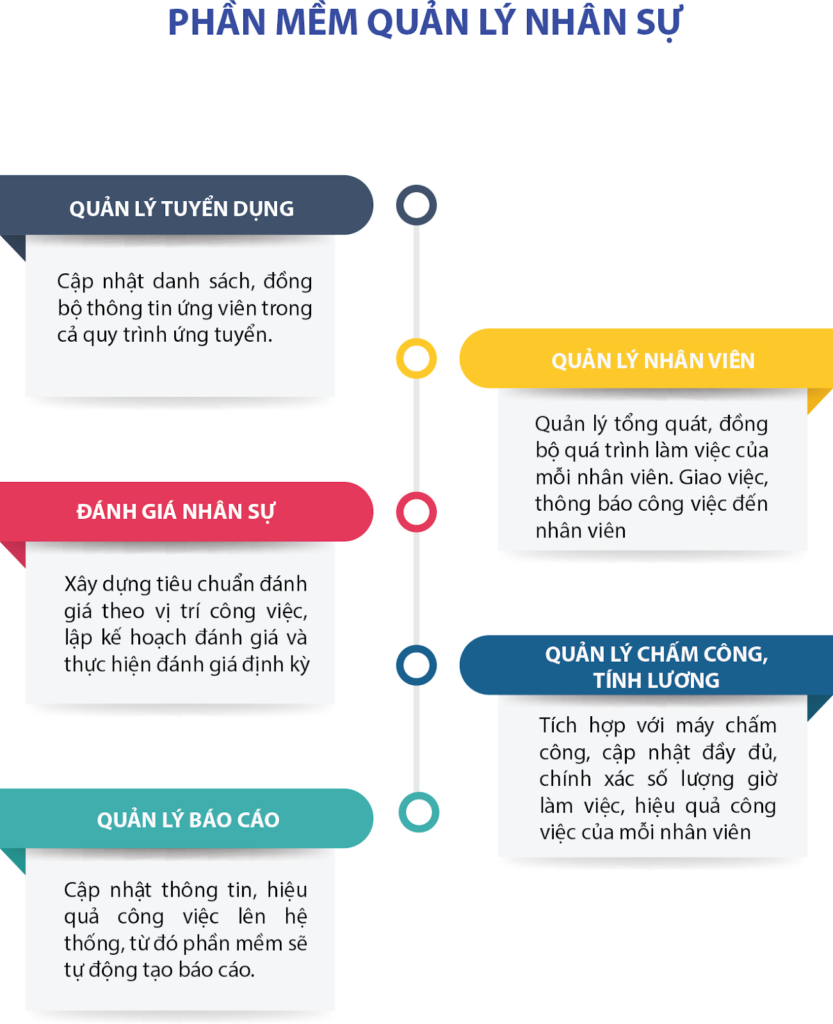
HRM software was developed to help businesses operate more effectively and address the challenges of human resource management. The functions that HRM software provides to facilitate the management process for businesses include:
3.1. Personnel System Management
HRM software helps businesses store all employee information, including resumes, contracts, insurance details, and more. It also manages aspects like employee experience, professionalism, and competencies within the company.
3.2. Creating an Intelligent Recruitment Process
The software supports businesses throughout the recruitment process, from simple steps like creating recruitment proposals on the system to screening suitable candidate profiles. It can also connect with job boards or recruitment websites to find qualified candidates.
3.3. Managing, Evaluating, and Ranking Employee Performance
Businesses can fully manage, evaluate, and rank employee performance using HRM software. Users can set up evaluations based on job tasks, review training progress, and analyze KPI results to make decisions regarding salary increases, deductions, or bonuses for employees.
3.4. Accurate Timekeeping and Payroll Management
It’s a hassle when HR has to spend time every month manually calculating payroll, workdays, and days off for each employee. This problem is quickly solved by HRM software. It connects with timekeeping machines to receive daily data, allows for setting up work shifts and leave schedules, and creates timesheets for each department.
Based on timekeeping data, the payroll software automatically calculates salaries. It automatically deducts for leave days and late arrivals, calculates income tax or salary advances, and sends payslips to employees. This feature significantly reduces the time HR spends on monthly timekeeping and payroll calculations, allowing them to focus on optimizing operational processes.
3.5. Reporting on the Company’s HR Situation
Based on the factors evaluated by the HRM software, management can assess the competency of each employee and monitor the overall HR situation of the company.
Check out: Top HRM Human Resource Management Software for 2026
4. Objectives of HRM Software in a Business
4.1. Organizational Objectives
HRM must prepare the human resources needed to achieve organizational goals. HRM aims to meet objectives such as profitability, growth, expansion, survival, diversification, etc., through HR functions like planning, recruitment, selection, placement, attraction, training, and development of human resources, as well as arranging employee performance evaluations. HRM serves other functional areas, helping them achieve operational efficiency and benefit the organization. HR needs to achieve organizational goals through the rational use of human resources. Succession planning is a crucial aspect considered a modern organizational objective.
4.2. Functional Objectives
HRM performs many functions for other departments, either directly or indirectly. HR develops the HRMS to maintain healthy working relationships among all employees and apply a rational and desired organizational structure. HR monitors whether the functions of human resource management are performed in a timely manner. It creates opportunities and facilities for the development of individuals or groups in line with the organization’s growth and development. It continuously develops human assets through training and development programs.

4.3. Societal Objectives
HRM should adhere to the rules, laws, and legal restrictions imposed by society. It must develop and maintain healthy relationships between unions and management. The HR department is responsible for ensuring that legal, ethical, and socio-environmental issues are addressed appropriately. This contributes to minimizing socio-economic problems such as unemployment, ensuring equitable distribution of income and wealth, creating more employment opportunities for women, and so on.
4.4. Personal Objectives
HR must support employees in achieving their personal goals, such as higher salaries and wages, job satisfaction, better working conditions, standard working hours, promotions, motivation, welfare facilities, prestige, recognition, status, and social security, all of which lead to employee satisfaction. It strives to provide healthy and hygienic working conditions for employees. HRM should motivate employees and keep their morale high. Every HR professional should transform the organization into an engaging workplace by bringing together both engaged employees and engaged employers. Employee engagement initiatives encourage employees to build trust in the organization.
5. Types of HRM Software
| Criteria | On-premise | Cloud-based | Open Source |
| Initial Cost | High (infrastructure investment, maintenance) | Low (monthly/annual service fee) | Low (no license fee) |
| Security | Complete control, high security | Depends on the service provider | Must manage security yourself |
| Scalability | Limited, requires infrastructure upgrades | Easy, flexible according to needs | Flexible, depends on the development team |
| Management and Maintenance | Self-managed by the business, requires a technical team | Managed and maintained by the service provider | Self-managed by the business, requires a technical team |
| Customization | Flexible to needs, but complex requirements | Limited, depends on the provider | Very flexible, customizable on demand |
| Application | Large enterprises with high security requirements | Businesses looking to save costs and time | Businesses with a strong technical team |
5.1. On-Premise HRM Software
On-Premise HRM software is installed directly on a company’s servers and systems. Users can manage and operate the software entirely in-house, without depending on an external provider.
Key characteristics:
- Internal installation: The software is deployed on the company’s servers and requires its own IT infrastructure.
- Data control: The company has full authority to manage and control its data.
- Security: The company is solely responsible for data security and backups.
- Maintenance: Software maintenance and upgrades are the company’s responsibility, requiring a dedicated technical team.
Benefits:
- High security: Data is stored locally, giving the company complete control.
- Flexible customization: The software can be customized to meet the specific requirements of the business.
- Suitable for large enterprises: Large organizations with high security requirements often choose this solution to protect internal data.
5.2. Cloud-based HRM Software
Cloud-based HRM Software, also known as cloud software, is delivered as a service over the Internet. Instead of being installed on internal servers, businesses use the software via an internet connection, with all data stored and managed on the service provider’s system.

Key characteristics:
- Access anywhere: Since the software operates on the cloud, users can access and work from anywhere with an internet connection.
- No dedicated infrastructure required: Businesses do not need to invest in servers or hardware; everything is managed by the provider.
- Automatic backups: Data is backed up automatically and can be easily restored in case of an incident.
- Scalability: Easily expand and customize as the business grows without worrying about upgrading internal systems.
Benefits:
- Low initial investment cost: With no need to invest in infrastructure, businesses only need to pay a monthly or annual service fee.
- Easy to customize and scale: Businesses can flexibly and easily add or remove users and services according to their needs.
- Quick access: All employees can work remotely, making it easy to monitor and manage tasks anytime, anywhere.
5.3. Open Source HRM Software
Open Source HRM Software is software developed and distributed with its source code made available. With this type of software, users can freely customize and develop it according to their needs without paying licensing fees. Businesses can download, customize, and deploy the software on their own systems.
Key features:
- Open source code: Businesses have full access to the software’s source code, making it easy to customize and develop additional features as needed.
- No licensing fees: This software is often free or has a lower cost compared to commercial solutions.
- Technical team required: Businesses need a technical team to deploy, install, maintain, and secure the system.
- Community support: A large community of users and developers helps support and improve the software.
Benefits:
- Low cost: With no licensing fees, businesses only need to invest in infrastructure and technical personnel.
- Flexible customization: The software can be easily customized to fit the specific needs of the business.
- Opportunity for learning and development: Businesses can participate in the open-source community to develop the software and share knowledge.
Besides identifying internal needs, referencing solutions chosen by many businesses will give you a more realistic perspective and make comparison easier. Popular HRM software today has been optimized in terms of features, processes, and scalability, making it suitable for various operational models.
6. What are the criteria for choosing good HRM software?

How to choose HRM software that fits the needs and criteria of an organization is a question many people are still wondering about. If your business is still struggling to find HRM software, let’s explore some of the criteria below:
6.1. Customization and Scalability
This is an important factor to consider when choosing software. Flexible customization allows you to create a systematic human resource management model with clear functions. This enables the business to easily evaluate and develop in parallel with the company’s workforce.
6.2. Intuitive and Easy to Use
No matter how well-rated the software is, if it lacks an intuitive, dynamic, and user-friendly interface, it will be difficult to implement for the company’s personnel. Each company has various employee groups with different ages and cognitive approaches, so individual comprehension levels will vary. If the software is too difficult to use, the business will spend a lot of time on training and guiding staff without a clear understanding of the software’s potential results for the company.
6.3. Cost-Effective and Within Budget
Every business has a specific budget for investing in HRM software. Therefore, you should consider whether the various HRM tools on the market fit your company’s price point and budget before making a decision.
6.4. 24/7 Support
During the software implementation process, technical issues and glitches are inevitable. Therefore, you should carefully consider choosing a provider that offers 24/7 customer support to promptly resolve any problems your business encounters.
See more: Latest Human Resource Management Software Price List – Best HRM Software Prices
7. Steps to Implement HRM Software in a Business
To implement HRM software effectively, a business needs an organized and rigorous process to ensure efficiency and feasibility during use. Here are some important steps that managers can reference and apply in their business:
- Step 1: Assess needs and define objectives
- Step 2: Select HRM software suitable for the business’s situation and needs
- Step 3: Create a detailed implementation plan
- Step 4: Prepare and import data
- Step 5: Customize the software according to the business’s HR management processes and needs
- Step 6: Disseminate information and train users
- Step 7: Test, monitor, and evaluate
Implementing HRM software requires a business to have a tightly organized process and coordination among departments: from identifying needs and selecting software to implementation, monitoring, and evaluation. A well-structured plan and process will help the business maximize the benefits of the software system, thereby improving human resource management efficiency.
8. Common Mistakes Businesses Make When Choosing HRM
When starting to implement HRM software, many businesses often focus on superficial aspects like an attractive interface or low price, overlooking the core factors that determine long-term effectiveness. Here are some common mistakes:
- Not clearly defining actual needs: The business fails to thoroughly analyze internal processes before choosing, leading to purchasing unsuitable software that requires extensive modifications or is abandoned midway.
- Making decisions based solely on price: Choosing a cheap solution that lacks features, is difficult to scale, or has no post-implementation support, leading to higher incurred costs later on.
- Overlooking system integration capabilities: The HRM cannot connect with accounting, CRM, or timekeeping systems, causing data to be fragmented, requiring manual entry, and increasing the likelihood of errors.
- Not evaluating the provider’s capabilities: Failing to thoroughly check the implementation team, warranty, and product development roadmap, which leads to risks when upgrades or support are needed.
- Lack of involvement from relevant departments: The decision to choose software is made solely by HR without coordination from IT, accounting, or leadership, leading to conflicts of interest during actual operation.
To avoid these mistakes, businesses should build a clear set of evaluation criteria, organize demos with multiple stakeholders, and consult feedback from businesses that have actually implemented the solution. This is how to ensure the selection of a suitable, stable, and cost-effective HRM solution for the long term.
9. 1Office HRM Software – A Comprehensive Human Resource Management Solution for Businesses
Known as one of the best HR management tools on the market today, 1Office HR management software is an ideal solution suitable for every Vietnamese business. Possessing many smart features, 1Office HRM software helps quickly solve problems related to recruitment management, personnel, competency assessment, timekeeping, payroll, and insurance:
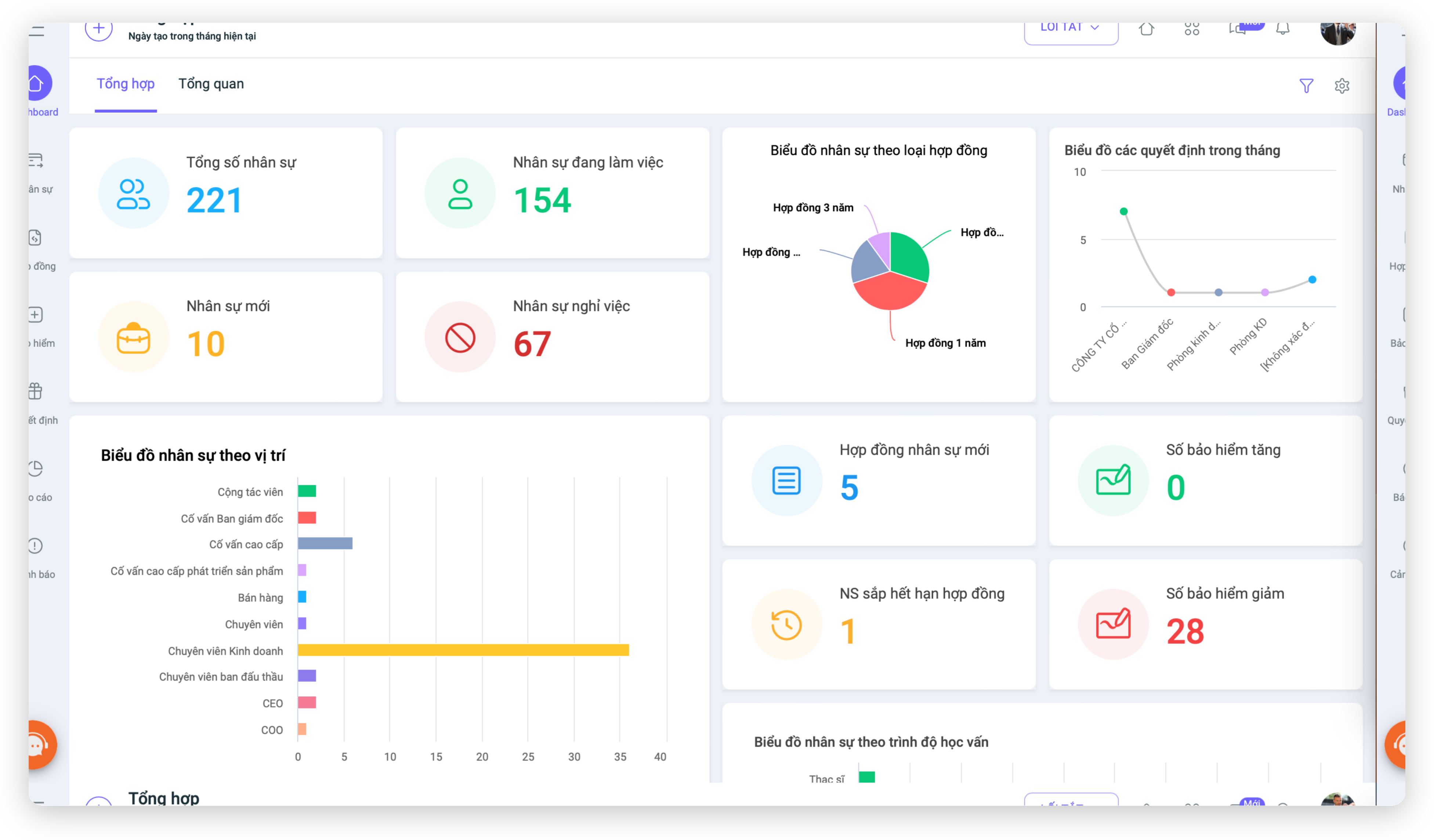
- Employee profile management software helps digitize information and administrative forms, updating them quickly into the timesheet
- Digitize the entire recruitment process, building an automated approval workflow for recruitment proposals to help businesses simplify and save time.
- Track candidate profiles in detail. Easily filter and search for candidate profiles for each recruitment campaign.
- Connects with over 90% of time clocks on the market, making it convenient to check employee hours. Timekeeping data is pushed to the timesheet, and the system automatically syncs to generate payroll. This helps accountants save maximum time on calculations, managing employee work hours, salaries, bonuses, etc.
- Quickly connects with other modules to retrieve data for calculating workdays and salaries, such as KPIs and sales figures. Helps HR save up to 85% of the time spent queuing at the bank and processing payroll
- Keep track of personnel work status, helping managers understand workforce fluctuations and devise the best solutions
- Track employee development through competency assessment periods
- Timekeeping via GPS positioning, allowing users to simply set the check-in location at a custom position
- Automatically updates insurance profile data from the HR management system, calculates projected increases or decreases in social insurance participants, helping the company save time and effort in declaring social insurance records. Provides complete information on the social insurance profiles of the company and its employees.
- Pay salaries directly on the software through MB Bank quickly and conveniently.
- Set company, department, and individual goals for monthly, quarterly, or yearly cycles, and allows linking between individual and department goals
- Allows customization of the OKR measurement board for each employee, department, and position, automatically updates completion percentages in real-time, and helps easily identify areas for improvement.
Register for a free Demo of the OKR feature!
10. Featured Customers Successfully Applying 1HRM Software
As a particularly familiar and relatable fashion brand to consumers, Yody impresses with its modern, youthful designs that are highly practical. Established in 2014, after a 9-year journey of development, Yody has gradually affirmed its position in the domestic market, owning more than 260 stores spread across 55 provinces from North to South with a scale of over 4,000 employees nationwide.

Before undergoing digital transformation, Yody faced many challenges in managing remote HR data and information, leading to wasted time and costs. Faced with the need for a solution to store information, facilitate searching for profile data, and provide sufficient information for decision-making, Mr. Nguyen Viet Hoa – Chairman of the Board and CEO of Yody Fashion, said: “At this point, we needed a technology platform to optimize the entire work process and transmit information quickly, timely, accurately, and completely. Yody has succeeded by integrating 1Office software into its operations.”
By applying 1Office software, Yody’s HR management has seen positive changes, such as:
- Timely and accurate updates of HR data and information: All profiles and data are digitized and stored centrally on the software.
- Maximum time and cost savings: Payment approval forms are quickly and accurately transferred from paper to the software.
- Minimized risks and losses: 100% digitization of timesheets and payrolls helps HR and Accounting minimize errors and wasted time in calculations
- The automated, intuitive, and multi-dimensional reporting system supports accurate and timely decision-making.
>>>>>> Read more: Yody and 1Office solve the human resources problem
11. Factors for a successful HRM software implementation
Implementing HRM software is not just about installing the system and handing it over for use; it is a comprehensive digital transformation process in human resource management. To ensure the HRM project operates effectively and delivers real value, businesses need to focus on the following factors:
Clearly assess internal needs
Before implementation, businesses need to re-evaluate their entire current HR process to identify weaknesses that need to be addressed:
-
Is recruitment slow due to a lack of centralized information?
-
Are the timekeeping and payroll processes prone to errors or time-consuming to consolidate?
-
Is employee data scattered across multiple Excel files or different platforms?
Correctly understanding internal issues helps in selecting the most suitable HRM software—avoiding buying based on trends or choosing software with “too many features, not enough solutions.”
User training
One of the common reasons for failure in HRM implementation is that employees do not fully understand how to use the software.
Businesses should organize formal training for the HR department, payroll accountants, and department managers, ensuring they understand how to input data, monitor, and extract reports.
This not only helps employees use the system confidently but also shortens the familiarization period and reduces operational errors.
Synchronize data from the old system
If the business already has data in Excel or other software, the data migration process needs to be tightly controlled.
Synchronizing clean data with consistent formats, employee IDs, contract information, salaries, and bonuses helps avoid duplication errors and ensures accuracy in the new HRM system.
Continuous monitoring and improvement
HRM implementation does not end when the system goes live.
Businesses need to continuously evaluate, collect user feedback, and adjust processes to better fit reality.
For example, after 1-2 months of use, it might be discovered that the timekeeping module needs to be more flexible, or that salary reports need to be customized by department.
Continuous optimization is the way to make HRM a true decision-support tool, not just a platform for storing HR data.
12. Common mistakes businesses make when choosing HRM software
When choosing HRM software, many businesses make mistakes due to a lack of practical needs assessment or by following big brand names. Below are common errors and their specific consequences:
Choosing software unsuitable for the business scale
If small businesses choose complex HRM software with many modules (recruitment, KPI, OKR, training, competency management…), they will incur high costs without fully utilizing the features.
Conversely, if large enterprises use simple software lacking integration capabilities, it will disrupt processes and make it difficult to expand to new branches.
Not assessing actual needs before choosing a solution
Many places choose HRM just because they “heard it’s good,” without defining the implementation goals: Automate payroll? Standardize HR records? Or support performance management?
Without clear criteria, the software is easily used for the wrong purpose or abandoned halfway.
No internal HRM system administrator
After implementation, if there is no dedicated personnel to manage and update HRM data, the system can easily fall into a state of “clinical death”:
-
Data is not updated in real-time.
-
Discrepancies in employee numbers, workdays, salaries, and bonuses.
-
Loss of user trust, causing departments to revert to manual work.
Skipping Employee Training
Implementing an HRM system without training employees means users won’t understand the operational procedures, leading to incorrect data entry or omission of important data.
This reduces the return on investment and turns the software into a “technical burden” instead of a supportive tool.
Not Considering Scalability and Integration
Another common mistake is choosing an HRM system that cannot connect with other systems like CRM, accounting, KPI, or OKR.
As the business scales, this lack of integration will lead to disjointed processes and fragmented data, resulting in wasted resources and difficulty in making strategic decisions.
13. Frequently Asked Questions about HRM Software
What are our most critical needs?
These are your must-haves, and fixing issues that are costing your business time and money should be your top priority. For example, if onboarding new employees and running bi-weekly payroll are currently your biggest challenges, then paperless onboarding and a flexible payroll processing schedule should be on your list of must-haves for any HR tech platform you consider.
What goals do we hope to accomplish once this platform is in place?
Researching your answers to questions one through five will help you prioritize the top three goals you hope to achieve with your platform. Are you looking to reduce employee turnover? How about providing your workforce with better, more cost-effective access to training and development? Or perhaps you hope to streamline your entire HR operation by implementing a more integrated platform.
Your key HR goals should align closely with those of your entire organization. Ultimately, the tech platform you choose should help you overcome your biggest HR challenges, which in turn can reduce administrative burdens and make your business more profitable through increased efficiency.
Who will be involved in the decision-making process?
Ideally, all stakeholders will be represented in your evaluation and final decision. That doesn’t mean you need buy-in from every single employee. That may not be feasible. But you should have at least one representative from every key department or group within your organization, or at least those directly involved in your business’s HR operations.
This group will serve as your vendor and software selection committee, and their primary role will be to help you weigh the pros and cons of potential vendors and platform solutions. It’s important to determine how the selection will be made. Will everyone have a say, or only certain committee members? Who will oversee the implementation and manage the ongoing relationship with the vendor? These are factors best considered beforehand—not as an afterthought.
What is our budget for purchasing an HRM software?
Having a clear understanding of the funds available for such a major purchase allows you to determine which vendors and platforms are within your reach and which are not. This can help you narrow down the top contenders more quickly without wasting time on options that may not be a good fit for your company. That being said, don’t automatically rule out a particular vendor or solution based on price alone.
What level of customer service do we need?
The answer to this question will largely depend on your internal capabilities. For example, a company with an in-house IT team likely won’t need as much support in implementing and operating HR software as a company whose HR director is also trying to handle IT responsibilities.
Service is a key differentiator among vendors and platforms. You may be better off with a vendor that offers exceptional, personalized service but can only provide your must-haves within budget, than one that promises both your should-haves and nice-to-haves at a lower price but skimps on service. Partnering with a vendor that offers scalable solutions tailored to your business needs will often allow you to add the nice-to-haves as your budget allows.
So, in this article, 1Office has provided you with detailed information about what HRM software is. It is certain that in the near future, as businesses realize the benefits of HRM software far outweigh traditional manual methods, 100% of businesses will trust and use it. If you are looking for a tool to help with comprehensive human resource management and digitize all management processes, then 1Office is an excellent solution for you. For a consultation on the 1Office human resource management software, please leave your information, and we will contact and advise you today.
For more details, please visit:
Fanpage: https://www.facebook.com/1officevn/
Youtube: https://www.youtube.com/channel/UCeTIRNqxaTwk0_kcTw6SxmA
















