


 12/05/2026
  595 views
Trong doanh nghiệp, quản lý hồ sơ nội bộ đòi hỏi sự chặt chẽ để tránh thất thoát dữ liệu quan trọng. Nhiều đơn vị đã áp dụng phần mềm quản lý hồ sơ miễn phí nhằm số hóa tài liệu, tăng bảo mật và tiết kiệm chi phí. Để giúp các doanh nghiệp lựa chọn được phần mềm phù hợp, đáp ứng đúng nhu cầu, 1Office sẽ review chi tiết ưu nhược điểm của 10 phần mềm quản lý hồ sơ lưu trữ miễn phí phổ biến trên thị trường hiện nay.
Mục lục
- I. What are the limitations of traditional records management?
- II. Why is free records management software important?
- III. TOP 10 best free records management software for businesses
- 1. 1Office – Comprehensive business records management software
- 2. WeOne Document Management Software
- 3. TechMoss Document and Record Management Software
- 4. DocEye Document Storage and Management Software
- 5. Google Drive: Free Work Record Management Software
- 6. Rubex records management software
- 7. WeUp ERP Document Management Software
- 8. eFile Records Management Software
- 9. Free document management software: Microsoft SharePoint
- 10. Hương Việt Agency Storage Management Software
- IV. Review of 10 free records management software
- V. Criteria for Choosing a Free Document Management Software Suitable for Your Business
- VI. Frequently Asked Questions about Document Management Software
- VII. Conclusion
I. What are the limitations of traditional records management?
Traditional records management causes operational stagnation due to cumbersome manual storage processes, which makes information retrieval slow, leads to data loss, and wastes the company’s budget on physical costs.
The outdated nature of paper-based storage methods is demonstrated by the following specific barriers:
- Poor data retrieval speed: Staff often spend too much time searching for documents in a “sea” of paperwork, leading to delayed decision-making and disrupted workflows.
- Heavy operational cost burden: Businesses must constantly pay for office supplies, printing, and storage space (warehouses, cabinets), consuming capital that could have been invested in profitable activities.
- Low security and safety: Physical records face risks of damage from the environment, fire, or loss during transit, severely affecting legal validity and data integrity.
- Decreased work efficiency: Manual processing and classification create unassigned tasks, reducing employees’ ability to focus on important professional duties.
This is why more and more businesses are looking for free records management software to digitize and optimize their processes.
II. Why is free records management software important?
Free document and records management software acts as an essential stepping stone to digitization, helping businesses overcome cost barriers to quickly transition to a digital office model, thereby optimizing storage, security, and operational flexibility.
For managers
- Save on storage costs: significantly reduce the budget for printing, paper, and physical record storage.
- Manage and approve remotely: track, control, and approve records directly on the system, regardless of location.
- Detailed permission settings: set access rights for each individual and department, ensuring the right person has the right access.
- Absolute security: encrypt data and log access history to prevent information leaks and loss.
For employees
- Quick access: easily search for and share records within the company.
- Reporting and statistics support: provide accurate data for creating reports and analysis.
- Effective collaboration: share and edit documents online, reducing duplicate or lost versions.
III. TOP 10 best free records management software for businesses
1. 1Office – Comprehensive business records management software
1Office records management software is a comprehensive storage and document management system for all businesses, integrated into the 1Office business management platform. With over 10 years of experience accompanying more than 6,000 businesses in the race for digital transformation, 1Office is the solution to digitize and automate all company resources on a single platform. 1Office provides a superior toolset that solves all challenges in records administration and storage, helping businesses optimize operational processes and work organization:
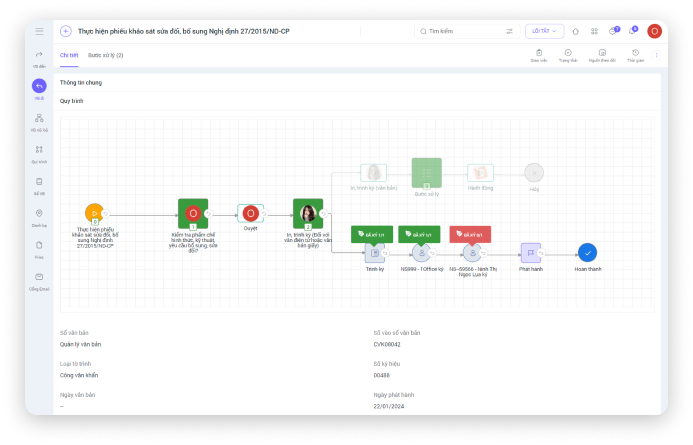
- Helps save 1/5 of the time spent searching for and retrieving records compared to traditional manual methods
- Builds a digitized, paperless office, minimizing costs for printing and hard copy storage
- The document repository is synchronized with all management modules on the system, ensuring a seamless and continuous records management process across departments
- Users can easily insert digital signatures into documents and throughout all document processing workflows
- Updates document numbers in the official log, supporting future statistics and information retrieval
Key Features
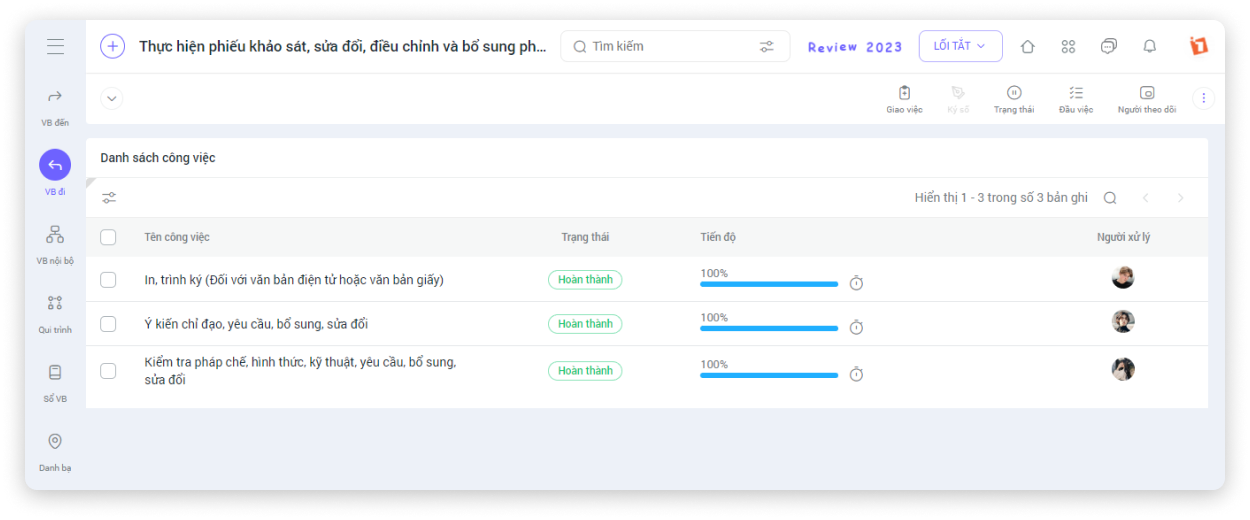
Create Document Profiles
- Upload documents to the software in various formats such as Word, Excel, PDF, etc.
- Clearly classify personal documents, company documents, and shared documents for easy searching
- Allows creating multiple subfolders for systematic document management
- Provides features for assigning tasks and managing work progress from incoming and outgoing documents. An integrated chat tool supports communication during implementation.
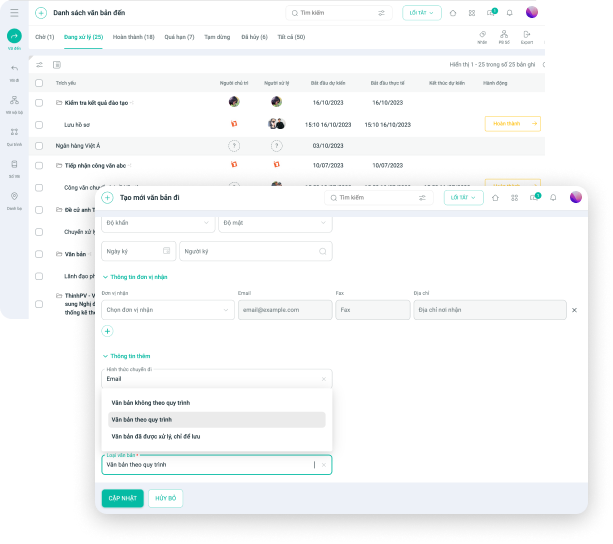
Document Management
- Flexibly share and assign document usage permissions to individuals and departments
- Allows authorized users to perform actions such as moving, copying, and renaming documents
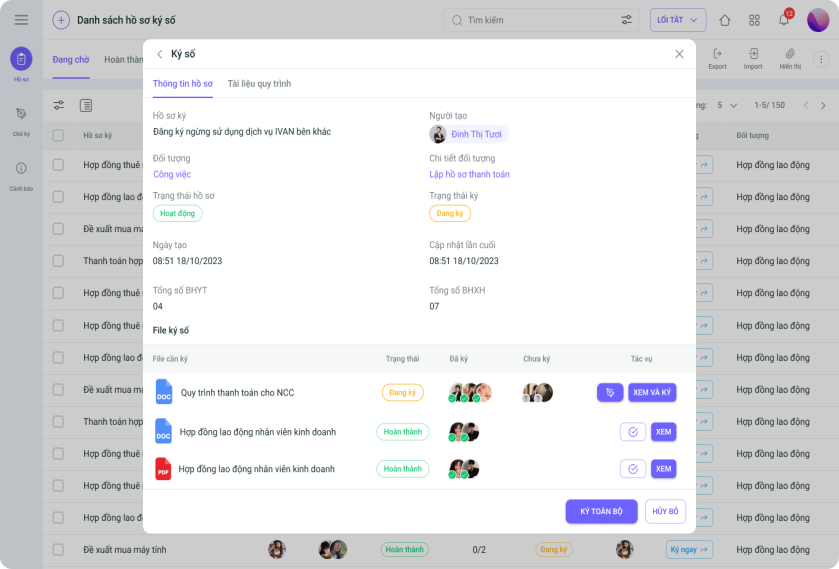
Digital Document Signing
- Allows for signing and approving documents directly on the software anytime, anywhere, helping businesses optimize electronic transaction processes and internal document signing
- Ensures legal standards for digital signatures and supports signing multiple documents at once
Storage Options: 1Office offers two deployment packages, On-Cloud and On-Premise, allowing businesses to choose flexibly based on their administrative needs.
| Read more: TOP 10 Best Business Management Software |
2. WeOne Document Management Software
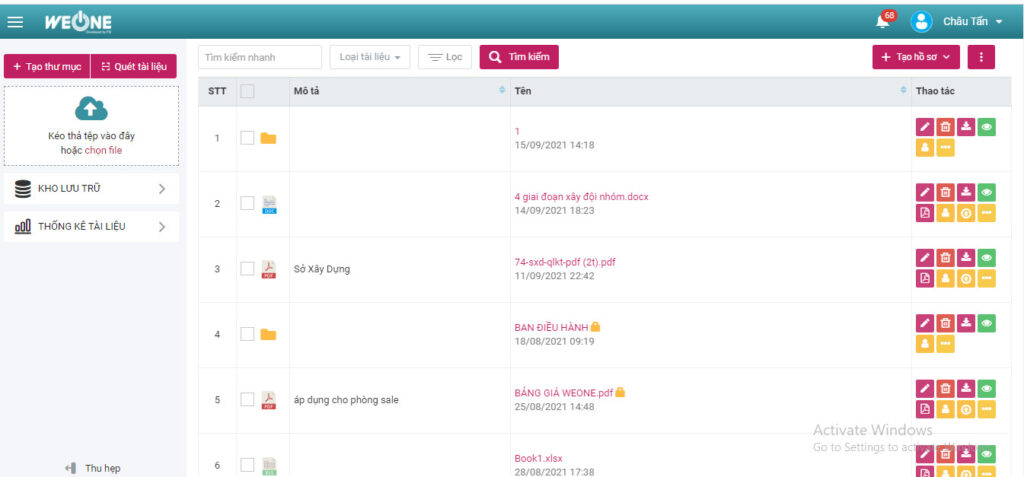
WeOne document management software is part of the WeOne business automation system. WeOne is considered the business’s “digital library,” helping users easily search and share records with a high level of security.
Key Features
- Manage personal, departmental, and organizational records centrally on one system
- Keyword search and advanced search with filters help look up records quickly and easily
- Secure record information by setting access permissions, passwords, and saving record edit history
- Enhance collaboration between departments with flexible sharing and editing permission features
| Advantages | Disadvantages |
|
|
Deployment model: On-premise, with the software installed directly on the company’s server
3. TechMoss Document and Record Management Software
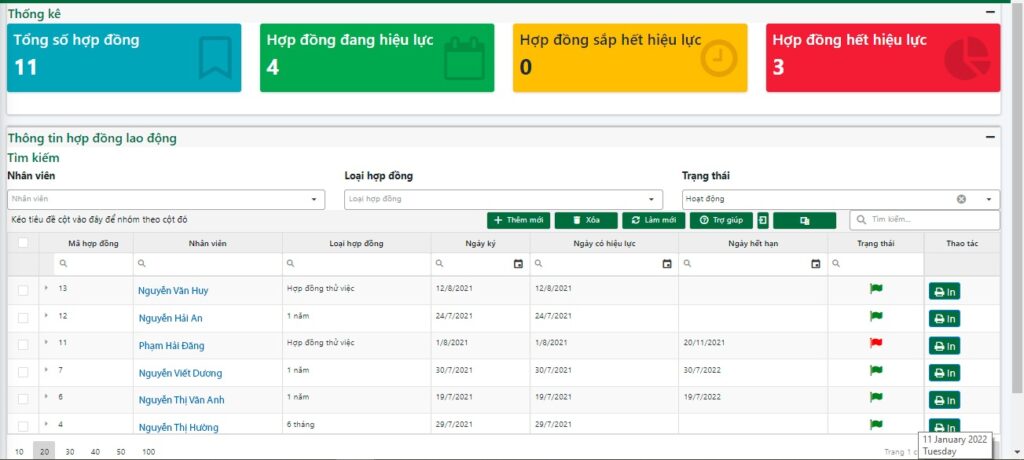
TechMoss is a document and record management software for small and medium-sized enterprises within the health-tech software ecosystem, commonly used in hospitals, pharmacies, and clinics. The TechMoss software helps digitize and store various types of documents, records, and official correspondence to support operational and work management with basic features.
Key features
- Systematically classify records, contracts, and incoming/outgoing official documents
- Quickly and easily search for information in documents, records, and files
- Ability to expand storage capacity and customize according to business needs
- Easily and quickly share documents and records with other departments
- Assign detailed record management permissions to employees based on their rank and job position
| Pros | Cons |
|
|
Deployment model: On-premise or On-Cloud
4. DocEye Document Storage and Management Software
DocEye’s free document management software provides agencies and businesses with a centralized electronic document repository, supporting fast document searches, and flexible, safe, and completely secure sharing.
Key features
- Centralized digital document repository: Digitize all records and documents onto the software, saving physical storage space and minimizing printing and manual preservation costs.
- Easy document search: Quickly and conveniently look up necessary documents using the search tool and logically organized folders.
- Flexible and secure document sharing: Share documents by assigning access permissions to members.
- Detailed and visual statistics: Specific statistics on the quantity and status of various document types help managers control records effectively, minimizing loss.
|
Advantages |
Disadvantages |
|
|
Storage method: On-premise, based on the business’s IT infrastructure
5. Google Drive: Free Work Record Management Software
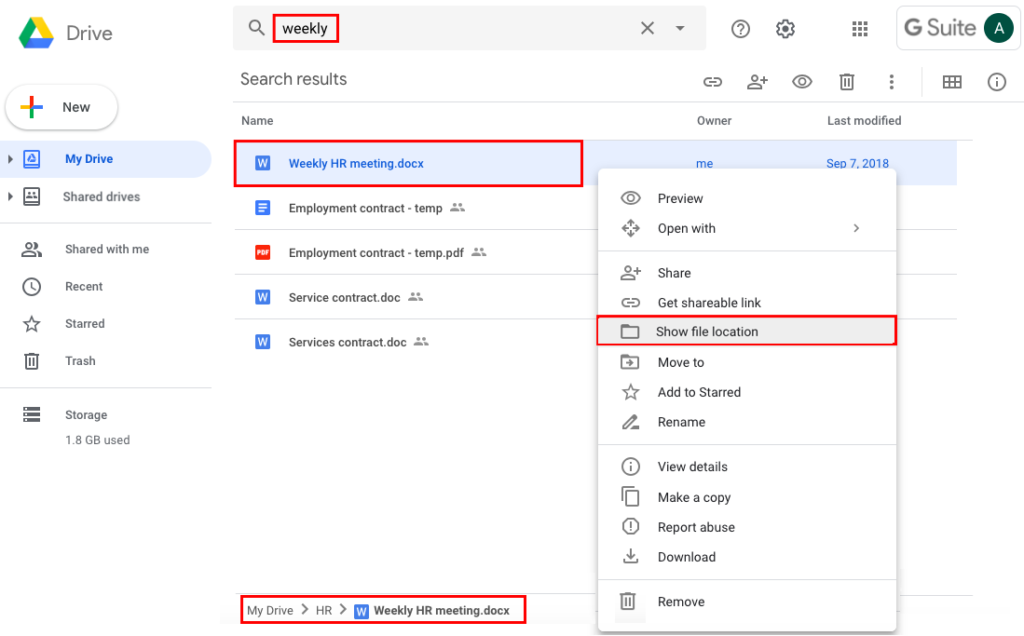
Google Drive is the most popular free record management software worldwide, developed by the tech giant Google. The online business record management software, Google Drive, provides cloud-based storage space, allowing users to easily upload and store records and documents in any format.
Key features
- Scientifically organize and manage records in main and sub-folders
- Supports uploading large files in various formats while maintaining original quality
- Supports online editing of documents and records through integration with Google Docs, Google Sheets, and Google Slides
- Allows sharing and collaboration with multiple users simultaneously, supporting effective teamwork
- Easily search for records using a toolbar that supports both basic and advanced search (by selecting fields and criteria)
|
Advantages |
Disadvantages |
|
|
Storage method: On Cloud, users need to create a Google account and log in via the Web or mobile App
>> READ NOW: 7 document management software that office workers must know
6. Rubex records management software
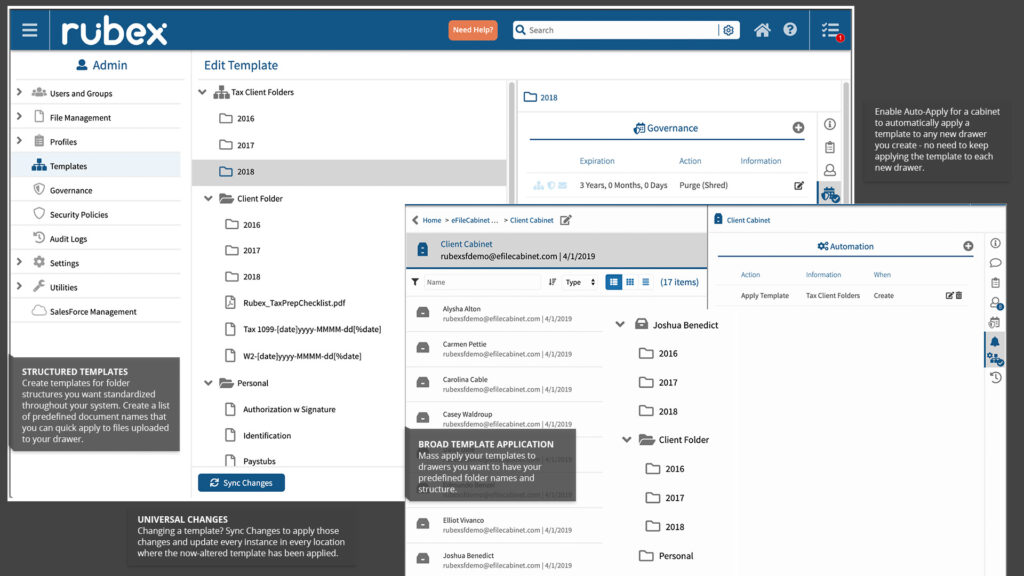
eFileCabinet is an all-in-one business records management software solution with features ranging from basic to advanced, digitizing and automating the records management process within a business, helping to improve efficiency and optimize time.
Key features
- Automatically recognize, classify, name, and store records using the information contained within the files themselves
- Create pre-structured document templates to save drafting time
- Grant record access to relevant parties. Set user access permissions and send notifications for shared records.
- Provides a digital signature feature with secure KBA & OTP signature transactions, ensuring strict and rigorous control over signed records
| Pros | Cons |
|
|
Deployment model: On-premise or On Cloud
7. WeUp ERP Document Management Software
WeUp is the corporate document management module within the WeUp ERP comprehensive enterprise management software. WeUp aims to support businesses in going paperless and optimizing work, helping managers easily monitor, track, and manage documents and workflows.
Key features
- Centralized storage and folder-based document management with complete information such as document name, issue date, expiration date, document status, etc.
- Flexible user permissions for multiple users to edit and add documents to work records.
- Easily search for documents quickly and accurately using various criteria.
| Pros | Cons |
|
|
Deployment model: On premise
8. eFile Records Management Software
eFile is a solution aimed at digitizing the management and storage of business records on a centralized system.
Key features
- Strict record check-out and check-in processes, minimizing document loss
- Establish policies for managing and utilizing records in compliance with state archives and records regulations
- Classify records and documents based on various criteria, and manage updated versions of records
- Manage record repositories and libraries
| Pros | Cons |
|
|
Storage method: On premise
The free, cloud-based document management software Microsoft SharePoint is part of the Microsoft Office suite, helping teams collaborate, share, and store documents effectively to optimize workflows.
Key features
- Manage and control the document lifecycle – including release date, modification date, disposal, or retention
- Set up check-in/check-out for document files to prevent unwanted modifications in the document library
- Allows for creating and editing documents online directly within the system
- Create internal resource libraries for teams and departments within the organization, making it easy for everyone to contribute and use documents
- Can synchronize data files from a computer to the system
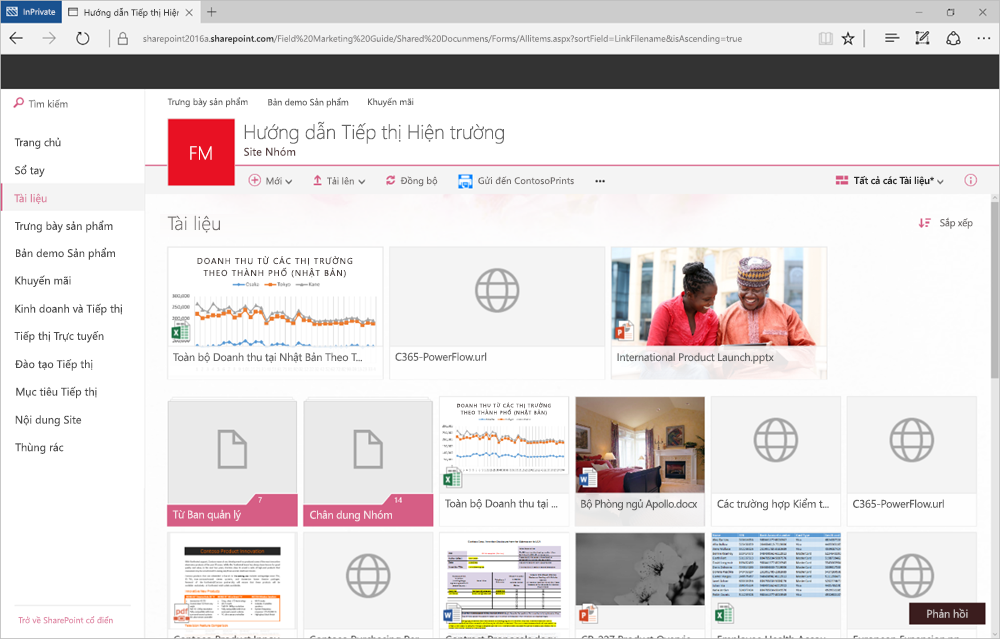
| Pros | Cons |
|
|
Storage method: On Cloud, users need an Office account to log in and use the software on the web.
10. Hương Việt Agency Storage Management Software
Hương Việt is one of the software solutions that supports the management, tracking, and storage of records throughout their entire lifecycle, ensuring compliance with legal regulations on electronic document storage. The Hương Việt business record management software is primarily used in government agencies and administrative units.
Key features
- Manage record information accurately, clearly, and categorized by specific industries and fields
- Search and retrieve data without limitations on time, space, or location
- Establish policies for exploiting and using digital records and documents, including managing access counts and collecting fees
| Pros | Cons |
|
|
Storage method: On premise
IV. Review of 10 free records management software
For an overview of the popular free records management software on the market today, please see the summary evaluation table below, which assesses each software based on key criteria:
| Security Level | Storage Capacity | Supported Document Formats | Integration Capability | Cost | |
| 1Office | Absolute security for business data and document management processes | Massive storage capacity to meet the needs of any business size | All document formats | 100% integration and synchronization of documents with all management modules on the system | From 40,000 – 100,000/user/month depending on business size and usage needs |
| WeOne | Good | Based on business size | Text document formats | Integrates with process and task modules | Contact for consultation |
| Doceye | Good | Based on business size | Text document formats | No integration | From 10,000,000 to 30,000,000 VND/year depending on the package |
| Google Drive | Average | Limited to 15GB/user for the free version | All document formats | Integrates with other Google applications | From 45,000 – 6,750,000 VND/month depending on the storage plan (from 100 GB – 30 TB) |
| Rubex | Good | – | All document formats | No integration | Contact for consultation |
| WeUp ERP | Good | Based on business size | Text document formats | Integrates with management modules | $1,000/up to 2 users
Additional user: $200/user |
| TechMoss | Good | – | Text document formats | No integration | Contact for consultation |
| Microsoft SharePoint | Average | 1 TB for the entire business | All document formats | Integrates with applications in the Office suite | From $5.00 – $20.00 user/month |
| Efile | Good | – | Text document formats | No integration | Contact for consultation |
| Hương Việt | Good | – | Text document formats | No integration | From 40,000,000 – 90,000,000 VND |
V. Criteria for Choosing a Free Document Management Software Suitable for Your Business
There are many free document storage software options on the market today, offering a full range of features from basic to advanced to support a business’s document management process. However, to select the right software that fully solves the document management problem specifically and supports overall administration generally, businesses need to consider the following criteria
Easy-to-use software
To optimize the document management process, a free document storage software must be user-friendly. Software that is easy to understand and use will save a significant amount of time on operations and help update records quickly and promptly.
Reasonable cost
The cost of implementing and using the software must fit the business’s budget. Document storage software that charges based on usage scale will be more optimal and reasonable.
Integration capability
Document management is part of a business’s overall administration picture. Therefore, to ensure smooth operations and optimize the ability to circulate documents for various tasks, businesses should choose document management software that can integrate with other management modules.
VI. Frequently Asked Questions about Document Management Software
Should I choose On-Cloud or On-Premise document management software?
The choice depends on your resources:
- On-Cloud (cloud computing) is suitable for businesses that want fast deployment, low investment costs, and flexible remote work.
- On-Premise (installed on-site) is for organizations that prioritize absolute control over their infrastructure and have a dedicated IT team.
How to ensure legal validity when signing and approving electronic documents?
Businesses should choose software that integrates digital signatures (CA) meeting the standards of the Ministry of Information and Communications. This ensures that electronic documents have the same legal validity as paper documents in transactions and internal approvals.
Is free document management software secure enough to store sensitive data?
Yes. Free versions often have limited encryption and advanced permission settings. For sensitive data, it is recommended to use a paid version for more secure data encryption and access tracking mechanisms.
Why is data linking between documents and other departments necessary?
Linking helps documents automatically circulate between departments (e.g., from HR to Accounting). This reduces manual data entry, minimizes errors, and speeds up operations. To optimize this information flow, businesses should use specialized human resource management platforms like 1HRM, which helps synchronize all employee records, contracts, and HR decisions on a single platform.
Some outstanding features of 1HRM include:
-
- Digitize tens of thousands of HR records and documents
- Reduce time and attendance & payroll processing time by up to 90%
- Provide a comprehensive view of each employee
- Save up to 80% on printing and storage costs
- Connect with over 99% of timekeeping devices
- Support direct digital signing of labor contracts
Register for a free feature Demo!
How can employees quickly adapt to using new software?
Prioritize software with a user-friendly interface, familiar folder structure, and automation support to reduce the data entry burden. Among them, 1Office is a prime example that meets all these criteria, as it is specifically designed for Vietnamese businesses with easy-to-use No-code drag-and-drop technology, integrated AI Agents, and Automation to automate operations, reducing implementation and adaptation time by 80% for all staff.
VII. Conclusion
In the article above, 1Office has introduced the TOP 10 best free document management software of 2026 with detailed reviews. We have also provided reference criteria to help businesses choose the right software to optimize their document storage and management processes. For more detailed advice on the 1Office document management software, you can contact us via:
- Hotline: 083 483 8888
- Fanpage 1Office: https://www.facebook.com/1officevn
- Youtube Channel: https://www.youtube.com/c/1OfficeNềntảngquảnlýtổngthểDoanhNghiệp
















