


 13/05/2026
  353 views
Want an easier way to manage your workload?
‘Workload management’ is like the ‘glue’ that holds a company’s business processes together.
Without it…
Your paperwork will pile up like Mount Everest,
Department heads will be constantly drawn into endless meetings
And your employees’ workloads will stretch on as endlessly as their social media feeds!
Mục lục
1. What is workload management?
Workload management does exactly what its name suggests. It’s the process of efficiently assigning and managing your team’s work to optimize productivity. It might sound simple, but don’t be fooled.
If applied incorrectly, it can even increase the existing workload:
In fact, a 2020 study found that employees are not satisfied when they have to take on an overwhelming workload. This leads to reduced productivity and employees easily falling into a state of ‘burnout’ at work.
But don’t worry!
When you manage your team’s workload effectively, you’ll see higher collaboration and team spirit.
- They can complete their work excellently before the deadline
- Every member is satisfied with their job and tasks
Sounds like a dream, right?
Now, let’s see how you can put ‘workload management’ into practice!
2. Why do you need a workload management system?
Of course, to easily assign and delegate tasks to each employee.
But imagine having to manage the tasks of every single individual in the company.
Pretty scary, right?
That’s why workload management tools were created.
It allows you to get a handle on every process happening in your company, but that’s not all.
Here are some other reasons why a workload management tool is more essential than ever:

- Work management software for businesses helps you optimize operational costs

- Ensure available resources (software, time, employee skills) are not wasted
- Get a clear and comprehensive overview of project progress
- See which business processes are slowing down your workflow
- Stay informed about deadlines and project budgets
- Reduce communication barriers between departments
In short, a work management tool allows team members to operate on the same platform, making the management process much easier. Fortunately, there is a very suitable tool that can handle these issues, and that is 1Office.
3. Steps for effective work management
Planning for work management in a company is like planting a “magic bean.”
At first, you might face some resistance.
But over time, team members will reap the huge benefits of workload management.
Here is a step-by-step guide to formalizing your workload allocation process:
4. Applying workload management software
1Office is a business management software solution that solves 04 basic problems in business management: Work Management (WorkPlace), Human Resource Management (HRM), Customer Relationship Management (CRM), and overall Management Automation. It acts as a central data hub, storing all business processes and serving as the single tool for managing employee workloads.
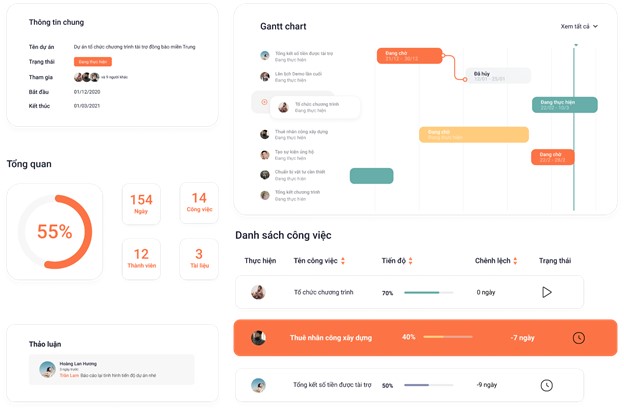
With 1Office work management software, you can easily manage, assign tasks, plan, and track the progress of work and projects on a single platform. This helps managers monitor employee work progress quickly and effectively.
The benefits of 1Office workload management software:
1. Understand your team’s capacity when managing workloads
Understanding your team’s capacity is the solid foundation for effective workload management.
Let’s see how you can set up a workload management system for your team:
a. Create a task list for every project
Start by listing all the business processes for every project your team is handling.
Then, break down each task to make it more manageable.
Make sure you list all tasks, regardless of their importance.
This can include administrative tasks like managing inboxes, document creation processes, and even the daily coffee run!
Adding these tasks will help you get a clear picture of the actual workload.
Finally, organize each group of tasks into separate categories by project or department.
b. Make an assessment
‘Workload management’ doesn’t mean assigning an equal amount of work to every employee. Each individual has a different working style and skill set; some can perform technical tasks, while others cannot.
What you need to do is assess each team member’s capacity to handle their workload.
So what’s the best way to do this?
The best way to do this is simply to gather feedback from your employees.
Ask each team member individually how they feel about their current workload and whether they can handle more or fewer tasks. You can use automatic team work management software to help you assign and manage each member’s tasks easily and effectively.
c. Focus on priority tasks
Not all tasks are equally important.
That’s why you need to learn how to prioritize.
Identify the tasks or jobs that need to be done as soon as possible.
2. Assign the work
After you’ve finished your workload management plan, it’s time to assign the work, right?
But wait… not so fast.
There are a few things you need to do before you start assigning tasks:
a. Assign workloads intelligently
The key to smart workload management is assigning the right task to the right person.
Make sure you know the skills, personality, and strengths of each team member before you start scheduling work.
The requirements of each task should match the strengths of each team member. The more comfortable they feel with the task, the higher their productivity will be.
It’s as simple as that!
Bonus Tip: When assigning a task to a team member, let them know why they were chosen for it. This makes the work more meaningful and engaging.
b. Assign tasks effectively
The first thing you must do is assign priority tasks to employees. Once that step is handled, you can assign the rest. After assigning tasks, set a start time and a due date for each member. However, manage deadlines reasonably to avoid scheduling conflicts.

- Assigning tasks to employees during work implementation

3. Enhance team collaboration and communication
While we may have forgotten how to solve an 8th-grade calculus problem, here’s a formula you must remember:
Workload Management = Stress Management
The less stress, the more manageable the workload.
So, what’s the biggest stressor in the workplace?
It’s the lack of communication and collaboration.
Fortunately, there are two ways you can address this issue:
a. Check in regularly
Team members can still experience stress, even with a good workload management plan in place.
So how do you lighten their workload?
Consider scheduling regular one-on-one meetings with team members to discuss their workloads.
If an employee feels overwhelmed, see which team member has the capacity to help with the extra work.
b. Foster collaboration among employees
There’s nothing more frustrating than sending an important message to team members and not getting a response for hours.
Messages that aren’t communicated promptly will slow down your progress, making it difficult to manage the existing workload.
4. Increase team efficiency to handle heavy workloads
During a project’s lifecycle, there will be times when your team has to deal with a heavy workload.
But don’t worry, we have solutions that can fix this problem before it happens:
a. Consider automating routine/repetitive tasks
The easiest way to reduce the actual workload is to identify routine tasks that can be automated. In fact, companies can save up to 2 hours per day by automating their workload!
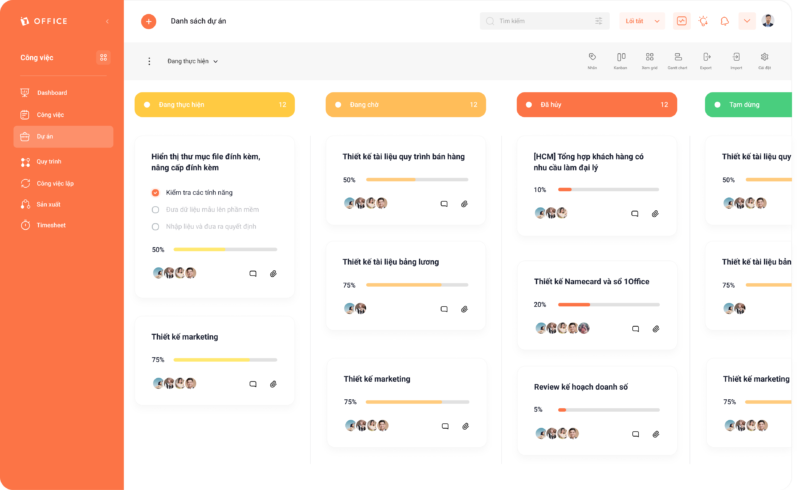
b. Standardize workflows with Kanban
A Kanban board is a simple yet highly effective tool for ensuring business processes run smoothly.
How does a Kanban board work?
It visualizes project workflows and displays the status of each task on a task board in a scientific and easy-to-follow manner.

- Manage project progress on the Kanban screen
But that’s not all:
Project managers can also identify which tasks are delayed and find bottlenecks in the process. They can then allocate resources (to team members) appropriately to get the job done.
c. Track work performance with a Dashboard screen
Once you’ve set up an effective workload management system, there’s only one thing left to do: track your team’s performance.
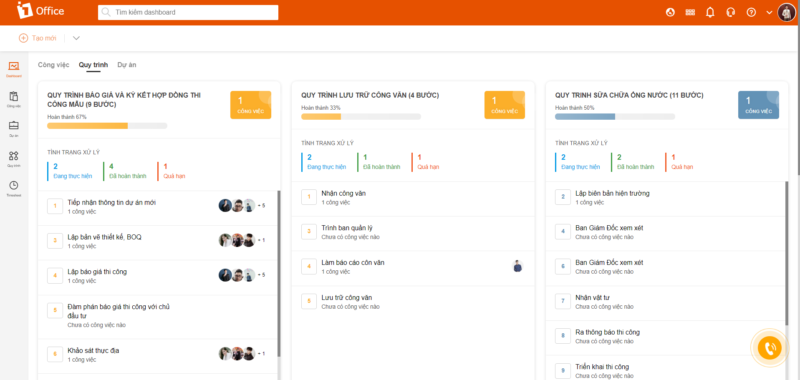
To do that, all you need is the 1Office Dashboard. The Dashboard acts as a task control center where you can manage and track your team’s work progress. It allows for the aggregation of various widget types like line charts, pie charts, bar charts, etc. Each type will measure the metrics you set up!
You also have access to small widget items in the task report section to get detailed information on how the team organizes and manages work.

- Manage work progress with the 1Office screen
It’s a great way to protect your team’s well-being when they’re facing an overwhelming workload. Not only that, but it also helps them increase their productivity quickly! However, managing workloads manually is a tough pill to swallow.
You need a ‘Workload Management’ tool to handle all the heavy lifting like assigning workloads, tracking team progress, creating reports, and more.
Fortunately, we have the 1Office platform – a comprehensive total business management system that helps business leaders easily solve problems related to people and performance. 1OFFICE provides managers with an incredibly effective overall management tool, helping both managers and employees easily plan, schedule, and prioritize important tasks. Task assignment will be more scientific and efficient, avoiding situations where one person is overloaded with work while another has nothing to do.
Learn more about the convenience and amazing features of 1Office here: https://1office.vn/
Register for a consultation: 083 483 8888
For more detailed information, please visit:
Fanpage: https://www.facebook.com/1officevn/
Youtube: https://www.youtube.com/channel/UCeTIRNqxaTwk0_kcTw6SxmA

















