


 13/05/2026
  182 views
1Office sincerely thanks our valued customers for their trust and use of our services over the past time.With the goal of improving product quality and providing our customers with a better experience, we are constantly researching and developing new features. In this upgrade, 1Office is updating several new features for the CRM module, including: sales, customer management, purchasing, warehouse, and suppliers.
I. SALES
- Added a keyword for ‘unit price after discount’ for each product in sales orders, purchase orders, and contracts for exporting to templates.
- Apply promotions to quotations.
- Added product descriptions directly under the product name in the details of sales contracts, sales orders, and quotations.
- Allow the person in charge of an order to edit the order, and the person in charge of a contract to edit the contract.
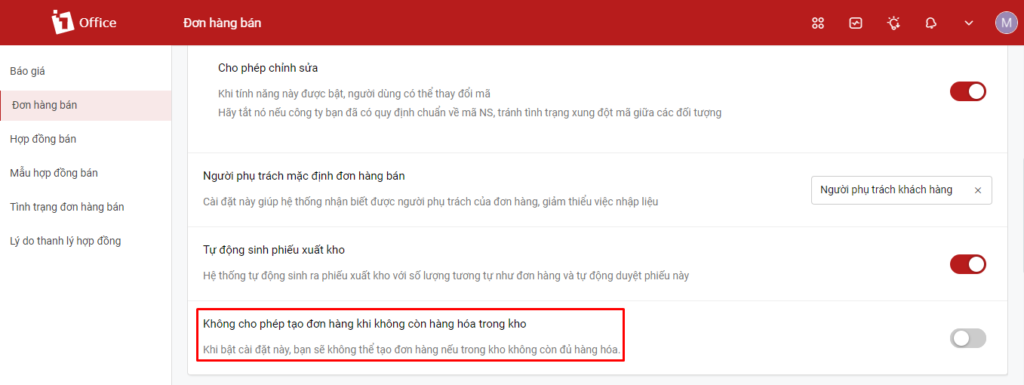
- Added a setting in Sales Orders/Contracts: Allow creating an order/contract when there is insufficient stock in the warehouse.
- Settings: In the left menu, the settings for Quotations, Sales Orders, and Sales Contracts have been consolidated into 2 screens.
- Sales Orders: Automatically generate Inventory Issue Slips; this option is only displayed when creating a new order;
- Added a discount field for the total order value, which is now a default, always-visible field.
- Revenue: Separated into Revenue before VAT and Revenue after VAT, and saved to the timekeeping module.
- Promotions: Allow applying multiple promotional programs.
II. CUSTOMERS
- Customer Settings: Added a setting to Allow multiple people to be in charge at the same time and a setting to control whether the Person in charge is allowed to edit customer information.
- In the Customer Details screen => Transaction History tab: Quotations have been removed. This tab now only shows debts from orders and contracts. Quotations have been moved to a ‘Related Quotations’ section in the customer’s General Information tab.
- When a contact is converted into an Opportunity, nurturing the opportunity also counts as nurturing the contact. The last nurturing activity for the contact is saved based on the opportunity to prevent it from becoming an unassigned contact.
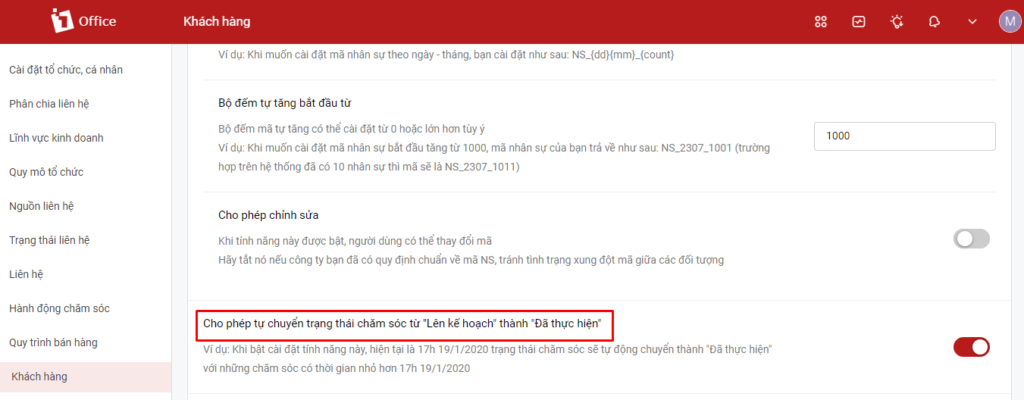
- Added nurturing setting: Automatically change the nurturing status to ‘Completed’ when the scheduled time has passed.
III. PURCHASING
Automatically create inventory receipts from purchase orders: A new checkbox allows you to choose whether to automatically create an inventory receipt from a purchase order. If checked, after the purchase order is approved, the system will automatically generate a receipt for the goods into your selected warehouse.
Purchase Orders: Allow configuring purchase orders with VAT and Tax types, similar to sales orders.
Purchase Requisition: This is a new feature that allows users to submit requests for necessary goods to their superiors. Once the requisition is approved, a purchase order can be created directly from it.
View the user guide at: https://1office.vn/support_feature/de-xuat-mua-hang/
IV. WAREHOUSE
- Allow entering product serial/IMEI numbers directly during goods receipt.
- When importing inventory receipts, you can now receive products that do not yet exist in the system.
- When creating an inventory issue slip, a new checkbox allows issuing from multiple warehouses. If enabled, you can select the issuing warehouse for each individual product.
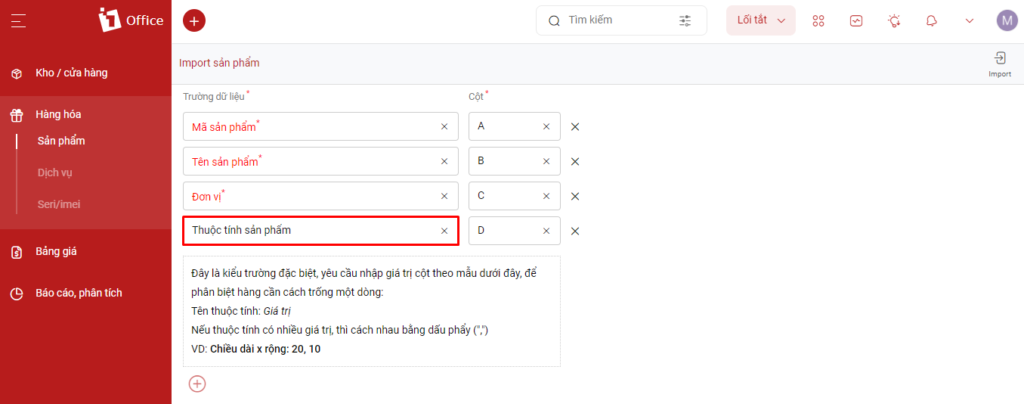
- Product attributes are now supported when importing products.
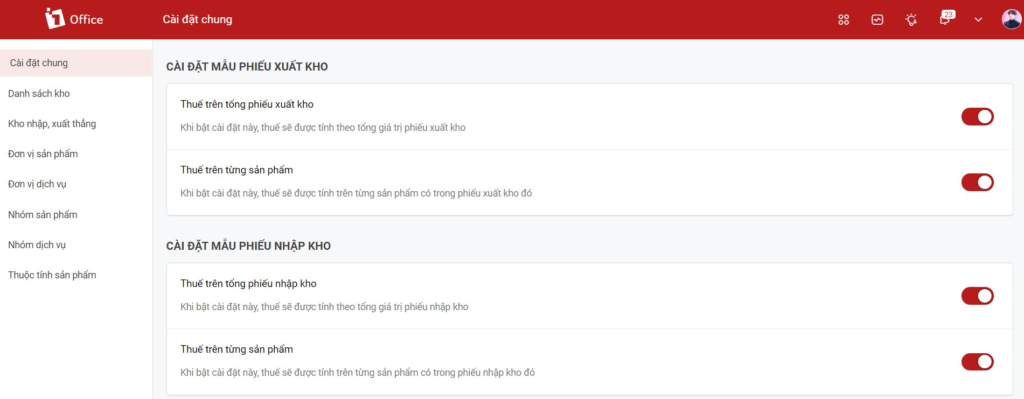
- Add tax calculation settings for inventory issue/receipt slips in Settings, including 2 types: Tax on total slip and Tax on each product.
6. Forms for Purchase/Sales Orders, Inventory Issue/Receipt/Transfer Slips -> When creating a new form related to a project, allow using the Project Name keyword for printing.
7. In the Purchase Order approval process, add the Product Group condition, allowing users to set up the approval process based on the order’s Product Group.
8. Add the Warehouse Manager field in warehouse settings to limit which warehouses can be managed.
9. When creating a new contact, add a “Belongs to contact” field to allow creating a contact that belongs to another contact: Individual belonging to an organization, Organization belonging to an organization.
10. Allow displaying care content when viewing the details of a care activity. Currently, care content can only be viewed from the care list.
11. When creating a new Quote => select product: the total inventory stock will be displayed under each product.
12. Inventory Issue Slip list: Add a serial number column.
13. Add a Materials Report to the Purchase Requisition object, which retrieves all orders and issue slips for each requested item.
14. Inventory Transfer Slip:
- Allow multi-warehouse transfer: When creating a new Inventory Transfer Slip, add a radio button to “Allow multi-warehouse transfer.” When selected, each product line will have an additional field to choose a warehouse.
- Add a field for the deliverer or receiver for reporting purposes.
V. SUPPLIERS
Remove the “Supplied Goods” field; users can add notes in the description when necessary.
Allow adding new Credit balances to supplier liabilities (Currently, only Debit balances can be added);
Liabilities: In the left menu, move the Liabilities object to be a child object of Suppliers.
These are the new features upgraded by 1Office in the CRM module. We will continue to research, upgrade, and add more new features in the future.
1Office hopes to bring many new experiences to the customers who trust and use the 1Office application – The comprehensive business management solution.
















