


[1OFFICE] NEW FEATURE UPGRADES FOR OBJECTS IN THE HRM MODULE


With the desire to improve product quality and provide our valued customers with a better experience, we are constantly researching and developing new features. In this upgrade, 1Office has updated several new features for objects within the HRM module: Recruitment, Personnel, Timekeeping, Payroll, and some other features.
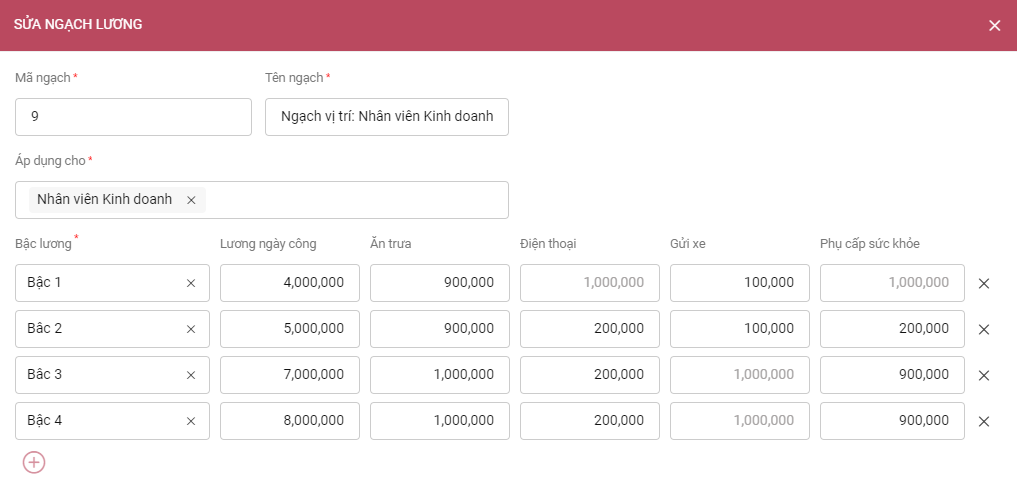
I. GRADE – STEP:
Grade – Step is a new feature that allows managers to set up Grades and Steps corresponding to salary levels and allowances. When creating a new Employee Profile, the system will automatically fill in the salary and allowance levels corresponding to the Grade – Step selected for that employee.
II. REWARDS – DISCIPLINE:
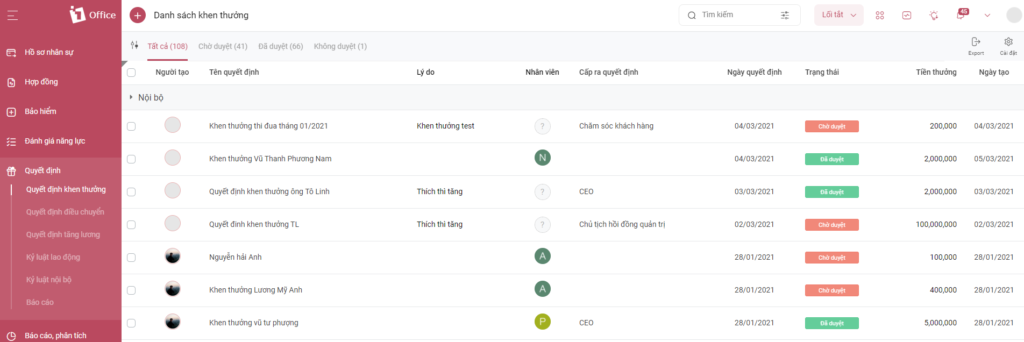
The object has been renamed to DECISION, which includes 5 types of decisions:
- Reward decision
- Department transfer decision
- Salary increase decision
- Labor discipline
- Internal discipline
III. HRM UPGRADES:
- Requests:
- Business trip requests now allow selecting domestic/international trips and link to timekeeping.
- Added related objects for Overtime, Leave, and Business Trip requests. Related objects include: projects, tasks, process tasks, customers, sales contracts, sales orders.
- Recruitment:
- When converting a Candidate Profile to an Employee Profile, attached files will also be saved to the Employee Profile.
- The Candidate Profile API has been updated to accept file attachments.
- Performance Review:
- When evaluating candidates, competencies, or KPIs, you can now add notes during the evaluation process.
- The score calculation formula and importance level sections have been removed when creating a Review Template. The system will now automatically calculate based on a default formula.
- When creating a template/review period, you can now allow reviewers to evaluate criteria with equal weighting and choose between parallel or sequential scoring. Specifically:
- Equal weighting: The system will automatically distribute 100% weight equally among all criteria;
- Parallel scoring: Among the 3 reviewing parties (Employee, Manager, Director), anyone can score first.
- Sequential scoring: The 3 reviewing parties must score in a specific order: Employee – Manager – Board of Directors.
- Personnel:
- Added Start date and Termination date fields to the list of employees participating in insurance.
- Employees on maternity leave will no longer appear on the payroll.
- Added a Pending start status in Employee Profiles.
- Added grouping options on the Employee Profile list screen.
- Competency Review: You can now create a review period from the ‘Create New’ action (previously, it could only be created from a Review Template).
- Added fields to manage dependents: Dependency period, Tax code of the dependent.
- Applied an approval process to labor contracts: Only when a contract is approved will all information be updated in related objects such as: Work history, salary, allowances…
- Added new statuses: Long-term unpaid leave; Short-term/long-term military service leave.
- In Employee Profile details: Added the competency review results for that employee.
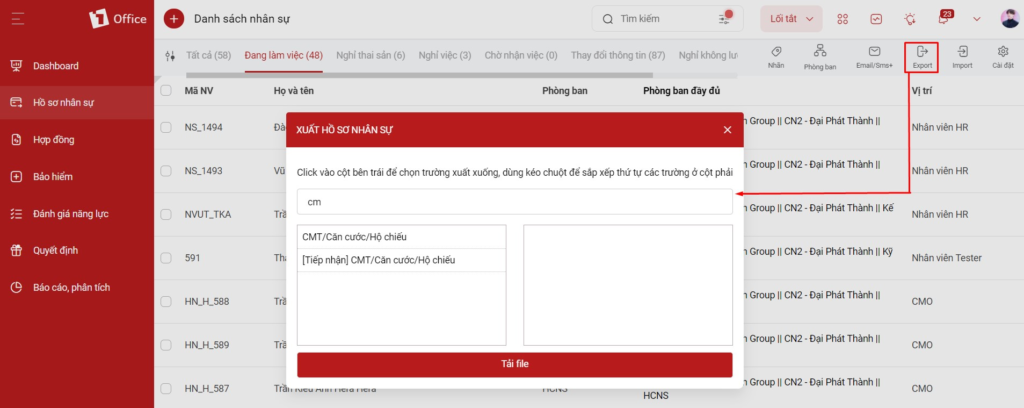
- When exporting or selecting columns to display in the list, you can now Search for the fields you want to export, instead of having to drag and select as before:
- When exporting Work Time in Timekeeping, you can select the columns to export, instead of exporting according to the system’s fixed columns.
- Transfer decision: Add a Reason field, allowing the setup of a Transfer Reason.
- Smart alerts: Allow setting up the Notification receiving time for target alerts.
- In the Request Report section of Timekeeping, add an Overtime Request Report type to extract overtime requests for work credit and for compensatory leave.
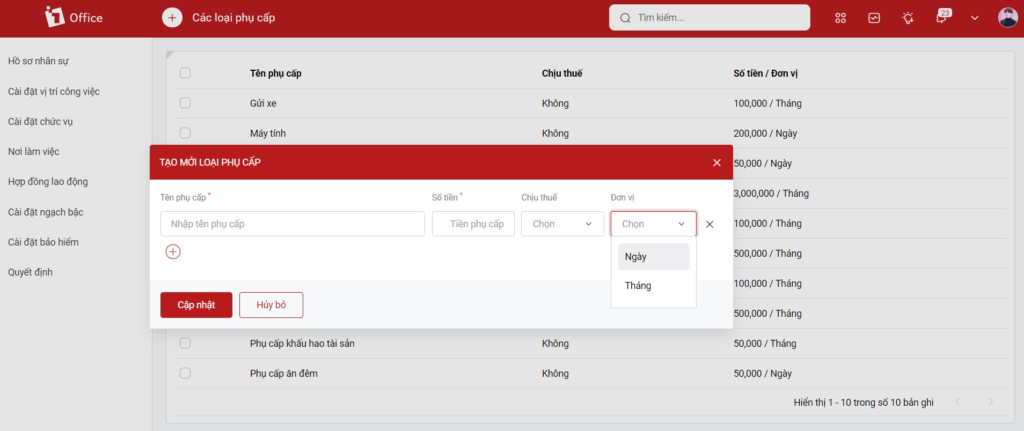
- Allowance settings: Add a “Unit” field in allowance types and the “unit” list keyword to export to employee profile and labor contract templates.
- Allow performing Edit/Delete actions for candidates who have been converted to Employee Profiles. This edited/deleted information will not affect the information in the Employee Profile.
- In the shift assignment table, add a Standard Workdays column. When the assigned workdays are greater than the standard, a warning will be highlighted.
- In the Employee Profile and Contract template settings, add more keywords to extract each type of allowance.
- Timekeeping:
- For the personal timesheet: highlight public holidays.
- Warning in the timesheet when an employee has a fingerprint scan but does not have an assigned work shift.
- Personal timesheet: Display the work shift so employees can see their assigned shift.
- Leave:
- Add an Effective Period setting for leave policies.
- Rename the Leave reason to Annual Leave, and disallow editing the reason name.
- Grade – Step Settings:
- Remove the Salary Step setting.
- Combine Salary Grade and rank settings into a single Grade – Step Settings screen, allowing the setup of salary types for each grade (currently defaults to Daily Wage).
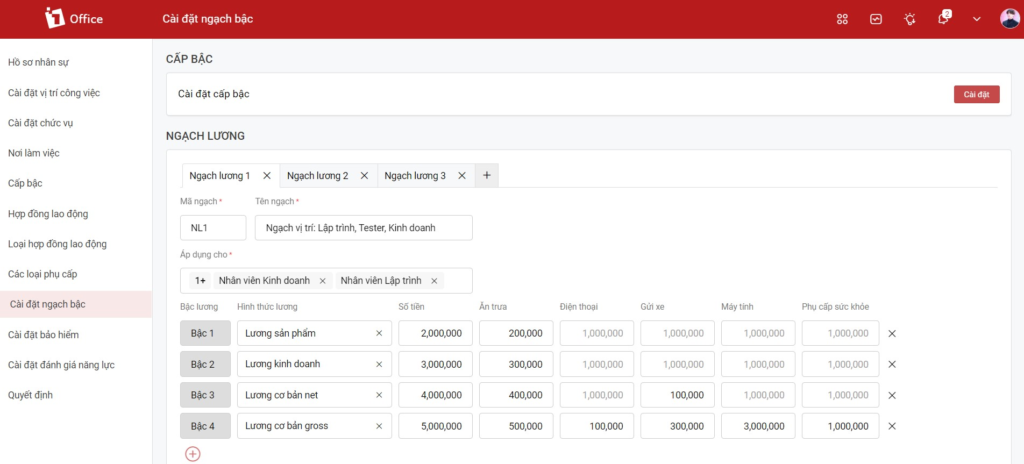
- When setting up a Salary Grade, you can select each salary type with its corresponding amount, instead of being fixed to Daily Wage as it is now.
- Decisions:
- The decision types in the left menu will be moved into the screen title, allowing users to select and view by type (similar to requests);
- The Internal Disciplinary Decision will become an action within the Employee Profile.
- Training:
- Remove sample training courses; create training courses directly. There will be 2 training formats:
- Mandatory training: This is a pre-existing format on 1Office;
- Training registration: When this format is selected, individuals eligible to register for the training course will receive a notification. Personnel must register before the deadline to be able to participate in the training course.
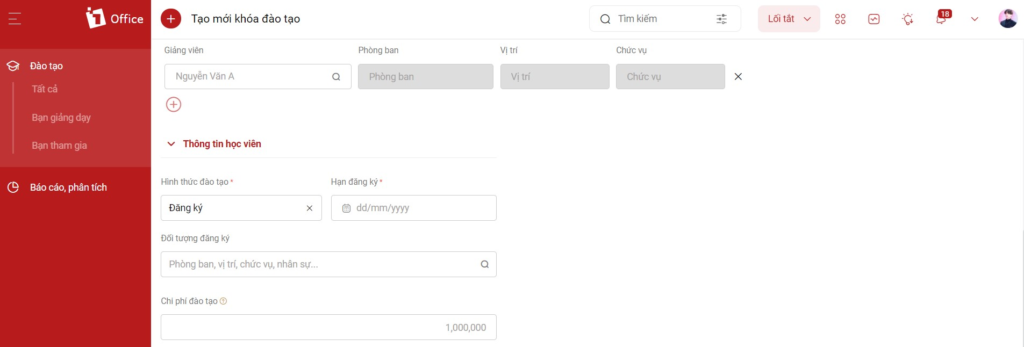
- Allows importing training courses.
- Other upgrades:
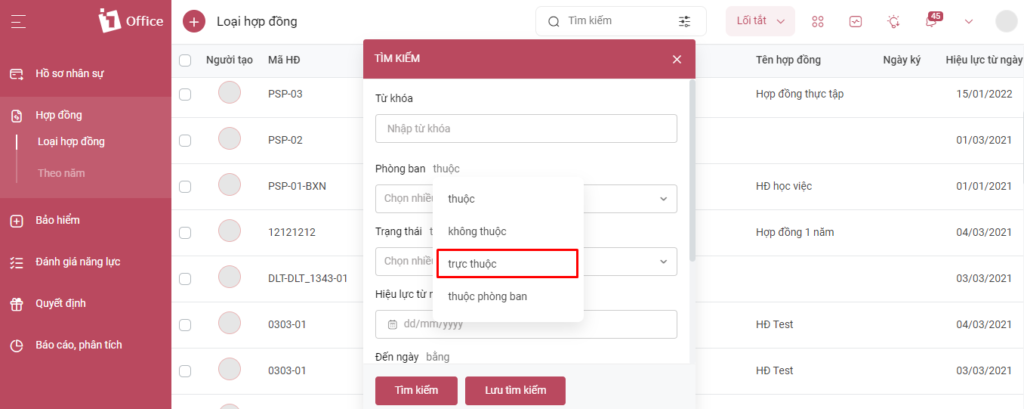
- In the filter, add an “Under Direct Management” option, so that when searching for parent objects, records belonging to child objects will not be displayed.
- Add a System Settings section on the Mobile App platform.
- Add permissions for the recruitment module and KPI evaluation by department, branch, and company.
- Work shift settings: allows importing work shifts. Within each shift, you can select the applicable personnel.
- Allows deleting the import history for objects.
- Link interview and candidate care schedules to the calendar module.
These are the new features upgraded by 1Office in the HRM module. In addition, we will continue to research, upgrade, and add many new features in the future.
1Office hopes to bring many new experiences to the customers who trust and use the 1Office application – The all-in-one business management solution.




