


 13/05/2026
  202 views
Dear Valued Customers,
To improve service quality and ensure the 1Office product project progresses effectively, bringing great value to our customers.
We would like to formally announce the “Upgrade of Timekeeping, Payroll, and Evaluation in October 2020”.
Time: 18:00 10/09/2020
Mục lục
I. 1Office updates the latest changes to the Recruitment module
1. Recruitment campaign
In practice, recruiters often face challenges in consolidating and screening the number of candidates, as well as tracking recruitment costs for each campaign. Understanding this, the 1Office product development team has added a Statistics tab to the Recruitment campaign details. This tab records the number of candidates and the cost associated with each Source, giving users a comprehensive overview.
Additionally, 1Office has removed the Recruitment Portal tab to display the portals in the General Information section.
2. Interview schedule
Users can set the default screen to a calendar view and have the option to switch to a list view. Furthermore, to help users prepare better, 1Office has added the ability to attach the CV of each candidate participating in the interview to each interview schedule.
3. Candidate profile
In this section, 1Office has added a feature to send an Offer Letter from the Candidate Profile details. For candidates with a “Hired” status, a “Send Offer Letter” action will be available in their profile details, allowing managers to send offer levels and accompanying information to the candidate. After the email is sent, the candidate confirms by selecting “Accept/Decline,” and the result is updated directly in the software, saving time and effort for the Recruitment department.
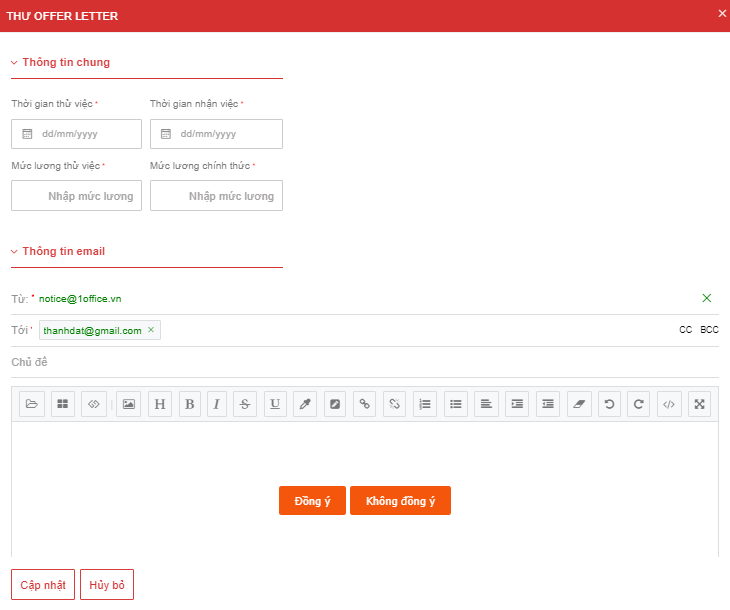
Added the Send Offer Letter feature in the Candidate Profile details
II. Upgrades to Timekeeping, Payroll, and Evaluation
1. Timekeeping – Payroll
1Office has separated Timekeeping and Payroll from HR into two distinct modules. The Timekeeping section includes information on time tracking and leave-offset management. 1Office has updated the descriptions for timekeeping settings to help users understand the meaning of each setting and added a formula checker for when setting up timekeeping formulas.
The Payroll section includes “Payroll Type, Payroll”. In the payroll details, 1Office has added a statistics tab by Position and Department to summarize the total value of each column for each department and position. Additionally, 1Office has added a formula check task and a Consolidated Value field when setting up a payroll type.
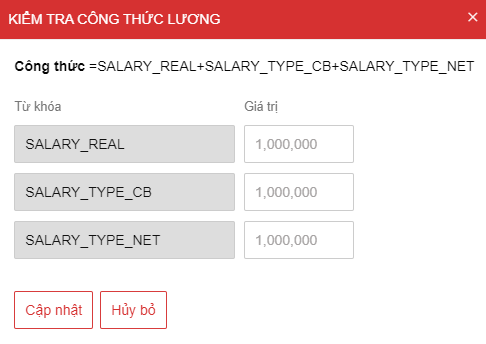
Added a formula check task and a Consolidated Value field when setting up a payroll type
2. Competency evaluation
To provide recruiters with a more intuitive and detailed view for evaluating personnel, 1Office has added settings for the Competency Evaluation section.
In this settings section, users will set up a scoring formula based on keywords available in the system:
- Standard score
- Self-evaluation score
- Manager evaluation score
- Board of Directors evaluation score
- Renamed some keywords. For example: SUM_TIEUCHUAN => TONGDIEMTIEUCHUAN
Additionally, 1Office has renamed the Evaluation Criteria section to Competency Library. Furthermore, when users create an evaluation template, the formula setup section will no longer be present (this has been moved to Settings).
The Competency Evaluation Table has been renamed to Create Evaluation Period. On this new creation screen, the scoring formula corresponding to the evaluator will be displayed, and users can flexibly edit the formula. The evaluation criteria are displayed by row, and the names of the evaluated employees are displayed by column in the Evaluation Results section.
3. KPI evaluation
In the KPI list, 1Office has added a checkbox for creating a new single KPI. This allows setting its status to active or inactive.
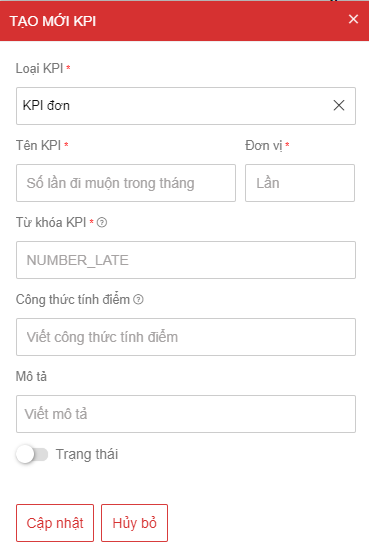
Added a checkbox for creating a new single KPI
The Sample KPI Table has been renamed to Evaluation Template. The system has moved the Evaluator section to the General Information section. Additionally, General Information and Criteria will no longer be in two separate tabs but will be merged into the General Information screen, with an added field for Description of scoring method for each criterion. In the Evaluation Period, users can create a new period directly instead of only from an Evaluation Template.
III. Other features
In the Payroll Type section, 1Office has added permissions for Payroll Type: Create new and Manage all.
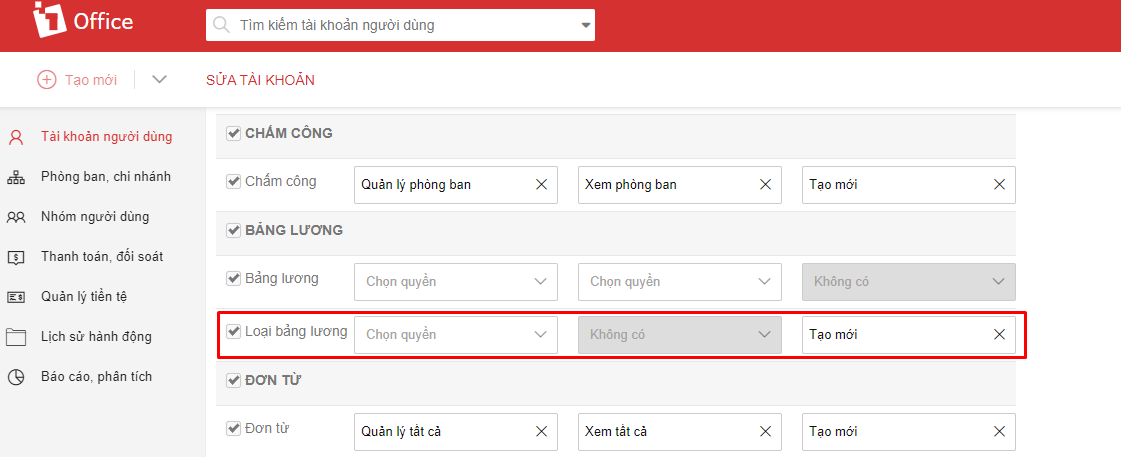
Added permissions for Payroll Type: Create new and Manage all
We hope that with these new feature updates, 1Office will help make your work easier. Don’t forget to follow 1Office to stay updated on new features and apply them to your work to achieve the best performance!
















