


 11/05/2026
  694 views
Sales is a crucial part of any business operation, helping companies grow while building a strong customer base. Therefore, building a sales process helps you reach potential customers, increase sales, and nurture your relationships with consumers. So, how do you build a sales process diagram for maximum efficiency, and what solutions can help businesses accelerate their sales process? Let’s explore this in the content below.
Mục lục
- I. General Overview of a Sales Process Diagram
- II. 7 Steps to Building a Sales Process Diagram
- III. Types of Sales Process Diagrams
- IV. Key KPIs to Track in the Sales Process
- V. Handling Situations & Risk Management in the Sales Process
- VI. Automating the Sales Process Flowchart with 1Office CRM
- VII. Frequently Asked Questions
I. General Overview of a Sales Process Diagram
1. What is a sales process diagram?
A sales process is a defined set of steps for a salesperson to move a customer through the sales funnel, leading to a sale. Typically, companies standardize transactions across the entire sales department so that the whole team uses the same set of steps. Most sales processes are 5 to 7 steps long, and they can vary depending on the industry or company. In short, the sales steps begin with contacting a potential customer and end after the salesperson closes the deal.
2. Why do businesses need a sales process diagram?
To sell successfully, a business must build a sales process that fits its scale and products. Creating a standard sales process will bring many significant benefits to the business, such as:
- Understand sales nuances: Establishing a clear and consistent sales process helps you understand the nuances of your sales and evaluate overall effectiveness.
- Improvement strategy: When all salespeople follow the same process, you can clearly see which steps frequently present challenges and which provide value. This allows you to quickly improve the sales process.
- Increase sales: A sales process leads to more sales. Salespeople know what they need to do to support customers, and customers have the time and space to decide when they are ready to buy.
- Bring efficiency: A sales process increases overall sales efficiency by eliminating unnecessary steps and tactics, focusing entirely on effective strategies.
- Clarity: A sales process provides clarity for the entire sales team. You can rely on your fellow salespeople for guidance or support because they follow the same process of moving customers through the sales funnel as you do.
- Minimize challenges: An effective sales process makes it easy to identify challenges in the sales steps. Team members or supervisors can work to alleviate those challenges and increase the sales department’s effectiveness.
- Provide a good customer experience: Customers are often happier making a large purchase through a sales process than without one. They know what to expect and feel less pressure compared to salespeople who skip important relationship-building steps in the sales process.
With the benefits above, building a sales process diagram helps managers understand each step in the sales process. Applying the Canvas business model to the sales process is favored by many organizations. It helps businesses quickly build a group of potential customers and easily optimize sales revenue. So, how many steps does a sales process consist of? Let’s find out in the article below:
II. 7 Steps to Building a Sales Process Diagram
A sales process provides salespeople with clear guidance and structure for customer interactions. Depending on the scale and industry, businesses may have different sales process steps. However, most common sales processes consist of the following 7 steps:
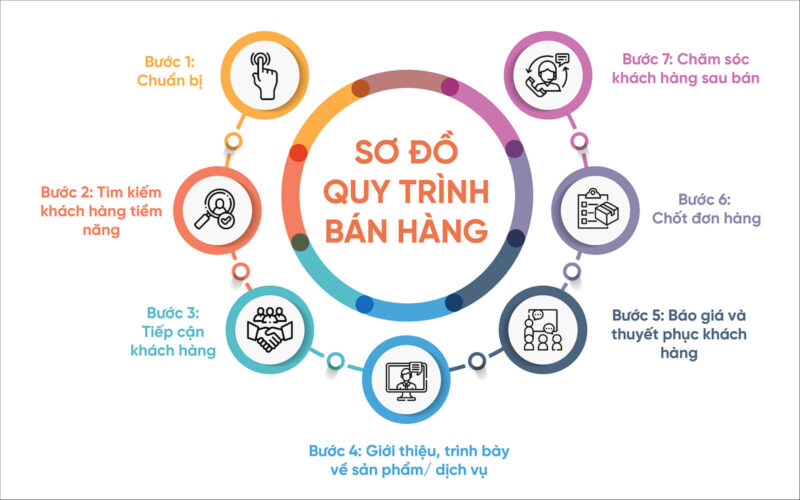
Step 1: Preparation
Before making initial contact with a potential customer, you need to have all your information ready, such as product descriptions, pricing, payment options, competitor prices, and specific sales dates. You also want to know as much as possible about your potential customers to better connect with them.
This stage of the sales process diagram may also involve preparing your initial sales presentation. Be ready to answer any questions your potential customers may have with supporting data. Practice what you will say out loud and have someone ask you potential questions so you can practice your responses.
Read now: The process of building a sales plan and common problems encountered
Step 2: Prospecting for Potential Customers
Prospecting involves finding and identifying potential buyers or customers. At this stage, you determine whether your potential customers have a specific need or desire that your business can fulfill. You can also assess various factors such as their ability to pay.
This stage of the sales process often involves research to identify your ideal customer. You can start by creating a list of prospects or potential customers. Based on criteria, you can filter them using qualifying questions, such as whether they are business owners or homeowners, or if their average monthly profit or income aligns with the product’s price. This helps narrow down the group of buyers within a specific customer segment.
Step 3: Approaching the Customer
This is a crucial step in the sales process diagram that both sales staff and managers need to prepare for carefully. During the approach stage of the sales process, you will make your first personal contact with your prospect or potential customer. This step involves getting the buyer or prospect to interact with you by personalizing your meeting or establishing a rapport. Ask questions to engage the customer in the conversation.

Step 4: Presenting the Product/Service
At this point in the sales process, you have established an understanding of your prospect’s individual needs and wants. You can present to the customer with an in-depth presentation or demonstration with examples and slideshows, while others may simply chat with their prospects to build rapport and answer any questions. To complete this step effectively, focus on personalizing it and framing your product as a solution to their problem.
Step 5: Handling Objections, Quoting, and Persuading the Customer
After conversing and gathering customer information, this is the decisive stage for persuading the customer to buy. Typically, most customers will have objections regarding the product’s price. At this point, the easiest way to persuade them is to emphasize that the benefits the product provides far outweigh the cost. It’s important to actually ask the prospect if they want to make the purchase and ensure they fully understand all the terms of the sale.
Step 6: Closing the Deal
At this stage, once the deal is successfully closed, you can apply techniques to upsell additional products to complement the initial purchase, upgrades, or premium versions of your product. After completing the transaction, always thank the customer and make sure not to disconnect immediately. Additionally, salespeople can use tactics to entice prospects to close, such as offering benefits like free gifts or service time, creating a sense of urgency, or asking the customer how they would like to schedule payment.
Step 7: Post-Sale Customer Care
Following up and managing customer care after the sale is one of the crucial steps in the sales process diagram. It is the continuation of the relationship between the seller and the buyer to ensure customer satisfaction, maintain customer loyalty, and help generate new customer prospects. The idea is not to continue selling during this stage, but rather to nurture the existing relationship. You can send a thank-you note or call the customer to ask about their experience with their product or service. Additionally, you can ask the customer to review your service.
The follow-up might involve sending a thank-you note or calling the customer to ask about their experience with their new product or service. You can also ask the customer to review your service or leave a review on your social media or business page. When done well, this stage can often lead you back to step one of the sales process with additional sales, referrals, or reviews that bring you new customers.
Learn about 1Office, the leading process automation software
III. Types of Sales Process Diagrams
There are two main types of sales in a sales process diagram: business-to-business (B2B) and business-to-consumer (B2C). Understanding the similarities and differences between these sales types can help you improve your use of the sales process when approaching potential customers.
B2B Sales
B2B sales involve selling products or services to other businesses. When you work in B2B sales, you often work with a professional buyer who is very familiar with the sales process. Examples of the B2B sales process include:
- Wholesale: A coffee bean producer sells a large quantity of coffee beans to a coffee shop, which then sells those beans in smaller quantities to consumers.
- Supplies: A paper goods company sells paper cups and napkins to restaurants.
- Services: A marketing firm works with businesses to increase their online presence.
B2C Sales
B2C sales involve selling products or services to consumers. The B2C sales process is often much shorter, with many customers making a purchase immediately after the research phase.
An example of B2C sales is a representative selling a laptop to a customer at a tech store. Another example, which often involves more research and prospecting, is an insurance agent selling a life insurance policy to an individual.
IV. Key KPIs to Track in the Sales Process
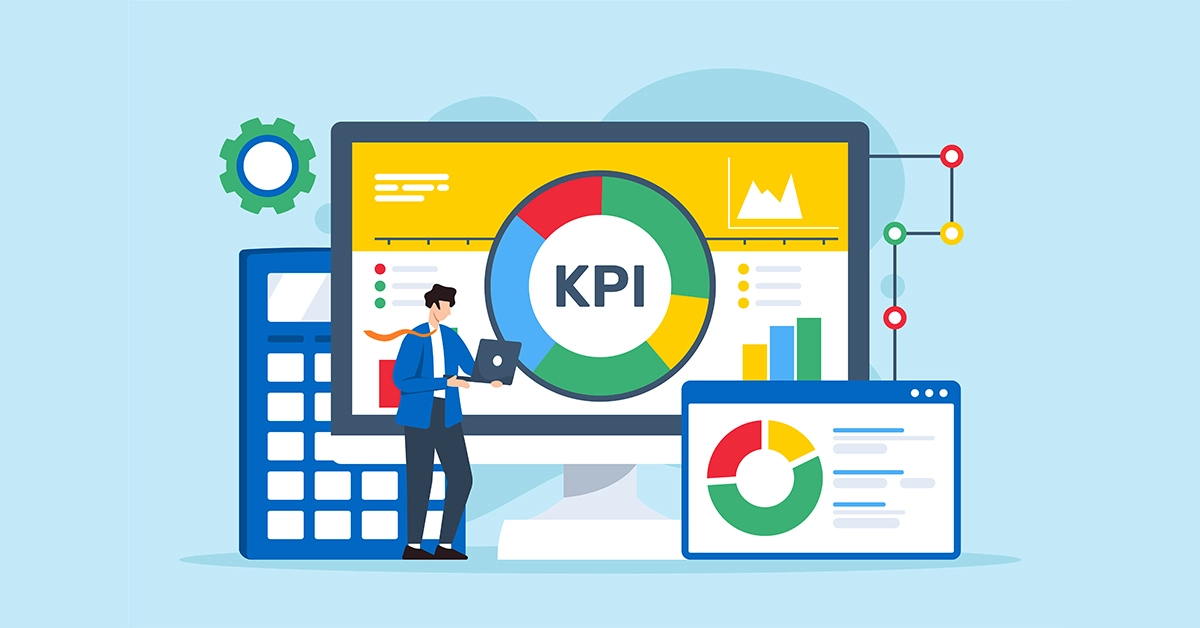
To evaluate the effectiveness of the sales process, businesses cannot just look at the final revenue. It’s crucial to track each “health indicator” (KPI) at different stages, from outreach to closing the deal and post-sales care. The following metrics serve as a foundation:
1. Conversion Rate Between Stages
This metric reflects how many potential customers actually move from one stage to the next in the sales process. If this rate is low, it indicates a problem at a specific stage.
-
Significance: Helps identify “leaks” (bottlenecks) in the sales funnel.
-
How to measure: (Number of customers moving to the next stage) / (Total number of customers in the previous stage).
-
Example: Out of 1,000 potential customers → 200 are successfully contacted → 50 receive a quote → 20 sign a contract. The overall conversion rate is only 2%, but a closer analysis might reveal the problem lies in the “quote → contract signed” stage.
2. Average Time per Stage
The time it takes for a customer to move from one stage to the next is also a crucial metric.
-
Significance: The shorter the time, the more streamlined the sales cycle, which helps reduce costs and improve efficiency.
-
Application: Compare against industry or internal benchmarks to identify delays.
-
Example: If the average time from demo to contract signing in the B2B software industry is 30 days, but your company takes 60 days, the issue might stem from the negotiation phase or the contract approval process.
3. Average Order Value (AOV)
It’s not just the “number of orders” that matters; the average value of each order is also important.
-
Significance: A direct measure that impacts revenue.
-
How to improve:
-
Increase order value through upselling (upgrading to a higher plan).
-
Cross-selling (suggesting complementary products).
-
Creating product combos/bundles.
-
-
Example: If the current AOV is 800,000 VND/order, just a 10% increase through upselling can yield significant profits when multiplied by thousands of orders.
4. Customer Return / Referral Rate
A customer’s value isn’t limited to their first purchase. When they return or refer friends and colleagues, it becomes a source of sustainable profit.
-
Significance: Measures satisfaction and loyalty.
-
How to measure: Track the number of repeat customers over a specific period, or use the Net Promoter Score (NPS).
-
Example: If 30% of customers return within 6 months, the cost of retaining this group is much lower than constantly acquiring new customers.
5. CAC & LTV
-
CAC (Customer Acquisition Cost): The average cost to acquire a new customer (total marketing + sales costs divided by the number of new customers).
-
LTV (Customer Lifetime Value): The total net profit expected from a customer throughout their entire relationship with the company.
By comparing the LTV/CAC ratio, a business can determine if its growth is sustainable.
-
Recommended benchmark: LTV/CAC ≥ 3.
-
For example: If CAC = 2 million, LTV = 8 million → LTV/CAC = 4 → the sales and customer care strategy is effective.
V. Handling Situations & Risk Management in the Sales Process
Even with a well-designed process, businesses often face unexpected risks. Preparing response plans in advance helps the sales team be proactive and minimize losses.
1. When a customer refuses / delays
This is the most common situation in the sales process, especially at the deal-closing stage.
Common causes:
-
The price is higher than expected.
-
Not enough trust in the business or product.
-
Doesn’t feel an urgent need.
-
Needs more time to research and compare with competitors.
Solutions:
-
Equip the entire sales team with objection handling scripts.
-
Provide social proof: case studies, feedback from previous customers, real data.
-
Focus on exploring the customer’s “pain points” and demonstrating the value of the solution.
-
Propose flexible options: trial packages, free demos, installment payment plans.
2. When lead information is missing / incorrect
Low-quality or mistargeted leads waste the sales team’s time and reduce conversion rates.
Consequences:
-
Wasted effort approaching the wrong people.
-
Difficulty tracking the customer journey.
-
Reduced overall effectiveness of the sales pipeline.
Solutions:
-
Standardize data from the beginning with a CRM integrated with registration forms, landing pages, and telesales.
-
Verify information through multiple channels: combine phone calls, email verification, or social profiles.
-
Set up a lead scoring system to assess potential before assigning to the sales team.
3. When competitors offer steep discounts
In a competitive business environment, competing on price can lead to a “war of attrition” that reduces profits.
Challenges:
-
Easily drawn into matching competitor discounts.
-
Customers focus only on cost instead of value.
-
Profit margins drop sharply, affecting reinvestment.
Solutions:
-
Differentiate through value: after-sales service, customer experience, warranties, reputable brand.
-
Create multiple service packages (basic – standard – premium) to suit different customer groups.
-
Train the sales team to emphasize ROI and long-term benefits, rather than just focusing on the sales price.
-
Combine upsell/cross-sell strategies to optimize revenue per customer.
4. When the sales team does not follow the process
A process is only effective when implemented consistently. If the sales team skips or incorrectly follows the process, overall efficiency will be affected.
Causes:
-
The process is complex and impractical.
-
Employees are not trained or lack supporting tools.
-
Lack of monitoring and incentive mechanisms.
Solutions:
-
Simplify the process and build a clear SOP (Standard Operating Procedure).
-
Organize periodic training and 1-on-1 coaching, especially for new employees.
-
Mandate data updates in the CRM for transparent management and to minimize discrepancies.
-
Apply a reward and penalty mechanism based on compliance KPIs to motivate and maintain discipline.
In summary, an effective sales process is not just about a well-designed structure but also about the ability to manage risks and handle situations flexibly. Businesses need to prepare a “response toolkit” for the sales team, helping them confidently handle any real-world situation.

VI. Automating the Sales Process Flowchart with 1Office CRM
Currently, many businesses have a specific sales process flowchart, but they struggle with controlling its implementation progress. Therefore, finding a sales CRM software is an effective solution to help you digitize the entire sales process quickly and easily. With CRM, you can manage the entire sales process in the most detailed and effective way. And 1Office is an excellent tool that has been trusted and chosen by over 3,500 businesses with more than 350,000 Vietnamese users, especially in the B2B sector.
Possessing many superior and intelligent features, the customer care management software helps businesses manage the entire customer lifecycle in the pre-sale, during-sale, and post-sale stages:
- Continuously update, manage, and store potential customer information for easy lookup and searching.
- Allows assigning a person in charge to quickly manage the customer’s status.
- Create order and contract information directly on the software with just one click.
- Integrates many smart functions such as: sending emails, making calls or texting customers, and conveniently signing and approving quotes and contracts directly on the software.
- Synchronizes with the sales staff’s payroll, automatically compiling accurate salary, bonuses, and sales figures for each employee.
Additionally, to save time during the contract signing process, you can use a corporate digital signature to easily sign all documents and contracts anytime, anywhere.
VII. Frequently Asked Questions
Above are the 7 steps in a standard sales process flowchart to help businesses increase sales revenue and gain a competitive edge in the market. Depending on the scale, industry specifics, and business goals, each company can build its own most suitable sales process flowchart. We hope this useful information will help your business establish a methodical, professional, and highly effective sales process. To optimize your sales process, you can use 1Office CRM software to save maximum time, increase sales efficiency, and improve the customer experience. Please leave your information for 1Office experts to contact and advise you today.
For more details, please visit:
Fanpage: https://www.facebook.com/1officevn/
Youtube: https://www.youtube.com/channel/UCeTIRNqxaTwk0_kcTw6SxmA
















