


 11/05/2026
  937 views
An employee list is one of the most important documents for a company’s human resource management. So, what information does an employee list include and how is it presented? Below, 1Office will provide you with a detailed and comprehensive Excel employee list template for each department, along with a 4.0 HR management solution to help optimize and professionalize the employee record management process.
Mục lục
- 1. What is an Excel Employee List Template?
- 2. Information Needed in an Employee List
- 3. Free Download: Excel Employee List Templates
- 4. The Role of an Employee List in Operations and Decision-Making
- 5. Supplementary Templates to Use in Parallel
- 6. What are the limitations of managing employee lists with Excel?
- 7. The optimal, automated employee list management solution with 1Office HRM
- 8. Frequently Asked Questions (FAQs) about Employee Lists
- 9. Conclusion
1. What is an Excel Employee List Template?
An Excel employee list template is an Excel form that records all HR-related data in the company, from personal information like Full Name, Date of Birth, Gender, etc., to information related to the work process at the company, such as Position, Employment Type, Contract, etc.
The employee list is created and managed by the HR department. It is used to look up information on each employee’s profile, track the organizational structure and workforce size, and support other business operations such as payroll, training, etc.
Typically, a business will have two types of employee lists: a master employee list and departmental employee lists.
2. Information Needed in an Employee List
To manage an employee list using Excel, you need to gather the following basic types of information:
Basic Information
- Full Name
- Employee ID
- Phone Number
- Date of Birth
- Gender
- Permanent Address
- Education Level
- ID/Citizen Card Number
- Personal documents and records: Curriculum vitae (CV), Health certificate, Notarized copies of Birth certificate, Family register, Citizen ID card, Diplomas/Certificates.
Work-Related Information
- Department
- Position
- Role: Intern, Trainee, Staff, Managerial levels
- Start Date: The date the employee officially starts working
- Employment Type: Full-time, Part-time, Seasonal, etc.
- Status: Working, On maternity leave, Resigned, etc.
Salary, Bonus, and Allowance Information
- Basic Salary: The fixed salary paid according to the job position and role. Detailed payments to the employee will be shown on the payslip.
- Bank Account Number: The employee’s bank account for receiving salary.
- Tax ID Number: The company will deduct personal income tax from the employee’s salary monthly.
- Health/Social Insurance Number: The insurance card number for the company to make monthly insurance contributions for the employee.
See more: DOWNLOAD NOW the latest standard shift-based timesheet template for HR
3. Free Download: Excel Employee List Templates
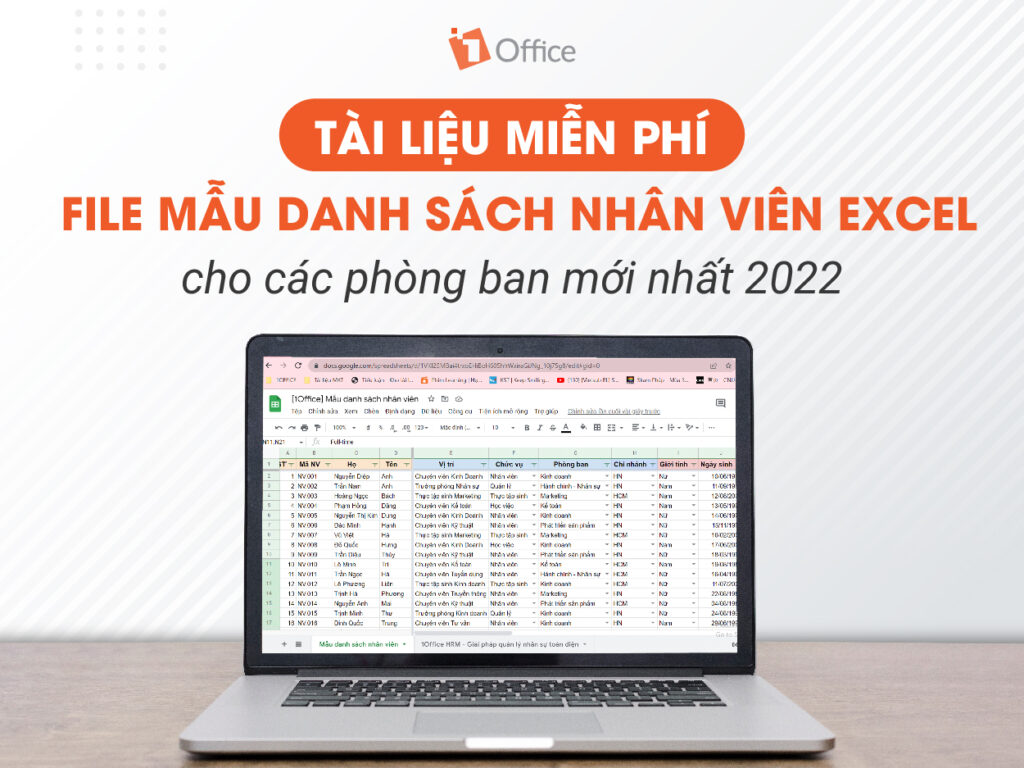
Master Excel Employee List Template
Departmental Excel Employee List Template
4. The Role of an Employee List in Operations and Decision-Making
An employee list may seem like just a simple Excel sheet for recording basic information. But in reality, it is a “resource map” that helps businesses effectively manage people – the most important asset in any organization. A complete, updated, and well-organized employee list offers much more value than just tracking workforce numbers.
4.1 Overall HR Management
Businesses can easily track the number of employees, departmental structure, contract status, and personnel changes. This helps make planning for recruitment, training, or personnel transfers more accurate and timely.
4.2 A Basis for Transparent Payroll and Benefits
Information about contracts, seniority, salary coefficients, allowances, etc., when clearly stored in the list, helps the HR and accounting departments pay salaries correctly, minimize errors, and create transparency for employees.
4.3 Data Analysis for Strategic Decisions
Leadership can analyze data based on various criteria such as age, qualifications, skills, or turnover rate. From there, the business can make decisions about training, retaining talent, or allocating resources appropriately.
4.4 Optimizing Operational Processes
Scheduling work shifts and coordinating manpower for projects or seasonal periods becomes easier with clear personnel data. This is especially useful for industries with high volatility, such as retail, manufacturing, or services.
4.5 A Foundation for HR Digital Transformation
The employee list serves as the source data for integration into HRM or ERP systems. This allows businesses to reduce manual data entry, minimize errors, and improve administrative efficiency.
4.6 Ensuring Legal Compliance
A complete and accurate employee list also serves as evidence for the business to meet inspection requirements from tax authorities, insurance agencies, or labor inspectors, thereby avoiding legal risks.
5. Supplementary Templates to Use in Parallel
A basic employee list helps businesses manage personal information and contracts, but to optimize operational efficiency, you should combine it with other supplementary templates. These templates not only make HR data more complete but also support analysis and quick decision-making:
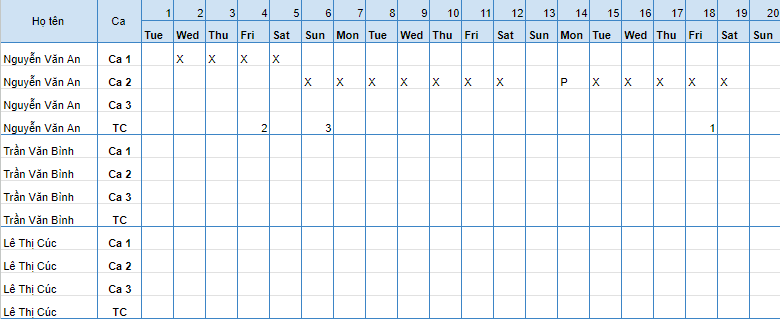
5.1 Timesheet Template
Helps track working days, shifts, leave, or overtime. When linked to the employee list, this template becomes a crucial basis for calculating salaries accurately and transparently.
5.2 Salary and Allowance Calculation Template
Integrates information on salary coefficients, KPI bonuses, responsibility allowances, or benefits. Using it in parallel with the employee list will minimize errors and make it easy to summarize personnel costs monthly or quarterly.

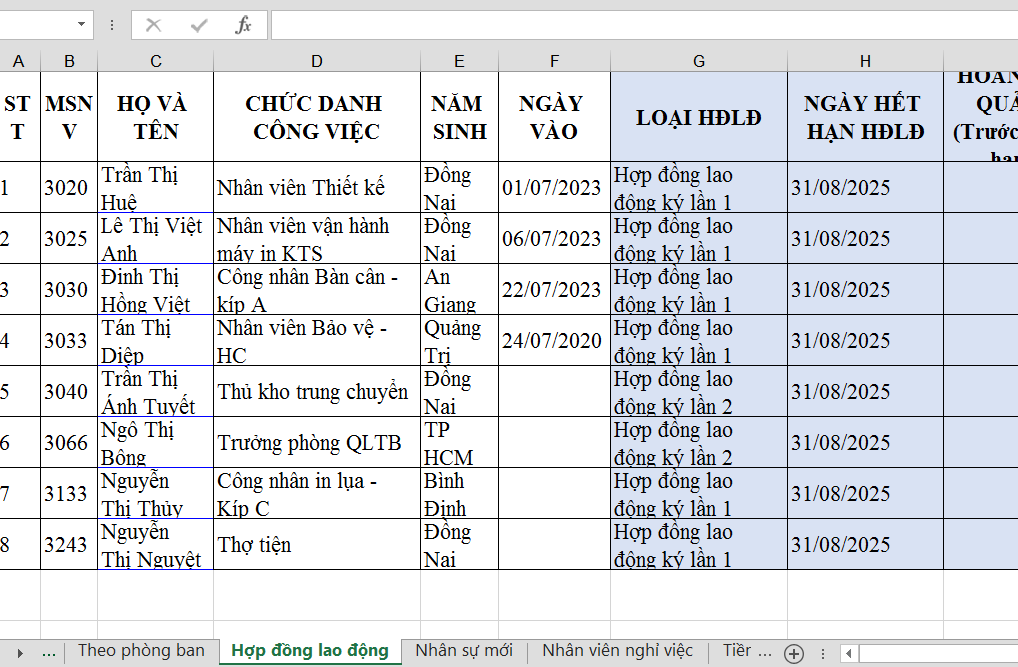
5.3 Labor Contract Management Template
Includes term, contract type (fixed-term, indefinite-term, probationary…), signing date, and expiration date. Combining this with the employee list helps businesses not miss renewal or extension milestones.
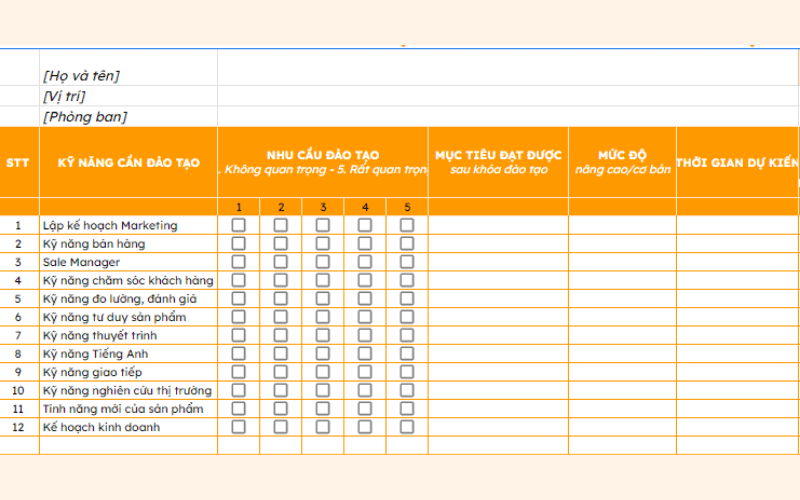
5.4 Training & Development Tracking Template
Records information about courses, certifications, and employee competency development plans. This is an important tool for assessing human resources, building career paths, or retraining when necessary.
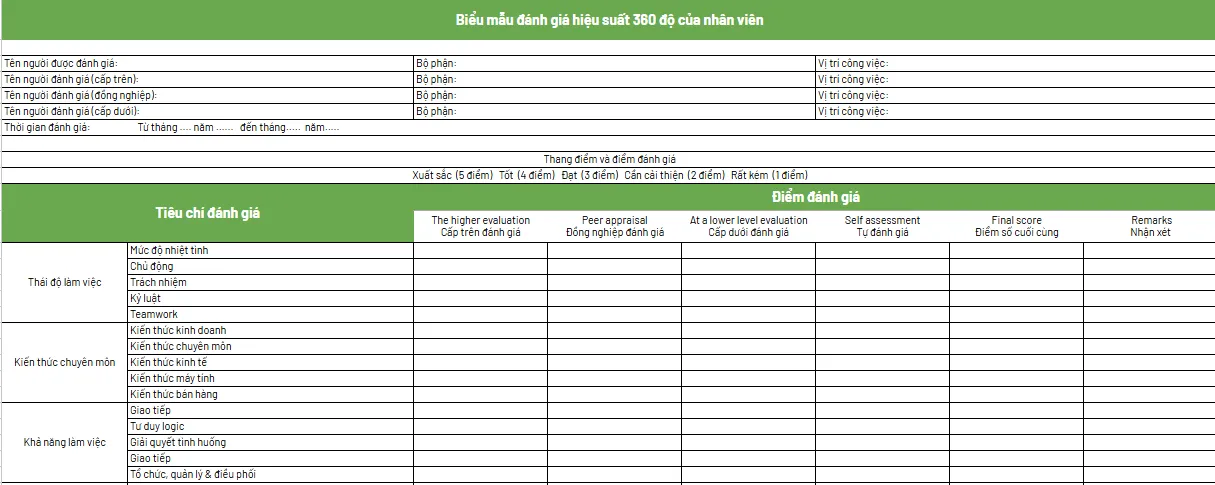
5.5 Performance Review Template
Records work results according to KPIs, OKRs, or other metrics. Combining this with the employee list helps leaders get a comprehensive view of each individual’s capabilities, thereby making decisions about rewards or personnel adjustments.
6. What are the limitations of managing employee lists with Excel?
Managing personnel with traditional spreadsheets often creates data bottlenecks, exposing businesses to high risks of manual errors, weak security, and poor operational connectivity as the workforce expands.
Disadvantages of the manual management method:
6.1 Time-consuming information consolidation
A large number of employees means you have to manage a huge data system. This hinders the process of data entry, review, and consolidation, leading to significant time consumption and a high likelihood of missing or omitted data.
6.2 Low security
Because Excel files do not have a permission-setting mode, anyone with the link can access them. This is very dangerous for businesses due to the risks of leakage and theft of employees’ personal information. Although Excel’s sharing mode allows you to limit and select who can view the file, it still does not guarantee control over access from outsiders.
6.3 Prone to errors
Since all tasks in Excel are performed manually, errors are very likely to occur during operations such as accidental deletion, incorrect information copying, or pasting into the wrong row/column. Furthermore, with many people accessing and editing a single file, it is difficult to trace where the error originated.
6.4 Poor integration capabilities
Because Excel files do not automatically link with related data fields, it is very inconvenient for users when performing tasks such as timekeeping, payroll, or KPI evaluation. Every time you want to retrieve employee information, you have to transfer data by manually copying and pasting.
6.5 No automatic updates
When there are changes in employee information such as phone number, salary, or work status, managers have to update it multiple times across different files because they are not linked. This wastes time and resources due to too many redundant operations.
See more: Top 15 Best HRM Human Resource Management Software Today
7. The optimal, automated employee list management solution with 1Office HRM
Today, with the development of the Industry 4.0 trend, many businesses have adopted technology to optimize their operational and management processes. Traditional employee management using Excel is gradually being replaced by streamlined human resource management software that helps manage employee profile lists effectively.
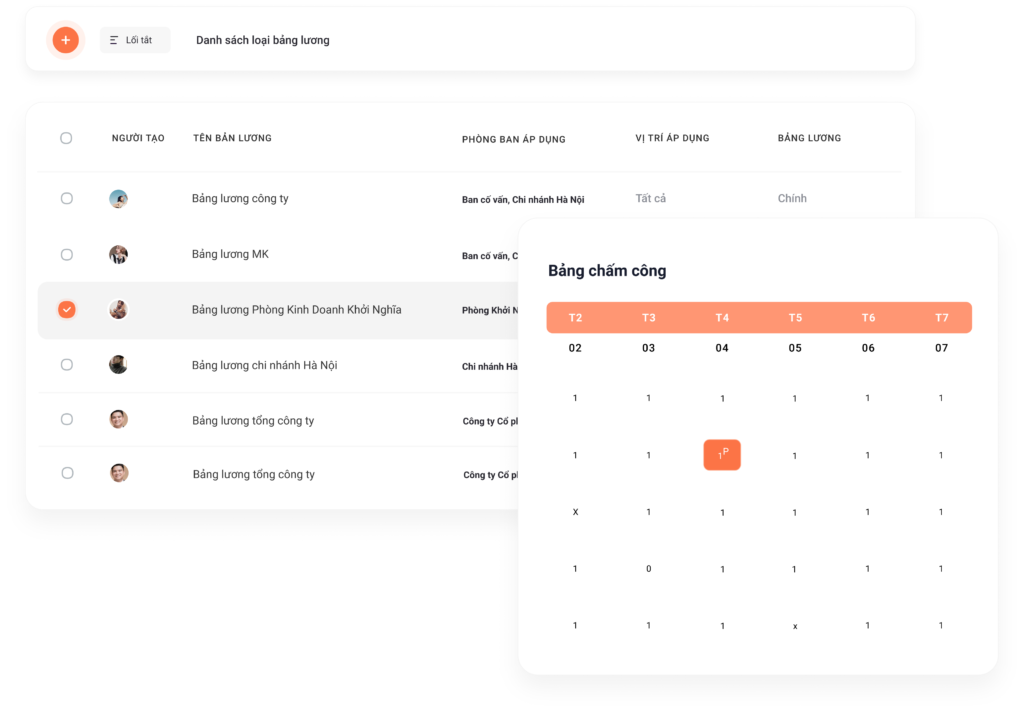
With the desire to help businesses comprehensively solve the human resources challenge, 1Office has launched the HRM module. HRM helps managers and businesses overcome bottlenecks in personnel management with outstanding features such as:
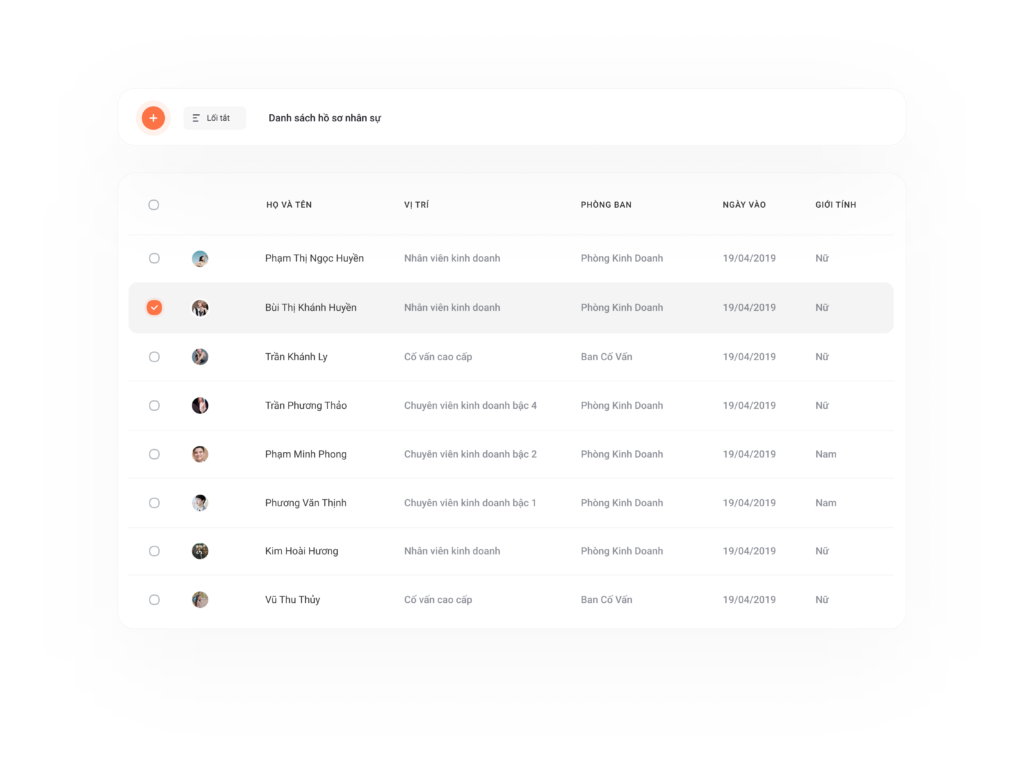
Personnel Information Management
- Personnel profile information will be automatically updated in the labor contract and stored securely and centrally on the 1Office platform
- The software will automatically alert employees about their profile status and any incomplete procedures. It also sends notifications for periodic salary increases.
- When there are changes in an employee’s position, title, or department, the system will automatically calculate and suggest a new salary level based on their work history and experience.
- Automatically classifies and manages the personnel system according to work status, such as active, on maternity leave, resigned, etc.
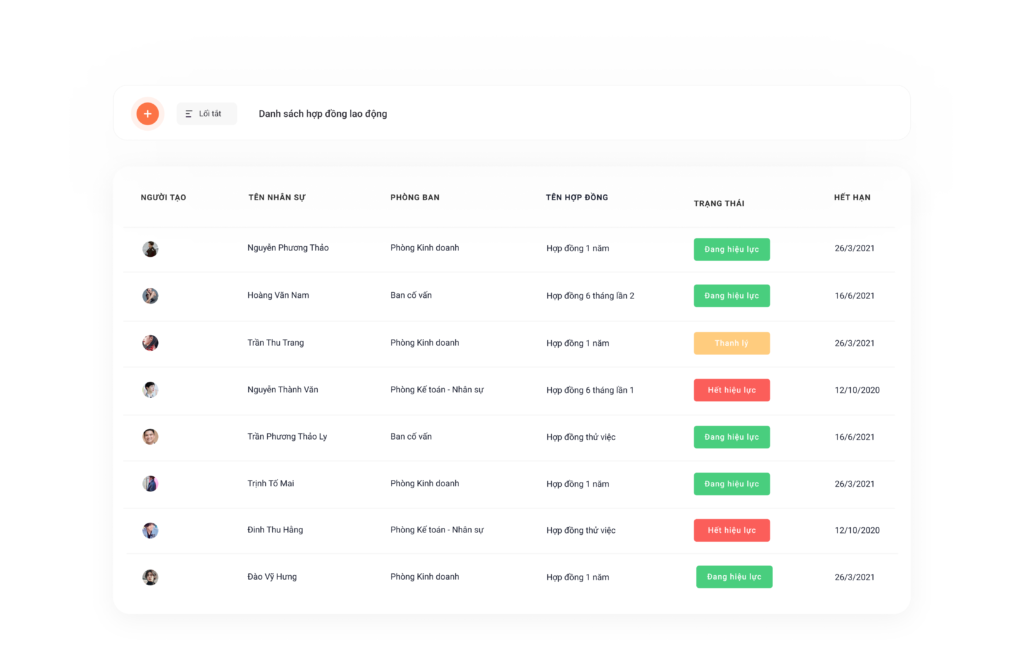
Contract Information Management
- Store detailed contract information including: Contract ID, contract type, employee name, timekeeping ID, department, creation date, signing date, expiration date, etc.
- Classify personnel by contract type such as official, probationary, internship, seasonal… and classify contracts by duration: monthly, yearly, or indefinite.
- Digitize contract information, making it easy for managers to import/export data from Excel files and view the contract data entry history.
- Data related to salary, allowances, position, title, and department in the contract will be automatically updated in the employee profile to serve as a basis for calculating salary and bonuses.
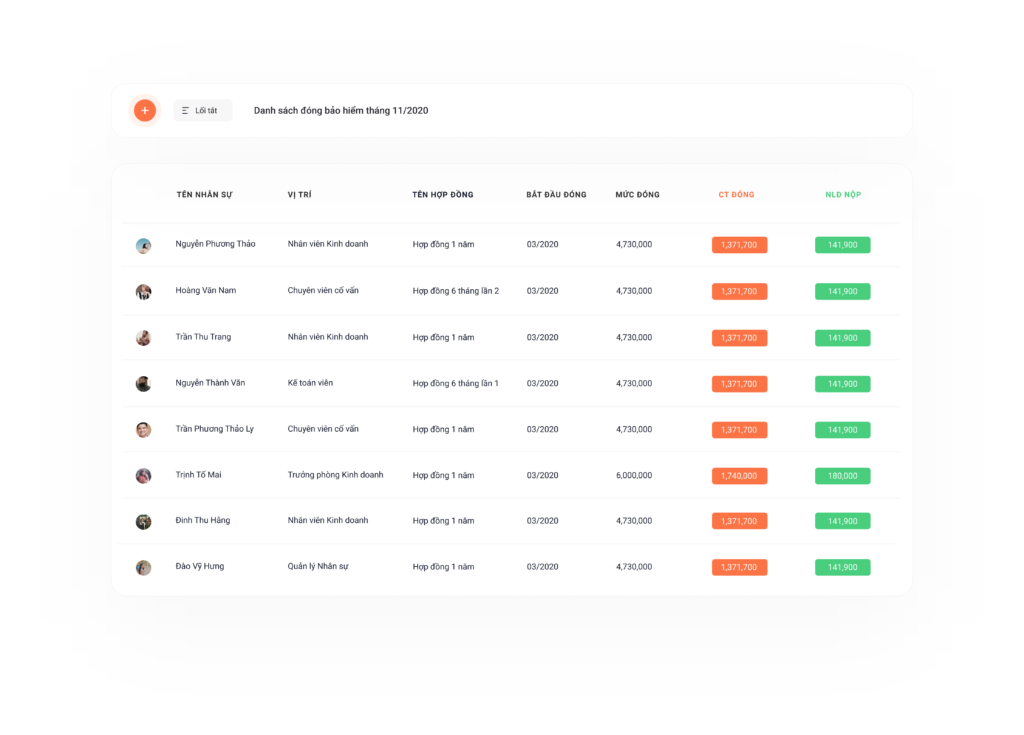
Insurance Information Management
- Allows configuration of insurance parameters such as: contribution rate, base contribution level, and cut-off date for insurance increases/decreases.
- Automatically suggests lists for insurance increases/decreases, assisting managers in deciding whether to finalize an increase or decrease in insurance contributions for employees.
- Automatically calculates insurance costs, arrears, and refunds, and exports payment forms for insurance procedures as required by state regulations.
- Stores the entire insurance contribution history for the business, making it easy to track payment history on the system.
Leave and Compensatory Time Off Management
- Store detailed leave information including: Employee ID, full name, total remaining leave, leave days used, expired leave days, advanced leave days, accumulated leave, etc.
- Automatically calculates leave and compensatory time off and adds it to the employee’s time bank for use within the allowed accumulation period.
- Option to view detailed leave reports by month, quarter, or year.
8. Frequently Asked Questions (FAQs) about Employee Lists
What core groups of information should an employee list store?
A standard list should ensure 3 groups of information: Personal Information (full name, date of birth, ID card number), Work Information (department, position, contract type), and Financial Information (salary, account number, tax code, social insurance book number).
Why should businesses divide the employee list by department?
Dividing the list helps the HR department and direct managers easily look up and track personnel changes specific to each department. It also serves as a basis for allocating training budgets and accurately calculating performance (KPIs) for each specialized team.
How can you secure an employee list when sharing it on Excel?
If you don’t have specialized software, you should set a password for the file and use the “Protect Sheet” feature to only allow authorized personnel to edit sensitive information columns like salary, bonuses, or personal data.
Should the lists for official employees and interns be combined?
They should be managed together on a “master list,” but there must be a clear Status Classification column. This helps the business get a comprehensive view of its current resources and makes it easy to filter data for reporting or to perform separate tasks for each group.
When should a business switch from Excel to Human Resource Management (HRM) software?
A business should make the switch when its workforce reaches 30-50 employees or more. At this point, manual operations in Excel are prone to errors, information leaks, and are no longer capable of automatically linking with timekeeping, payroll, or performance evaluation data.
9. Conclusion
Through the article above, 1Office has provided you with the latest standard employee list excel template for 2022 and proposed a 4.0 human resource management solution to streamline and optimize the process of managing employee profile lists within the business.
For more detailed information, please contact:
Hotline: 083 483 8888
Fanpage 1Office: https://www.facebook.com/1officevn
Youtube Channel: https://www.youtube.com/c/1OfficeNềntảngquảnlýtổngthểDoanhNghiệp
















