


 10/05/2026
  182 views
Google has been in the Gemini era for over two years. The pace of improvement remains very fast, and the confusing rebrandings have subsided. Currently, the name Gemini is used by Google for many different products, but at their core, they are all based on a single family of AI models.
Specifically, Google currently has the following products named Gemini:
- The Gemini family of multimodal AI models (Gemini models). The latest version is Gemini 3 Pro.
- The Gemini chatbot (formerly known as Bard) at gemini.google.com.
- The Gemini assistant, which is gradually replacing Google Assistant on Android phones, Wear OS watches, Android Auto, and Google TV.
- Gemini for Google Workspace: AI features in Gmail, Docs, Sheets… for paid users.
- Several other features are also named Gemini.
All are built on the Gemini family of AI models.
Mục lục
What is Gemini?
Gemini is the collective name for a generation of artificial intelligence models developed by Google, similar to OpenAI’s GPT. These are multimodal models, meaning they can:
- Understand and generate text
- Natively understand and process images, audio, video, and code (without intermediate conversion)
For example:
- You send a photo and ask, “what is happening in this picture?”, and Gemini will provide a detailed description.
- You send a data table and ask it to draw a chart, and Gemini will create it instantly.
- You upload a document hundreds of pages long and ask about specific content, and Gemini can answer accurately.
Some key technical specifications
- Uses the Transformer architecture and Mixture-of-Experts (MoE) technique in its larger versions.
- All current Gemini models have a context window of at least 1 million tokens (equivalent to about 700–800 pages of text).
- Newer versions (from Gemini 2.5 onwards) have added reasoning capabilities, helping to better solve logic, science, and programming problems.

Gemini Model Versions
| Version | Key Features | Availability |
| Gemini 3 Pro | The most powerful current model, excels at coding and reasoning | Gemini Chatbot, API, Google AI Search, Workspace |
| Gemini 3 Deep Think | Specialized in deep reasoning, surpasses Gemini 3 Pro on some benchmarks | Currently in safety testing, coming soon |
| Gemini 2.5 Pro | Previous generation flagship model, still very powerful | API, some legacy applications |
| Gemini 2.5 Flash | Fast, cost-effective, with reasoning capabilities | Gemini Chatbot, Workspace, many other features |
| Gemini 2.5 Flash-Lite | Fastest, lowest cost, handles high volume | Primarily via API |
| Gemini 3 Flash | New generation Flash version | Expected to launch in the next few months |
Older versions (less commonly used)
- Gemini 2.0 Flash
- Gemini 1.5 Pro / 1.5 Flash
- Gemini 1.0 Ultra (not yet widely released)
- Gemini 1.0 Nano (for mobile devices, now largely replaced)
How to use Gemini on the web or mobile app
The fastest way
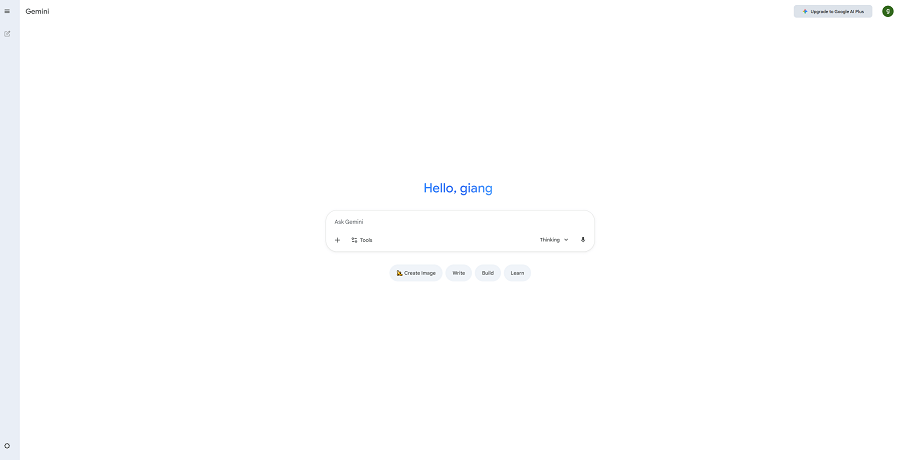
- Go to gemini.google.com → log in with your Google account (free).
- Select the AI model you want to use (the best version is selected by default).
- Enter your question (text, image, or voice).
- After receiving a response, you can: edit the question, ask a follow-up, like/dislike, request a rewrite, share, copy, check sources, listen aloud…
Step-by-step details:
- Log in Go to gemini.google.com → Log in. Note: This feature may be disabled by the administrator for company/school accounts.
- Select the AI model In the chat window, click on the model name at the top → select the desired version.
- Ask a question There are several ways to input:
- Type text normally → Enter
- Click the microphone icon to speak
- Click Tools → Deep Research (in-depth research + source citation)
- Click Tools → Canvas (create a separate document for detailed work)
- Click Tools → Create images (generate AI images)
- Drag and drop an image/file into the chat box
- On the mobile app: use Gemini Live for natural conversation
- Interact with the answer
- Edit the previous question (pencil icon)
- Like / Dislike (thumbs up/down)
- Request a rewrite (Redo button)
- Share the entire conversation (create a public link)
- Copy just a portion of the answer
- Check sources (Double-check response)
- Listen aloud (Listen)
- Review previous versions of the answer
Use Gemini directly in the Chrome address bar
- Type @gemini into the Chrome address bar
- Select “@gemini – Ask Gemini”
- Type your question → Enter
- The page will redirect to gemini.google.com and provide an answer

How to use Gemini Live (natural voice conversation)
Only available on the Gemini mobile app:
- Open the Gemini app (Android/iOS)
- Tap the Gemini Live icon (star over 3 horizontal lines)
- Speak normally (no need to press send)
- Gemini will respond with voice, and you can interrupt at any time
- Pause: tap Hold → resume: tap Continue
- End: tap End
Features beyond standard chat
- Get data from other Google apps Type @gmail, @drive, @youtube, @maps… then ask. Example: “@gmail summarize emails from Nam about last week’s project” → Gemini will find and provide a link to the original email.
- Generate AI images Click Tools → Create images → describe the desired content.
- Generate AI videos (using Veo 3) Describe a scene or upload a still image → Gemini creates a short video with sound and dialogue.
- Audio Overview – turn a file into a podcast Upload a file → click “Generate Audio Overview” → receive an audio file in podcast format summarizing the content (can be downloaded for offline listening).
- Schedule reminders (Scheduled actions) Type a description of the task + time + frequency. Currently only supports adding to Google Tasks and setting Google Calendar reminders.
Gemini Pricing
| Feature / Plan | Free | Google AI Plus | Google AI Pro | Google AI Ultra |
| List Price | 0 VND / month |
~~132,000 VND~~ 66,000 VND / month
(for 6 months) |
~~489,000 VND~~ 0 VND
(for one month)
(Free plan available for students) |
~~6,000,000 VND~~ 3,000,000 VND / month
(for 3 months) |
| General Description | Get daily AI assistance for basic tasks. | Greater access to new features to boost productivity. | Higher access to the most powerful features. | Highest access to the best AI model and exclusive features. |
| Gemini App |
– Access to 2.5 Flash
– Limited access to 3 Pro
– Deep Research, Canvas, Gem
– Create/edit images |
– Enhanced access to 3 Pro
– Deep Research
– Create images with Nano Banana Pro
– Create videos with Veo 3.1 Fast (limited) |
– Higher access to 3 Pro
– Deep Research
– Create images with Nano Banana Pro
– Create videos with Veo 3.1 Fast |
– Highest limits, including video creation with Veo 3.1
– Access to Deep Think and Gemini Agents (US/English only) |
|
AI Credits
(for Flow/Whisk) |
100 credits / month | 200 credits / month | 1,000 credits / month | 25,000 credits / month |
|
Flow
(AI filmmaking tool) |
Limited access to Veo 3.1 | Limited access to Veo 3.1 | Enhanced, limited access to Veo 3.1 | Highest access, including limits on Veo 3.1 |
|
Whisk
(Image/video creation) |
Create images and animate them with Imagen 4 and Veo 3 | Unlock more image-to-video features with Veo 3 | Higher access to image-to-video features with Veo 3 | Highest limits for image-to-video features with Veo 3 |
|
NotebookLM
(Research assistant) |
Basic features | Audio overviews and more notebooks | 5x more notes and audio | Highest limits and best functions (launching later this year) |
| Gemini Integration | Not mentioned | In Gmail, Docs, Vids, and other Google apps | In Gmail, Docs, Vids, and other Google apps | Highest limits for using Gemini directly in Google apps |
| Storage / Other Benefits |
15 GB
(shared across Photos, Drive, Gmail) |
200 GB
(shared across Photos, Drive, Gmail) |
2 TB
(shared across Photos, Drive, and Gmail) |
Personal YouTube Premium plan
(Watch YouTube ad-free, background play) |

Tips for using Gemini
1. Access the right place – the right version
| Access Point | Most powerful version you get | Notes |
|---|---|---|
| gemini.google.com | Gemini 3 Pro (1 million tokens, strongest reasoning) | Free + limited, log in with a personal account |
| gemini.google.com/?gemini_advanced | Unlimited Gemini 3 Pro + Veo 3 + Unlimited Deep Research | Requires Gemini Advanced plan (around 20 USD/month) |
| Gemini App (Android/iOS) | Gemini 3 Pro + Gemini Live (natural voice conversation) | The free version is also very powerful |
| Chrome address bar (@gemini) | Gemini 3 Pro | Fastest for quick questions |
| Gmail / Docs / Sheets | Gemini for Workspace (if your company purchases it) | Directly integrated into the app |
Tip: To use the most powerful version for free → use gemini.google.com with a personal account + open an incognito tab if you need to “reset” the daily limit.
2. How to write effective prompts for the best results
- Specify the version (if needed) “Use Gemini 3 Pro to answer the following question: …”
- Specify the output language “Answer entirely in Vietnamese, with a professional tone”
- Request step-by-step reasoning (very important for problems, code, analysis) “Think step-by-step before giving the final result”
- Provide long context (Gemini has a 1 million token context window) You can upload an entire 300–400 page PDF file, contract, or financial report → ask questions freely without needing to summarize first.
- Combine multiple tools in one prompt. Example: “@gmail find all emails from customers with the keyword ‘contract’ in November → @drive open the latest contract file → summarize the payment terms and create a comparison table with the old contract”

3. Features you should use daily
| Feature | Quickest way to activate | When to use |
|---|---|---|
| Deep Research | In the chat box → Tools → Deep Research | Need detailed reports + reliable reference sources |
| Canvas | Tools → Canvas | Writing long articles, planning, creating slides, writing large code blocks |
| Create images | Tools → Create images or type directly “draw me…” | Create illustrations, thumbnails, design ideas |
| Create video (Veo 3) | Type “create video: …” or upload an image + description | Only available in the Advanced plan |
| Audio Overview | Upload a PDF/slide file → click the “Generate Audio Overview” chip | Listen to summaries of reports and long documents instead of reading |
| Gemini Live | Open the mobile app → star icon on the three-line menu | Brainstorm ideas, learn foreign languages, get quick explanations |
| @gmail / @drive / @youtube | Type @app-name directly in the chat box | Look up emails, files, YouTube videos without leaving the chat |
4. Pro-tips for optimal use
- For long-term memory: create a separate conversation as a “project memory,” upload all related documents into it → later, you can simply reopen it to continue the conversation.
- Use Canvas for long-form writing: Gemini will create a separate document where you can edit, add titles, insert tables, and export to Word/PDF.
- Quickly check sources: click “Double-check response” → every green-highlighted sentence will have a Google Search link for verification.
- Increase code accuracy: always add “write in Python 3.11, with English comments, and full error handling” to your prompt.
- Save tokens: if you only need a short answer → add “answer concisely within 200 words” to the end of your prompt.
5. Shortcut & Quick Command Summary
| Action | Quickest way |
|---|---|
| Create a new image | “draw a cat wearing a conical hat by Hoan Kiem Lake” |
| Deep research | Tools → Deep Research |
| Open a private canvas | Tools → Canvas |
| Find an email | @gmail + question |
| Find a Drive file | @drive + question |
| Listen to a file summary | Upload file → click the Audio Overview chip |
| Have a voice conversation | Mobile app → Gemini Live |
| Check the source | Click the G icon (or Double-check) |
| Share the conversation | Share & export → Copy link |
Limitations, Disadvantages & Challenges of Gemini
Gemini, Google’s AI chatbot and model family, has made impressive strides since its launch, especially with versions like Gemini 3 Pro in 2025. However, like any AI technology, it still has several limitations, disadvantages, and challenges. Below is a detailed analysis based on reviews, reports, and feedback from users and experts (updated as of November 2025). These issues do not diminish Gemini’s overall value but should be considered to avoid risks.
1. Limitations in Accuracy and Reliability
Gemini, like other large language models (LLMs), often experiences hallucinations (generating false information that sounds plausible). This occurs because the model lacks a solid real-world knowledge base or the latest event information if not updated in a timely manner. For example:
- In tasks requiring general knowledge or basic math, Gemini can make mistakes (such as miscalculating timer settings).
- With multimodal data (images, videos), the model sometimes misunderstands context or produces illogical results, leading to lower reliability compared to competitors like Claude Opus 4.5 in programming.
Challenge: Users must always verify sources (using Gemini’s “Double-check response” feature) to avoid spreading misinformation, especially in the medical, legal, or research fields.

2. Limitations in Creativity and Customization
Although Gemini is strong in data processing and Google Workspace integration, it is considered less creative compared to models like GPT-5. Examples include:
- Creating artistic content or novel ideas often feels “formulaic,” lacking emotional depth or originality.
- Limited customization: Users find it difficult to fine-tune the model for specialized tasks without programming knowledge, leading to generic results.
Challenge: In content creation or design, Gemini is suitable for initial ideas but requires manual editing, reducing efficiency for professional users.
3. Issues with Scale and Performance
Gemini struggles with handling large-scale, complex tasks, such as analyzing massive datasets or long coding projects.
- Slower speeds on larger models (like Gemini 3 Pro) when using the full 1 million token context window.
- Rate limits (daily request limits) can be unexpected, especially in the free version, causing workflow disruptions.
Challenge: With a growing user base, Google must expand its data center infrastructure, but high costs could lead to price increases or stricter limitations.
4. Integration and Language Limitations
Gemini integrates well with the Google ecosystem (Gmail, Drive, Sheets), but its language support is uneven.
- Non-English languages (like Vietnamese or Polish) have only basic support; features like internet research or summarization require explicit instructions.
- Does not fully support Shared Drives or complex PDFs in Workspace.
- Slide creation is limited to 1 slide per prompt, not an entire presentation.
Challenge: Users in non-English-speaking regions or those using third-party tools (like Microsoft Office) will face difficulties, reducing its global appeal.
5. Ethical, Privacy, and Safety Issues
Gemini faces risks related to personal data and safety.
- In applications like GenAI toys for children, there is a risk of exposure to inappropriate content (sex, tobacco) or the collection of biometric data without strict controls.
- The model can generate biased or inappropriate content due to a lack of “common sense.”
- The initial demo video was criticized for being edited, which eroded trust.
Challenge: Google must balance innovation with regulatory compliance (like GDPR), especially when integrating into mobile devices or cloud services. The lack of transparency in benchmarks (not disclosing training data) has also been criticized.
6. Cost and Competition
- High cost: The advanced version (Gemini Advanced or AI Pro) costs around $20/month, plus additional API costs for businesses.
- Fierce competition: Gemini 3 excels in reasoning but is criticized for being “vibes-based” (relying on feel rather than detail), and it may be surpassed by Claude or Grok in some areas.
Challenge: Google needs to maintain a rapid update pace to avoid losing market share, while soaring AI infrastructure costs could impact profitability.
















