


 10/05/2026
  1550 views
Ideogram is an AI tool that is gaining a lot of attention for creating image and video content faster. If you want to know what Ideogram is, what its standout features are, and how to use it, this article will help you quickly grasp the most important information.
Mục lục
1. What is Ideogram?
Ideogram AI is a text-to-image tool that uses advanced generative artificial intelligence, allowing you to turn text descriptions into high-quality, photorealistic, or artistic images in just a few seconds. Launched in 2023 and rapidly developed into 2025 with version Ideogram 3.0 (March 2025), this tool stands out for its ability to integrate clear and accurate text directly into images—addressing a major limitation of many other AIs like DALL-E or Midjourney.
Origin and Development Team: Ideogram AI was developed by Ideogram Inc., a startup in Toronto, Canada, founded in 2022 by a group of former Google Brain researchers, including Mohammad Norouzi (CEO), Jonathan Ho, William Chan, and Chitwan Saharia—who previously contributed to the creation of Imagen (Google’s text-to-image system). The company has raised over $96 million through funding rounds (a $16.5 million seed round in 2023 and an $80 million Series A in 2024), with a mission to “help people become more creative through generative AI”.
Core difference from the concept of “Ideogram” in linguistics/semiotics:
In linguistics, an “ideogram” is a character that directly represents an idea (like Chinese characters or ancient Egyptian hieroglyphs). Ideogram AI is not related to this concept; it simply uses the name to emphasize its ability to “understand and reproduce ideas” through images, especially by intelligently integrating text. It is purely the brand name of the AI tool, not a linguistic term.
Why Ideogram AI Became “Hot” and Gained Attention
Ideogram AI quickly became a sensation in 2023 and continues to lead in 2025 by solving the biggest “pain point” of AI image generators: the ability to generate clear and accurate text within images. While Midjourney or DALL-E often produce distorted, misspelled, or unreadable text, Ideogram handles typography perfectly—making it ideal for logos, posters, advertisements, memes, or any design containing text.
- User-friendly interface, easy for beginners: Simple web-based interface (ideogram.ai), no need for a complex Discord setup like Midjourney, supports basic English/Chinese prompts, and offers a real-time preview.
- Free or has an attractive free plan: The free tier provides 10-40 generations/week (slow queue), enough for testing; paid plans start from $7-8/month for priority and unlimited generations—a competitive price, making it more accessible than many competitors.
With over 1 billion images generated in just a few years, Ideogram AI is highly regarded by the designer, marketer, and creator communities for its practicality (superior text rendering) and rapid updates (over 30 iterations in 2025). This is the “game-changer” tool for creating content with text, helping Ideogram stand out in the 2025 AI image race!
2. Standout Features of Ideogram AI
Ideogram AI stands out for its ability to generate high-quality images from text,
2.3 Flexible Customization and Diverse Artistic Styles
- Customization Mode: Users can adjust the aspect ratio (1:1, 16:9, 9:16), composition, color palette, and seed (to reproduce variations). Supports remixing (creating from an original image) and upscaling.
- Style Options: Dozens of presets like 3D render (high detail), cinematic, photography, illustration, abstract art, or custom via prompt. Example: “Vietnamese mountain landscape, 3D render style, sunset lighting”.
2.4 Other Useful Features
- Remaster/Enhance Mode: Upscale and remaster old/low-quality images to a higher resolution (up to 4K+), improving detail, color, and reducing noise – ideal for restoring old photos or upgrading output.
- Sharing and Community Features: Integrated public gallery to share creations, remix prompts from the community, and an active Discord (hundreds of thousands of members) for learning and sharing experiences. Users can export high-quality PNG/JPGs, with commercial use supported in paid plans.
Ideogram AI truly stands out for its ability to “understand text” and its ease of use, making it a top choice for designs with text or commercial content. With an attractive free plan (10-40 generations/week), it’s a tool worth trying for every creator!
3. Detailed Guide to Using Ideogram AI for Beginners
Ideogram AI is an easy-to-use text-to-image tool with a simple web interface that primarily supports English (basic Vietnamese is also supported). You can start for free with 10-40 generations/week. Below is a step-by-step guide (updated for 2025 based on docs.ideogram.ai and practical experience).

3.1 How to Create an Account and Log In
- Accessing the Official Website: Open your browser and go to https://ideogram.ai. The homepage displays a large prompt box in the center and a community gallery.
- Registration Steps:
- Click “Continue with Google” or “Continue with Apple” (recommended, fast, and secure).
- Choose a unique username (this will be your @username for your public profile).
- Complete – you will be taken directly to the dashboard with free weekly credits.
No Chinese phone number is required (for the global version). If you use email, you will need to confirm via a code.
3.2 User Interface and Key Components
The interface is clean and focused on generation.
- Dashboard/Home: Central prompt box, recent gallery, Explore/Top trending.
- Prompt Input Area: Large box in the center, supports Magic Prompt (AI automatically expands the prompt).
- Control Buttons: Styles/tags below, aspect ratio, number of images (1-4), model version (latest is 3.0), Generate button.
- Sidebar: History, Profile, Settings (credits, subscription).
3.3 Basic “Prompt Engineering” Techniques for Creating Beautiful Images
- Writing Effective Prompts:
- Principle: Be concise, clear, and specific; prioritize English for better results.
- Using Keywords: Subject + details + style + quality (color, lighting, emotion).
- Example of a good prompt: “A futuristic cityscape at sunset with neon lights, cyberpunk style, highly detailed, 4K, vibrant colors”.
- Example of a suboptimal prompt: “Futuristic city” → vague, random results.
- Tip: Place text in double quotes “” to render it accurately (e.g., “Poster with text ‘Hello World’ in bold font”).
- Use tags/styles:
- Choose from available presets (General, Design, Anime, Photography, Cinematic, 3D Render…).
- Combine prompts and tags: The prompt describes the content, while tags guide the style – helping to achieve more consistent results.
- Customize parameters:
- Aspect ratio: 1:1 (square), 16:9 (horizontal), 9:16 (vertical for TikTok), custom.
- Number of images: 1-4 (free plan usually provides 4 variants).
- Negative Prompt: Available (in advanced settings), add to avoid errors (e.g., “blurry, low quality, deformed”).
3.4 Guide to Creating a Logo with Ideogram AI (Real Case Study)
Ideogram excels at creating logos with clear text.
- Specific steps:
- Enter prompt: “Minimalist logo for coffee shop named ‘Morning Brew’, bold serif font, coffee cup icon, warm colors, clean design”.
- Put text in double quotes: “‘Morning Brew'”.
- Choose style: Design or Typography.
- Aspect ratio: 1:1 (square for logos).
- Generate → choose the best variant → Remix if adjustments are needed.
- Tips for creating logos with clear, readable text:
- Specify the font: “bold sans-serif”, “elegant script”, “vintage serif”.
- Keep the prompt short for text: Focus on text + simple icon.
- Generate multiple times, use Magic Prompt for AI suggestions.
3.5 Processing and Downloading the Product
- How to choose your preferred image: The gallery displays 4 variants; click the heart to favorite, or remix (adjust the prompt from the original image).
- Download formats and quality: PNG/JPG (1080p+ on the free plan, higher on paid plans), transparent background if requested in the prompt. Click Download (no watermark on paid/private plans).
Ideogram AI is user-friendly and focuses on typography – start with simple English prompts to get familiar. Join the Discord community to learn more tips!
4. Ideogram AI Pricing
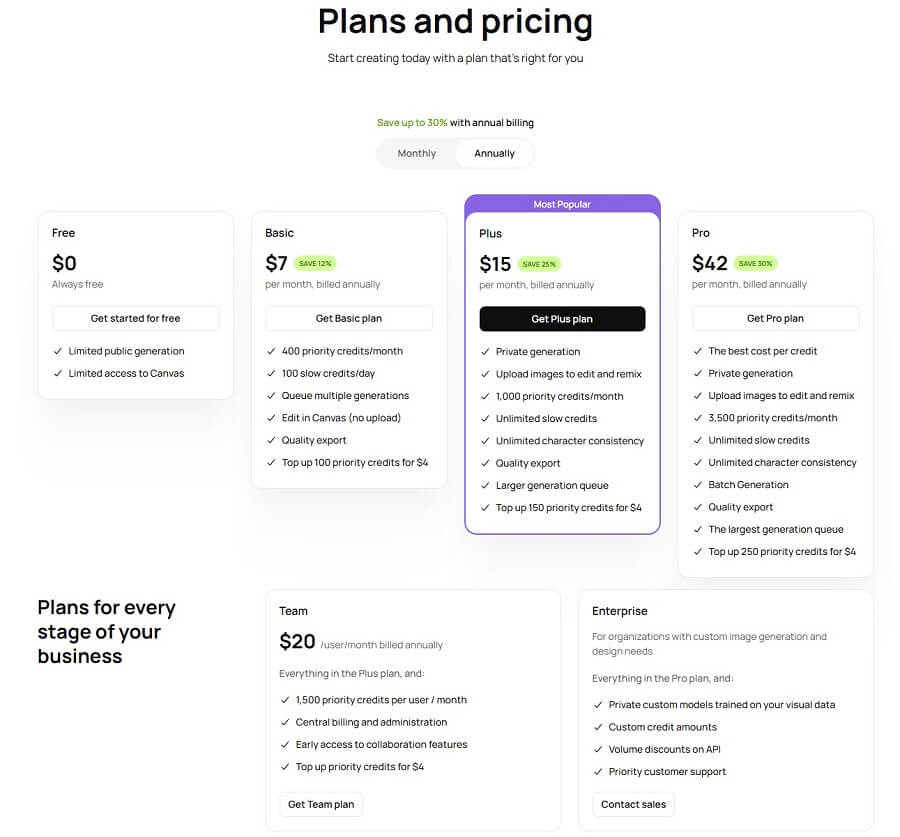
Ideogram AI uses a credit-based system (credits are used to generate images, about 1-4 credits/generation depending on quality). The free plan is sufficient for testing, while paid plans unlock priority (faster) generation, private generations, and a full commercial license. Prices are in USD/month (discounted for annual payment), based on the official ideogram.ai/pricing page and other reputable sources.
Personal Plan
| Plan | Price | Billing | Key features |
|---|---|---|---|
| Free | $0 | Always free | • Limited number of public users • Limited access to Canvas |
| Basic | $7 / month | Billed annually | • 400 priority credits/month • 100 slow processing credits/day • Multi-generation queue • Live editing on Canvas (no upload required) • High-quality file export • Top up 100 priority credits for $4 |
| Plus (Most Popular) | $15 / month | Billed annually | • Private content creation • Upload images to edit and remix • 1,000 priority credits/month • Unlimited priority credits • Unlimited character consistency • High-quality export • Larger content creation queue • Top up 150 priority credits for $4 |
| Pro | $42 / month | Billed annually | • Best cost per generation • Private content creation • Upload images to edit and remix • 3,500 priority credits/month • Unlimited slow generations • Unlimited character consistency • Batch content creation • High-quality export • Largest content creation queue • Top up 250 priority credits for $4 |
Business package
| Plan | Price | For | Features |
|---|---|---|---|
| Team | $20 / user / month | Billed annually | • All features in the Plus plan • 1,500 priority credits/user/month • Centralized management and billing • Early access to collaboration features • Top up priority credits for $4 |
| Enterprise | Contact Us | Large enterprises | • All features in the Pro plan • Custom model trained on your image data • Custom credit balance • Volume discounts for API usage • Priority customer support |
- Note:
- Priority credits for fast generation (under 15 seconds); when they run out, you’ll be in the slow queue.
- Top-up credits can be purchased (they don’t expire).
- Commercial use: Paid plans allow full commercial use (IP ownership), while the free plan is for personal use only.
- Taxes may be added depending on your region; payment is via Stripe (card, no PayPal).
Ideogram AI is competitively priced (cheaper than Midjourney Pro at $60-120), especially with its superior text rendering. Get started for free at ideogram.ai to try it out – upgrade to Basic/Plus if you need priority generation. Check ideogram.ai/pricing for the latest prices!
5. Practical Applications of Ideogram AI
Ideogram AI is not just a regular image generation tool; it’s a powerful assistant for many fields thanks to its ability to render text accurately and in high quality. Here are the most common practical applications (updated 2025) to help you make the most of Ideogram in your work and daily life.
5.1 For Content Creators & Bloggers
Ideogram AI helps creators produce content quickly and professionally, especially when clear text in images is needed.
- Create illustrations for articles, videos, and social media: A prompt like “Infographic about the benefits of coffee with the large text ‘Morning Boost’, minimalist style” → creates a beautiful image for a blog post or Instagram story.
- Design book covers and thumbnails: Create a YouTube thumbnail with a clear title (e.g., “Top 10 Healthy Living Tips” in bold font) or a personalized ebook cover – saving time compared to manual editing.
Benefits: Enhances aesthetics and engagement, especially for educational or instructional content.
5.2 For Marketers & Small Businesses
This is Ideogram’s largest user group, thanks to its ability to create professional commercial content with text.
- Design ad banners, posters, and campaign images: A prompt like “Black Friday sale poster with large text ‘Up to 70% Off’, fashion product background, modern style” → a banner ready for Facebook Ads.
- Create basic logos and branding: Generate a simple logo with clear text (e.g., “Logo for a coffee shop ‘Brew Haven’, elegant font, coffee cup icon”) – ideal for startups on a limited budget.
Benefits: Reduces designer hiring costs, quickly creates multiple variants for A/B testing campaigns.
5.3 For Designers & Artists
Ideogram is a powerful ideation tool that helps explore creativity without taking much time.
- Quickly sketch ideas: Create concept art from complex prompts (e.g., “Fantasy elf character with detailed armor, digital painting style”) to build a project mood board.
- Explore new art styles: Experiment with styles like 3D render, cinematic, or illustration for inspiration, then refine in specialized software.
Benefits: Speeds up the creative process, especially when ideas require text (art posters, album covers).
5.4 For Personal Use
Ideogram AI brings creative joy to casual, non-professional users.
- Create unique wallpapers, profile pictures, and gifts: A prompt like “Desktop wallpaper of a Vietnamese mountain landscape with the motivational text ‘Keep Going’, realistic style” → a personalized wallpaper; or a birthday gift image with the recipient’s name clearly visible.
Benefits: Turns personal ideas into beautiful products without needing special skills, perfect for gifts or social media decoration.
Ideogram AI is particularly suitable for anyone who needs images with clear text – from content creators and marketers to personal users. With a free plan sufficient for testing and affordable paid plans ($7-20/month for unlimited), it’s a “must-try” tool to elevate your creativity effortlessly. Start with a simple prompt and explore – you’ll be surprised by what Ideogram can do!
6. Comparing Ideogram AI With Other AI Image Generation Tools
Ideogram AI (version 3.0, 2025) stands out with its accurate text rendering capabilities – a major weakness of many competitors. Below is a detailed comparison with Midjourney, DALL-E, and Stable Diffusion (based on 2025 benchmarks and reviews from sources like Brand Vision, Fahim AI, and Reddit).
6.1 Ideogram AI vs. Midjourney
| Criteria | Ideogram AI (3.0) | Midjourney (v6.1/v7) |
| Image Quality | Good at realism and consistency, especially with text/typography. | Excellent for artistic and cinematic styles, high detail, but text is often distorted/incorrect. |
| Complexity | Handles complex prompts well, but stylized results are not top-tier. | Strong with complex prompts and diverse styles, but difficult to control text. |
| Text Handling Capability | Superior (legible text, accurate fonts). | Weak (text is often garbled, requires workarounds). |
| Cost | Strong free tier (10-40 gens/week); Basic $7-8/month, Plus $16-20, Pro $48-60. | $10-120/month (Basic to Mega), no strong free tier. |
| Accessibility | Easy-to-use web interface, global, good free tier. | Discord/web, steeper learning curve. |
Key advantages of Ideogram over Midjourney: Accurate typography (logos, posters, memes), more affordable for commercial use, and user-friendly for beginners/marketers. Midjourney excels in pure artistic expression.
6.2 Ideogram AI vs. DALL-E/Stable Diffusion
| Criteria | Ideogram AI | DALL-E 3/4 (OpenAI) | Stable Diffusion (tools like Leonardo/ComfyUI) |
| Style Diversity | Diverse (realistic, illustration, 3D render), strong in text. | Very diverse, good prompt adherence, ChatGPT integration. | Highest flexibility (custom models, LoRA). |
| Features | Excellent text rendering, remix, enhance; community gallery. | Conversational, safety filters; basic video. | Unlimited local, powerful editing (ControlNet). |
| Community | Active Discord, shared gallery. | Large via OpenAI/ChatGPT. | Huge on Reddit/Hugging Face, open-source. |
Overall comparison: Ideogram surpasses DALL-E in text rendering (DALL-E is good but sometimes has text errors); Stable Diffusion is flexible/customizable but requires advanced skills and can be run locally for free.
6.3 When should you choose Ideogram AI?
Ideogram AI is the top choice when you need images with clear, accurate text (logos, posters, memes, advertisements, branding) or want to design quickly with its attractive free plan (10-40 generations/week, enough for testing).
Key advantages:
- Superior typography (no distorted/incorrect text).
- Easy-to-use interface, real-time preview.
- Affordable price/clear commercial license.
- Ideal for marketers, content creators, and small businesses needing professional content with text without high costs.
If you prioritize top-tier artistic quality → Midjourney; for precision prompting → DALL-E; for customization/open-source → Stable Diffusion. Ideogram is the “best for text” in the 2025 AI image race – choose it when text is a critical factor!

7. Important Notes When Using Ideogram AI
Although Ideogram AI is one of the most powerful and user-friendly AI image generation tools available today (2025), effective use still requires attention to some common issues. Below are important notes to avoid errors and optimize your experience.
7.1 Common Errors and How to Fix Them
- Unclear prompts: The results can be skewed, lack detail, or not match the intended idea because the AI misunderstands vague descriptions. How to fix: Write specific, structured prompts (subject + details + style + quality). For example: Instead of “a cat,” use “a gray British Shorthair cat sitting on a sofa, realistic photo style, high detail, natural lighting.”
- Incorrect/distorted text (although a strength, it can still happen): In some complex cases (unusual fonts, multiple overlapping text layers, or overly long prompts), the text can still have minor errors or not be 100% perfect. How to fix: Place the main text in double quotes “” (e.g., “‘Hello World’ in bold serif font”), select the Design/Typography style, and generate multiple times to choose the best variant. If errors persist, remix from an image with good text.
7.2 Tips to Optimize Experience and Results
- Experiment with multiple prompts and styles: Ideogram is very sensitive to prompts – don’t stop at the first attempt. Change keywords (e.g., add “highly detailed, sharp focus”) and try different style presets (Cinematic, Illustration, 3D Render) to find the most satisfactory result.
- Use Remaster/Enhance mode: For old images or imperfect generations, use Remaster to upscale and improve detail (up to 4K+), reduce noise, and increase sharpness – especially useful for images with text.
- Other tips: Save good prompts to your History for reuse; use Magic Prompt (AI auto-expands the prompt) if you’re out of ideas; generate 4 variants at once for comparison.
7.3 Ethics and Copyright in AI Art
- Ownership of AI-generated images: According to Ideogram’s policy (2025), users own the images created on paid plans (commercial license), but Ideogram retains the right to use them for model training (non-exclusive). The free tier is for personal use only. Avoid directly copying the works of famous artists in prompts to reduce copyright risks (the training data can be controversial, like with many other AIs).
- Avoid creating offensive or infringing content: Ideogram has content moderation (blocks violent, pornographic, and hate speech content). Do not create deepfakes of real faces without consent, or content that violates the law. Always use it responsibly – add a watermark if sharing publicly to be transparent about the AI source.
Ideogram AI is a powerful tool but requires smart prompting and ethical awareness. Following the notes above will help you create high-quality, safe, and effective content. If you encounter problems, join the Ideogram Discord community to ask for tips from other users – you’ll improve very quickly!
8. The Future of Ideogram AI
Ideogram AI is in a strong development phase in late 2025, with the latest version Ideogram 3.0 (launched in March 2025) marking a major step forward in realism, style consistency, and text rendering. With over $96 million in funding (seed + Series A), Ideogram is not just an image generation tool but is also aiming for a more comprehensive creative ecosystem.
8.1 New Updates and Versions
Ideogram is known for its rapid update speed (dozens of major updates in 2025):
- Ideogram 3.0 (March 2025): Significant improvements in realism, high style consistency, more accurate complex text layouts; added Style Reference and Random Style for rapid creative exploration.
- Recent updates: Batch Generation (December 2024), Ideogram Canvas/Magic Fill/Extend (October 2024), Ideogram 2.0 (August 2024) with an iOS app and API beta.
- Upcoming features: Advanced video/3D integration, deeper custom model personalization, and multimodal (combining audio-visual) capabilities – moving towards a unified “creative studio”.
8.2 Development Potential and Impact on the Creative Industry
Ideogram AI is democratizing professional creativity, especially in fields requiring accurate text (branding, marketing, design). With its superior text rendering capabilities, it is changing how creators and marketers work: reducing costs/time by 70-90%, and accelerating ideation and production.
- Impact: Helps small businesses/startups create professional logos/posters without hiring a designer; assists artists in exploring new styles; promotes personalized content (social media, education).
- Potential: By 2026, Ideogram may expand its API/custom training, integrate VR/AR or long-form video – competing directly with Midjourney/DALL-E for commercial use, shaping the “AI for design” era with a focus on typography and usability.
Ideogram is not just a tool but a driving force making the creative industry more accessible, especially for general users and businesses that need content with beautiful typography. With this momentum, Ideogram is poised to continue leading the AI image trend in 2026!

















