


 10/05/2026
  11968 views
Workflow helps businesses standardize processes, assign tasks clearly, and track progress more effectively. But what is a workflow, when should you apply it, and how do you build a suitable workflow? This article will help you quickly understand everything from the concept and benefits to the practical implementation steps within a business.
Mục lục
- I. What is a Workflow?
- II. What are the benefits of a workflow?
- III. When should a business use a workflow?
- IV. 7 Steps to build a detailed and effective workflow for your business
- V. 5 Effective Theories for Workflow Improvement
- VI. 5 Common Workflow Templates for Departments in a Business
- VII. Notes on Applying Workflows in Business
- VIII. What are the common mistakes when building a workflow?
- IX. Metrics for evaluating and measuring workflow effectiveness
- X. Conclusion
I. What is a Workflow?
Workflow is composed of two words: “work” and “flow,” meaning a flow of work, also known as a workstream or work process. Simply put, a workflow is a template process applied to specific tasks. Implementation activities are carried out in a specific order that has been previously established in the template process.
Workflows are visually represented through workflow diagrams. A workflow diagram is a chart that uses images and symbols to visually represent a work process. It helps users clearly understand the process and get the best possible overview of the workstream.
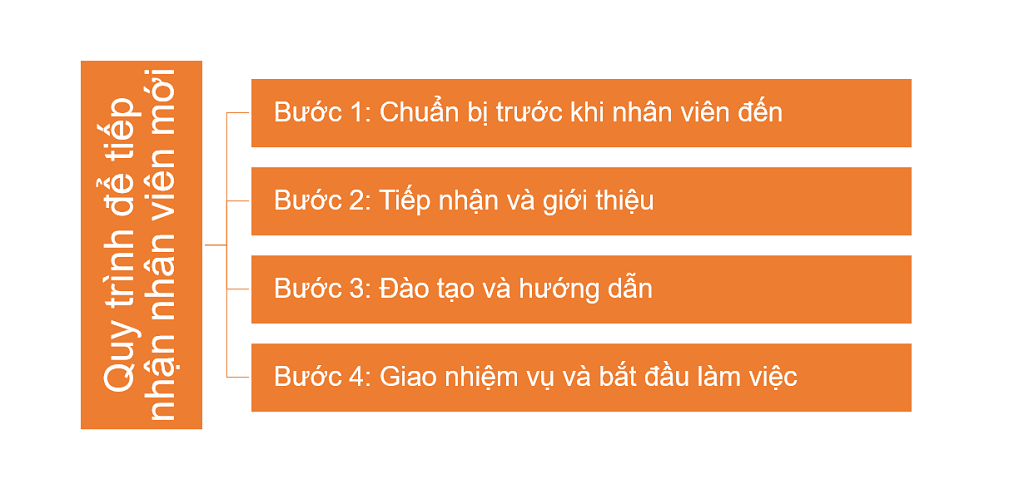
For example, a company establishes a new employee onboarding process with the following steps: preparation before the employee arrives => reception and introduction => training and guidance => task assignment and starting work. In this case, HR will follow the steps in the process to onboard new employees joining the company. That process is called a workflow.
II. What are the benefits of a workflow?
Any business should use workflows in its operations for the following reasons:
- Increases work performance and efficiency: Businesses can boost performance and efficiency without spending excessive time and effort. Tasks are clearly assigned with specific responsibilities, assignees, and deadlines.
- Ensures consistency: All implementation activities are built according to standard processes. Responsible departments/divisions are obligated to comply with and execute the workflow. This ensures consistency in how activities are carried out, avoiding task overlaps and eliminating “clutter.”
- Easy to track and manage work processes: Through each step and stage in the process, businesses can easily grasp and monitor work progress. Managers and staff have a comprehensive overview and can stay on top of their work.
- Enhances connectivity and synchronization: When using a Workflow in a business, all members connect and work according to the process. Information sharing, document sharing, and direct interactions are synchronized within the workflow.
- Optimizes costs and resources: Work steps are implemented scientifically, eliminating unnecessary activities and optimizing tasks. As a result, work is completed faster, reducing business costs.
III. When should a business use a workflow?
As you can see, workflows bring many benefits to a business’s operations. The effectiveness of a workflow is maximized when the business knows how to use it at the right times.
WHEN SHOULD A BUSINESS USE A WORKFLOW?
- The work has a complex process: The work involves multiple employees and departments with many complex implementation steps.
- The business has many departments and a large number of employees: There is a loss of control in managing and tracking the work of departments and personnel.
- The business has not optimized its resources: The full potential of individuals has not been unlocked, and financial resources have not been tightened and optimized.
- The business wants to improve work performance and quality: The work process is not clearly defined, leading to ambiguity and a waste of time and resources.
- The business needs synchronization and consistency: Departments within the company operate independently with a lack of interaction, leading to information loss and inefficient performance.
WHICH DEPARTMENTS IN A BUSINESS OFTEN USE WORKFLOWS?
- Production and Business Department: production management, quality management, purchasing, technical and maintenance departments, etc.
- Sales Department: marketing, sales, customer care departments, etc.
- Marketing Department: market research, Digital marketing, PR, content, media departments, etc.
- Operations Department: supply chain management, maintenance and repair, supply chain management departments, etc.
- Training Department: implementation, training development, content design departments, etc.
IV. 7 Steps to build a detailed and effective workflow for your business
What does it take to build an effective workflow? Follow the steps below:
Step 1: Identify data sources
To create a workflow, you first need to have the relevant databases for that workflow. This is a crucial foundation that helps you implement and form the most accurate process.
It ensures the accuracy and completeness of information in the workflow, thereby enhancing efficiency and ensuring work quality.
Data sources can be information, documents, records, or digital data from various sources. You need to identify the necessary data sources for each step of the process. Data is collected from two main sources:
- Internal data sources: This is a collection of internal information and data owned and stored by the organization, such as: personnel information, inventory information, project information, business information, etc.
- External data sources: This is information and data collected from sources not owned or controlled by the organization, such as market news, social fluctuations, etc.
Step 2: List the necessary tasks
This activity helps create consistency and efficiency in the work process, avoiding errors. As a result, members involved in the process can clearly understand and grasp the tasks to be performed directly within the workflow.
To list the tasks needed for an effective workflow, follow these steps:
- Define the process’s objective.
- Analyze the process and identify the main steps.
- Determine the tasks to be done.
- Determine the order and relationship between tasks.
- Assign tasks to suitable personnel.
- Evaluate and make changes as necessary.
Note: These tasks must be fully described, clearly defined, specific, and in the correct order.

For example: When a business carries out recruitment, it will also have to list and arrange the steps in the correct order as follows:
- Identify recruitment needs: How many people to hire? For which position? What skills, experience, and knowledge are required?
- Create a recruitment plan: When to recruit? What is the recruitment objective? What is the recruitment budget? What will the recruitment content be? What are the detailed recruitment needs? What recruitment methods will be used?
- Job analysis: Determine the detailed requirements for experience, skills, and knowledge in candidates.
- Source candidates: Which channels will the company use to find candidates? (website, social media, etc.) Will the company use external recruitment services? If so, which ones?
- Screen candidate profiles: Establish criteria for evaluating and screening candidates. Compare and select the highest quality CVs.
- Interview candidates: Schedule interviews with candidates, choose the interview format (online or offline)
- Evaluate candidates: Based on criteria such as attitude, knowledge, past achievements, etc.
- Make a job offer: When will the offer be extended to the candidate? (how many days after the interview), How will the offer be made (email/SMS/chat/phone call), The offer letter will include details about work regulations, job requirements, bonuses and penalties, etc.
- Onboard the new hire: HR will introduce the company culture and work environment, and prepare relevant documents for the new employee. Then, HR will escort the new employee to their department, etc.
>> DOWNLOAD NOW: 8+ Common work checklist templates + Tips for effective application
Step 3: Assign roles and responsibilities for each step
Clearly identify the person in charge and responsible for each specific task. Ensure that work is assigned to the right person, for the right job, at the right time. All members will understand their duties, ensuring the consistency and effectiveness of the process.
Based on the tasks listed in step 2, proceed to assign roles and responsibilities for each step as follows:
- Assess the capabilities and responsibilities of each member.
- Discuss and consult with those who will be taking on the tasks beforehand to ensure balance and consensus.
- Assign tasks to each member based on their capabilities and responsibilities.
- Clearly define the roles, responsibilities, and authority of each member.
- Establish communication and contact mechanisms to ensure effective coordination.
- Monitor and evaluate the work results of each member.
- Ensure cooperation and good relationships among members during the work process.
For example: When recruiting a sales employee, the person responsible for each task is as follows:
- CEO: Approves the recruitment request.
- Head of Sales: Creates the recruitment proposal, defines recruitment needs, supports HR in screening and evaluating candidates, interviews candidates, and welcomes candidates.
- HR: Creates the recruitment plan, implements the recruitment plan (sourcing candidates, screening candidates, interviewing candidates, evaluating candidates, making job offers).
Step 4: Design the workflow documentation
Designing the workflow documentation is an essential part of creating a workflow diagram. It describes in detail the steps, interactions, and summarizes relevant data in the process. This helps everyone clearly understand the process, ensuring accuracy and consistency in their work. The workflow documentation includes items such as:
- Process diagrams/charts/models
- Job descriptions
- Responsible person/party
- Time and schedule
- Resources
- Evaluation criteria
- General regulations
- Control and evaluation
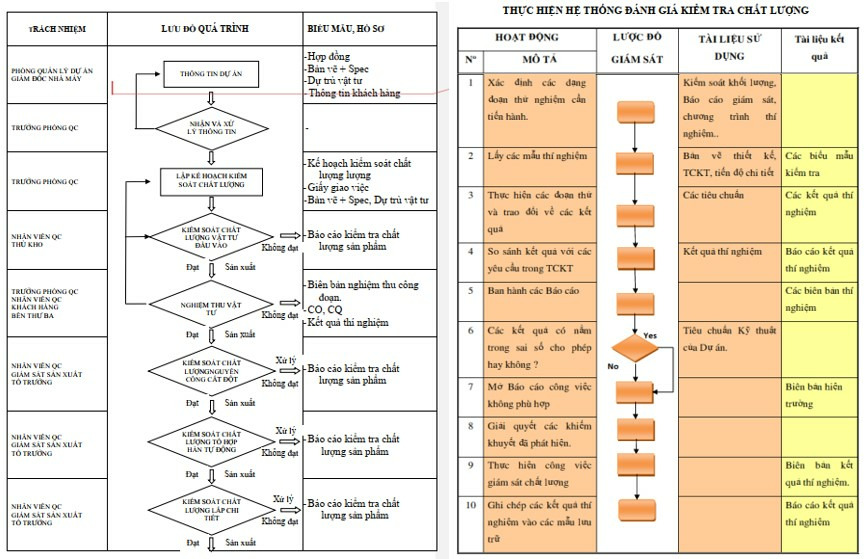
Below is a detailed sample diagram of a product quality management process. Check it out now!
Step 5: Test the created workflow
Test and evaluate the created workflow to ensure feasibility and improve efficiency.
This is also a way to find potential errors during implementation. Then, you can proceed to find solutions and contingency plans.
To test the created workflow, follow these steps:
- Establish criteria for evaluation and comparison, such as accuracy, time, feasibility, reliability, actual resources, etc.
- Collect feedback/evaluations from relevant parties such as participating personnel, managers, work coordinators, etc.
- Propose improvements if errors are found.
- Re-evaluate the process after adjustments.
Example: In the sales employee recruitment process, the business can test the created workflow as follows:
- Establish evaluation criteria: candidates, plan feasibility, company resources, recruitment costs, recruitment market, implementation and completion time, etc.
- HR discusses the plan with the Head of Sales to ensure consistency and synchronization of information.
- During the discussion, if errors are found or the process is unsuitable, adjustments will be made. Afterward, all members involved in the recruitment activity will review and re-evaluate the process.
Step 6: Guide and implement the created workflow
Guide and organize the workflow for participating members to ensure consistency and efficiency in the work process. Everyone will quickly understand and correctly follow the process.
The business can carry out the following activities to guide and implement the created workflow for the staff:
- Guidance and training
- Organize meetings/training sessions/discussions for staff to understand the benefits of applying a workflow
- Implement a sample workflow
- Set up a notification system for the workflow
- Monitor and support staff
- Enhance discussion and communication with members

For example: When a business finalizes a workflow, it needs to guide the participants on that workflow. First, the business should organize a meeting to provide guidance and share information about the process so everyone has a preliminary understanding of what the workflow is and how it will be applied in detail. Afterward, the business proceeds to assign tasks to each individual so they can grasp their responsibilities within the process. Concurrently, during implementation, the business also needs to continuously monitor, support, and answer questions from personnel to ensure all members understand the process for effective execution. Absolutely do not just send the process file for personnel to read, understand, and implement on their own.
Step 7: Implement the new workflow
The final step in building a workflow is to implement the new process within the organization. These activities aim to contribute to improving performance, consistency, and work quality in the organization.
The implementation of the new workflow includes the following specific tasks:
- Prepare resources and schedule the implementation.
- Execute the implementation of the new process.
- Measure, evaluate, and refine.
- Support, train, and ensure compliance with the process.
V. 5 Effective Theories for Workflow Improvement
When building a workflow and workflow diagram, it’s necessary to rely on theories of work process improvement. These theories originated from the work of W. Edwards Deming and Joseph M. Juran in 1980. To this day, these theories are still effectively applied by businesses.
Detailed information about the 5 theories of work process improvement will be shared by 1Office in the content below!
1. Six Sigma Methodology
The Six Sigma methodology is a quality management and process improvement method based on data and quantitative metrics to find defects, identify their causes, and implement corrective measures.
- Objective: Eliminate defects in the production process. (No more than 3.4 defects per million opportunities)
- Method: Uses mathematical equations based on statistical theory to measure and analyze processes. It includes two main methods:
- DMAIC (Define, Measure, Analyze, Improve, Control): Define the problem, measure data, analyze the cause, improve the process, and control.
- DMADV (Define, Measure, Analyze, Design, Verify): Define requirements, measure data, analyze and design a new process, verify, and control.
2. Total Quality Management
Total Quality Management (TQM) is a management system focused on improving and enhancing quality and work performance.
- Objective: Enhance product quality and create the best possible work environment.
- Method: Focuses on building a positive work environment, encouraging communication and collaboration between departments and employees. It places special emphasis on ensuring operational processes are executed correctly, completely, and consistently.
3. Business Process Reengineering
Business Process Reengineering (BPR) is a method for improving work processes by changing and optimizing business operations.
- Objective: Evaluate and improve business processes.
- Method: Uses algorithms and analysis to identify aspects that need to be changed and to optimize business processes. Business process reengineering aims to create flexibility and respond promptly to customer preferences and market trends.
4. Lean Systems
Lean Systems is a method for optimizing operational processes by eliminating waste and optimizing the company’s time and resources.
- Objective: Eliminate costs and activities that waste resources in the production and business process.
- Method: Focuses on optimizing processes by eliminating unnecessary activities, enhancing efficiency, and reducing waste. Lean systems emphasize creating value for the customer and responding quickly to market demands.
5. Theory of Constraints (TOC)
The Theory of Constraints (TOC) is a management methodology that focuses on identifying and resolving the main constraints in a business process to improve performance and profitability.
- Objective: Identify and eliminate major constraints within the process.
- Method: Seeks out the primary constraint, then focuses on resolving and eliminating it to optimize the overall performance of the system. TOC emphasizes optimizing processes and resources to achieve maximum efficiency.
VI. 5 Common Workflow Templates for Departments in a Business
To help you better understand what a workflow is, 1Office has compiled the top 5 common workflow templates for departments in a business below:
1. Workflow Template for the Sales Department
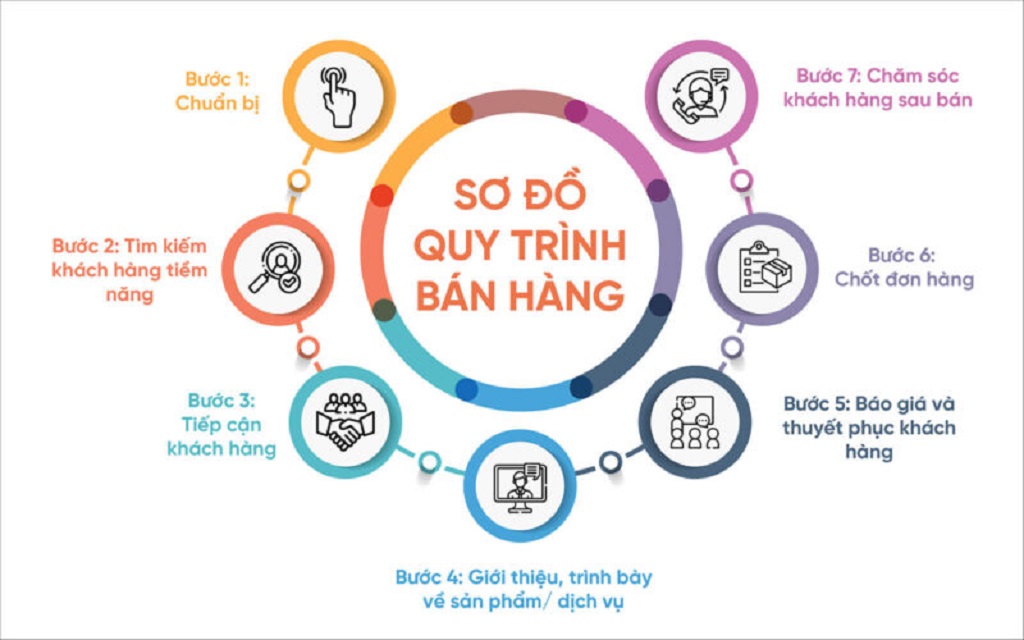
Workflow template for a business’s sales process
Workflow
Step 1: Preparation
Step 2: Finding potential customers
Step 3: Approaching customers
Step 4: Introducing and consulting on products/services
Step 5: Quoting and persuading customers
Step 6: Finalizing and closing the deal
Step 7: Post-sales customer care
Workflow diagram
>> See more: How to build a methodical and professional sales process diagram
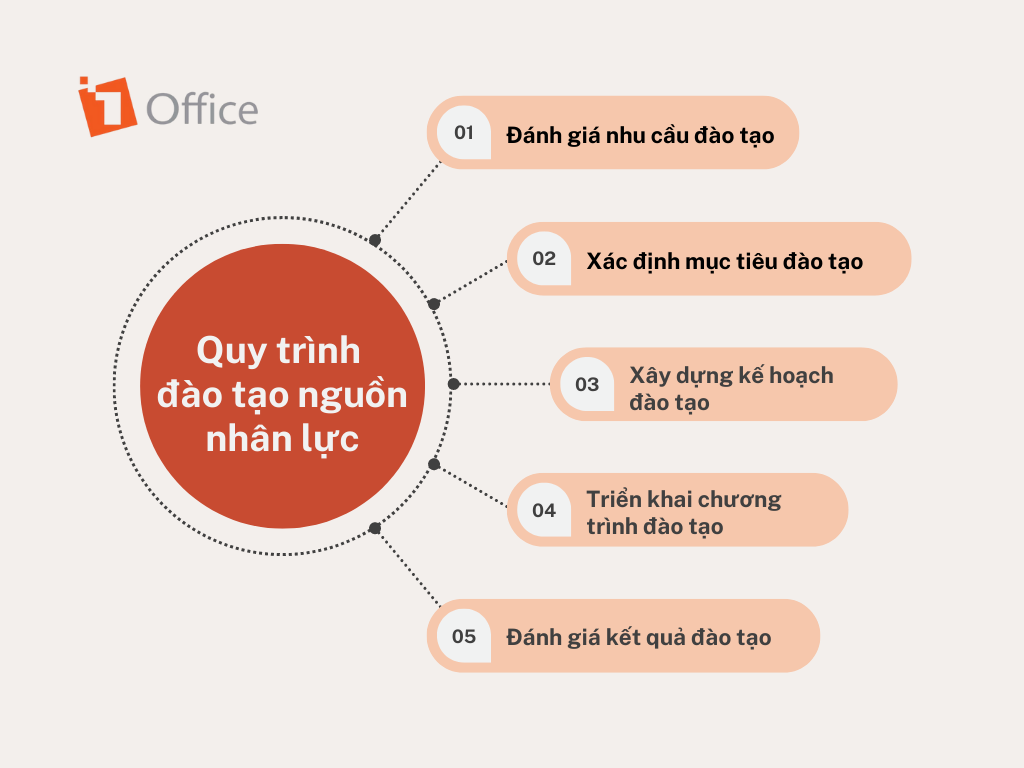
2. Workflow Template for the Training Department
Workflow template for a business’s human resources training process
Workflow
Step 1: Assess training needs
Step 2: Define training objectives
Step 3: Develop a training plan
Step 4: Implement the training program
Step 5: Evaluate training results
Workflow diagram
>> See more: Standard human resources training and development process for businesses
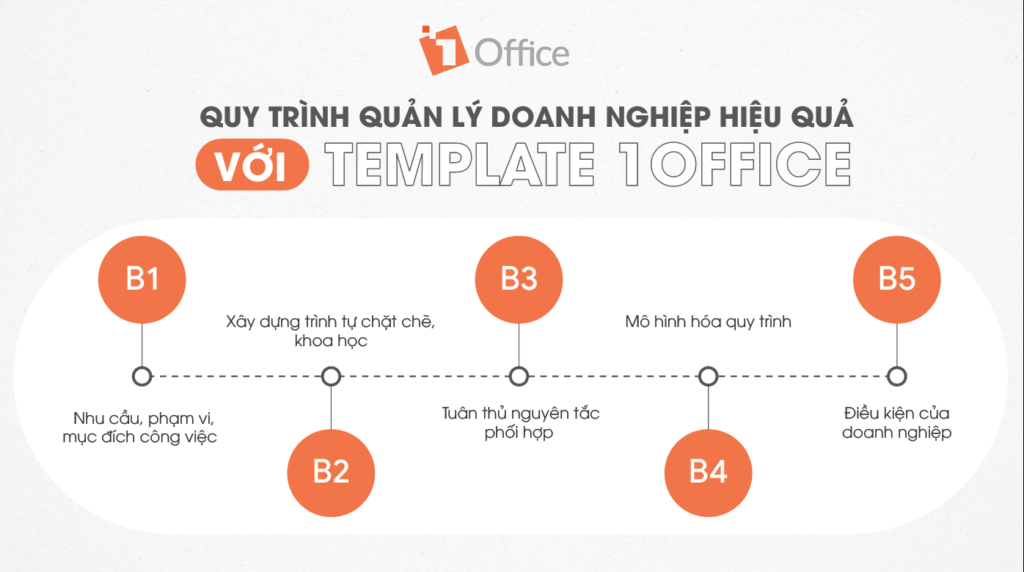
3. Workflow Template for the Operations Department
Example of a workflow for the operations department for effective business management:
Workflow
Step 1: Define the needs, scope, and purpose of the work
Step 2: Build a tight, scientific sequence
Step 3: Adhere to coordination principles
Step 4: Model the process
Step 5: Business conditions
Workflow diagram
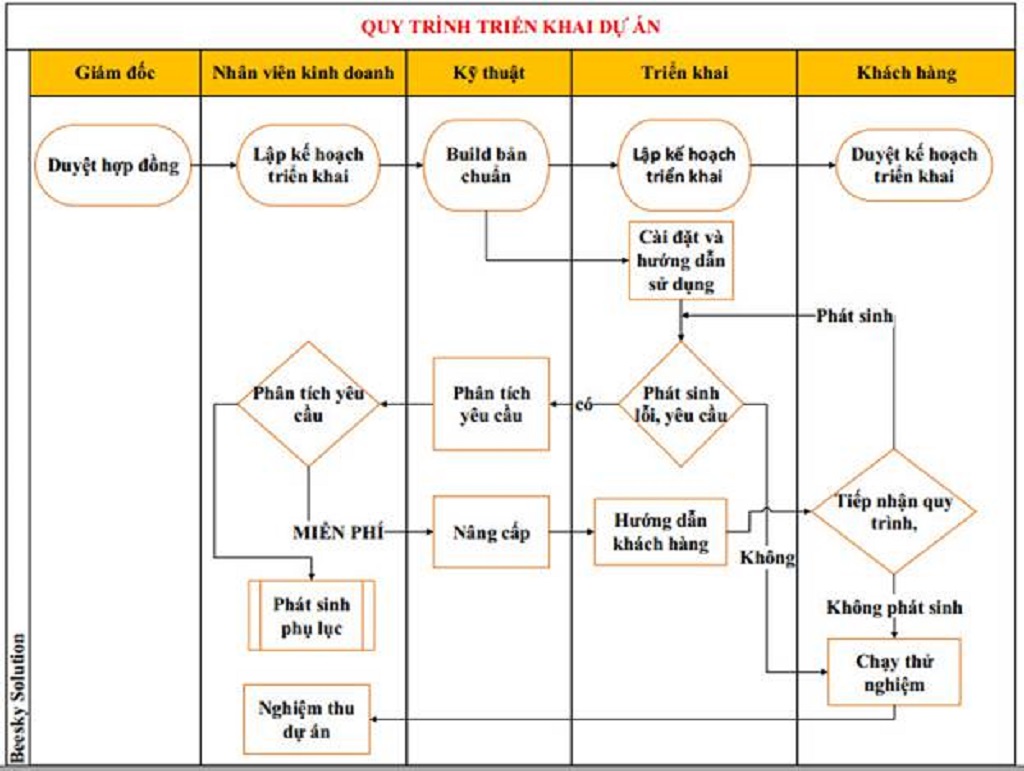
4. Workflow Template for a Project
Workflow template for project implementation for a business
Workflow
Step 1: Approve contract
Step 2: Create implementation plan
Step 3: Build standard version
Step 4: Create implementation plan
Step 5: Approve implementation plan
Workflow diagram
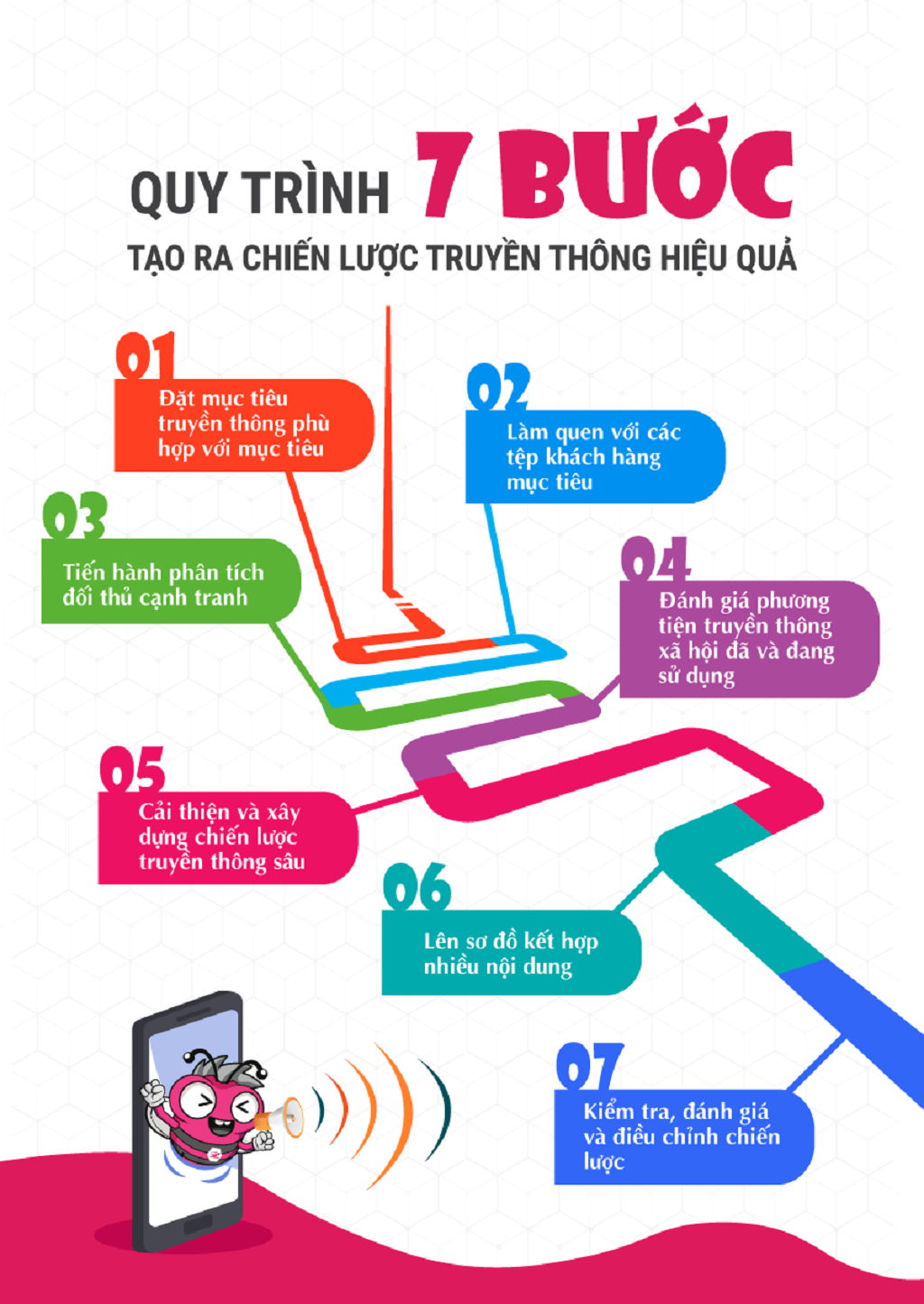
5. Workflow Template for the Marketing Department
Workflow template for creating an effective communication strategy
Workflow
Step 1: Set communication objectives aligned with goals
Step 2: Get familiar with target customer segments
Step 3: Conduct competitor analysis
Step 4: Evaluate social media channels currently in use
Step 5: Improve and build an in-depth communication strategy
Step 6: Create a diagram combining multiple content types
Step 7: Test, evaluate, and adjust the strategy
Workflow diagram
>> See more: 6 Detailed Communication Plan Templates from A-Z
VII. Notes on Applying Workflows in Business
Once you have built suitable workflows, your business should proceed to apply and implement them in its operations. However, during the application process, businesses need to note the following issues:
- Understand the current process and identify issues: Master the current work process and identify problems and implementation methods. Avoid confusion or errors.
- Define the steps and tasks to be performed: Clearly define the steps and tasks in the new process to ensure smooth and effective operations.
- Prioritize tasks and eliminate unnecessary ones: Assess the priority level of tasks in order, and eliminate unnecessary tasks to optimize work efficiency.
- Use technology to create and manage processes: Implement – track – manage – evaluate quickly and automatically with modern software.
- Train and support employees: Ensure employees are trained and supported when performing tasks in the workflow. Provide timely and quick answers to any questions.
- Monitor and evaluate the effectiveness of the Workflow: Work progress needs to be continuously updated for members to track and understand, allowing for evaluations and planning for the next steps.
- Improve and adjust the process when necessary: Continuously improve and adjust the process to ensure flexibility and alignment with business requirements.
VIII. What are the common mistakes when building a workflow?
When setting up business workflows, many organizations often encounter common problems that prevent the process from achieving optimal efficiency. Identifying and fixing these mistakes is a crucial step to ensure the workflow truly helps the business operate smoothly and improves work efficiency. Some common mistakes include:
-
Unclear task definition:
Many workflows fail because tasks are described vaguely, lack detail, or do not clearly define the desired outcome. When tasks are unclear, employees are prone to confusion, making mistakes, or missing steps.
How to fix: Each task needs to be described in detail, with clear objectives, deliverables, and deadlines. Diagrams or checklists can be used to illustrate each step of the work. -
Improper assignment of responsibilities:
A workflow is ineffective if roles and responsibilities are unclear or assigned to individuals who lack the necessary skills. This leads to delays, errors, and internal conflicts.
How to fix: Clearly define the person responsible and the support person for each step of the work. Establish a transparent assignment chart to ensure everyone knows their role and responsibilities. -
Not testing the workflow before implementation:
Some businesses skip the testing phase before full implementation, leading to errors, work disruptions, and time-consuming corrections.
How to fix: Before implementation, conduct a trial run of the workflow with a small group or on a pilot project to identify errors and refine the steps, ensuring the process is viable. -
Not updating the workflow with business changes:
Businesses are constantly changing in terms of processes, personnel, and technology. If the workflow is not updated, it becomes outdated, causing difficulties for employees and reducing efficiency.
How to fix: Establish a mechanism for periodic review and updates, at least every 3–6 months or whenever there are significant changes. Use a workflow management tool that allows for easy editing and version history tracking.
IX. Metrics for evaluating and measuring workflow effectiveness
To ensure a workflow truly delivers value, businesses need to measure its effectiveness and make improvements based on actual data. Evaluation metrics help businesses track progress, identify weaknesses, and optimize work.
-
Metrics for evaluating workflow effectiveness:
-
Completion time: The total time taken to complete each task or the entire workflow. If the time exceeds the plan, the workflow needs improvement.
-
Error rate: Measures the number of errors that occur during execution. A high rate indicates that tasks are unclear or the workflow is inefficient.
-
Process compliance rate: Assesses whether employees are following the established steps correctly. This is a crucial metric for measuring the viability and discipline of the workflow.
-
-
How to monitor and evaluate periodically:
-
Collect data from daily work reports or internal management software.
-
Organize periodic reviews weekly or monthly with relevant departments.
-
Compare actual results with the plan to identify bottlenecks or time-wasting points.
-
-
Optimizing the workflow based on actual data:
-
Based on the metrics, adjust task sequences, reassign responsibilities, or improve support tools.
-
Apply process improvement methods such as reducing waste, shortening waiting times, and streamlining unnecessary steps.
-
Ensure the workflow is always updated according to business needs, personnel changes, and employee feedback.
-
By periodically measuring and improving based on data, workflows not only become more efficient but also help businesses save time, reduce errors, and enhance overall productivity.
X. Conclusion
What is a workflow? A workflow is a template process applied to specific tasks. Implementation activities will be carried out in a specific order that has been previously established in the template process.
Workflows are built based on 5 theories of work process improvement: the Six Sigma method, Total Quality Management, Business Process Reengineering, Lean Systems, and the Theory of Constraints (TOC).
Managing and tracking multiple workflows manually can cause many difficulties for businesses. Therefore, many businesses have used 1Office’s process management feature as a powerful assistant in implementing, tracking, and evaluating workflows. The feature offers many benefits to users, such as:
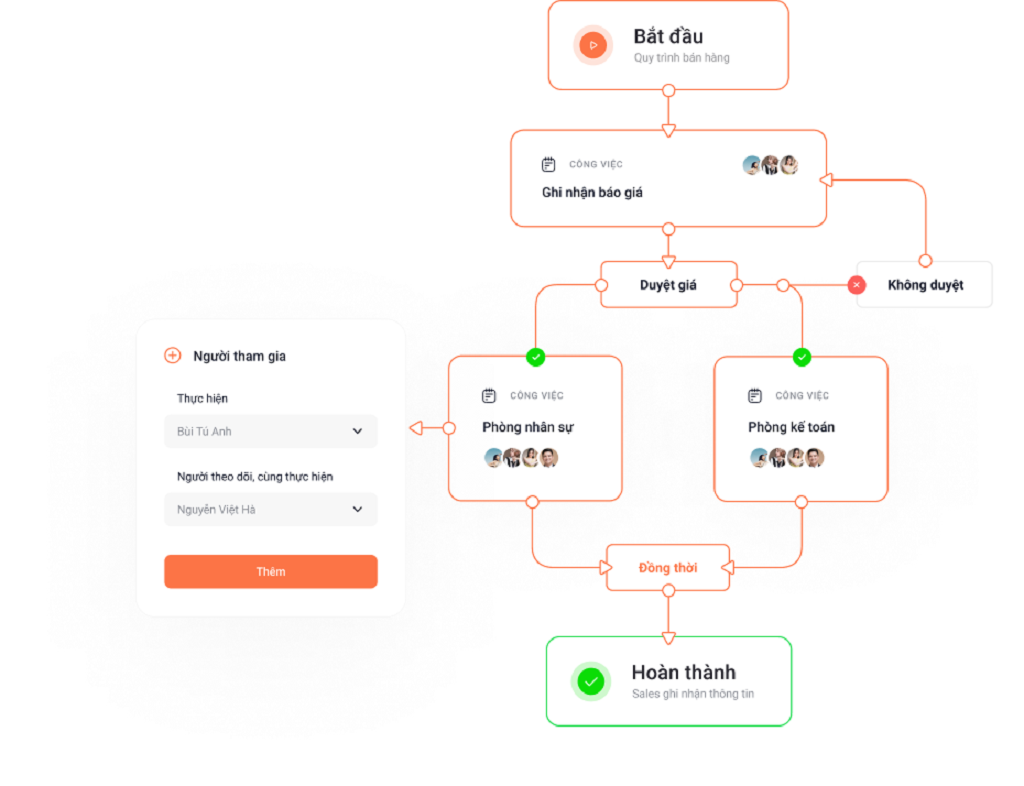
- Automated declaration setup: Declare the steps in the process using available templates (execution time, assignee, manager, detailed implementation steps), and send notifications to the assignee at each step.
- Easy process management: Set up custom alerts, configure security for process steps, and exchange information synchronously right on the 1Office system.
- Assign tasks by position, department: Designate assignees, participate in the process synchronously, update continuously with personnel changes, and display detailed workflows.
- Flexible security: Assign access and tracking permissions for workflows as desired.
- Convenient and synchronous communication: Message and communicate directly on the process interface. Notably, the feature also supports users in sharing unlimited work document files.
Thus, the question “what is a workflow” has been answered in detail by 1Office in the article above. We hope the information above helps you better understand workflows and build the most effective ones for your business. We wish you success!
















