


Social Insurance Spreadsheet: Latest 2026 Formulas and Template


Social insurance is a financial safety net for employees against life’s risks, helping them focus on their work with peace of mind. Therefore, creating a social insurance calculation sheet is a crucial task for accountants and HR professionals. The social insurance calculation sheet requires absolute accuracy and must comply with legal regulations to ensure employee benefits. In the article below, 1Office will update the latest regulations on the 2026 social insurance regime and provide the most detailed and complete guide to creating a voluntary social insurance calculation sheet.
Mục lục
- 1. New regulations on Social Insurance in 2026
- 2. Considerations when creating a social insurance calculation sheet
- 3. The Latest Social Insurance Calculation Formula for 2026
- 4. FREE DOWNLOAD: Latest 2026 Social Insurance Calculation Template
- 5. Standardize the Social Insurance Calculation Process with 1Office HRM
Social insurance is one of the corporate welfare policies aimed at ensuring a stable life and supporting employees against risks such as illness, maternity, occupational diseases, or work-related accidents,…
To create an accurate social insurance calculation sheet that complies with the law, businesses must first update themselves on the latest changes in the 2022 Social Insurance regulations.
For Vietnamese employees working in businesses, the social insurance fund will be contributed to by both the employee and the employer.
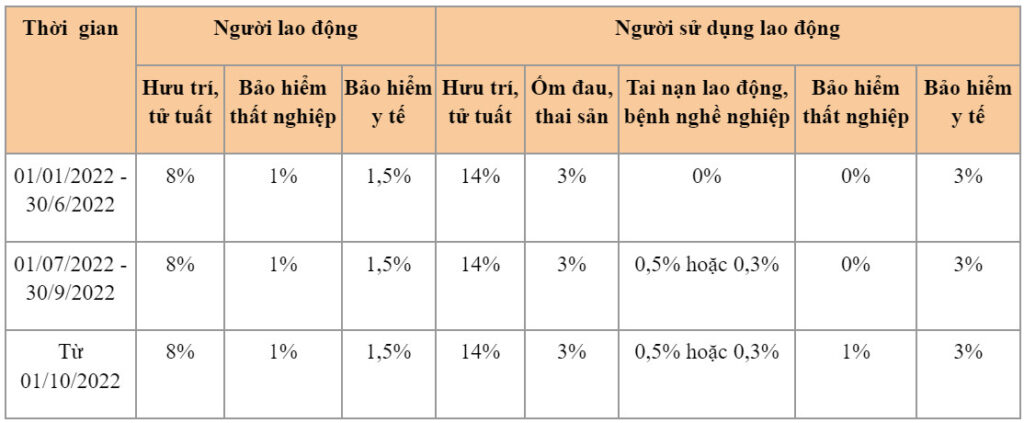
The compulsory social insurance contribution rates for Vietnamese employees, based on Decision 595/QD-BHXH of 2017, Decree No. 58/2020/ND-CP, Resolution 68/NQ-CP of 2021, and Resolution 116/NQ-CP of 2021, are specified in the table below:
| >> Read more: What is Payroll? Payroll fundamentals every HR professional should know |
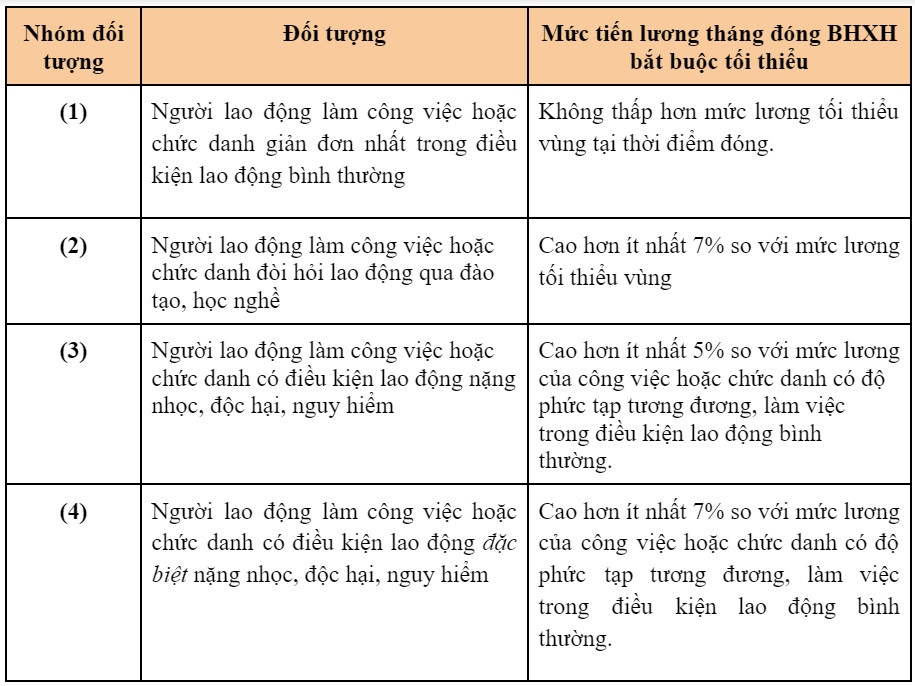
According to Decision 595/QD-BHXH, the minimum monthly salary for compulsory social insurance contributions for employees, categorized by groups of subjects, is regulated as follows:
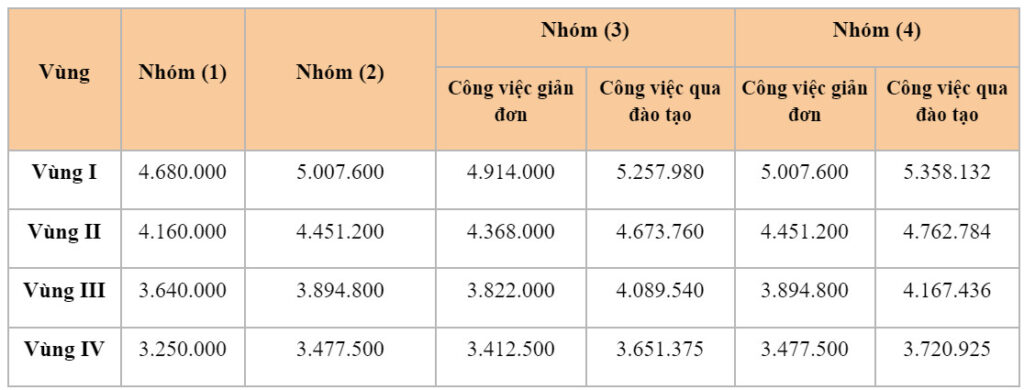
Additionally, the recently issued Decree 38/2022/ND-CP has adjusted the regional minimum wage, specifically increasing it by 6% (from July 2022). This will lead to an increase in the minimum salary for compulsory social insurance contributions, as detailed in the following table:
| Read more: The Easiest and Most Accurate Guide to Calculating Salary by Coefficient |
Article 6 of Decision 595/QD-BHXH stipulates that the maximum salary for social insurance contributions is 20 times the statutory minimum wage.
According to Decree 128/2020/QH14, the statutory minimum wage for 2022 is 1.49 million VND/month.
Therefore, the maximum monthly salary for compulsory social insurance contributions can be calculated as: 1.49 million VND x 20 = 29.8 million VND/month.
In addition to understanding the regulations, businesses should also consider the following points when creating a social insurance calculation sheet.
| Allowances subject to Social Insurance contributions | Allowances intended to compensate for factors related to working conditions, living conditions, and job complexity, such as: position allowance, responsibility allowance, hazardous or dangerous work allowance, seniority allowance, and other similar allowances. |
| Allowances not subject to Social Insurance contributions | Benefits such as meal allowance, travel/gasoline allowance, phone allowance, bonuses, etc., and other subsidies as stipulated in Clause 11, Article 4 of Decree No. 05/2015/ND-CP. |
Read more: How to build an attractive employee benefits package – The key to retaining talent
The voluntary social insurance contribution table will be created by establishing a social insurance (SI) calculation formula for each specific case.
The monthly SI contribution amount is calculated based on the monthly salary subject to SI contributions, which includes 3 components:
- Salary;
- Salary allowances;
- Other supplementary amounts as stipulated by labor law
The monthly SI contribution amount is calculated using the following formula:

Lump-sum social insurance is a benefit that SI participants are entitled to after one year of unemployment or cessation of SI contributions, and in some other special cases.
The lump-sum SI benefit is calculated based on the number of years of SI contributions and is divided into two periods, before and after 2014, as follows:
- The lump-sum SI benefit is equal to 1.5 months of the average monthly salary subject to SI contributions for the years before 2014
- The lump-sum SI benefit is equal to 2 months of the average monthly salary subject to SI contributions for the years from 2014 onwards
Based on the regulations above, the formula for calculating the lump-sum SI benefit is as follows:

Example:
Mr. A has contributed to social insurance for 6 years and 3 months, with an average salary of 4,500,000 VND. Mr. A contributed to social insurance from 11/2011 to 01/2018. Specifically:
- Before 2014, Mr. A contributed for 2 years and 2 months. The 2 months contributed before 2014 will be transferred to the post-2014 contribution period.
- After 2014, Mr. A contributed for 4 years and 1 month, plus the 2 odd months transferred from before 2014, totaling 4 years and 3 months.
Mr. A’s lump-sum SI benefit is:
=(4.500.000 x 2 x 1,5) (4.500.000 x 4,5 x 2) = 54.000.000
If an employee has contributed to social insurance for less than one year, the lump-sum social insurance benefit will be 22% of the monthly salary on which contributions were based, with a maximum benefit equal to two months of the average monthly salary on which contributions were based.
| Read more: Employee Salary Advance Process According to the Latest 2022 Regulations |
Creating a Social Insurance calculation sheet requires meticulousness and accuracy in every figure. Therefore, this is a very time-consuming task for the HR and accounting departments. To help businesses shorten the process of calculating social insurance for employees, 1Office provides you with 02 standard Social Insurance calculation templates compliant with the latest 2026 regulations below.
Download the Monthly Social Insurance Calculation Sheet HERE
Download the One-time Social Insurance Calculation Excel Sheet HERE
Insurance management is an important task in improving the quality of life and ensuring security for employees, so they can work with peace of mind. With the current development of science and technology, insurance management processes and the creation of Social Insurance calculation sheets in businesses have been digitized on software, helping businesses optimize management and reduce manual operations.
1Office HRM is one of the most professional human resource management software on the market today. Besides outstanding features such as personnel records management, employee payroll management, recruitment & training, the HRM module also provides an insurance management feature linked to each specific employee. The insurance management feature includes utilities such as:
- Store employee insurance information: Allows managers to set parameters for contribution rates (default according to regulations), base contribution levels, and cut-off dates for increases or decreases
- Suggests lists for increasing or decreasing insurance contribution levels according to legal regulations
- Track the monthly insurance contribution history of each employee
- Export insurance payment reports and extract insurance information for payroll calculation
- In particular, all employee insurance data is automatically linked to the payroll for collection or deduction, eliminating the need for manual copying and saving thousands of work hours for accountants and HR staff
Through this article, 1Office has provided readers with the social insurance calculation formula as well as the social insurance calculation coefficient table compliant with the latest 2026 legal regulations, and introduced an automated personnel insurance management solution. For a free consultation and a trial experience of the software, please contact us using the information below.
For more details, please see:
- Hotline: 083 483 8888
- Fanpage: https://www.facebook.com/1officevn/
- Youtube: https://www.youtube.com/channel/UCeTIRNqxaTwk0_kcTw6SxmA




