


Run your business with effective work management software


Most businesses, whether large, medium, or small, use effective work management software to manage their business operations more thoroughly. With an online management system, all employees can keep track of tasks, share, discuss, and managers have the authority to decide whether to approve the next step in the process.
Mục lục
- 1. Benefits of using online work management software
- 2. What software should be used for effective work management?
- 3. Effective Work Management with 1Office Online Work Management Software
- 3.1. Manage all work operations from a single platform
- 3.2. Effective work management anytime, anywhere
- 3.3. Planning Support
- 3.4. Closely Track Work Progress and Evaluate Performance
- 3.5. Direct Discussion
- 3.6. Eliminate Remote Work Barriers
- 3.7. Add Sub-tasks to Larger Tasks
- 3.8. Create Separate Workspaces for Each Team
1. Benefits of using online work management software
If in the past or even now, you often manage work and projects using three main tools: pen, paper, and various separate tools like Excel, Zalo, WhatsApp, etc., then applying effective work management software brings many significant benefits. This is a human resource management method used to plan tasks or workflows, manage time, allocate resources, and manage change.
1.1. Work Planning
Using work management software, leaders can easily plan projects, major tasks, and allocate implementation processes for all their employees. All these plans are stored and managed centrally on the online software so that managers and employees can access all information at any time.
1.2. Time Management
If you use chat tools to manage work, it’s certain that arranging time and allocating deadlines can easily lead to forgotten tasks. Therefore, for effective work management, managers can use digital software that helps you set time goals and provides alerts when deadlines are approaching or have passed.
1.3. Resource Allocation

Ensure that you are always fair in assigning tasks to each department and position, consistent with the employee’s job responsibilities. To avoid overlapping tasks, assigning work to the wrong person or position, you should use comprehensive employee management software.
1.4. Communication and Collaboration
Using effective work management software allows you to add assignees to tasks to support the responsible department. Additionally, both managers and employees can post comments, share personal opinions, exchange documents, and more.
2. What software should be used for effective work management?
You can find countless standalone work management software options available on the market. They all share common benefits for your business. However, not all software can meet all the needs for effective work management and help maintain stable business operations.
Among all the popular software types today, you should use software that manages all work-related operations on a single platform. At the same time, your business needs software that stores all employee activities, is easy to use, and has a suitable cost.
1Office is currently one of the leading providers of online work management tools in Vietnam. 1Office is trusted by over 300,000 users from 3,500 businesses.
3. Effective Work Management with 1Office Online Work Management Software
1Office’s work management feature helps managers track work progress in detail and accurately evaluate performance. Here are some of the benefits that 1Office offers:
3.1. Manage all work operations from a single platform
Whether you are working on a single task or multiple different tasks, 1Office provides a centralized platform that can record and store them. This task management application helps you avoid the risk of losing any important information, tasks, or deadlines. Using the effective work management feature from 1Office software not only saves you time but also provides a sustainable paperless environment for easy access to important data.
3.2. Effective work management anytime, anywhere
If you are handling a complex task and plan to work outside the office or on weekends, it’s crucial to bring all important data with you so you don’t run into problems when continuing your work.
1Office gives you access to your database anytime, anywhere, on any device—from mobile phones, laptops, to tablets. Simply log in to the online system or mobile app, and you’ll have the flexibility to easily access all your necessary data.
3.3. Planning Support
1Office helps users create specific and realistic work plans. This makes it easy to assign and allocate tasks to the right personnel based on their job positions and departments. Once a task is assigned, it automatically updates to the individual’s personal schedule, allowing them to be proactive with their work.
3.4. Closely Track Work Progress and Evaluate Performance
Individuals and managers can monitor and manage work effectively on screens like Gantt and Kanban. Here, you can easily drag and drop statuses such as “in progress” or “completed” to capture detailed task information and continuously track the actual execution time.
All work processes feature automatic alerts and smart reminders, helping individuals proactively complete tasks by their deadlines. Task results are automatically updated in reports based on progress and managed tasks, visualized on a Dashboard screen. From these reports, managers can accurately evaluate employee effectiveness and performance.
3.5. Direct Discussion
To prevent work-related messages from getting lost, 1Office integrates a feature for direct discussion and exchange right within the workflow or task in a company’s project. Additionally, users can attach document files or add images as resources for the task, helping work flow more smoothly.
3.6. Eliminate Remote Work Barriers
Today, the concept of remote work is at its peak because organizations realize they can now have a perfect platform to see how their remote employees are performing their tasks.
The online effective work management feature of 1Office helps remote team members receive all live work updates in real-time. It not only saves business time from rescheduling important updates but also ensures that everyone is on the same page without extra effort.
3.7. Add Sub-tasks to Larger Tasks
In larger organizations, there is always an issue with how to handle large and complex tasks. Because so many things are attached to that task, it is quite difficult to describe parts of a task to team members and departments.
1Office allows you to add as many sub-tasks to a parent task as you want, so you can break a parent task into manageable parts.
3.8. Create Separate Workspaces for Each Team
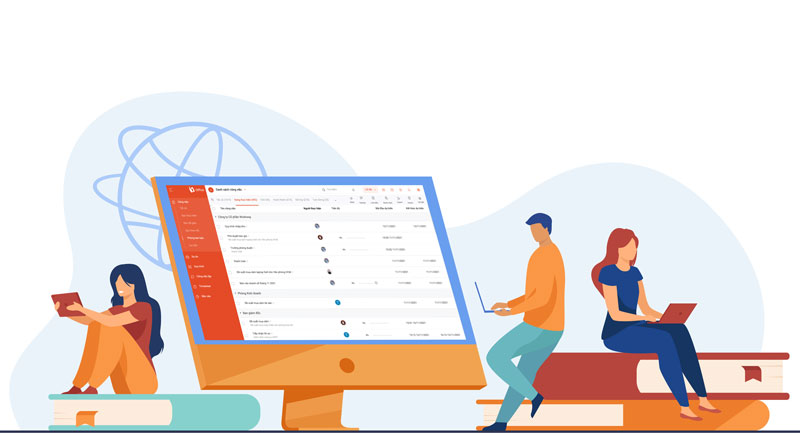
Drawing every team member’s attention to each task doesn’t make sense, as it can be distracting for those not involved in that task. The best approach is to create dedicated, separate workspaces using the effective work management feature from 1Office. This application allows you to select which employees are added to specific tasks.
Thus, using software for effective work management not only smooths out complex tasks but also helps your business meet deadlines for tasks and projects more easily. 1Office is the business management software for your company.
Learn more:
Work management feature on 1Office: https://www.facebook.com/1officevn
Email: support@1office.vn
Hotline: 083 483 8888




