


 13/05/2026
  800 views
Whether you are an employee or a manager struggling to organize your work reasonably, this article introduces you to effective personal task management applications that help you optimize work performance, manage time, and complete tasks on schedule.
Mục lục
- 1. What are the benefits of a personal task management application?
- 2. Top 7 Best Personal Task Management Applications Today
1. What are the benefits of a personal task management application?
Task reminders anytime, anywhere
You receive too many tasks, making it impossible to remember or even prioritize them. Personal task management software will help you avoid that.

The software will specifically list all the tasks you need to do, are doing, have completed, and which ones are overdue. Moreover, the task management system also provides reminder reports. This helps you organize your work well and meet deadlines.
A personal task management application also helps you interact more easily with your colleagues, allowing you to discuss, plan, and take notes directly within the software. This helps you stay on top of everything and complete assigned tasks to the best of your ability.
Proactively manage and organize work
The biggest headache for many managers is how to delegate tasks optimally and effectively. Managers always have to calculate and plan for upcoming projects, from brainstorming ideas and allocating tasks to optimizing productivity and time.
Work reporting software on your phone will help users plan, manage, and execute in the best way possible. Not only that, but this is also a tool that helps managers see all the tasks within a plan. From there, they can make reasonable allocations to ensure tasks are completed in the best possible way.
See more: 7+ Most Used Task Management Apps
2. Top 7 Best Personal Task Management Applications Today
2.1 Todoist
Todoist is a standalone software where users can create and set up daily to-do lists. The advantage of this personal task management app is its ability to automatically interpret and categorize tasks based on your input.
For example: You will have lunch with your team at 12 PM tomorrow. The Todoist software will schedule a reminder for you at exactly 12 PM tomorrow, as well as automatically place this task into the corresponding list.
You can download and use the Todoist work schedule management software for free from the app stores on mobile platforms. For advanced features, you must pay an additional annual fee.
Read now: Top 8 Most Effective Free Task Assignment Software for Employees Today
2.2 Evernote Task Management Software
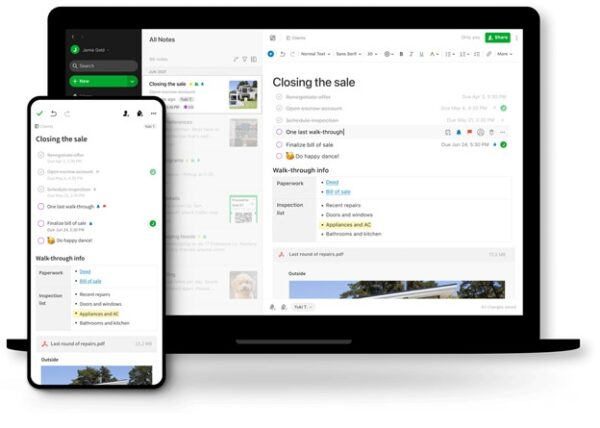
Evernote is a free, cloud-based personal task management software that allows users to attach documents, collaborate on projects, and store all information in a centralized system.
Team members can access, edit, and upload image and video files from any device. You can even easily share notes or notebooks with others, even if they don’t use Evernote.
2.3 Microsoft Planner Task Management Tool
Microsoft has launched task management software Planner. This software will help users organize and arrange tasks, share data with team members, and much more.
Not only that, you can track project progress, see who is performing which task, and monitor how far along they are. In addition, the software also allows you to view others’ tasks through the “Hub” feature. The biggest advantage of this personal task management application is its ability to integrate with other Microsoft Office software.
See more: Should you manage employee tasks with Excel or with online software?
2.4 Personal task management tool Due
Due is an effective work schedule management software. You will no longer have to worry about forgetting your tasks; Due will remember and remind you. Your only job is to list the tasks you need to complete for Due. This is also a task reminder software with an easy-to-use, minimalist interface, and most importantly, it has no limit on the number of participants.
2.5 Freedcamp
When using Freedcamp, you can choose from 12 different widgets such as: Calendar, My Tasks, My History, or Milestones and select the projects you want to pull data from. Then, you can drag and drop the widgets on the page to arrange and customize your layout, allowing you to quickly view all your projects at once.
2.6 Trello work reporting software
Trello is an effective personal task management application that helps manage and monitor work within a project. Trello has a perpetually free version for users, but it is limited in some functions.
The advantage of this software is that Trello’s interface resembles sticky notes on a screen, making it very easy to use. Just by looking at the interface, a manager can get the most comprehensive overview of the project’s progress.
However, the Trello personal task management tool is only suitable for small-scale projects or teams and is not suitable for reporting on large, complex projects.
2.7 1Office daily personal task management software
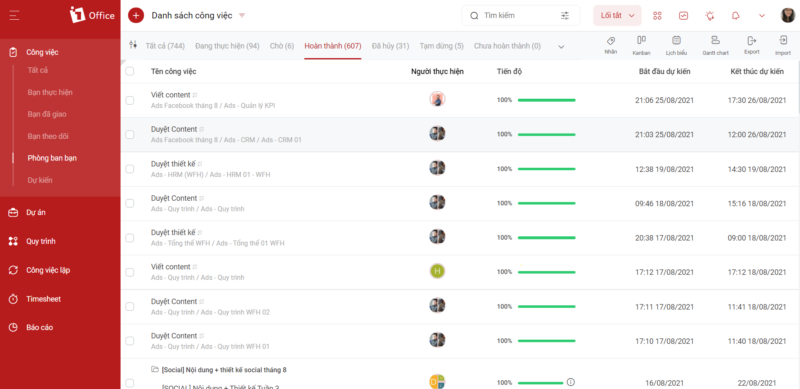
1Office is one of the most professional and effective solutions for managing personal and team tasks available today. Integrated with many smart and useful features, the task management 1Office software helps you:
Clear, unified processes on a single platform
– Closely monitor project progress: status, assignee, work results.
– Control operational data, synchronize metrics, and optimize data mining capabilities.
– Customize the system, measurement methods, and reports to suit the different characteristics and purposes of the business.
Visual, real-time project progress reports
– Measure accurately and visually with detailed figures, charts, and statistics
– Instantly update reports and data on all aspects of the business (sales, projects, HR, communications, etc.)
– Check the results achieved by departments/individuals. Automatically and quickly calculate the profit/loss percentage for each project. You can easily learn about task management methods that help increase work efficiency.
Standardize processes, improve work efficiency
– Proactively monitor project progress and processes with automatic, real-time reports to promptly handle any issues that arise
– The process system is built specifically for each department and staff position, with a clear division of responsibilities for each part, helping to minimize delays or missed assignments
– Helps employees understand the overall coordination picture, enabling them to take control of their work progress
Free task management software helps people significantly improve their work efficiency. Although these tools can be used flexibly from a manager’s perspective, organizing work for an entire team often requires using multiple different software to control tasks. This consumes a lot of time and effort in searching for information and compiling content, and it is very easy for information to become inaccurate.
Therefore, if you want to manage personal or group tasks, implementing a comprehensive management software that can notify, arrange tasks for each individual, and provide an overview of the entire team’s work is the optimal solution to consider.
To get the #1 comprehensive management solution in Vietnam for your business/team, which helps create a competitive advantage in the market, please leave your information, the 1Office consulting team will contact and advise you today:
For more details, please see:
Hotline: 083 483 8888
Website: https://1office.vn/
Fanpage: https://www.facebook.com/1officevn/
Youtube: https://www.youtube.com/channel/UCeTIRNqxaTwk0_kcTw6SxmA

















