


 13/05/2026
  273 views
How to create a work plan always plays a very important role for everyone in any field. A detailed work plan will help us arrange our work time scientifically and achieve high results. However, businesses today often spend a lot of time and resources on work planning. Don’t worry, 1Office’s planning software helps you create work plans quickly and scientifically.
Mục lục
1. What are the benefits of creating a work plan with software?
Work planning software is an effective solution that helps you determine the sequence of tasks that need to be done. This helps you complete your work progress as quickly as possible according to the set plan. Below are the benefits of using 1Office’s work planning management software:

- Track and monitor work progress anytime, anywhere, and on any device, helping managers easily stay updated on tasks.
- Helps managers save maximum time on work planning and task assignment.
- By applying the most visual and advanced work management models like Kanban, Gantt, and resource allocation charts, it helps managers utilize resources for task execution more reasonably.
- Using the software helps managers assign tasks quickly to the right person with a reasonable timeline, and arrange work scientifically to avoid overlaps that cause pressure on employees.
With the benefits mentioned above, 1Office’s work planning software is truly an excellent solution that helps individuals and businesses track work progress and create work plans easily. So, what is the work management process with 1Office’s work management software? Let’s explore it in the content below.
>> See more: Top 25+ best effective work management software of 2023
2. How to create a work plan with 1Office’s work planning software
2.1 Software Overview
1Office is known as the most comprehensive and intelligent work planning and project management software available today. Possessing many superior features, you can easily create plans and schedule assigned tasks for specific times. In addition, the management software also integrates many other features such as: schedules, projects, and extremely convenient data storage.
| ☑️ Company Name | 1Office Joint Stock Company |
| ☑️ Place of Production | Vietnam |
| ☑️ Company Size | Over 200 employees |
| ☑️ Year Established | 2015 |
| ☑️ Cost | Depends on the number of users |
| ☑️ Free Version | 15-day free trial |
| ☑️ Website | https://1office.vn/cong-viec |
| ☑️ Headquarters | 5th floor, Diamond Place, No. 25 Le Van Luong, Thanh Xuan Ward, Hanoi City, Vietnam |
| ☑️ Hotline | 083 483 8888 |
| ☑️ Tax Code | 0106920494 |
2.2 How to create a work plan with 1Office software
Regular tasks are variable tasks that any employee is assigned and performs daily or weekly. With the task management feature of 1Office’s work planning software, you can easily plan, manage, monitor, and remind employees to complete their duties scientifically and easily.
To manage and plan regular tasks on 1Office, follow these 3 steps:
- Quickly create a to-do list
With 1Office’s intuitive and easy-to-view interface, users can quickly create a series of tasks just by adding the task name and pressing Enter. The tool helps users assign tasks to employees, update timelines, and track work progress quickly and easily.
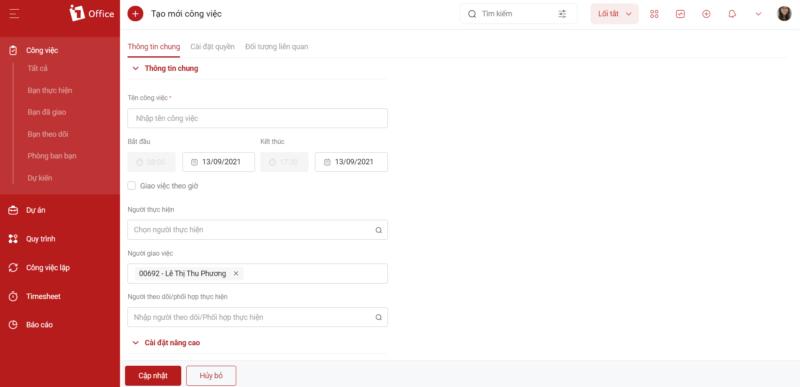
Additionally, if you want employees to track tasks in more detail, you can import an Excel file into the software for management. This saves maximum time for managers, and employees can start working immediately without waiting for a plan from their superiors.
- Assign tasks anytime, anywhere, on multiple devices
Instead of having to be at the office to assign tasks to employees, 1Office now allows you to automatically assign tasks on multiple interfaces, no matter where you are or what the situation is. This enables you to quickly see the workload of each employee, how far they have progressed, and promptly address any issues that arise. With just a smartphone, you can assign and check employee tasks, even when you are not at the office.
Track and manage tasks easily
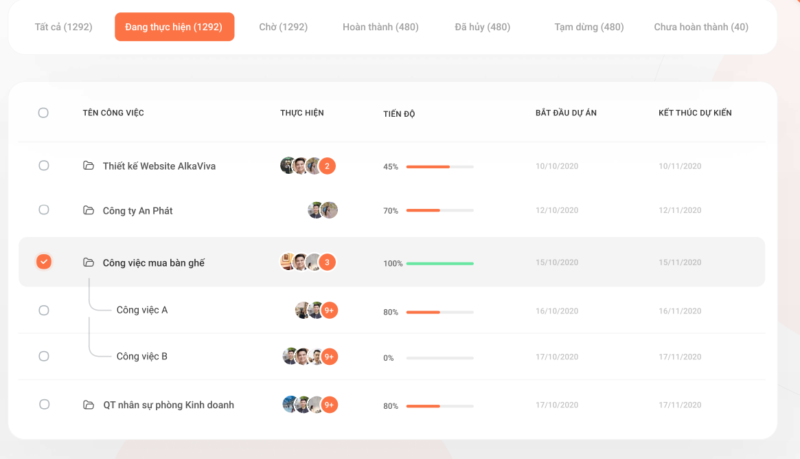
Currently, 1Office provides users with 2 screens to track tasks: the list screen and the schedule screen.
- Manage tasks on the task list screen
On the task list screen, right-click on a task name to perform task management actions. This method of work planning will help you get an effective overview of all tasks according to each timeline.
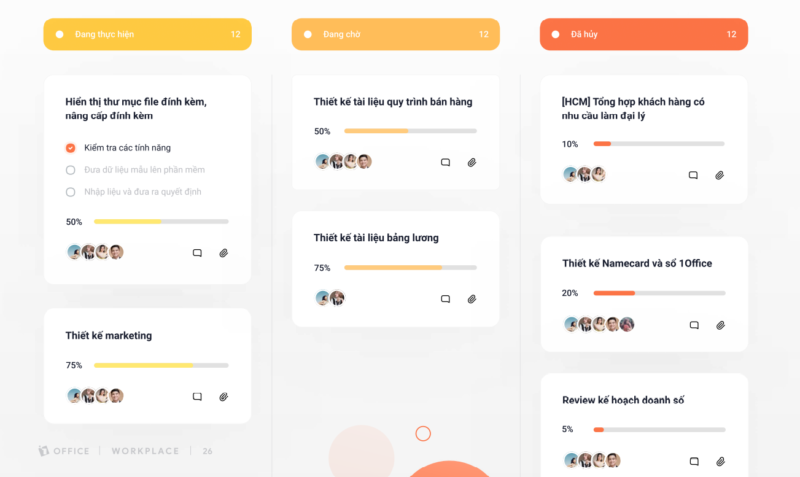
- Manage tasks on the task detail screen
With this work planning method, you go to the task detail screen and perform task management actions in the top right corner of the screen. This method allows you to easily view the details of each task item, such as: task name, progress, assignee…
The article above has shared the benefits, features, and how to create a work plan with 1Office software to help businesses track work progress and plan tasks quickly.
To register to use our work planning software to optimize workflows, time, and resources, please leave your information for 1Office experts to contact and advise you today.
For more detailed information, please see:
Hotline: 083 483 8888
Fanpage: https://www.facebook.com/1officevn/
Youtube: https://www.youtube.com/channel/UCeTIRNqxaTwk0_kcTw6SxmA
















