13/05/2026
  539 views
1Office is one of the names dominating the software technology market in Vietnam today, pioneering the trend of corporate digital transformation. Therefore, 1Office reviews are also a topic of interest for many managers and business owners who want to verify its quality and evaluate 1Office comprehensively based on the software’s practical application. So, what features does 1Office include? What makes 1Office different from other business management software? Is 1Office the right choice for Vietnamese businesses? Let’s get a general overview in the following article.
Mục lục
- 1. What is 1Office? What business problems does 1Office help solve?
- 2. Review of the main modules of the 1Office software
- 3. 1Office Review: Pros and Cons
- 4. Which businesses are a good fit for 1Office software?
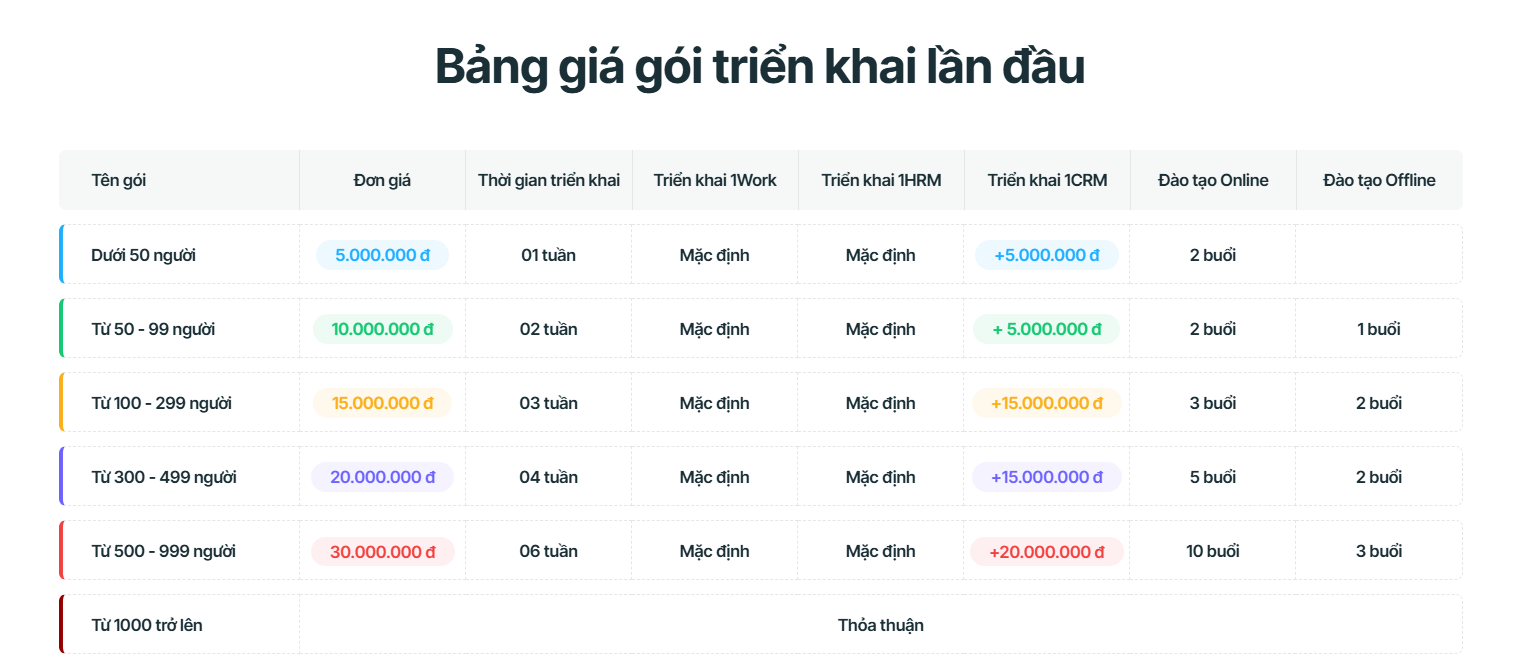
- 5. Pricing
1. What is 1Office? What business problems does 1Office help solve?
1Office is researched and developed based on scientific thinking methods, consistently combined with a modern technology platform with 3 core development philosophies: Low-code, Automation, and AI, to create a unified, cohesive, and comprehensive all-in-one solution. More than just providing a comprehensive business management solution, 1Office offers an entire online working environment on the Internet. By digitizing your entire business and turning it into a unified entity covering HR, Customers, Work, Sales, and Communication. This allows every member in the system to easily communicate and leverage the benefits to serve their work.
The 1Office.vn software operates smoothly on mobile phones, tablets, and computers (laptops, PCs), creating one of the most effective work and human resource management solutions for businesses in the digital era. From planning, assigning tasks, reporting results, to communication, everything is easy to use on a mobile phone, helping users proactively manage their work.
Instead of focusing on providing grand features and solutions, 1Office aims to research and analyze user behavior on the software more deeply and meticulously, paying attention to the smallest details to help each individual in the business maximize efficiency and optimize every second of work.
2. Review of the main modules of the 1Office software
Overall, 1Office provides a fairly complete set of necessary modules for businesses of various sizes and fields to comprehensively manage their company’s activities. Let’s explore the 3 main modules of the 1Office business management platform below:
2.1. 1Work – Work Management Module
The challenge of work management is how to control ongoing tasks and projects, optimize available resources, and enhance business productivity. To solve this problem, management software must address two things:
- First, make the task assignment and acceptance process between managers and employees transparent, thereby clarifying responsibility;
- Second, help managers plan and enable employees to collaborate and work centrally on a single platform.
Based on these criteria, 1Office addresses the problem quite well, meeting approximately 80% of business needs. This is one of the few solutions in Vietnam that allows the application of both work management methodologies: the Waterfall Model and the Scrum Model. This combination helps businesses manage work in terms of both quality and quantity in a scientific, intuitive way, closely tracking progress.
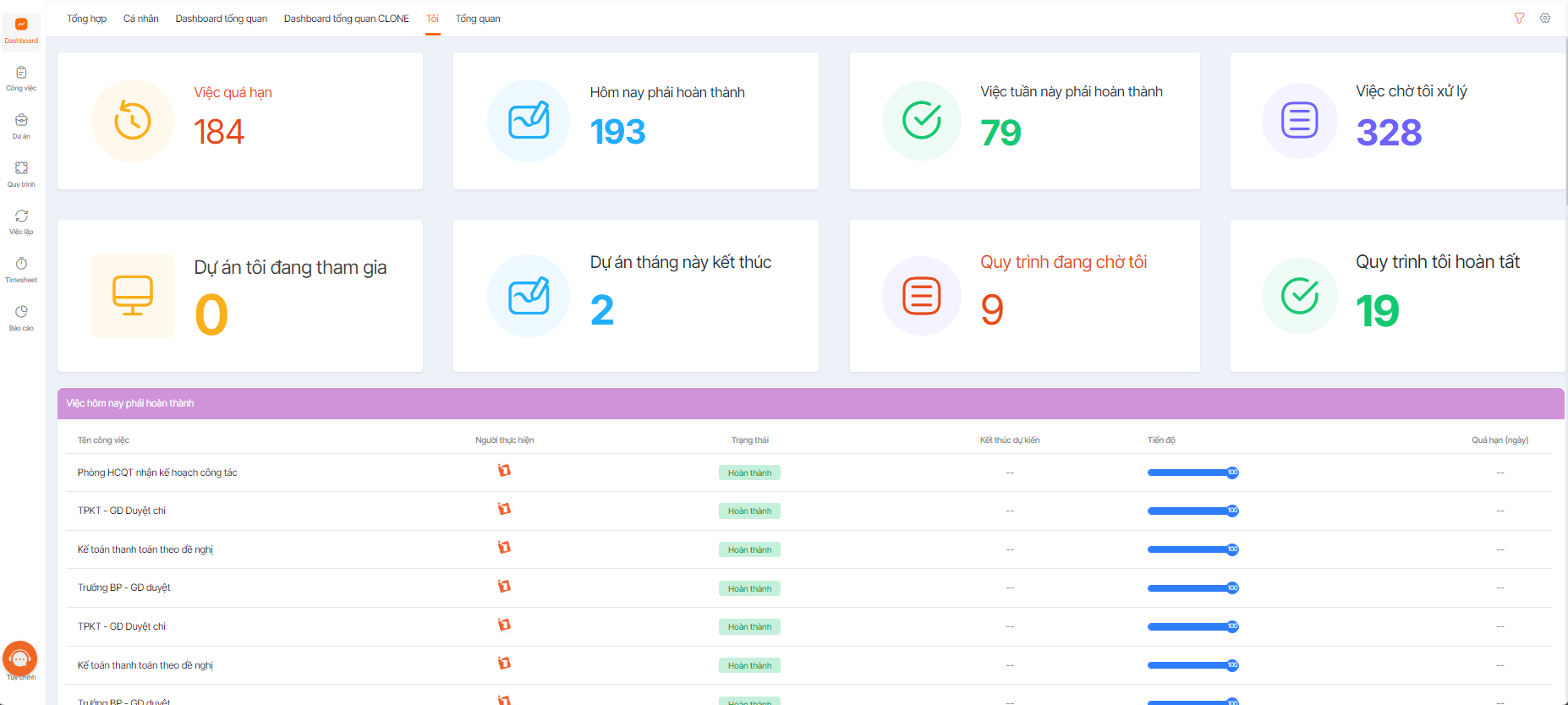
Corresponding to 3 features: Project Management, Task Management, and Process Management, the 1Work module of 1Office can bring the following benefits to a business:
Quickly plan and organize project implementation
- Create projects directly on the software or import from Excel
- Define, link, and automate 100% of processes
- Strict project permissions ensure safety and security
Simplify task assignment – Easily allocate resources
- Assign tasks anytime, anywhere to individuals, departments, or teams
- Assign tasks from a plan, a meeting conclusion, or a chat message
- Break down projects into smaller phases or categories for easier management
Direct communication – Easy interaction
- Communicate directly and quickly on each task, preventing information from getting lost or mixed up.
- Allows attaching documents within the project for more convenient information reference.
- Tasks will be synchronized with the personal calendars of project participants.
Smart Alerts – No More Forgetting or Missing Tasks
- The smart alert feature helps users avoid forgetting or missing tasks
- Documents are stored centrally, easy to retrieve, preventing loss, omissions, and version discrepancies.
Real-time Progress Tracking – Accurate Visual Reports
- Diverse progress reporting methods help balance implementation resources
- Real-time data statistics through automatic reports on the Dashboard screen
- Easily evaluate the work performance of participating individuals and departments.
1Chat – Flexible and Smart Communication
1Chat offers a flexible communication experience, allowing you to assign tasks and track progress directly within conversations. It enables the creation of chat groups between specific departments, positions, or job titles. The system can also automatically add relevant personnel to chat groups or display a list of commands to quickly generate charts like column charts, pie charts, bar charts, etc., or compile statistics such as comparing two data points, counting digitally signed documents, and more, right within the conversation.
2.1.1 Project Management
Create Projects & Allocate Resources
The Project Management feature allows users to create projects with multiple sub-tasks and add participants (with permissions: Assignee, Manager, Follower), ensuring a clear and transparent division of work and responsibilities. Users can quickly update the project timeline without having to edit the entire project. Anyone involved in the project can add documents and participate in public discussions.
A key differentiator of 1Office is that you can create a task that doesn’t necessarily belong to any project – which aligns with the daily work management culture in Vietnamese businesses.
Manage & Monitor Projects
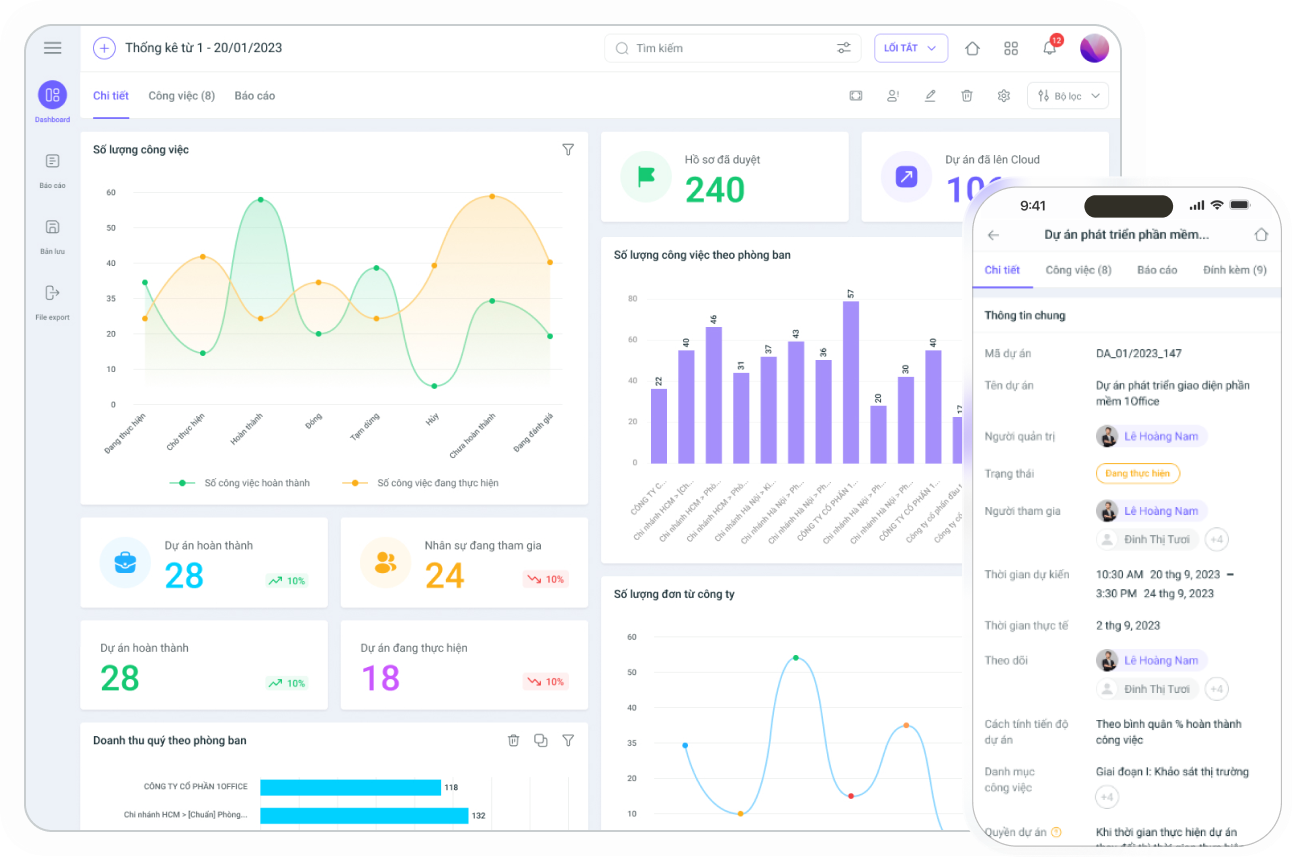
The Project Management feature helps managers closely follow the project process, tracking progress and work quality tightly and visually, anytime, anywhere, with various charts: Gantt chart, Kanban, Grid, etc.
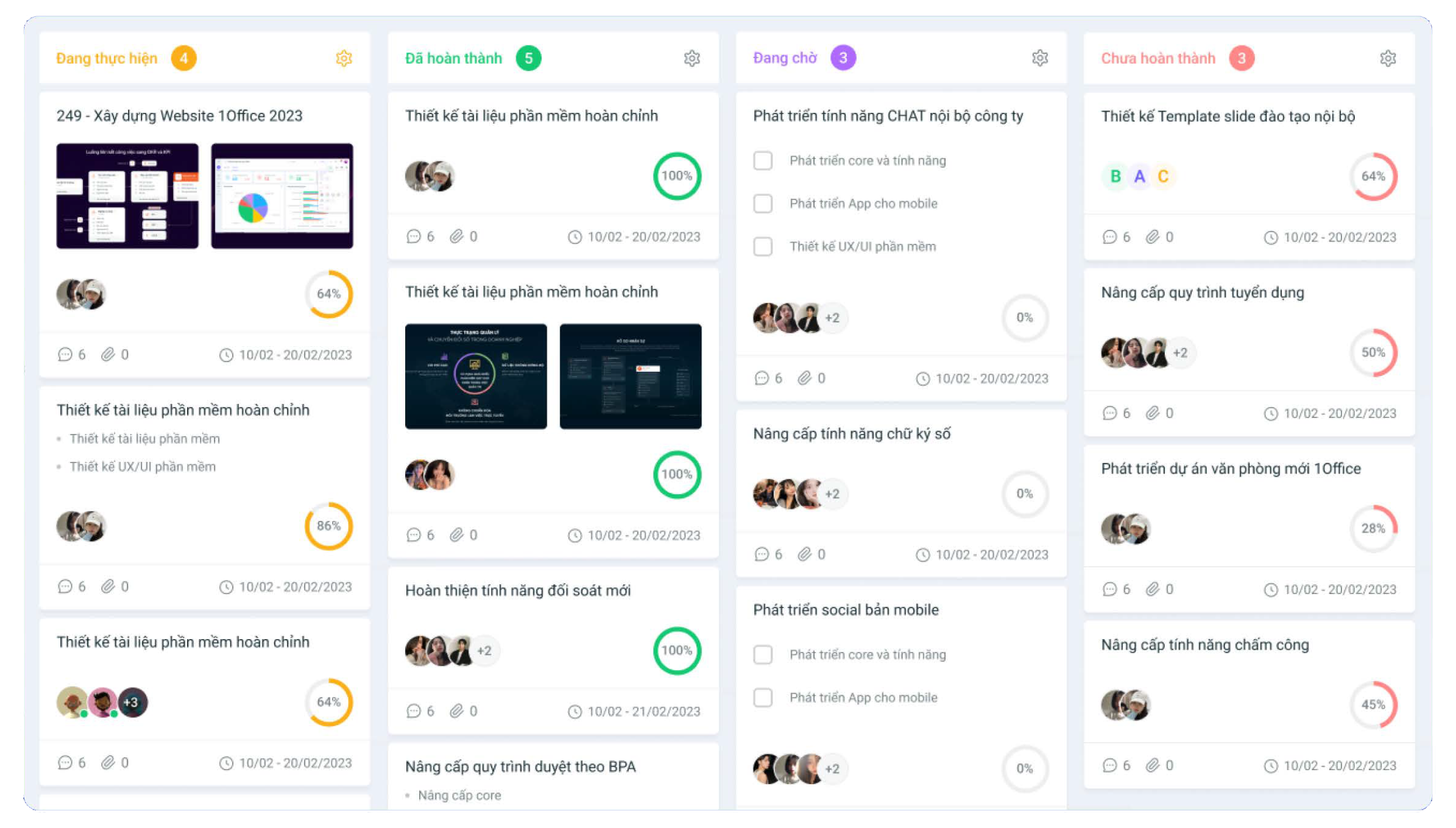
By continuously updating the project status through automatic dashboard reports, managers can immediately identify emerging issues and devise timely solutions.
2.1.2. Task Management
Plan Tasks
Besides basic features like creating tasks, assigning tasks, updating task lists, adding documents, and discussions, the Task Management feature in 1Office also allows you to create tasks linked to other objects such as: Customers, Candidates, HR Records, Contracts, Orders, and Marketing Campaigns. This enables participants to quickly grasp and manage their tasks with 1Office
Closely Monitor Task Progress
The task management feature allows users to update task progress in various ways: Manual updates/ Percentage of tasks completed/ Percentage of workload completed/ Weight of sub-tasks…
Smart Task Reminders and Alerts
For each task, users can set up different alert and reminder scenarios, helping both assignees and managers never forget tasks or be bothered by rigid notifications.
Report & Evaluate Work Performance
Work results are the basis for managers to evaluate employee performance and task completion levels. Visual dashboard reports, automatically updated based on various criteria such as KPIs, sales figures, closing rates, marketing cost/revenue, etc., provide the most accurate data for clear and transparent employee evaluations, while also offering a comprehensive overview of the company’s operational status.
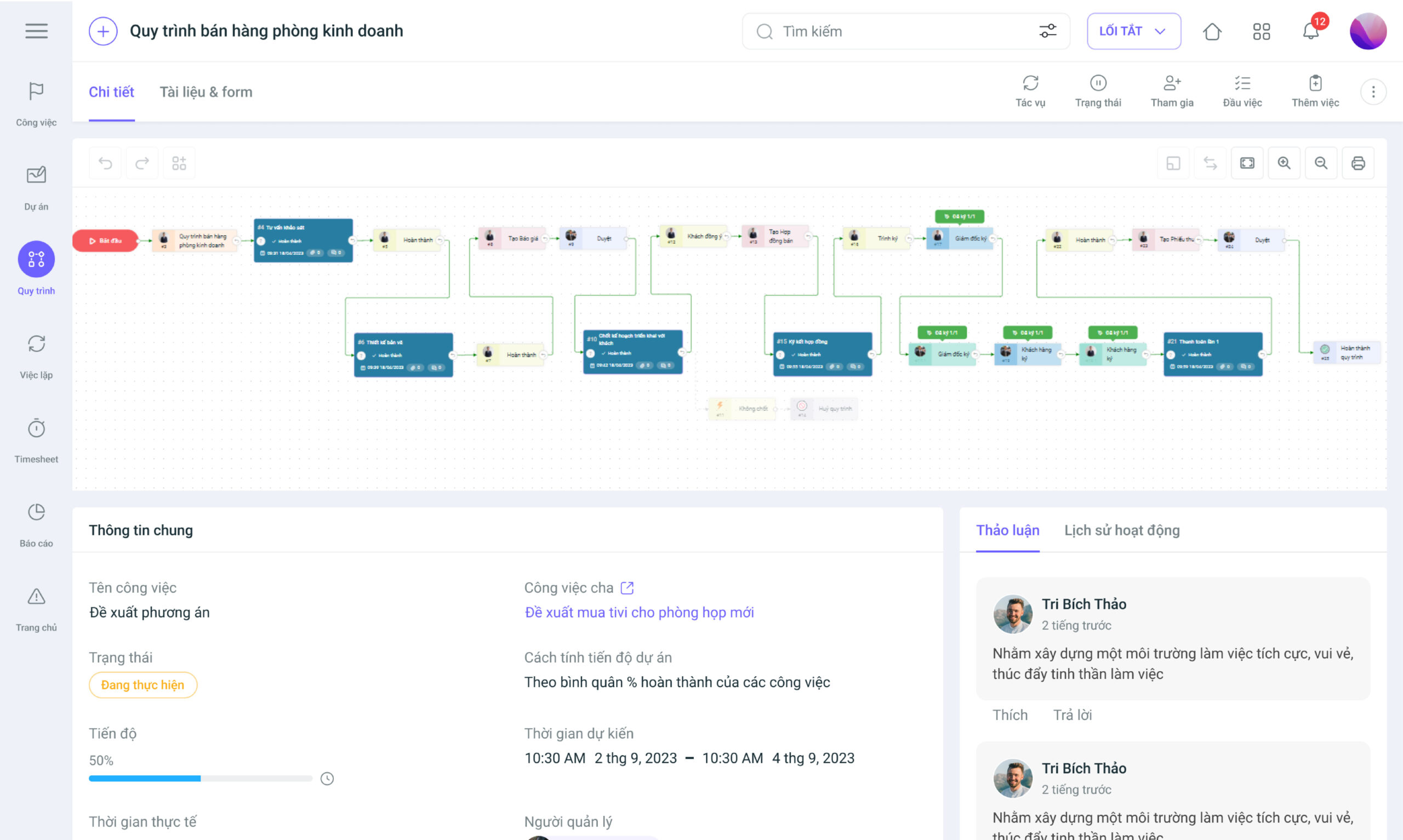
2.1.3. Process Management
In reality, every business has numerous ongoing processes. However, there is often no tool to manage them. A process is essentially a collection of repetitive tasks performed by different departments within the company. Due to a lack of management, these tasks are often communicated, discussed, and exchanged via email, group chats, etc., leading to many limitations such as forgotten tasks, no reminder tools, new employees not knowing where to perform their work, and ultimately, the inability to track the performance results of each individual and department.
Build and standardize workflows
Currently, Process Management is a feature exclusive to 1Office. With this feature, businesses can digitize all real-world work processes, such as: Asset purchase proposals, invoice issuance proposals, employee onboarding processes, and more.
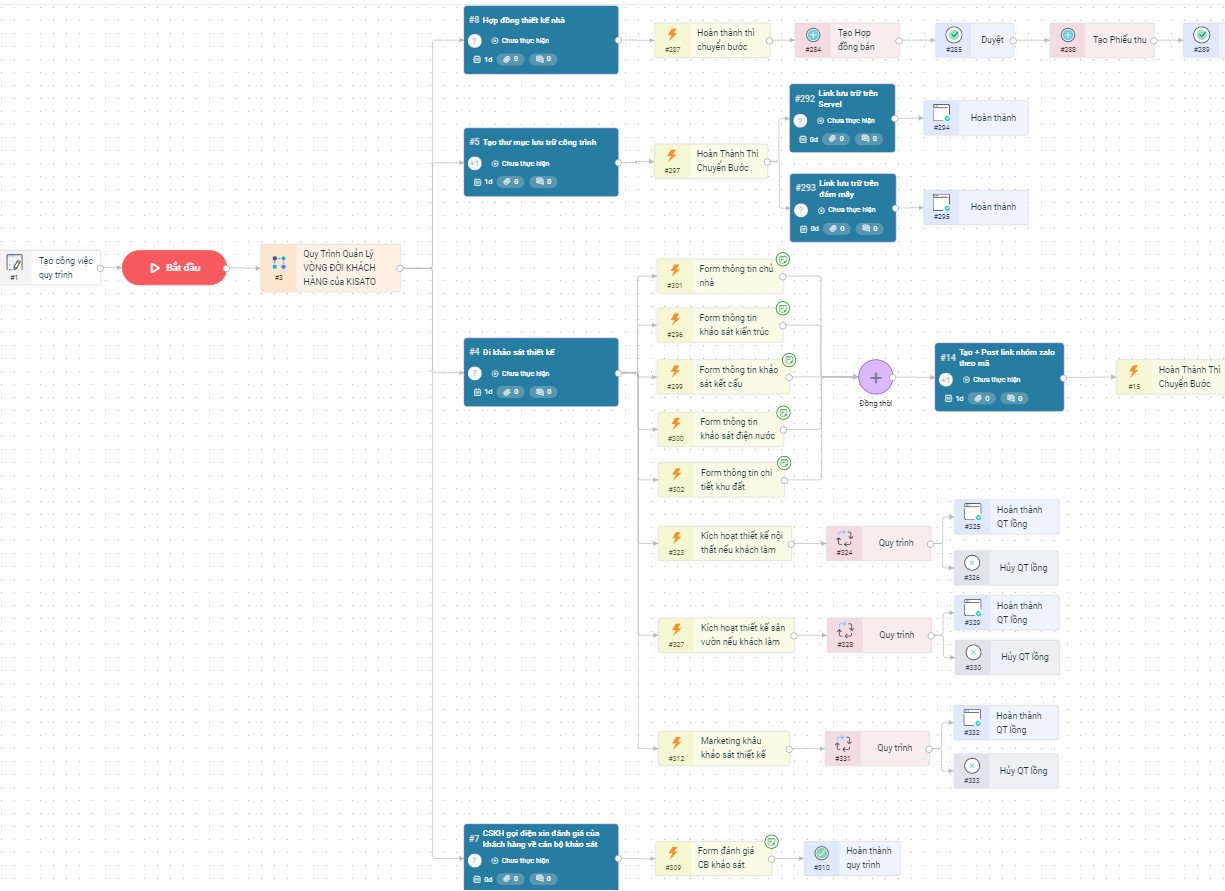
Additionally, the Process Management feature can define 100% of all process types within a business and allows for the custom setup of linear, branching, or multi-threaded processes to suit specific job requirements, industries, and departmental structures.
Automate processes
When a task is created and assigned to a process, it will automatically follow that process. Participants will be notified when it is their turn to act. Once a task is marked as complete, the process automatically moves to the next step.
Sign digitally directly within the process
The 1Office software allows business owners and senior managers to review and digitally sign all types of documents, vouchers, and records directly within the process, anytime, anywhere, on any device. This feature helps businesses overcome the limitations of traditional manual paper-based approval processes with their cumbersome and complex procedures.
2.2. HRM – Human Resource Management Module
2.2.1. Employee Information Management
Manage employee records and contracts
The Human Resource Management module of 1Office helps businesses digitize and store all employee-related documents and records, from resumes, labor contracts, insurance, to work history, on a single platform.
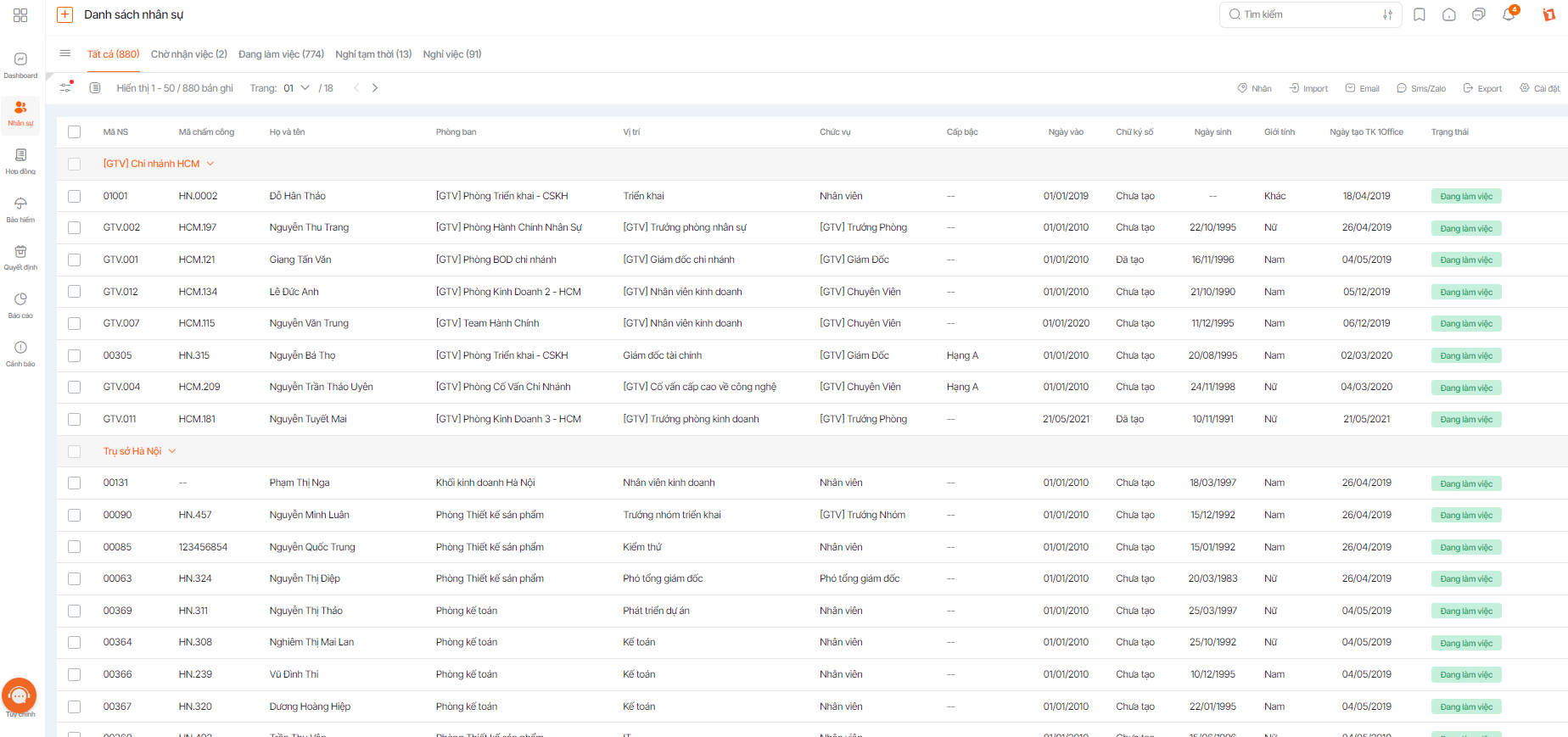
The 1Office software allows HR to easily search and extract employee record information quickly because all data is centrally compiled for each employee. Furthermore, a key advantage of the HRM module is that employee data is automatically and tightly linked with other modules in the system, such as: Payroll, Reporting, Insurance, etc., to support employee management tasks.
Approve requests
In today’s businesses, managers often have to handle numerous employee requests. This is time-consuming and makes it difficult to control the number of requests and employee workdays when using traditional paper-based management.
The Requests module in 1Office is a tool that digitizes the entire process and templates for administrative requests, helping managers resolve and process requests quickly, efficiently, and reduce printing costs. Additionally, the system can automatically update employee workdays when a request is submitted.
2.2.2. Recruitment Process Management
Manage profiles & evaluate candidates
Candidate profiles are collected from various recruitment sources and pushed directly into the system, minimizing the risk of overlooking candidates and saving effort for the recruitment department. A standout feature of the 1Office recruitment management system is its use of AI technology to automatically parse candidate profile data, enabling effective resume screening.
Additionally, 1Office provides multi-faceted candidate analysis charts, making it easier for recruiters to develop and provide additional training for candidates
Evaluate recruitment campaign effectiveness
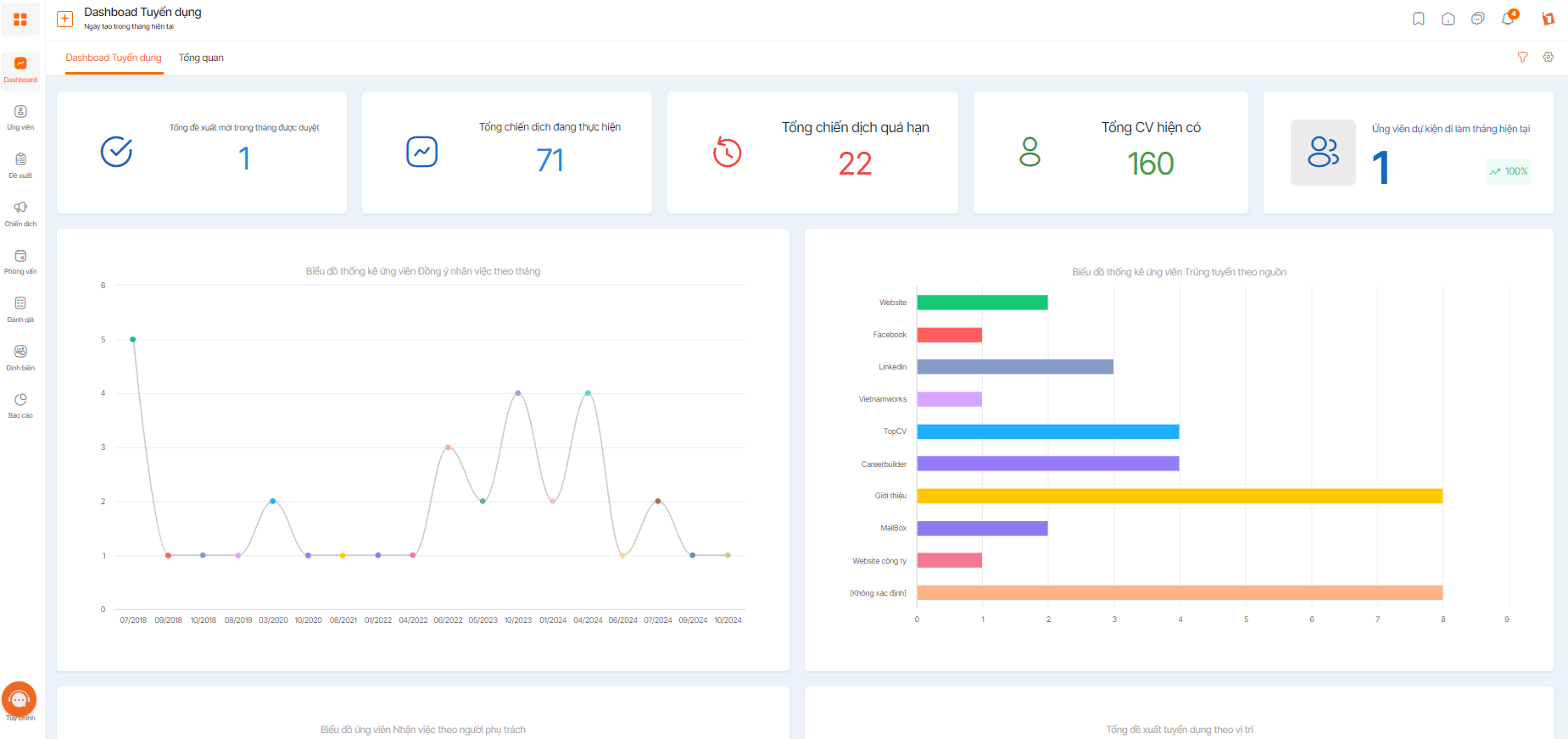
The diverse, flexible, and comprehensive reporting system helps recruiters measure and evaluate recruitment campaigns based on criteria such as candidate conversion rates, recruitment channel effectiveness, cost per hire, and more. This provides a basis for better planning of future recruitment activities
2.2.3. Time & Attendance Management
Time and attendance management is the most challenging and time-consuming task for HR managers. Every month, they have to export fingerprint logs from the time clock, compile shift schedules submitted by various departments, and consolidate employee leave requests before calculating the timesheet. Now, with 1Office, these tasks are no longer a problem.
Set up flexible timekeeping policies
Depending on the nature of the work and the team’s overall situation, you can define work shifts with information such as: workdays, meal allowances, employee details (position, department, etc.), shift schedules (times, break times, etc.). This information will be displayed in the final monthly attendance report.
Especially for businesses like retail chains, restaurant and beverage systems, cafes, etc., where the work environment is youthful and most employees are students. A key characteristic of this age group is their extremely flexible working hours, which creates a challenge in managing timekeeping accurately and honestly.
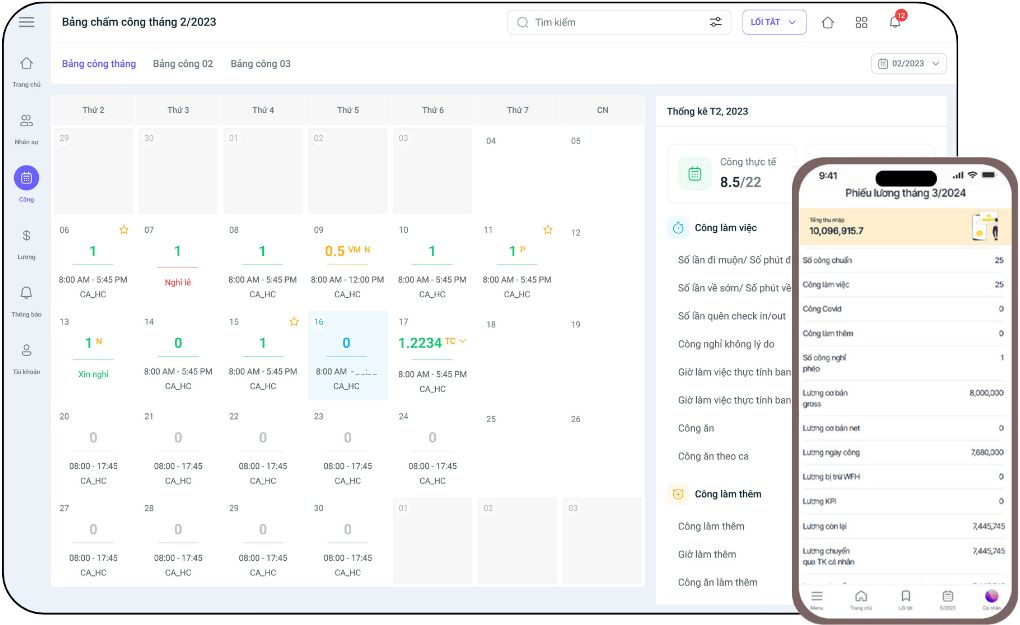
1Office not only helps you define work shifts but also creates a dynamic shift assignment approval process. If a team member has an unexpected task, you can completely change or edit their shift directly on the system without worrying about a chain reaction affecting other ongoing activities.
Synchronize timekeeping data
With the ability to connect to over 90% of time clocks on the market, the 1Office system can push timekeeping data to the timesheet instantly in real-time. This saves HR time in summarizing monthly workdays, and employees can also proactively track their own attendance on the system.
Additionally, timekeeping data is also automatically updated in the payroll system to generate monthly employee payslips without the need for manual copying or data entry.
2.2.4. Performance evaluation system using KPI & OKR
1Office provides a comprehensive and integrated solution to build and manage KPIs within a business. Using this software helps increase accuracy, efficiency, and automates the process of goal management and performance evaluation, while also facilitating the payroll process. 1Office helps managers easily allocate, track, and evaluate goals:
- Customize and set up KPI evaluation formulas according to the business’s needs, allowing the company to define how to calculate and evaluate the effectiveness of criteria based on its internal processes.
- Easily track the evaluation results of each criterion for every individual or department. This allows managers to view and compare the performance of each employee and department.
- The aggregated evaluation results from 1Office can be directly linked to the company’s payroll, automatically calculating salaries based on KPI completion levels and saving time in the payroll process.
Thanks to these features, managers can fully build a KPI system for their business based on quantitative and qualitative parameters. This helps the business shape its business strategy, optimize goal management, and achieve its set objectives more effectively and comprehensively.
2.2.5. Payroll Management
Build a systematic payslip
Based on timekeeping data along with information on workdays, basic salary, allowances, etc., of personnel already created in the system, you can build a systematic payslip with all the necessary information.
Currently, 1Office is the only software that allows customization of Excel-like formulas for payroll calculation. Managers can set up payslip templates corresponding to their departments. You can set up multiple payslips in a month, and these payslips can be fully linked to each other.
Automated and fast payroll calculation
Previously, calculating employee salaries was always a nightmare for HR because it involved many steps like compiling timekeeping information, creating calculation formulas, etc. Not to mention, a single incorrect piece of information would require reviewing the entire payslip. Such a payroll process could take up to 3-5 days, putting pressure on the HR and accounting departments.
With the 1Office software, the payroll process takes only 30 minutes to 1 hour for all stages because the system automatically compiles all data needed for payroll from other modules like KPI, sales, timekeeping, etc. HR only needs to configure the payslip once, and the system will automatically calculate and return the results quickly according to the pre-set formulas. The payslip is also automatically updated to the employee’s account so they can proactively track and check it transparently and fairly.
Pay salaries directly on the software 24/7
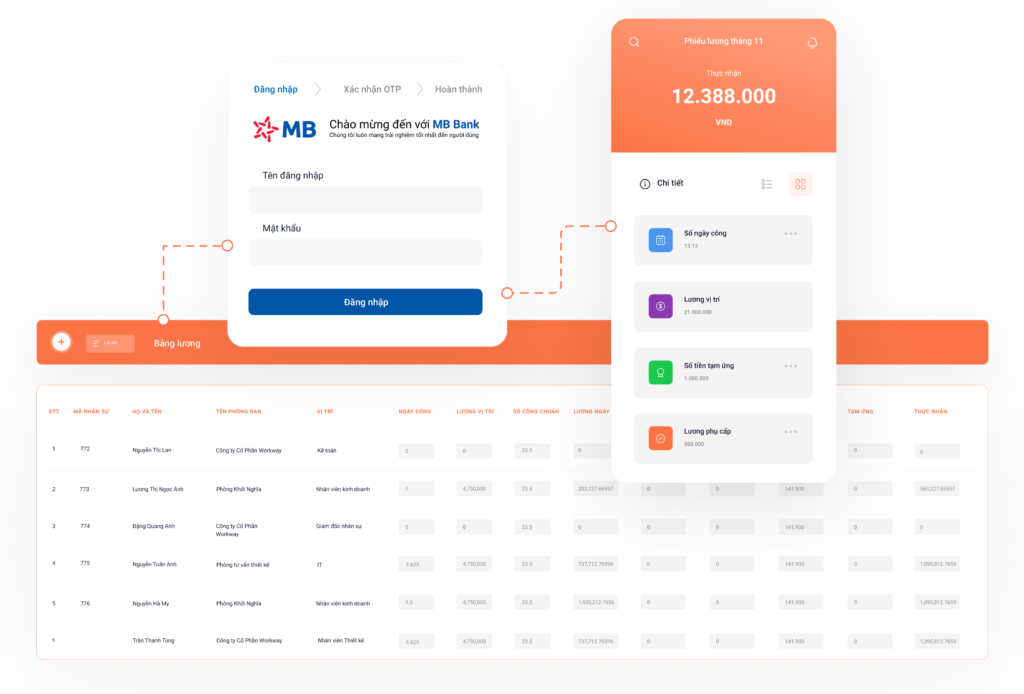
From that payslip, once approved by the director, the accountant can transfer salaries directly through Military Commercial Joint Stock Bank (MBBank) or issue a payment order to another bank account. Instead of wasting time waiting for approval and going to the bank for procedures as before, you can approve the payslip and transfer money to employees right on your phone 24/7, at any time (including weekends and holidays).
Flexible Salary Advance 1Care
1Care Salary Advance is a solution built with the vision of becoming a feature that directly serves employees in businesses using 1Office. With 1Office Care, businesses will “directly borrow” money from the 1Office Salary Advance Fund to meet the salary advance needs of their employees. Then, on the regular payday, the business will repay that advanced amount to 1Office. With this model, 1Office Care ensures 3 NOs for the business: No fees – No impact on cash flow – No impact on the payroll process.
2.3. Customer Relationship Management (CRM) Module
2.3.1. Customer Care Management
Centralized Customer Information Storage and Management
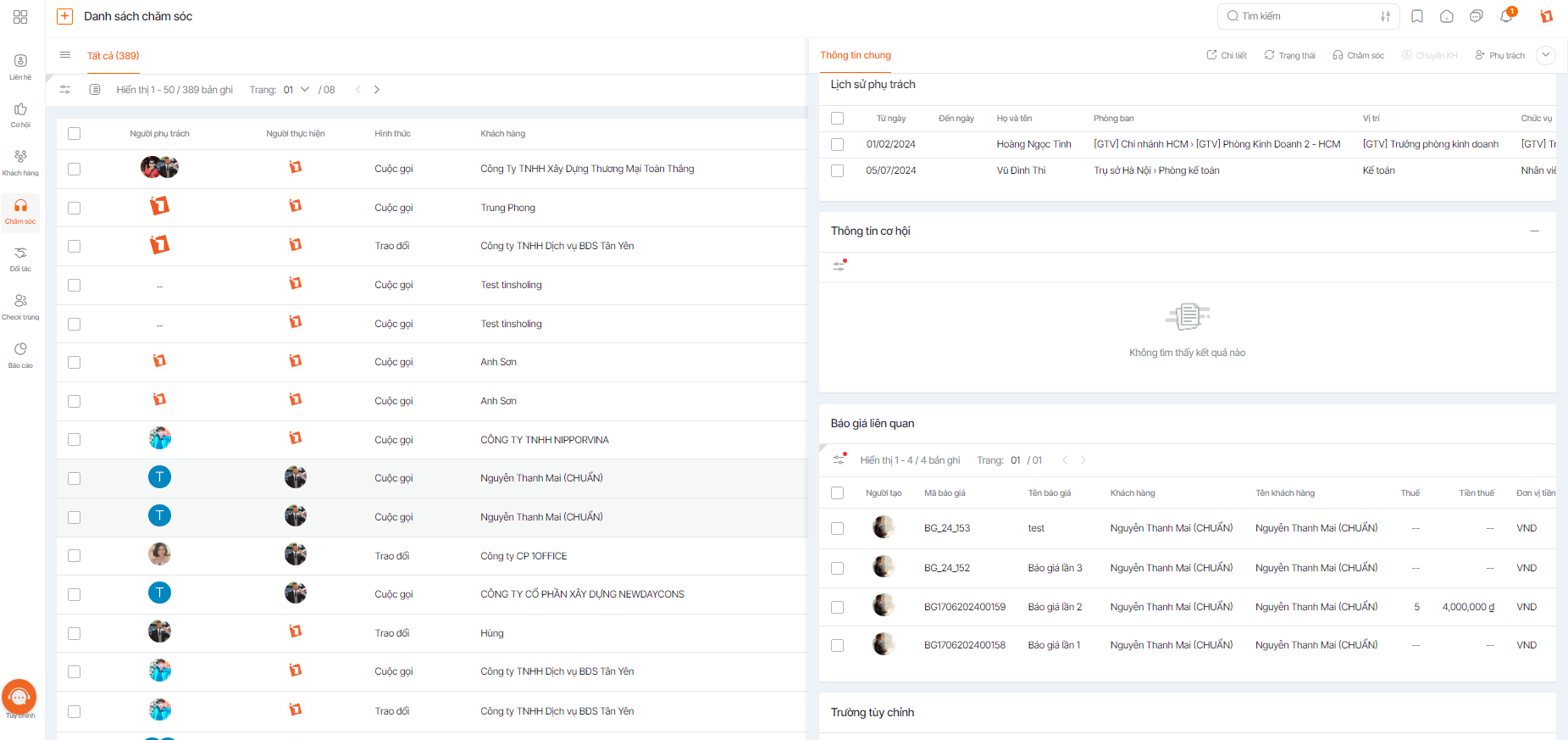
The CRM module helps businesses digitize customer data and store it centrally on one platform, making it easy to classify and retrieve information. It also supports classifying and segmenting customer data to build care scenarios tailored to each customer’s needs, thereby improving service quality.
Customer Care Process Management
The customer care automation feature, linked with email and chatbots, helps businesses optimize their customer care process. It also includes tools for assigning tasks and sending reminders to the sales department to ensure they remember appointments and take appropriate care actions.
2.3.2. Marketing Management
Marketing Campaign Operations
The CRM module provides a set of tools to help businesses operate and monitor marketing campaigns effectively, optimizing profits. With CRM, the marketing department can implement all stages of the company’s marketing process on the system, from planning and tracking results to evaluating campaign performance.
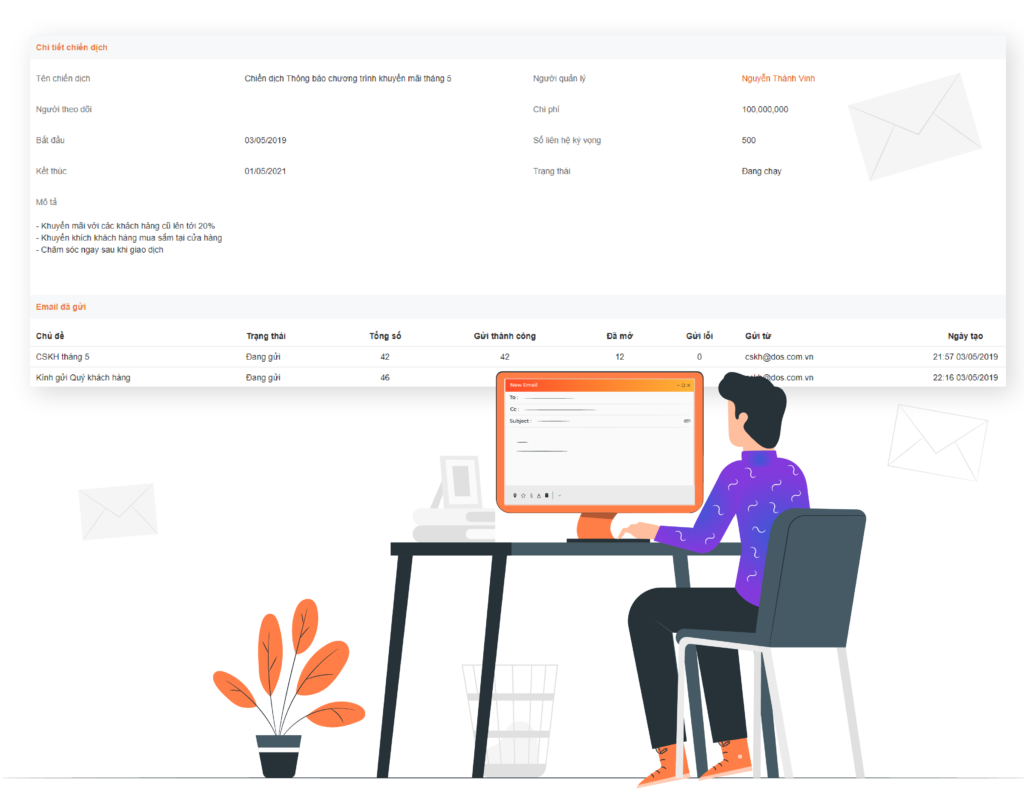
The system can compile and report detailed and visual campaign metrics. Managers can track the number of customers who have opened emails or SMS, conversion rates, and the marketing cost of each campaign to evaluate the effectiveness of each marketing channel and plan accordingly.
Marketing Automation
With its powerful automation features, 1Office allows marketing specialists to send marketing and advertising emails and SMS messages according to pre-configured workflows. All you need to do is select the time to send emails to customers and filter recipients on the software. The system can automatically send emails to 100 customer files in just 1 minute and update the results (email opens, clicks, etc.) in real-time.
2.3.3. Sales Management
Standardize the Sales Process
In the business operations of many B2B and B2C companies today, the sales process is often not standardized at stages like order approval, quoting, etc. This leads to a lack of transparency in approvals and manual management, making it difficult for managers to control order information and creating a high risk of data leaks.
The Sales Management feature in 1Office provides a closed, standardized, and automated sales process, allowing users to track the status of quotes, customer contract approvals, payment receipts, etc. At each stage, clear permissions are assigned to managers and responsible staff, and task reminder alerts are provided to all participants. This helps the sales workflow run smoothly and seamlessly, improving business quality and customer satisfaction.
Track Business Performance
1Office provides managers with the most comprehensive and centralized view of the company’s business situation through transparent, detailed, and clear reports on sales, receivables, and orders.
3. 1Office Review: Pros and Cons
Pros
Comprehensive Solution for Overall Management
The ability to completely solve the overall business management problem is 1Office’s greatest strength compared to other management platforms on the market. With a product development orientation based on the All-in-One model, 1Office can digitize and centrally manage the entire business as a unified entity, with close links between departments and synchronized data across all operational processes. This allows 1Office to address every aspect of business management, including Work, Human Resources, Business, and Corporate Culture.
All the tools needed to handle the operational tasks of every department and division in the organization are fully integrated into the software. Business owners will not need to combine different applications and incur additional costs to purchase more products.
Furthermore, the All-in-one model can flexibly adapt to any changes in the business structure, such as expansion, downsizing, or restructuring, minimizing operational disruptions.
User-friendly interface
In addition to feature development, 1Office also focuses on optimizing the user experience. The software interface design of 1Office is notably clean and simple.
The operations within the software are quite intuitive, requiring minimal time to learn and master. This is an aspect where 1Office excels, breaking down the barrier of technology adoption for Gen X and Y employees, unlike other software with complex and difficult-to-use interfaces.
Reasonable implementation cost
Most management software on the market today offers fixed packages, which inflates the cost and makes the initial investment for software implementation quite substantial. Since the Vietnamese market is dominated by SMEs, spending a large amount on management software is often an overwhelming investment.
1Office provides a subscription-based service on a cloud computing platform, with pricing based on the number of users. This helps businesses minimize unnecessary costs such as server infrastructure setup, operational staff hiring, and periodic maintenance fees.
Limitations
Marketing features are still basic
In terms of limitations, it’s clear that 1Office focuses on solving the two biggest pain points in business management: Processes – Work and Human Resources. Consequently, the Marketing Management feature has not been developed in-depth. The product’s marketing toolkit is still quite basic and does not cover the full scope of marketing operations.
Only supports the Vietnamese language
The software is currently only available in Vietnamese as 1Office is a “Make in Vietnam” product primarily serving the domestic market. Therefore, multinational companies with many foreign employees will face difficulties in accessing and using the software.
4. Which businesses are a good fit for 1Office software?
By company size
Based on a review of its features and an evaluation of its advantages and limitations in practical business applications, 1Office is a suitable solution for businesses of various sizes with 10 or more employees. The 1Office software is particularly optimized for large enterprises, corporations, and conglomerates with complex personnel structures and operational systems.
By industry and sector
With its flexible adaptability and high customizability, 1Office software is suitable for all businesses across every industry, specialty, and nature. The software provides all the necessary features to operate and manage a business effectively.
In particular, 1Office has deep and solid experience in implementing its management platform for leading companies in the fields of Construction (Phú Cường Group, Lilama 45.1, Kisato), Retail (Sakuko, Media Mart, Tokyo Life), Fashion – Apparel (Friday, Canifa, Yody), and Finance – Banking (MBBank, F88, VNPay)
5. Pricing
Freemium |
Standard100k/month |
Professional100k/month |
Enterprise100k/month |
1Office150k/month |
|
|---|---|---|---|---|---|
| Human Resources | |||||
|
Internal Network |
 |
|
|
|
|
|
Employee Profiles |
|
|
|
|
|
|
Labor Contracts |
|
|
|
 |
|
|
Insurance & Benefits |
|
|
|
|
|
|
Decisions |
|
|
|
|
|
|
Administrative Forms |
|
|
|
|
|
|
Timekeeping |
|
|
|
|
|
|
Payroll |
|
|
|
|
|
|
Performance Review |
|
|
|
|
|
|
Assets |
|
|
|
|
|
|
Recruitment |
|
|
|
|
|
|
OKR & KPI |
|
|
|
|
|
|
Training |
|
|
|
|
|
| Workspace | |||||
|
Documents |
|
|
|
|
|
|
Schedule |
|
|
|
|
|
|
Tasks |
|
|
|
|