


 10/05/2026
  19482 views
An hourly timesheet provides detailed information about the number of working hours for each employee, helping businesses and organizations track and manage employee efficiency and performance. Therefore, creating a complete timesheet requires meticulousness and accuracy in calculating and processing data. In this article, 1Office will guide you on how to create an accurate hourly employee timesheet and download the sample hourly timekeeping Excel files we have compiled.
Mục lục
- What Is an Hourly Timesheet?
- 2. Which businesses need to create hourly timesheets?
- 2. Required contents of an hourly timesheet
- 3. Master the 5 Most Popular Excel Functions for Creating Timesheets
- 4. Collection of hourly Excel timesheet templates for businesses
- 5. Tips for using hourly timesheets effectively
- 6. Pros and cons of using hourly Excel timesheets
- 7. Legal Regulations on Hourly Timekeeping and Payroll
- 8. Best Practices for Managing Hourly Timesheets in Small & Medium-Sized Enterprises
- 9. 1Office – The #1 Solution for Payroll Processing for All Businesses
What Is an Hourly Timesheet?
An hourly timesheet is a sheet that tracks working hours, recording the actual work time (clock-in – clock-out) of each employee for each day, to serve as a basis for calculating salary and overtime based on the actual hours worked, instead of calculating based on a “standard workday” (26 workdays/month).
| Key Features | Traditional Timesheet (Standard Workdays) | Hourly Timesheet |
|---|---|---|
| Unit | 1 day = 1 workday (or 0.5 workdays) | 1 day = 8 hours (or flexible) |
| Salary Calculation | Monthly salary divided by 26 | Salary = Total hours worked × Rate/hour |
| Overtime Calculation | 150%, 200%, 300% by day | 150%, 200%, 300%, 390% calculated by the minute |
| Suitable for | Full-time administrative, production staff | Part-time, freelancer, project-based, remote, agency, IT, lawyers, marketing… |
| Legal Compliance | Still valid under the 2019 Labor Code | Mandatory if paying salary by product or by the hour (Articles 96, 107) |
Real-world example (1 employee, November 2026)
| Date | Check-in | Check-out | Total work hours | Notes |
|---|---|---|---|---|
| 01/11 | 08:15 | 18:30 | 9h 15m | Overtime 1h 15m |
| 02/11 | 09:00 | 17:00 | 8h 00m | On time |
| 09/11 (Sunday) | 08:00 | 20:00 | 12h 00m | Weekend + holiday overtime |
The 3 most common hourly timekeeping methods today
| Method | How it works | Best for |
|---|---|---|
| 1. Excel / Google Sheets | Employees record manually or HR inputs | Companies with <50 employees, free of charge |
| 2. Timekeeping App | Check-in via phone, GPS, Face ID | Remote, hybrid, part-time |
| 3. Specialized HR Software | Automated from time clock or app | Companies with >50 employees, needing accurate payroll calculation |
2. Which businesses need to create hourly timesheets?

- Businesses that pay hourly wages: for example, sales staff, service staff, and production workers will need to create suitable hourly timesheets to record working time and calculate wages based on the number of hours worked.
- Businesses with shift-based employees: such as restaurants, hotels, hospitals, and factories often use a shift-based work model. Hourly timesheets help these businesses record each employee’s working time to calculate wages, allocate tasks, and manage schedules.
- Companies with office-based employees: tracking employee working time is still very necessary. Timesheets help manage performance, evaluate work, and calculate working hours to ensure fairness in pay and human resource management.
- Event planning and project management businesses: also need to track employee working time to calculate the appropriate time spent on each event or project. Hourly timesheets will help these businesses allocate resources, manage schedules, and evaluate employee performance.
- In addition, businesses required to comply with labor regulations: must record and store timesheets to ensure compliance with labor laws, protect employee rights, and determine appropriate wages.
| >> DOWNLOAD NOW the latest standard shift-based timesheet template for HR |
2. Required contents of an hourly timesheet
| Information Group | Specific Content (required by the Labor Code & Circular 10/2020/TT-BLĐTBXH) | Practical Notes for Excel/App Usage |
|---|---|---|
| 1. Identification Information |
|
Place at the top of the table, fixed for printing and signing |
| 2. Working Time |
|
Must have 2 columns: Clock-in and Clock-out to calculate time accurately to the minute |
| 3. Working Hour Calculation |
|
This is the most important part – must have automatic formulas |
| 4. Special Symbols |
|
Use colors or symbols for easy identification |
| 5. Monthly Summary |
|
Used as the basis for salary calculation = (normal hours × rate) + (overtime hours × multiplier) |
| 6. Confirmation by Both Parties |
|
Required for legal compliance (Article 95 of the 2019 Labor Code) |
| 7. Recommended Additions (very useful) |
|
Helps with quick reporting to management and clients |
| >> Read more: Guide to creating a timesheet in Excel, simple and easy to understand |
3. Master the 5 Most Popular Excel Functions for Creating Timesheets
3.1 The SUM Function to Calculate the Sum of Values
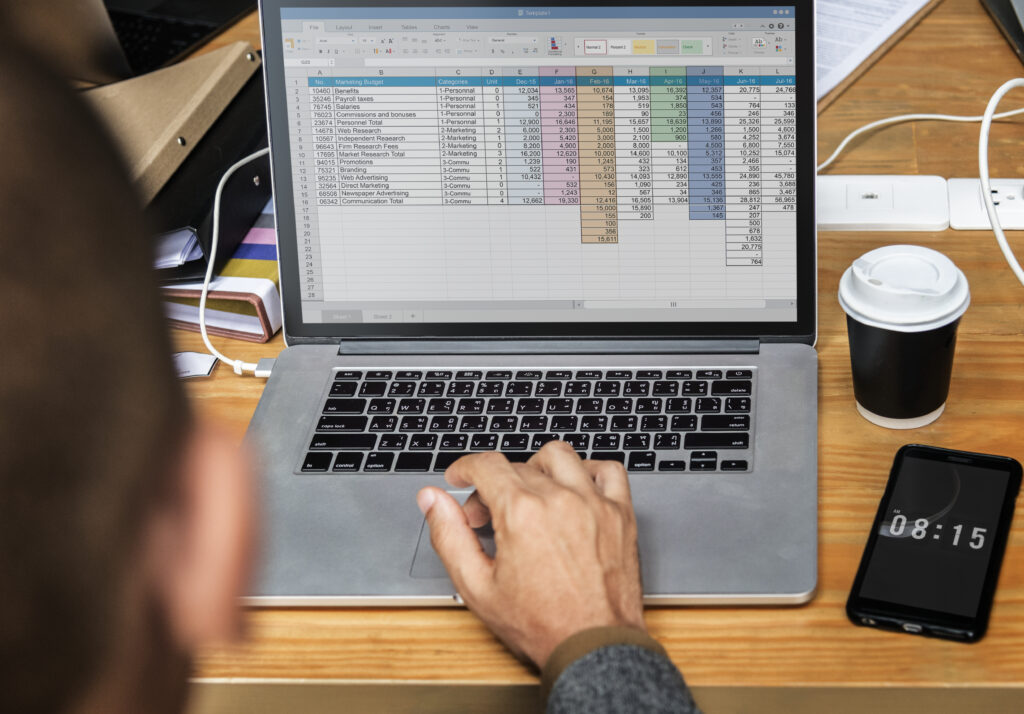
This function is used to calculate the sum of values within a specific range. In a timesheet, you can use the SUM function to calculate the total working hours for each employee in a day or the total working hours over a specific period. For example: =SUM(C2:C10) will calculate the sum of the values from cell C2 to C10.
3.2 The IF Conditional Function
The IF function is used to perform a logical test and return different values depending on the result of that test. In a timesheet, you can use the IF function to check conditions like the number of working hours and return different results. For example: =IF(D2>=8, “Full day”, “Incomplete day”) will check the number of working hours in cell D2 and return “Full day” if the working hours are greater than or equal to 8, otherwise it will return “Incomplete day”.
3.3 The VLOOKUP Function to Look Up Values
The VLOOKUP function is used to search for a value in a data range and return a corresponding value from another column. In a timesheet, you can use the VLOOKUP function to look up information such as an employee’s salary from a separate data table. For example: =VLOOKUP(A2, Sheet2!A:B, 2, FALSE) will search for the value in cell A2 in Sheet2 from column A to column B and return the value in column B.
3.4 The COUNTIF Function to Count Occurrences of a Value
The COUNTIF function in Excel is used to count the number of times a specific value appears in a data range. This function has the following syntax: COUNTIF(range, criteria) where: range is the data range you want to check, and criteria is the value or condition you want to count. For example: if you want to count the number of times the value “Yes” appears in a range from A1 to A10, you can use the COUNTIF function as follows: =COUNTIF(A1:A10, “Yes”).
3.5 The AVERAGE Function to Calculate the Average Value
This function is used to calculate the average value of a data range. Use the AVERAGE function to calculate the average daily working hours, average salary, or other metrics in the timesheet. For example: =AVERAGE(D2:D10) the returned result displays the average value of the working hours in the range from D2 to D10.
|
>> Read more: Standardize Your Business’s Payroll Process in 7 Simple Steps |
4. Collection of hourly Excel timesheet templates for businesses
4.1 Summary Timesheet
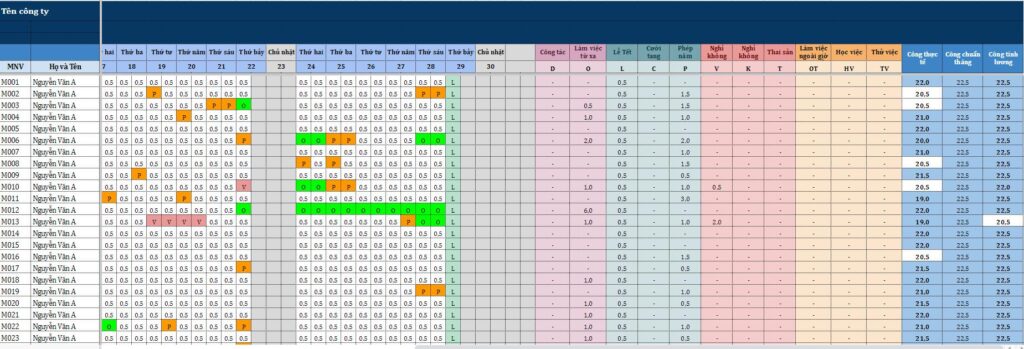
The summary timesheet is a tool used to fully track the work status of employees on a daily basis throughout the month. The sheet displays the entire list of personnel along with their number of workdays, work sessions, annual leave days, sick leave, unpaid leave, business trips, overtime, etc., encoded with symbols (1, 0.5, P, K, O…).
The data is presented in a matrix format:
- Rows represent employees
- Columns represent days of the month
- Colors help to quickly differentiate between various statuses (working – on leave – unpaid leave – overtime – public holidays…)
This is an end-of-period summary sheet that helps the HR and accounting departments get an overview of attendance and performance, and it serves as the primary basis for calculating salaries. The system of formulas and color formatting helps make the checking and reconciliation process faster, more accurate, and transparent.
| >> DOWNLOAD: Consolidated Timesheet Template |
4.2 Hourly Timesheet
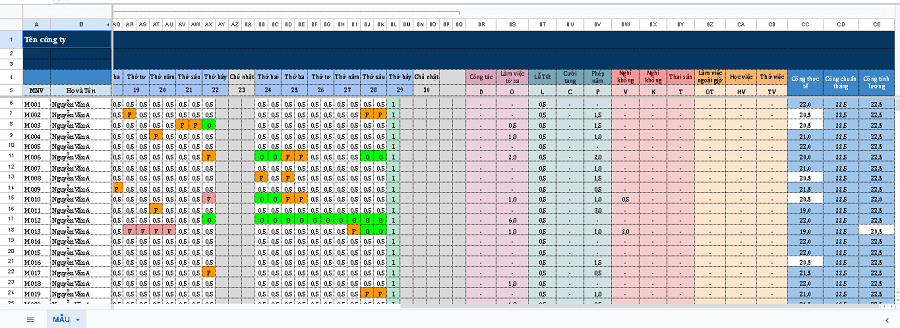
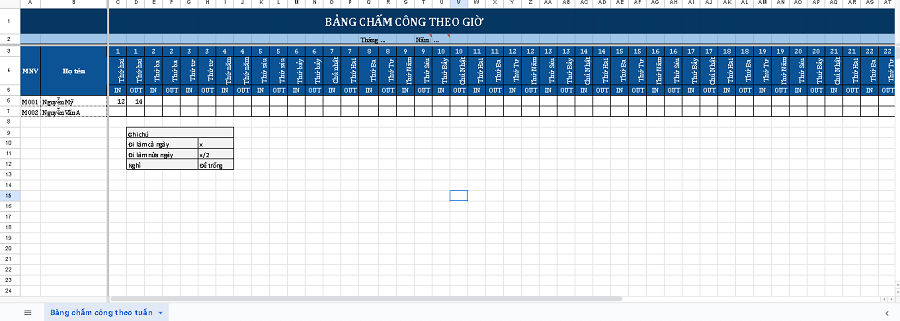
The hourly timesheet is a template used to record the actual working time of employees each day, including clock-in time, clock-out time, hours worked, and overtime hours (if any).
This timesheet is commonly used for:
- Companies that calculate payroll by the hour
- Flexible work shifts
- Part-time employees
- Seasonal work
This timesheet helps businesses closely monitor actual hours worked, prevent time theft, and automatically summarize the hours for quick end-of-month payroll calculation.
| >> DOWNLOAD: Hourly Timesheet Template |
See also: Collection of popular daily timesheet templates for 2026
5. Tips for using hourly timesheets effectively

5.1 Important notes when using hourly timesheets
- Ensure privacy and security:
Protect employees’ personal information and privacy in the timesheet. Restrict access to the timesheet to authorized personnel only and ensure that personal information is kept secure.
- Accurate and complete:
Ensure that the information in the timesheet is updated accurately and completely. Double-check information such as work dates, clock-in/out times, work shifts, and other related details before entering data into the timesheet.
- Handle invalid data:
Check for and handle invalid or missing values in the timesheet. This includes checking for invalid values, such as incorrect clock-in/out times, and correcting data entry errors.
- Review and approve:
Confirm and approve the timesheet before calculating payroll and finalizing attendance records. This helps ensure data accuracy and avoid errors in the calculation process.
5.2 Ways to create effective timesheets in a business
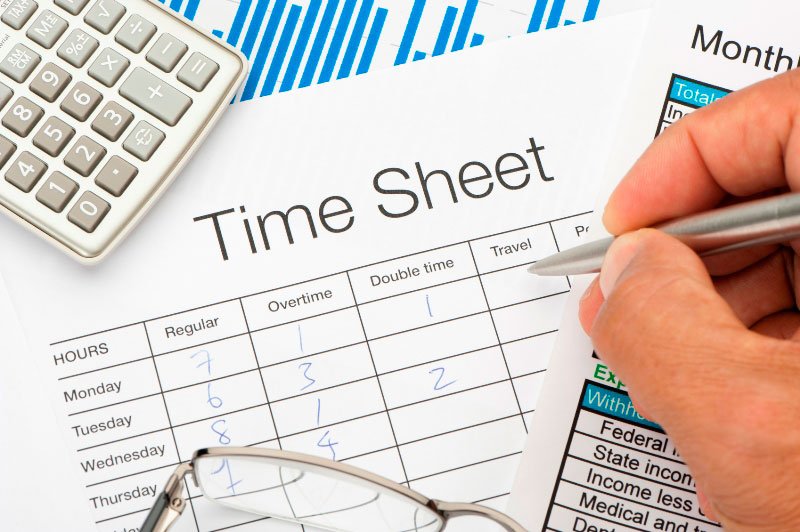
Timekeeping is a crucial part of human resource management and payroll calculation in a business. However, the timekeeping process can be time-consuming and labor-intensive if not done effectively. To help you increase efficiency and save time in your timekeeping tasks, here are some important tips:
- Use automated timekeeping software
- Create timesheets with a clear format
- Create a standard timesheet template and apply it to all employees
- Use Excel functions and calculation tools
- Apply data filters and sorting
- Handle exceptions and data entry errors
6. Pros and cons of using hourly Excel timesheets
| Advantages | Disadvantages |
| – Simple to use and accessible to many people.
– Flexible customization according to the needs of each business. – Quick and easy to update. – Powerful data analysis capabilities, creating visual charts and reports. |
– Manual data entry and errors in data entry affect the accuracy of timekeeping data.
– Difficulty in data management if the business has a large number of employees. – Limited automation in timekeeping when there are complex timekeeping rules or special requirements. – Inability to share and update simultaneously leads to low work efficiency for the HR department. |
7. Legal Regulations on Hourly Timekeeping and Payroll
According to the 2019 Labor Code and its guiding documents, hourly timekeeping and payroll calculation are crucial for ensuring the legal rights of employees and the obligations of the business. Compliance not only helps businesses avoid legal risks but also builds a transparent and fair working environment.
Here are some key points for businesses to note:
- Standard working hours: The Labor Code stipulates that normal working hours shall not exceed 8 hours per day and 48 hours per week. Businesses can implement a weekly work schedule but must still adhere to the total hour limit.
- Overtime: To organize overtime work, businesses must have the employee’s consent. Overtime pay must be higher than the regular hourly wage (at least 150% on regular days, 200% on weekly days off, and 300% on public holidays).
- Holidays and annual leave: Employees are entitled to paid leave on public holidays and annual leave as stipulated by regulations. Accurate recording on the timesheet is crucial for correctly calculating salaries, allowances, or compensation in the event of a dispute.
- Timekeeping records and payroll basis: Businesses must retain timekeeping records for verification during inspections, audits, or complaints. These records serve as crucial legal evidence in the event of a labor dispute.
If a business lacks transparency in timekeeping, potential risks include:
- Administrative penalties for labor and wage violations under Decree 12/2022/ND-CP.
- Loss of internal credibility and causing dissatisfaction among employees.
- Increased risk of collective or individual labor disputes, leading to resolution costs and damage to the company’s reputation.
8. Best Practices for Managing Hourly Timesheets in Small & Medium-Sized Enterprises
For small and medium-sized enterprises (SMEs), limited resources in both personnel and management tools can make hourly timekeeping prone to errors and lack of transparency. The following practical tips can help businesses manage more effectively:
8.1 Assign Clear Control Responsibilities
Businesses should designate a person to be directly responsible for monitoring, checking, and confirming timesheets, typically a team leader or shift manager. When responsibilities are clearly defined, timekeeping becomes more transparent, reducing the risk of missed hours or incorrect entries. Additionally, employees become more conscientious when they know their data is being monitored.
8.2 Establish a Standardized Process with Multiple Control Steps
An effective timekeeping process should include the following steps:
- Employee clocks in/out: This can be done via a logbook, fingerprint scanner, card reader, or an electronic timekeeping system.
- Team leader/HR consolidation: Review and cross-reference data with the work shift schedule.
- Direct manager approval: Confirm the final data to ensure accuracy.
- Accounting department processes payroll: Use the approved data to calculate salaries.
This multi-layered control process helps minimize errors and reduces the risk of manual data entry mistakes or fraud.
8.3 Incorporate Timekeeping into Labor Regulations
Timekeeping is not just an administrative task but also a legal and disciplinary obligation. Businesses should incorporate timekeeping rules into their internal labor regulations, clearly stating:
- The employee’s responsibility to clock in and out on time for their assigned shift.
- Penalties for non-compliance or intentional fraud.
- Procedures for handling cases of forgetting to clock in/out or buddy punching.
When timekeeping is part of the official regulations, employees will treat it as a mandatory duty rather than a mere formality.
8.4 Conduct Spot Checks and Reconcile Data
To enhance transparency, businesses should implement random checks:
- Spot checks: Compare timekeeping data with the actual on-site situation (e.g., using camera footage, shift handover logs).
- Periodic reconciliation: Compare timesheets against shift schedules, system logs, or work reports.
This practice helps detect fraud (such as buddy punching) and acts as a deterrent, ensuring the accuracy of the data.
8.5 Train Employees on the Importance of Timekeeping
In addition to management processes, businesses should communicate and train employees to understand the importance of timekeeping: it is not just the basis for calculating salary but also relates to their insurance benefits, welfare, and overall management transparency.
If your business is still managing hourly work with Excel or manual methods, you can check out our free personal timesheet template to more easily track work hours, shifts, and compile more accurate payroll data.

9. 1Office – The #1 Solution for Payroll Processing for All Businesses
To increase accuracy, enhance efficiency in timekeeping management, and overcome the drawbacks of manual data entry in Excel, many Vietnamese businesses now opt for 1Office’s automated timekeeping software.
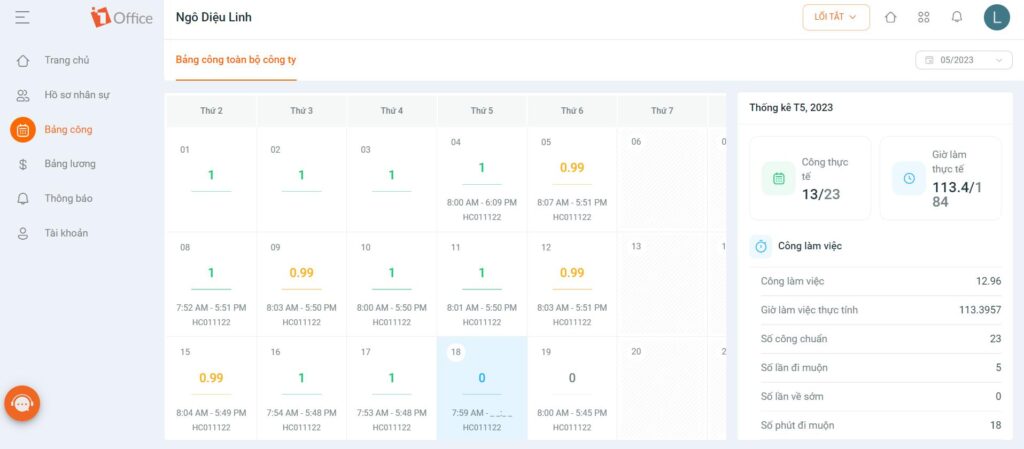
1Office is a software that helps manage timekeeping and automatically calculates payroll with a simple and easy-to-use interface. Here are some of the outstanding features of this module:
- Set up and configure timekeeping features: such as shift approvers, shift assignments, and timesheet display methods to manage and control the timekeeping process more easily.
- Real-time synchronization: with over 90% of different time clocks, helping to avoid errors and save time in data entry and updates.
- Flexible timekeeping formulas: allows you to customize timekeeping formulas according to the requirements of each business, such as adding new holidays or setting up fields that do not require timekeeping.
- GPS location-based timekeeping: allows businesses to set timekeeping locations based on GPS to control and determine employee locations during the timekeeping process.
- Set up timekeeping using Excel-like formulas: you can apply complex timekeeping rules and perform automatic calculations based on formulas set up in 1Office.
- Synchronize timekeeping data with payroll: 1Office helps businesses automatically calculate, update working hours information, and process payroll, saving time and ensuring data accuracy.
Get a demo to try 1Office’s timekeeping feature
Above are all the secrets to building the most effective hourly timesheet that 1Office wants to share with businesses. If you want to learn more about 1Office’s automated timekeeping and payroll processing software, please contact us via hotline: 083 483 8888
Explore more solutions: The most popular mobile timekeeping app in 2026
Frequently Asked Questions (FAQs)
How is an hourly timesheet different from a daily timesheet?
An hourly timesheet records detailed clock-in/clock-out times and the total actual hours worked, helping to calculate wages accurately by the hour. In contrast, a daily timesheet only determines if an employee worked or was absent (1 workday, 0.5 workday), which is suitable for businesses that calculate monthly salaries.
Which businesses should use hourly timesheets?
Businesses with employees working in shifts, part-time, as freelancers, on projects, or paid by the hour, such as restaurants, manufacturing, agencies, IT, etc., should use hourly timesheets to ensure accuracy and transparency in work time management.
Can Excel be used to create an hourly timesheet?
Yes. Excel is a popular tool that helps businesses create hourly timesheets with functions like SUM, IF, VLOOKUP, etc. However, for businesses with many employees, using Excel can easily lead to errors and make it difficult to manage data synchronously.
What are the common mistakes when managing hourly timesheets?
Some common mistakes include: incorrect clock-in/out data entry, lack of data verification, no approval process, or not tracking overtime according to regulations. These errors can directly affect payroll calculations and lead to labor disputes.
Is there a solution to automate timekeeping and payroll calculation?
Currently, many businesses are switching to software solutions (See: Top timekeeping software)
















