


 13/05/2026
  345 views
One of the most important factors in task management is staying organized and having a tracking roadmap. Currently, many businesses use Excel to help them track all of their employees’ tasks. Others use online task management software. So, should you manage tasks with Excel or with online software? Let’s find out in this article.

1. What are the pros and cons of managing tasks with Excel?
Excel is a software that is widely used in businesses. It seems to be an indispensable tool in the daily work activities of both employees and leaders. This is because Excel is a way to manage tasks that offers many fixed benefits, but it also comes with just as many drawbacks.
1.1. Benefits of managing tasks with Excel
Although there are many software options, managing daily tasks with Excel still offers various benefits, such as:
- Simplicity
- Centralized data system
- Customizability.
- Installation on any device
- Cost-effective
1.2. Limitations of managing tasks with Excel
Managing tasks with Excel can bring many practical benefits in terms of cost and convenience. However, your business can hardly avoid the drawbacks of using this free task management application, such as:
- Security risks: It’s difficult to control who views the data if you share the file. The values within the file can also be easily lost at any time.
- Lack of automation: Excel does not have features for automatic task reminders or notifications for new updates to the file. Additionally, it cannot automate payroll formulas for employees. You have to manually input data and painstakingly calculate salaries every month.
- Limited task administration: Excel cannot help you track the progress of an entire large project or task to evaluate work productivity. This is because Excel only contains the information that users manually input.
- Lack of control: Since all Excel files for task management are named differently, you might store them in various places. Therefore, you can easily lose them.
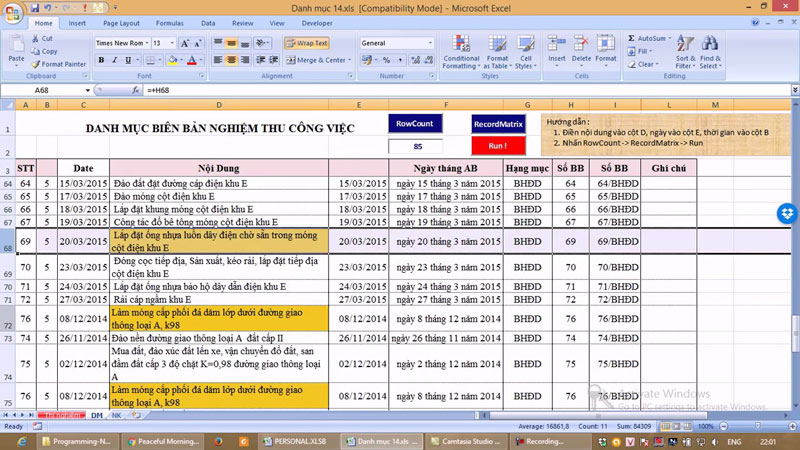
The above drawbacks make your personnel management more complex and time-consuming. That’s why you need to use online task management software to optimize all management operations effectively.
See more: The most effective task management process for businesses
2. Using employee task management software
Managing employee tasks with online software is the choice of thousands of businesses today. This is because it brings added value both internally and for the business.
Benefits of using task management software
Online employee task management software is designed to serve the purposes of planning, managing, and tracking reports. Depending on the business’s field of operation, these software programs will be set up with different functions. However, most popular software provides several key benefits:
- Centralized information management
You can easily manage a series of large and small tasks on a single system. This prevents tasks from being forgotten or errors from occurring when compiling information.
- Saves time and costs
The time spent searching for data and the costs of printing and managing paperwork are eliminated. You can easily manage all information files on a tool for team task management in particular, or for the business as a whole.
- Automation
The smart benefit of management software is that within the task management process, you can receive all notifications about an employee’s work progress, and vice versa. Reminders and alerts for changes and next steps are sent to the person in charge and other task participants.
- Create smart workflows
Both managers and employees can follow a unified workflow. Participants can track and work 100% online.
See more: Top 9 Best Free Team Task Management Software
3. The Most Effective Task Management Software Today
Currently, there are quite a few providers of employee task management software. However, choosing a task management solution that saves time and effort is not simple. Therefore, to meet user criteria, we would like to introduce you to the two software most trusted by businesses today: Trello and 1Office.
1. 1Office Task Management Software
1Office is a comprehensive overall business management solution. 1Office integrates task management and workflow features on a common system. This software was founded by Vietnamese developers and has been on the market for 7 years.
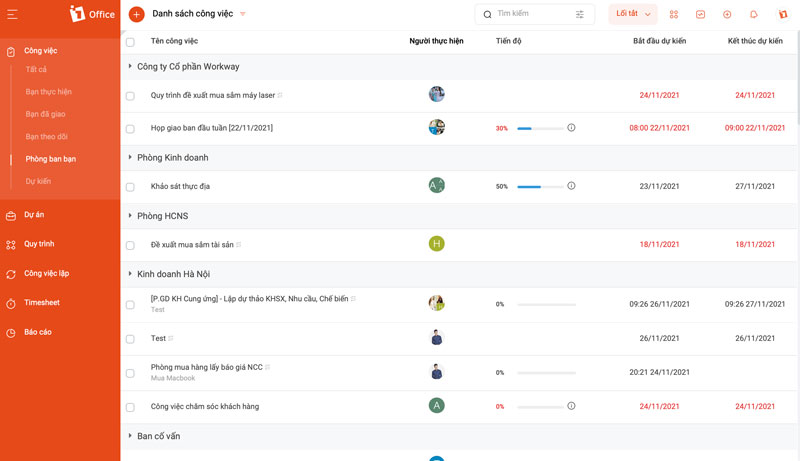
The advantage of 1Office in employee task management is that it can help managers schedule work, assign tasks, track progress, manage workload, evaluate quality, and more. In addition, users can easily exchange documents and discuss directly on each task. The software has notification, reminder, and alert features for changes and approaching deadlines.
2. Trello Task Management Software
This is a project and task management software. It is a tool that provides basic features like assigning and tracking tasks. Notably, company personnel can use it on mobile devices, laptops, or PCs.
However, Trello still has many limitations in evaluating task effectiveness. You cannot discuss directly in chat boxes on each task. In addition, the features are also very limited by the usage cost.
3. Comparison of Task Management with Excel vs. 1Office Software
To manage employee tasks, you can consider using Excel and modern software available today. Let’s compare the differences between managing employees with Excel and with 1Office software for your business.
| Criteria | Management with Excel | Management with 1Office software |
| Business Scale | Small number of employees. | Diverse scales: small, medium, large corporations, multi-industry. |
| Interface and System Usage | Simple |
|
| Simplicity | Easy to use | Easy to use |
| Alerts | None | Automatic alerts based on time, work status, and personnel changes. |
| Number of Tasks | Small |
|
| Workflow |
|
|
| Communication and Discussion |
|
Easily exchange documents and discuss ideas directly within each task and workflow. |
| Reporting and Evaluation | Manual data entry. |
|
| Connectivity |
Connects across all devices: mobile, PC, laptop. Use anytime, anywhere. 1Office allows importing and exporting Excel files within the software. |
|
| Cost | Free | Detailed 1Office Software Price List |
From the analysis above, you surely have the answer to whether you should manage employee tasks effectively with Excel or with online software?
Applying modern technology to business operations is the optimal solution to help business owners manage tasks faster, maximize work efficiency, and create a stronger competitive edge in the market. For consultation and user support, please contact us for advice on the 1Office task management software.
Learn more about the 1Office task management tool:
- Hotline: 083 483 8888
- Fanpage: https://www.facebook.com/1officevn
- Youtube: https://www.youtube.com/c/1OfficeNềntảngquảnlýtổngthểDoanhNghiệp